Our readers keep the lights on and my smoothie glass nicely filled. As an Amazon Associate, I earn from qualifying purchases.
Choosing a high-performance 120mm fan comes down to a single trade-off: pushing air through a dense radiator or moving it freely inside a case, all while keeping the noise floor low enough that you forget it is spinning. Static pressure versus airflow volume—the wrong choice leaves components hotter or the build louder than it should be.
I’m Mohammad Maruf — the founder and writer behind WellFizz. I evaluate PC cooling hardware by comparing measured airflow figures, static pressure ratings, bearing technologies, and real-world noise profiles to separate marketing specs from actual thermal performance.
This guide breaks down five carefully selected models that deliver the highest cubic feet per minute in their class without sacrificing acoustic comfort, so you can find the true best cfm 120mm fan for your specific cooling setup.
How To Choose The Best CFM 120mm Fan
Not all 120mm fans move air the same way. A fan that excels as a case intake may struggle to push through a thick radiator, while a high-static-pressure design can be unnecessarily loud in an open mesh panel. Understanding the following specs will help you match the fan to your specific build.
Static Pressure vs. Airflow Volume
Static pressure, measured in mmH₂O, tells you how much force the fan can generate to push air against resistance—like a dense radiator core, a CPU tower cooler, or a restrictive mesh filter. Airflow volume, measured in CFM, tells you how much total air the fan moves when there is little to no resistance. For radiator and AIO cooling, prioritize static pressure first; for open case ventilation, raw CFM matters more.
Bearing Type and Longevity
The bearing inside the fan determines its noise signature and how long it will run before developing a hum or rattle. Fluid Dynamic Bearings (FDB) offer excellent longevity and quiet operation, often rated for 100,000+ hours. Magnetic-levitation bearings (MagLev) reduce friction even further and can last up to 400,000 hours. Hydraulic bearings are a budget-friendly middle ground, while sleeve bearings tend to wear out faster in warm chassis environments.
PWM Control and Minimum RPM
A 4-pin PWM connector lets your motherboard adjust fan speed dynamically based on temperature. The speed range—especially the minimum RPM where the fan becomes inaudible—matters as much as the maximum RPM. Some premium fans can drop below 300 RPM for near-silent idle operation, while others stop entirely below 5% PWM duty cycle. A wide speed range gives you the flexibility to balance thermals and noise.
Quick Comparison
On smaller screens, swipe sideways to see the full table.
| Model | Category | Best For | Key Spec | Amazon |
|---|---|---|---|---|
| ARCTIC P12 Pro PST 5-Pack | Premium | Radiators / high-restriction builds | 77 CFM at 3000 RPM | Amazon |
| Noctua NF-P12 redux-1700 PWM | Mid-Range | Balanced case and radiator use | 120.2 CMH / 1700 RPM max | Amazon |
| ASUS ROG Strix XF120 | Mid-Range | Whisper-quiet builds | 22.5 dBA / 1800 RPM MagLev | Amazon |
| Cooler Master MF120 Halo² ARGB | Premium | RGB showcase / balanced cooling | 2050 RPM / Air Balance blades | Amazon |
| ID-COOLING AS-120-K Trio 3-Pack | Budget | Multi-fan case builds on a tight budget | 58 CFM / 2000 RPM daisy chain | Amazon |
In‑Depth Reviews
1. ARCTIC P12 Pro PST 5-Pack

The ARCTIC P12 Pro PST delivers the highest maximum CFM in this roundup at 77 cubic feet per minute, thanks to a 3000 RPM ceiling and redesigned rotor blades that maintain efficiency across the speed range. The Fluid Dynamic Bearing ensures a long, reliable service life with minimal noise degradation over time—a critical factor for enthusiasts who leave their systems running 24/7.
What sets this fan apart is its PWM control with a true 0 RPM stop below 5% duty cycle, meaning it can remain completely silent at idle while ramping to full performance under load. The five-pack includes Y-cable splitters for daisy-chaining, though some users find the fixed splitters make cable routing less flexible than individual connectors.
At full tilt, the P12 Pro is notably audible—this is a fan built for thermal performance first. But at moderate speeds under 1800 RPM, it runs surprisingly quiet while still moving substantial air, making it the top choice for radiator setups and high-restriction chassis where raw static pressure matters most.
Why it’s great
- Highest CFM output (77 CFM) in the roundup
- 0 RPM stop below 5% PWM for silent idle
- Fluid Dynamic Bearing for long-term reliability
- Excellent static pressure for dense radiators
Good to know
- Loud at maximum 3000 RPM
- Fixed Y-splitters complicate cable management
- No RGB or aesthetic options
2. Noctua NF-P12 redux-1700 PWM

The Noctua NF-P12 redux is a pressure-optimized design that prioritizes quiet operation without sacrificing thermal performance. At 1700 RPM max and just 25.1 dBA, it maintains an inaudible presence up to around 1300 RPM—a sweet spot where it still pushes strong CFM through CPU coolers and slim radiators with ease.
Fibre-glass reinforced PBT construction gives the frame and blades a dense, high-quality feel that dampens vibration naturally, and the 150,000-hour MTTF rating speaks to its longevity. The redux edition strips away the premium accessories and color scheme to deliver proven Noctua engineering at a more accessible price point.
This fan truly excels in the 700–1000 RPM range where it becomes completely silent while keeping an i7-13700K cool under gaming loads. It is not the highest-CFM option here, but for builders who value acoustic comfort above raw peak airflow, the NF-P12 redux is a benchmark choice.
Why it’s great
- Nearly silent operation below 1300 RPM
- Pressure-optimized for coolers and radiators
- Proven 150,000-hour MTTF reliability
- Excellent build quality at a budget-friendly price
Good to know
- No RGB or A-RGB lighting
- Max CFM lower than some competitors
- Limited to 1700 RPM max speed
3. ASUS ROG Strix XF120

The ASUS ROG Strix XF120 leverages a magnetic-levitation bearing to stabilize the rotor with near-zero friction, resulting in a whisper-quiet 22.5 dBA maximum noise output. The MagLev bearing also delivers an extraordinary 400,000-hour lifespan—far surpassing typical sleeve or hydraulic bearing fans.
Its wide PWM range from 250 to 1800 RPM allows the fan to spin down to near-silent levels at idle while still providing strong static pressure and airflow when needed. The aerodynamic blade and frame design minimize turbulence, and the included anti-vibration pads prevent rattling on metal case panels.
In real-world testing, the XF120 dropped gaming thermals by roughly 10°C compared to stock case fans, all while running quieter at full load. It lacks RGB, but for silence-focused builders who want premium reliability without the premium price tag, this is a strong contender.
Why it’s great
- Whisper-quiet 22.5 dBA max noise
- MagLev bearing rated for 400,000 hours
- Wide PWM range (250-1800 RPM)
- Anti-vibration pads reduce chassis resonance
Good to know
- No RGB lighting
- Maximum CFM not highest in class
- Single fan package only
4. Cooler Master MF120 Halo² ARGB
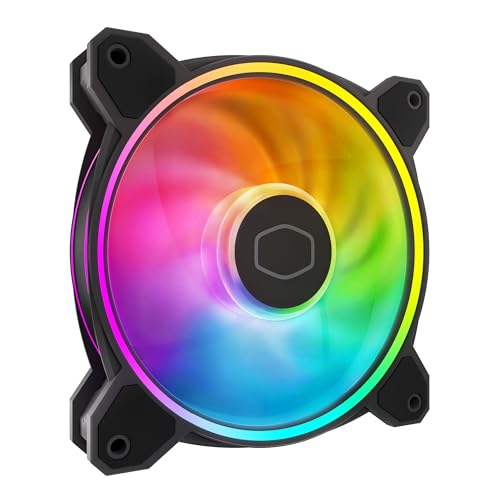
The Cooler Master MF120 Halo² brings dual-loop addressable RGB rings that are 50% brighter than its predecessor, with frosted blades that diffuse the lighting evenly across the fan face. Beyond aesthetics, the redesigned Air Balance blades are 10% larger than previous models, boosting both static pressure and total airflow at 2050 RPM max speed.
The hybrid frame construction simplifies installation while maintaining structural rigidity, and dynamic PWM control lets the fan operate from 0 to 2050 RPM for flexible noise-to-performance tuning. At 27 dBA, it is not the quietest fan here, but the acoustic profile remains smooth without the annoying whine that plagues cheaper RGB fans.
For builders who want a stunning visual centerpiece without sacrificing cooling capability, the Halo² delivers. It works equally well as a case intake, radiator fan, or side-panel showpiece—just be aware that the proprietary hub adds cable complexity if you run more than five units.
Why it’s great
- Vibrant dual-loop ARGB with frosted diffusion
- 10% larger Air Balance blades boost airflow
- Dynamic PWM (0-2050 RPM) for flexible control
- Smooth acoustic profile at higher speeds
Good to know
- Proprietary hub needed for full RGB control
- 27 dBA is audible at max RPM
- Single fan package; multi-pack not available
5. ID-COOLING AS-120-K Trio 3-Pack

The ID-COOLING AS-120-K Trio packs three PWM fans with a 2000 RPM max speed and 58 CFM airflow into a single box at a price that undercuts most single premium fans. Each unit uses a hydraulic bearing that keeps noise to 27.2 dBA, and the daisy-chain connector lets you link all three fans to a single motherboard header for clean cable management.
At 900 RPM these fans are whisper quiet and move enough air for a standard mid-tower case with positive pressure. The 1.94 mmH₂O static pressure rating is modest, so they are better suited as general case intakes or exhausts rather than pushing through thick radiators. The black finish blends seamlessly into dark interiors.
Builders on a tight budget looking to populate a three-fan case will appreciate the value, though the included screws lack pre-threading which makes initial installation slightly finicky. If you need high-CFM performance for a radiator, spend more on a premium unit—but for case ventilation, this trio delivers respectable airflow without breaking the bank.
Why it’s great
- Excellent value with three fans in one box
- Daisy-chain connector reduces wiring clutter
- Quiet operation at sub-1000 RPM speeds
- Respectable 58 CFM for case ventilation
Good to know
- Low static pressure (1.94 mmH₂O) for radiators
- Screws lack pre-threading for easy installation
- 27.2 dBA becomes audible at higher RPM
FAQ
What does CFM mean for a 120mm fan?
Is a higher RPM always better for cooling?
Can I use a high-static-pressure fan for case intake?
How important is PWM control on a 120mm fan?
Final Thoughts: The Verdict
For most users, the best cfm 120mm fan winner is the ARCTIC P12 Pro PST 5-Pack because it delivers the highest raw CFM (77 CFM) and static pressure at a price that undercuts premium single-fan options, making it ideal for radiator-heavy builds and high-restriction chassis. If you want near-silent operation and long-term reliability for a quiet gaming rig, grab the Noctua NF-P12 redux-1700 PWM. And for an RGB showcase that still moves serious air, nothing beats the Cooler Master MF120 Halo² ARGB.

Mo Maruf
I created WellFizz to bridge the gap between vague wellness advice and actionable solutions. My mission is simple: to decode the research and give you practical tools you can actually use.
Beyond the data, I am a passionate traveler. I believe that stepping away from the screen to explore new environments is essential for mental clarity and physical vitality.