Our readers keep the lights on and my smoothie glass nicely filled. As an Amazon Associate, I earn from qualifying purchases.
Finding a budget-friendly audio interface often means navigating a minefield of muddy preamps, driver dropouts, and confusing spec sheets that promise the world but deliver thin, noisy sound. A low price shouldn’t force you to compromise on the core essentials: clean gain, stable latency, and reliable connectivity that actually works with your gear.
I’m Mohammad Maruf — the founder and writer behind WellFizz. I’ve spent hundreds of hours cross-referencing technical datasheets, customer reliability reports, and real-world driver performance to filter out the marketing noise from the genuinely capable hardware in this segment.
This guide focuses on the models that deliver professional-caliber recording quality without the professional price tag, helping you find the very best cheap audio interface for your home studio, podcast setup, or streaming rig.
How To Choose The Best Cheap Audio Interface
Selecting an interface under the premium price bracket requires a sharp focus on the components that directly affect recording quality: the preamp’s signal-to-noise ratio, the headphone amp’s ability to drive your cans, and the stability of the driver across your operating system. Ignoring any of these three pillars can turn a cheap deal into a frustrating paperweight.
Preamp Quality: The Gain and Noise Floor
A preamp’s job is to bring a microphone’s weak signal up to line level without adding hiss. Look for an Equivalent Input Noise (EIN) figure, often listed as -129 dBu or better — this tells you how quiet the preamp is when no signal is present. Gain range is equally critical; a maximum gain of less than 50 dB may leave you struggling with quiet dynamic mics like the SM7B, even on a cheap interface.
Connectivity and Latency
USB-C is the modern standard for bus-powered operation, but some budget interfaces still use older USB-B connectors. The connection type matters less than the quality of the driver. Rock-solid ASIO drivers (or class-compliant drivers for Mac) keep round-trip latency low enough for real-time monitoring. Avoid interfaces known for frequent driver crashes and crackling at low buffer sizes.
Input and Output Flexibility
Count your physical input needs: one XLR for a single vocal mic, two for a co-host or stereo instrument. Separate line inputs allow you to connect external gear like a synthesizer without repatching. Balanced TRS main outputs are essential for connecting studio monitors with minimal interference, while a dedicated headphone output with its own volume control saves you from buying a separate headphone amp.
Quick Comparison
On smaller screens, swipe sideways to see the full table.
| Model | Category | Best For | Key Spec | Amazon |
|---|---|---|---|---|
| MOTU M2 | Premium | High-resolution audio & high-impedance headphones | ESS Sabre32 Ultra DAC, 120 dB dynamic range | Amazon |
| PreSonus Revelator io44 | Mid-Range | Streaming & podcasting with onboard DSP effects | 7-channel virtual mixer, 96 kHz sample rate | Amazon |
| ESI Amber i1 | Mid-Range | Home studio recording with RCA inputs | 24-bit/192kHz, DirectWIRE loopback | Amazon |
| MAONO MaonoCaster E2 Gen2 | Mid-Range | All-in-one podcasting with sound pads | 60 dB preamp gain, 8 custom sound pads | Amazon |
| Pyle PMXU46BT | Mid-Range | Live mixing & multi-mic setups | 4-channel mixer, Bluetooth streaming | Amazon |
| Pyle PMUX6 | Budget | Simple two-mic podcast recording | 24-bit/48kHz, dual headphone outputs | Amazon |
| Riworal 6-Channel Mixer | Budget | Entry-level blending of multiple audio sources | 6-channel analog mixer, 16 DSP effects | Amazon |
In‑Depth Reviews
1. MOTU M2 2×2 USB-C Audio Interface

The MOTU M2 sets a benchmark in its class by integrating the ESS Sabre32 Ultra DAC — converter technology typically reserved for interfaces costing several times more. Measured at 120 dB dynamic range on its outputs and -129 dBu EIN on its mic inputs, this unit delivers an astonishingly transparent and noise-free signal path that lets your microphones and instruments sound exactly as they should, without coloration or added hiss.
Beyond its stellar converters, the M2 provides a headphone output powerful enough to drive 250-ohm studio headphones like the Beyerdynamic DT 990 Pro without an external amp. The LCD display gives you real-time metering for both inputs and outputs, a rare convenience at this level. Users consistently report stable ASIO drivers across Windows and Mac, with low round-trip latency suitable for real-time monitoring and tracking.
Some users note that a high-quality USB-C cable is not included, and the loopback feature is disabled by default, requiring a quick software toggle to enable for streaming. The unit demands a reasonably powerful computer to avoid pops and crackles at lower buffer settings. If clean, high-resolution conversion is your priority, the M2 remains the uncompromising choice.
Why it’s great
- Reference-grade ESS Sabre32 DAC with 120 dB dynamic range
- Headphone output drives high-impedance cans with ease
- Reliable drivers and very low latency performance
Good to know
- USB-C cable not included in the box
- Loopback function requires manual activation
- Demands a capable PC for low-buffer operation
2. PreSonus Revelator io44

The Revelator io44 is engineered specifically for content creators who need polish without post-production hassle. Its onboard DSP effects engine includes a compressor, noise gate, EQ, and reverb — all applied in real-time before the signal ever hits your software. The professionally crafted presets get you a broadcast-ready sound with a single click, saving hours of plugin tweaking.
This unit features a built-in mixer that blends audio from up to three separate applications, making it ideal for streamers who want game audio, microphone, and Discord all routed independently. The included Studio One Artist DAW and Studio Magic software bundle provide a complete recording and production ecosystem out of the box. The XMAX-L preamp delivers a clean 50 dB of gain with switchable +48V phantom power.
Some users have reported minor firmware glitches that affect the headset input on occasion, though PreSonus has released patches to address these issues. The preamp, while clean, doesn’t quite match the transparency of the MOTU M2 for critical stereo recording. For podcasters and streamers, however, the integrated DSP and loopback flexibility make this a uniquely powerful tool at a mid-range price.
Why it’s great
- Professional DSP effects (compressor, gate, EQ) built-in
- 3-application mixer with loopback for streaming
- Comes with Studio One Artist and extensive software bundle
Good to know
- Firmware can have minor glitches on headset input
- XMAX-L preamp is good but not class-leading for pure transparency
- Requires direct PC connection or quality USB hub
3. ESI Amber i1

The ESI Amber i1 punches above its weight class with studio-grade converters capable of 24-bit/192 kHz resolution, a spec typically found on interfaces at double its price point. The combo XLR + 1/4-inch input handles both microphones and high-impedance instruments, while the separate RCA inputs offer a dedicated path for connecting turntables or external mixers without sacrificing your main input.
DirectWIRE loopback technology enables internal audio routing between your DAW and streaming applications — a feature that many budget interfaces omit entirely. The headphone amp performs admirably with common studio headphones, and the front-panel volume knob provides convenient control over the input/output blend. The included software bundle — Bitwig Studio 8-Track, WaveLab LE, and Cubasis LE — adds immediate creative value.
The front volume knob’s design and feel have drawn some criticism for feeling slightly cheap, and the orange color scheme won’t appeal to everyone’s aesthetic. The preamps are quiet but not quite as pristine as the MOTU M2’s. For home studio users who need high sample rate flexibility and RCA connectivity at an accessible price, the Amber i1 is a compelling contender.
Why it’s great
- Excellent 24-bit/192kHz conversion for the price
- Separate RCA line inputs for turntables or extra gear
- DirectWIRE loopback and generous software bundle included
Good to know
- Front volume knob feels a bit cheap and has an odd color
- Preamps are clean but not quite flagship-grade
- Less portable than some smaller USB-C interfaces
4. MAONO MaonoCaster E2 Gen2

The MaonoCaster E2 Gen2 is an all-in-one podcasting solution that packs dual XLR combo inputs with high-gain preamps delivering up to 60 dB — enough to drive even the most gain-hungry dynamic microphones cleanly. The noise reduction technology helps filter out ambient room noise like fans or air conditioning, giving you cleaner recordings straight out of the gate.
Its eight customizable sound effect buttons let you trigger intro music, jingles, or comedic sound bites with a single press, each supporting up to 20 seconds of recording with adjustable volume. The built-in 1500 mAh battery provides up to 8 hours of portable operation, freeing you from wall outlets during long sessions. Bluetooth connectivity for background music and a dedicated loopback button for streaming make this a turnkey solution for live content creators.
The unit’s plastic body feels less robust compared to the all-metal construction of competitors like the MOTU M2, and some users note that the noise gate could be more aggressive. The 48 kHz maximum sample rate is sufficient for spoken word and most streaming applications but limits high-resolution music recording. For podcasters and streamers who value convenience and creative features over raw converter specs, the E2 Gen2 delivers exceptional versatility.
Why it’s great
- 60 dB preamp gain for demanding dynamic microphones
- 8 customizable sound pads and built-in battery for portable use
- Noise reduction and loopback for clean streaming workflows
Good to know
- Plastic chassis feels less durable than metal alternatives
- Maximum sample rate limited to 48 kHz
- Noise gate adjustments could be more refined
5. Pyle PMXU46BT 4-Channel Bluetooth Studio Audio Mixer

The Pyle PMXU46BT operates as a full analog mixing console with a built-in USB audio interface, offering four input channels with two XLR/1/4-inch combo jacks and dedicated stereo inputs. This makes it a natural fit for live sound reinforcement, multi-mic podcast panels, or DJ setups where physical faders and EQ knobs provide tactile control that a simple 2-in/2-out interface cannot match.
Bluetooth wireless streaming allows you to incorporate backing tracks or remote guest audio directly into the mix without a cable. The 3-band EQ per channel, along with send/return effects loops, gives you substantial tonal shaping ability. The 12-segment stereo output meter provides clear visual feedback on your levels, preventing unwanted clipping during performances.
The unit is heavier (6.8 pounds) and bulkier than compact desktop interfaces, making it less portable for recording on the go. USB recording is limited to a single stereo mix — multitrack recording is not supported. Some users have reported that the USB connection occasionally needs to be re-seated. As a hybrid mixer-interface, it excels in live scenarios but lacks the clean preamps and low latency of dedicated audio interfaces.
Why it’s great
- Full 4-channel analog mixer with tactile EQ and faders
- Bluetooth input for wireless music streaming
- 12-segment level meter for accurate visual monitoring
Good to know
- Heavy and large compared to desktop interfaces
- USB recording is stereo mix only, not multitrack
- USB connection can occasionally lose sync
6. Pyle PMUX6 Professional USB Audio Interface
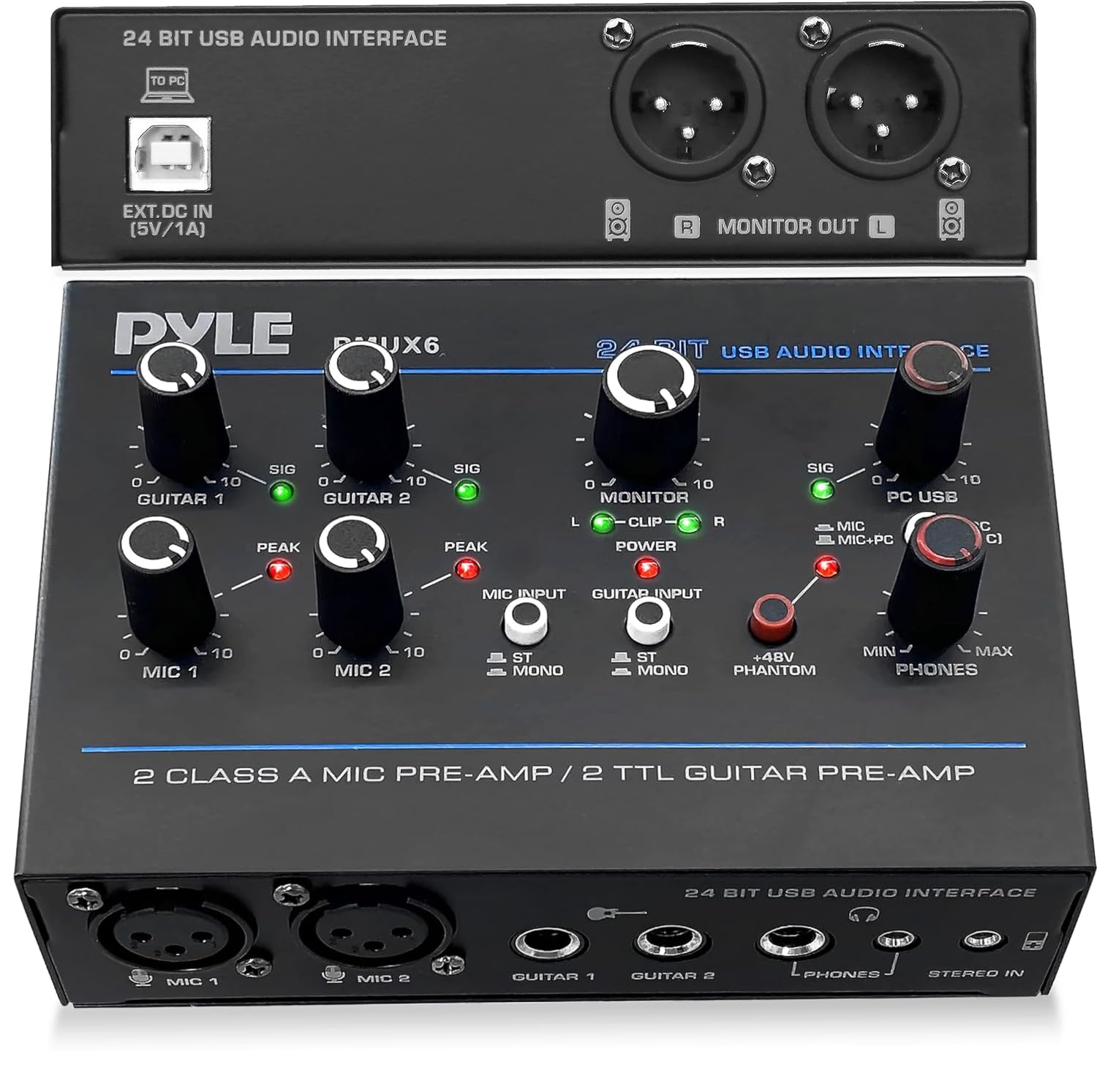
The Pyle PMUX6 is a straightforward, no-frills USB audio interface designed for entry-level podcasters and musicians who need to get two microphones into their computer quickly. It features two XLR inputs with individual gain controls, a 48V phantom power switch for condenser mics, and two headphone outputs — perfect for a host and guest to monitor simultaneously.
The ultra-low-noise design and 24-bit/48kHz resolution deliver adequate clarity for spoken word projects, voiceovers, and basic instrument recording. The rugged metal housing feels surprisingly solid for its weight and price class, and the compact footprint (5.6 x 4.1 x 1.5 inches) leaves plenty of desk space for other gear. The USB 2.0 Type-B connection is widely compatible but not as modern as USB-C.
This unit struggles with bass guitar recording, where the signal can become muddy, and the maximum sample rate of 48 kHz caps its usefulness for high-resolution music production. Some users also note that the headphone outputs lack the power to drive higher-impedance headphones effectively. For simple two-mic podcast or vocal recording, the PMUX6 offers a reliable, low-cost entry point.
Why it’s great
- Two XLR inputs with individual gain and phantom power
- Compact metal housing with a small desk footprint
- Dual headphone outputs for host and guest monitoring
Good to know
- Not ideal for bass guitar or low-frequency recording
- Sample rate limited to 48 kHz
- Headphone amp lacks power for high-impedance headphones
7. Riworal 6-Channel Audio Interface Sound Board

The Riworal 6-channel mixer bridges the gap between a traditional analog mixing board and a USB audio interface, offering four XLR inputs with +48V phantom power alongside stereo 1/4-inch inputs on channels 5/6. Its built-in Bluetooth receiver allows wireless streaming from a smartphone or tablet directly into your mix, making it useful for karaoke, live streaming, or small venue performances.
The onboard 16 DSP effects (including various reverb and delay presets) add color to your audio without needing external processors. The 3-band EQ per channel provides basic tonal control, and the independent faders for each channel plus a master output fader give you classic analog workflow. The USB interface enables recording directly to a computer, and the U-disk playback function is handy for backing tracks.
The onboard effects are described by users as “muddy” and not suitable for critical studio work, though they work fine for live ambiance. A significant number of negative reviews cite units arriving with no power or failing shortly after the return window — quality control is inconsistent. The unit is a traditional analog mixer at heart, so users expecting modern digital interface features like ultra-low-latency ASIO drivers may be disappointed. For extremely cost-sensitive live applications where the effects are a bonus rather than a necessity, this board offers maximum channel count for the price.
Why it’s great
- High channel count (6) with 4 XLR inputs at low cost
- Built-in Bluetooth and 16 DSP effects for live sound
- Classic analog mixer layout with individual channel faders
Good to know
- DSP effects are muddy and not suitable for recording
- Inconsistent quality control reported by some users
- Traditional analog design, not a modern low-latency interface
FAQ
Do I need an interface with 192 kHz sample rate for podcasting?
Why does my cheap audio interface produce crackling sounds?
Final Thoughts: The Verdict
For most users, the best cheap audio interface winner is the MOTU M2 because it delivers reference-grade converter tech and a powerful headphone amp at an accessible price point. If you want onboard DSP effects and loopback flexibility for streaming, grab the PreSonus Revelator io44. And for podcasters who need a portable all-in-one with sound pads and battery operation, nothing beats the MAONO MaonoCaster E2 Gen2.

Mo Maruf
I created WellFizz to bridge the gap between vague wellness advice and actionable solutions. My mission is simple: to decode the research and give you practical tools you can actually use.
Beyond the data, I am a passionate traveler. I believe that stepping away from the screen to explore new environments is essential for mental clarity and physical vitality.