Our readers keep the lights on and my smoothie glass nicely filled. As an Amazon Associate, I earn from qualifying purchases.
The jump from 1080p to 1440p is the single most noticeable upgrade you can make for both work and play—but for years, that resolution was locked behind a premium paywall. Now the market is flooded with sharply priced QHD panels, and separating the ones with genuine IPS speed and solid build quality from the rest is what this guide is built for.
I’m Mohammad Maruf — the founder and writer behind WellFizz. I’ve spent hundreds of hours cross-referencing panel specifications, refresh rate tables, real-user feedback on backlight bleed and dead pixels, and ergonomic feature lists to find which monitors actually deliver on their promises at an accessible budget.
Your next display doesn’t have to cost a fortune to look incredible. This guide cuts through the noise to showcase the best cheap 1440p monitor options that balance sharp resolution with fast refresh rates and reliable daily performance.
How To Choose The Best Cheap 1440P Monitor
Not all budget QHD monitors are built the same. Some skimp on the stand or use older VA panels with visible ghosting, while others pack IPS speed and vibrant color into a price that seems unrealistic. Knowing which specs to prioritize will keep you from wasting money on a screen that looks dull or tears during fast motion.
Panel Type: IPS vs VA vs Entry-Level OLED
IPS panels dominate the budget 1440p space because they offer wide viewing angles and punchy colors without the black-level smearing that cheaper VA panels can exhibit. VA wins on contrast ratio (often 3000:1 versus 1000:1) but struggles with dark scene ghosting. Entry-level OLED, like the Acer Predator X27U, is a premium outlier here—its colors and black levels are in a different league, but it comes at a higher price and lower brightness ceiling compared to typical budget picks.
Refresh Rate and Adaptive Sync
A 1440p monitor is wasted at 60Hz. Look for at least 180Hz for fluid gaming, but remember that refresh rate alone doesn’t prevent screen tearing—that’s where adaptive sync (FreeSync Premium or G-Sync Compatible) steps in. All seven picks here support variable refresh rate, so your GPU and monitor stay in lockstep for smoother frame delivery.
Stand Adjustability and Connectivity
Budget monitors often cut costs on the stand: tilt-only bases are common. Height adjustment, swivel, and pivot make a massive difference in daily comfort, especially if you run a dual-monitor setup. Also check for DisplayPort 1.4 connectivity—HDMI 2.0 often caps at lower refresh rates on 1440p, so DP is your friend for hitting 180Hz out of the box.
Quick Comparison
On smaller screens, swipe sideways to see the full table.
| Model | Category | Best For | Key Spec | Amazon |
|---|---|---|---|---|
| ASUS TUF Gaming VG27AQL5A | IPS, 210Hz | Competitive Gaming & Color Accuracy | Fast IPS 0.3ms GtG response | Amazon |
| Samsung Odyssey G5 G53F | IPS, 200Hz | All-Around Gaming & Productivity | FreeSync Premium, 1ms MPRT | Amazon |
| Alienware AW2725DM | IPS, 180Hz | Marathon Gaming Sessions | VESA DisplayHDR 400, DCI-P3 95% | Amazon |
| LG UltraGear 32GS60QC-B | VA, 180Hz | Immersive Sim Racing & Dark Games | 1000R curve, 3000:1 contrast ratio | Amazon |
| SANSUI 34″ UWQHD | VA, 200Hz | Ultrawide Productivity & Media | 21:9 3440×1440, 3000:1 contrast | Amazon |
| KTC H34S18S | VA, 180Hz | Full Ergonomics & Multitasking | Height/tilt/swivel/pivot, RGB | Amazon |
| Acer Predator X27U | QD-OLED, 240Hz | Best Picture Quality | 0.03ms GtG, DCI-P3 99% | Amazon |
In‑Depth Reviews
1. ASUS TUF Gaming VG27AQL5A

The ASUS TUF VG27AQL5A takes the top spot because it packs Fast IPS technology with a 0.3ms GtG response time and 210Hz overclocked refresh rate—numbers that usually belong to monitors costing significantly more. The Extreme Low Motion Blur Sync (ELMB Sync) lets you run backlight strobing and variable refresh rate simultaneously, eliminating both ghosting and tearing in one go. For competitive gamers who demand clarity during fast strafes, this combination is a clear winner at this price tier.
Color accuracy is another strong suit: the 130% sRGB and 1300:1 contrast ratio deliver far punchier images than typical budget IPS panels. The built-in DisplayWidget Center software lets you adjust monitor settings with a mouse, which is rare for affordable displays. You also get a 3-year warranty, an L-shaped screwdriver in the box, and a DisplayPort cable—everything you need out of the box.
The only real compromise is the built-in speakers, which are usable for system sounds but not for immersive gaming. The stand offers height, tilt, and swivel adjustability, though it’s heavier than some plastic alternatives. For anyone wanting the fastest gaming experience without moving to OLED pricing, this ASUS model is the benchmark to beat.
Why it’s great
- 0.3ms GtG response is virtually unmatched at this budget
- ELMB Sync allows strobing + VRR simultaneously
- DisplayWidget Center for mouse-based adjustments
- Full ergonomic stand with height adjustment
Good to know
- Built-in speakers are weak for gaming audio
- Stand base is somewhat bulky for small desks
- Adobe Creative Cloud offer expires mid-2026
2. Samsung Odyssey G5 G53F

The Samsung Odyssey G5 G53F is a crowd-pleasing IPS monitor that hits 200Hz and 1ms MPRT out of the box, with FreeSync Premium keeping variable refresh rate active by default for a tear-free experience. The 27-inch QHD panel delivers 300 cd/m² brightness and a 1000:1 contrast ratio that makes everyday gaming and office work look crisp and vibrant. Users consistently praise the easy setup and the vibrant colors that require little to no calibration.
Where this monitor stands out is its suite of gaming-focused features: the Black Equalizer lifts shadow details in dark scenes without washing out the rest of the image, and the Virtual Aim Point overlays a crosshair for games that lack one. The Auto Source Switch+ automatically detects and switches to newly connected devices, a surprisingly handy convenience for multi-platform setups.
Build quality is decent for the price point, though the stand only offers tilt adjustment and the cable management loop can feel flimsy. The slim bezels make it a great candidate for multi-monitor arrays. For a straightforward, fast IPS panel that requires zero tweaking and delivers on every core spec, this Samsung is a superb entry point into 1440p.
Why it’s great
- 200Hz with FreeSync Premium for tear-free high fps
- Black Equalizer improves visibility in dark scenes
- Auto Source Switch+ for multi-device convenience
- Vibrant IPS colors right out of the box
Good to know
- Tilt-only stand with basic cable management
- No built-in height or swivel adjustment
- Brightness limited to 300 cd/m²
3. Alienware AW2725DM

Alienware brings its premium design language to a very accessible price with the AW2725DM. The 27-inch IPS panel runs at 180Hz with a 1ms GtG response, and VESA DisplayHDR 400 certification ensures brighter highlights and better contrast than standard SDR displays. The DCI-P3 95% color gamut makes games and media look vivid, while the hardware-based low blue light solution reduces eye strain without washing out colors—a rare feature for marathon sessions.
Build quality is a strong point: the stand offers height, pivot, swivel, and tilt adjustments, and the overall construction feels solid. It also supports both G-Sync and FreeSync, so it works flawlessly with Nvidia and AMD GPUs alike. The package includes DisplayPort and HDMI cables, plus a USB-A to Type-B upstream cable for the built-in USB hub. Users report very low backlight bleed and zero dead pixels on delivery.
The main limitation is that reaching 180Hz requires DisplayPort—HDMI caps at 144Hz—and there’s no USB-C input for modern laptops. Also, the lack of built-in speakers means you’ll need external audio. For gamers who want a robust, adjustable stand and excellent color performance from a trusted brand, this Alienware delivers serious value without the usual premium markup.
Why it’s great
- Full ergonomic stand (height, pivot, swivel, tilt)
- DisplayHDR 400 with DCI-P3 95% color
- Dual adaptive sync: G-Sync & FreeSync
- Hardware low blue light preserves color
Good to know
- No USB-C input for laptop connectivity
- 180Hz only via DisplayPort, 144Hz over HDMI
- No built-in speakers or headphone jack
4. LG UltraGear 32GS60QC-B

The LG UltraGear 32GS60QC-B differentiates itself with a steep 1000R curvature that wraps around your peripheral vision, creating an unusually immersive feel for a 32-inch panel. The VA panel delivers a 3000:1 contrast ratio, meaning deep blacks and strong color pop that IPS panels can’t match. With 180Hz and 1ms GtG response, this monitor keeps up with fast-paced shooters and racing sims alike.
LG includes a useful gaming GUI with modes for FPS and RTS, plus Dynamic Action Sync to reduce input lag and a Black Stabilizer for shadow visibility. The three-side virtually borderless design looks clean on any desk. Users particularly love this monitor for sim racing rigs, where the 1000R curve and 32-inch size create a convincing cockpit feel.
The VA panel does have one well-documented caveat: dark scene ghosting can appear when aggressive overdrive settings are applied, so you’ll want to stick with the “Fast” response time setting rather than “Faster.” The stand only offers tilt adjustment, and the power-off joystick behavior is inconsistent according to multiple reviews. For gamers who prioritize deep contrast and curvature over pixel-perfect motion clarity, this LG is a compelling choice.
Why it’s great
- 1000R curve deeply immerses in sim racing
- 3000:1 contrast ratio for rich blacks
- 3-side borderless design saves desk space
- Dynamic Action Sync for low input lag
Good to know
- VA ghosting possible at higher overdrive settings
- Tilt-only stand with no height adjustment
- Power-off joystick can be unresponsive
5. SANSUI 34″ UWQHD
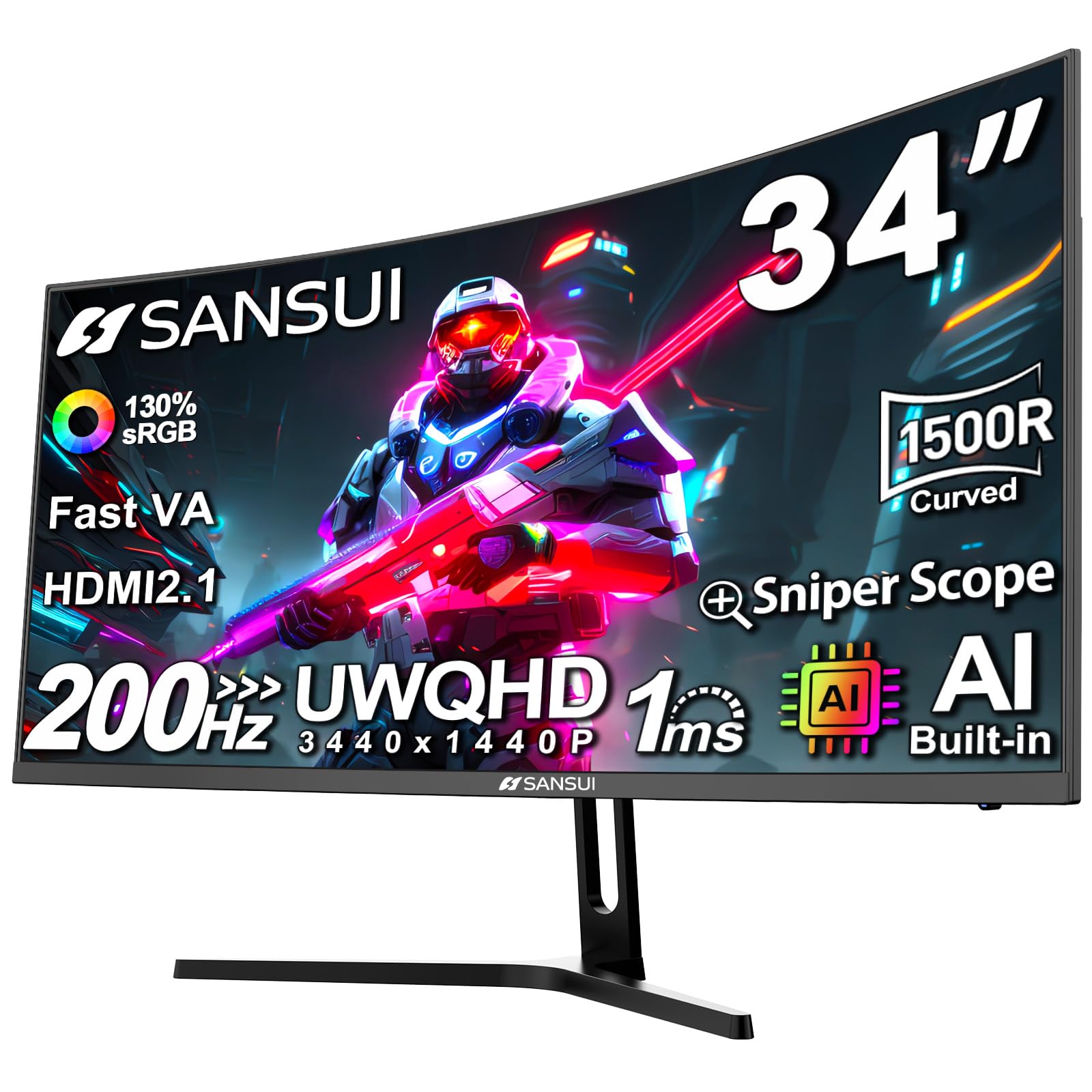
The SANSUI 34″ UWQHD is an ultrawide powerhouse that packs 3440×1440 pixels and a 200Hz refresh rate into a 1500R curved panel at an entry-level price. The VA panel delivers 3000:1 contrast and 300 nits brightness, while the sRGB 130% coverage makes media look rich and saturated. PIP/PBP support is a major productivity win, letting you run two input sources side by side on one big screen.
Beyond raw specs, SANSUI includes AI-driven features like AI Crosshair, Sniper Scope, and AI Blue Light reduction. The HDMI 2.1 ports support up to 200Hz, making this monitor compatible with modern consoles that support VRR. Users praise the picture quality and build construction, though some note confusion around the advertised versus actual refresh rate—box may read 180Hz while maxing at 120Hz over certain inputs.
The biggest trade-off is the lack of height adjustment—you get tilt only—and the absence of built-in speakers. The 1500R curve is less aggressive than the LG’s 1000R, making it better suited for productivity workflows and media consumption alongside gaming. For anyone wanting ultrawide real estate without paying ultrawide prices, this SANSUI delivers the largest QHD canvas at the lowest cost in this roundup.
Why it’s great
- 3440×1440 ultrawide for multitasking and immersion
- 200Hz with HDMI 2.1 for console compatibility
- PIP/PBP for dual-source productivity
- 3000:1 VA contrast ratio
Good to know
- No height adjustment, tilt-only stand
- Actual max refresh rate may vary by input
- No built-in speakers
6. KTC H34S18S

The KTC H34S18S is the most fully featured ultrawide in this group—it offers height adjustment, tilt, swivel, and even pivot, a rarity at this price tier. The 34-inch VA panel delivers 3440×1440 resolution at 180Hz with 1ms MPRT, and the 4000:1 contrast ratio is the highest in this roundup, resulting in exceptional black depth and shadow detail. The 1500R curve wraps the image comfortably in your field of view.
Color performance is impressive for a VA panel: 123% sRGB and 98% DCI-P3 coverage make games and movies look vibrant, and HDR10 support adds extra pop in supported content. The back panel features RGB lighting, and the quick-release VESA mount makes desk mounting a breeze. Users praise this monitor for coding and productivity as much as gaming, citing sharp text and wide viewing angles.
The main compromise is the on-screen display menu, which users describe as tricky to navigate with the joystick control. Also, the 180Hz refresh rate requires DisplayPort to achieve—HDMI 2.0 caps at 100Hz on this model. It lacks built-in speakers, but the inclusion of both DP and HDMI cables in the box is a nice touch. For anyone who needs a fully adjustable ultrawide for both work and play, the KTC hits a sweet spot rarely seen at this cost.
Why it’s great
- Full ergonomic stand: height, tilt, swivel, pivot
- 4000:1 VA contrast for deep blacks
- 123% sRGB and 98% DCI-P3 color coverage
- Quick-release VESA mount and RGB lighting
Good to know
- OSD menu logic is unintuitive
- 180Hz only via DisplayPort
- No built-in speakers
7. Acer Predator X27U

The Acer Predator X27U is the wild card: a 26.5-inch QD-OLED display at a price that undercuts almost every other OLED monitor on the market. The 240Hz refresh rate and 0.03ms GtG response time are genuinely elite-tier specs, delivering motion clarity that no IPS or VA panel can touch. The DCI-P3 99% color gamut and true 10-bit depth produce colors that look almost surreal, with perfect blacks and infinite contrast from the self-emissive OLED technology.
This monitor supports both FreeSync Premium and is G-Sync Compatible, so any modern GPU will sync perfectly without tearing. The ZeroFrame design minimizes bezels for a clean look, and the stand offers height, pivot, swivel, and tilt adjustments. Users are unanimous: the picture quality is “absurdly good for the price” and the gaming experience is transformative, especially in HDR titles.
The trade-offs are inherent to budget OLED: peak brightness is lower than premium OLEDs (around 250-300 nits in SDR), the menu system is overly complex, and text clarity can be slightly fringed due to the QD-OLED subpixel layout. Also, the stand on some units has been reported to arrive with cracks. For anyone willing to accept moderate brightness and potential burn-in risk for unmatched contrast and response, this Acer is the best-looking display in the entire guide by a wide margin.
Why it’s great
- QD-OLED gives perfect blacks and infinite contrast
- 240Hz with 0.03ms response is elite-grade
- DCI-P3 99% for stunning color volume
- Full ergonomic stand
Good to know
- Lower peak brightness than premium OLEDs
- Text clarity can be fuzzy on QD-OLED
- Complex on-screen menu navigation
- No built-in speakers
FAQ
Is a 27-inch monitor the best size for 1440p?
What cable do I need to reach 180Hz on a 1440P monitor?
Will a cheap 1440P monitor work with my PS5 or Xbox Series X?
Final Thoughts: The Verdict
For most users, the best cheap 1440p monitor winner is the ASUS TUF Gaming VG27AQL5A because it delivers a blistering 0.3ms response and full ergonomic adjustability at a price that undercuts the competition. If you want deep blacks and an immersive curved experience, grab the LG UltraGear 32GS60QC-B. And for unmatched picture quality that rivals monitors twice its cost, nothing beats the Acer Predator X27U.

Mo Maruf
I created WellFizz to bridge the gap between vague wellness advice and actionable solutions. My mission is simple: to decode the research and give you practical tools you can actually use.
Beyond the data, I am a passionate traveler. I believe that stepping away from the screen to explore new environments is essential for mental clarity and physical vitality.