Our readers keep the lights on and my smoothie glass nicely filled. As an Amazon Associate, I earn from qualifying purchases.
The struggle is real: a tangle of white bricks, fraying cables, and a frantic search for the one outlet that isn’t already occupied. A charging hub promises to end this daily frustration, but finding the right one means matching power output, port types, and physical design to the specific devices you actually own. This guide cuts through the noise to help you pick the hub that will genuinely clean up your desk and keep every gadget topped off.
I’m Mohammad Maruf — the founder and writer behind WellFizz. I’ve spent countless hours analyzing charging specifications, reading through user experiences, and comparing the real-world performance of dozens of multi-port chargers to understand which ones truly deliver on their promises.
Whether you need to power a laptop, a tablet, a phone, and earbuds all at once, this guide will help you select a charging hub that fits your device mix and daily routine without wasting space or money.
How To Choose The Best Charging Hub
The perfect charging hub for your desk is the one that matches the power appetite of your biggest device while offering enough ports for everything else. Here are the three most important factors to consider before you buy.
Total Wattage and Port Distribution
A hub’s total wattage (e.g., 60W, 200W, 400W) tells you how much power it can deliver across all ports at once. A laptop like a MacBook Pro needs at least 60W to fast charge, while a phone might only need 18W. If you plan to charge a laptop plus several smaller devices simultaneously, look for a hub with dual high-power USB-C ports (100W each) and enough remaining capacity for the rest. A hub with a low total wattage will struggle to fast-charge a laptop if other ports are in use.
Port Types: USB-C PD vs. USB-A
USB-C with Power Delivery (PD) is the modern standard for fast charging laptops, tablets, and newer phones. A high-wattage PD port can deliver enough power to charge a laptop at full speed. Standard USB-A ports are slower and best suited for older devices, earbuds, or low-power accessories. A quality charging hub will clearly label each port’s maximum output, so you know exactly where to plug in your most power-hungry gear.
Physical Design and Organization
Charging hubs generally fall into two form factors: flat desktop bricks and vertical organizer docks. A flat brick is compact and portable but leaves your devices lying around on the desk. A vertical organizer with slots keeps phones, tablets, and even a laptop upright and visible, reducing clutter and making it easy to grab a device in a hurry. If desk organization is a top priority, a station with sturdy, non-removable dividers and anti-slip silicone strips will keep everything securely in place. Some docks also include a dedicated spot for an Apple Watch charger.
Quick Comparison
On smaller screens, swipe sideways to see the full table.
| Model | Category | Best For | Key Spec | Amazon |
|---|---|---|---|---|
| Zobirez 10-Port 750W | Premium | Powering Two Laptops Simultaneously | 750W total, 5x USB-C 120W each | Amazon |
| Anker Prime 200W | Premium | Compact Desktop Brick with High Power Density | 200W total, 2x USB-C 100W each | Amazon |
| Belkin 3-in-1 MagSafe | Premium | Wireless Charging for Apple Ecosystem | 25W Qi2.2, foldable travel stand | Amazon |
| Rocoren 10-Port 400W | Mid-Range | Family Desk with Tablets and Phones | 400W total, 2x USB-C 100W each | Amazon |
| MERGROLY 10-Port 320W | Mid-Range | Organized Charging with Fast Laptop Power | 320W total, 2x USB-C 65W each | Amazon |
| ASOMETECH 100W 8-Port | Mid-Range | Fast Charging Phones and Wireless Earbuds | 100W total, 4x QC 3.0 + 4x USB-C PD | Amazon |
| Ziwodiv 8-Port 60W | Budget | Charging Many Low-Power Devices | 60W total, 12A output, LED display | Amazon |
In‑Depth Reviews
1. Zobirez 10-Port 750W Charging Station
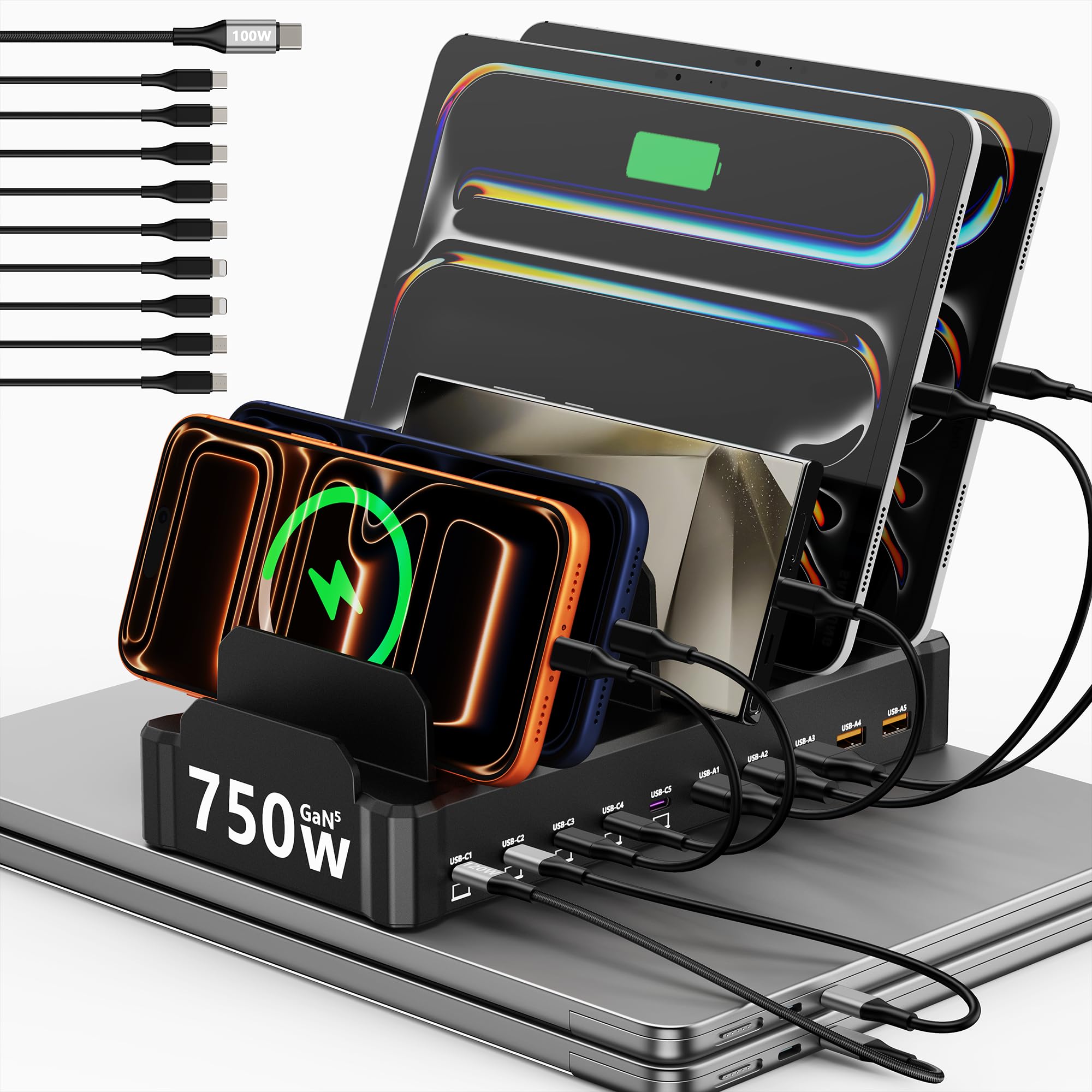
The Zobirez delivers a staggering 750W total output across 10 ports, with five USB-C ports each capable of 120W. This is enough power to charge two MacBook Pros at full speed while simultaneously juicing up an iPad, an iPhone, and a handful of smaller devices. The vertical organizer design includes two wide center slots that accommodate a laptop or a tablet with a thick protective case, and the one-piece ABS construction feels far more durable than docks with removable dividers.
Each of the five USB-A ports outputs 30W, which is more than enough for phones, earbuds, and Kindles. The hub comes with a full cable kit including a long 100W USB-C cable and several short cables to keep the desktop tidy. Real-world users report that the station stays cool under sustained load, and GaN technology helps keep the overall size reasonable given the power.
If you need to fast-charge two laptops plus an entire family’s worth of devices from a single wall outlet, this is the most future-proof organizer on the market. The only trade-off is that the slot width, while generous, may not fit every oversized gaming laptop when a case is attached.
Why it’s great
- Five 120W USB-C ports handle dual laptops with ease
- Sturdy one-piece organizer design reduces desk clutter
- Comes with 10 cables (including one long 100W USB-C cable)
Good to know
- Wide slots may not fit a thick gaming laptop with a case
- Not highly portable due to the organizer form factor
2. Anker Prime Charging Station 200W

The Anker Prime is a flat desktop brick that packs 200W of power into a chassis about the width of an iPhone. Its two USB-C ports each support up to 100W, fast-charging two 14-inch MacBook Pros to 50% in just 28 minutes in real-world tests. The remaining four ports deliver a total of 100W combined, enough for phones, tablets, and earbuds. Anker’s proprietary safety system continuously monitors temperature to protect connected devices.
Users consistently praise the build quality and the flexible power cord that keeps the brick stable on the desk. The lack of indicator lights makes it ideal for bedside use. While the six-port count is lower than some organizer-style hubs, each port delivers meaningful power — no shared low-power lanes.
This hub is best for users who want a compact, powerful, and completely reliable brick that disappears into a desktop setup. It is not designed for travel and does not include a device organizer, so your gadgets will lie flat on the desk while charging.
Why it’s great
- Two 100W USB-C ports for ultra-fast laptop charging
- Compact footprint with GaN power density
- Strong safety monitoring and temperature control
Good to know
- No organizer slots — devices lie flat on the desk
- Expensive for a 6-port hub without cables included
3. Belkin MagSafe 3-in-1 Qi2.2 Charging Station
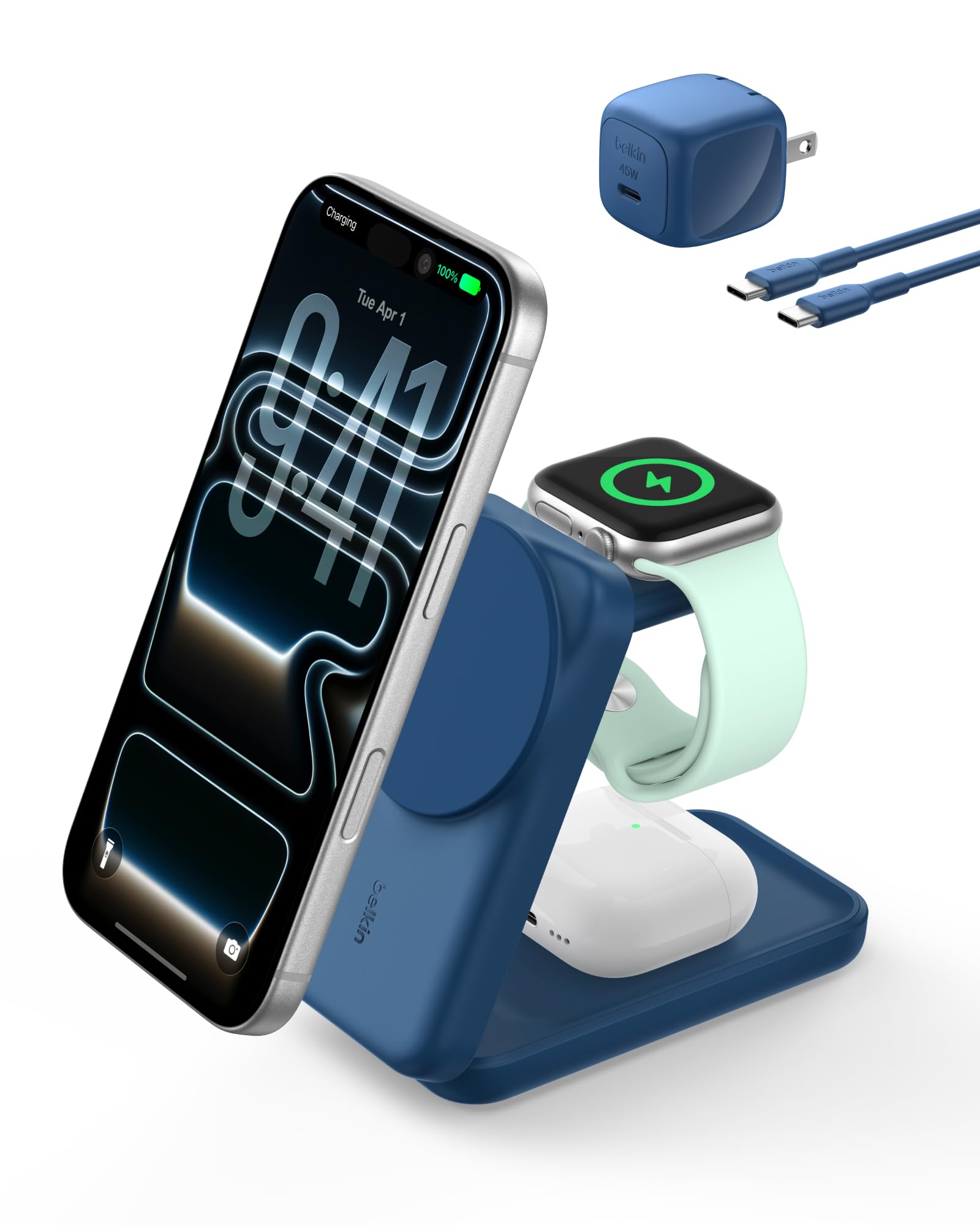
The Belkin 3-in-1 is a wireless charging stand purpose-built for the Apple ecosystem. It supports Qi2.2 fast charging up to 25W for an iPhone, fast charging for an Apple Watch Series 10 (0-80% in 30 minutes), and up to 5W for AirPods. The magnetic alignment snaps your phone into place securely, and the stand angle adjusts up to 65 degrees for both portrait and landscape orientation, making it an excellent StandBy companion.
The entire unit folds flat for travel, and the included 45W power supply with a folding prong plug adds to its portability. Users report strong magnet retention even with cases up to 3mm thick, and the fire-resistant silicone construction feels premium. The passive cooling system — ChillBoost — keeps the device running without a fan.
This is the best option for Apple users who want a single wireless dock for bedside or desk use, especially those who travel frequently. It only charges three devices wirelessly and does not include any wired USB ports for additional gadgets.
Why it’s great
- True 25W Qi2.2 fast charging for iPhone
- Folds compactly for travel with a detachable PSU
- Strong magnetic hold and adjustable viewing angle
Good to know
- Only charges three Apple devices — no wired USB ports
- Requires a MagSafe-compatible case for optimal grip
4. Rocoren 10-Port 400W Charging Station
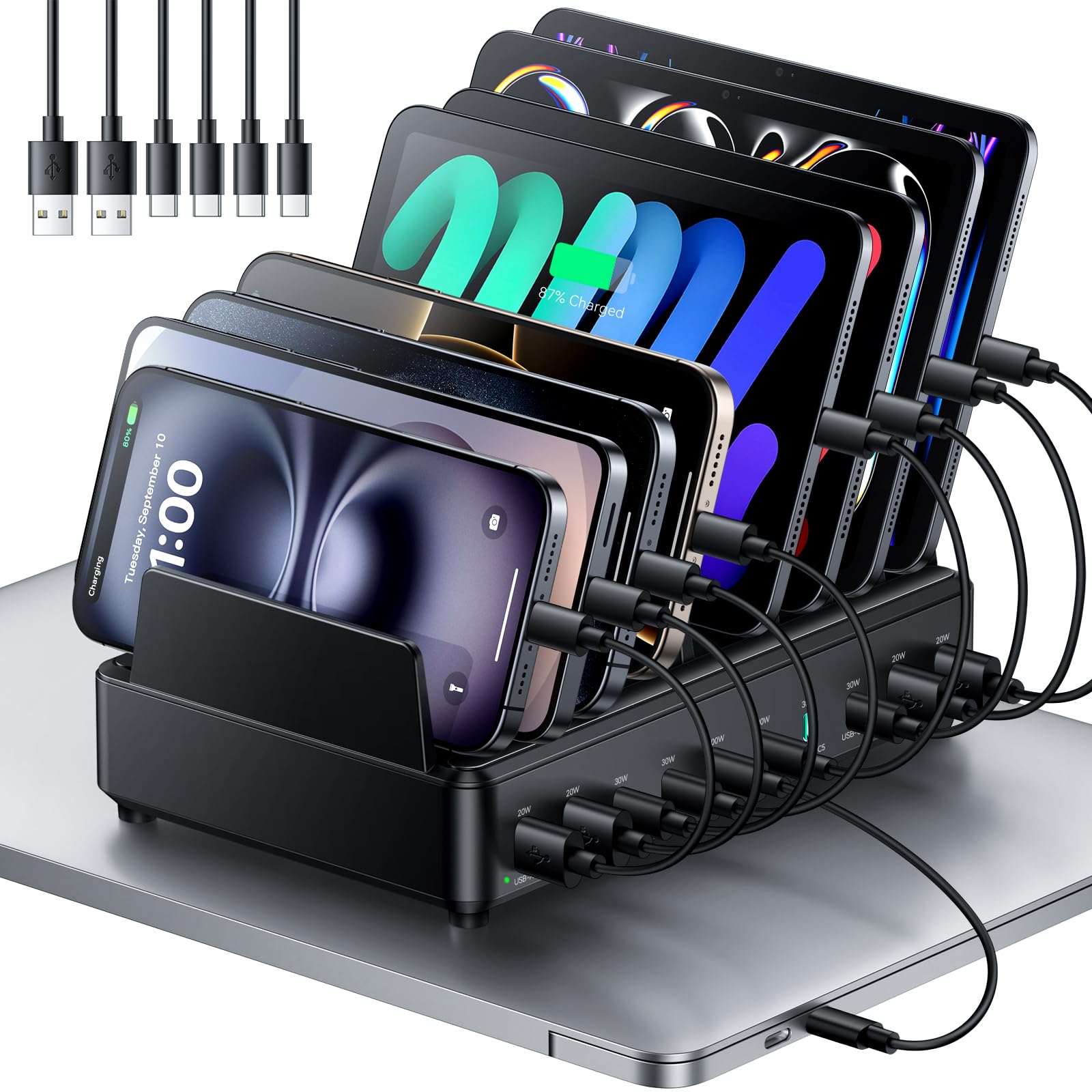
The Rocoren station offers a strong middle path between raw wattage and an organized dock design. With 10 ports — 6 USB-C and 4 USB-A — and two USB-C ports capable of delivering 100W each, it can fast-charge a MacBook Pro and an iPad Pro at the same time while the other ports manage phones, Kindles, and earbuds. The total output of 400W leaves plenty of headroom for simultaneous charging of all ports.
The organizer features a soft silicone strip on top that prevents devices from slipping, and the raised bottom feet improve airflow. The middle partitions are slightly wider to accommodate tablets and phones with thick cases. The included six cables are a welcome bonus, though users note that the power cord exits from the side, which can limit placement against a wall on one side.
This is a solid pick for a family or office desk where multiple devices need to stay organized and charged daily. The dual 100W ports make it one of the most versatile options under the premium tier, and the ABS construction with flame-retardant material adds peace of mind.
Why it’s great
- Two 100W USB-C ports handle laptops and tablets simultaneously
- Soft silicone top keeps devices scratch-free and stable
- 10 ports offer plenty of flexibility for families
Good to know
- Power cord exits the side, limiting right-side wall placement
- Some users report a slight learning curve with port wattage labels
5. MERGROLY 10-Port 320W Charging Station
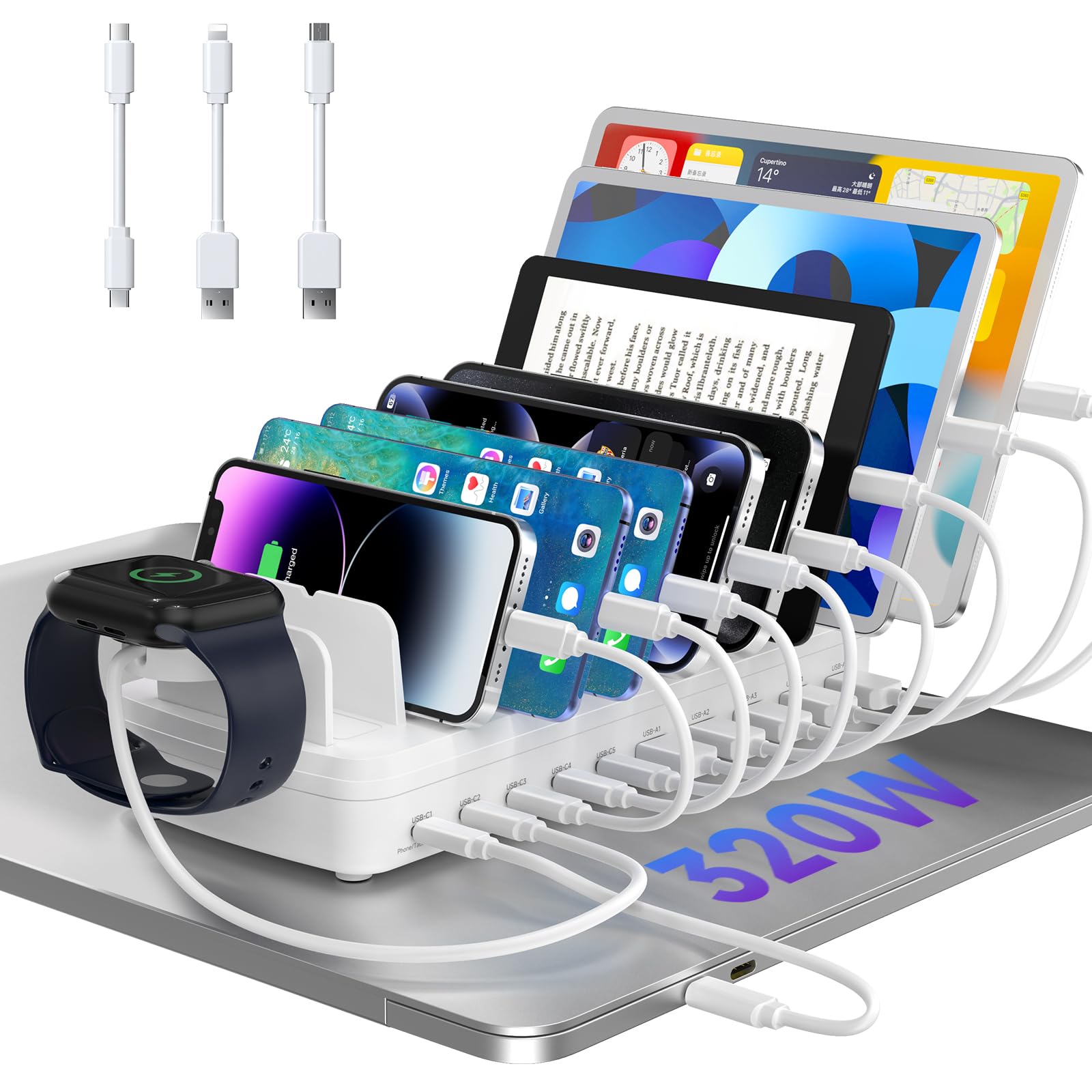
The MERGROLY station organizes up to 10 devices in a dedicated dock with five USB-C and five USB-A ports. Two of the USB-C ports output 65W each, enough to charge a MacBook Air or a large iPad Pro at a solid clip, while three more 30W USB-C ports and five USB-A ports cover phones, earbuds, and other accessories. The total output of 320W ensures every port can draw meaningful current even when all are in use.
A key design feature is the anti-slip rubber pad in the middle of each partition and eight rubber feet on the bottom. This keeps devices from sliding off the dock and protects the desk surface. The widened slots accommodate devices in protective cases without needing to remove them, and the station includes eight short cables covering USB-C to C, USB to Lightning, and USB to Micro.
The MERGROLY is ideal for someone who wants a complete organizational solution with solid fast-charging capabilities for phones and tablets. Laptop charging is limited to 65W, so power users with high-wattage MacBook Pros should look at the Zobirez or Rocoren options.
Why it’s great
- Anti-slip pads and rubber feet keep the dock and devices stable
- Widened slots fit devices with thick protective cases
- Comes with 8 short cables for a tidy, ready-to-use setup
Good to know
- Maximum 65W per USB-C port (not enough for a large laptop at full speed)
- Slots are non-removable, so the dock cannot be reconfigured
6. ASOMETECH 100W 8-Port USB Charging Station

The ASOMETECH 100W hub is a flat desktop device that combines four USB-C PD ports (27W max each), four QC 3.0 USB-A ports (18W max each), and a top-mounted wireless charging pad. The LCD screen cycles through voltage, current, and wattage for each port, providing real-time feedback that power-conscious users love. The wireless pad supports 5W, 7.5W, 10W, and 15W charging, making it compatible with most modern phones and earbuds.
The smart chip automatically detects connected devices and allocates the appropriate current. A neat feature is the button to turn off the LCD display at night so the light doesn’t disturb sleep. Users report that GaN technology keeps the unit surprisingly cool even when all ports are in use.
This hub is best for tech enthusiasts who want to monitor power consumption and need a mix of wired and wireless charging. The 100W total output means you can fast-charge a phone or a tablet, but it lacks the wattage needed for a full-size laptop. budget-conscious buyers will appreciate the versatility, but power users should look for a higher-wattage model.
Why it’s great
- LCD screen shows voltage, current, and wattage per port in real time
- Built-in wireless charging pad saves desk space
- Display can be switched off for nighttime use
Good to know
- 100W total output is not enough for a high-power laptop
- Wireless charging pad does not detect very low-power devices like some wearables
7. Ziwodiv 8-Port 60W USB Charging Station

The Ziwodiv 8-port station is an entry-level hub designed for charging multiple low-power devices at once. With 12A total output across eight USB-A ports, it delivers up to 60W, perfect for smartphones, tablets, headphones, and smartwatches. The integrated LED display shows the real-time current and voltage, giving you basic visibility into the charging status of your devices.
Safety certifications include CE, FCC, and RoHS, and the unit features built-in protection against overheat, overcharge, overcurrent, surge, and short circuit. The compact plastic body and 4-foot cable make it easy to stash in a backpack or carry between rooms. User feedback highlights its ability to handle multiple phones and smaller gadgets without overheating, though it cannot fast-charge a laptop.
The Ziwodiv is a budget-friendly option for users who simply need to organize and charge a collection of phones, older tablets, and accessories. It lacks USB-C ports and high-wattage PD charging, but for the price, it offers reliable multi-device charging for non-laptop gear.
Why it’s great
- LED display shows current and voltage for each port
- Very compact and portable for travel
- Safety certifications and multiple protection circuits
Good to know
- No USB-C ports — all ports are standard USB-A
- 60W total output is not enough to fast-charge a laptop
FAQ
Can a charging hub charge a laptop at full speed?
Is it safe to charge different brands of devices in the same hub?
How many ports do I actually need in a charging hub?
Final Thoughts: The Verdict
For most users, the charging hub winner is the Zobirez 10-Port 750W because it offers enough power to charge two laptops at full speed while organizing an entire desk worth of devices in sturdy slots. If you want a compact desktop brick with ultra-reliable performance and a smaller footprint, grab the Anker Prime 200W. And for a dedicated wireless charging solution for Apple users who value portability and a clean bedside setup, nothing beats the Belkin 3-in-1 MagSafe.

Mo Maruf
I created WellFizz to bridge the gap between vague wellness advice and actionable solutions. My mission is simple: to decode the research and give you practical tools you can actually use.
Beyond the data, I am a passionate traveler. I believe that stepping away from the screen to explore new environments is essential for mental clarity and physical vitality.