Our readers keep the lights on and my smoothie glass nicely filled. As an Amazon Associate, I earn from qualifying purchases.
Finding a 4K monitor on a tight budget used to mean accepting washed-out colors, plastic stands, and 60Hz caps that made scrolling feel sluggish. That compromise is no longer necessary — the current market flood of affordable 4K panels has changed the game entirely, with IPS and VA screens delivering genuinely crisp text and vibrant color at prices that felt impossible just two years ago.
I’m Mohammad Maruf — the founder and writer behind WellFizz. I’ve spent hundreds of hours dissecting spec sheets, analyzing customer feedback patterns, and comparing real-world performance data across the most popular budget 4K displays to separate the genuine value picks from the price traps.
This guide cuts through the noise to help you confidently pick the right best cheap 4k monitor for your specific needs without wasting money on features you won’t use or missing specs that actually matter for daily use.
How To Choose The Best Cheap 4K Monitor
Buying a budget 4K monitor means making smart trade-offs. You can get fantastic resolution and solid panel quality, but you need to know where to spend your limited dollars and where it’s safe to save. Here are the three most important factors to evaluate.
Panel Type: IPS vs. VA
IPS panels offer superior color accuracy and wider viewing angles, making them better for photo editing and shared-screen work. VA panels provide deeper blacks and higher contrast ratios, which improves the cinematic feel of movies and games but can suffer from narrower viewing angles and slightly slower pixel response. For a cheap 4K monitor used primarily for office work and media consumption, a good VA panel often delivers more perceived value than a low-cost IPS that can look washed out.
Refresh Rate and Adaptive Sync
Until recently, 60Hz was the only option at this price tier, but models with 120Hz, 144Hz, or even 180Hz are now available for under . A higher refresh rate drastically improves the smoothness of mouse movement, window dragging, and web scrolling — not just gaming. Pair this with FreeSync or G-Sync compatibility to eliminate screen tearing without the premium price tag.
Ergonomics and Connectivity
Height-adjustable stands are a rarity in the budget segment, but they matter for neck comfort during long sessions. Check for tilt-only stands and factor in the cost of a VESA arm if you need height adjustment. For connectivity, a single DisplayPort 1.4 is essential for full 4K 60Hz without chroma subsampling, while HDMI 2.1 support is a bonus for console gamers. USB-C with power delivery is a premium feature rarely seen at this price level.
Quick Comparison
On smaller screens, swipe sideways to see the full table.
| Model | Category | Best For | Key Spec | Amazon |
|---|---|---|---|---|
| ViewSonic VX2730D-4K | Gaming | Versatile gaming + work | 27″ IPS, 4K 144Hz / FHD 288Hz | Amazon |
| LG 32UR500K-B | Home Office | Spacious productivity | 32″ VA, 60Hz, 90% DCI-P3 | Amazon |
| Dell S3225QS | Premium Value | All-day comfort + media | 32″ VA, 120Hz, 95% DCI-P3 | Amazon |
| Samsung Odyssey G7 G70F | Performance Gaming | Competitive FPS + 4K gaming | 27″ IPS, 4K 180Hz / FHD 360Hz | Amazon |
| Samsung M7 (M70F) | Smart Monitor | TV replacement + work hub | 32″ VA, 60Hz, Smart TV apps | Amazon |
| ViewSonic VX3276-4K-MHD | Value Office | Budget dual-monitor setup | 32″ MVA, 60Hz, 2500:1 contrast | Amazon |
| CRUA 32″ Curved | Curved Value | Immersive budget gaming | 32″ VA, 160Hz, 120% sRGB | Amazon |
| LG 27G810A-B Ultragear | Elite Gaming | High-end 4K gaming + work | 27″ IPS, 4K 180Hz / FHD 360Hz | Amazon |
| ASUS ROG Strix XG32UCG | All-Rounder Premium | Top-tier gaming + creation | 32″ IPS, 4K 160Hz / FHD 320Hz | Amazon |
In‑Depth Reviews
1. Samsung M7 Smart Monitor (M70F)

The Samsung M7 combines a 32-inch 4K VA panel with an entire smart TV platform, making it the most versatile single-device solution in the budget tier. The AI Picture Optimizer adjusts visuals on the fly for documents or games, and the 3,000:1 native contrast ratio delivers deep blacks that standard IPS panels at this price cannot match. The matte screen finish also helps with glare in bright rooms, a common pain point for home office users.
Samsung Knox security and the 3D Map View smart home dashboard add genuine utility beyond a conventional monitor, while the solar-equipped remote is a thoughtful touch. However, the 60Hz refresh rate and VA panel response limits its appeal for fast-paced gaming. Some users have reported Bluetooth audio sync quirks, and the built-in speakers lean toward treble-heavy output best replaced with an external soundbar.
For anyone looking to replace a secondary screen and a streaming dongle simultaneously, the M7’s value proposition is unmatched. It works excellently as a multi-computer hub with the USB-C port, and the 60Hz ceiling is irrelevant for office workflows, media consumption, and even casual console gaming at 4K.
Why it’s great
- Full smart TV platform eliminates need for external streaming device
- Excellent 3,000:1 contrast ratio for deep black levels and vivid movies
- USB-C and Knox security make it a safe, convenient work hub
Good to know
- 60Hz refresh rate caps smoothness for fast gaming and scrolling
- Some units have intermittent sound quality or color uniformity issues
2. ViewSonic VX2730D-4K
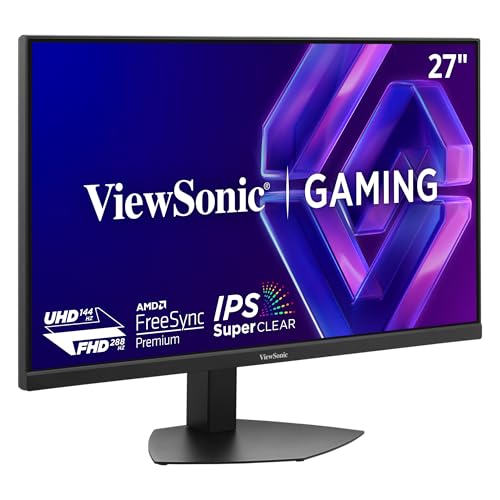
The ViewSonic VX2730D-4K redefines what budget 4K gaming can look like. Its switchable refresh rate technology allows you to toggle between a crisp 4K 144Hz for visually rich single-player games and a blistering FHD 288Hz for competitive esports titles — a feature normally reserved for displays costing more than double. The 27-inch IPS panel delivers strong 99% sRGB coverage with wide viewing angles that hold up in multi-monitor setups.
AMD FreeSync Premium and NVIDIA G-Sync compatibility ensure tear-free operation across a broad range of GPUs. The fully ergonomic stand includes height, tilt, swivel, and pivot adjustments, a rare find in this price range. The maximum brightness of 250 cd/m² is adequate for most indoor environments but will struggle in rooms with direct sunlight, and the lack of true HDR support means HDR10 content will look flat compared to premium panels.
The main drawback reported by users is the absence of 1440p support, as the monitor only offers native 4K and FHD resolutions. This can be an issue for users who prefer intermediate scaling. Still, for the money, the VX2730D-4K is arguably the most feature-complete budget gaming monitor available.
Why it’s great
- Switchable 4K 144Hz / FHD 288Hz gives flexibility for any game type
- Full ergonomic stand with height, tilt, swivel, and pivot adjustments
- Dual HDMI 2.1 ports for seamless console connectivity
Good to know
- Missing 1440p resolution option limits intermediate scaling choices
- 250 cd/m² brightness may appear dim in brightly lit rooms
3. LG 32UR500K-B Ultrafine

LG’s 32UR500K-B brings a 32-inch 4K VA panel with 90% DCI-P3 color gamut coverage to a price point where many competitors offer only 72-80%. The extra color volume translates to noticeably richer reds and greens in photos and video, making this a strong candidate for amateur photo editors and media fans on a strict budget. The built-in MaxxAudio-equipped stereo speakers produce fuller sound than typical monitor tin cans, significantly reducing desktop clutter.
Dynamic Action Sync and Black Stabilizer are welcome gaming extras for a non-gaming monitor, reducing input lag and lifting shadow details in dark scenes. The OnScreen Control software makes split-screen customization simple via mouse clicks. Customers consistently praise the “crystal clear” picture and sturdy build quality, with dead pixel reports being rare in user feedback.
The 60Hz refresh rate limits its usefulness for competitive gaming, and some users note the black levels on this VA panel are good but not as deep as higher-end VA screens. The tilt-only stand necessitates an aftermarket arm for height adjustment. For pure productivity and media use at a large size, this monitor offers the best color value in the entire guide.
Why it’s great
- 90% DCI-P3 coverage at this price is exceptional for color-critical work
- Integrated MaxxAudio speakers are genuinely usable for daily media
- Easy OnScreen Control software simplifies multi-window setups
Good to know
- 60Hz refresh rate is not suitable for fast-paced competitive gaming
- Tilt-only stand requires extra spending on a VESA arm for height adjustment
4. Dell 32 Plus S3225QS

Dell’s S3225QS is a rare bird in the budget 4K segment: a 31.5-inch VA panel that combines 4K resolution with up to 120Hz refresh rate via AMD FreeSync Premium, all while keeping blue light emissions below 35% to preserve color accuracy. The 1500:1 contrast ratio and 95% DCI-P3 coverage deliver rich, true-to-life images that look noticeably better than the 72% gamut panels common in this price tier. The built-in speakers have also been redesigned with deeper frequency response and higher output than most competitors.
Every customer review for this model is overwhelmingly positive, highlighting the “noticeably brighter colors” and “excellent viewing angle and depth.” The ultra-thin bezels and ash white finish give it a modern, high-end aesthetic that belies its price. The stand is height-adjustable, and anti-glare coating reduces strain during long work sessions.
Potential downsides include the lack of a remote control (volume is too loud even at 1% for some users) and a 6-foot HDMI cable that may feel short for deep desks. Additionally, the VA panel’s viewing angles, while good, shift in contrast when viewed from extreme side positions. For all-day productivity plus occasional media or console gaming, the S3225QS is the best-balanced cheap 4K monitor on this list.
Why it’s great
- 95% DCI-P3 and 1500:1 contrast bring premium color and depth
- 120Hz FreeSync Premium smooths both work and play
- ComfortView Plus cuts blue light without making the screen yellow
Good to know
- Built-in speakers are loud even at minimum volume setting
- Included 6ft HDMI cable may be short for larger desks
5. Samsung Odyssey G7 G70F

The Samsung Odyssey G7 G70F is a 27-inch Fast IPS gaming monitor that pushes the envelope with a dual-mode feature: 4K at 180Hz for immersive visuals or instant switch to FHD at 360Hz for competitive play. The 1ms GtG response time virtually eliminates ghosting, and the 350 cd/m² peak brightness is among the highest in this guide, ensuring HDR10 content shows visible highlights rather than a flat gray wash. G-Sync and FreeSync Premium compatibility keep motion smooth across a wide range of hardware.
The ergonomic stand offers full height, tilt, swivel, and pivot adjustments, and the matte finish effectively reduces reflections. Users consistently report “no dead pixels or backlight bleed” and praise the “bright, vibrant colors” after a minor saturation tweak. Auto Source Switch+ is a thoughtful addition for multi-device setups, seamlessly switching inputs as devices wake.
Notably absent are built-in speakers — you’ll need external audio. Some users also find the wake-from-sleep behavior slow, taking several seconds to re-establish the display signal. The price sits at the upper edge of what most consider “cheap,” but the raw performance-per-dollar ratio is outstanding for anyone who wants serious gaming capabilities without breaking the bank.
Why it’s great
- 4K 180Hz / FHD 360Hz dual-mode provides unmatched versatility for gaming
- 350 cd/m² brightness and 1ms GtG response are best-in-class here
- Full ergonomic stand with height, pivot, and adjustable tilt
Good to know
- No built-in speakers require external audio solution
- Wake-from-sleep delay of several seconds can be annoying
6. ViewSonic VX3276-4K-MHD

The ViewSonic VX3276-4K-MHD has been a staple of the budget 4K category for years, and for good reason. Its 32-inch MVA panel delivers a solid 2500:1 contrast ratio that provides deeper blacks than many IPS alternatives at the same price, while the all-metal chassis gives it a premium feel on the desk. The ultra-thin bezel design makes it an excellent candidate for a dual-monitor setup where you want a seamless edge-to-edge look.
Color accuracy is respectable out of the box, and experienced users report that a full calibration yields results that rival far more expensive panels. The front-facing OSD buttons are a practical touch, and the inclusion of both HDMI and Mini DisplayPort inputs offers flexibility for older hardware. Customer feedback is broadly positive, with many noting it as “best value 4K monitor” for office and programming work.
That said, the 60Hz refresh rate and slower pixel response of the MVA panel mean this is not a gaming monitor — motion blur will be noticeable in fast scenes. A small number of users report receiving units with dull colors or vertical line defects, highlighting the panel lottery at this price point. The non-adjustable stand also limits comfort without an aftermarket arm.
Why it’s great
- Metal chassis feels more premium than plastic competitors
- 2500:1 contrast ratio provides excellent black levels for movies
- Wide input selection includes Mini DisplayPort for older laptops
Good to know
- 60Hz MVA panel is not suitable for competitive or fast gaming
- Some units have quality inconsistency (dull colors, dead pixels)
7. CRUA 32″ Curved Gaming Monitor

The CRUA 32-inch curved gaming monitor packs features that defy its price tag: a 1500R VA panel with 4K resolution, 160Hz refresh rate, 120% sRGB color gamut, and built-in RGB lighting — all for under . The 3000:1 contrast ratio provides the deep blacks and high dynamic range you expect from a VA panel, making games and movies pop with dramatic shadow detail. The 1500R curvature wraps around your field of view for a genuinely immersive experience in racing and flight sims.
Connectivity is solid with HDMI 2.1 and DisplayPort 1.4, and the built-in speakers provide passable audio for casual use. Users praise the “excellent picture quality” and “easy on my eyes” performance. The white color scheme is a refreshing alternative to the sea of black monitors, and RGB lighting adds style to any gaming desk.
However, there are reliability concerns: multiple users report the screen failing after just three months with no manufacturer warranty honored despite a one-year claim. The maximum brightness of 320 cd/m² is adequate indoors but may struggle in sunny rooms. Assembly of the stand is also more complicated than average. For short-term value with a high-risk tolerance, the CRUA is tempting; for long-term ownership, the warranty gap is a significant drawback.
Why it’s great
- 1500R curve and 3000:1 contrast create deep, immersive gaming visuals
- 160Hz refresh rate and 120% sRGB exceed typical cheap monitor specs
- HDMI 2.1 support provides full 4K bandwidth for modern consoles
Good to know
- Multiple reports of screen failure after 3 months with unresponsive warranty
- Stand assembly is more complex than most competitors
8. LG 27G810A-B Ultragear

The LG Ultragear 27G810A-B is a serious investment for the budget buyer, but it delivers premium features that justify the stretch. The 27-inch IPS panel achieves DisplayHDR 400 certification with 400 cd/m² brightness and 95% DCI-P3 coverage, producing colors that “pop like OLED” according to users. The dual-mode capability offers 4K at 180Hz or FHD at 360Hz, and the 1ms GtG response time ensures every fast movement stays razor sharp. FreeSync Premium and G-Sync compatibility cover both major GPU ecosystems.
VESA DisplayHDR 400 means this monitor delivers real, measurable HDR highlights rather than just accepting an HDR10 signal and displaying it flatly. The DTS Headphone:X support provides spatial audio through a 4-pole headphone jack, a unique feature for immersive gaming without a separate DAC. The full ergonomic stand includes height, tilt, swivel, and pivot control.
The primary drawbacks are a noticeable fan noise from the internal cooling in silent environments and a base that sits lower than expected on the desk. Some users note that while colors are excellent, a high-quality OLED still has superior contrast and zero motion blur. For a burn-in-free IPS panel that can handle both 4K creative work and 360Hz competitive gaming, however, the 27G810A-B is hard to beat.
Why it’s great
- DisplayHDR 400 delivers genuine HDR performance and color depth
- 4K 180Hz / FHD 360Hz dual-mode handles any genre of gaming
- DTS Headphone:X provides immersive spatial audio via 4-pole jack
Good to know
- Internal fan produces audible noise in quiet rooms
- Stand base sits low; may require a riser for comfortable eye level
9. ASUS ROG Strix XG32UCG

The ASUS ROG Strix XG32UCG is the most expensive monitor in this guide, but it redefines the ceiling of what a “cheap 4K monitor” can be. Its 32-inch Fast IPS panel achieves a 0.3ms response time (minimum) — the fastest in the entire list — and delivers a dual-mode that switches between 4K at 160Hz and FHD at 320Hz. The 95% DCI-P3 coverage is paired with ASUS’s advanced gray-scale tracking for exceptionally smooth color gradation, and the ELMB Sync feature eliminates motion blur while keeping variable refresh rate active.
The USB-C port with DisplayPort Alt Mode simplifies connection to modern laptops with a single cable, while the built-in tripod socket is a unique touch for streamers or content creators who need camera mounting directly on the display. DisplayWidget Center software allows for mouse-based setting adjustments without fumbling with OSD buttons. Customer feedback is ecstatic, with one user calling it “the greatest I have ever seen” and praising the HDR handling and build quality.
The downsides are primarily financial: the price is significantly higher than the rest of this list, pushing the definition of “cheap.” Additionally, the semi-gloss screen, while vivid, can show reflections in brightly lit rooms more than matte finishes. For users who want console-level gaming features, PC productivity, and professional-grade color in one monitor and are willing to stretch their budget, the XG32UCG is the ultimate choice.
Why it’s great
- 0.3ms Fast IPS response is the fastest response time on this list
- USB-C with DP Alt mode provides single-cable laptop connectivity
- ELMB Sync eliminates motion blur without sacrificing variable refresh rate
Good to know
- Semi-gloss screen shows reflections in brightly lit workspaces
- Price is the highest on this list, requiring budget flexibility
FAQ
Can I use a cheap 4K monitor for gaming with a mid-range GPU?
What is the ideal size for a budget 4K monitor?
Is HDR worth it on a cheap 4K monitor?
Final Thoughts: The Verdict
For most users, the best cheap 4k monitor winner is the Dell S3225QS because it combines a large 32-inch 4K panel with a smooth 120Hz refresh rate, genuine 95% DCI-P3 color, and blue light reduction built right in — all for a price that undercuts almost everything in its class. If you want a dedicated gaming beast that can also handle daily work, grab the ViewSonic VX2730D-4K for its unmatched dual-mode refresh technology. And for the ultimate all-in-one monitor that replaces a streaming TV, a work hub, and a display, nothing beats the Samsung M7 M70F.

Mo Maruf
I created WellFizz to bridge the gap between vague wellness advice and actionable solutions. My mission is simple: to decode the research and give you practical tools you can actually use.
Beyond the data, I am a passionate traveler. I believe that stepping away from the screen to explore new environments is essential for mental clarity and physical vitality.