Our readers keep the lights on and my smoothie glass nicely filled. As an Amazon Associate, I earn from qualifying purchases.
Ditching your physical keys for a Bluetooth-enabled smart lock means instant access with a fingerprint, a passcode, or a tap on your phone. No more hiding a spare under the mat or worrying about lost keys — just seamless, keyless entry to your home.
I’m Mohammad Maruf — the founder and writer behind WellFizz. I’ve spent hundreds of hours analyzing smart lock specifications, studying consumer feedback on biometric accuracy, battery performance, and real-world app reliability to find the best options for every type of home.
This guide breaks down the key features, security grades, and installation requirements so you can confidently pick the right best bluetooth door lock for your front door, apartment, or rental property.
How To Choose The Best Bluetooth Door Lock
Selecting a smart lock involves more than just picking a brand. Factors like connectivity, security certification, and biometric speed directly affect your daily experience and long-term peace of mind. Focus on these critical areas first.
Biometric Sensor Type and Speed
The core convenience of a smart lock is unlocking without a key. Fingerprint sensors are the most common, with average read times ranging from 0.2 to 0.5 seconds. More advanced options use palm vein recognition, which is highly secure but may require precise hand positioning. Check the claimed read speed and look for user reviews that confirm consistent performance across different users, including wet or dirty fingers.
Connectivity: Bluetooth vs. Built-in Wi-Fi
A basic Bluetooth door lock works well within close range (about 30 feet) and is excellent for auto-unlock features when you approach the door. For remote access — locking/unlocking from work or granting guest codes — you need either a lock with built-in Wi-Fi or a separate Wi-Fi hub. Built-in Wi-Fi eliminates the need for extra hardware but may consume battery faster than pure Bluetooth models.
Security and Build Quality (BHMA Grade)
Look for a BHMA (Builders Hardware Manufacturers Association) grade. Grade 3 is the minimum standard for residential use and is perfectly adequate for most homes. Grade 2 offers superior durability and is often found on commercial-grade residential locks, providing better resistance to forced entry. The lock’s material — solid zinc alloy or reinforced metal — also determines long-term reliability.
Battery Life and Backup Power
Smart locks run on batteries, and a dead battery means a lockout. Premium models boast 6 to 16 months of battery life. A low-battery alert in the app is essential. For emergencies, look for a physical key override or a USB-C emergency charging port that allows you to power the lock from a portable battery pack.
Installation and Door Compatibility
Most smart locks are designed for standard US doors with a thickness of 1-3/8″ to 2″ and a 2-1/8″ bore hole. Many retrofit into existing deadbolt holes, making installation a 15-minute DIY job with just a screwdriver. Always measure your door’s thickness and confirm the lock’s backset compatibility before purchasing.
Quick Comparison
On smaller screens, swipe sideways to see the full table.
| Model | Category | Best For | Key Spec | Amazon |
|---|---|---|---|---|
| Tapo DL110 | Premium | Long battery life & fast fingerprint | 1-Year Rechargeable Battery | Amazon |
| Philips 4200 Series | Premium | All-in-one handle set with built-in Wi-Fi | 0.3s Fingerprint Reader | Amazon |
| Lockly Secure Plus | Premium | Highest security PIN entry technology | Patented PIN Genie Keypad | Amazon |
| Wyze Palm Lock | Mid-Range | Contactless palm vein recognition | Palm Vein Biometric Sensor | Amazon |
| Veise VE06-L | Mid-Range | Lever handle set with IC card support | IP54 Weatherproof Rating | Amazon |
| Veise VE018 | Mid-Range | 8 ways to unlock with app control | 128-bit AES Encryption | Amazon |
| Philips DDL242X-1HW | Mid-Range | Built-in Wi-Fi without extra hub | Fingerprint & Passcode Unlock | Amazon |
In‑Depth Reviews
1. Tapo DL110 Smart Wi-Fi Deadbolt

The Tapo DL110 sets a high standard with its removable and rechargeable battery that lasts a full year, eliminating the frequent battery swaps required by other smart locks. Its advanced fingerprint sensor reads and unlocks in just 0.42 seconds, consistently performing well even with wet or dirty fingers — a common pain point for biometric locks. The lock supports six methods of access including fingerprint, passcode, app, voice control, Bluetooth, and a physical backup key.
With BHMA Grade 2 certification, this lock is built to a higher durability standard than most residential models, offering better resistance to tampering and physical force. The built-in Wi-Fi provides seamless remote control via the Tapo app without needing a separate hub or gateway. Users report a fast and intuitive app pairing process, and the ability to create permanent, one-time, or scheduled guest codes makes it ideal for rental properties or frequent visitors.
The lock integrates with Amazon Alexa and Google Assistant for voice control, and its auto-lock feature can be adjusted within the app for added security. While the sleek, polished finish is attractive, the interior assembly is slightly bulkier than some competitors. The USB-C charging port provides a convenient emergency power option, ensuring you are never locked out unexpectedly.
Why it’s great
- Rechargeable battery rated for one year of use
- Fast, reliable fingerprint reader (0.42 sec)
- BHMA Grade 2 for superior durability
- Built-in Wi-Fi, no hub required
Good to know
- Interior assembly is slightly larger than some rivals
- No NFC or IC card support
2. Philips 4200 Series WiFi Smart Lock with Handle

The Philips 4200 Series combines a smart deadbolt with a matching lever handle for a complete front door lock set upgrade. Its 0.3-second fingerprint reader is one of the fastest in its class, and the reader itself is embedded in a weather-resistant touchscreen keypad. The lock connects directly to your 2.4GHz Wi-Fi network without any extra hub, giving you remote lock/unlock control and real-time access logs through the Philips Home Access app.
Users praise the straightforward installation process that fits standard door preparations, and the matte black finish is often described as looking high-end. The lock supports multiple passcode types — permanent, one-time, periodic, and recurring — making it highly flexible for managing access for family, housekeepers, or short-term rental guests. Voice control via Alexa or Google Assistant works reliably for locking and checking door status.
The auto-lock timer is adjustable from 0 to 180 seconds, though it is turned off by default and must be enabled in the app. The lock runs on 8 AA batteries (not included) with an estimated 6-month battery life. The backup physical key is hidden behind the fingerprint reader, maintaining a clean aesthetic. The lever handle is especially appreciated by users with arthritis or mobility issues, as it requires less effort than a traditional knob.
Why it’s great
- Complete handle set included, no extra hardware needed
- Very fast 0.3-second fingerprint sensor
- Built-in Wi-Fi for remote access
- Easy installation for standard doors
Good to know
- Requires 8 AA batteries, not included
- Auto-lock feature must be activated manually
3. Lockly Secure Plus Bluetooth Smart Lock

The Lockly Secure Plus is engineered for users who prioritize PIN entry security above all else. Its patented PIN Genie keypad features four virtual buttons, each containing three random digits that shuffle positions after every use. This prevents shoulder surfers and hidden cameras from stealing your passcode. The lock also features a second-generation 3D biometric fingerprint sensor that stores up to 99 fingerprints and unlocks in about 0.3 seconds.
This smart lock communicates via Bluetooth as standard, and remote access features like voice control and activity monitoring require the optional Lockly Secure Link Wi-Fi Hub. The lock’s construction feels heavy-duty, weighing 6.5 pounds, and is made from robust materials. Users consistently report that the fingerprint sensor is fast and reliable, and the auto-lock feature engages automatically when the door is closed, preventing accidental lockouts.
Unique to Lockly is the Offline Access Code (OAC) feature, which allows you to generate time-limited guest codes that work without any internet connection — ideal for rentals in areas with spotty Wi-Fi. The lock operates on 4 AA batteries, which users report lasting over a year. The inclusion of physical backup keys provides an extra layer of reliability, though the key cylinder uses a non-standard groove and cannot be rekeyed to match existing Kwikset keys.
Why it’s great
- PIN Genie keypad prevents code theft from onlookers
- Fast and highly reliable 3D fingerprint sensor
- Offline Access Codes work without internet
- Robust, heavy-duty metal construction
Good to know
- Remote access requires separate Wi-Fi hub purchase
- Backup key cylinder not interchangeable with common key systems
4. Wyze Palm Lock

The Wyze Palm Lock takes a different approach to biometric entry by using palm vein recognition instead of a fingerprint sensor. This technology reads the unique vein pattern beneath your skin, offering a contactless unlock that is both hygienic and highly secure. Simply hover your palm near the sensor, and the door unlocks instantly. The sensor uses millimeter-wave radar to detect a person’s presence, waking up the lock only when someone approaches, which conserves battery.
The lock features a unique dual-battery system: a primary battery lasts about six months, backed by a secondary battery that provides an additional two weeks of power. If both are drained, an integrated USB-C port allows you to charge the lock from any power bank to gain entry. The built-in Wi-Fi provides remote control and monitoring through the Wyze app without needing an extra hub, and it integrates seamlessly with Alexa and Google Assistant.
Wyze includes a physical key override hidden under a sliding cover, plus a backlit keypad for code entry. The lock is IP53 weather-resistant and BHMA Grade 3 certified. Users with screen doors have reported occasional battery drain issues because the radar sensor may be triggered too frequently, though the “saver mode” setting helps mitigate this. Overall, the contactless palm unlock is a standout feature for families with young children or anyone who finds fingerprint sensors finicky.
Why it’s great
- Contactless palm vein recognition, no touching required
- Dual-battery system with USB-C emergency charge
- Built-in Wi-Fi for remote control
- Millimeter-wave radar for smart wake-up
Good to know
- Screen door installations may cause battery drain
- Palm sensor requires precise hand positioning
5. Veise VE06-L Smart Lock with 2 Lever Handles

The Veise VE06-L is designed as a complete door lock replacement, shipping with two matching lever handles and a deadbolt. This makes it an ideal choice for retrofitting a full entry set. It supports multiple unlocking methods, including app, passcode, IC cards (up to 1,000 capacity), e-keys, physical keys, and even web portal control. The auto-lock timer is highly adjustable from 5 to 900 seconds, giving you precise control over locking delay.
The lock is IP54 weatherproof and BHMA/ANSI Grade 3 certified, meaning it can withstand rain, dust, and temperature extremes from -35°F to 160°F. The solid zinc alloy construction feels durable, and the lock offers “Passage Mode” (disables auto-lock for moving or parties), “Silent Mode,” and “Privacy Mode” for internal doors. The DDlock app is free with no subscription fee and provides full user management, access logs, and remote code generation.
Remote access and voice control via Alexa or Google Assistant require the purchase of the Veise G2 Gateway, which is sold separately. Users praise the helpful customer support team, particularly during setup. The lever handles are easier to operate than knobs, making this lock a good choice for elderly family members or those with limited hand strength. The ability to use IC cards is a nice touch for kids or seniors who may struggle with smartphone apps.
Why it’s great
- Complete lever handle set included
- IP54 weather-resistant for outdoor use
- Supports IC cards and e-keys
- Highly adjustable auto-lock timer (5–900s)
Good to know
- Remote control requires separate G2 Gateway hub
- Fingerprint sensor is not included
6. Veise VE018 Smart Knob Handle Lock
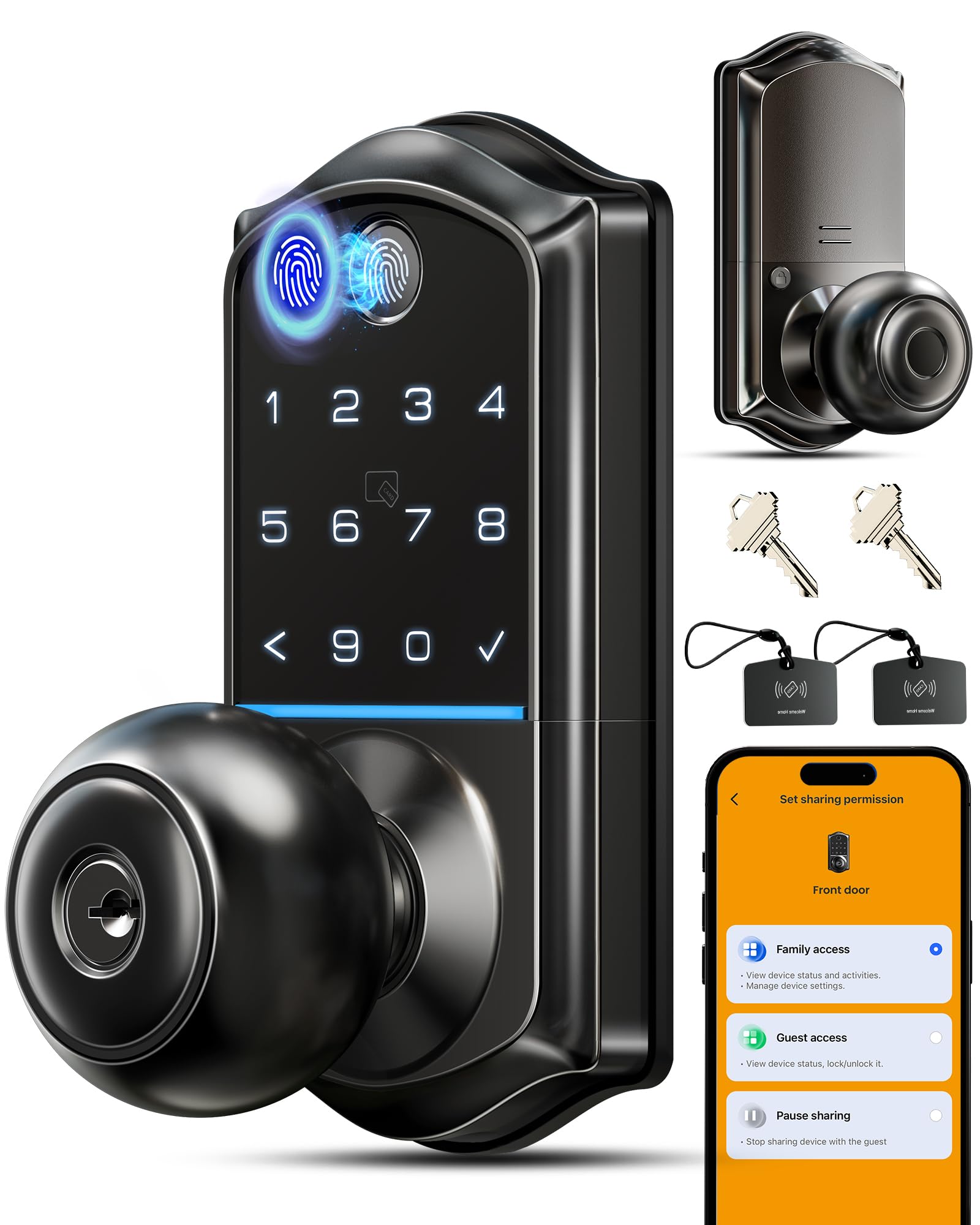
The Veise VE018 offers an impressive array of eight unlocking methods: fingerprint, app, keypad, IC card, mechanical key, remote authorization, password sharing, and (with the optional G1 Gateway) voice control via Alexa and Google. The fingerprint sensor uses AI self-learning technology and claims a 0.2-second recognition speed with 99% accuracy, storing up to 20 fingerprints. Users note that while the fingerprint sensor works well, it can occasionally require a second attempt, especially with thumbprints.
Security is a strong point here, with 128-bit AES encryption and local data storage on the lock’s chip, meaning your access records and user data are not vulnerable to cloud breaches. The lock also features an anti-peeping keyboard that allows you to add random digits before and after your real code to prevent someone from learning your PIN by watching. It is BHMA Grade 3 certified and has passed a 96-hour corrosion resistance test, operating reliably from -35°F to 160°F.
The lock runs on 4 AA batteries (not included) and boasts an ultra-long battery life of up to 16 months, significantly longer than many competitors. A Type-C emergency power port and two backup keys provide fallback options. Installation is designed to take about 10 minutes with just a screwdriver, fitting doors 1-3/8″ to 2″ thick. The auto-lock timer is adjustable from 10 to 180 seconds, and the lock offers a mute mode for silent operation.
Why it’s great
- Very long 16-month battery life
- 8 different unlocking methods
- 128-bit AES local data encryption
- Anti-peeping keypad with false digit entry
Good to know
- Fingerprint sensor can be inconsistent at times
- Remote voice control requires separate G1 Gateway
7. Philips DDL242X-1HW WiFi Door Lock

The Philips DDL242X-1HW brings key smart lock features to the entry-level premium space with its built-in Wi-Fi, eliminating the need for any additional hub. It provides remote lock/unlock, real-time notifications, and access history right from the Philips Home Access app. The lock supports five unlocking methods: app, passcode, fingerprint, backup key, and voice control via Alexa or Google Assistant. Its fingerprint sensor is praised for being fast and accurate, storing multiple prints for the whole family.
One standout feature is the “Away Mode,” which disables all unlocking methods except for a master code — an excellent security measure when you are on vacation. The auto-lock timer is adjustable from 10 to 180 seconds, though users note it lacks a door sensor to confirm closure before locking. The illuminated keypad with raised numbers makes code entry easy in the dark, and the anti-peeping technology lets you add random digits before and after your code for security.
The lock runs on 8 AA alkaline batteries (not included), which is a higher count than average but supports its consistent Wi-Fi connection. Installation is straightforward with a screwdriver, and the lock fits standard door thicknesses. The brushed finish and compact design look modern without being bulky. Users switching from the Ultraloq brand have reported this to be a significant upgrade in both app reliability and sensor performance. The 2-year warranty and US-based customer support team provide peace of mind.
Why it’s great
- Real built-in Wi-Fi, no hub required
- Away Mode disables all codes except master for travel security
- Fast and reliable fingerprint sensor
- App provides detailed access history
Good to know
- Requires 8 AA batteries, not included
- Auto-lock does not have a door sensor to verify closure
FAQ
Will a Bluetooth door lock fit on my existing door?
How long do the batteries in a smart lock last?
Can I use a Bluetooth lock without a smartphone?
What is the difference between a smart deadbolt and a smart lock with a handle?
Final Thoughts: The Verdict
For most users, the best bluetooth door lock winner is the Tapo DL110 because it combines a full year of rechargeable battery life with a fast biometric sensor and BHMA Grade 2 durability at a mid-range price. If you want the most secure PIN entry technology and don’t mind purchasing an optional Wi-Fi hub, grab the Lockly Secure Plus. And for a complete, stylish door set with built-in Wi-Fi and one of the fastest fingerprint readers available, nothing beats the Philips 4200 Series.

Mo Maruf
I created WellFizz to bridge the gap between vague wellness advice and actionable solutions. My mission is simple: to decode the research and give you practical tools you can actually use.
Beyond the data, I am a passionate traveler. I believe that stepping away from the screen to explore new environments is essential for mental clarity and physical vitality.