Our readers keep the lights on and my smoothie glass nicely filled. As an Amazon Associate, I earn from qualifying purchases.
Paper calendars meant well, but they cannot do much for a household where soccer practice shifts, work meetings, meal prep, and dentist appointments compete for the same magnet space. An at-home digital calendar upgrades that chaos to a single live screen that syncs across everyone’s phone and updates itself the moment a schedule changes. No sticky notes, no crossed-out entries, no forgetting to tell your partner an appointment moved to Thursday.
I’m Mohammad Maruf — the founder and writer behind WellFizz. I have spent hundreds of hours studying digital home organizers, comparing sync protocols, display quality, and family-specific features so busy households can find the screen that actually earns a place on the wall or counter.
Whether you are wrangling kids’ chores, coordinating with a partner’s work calendar, or helping aging parents stay connected, the best at home digital calendar keeps every family member on the same page without anyone needing to send a group text.
How To Choose The Best At Home Digital Calendar
An at-home digital calendar needs to do more than show dates. It must pull in data from every app your family already uses, display it clearly from across the room, and offer features — chore tracking, meal planning, photo sharing — that actually reduce daily friction rather than add another screen to manage. Below are the four criteria that separate a useful family hub from a digital picture frame that happens to show a date.
Calendar Sync Compatibility
Your digital calendar must automatically sync with the calendar services your household already depends on: Google Calendar, Apple iCloud, Outlook, Yahoo, and Cozi are the most common. Real-time two-way sync — where a change made on your phone appears on the wall screen within seconds — is non-negotiable. Without it, you are effectively managing two separate calendars, which defeats the purpose entirely.
Display Size, Mounting, and Viewing Angle
Think about where the screen will live. Kitchens demand an anti-glare coating because windows and overhead lights wash out cheap displays. Hallways or entryways need a wide viewing angle so the schedule is readable while walking past. Screens under 10 inches can feel cramped for a family of four or more. A 15- or 16-inch panel gives each person’s color-coded events enough real estate to be legible from a few feet away. Wall-mounting is standard, but some units also offer a magnetic back for refrigerator attachment or a kickstand for countertops.
Family-Specific Tools: Chores, Meals, and Rewards
A basic calendar view is not enough to replace the paper planner on your fridge. The best digital calendars include chore charts that let you assign tasks to individual family members and track completion. Meal planning modules that generate a grocery list from the week’s menu save real time. A reward system — stars, points, or badges that kids can redeem for privileges — turns household responsibilities into a game that builds self-discipline without parental nagging.
Subscription Fees and App Ecosystem
Some digital calendars require a monthly or yearly subscription to unlock full sync, photo sharing, or advanced task management. Read the fine print before buying. The models in this guide either have zero subscription fees or offer a free companion app that handles all core functions. A paid tier for extra storage or advanced features (like OCR import of paper schedules) is acceptable only if the free tier already covers sync, chores, and meal planning for your household size.
Quick Comparison
On smaller screens, swipe sideways to see the full table.
| Model | Category | Best For | Key Spec | Amazon |
|---|---|---|---|---|
| Dragon Touch 15.6″ | Premium | Large family coordination | 15.6″ FHD touchscreen | Amazon |
| Anyuse 16″ Smart Digital Calendar | Premium | Seniors and big fonts | 16″ HD touchscreen | Amazon |
| JSUSOU 15.6″ Fridge Calendar | Premium | Fridge-mounted family hub | Magnetic refrigerator mount | Amazon |
| Whale Framely 10.1″ | Mid-Range | Easy-to-use senior interface | 10.1″ IPS touchscreen | Amazon |
| Annalivkg Digital Calendar Wall Planner | Mid-Range | Reward-based kid chore system | Touchscreen with photo frame | Amazon |
| Oqsonwu 10.1″ Touchscreen | Mid-Range | Multi-household photo sharing | 10.1″ display with app control | Amazon |
| Mitoart 10.1″ IPS | Entry-Level | Budget-friendly basic sync | 0.58 lbs, desk/wall mount | Amazon |
In‑Depth Reviews
1. Dragon Touch 15.6″ Digital Calendar Chore Chart

The Dragon Touch 15.6-inch hits the sweet spot for households that want a large, clear screen without paying over the odds. Its 1080p Full HD touchscreen makes color-coded family calendars, chore charts, and meal plans easy to read from the kitchen counter. Setup takes under ten minutes — plug in, connect to Wi-Fi, and sync multiple personal calendars from iOS or Google into one unified interface.
The built-in chore chart is the standout feature. Kids earn stars for completing tasks, and the reward system lets parents assign privileges without daily reminders. The dinner planner ends the “what’s for dinner” loop by displaying the week’s menu for everyone to see. When the calendar is idle, the screen rotates through family photos, making it a live digital picture frame that adds warmth to the room.
The companion eCalendar App allows remote management from anywhere, so both parents can add appointments or adjust tasks even when away from home. Paid features like Magic Import are available for advanced users, but the free tier covers sync, chores, meal planning, and photo display — which is sufficient for nearly every family.
Why it’s great
- Large 15.6-inch FHD touchscreen with vivid color differentiation for multiple family members
- Free companion app handles sync, chore rewards, and dinner plans without subscription
- Setup takes under 10 minutes and syncs iOS and Google calendars seamlessly
Good to know
- Paid Magic Import feature required for scanning paper schedules
- Task assignments to multiple people need manual edits in the app
2. Anyuse 16″ Smart Digital Calendar

At 16 inches, the Anyuse digital calendar offers the largest display on this list, which directly addresses a key pain point for households with older members: readability. The 4-level font size and brightness adjustment means grandparents can see the date, time, and daily events without squinting. The anti-glare coating helps when the screen is placed near a window or under kitchen cabinet lighting.
The Whale Framely app provides two-way sync with Google, iCloud, Outlook, Cozi, Yahoo, and TeamSnap calendars, so youth sports schedules appear automatically. The chore and reward system uses color labels and star-based redemption, and the virtual member feature lets kids join the family hub without needing an email address. Meal planning is built into the interface with a recipe library that supports multiple recipes per meal and cooking notes.
Placement options include wall, desk, horizontal, or vertical orientation, which makes it adaptable for kitchens, entryways, or home offices. The sleep mode saves power during off-hours, and the 24-hour time format toggle accommodates diverse household preferences. The 1-year warranty is standard, but the high-resolution panel and senior-friendly interface make this a stand-out choice for multi-generational homes.
Why it’s great
- 16-inch screen with 4-level font size adjustment — best readability for seniors
- Syncs with TeamSnap, Cozi, and Yahoo in addition to Google and iCloud
- Virtual member feature lets kids participate without an email address
Good to know
- Photo size adjustment options are limited to two presets
- Screen requires AC power — no battery backup during outages
3. JSUSOU 15.6″ Fridge & Wall Touch Screen

The JSUSOU 15.6-inch digital calendar solves one specific problem that no other model on this list addresses directly: it mounts magnetically to your refrigerator. The included magnets hold the screen securely on textured fridge surfaces, and a 3M adhesive strip is provided for smooth stainless steel doors. This placement puts the schedule exactly where families already look for notes and reminders — the fridge door.
Behind that clever mount is a capable 15.6-inch HD touchscreen that syncs with Google, iCloud, and Outlook calendars with one click. Changes made on your phone update on the device in seconds, and both parents can add appointments and photos via the companion app. The display can also be wall-mounted over a counter, giving you flexibility if fridge space is tight.
The unit weighs 2.21 kilograms, which is heavier than smaller 10-inch alternatives, but the sturdy build and large screen size justify the heft. Users report that setup is straightforward even without reading the manual, though syncing a second phone to the calendar can require some patience. For households that want a visible, always-on family hub placed at eye level in the kitchen, this is the most practical option available.
Why it’s great
- Magnetic refrigerator mount places the schedule where families already look for notes
- 15.6-inch HD touchscreen with one-click sync to Google, iCloud, and Outlook
- Both parents can add appointments and photos via the companion app
Good to know
- Syncing a second phone can be tricky — multiple users report setup challenges
- Directions are minimal; setup relies on intuitive navigation
4. Whale Framely 10.1″ Digital Wall Calendar
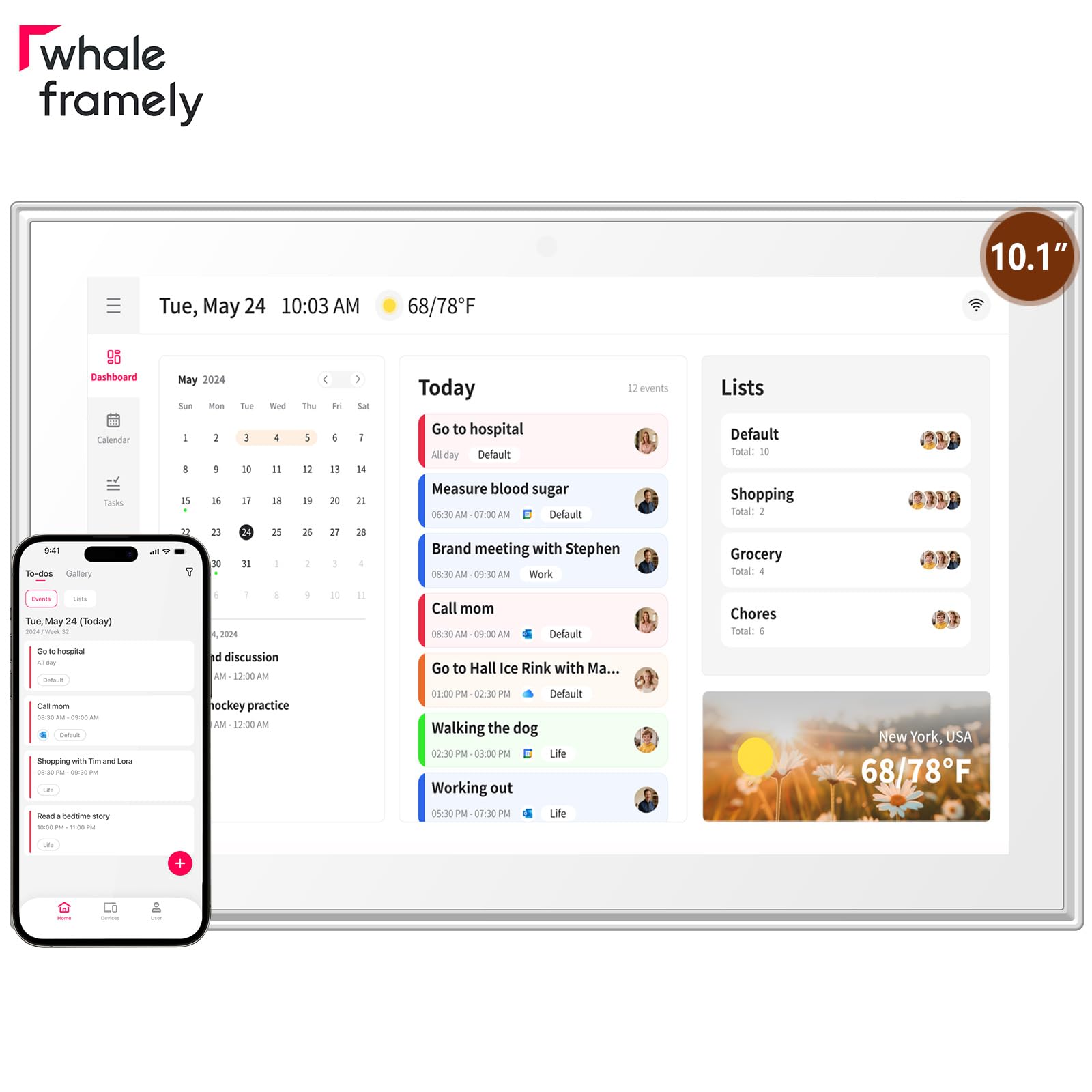
The Whale Framely 10.1-inch earns its spot with an interface designed specifically for users who are not tech-savvy. The IPS full HD screen includes an anti-glare coating that cuts reflections in bright kitchens, and the auto-rotate feature lets you switch between horizontal and vertical orientations depending on where you mount it. The senior-friendly interface allows font and layout zoom without digging through complicated menus.
Calendar sync covers Google, iCloud, Outlook, and Yahoo, with real-time WiFi synchronization. The Whale Framely app supports dual control — you can manage the display directly on the touchscreen or remotely from your phone. The built-in meal planning module solves weekly dinner dilemmas, and when the screen is idle, it shows a slideshow of uploaded photos and videos. The sleep mode reduces energy consumption during standby.
Users in nursing homes and assisted living facilities report that this calendar keeps distant family members connected — relatives send photos via the app, and notifications alert residents when new images arrive. The main trade-off is the 10.1-inch screen: it is smaller than the 15- and 16-inch panels, so event text is less readable from across a large room. For countertop placement or a wall near the kitchen table, the size works perfectly.
Why it’s great
- Senior-friendly interface with zoomable fonts and layout — no tech skills required
- Auto-rotate IPS screen with anti-glare coating for bright room placement
- Families can remotely send photos to keep elderly relatives connected
Good to know
- 10.1-inch screen feels small for large rooms or walk-past visibility
- Photos cannot be deleted remotely from the phone app — must use the device
5. Annalivkg Digital Calendar Wall Planner
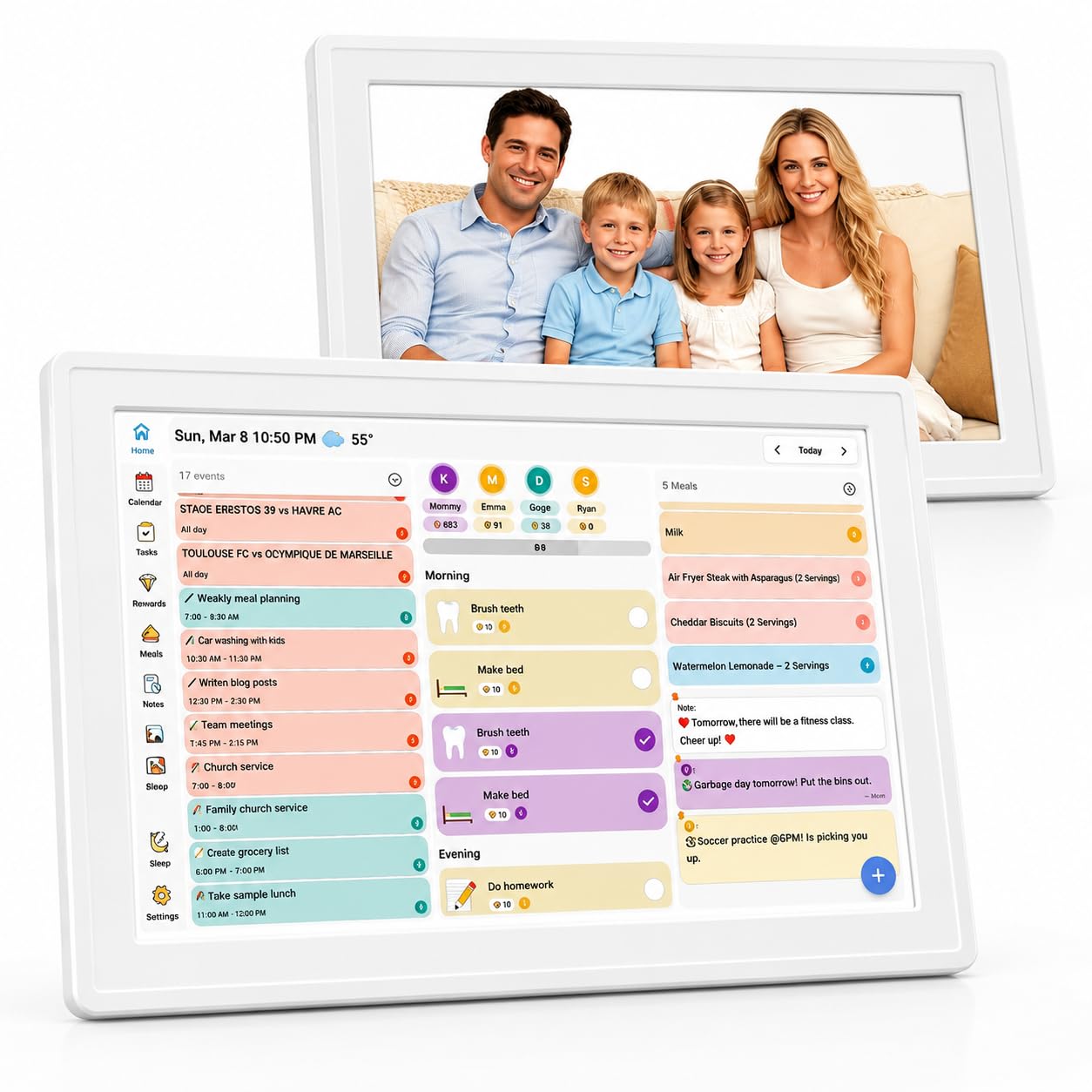
The Annalivkg digital wall planner focuses on the chore-and-reward system more tightly than most of its competitors. Its color classification system assigns distinct markers to each family member’s tasks, and the interactive reward mechanism lets kids earn stars for completing chores and redeem them for preset privileges. This turns daily housework into a gamified process that builds independence without parental nagging.
Calendar sync covers Google, Apple, Yahoo, Outlook, and Cozi, keeping work schedules and school plans visible on the same screen. The one-click recipe saving function and editable checklists simplify meal planning and grocery shopping. When the screen is not displaying the schedule, it functions as a digital photo frame that supports remote photo uploads from family members’ phones — a feature that grandparents particularly appreciate.
The setup process uses the Wanmine app and supports both horizontal and vertical placement. Users note that the photo frame holds at least 20 images and supports short video uploads, though a micro SD card is required for expanded storage. The unit is backed by a 1-year free warranty, and the 1.4-pound weight makes it easy to mount on any wall without heavy anchors.
Why it’s great
- Color-coded chore and reward system with redeemable stars motivates kids effectively
- Supports remote photo uploads from extended family for continuous slideshows
- One-year free warranty with responsive customer support
Good to know
- Requires a micro SD card for expanded photo storage — not included
- Photo upload speed can be slow when sending multiple images at once
6. Oqsonwu 10.1″ Touchscreen Digital Calendar
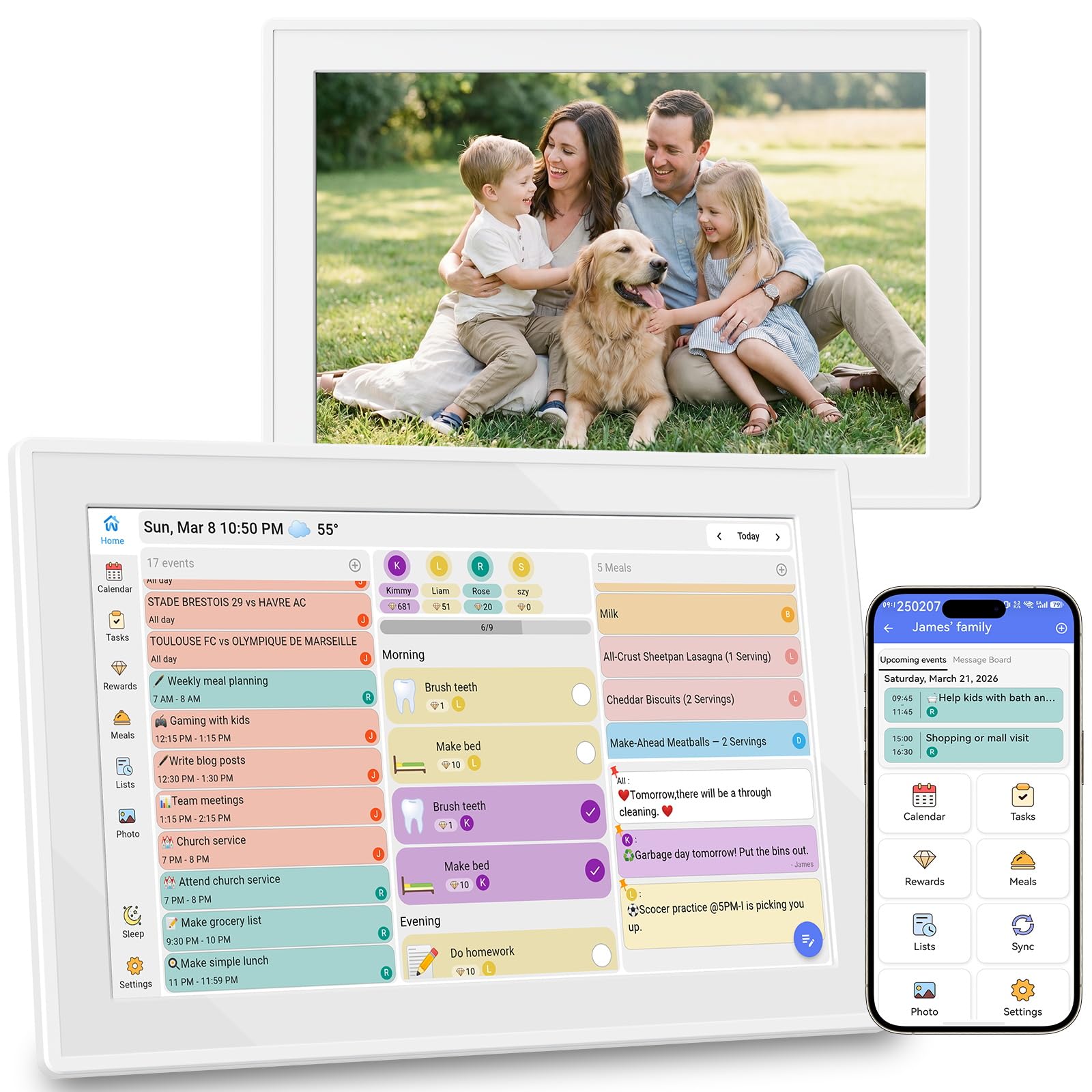
The Oqsonwu 10.1-inch digital calendar distinguishes itself with the Uhale app, which allows multiple households to share a single frame code. This means grandparents, aunts, and cousins can all send photos to the screen without needing their own login — a genuine convenience for extended families who want to stay visually connected. The interactive chore chart turns tasks into a star-based game, and the weekly meal planner generates grocery lists automatically.
Calendar sync is real-time with Google, iCloud, and Outlook, and the touchscreen is sensitive enough for smooth fingertip navigation. The device ships with no subscription fees — every feature, including the chore chart, meal planner, grocery list, and digital photo frame, is fully unlocked. When idle, the display cycles through family photos in a clean slideshow.
Users consistently praise the image quality and ease of setup, noting that the frame holds hundreds of photos without slowing down. The main limitation is the 10.1-inch display: it works beautifully on a countertop or desk but is less effective when mounted on a wall that family members walk past at a distance. For households where the calendar will sit on a kitchen island or entry table, this is a solid mid-range pick with strong photo-sharing capabilities.
Why it’s great
- Uhale app uses shareable frame codes so multiple households can send photos easily
- Zero subscription fees for chore chart, meal planner, and grocery list features
- Excellent image quality with smooth scrolling through hundreds of photos
Good to know
- 10.1-inch screen limits readability from across a large room
- Second phone sync setup can take time — follow the app instructions closely
7. Mitoart 10.1″ IPS Digital Calendar
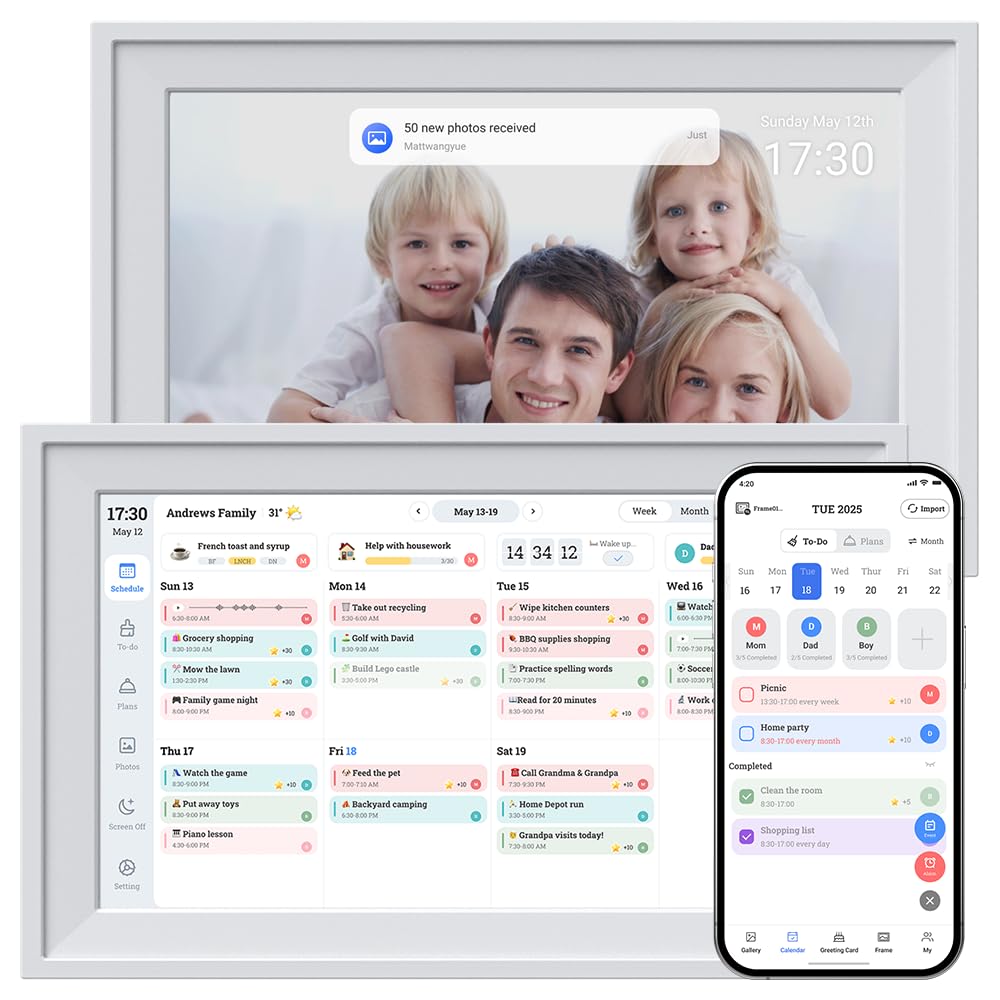
The Mitoart 10.1-inch IPS digital calendar serves as a budget-friendly entry point for households that want basic calendar sync without the chore charts and meal planners that drive up the cost of other models. It uses the free FotoCube app for remote management and one-click network connection. The IPS panel provides decent viewing angles, and the desk mount and wall mount options give flexibility for placement.
Calendar sync is straightforward: plug in, connect to Wi-Fi, and sync your preferred calendar service. The device is lightweight at 0.58 pounds, which makes wall-mounting simple without heavy anchors. The touchscreen is responsive, and users report that the display quality is satisfactory for reading events and dates from a typical kitchen or desk distance.
The main trade-off is the feature set — this unit lacks the chore chart, meal planner, and reward system that make other digital calendars true family command centers. It is best suited for a single person or a couple who just want a digital display of their shared calendar.
Why it’s great
- Easiest on the budget while still providing real-time calendar sync via FotoCube app
- Extremely lightweight at 0.58 pounds — simple wall mounting without heavy anchors
- Plug-and-play setup with one-click network connection
Good to know
- No chore chart, meal planner, or reward system — basic calendar display only
- Small screen can be difficult to read from across a room
FAQ
Can I use an at-home digital calendar without a smartphone app?
How does the color-coded chore system actually work for multiple children?
Do I need to pay a monthly fee for cloud sync and photo storage?
Which mounting method works best for a busy kitchen with limited wall space?
Final Thoughts: The Verdict
For most users, the best at home digital calendar winner is the Dragon Touch 15.6″ because it balances a large FHD screen, full chore and meal planning tools, and free app management at a value that outperforms more expensive competitors. If you want an extra-large 16-inch panel with senior-accessible font sizing, grab the Anyuse 16″ Smart Digital Calendar. And for a fridge-mounted family hub that keeps the schedule right where everyone already looks, nothing beats the JSUSOU 15.6″ Fridge & Wall Calendar.

Mo Maruf
I created WellFizz to bridge the gap between vague wellness advice and actionable solutions. My mission is simple: to decode the research and give you practical tools you can actually use.
Beyond the data, I am a passionate traveler. I believe that stepping away from the screen to explore new environments is essential for mental clarity and physical vitality.