Our readers keep the lights on and my smoothie glass nicely filled. As an Amazon Associate, I earn from qualifying purchases.
The hunt for a reliable home network often stalls between sky-high monthly rental fees and the sticker shock of premium hardware. A router that doesn’t choke on four simultaneous video streams or drop a video call shouldn’t require a second mortgage, yet separating genuine value from marketing fluff has never been trickier. The difference often comes down to real-world throughput under load, not the theoretical maximum printed on the box.
I’m Mohammad Maruf — the founder and writer behind WellFizz. I’ve spent years analyzing router benchmarks, customer durability reports, and real-world throughput data to identify where brands cut corners and where they deliver genuine performance for the price.
After evaluating dozens of models across multiple price tiers, the best path forward is a clear, spec-focused look at what actually matters. This guide breaks down the top contenders for every home setup and concludes with a clear winner for the best affordable router.
How To Choose The Best Affordable Router
The market is flooded with routers that look identical on paper but perform wildly differently once your family’s devices connect. Prioritizing the wrong spec — like raw speed over stable connections — leads to frustration. Here are the three most critical factors for this category.
Wi-Fi Generation: Wi-Fi 6 vs. Wi-Fi 5
Wi-Fi 6 (802.11ax) is now table stakes for any router worth buying in this class. It handles more devices simultaneously and reduces latency through OFDMA, which divides a channel into smaller sub-channels. A Wi-Fi 5 (802.11ac) router might look cheaper, but it will struggle with more than 10-15 active devices. Stick with Wi-Fi 6 for future-proofing and lower bufferbloat.
Coverage vs. Mesh Topology
A single high-power router with four antennas can cover up to 1,500 square feet reliably. For homes over 2,000 square feet, multi-story layouts, or thick-walled construction, a mesh system is better. Mesh units communicate wirelessly and hand off clients seamlessly, but not all mesh systems handle wired backhaul equally — check if the Ethernet ports are gigabit for wired backhaul support.
Real Ports and Processor
All gigabit Ethernet ports are not the same — look for hardware NAT acceleration and at least a dual-core processor. Without these, your wired speed drops even if the wireless spec looks high. Also ensure at least two LAN ports are available for gaming consoles or streaming boxes. A single-core processor in a budget router will bottleneck under moderate load.
Quick Comparison
On smaller screens, swipe sideways to see the full table.
| Model | Category | Best For | Key Spec | Amazon |
|---|---|---|---|---|
| TP-Link AX21 | Mid-Range | Value Wi-Fi 6 Upgrade | AX1800 (1200+574 Mbps) | Amazon |
| Tenda RX12Pro | Premium Value | High Speed on a Budget | AX3000 (2402+574 Mbps) | Amazon |
| D-Link DIR-1260 | Mid-Range | Wide Coverage & Mesh Roaming | AC1200 (867+300 Mbps) | Amazon |
| NETGEAR R6700AX | Premium | Brand Reliability & App Control | AX1800 (1.8 Gbps total) | Amazon |
| NETGEAR RAX30 | Mid-Range Renewed | Certified Refurbished Performance | AX2400 (2.4 Gbps total) | Amazon |
| Google Wifi (1-Pack) | Premium Mesh | Simple Mesh Upgrade | AC1200 Mesh (1 Gbps total) | Amazon |
| TP-Link Deco S4 (2-Pack) | Premium Mesh | Whole-Home Mesh Coverage | AC1900 Mesh (3,800 sq ft) | Amazon |
In‑Depth Reviews
1. TP-Link Archer AX21 (AX1800)

The Archer AX21 is the most balanced affordable router on this list. With a total bandwidth of 1.8 Gbps (up to 1200 Mbps on 5 GHz and 574 Mbps on 2.4 GHz), it punches well above its price tier. The OFDMA implementation allows it to handle 20+ connected devices without introducing latency spikes during peak use — a critical advantage over Wi-Fi 5 alternatives at similar price points.
Real-world feedback from users replacing ISP rental gear consistently shows a 15-20% speed boost and dramatically fewer dropouts. The ability to split 2.4 GHz and 5 GHz SSIDs independently is a major win for homes with older smart devices or Echo units that struggle with band steering. Setup via the Tether app is smooth, and the admin interface is well-organized for manual configuration.
TP-Link’s commitment to firmware updates and their Secure-by-Design pledge adds peace of mind. The four gigabit LAN ports handle wired backhaul well, and the VPN server support (OpenVPN and PPTP) adds flexibility for remote access. For the price, no other router delivers this combination of throughput, stability, and feature depth.
Why it’s great
- Excellent OFDMA performance under load
- Allows separate 2.4/5 GHz SSIDs for device compatibility
- Strong build quality with clear admin interface
Good to know
- No USB port for shared storage
- QoS settings are basic compared to higher-end models
2. Tenda WiFi 6 Router RX12Pro (AX3000)
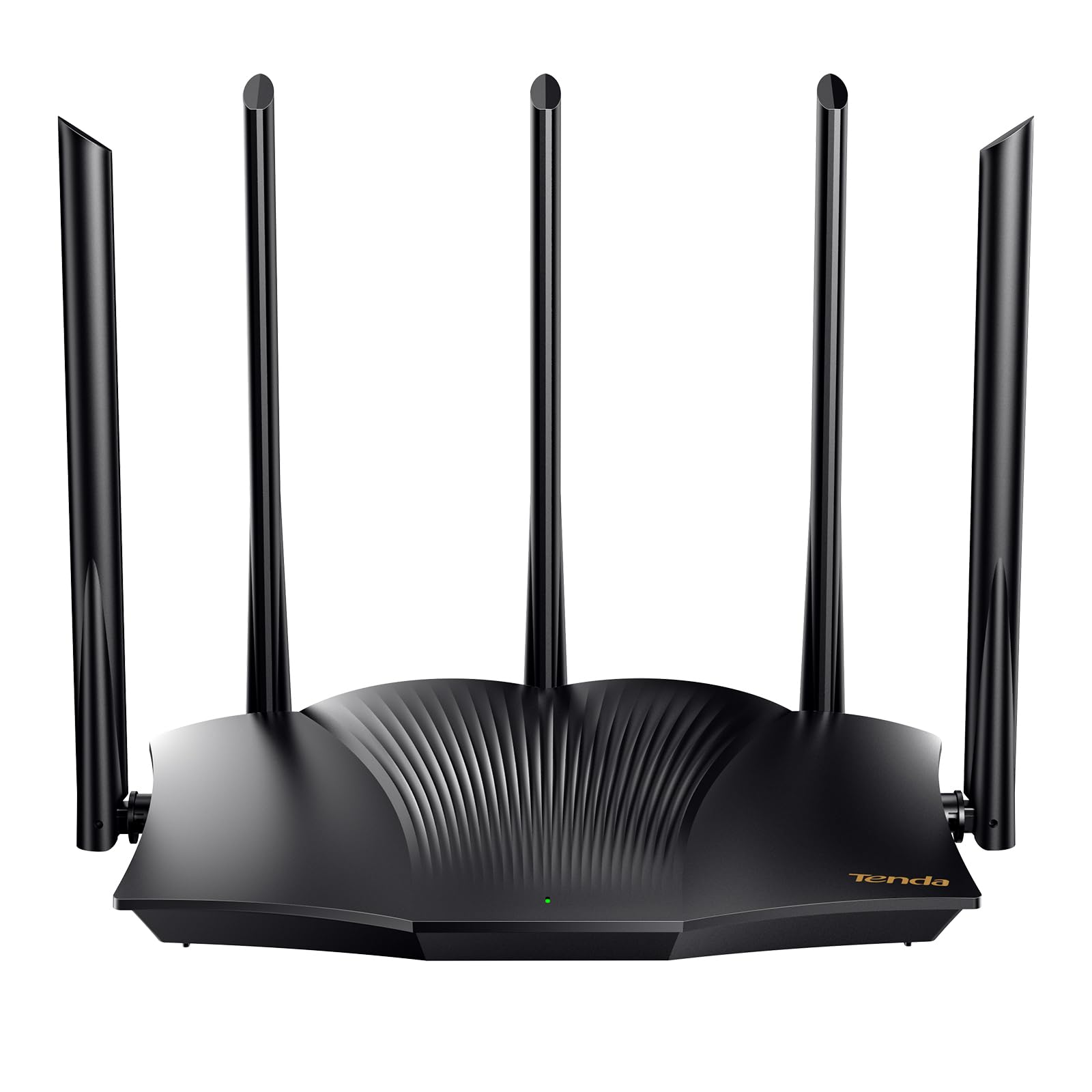
The Tenda RX12Pro delivers an AX3000 configuration — up to 2402 Mbps on 5 GHz — which is the highest raw throughput in this group. Five external 6 dBi antennas and dedicated signal enhancement modules provide aggressive beamforming that can push coverage through multiple walls better than many competitors at this level. This makes it a strong option for homes with a central router location but challenging floor plans.
Setup includes a one-click intelligent diagnosis feature for troubleshooting network freezes, and the router supports OpenVPN and WireGuard via a firmware update. Users report that the unit works exceptionally well as an access point for extending an existing network. The 4 gigabit ports handle wired clients without bottlenecking the wireless bandwidth.
Some early firmware iterations had minor stability quirks, but recent updates have resolved most complaints. The lack of a dedicated USB port limits local media sharing. For sheer speed per dollar, the RX12Pro is unmatched, but it requires a comfortable familiarity with router configuration to unlock its full potential.
Why it’s great
- Highest raw throughput (AX3000) in this price range
- Strong antenna array for signal penetration
- Supports OpenVPN and WireGuard
Good to know
- Setup process can be finicky without prior networking experience
- No USB port for shared storage
3. NETGEAR R6700AX (AX1800)

The NETGEAR R6700AX is a compact AX1800 router that prioritizes ease of use and brand reliability. It covers up to 1,500 square feet and supports up to 20 devices, making it a perfect fit for small to medium apartments or condos. The Nighthawk app provides a guided setup that most users complete in under 10 minutes, and the automated firmware updates keep security tight without manual intervention.
Benchmarks from users with Spectrum and Comcast connections show consistent speeds matching their subscribed bandwidth with minimal jitter. The four gigabit LAN ports provide solid wired performance for gaming consoles or desktop PCs. The router’s compact footprint and internal antenna design make it unobtrusive on a shelf or entertainment center.
The main limitation is the absence of a USB port and the lack of advanced QoS controls present in higher-end NETGEAR models. After a year of use, most owners report zero reboots needed. For buyers who want a familiar brand with reliable support and a simple setup, the R6700AX is a safe, high-performing choice.
Why it’s great
- Fast, app-based setup with guided troubleshooting
- Compact design with strong internal antennas
- Automatic firmware updates for security
Good to know
- No USB port for shared storage
- Advanced settings are limited compared to competitors
4. TP-Link Deco S4 (2-Pack)

The Deco S4 is a true whole-home mesh system that covers up to 3,800 square feet with two nodes. It operates on AC1900 speeds (combining 1300 Mbps on 5 GHz and 600 Mbps on 2.4 GHz) with 3×3 MU-MIMO streams. This is a significant upgrade over traditional range extenders because it creates a single network name and handles client handoff automatically as you move through the house.
Users with 4,800 square foot homes report eliminating all dead zones after deploying three units, with speeds of 450-550 Mbps near a node. The Deco app simplifies parental controls and network management, though power users will find the web UI limited. The two gigabit Ethernet ports per node support wired backhaul for even greater stability.
This system is ideal for families with multiple streaming devices and thick-walled construction. It supports Alexa voice commands for guest Wi-Fi control. The lack of a dedicated backhaul radio means wireless speeds can degrade if nodes are placed too far apart. For the price, no other mesh system offers this coverage and ease of use.
Why it’s great
- Excellent coverage at 3,800 sq ft with 2-pack
- Simple app setup with robust parental controls
- Supports wired Ethernet backhaul for stability
Good to know
- Web UI is basic and less configurable than competitors
- No dedicated wireless backhaul channel
5. Google Wifi (1-Pack)

Google Wifi is a mesh-ready AC1200 router that covers up to 1,500 square feet per node. Its mesh architecture allows you to add more pucks for larger homes, with seamless handoff between nodes. Setup through the Google Home app takes about 15 minutes, and the system intelligently manages band steering between 2.4 GHz and 5 GHz without user intervention.
Retired IT professionals report that a single puck solved dead spots in homes up to 2,800 square feet, outperforming traditional high-power routers with aggressive antenna positioning. The coverage extends to outdoor areas up to 60 feet from the node. Parental controls allow screen time limits and content filtering on a per-device basis, all manageable from the app.
The AC1200 speeds are modest compared to Wi-Fi 6 routers, but for general browsing, streaming, and light gaming, the throughput is sufficient. The lack of a web-based admin interface may frustrate advanced users who want detailed configuration. For a simple, reliable mesh system that integrates neatly into a Google smart home, it’s hard to beat.
Why it’s great
- Extremely easy setup via Google Home app
- Excellent outdoor range for a mesh node
- Seamless handoff between multiple nodes
Good to know
- AC1200 speeds lag behind Wi-Fi 6 options
- No web-based admin interface for advanced settings
6. D-Link DIR-1260 (AC1200)

The D-Link DIR-1260 uses high-power amplifiers and AC1200 dual-band speeds to deliver a wide coverage area that often exceeds its price class. The MU-MIMO implementation sends data to multiple devices simultaneously, which helps in households with many connected gadgets. The mesh smart roaming feature adds flexibility if you later add compatible D-Link mesh nodes.
User feedback highlights a significant improvement over ISP-provided routers, with a dual-core processor handling heavy traffic without stuttering. The profile-based parental controls are straightforward to configure. The four gigabit LAN ports provide full-speed wired connections. However, automatic band steering between 2.4 GHz and 5 GHz can be inconsistent, sometimes connecting 5 GHz-capable devices to the slower band.
Separating the SSIDs manually resolves this quirk. The router’s outward design is a standard white unit with fixed antennas. For users prioritizing coverage breadth over peak speed, the DIR-1260 is a reliable performer that won’t require constant rebooting.
Why it’s great
- High-power amplifiers for better coverage
- Dual-core processor handles multiple devices well
- Profile-based parental controls are easy to set up
Good to know
- Band steering can be unreliable out of the box
- Wi-Fi 5 standard, not compatible with Wi-Fi 6
7. NETGEAR Nighthawk RAX30 (AX2400 Renewed)

The NETGEAR Nighthawk RAX30 offers AX2400 speeds (up to 2.4 Gbps total) and covers up to 2,000 square feet, making it the highest-rated speed option among the mid-range contenders. As a renewed product, it comes at a significant discount while maintaining like-new performance according to buyer reports. The 5-stream architecture handles 20 devices without noticeable slowdown.
Users replacing older Nighthawk models (like the R7000) reported consistent 200+ Mbps speeds on the 5 GHz band in 2,000 square foot homes. The unit includes 4 x 1G Ethernet ports for wired devices and automatic firmware updates for security. The compact form factor is smaller than previous Nighthawk designs, a welcome change for shelf space.
The main caveat is the renewed status — while most units arrive in excellent condition, the packaging is a generic brown box without printed documentation. Setup is done through the Nighthawk app or web interface. For buyers comfortable with refurbished electronics, the RAX30 delivers premium specs at a mid-range price point.
Why it’s great
- AX2400 speeds at a reduced price point
- Good coverage in 2,000 sq ft homes
- Compact design with strong internal components
Good to know
- Renewed condition may lack original documentation
- Setup requires manual configuration for some users
FAQ
Can I use any of these routers without a separate modem?
Will Wi-Fi 6 give me faster internet if I have a low-tier plan?
Does band steering really cause issues with smart home devices?
Final Thoughts: The Verdict
For most users, the best affordable router winner is the TP-Link Archer AX21 because it delivers Wi-Fi 6 speeds, reliable OFDMA performance, and separate band support at a price that undercuts most competitors without sacrificing build quality. If you need the highest raw throughput, grab the Tenda RX12Pro. And for whole-home mesh coverage without dead zones, nothing beats the TP-Link Deco S4.

Mo Maruf
I created WellFizz to bridge the gap between vague wellness advice and actionable solutions. My mission is simple: to decode the research and give you practical tools you can actually use.
Beyond the data, I am a passionate traveler. I believe that stepping away from the screen to explore new environments is essential for mental clarity and physical vitality.