Our readers keep the lights on and my smoothie glass nicely filled. As an Amazon Associate, I earn from qualifying purchases.
Finding an optical drive that reads and burns Blu-ray discs on a modern desktop or laptop without the hassle of compatibility issues, noisy operation, or a flimsy build is a specific pain. You need a unit that pairs correctly with your SATA or USB interface, handles the finicky Blu-ray format, and delivers stable read speeds for movie playback and reliable write speeds for data backups.
I’m Mohammad Maruf — the founder and writer behind WellFizz. I have spent years analyzing the internal mechanisms and interface protocols of PC optical drives, specifically evaluating SATA burners and USB enclosures for Blu-ray playback consistency and long-term archival reliability.
This guide examines seven distinct configurations that function as a blu-ray player for pc, breaking down which internal SATA burners and external USB enclosures offer the most stable reading, quietest operation, and best value for your specific rig.
How To Choose The Best Blu-ray Player For PC
Selecting a Blu-ray drive for your computer is not as simple as picking the cheapest model. The interface type, the form factor, the read speed, and the software ecosystem all play a role in whether your PC will actually play a Blu-ray disc without stuttering or failing to authenticate.
Interface: Internal SATA vs. External USB
The first fork in the road is how the drive connects to your PC. An internal SATA drive offers a direct, low-latency connection that is ideal for stable 6X to 12X Blu-ray read speeds. An external USB 3.0 enclosure or drive offers plug-and-play convenience, but the performance depends heavily on the quality of the bridge chip inside the enclosure. For a desktop PC with a free 5.25-inch bay, an internal SATA drive is the most reliable path. For a laptop or a modern desktop without an optical bay, an external USB-C or USB 3.0 solution is the only practical choice.
Read and Write Speeds
Blu-ray read speed is measured in multiples (1X, 2X, 4X, 6X, 8X, 12X, 16X), with 1X being roughly 4.5 MB/s. A 6X drive reads a standard 25GB disc in about 15 minutes, which is adequate for movie playback. For burning, a 6X BD-R write speed is the ceiling for most consumer drives. DVD and CD speeds matter less for Blu-ray use, but a drive that can read DVD at 8X and CD at 24X offers versatility for legacy media.
Software and Codec Support
No PC Blu-ray drive will play a commercial movie disc out of the box without third-party playback software like PowerDVD, Leawo, or VLC (with appropriate libraries). You must also check that your system supports HDCP (High-Bandwidth Digital Content Protection) over your display connection (HDMI, DisplayPort, or DVI-D). Without HDCP, the video output will be downscaled to 540p or blocked entirely.
Quick Comparison
On smaller screens, swipe sideways to see the full table.
| Model | Category | Best For | Key Spec | Amazon |
|---|---|---|---|---|
| BUNUD External Blu Ray | External USB | Plug-and-play on PC & Mac | 6X BD-R write / 8X DVD | Amazon |
| Panasonic UJ240 | Internal Slim | Laptop upgrade or mini PC | 6X BD-R / 8X DVD-R / 24X CD-R | Amazon |
| GODBPNYMU 8-in-1 | External Multi Hub | Ultra-portable with card reader | 6X BD read / 8X DVD / 24X CD | Amazon |
| Vantec NexStar DX2 | External Enclosure | Custom build with your own drive | USB 3.0 5Gbps / fits 185mm drive | Amazon |
| CENMATE 5.25 Enclosure | External Enclosure | Repurpose an old internal drive | USB 3.0 / Aluminum alloy shell | Amazon |
| LG GH24NSD0D | Internal SATA | Reliable DVD/CD burner in a desktop | 24X DVD write / M-Disc support | Amazon |
| Plextor PX-891SAF | Internal SATA | Archival DVD/CD burning | 24X DVD write / 1.5 MB cache | Amazon |
In‑Depth Reviews
1. BUNUD External Blu Ray CD DVD Drive

The BUNUD external drive hits the sweet spot for anyone building a Blu-ray player for a PC without opening the case. It connects via both a USB 3.0 Type-A cable and a USB-C cable, making it immediately compatible with modern laptops and desktops that lack a dedicated optical bay. The 6X BD-R write speed and 8X DVD read speed are sufficient for watching a full-length movie or backing up a 25GB disc in about 15 minutes.
The embedded cable design prevents the frustration of lost wires during travel, and the slim form factor (roughly the size of a small notebook) slides easily into a backpack. The unit also integrates a 5-in-1 hub with two additional USB ports and an SD/TF card reader, turning the drive into a functional docking station for quickly importing photos or connecting a mouse.
Users report that the drive is recognized immediately on Windows 11 and macOS without additional drivers. The internal 2 MB cache helps smooth out data flow during read operations, and the low-power USB connection means no external power brick is needed for most laptops. It is a true plug-and-play solution that removes the guesswork from Blu-ray integration.
Why it’s great
- Dual USB-A and USB-C cables included for universal compatibility
- Built-in SD/TF card reader adds practical hub functionality
- Lightweight and truly portable with embedded cable storage
Good to know
- Does not support 4K Ultra HD Blu-ray playback
- Requires third-party software for Blu-ray movie playback
2. Panasonic UJ240 6x Blu-ray Burner

For anyone who wants to install a real Blu-ray burner directly into a laptop or a slim desktop SATA bay, the Panasonic UJ240 is the gold standard. It uses a 12.7 mm height form factor, which fits the majority of standard laptop optical bays, and connects via a native SATA interface for the lowest possible latency. The 6X BD-R write speed and 4X BD-RE rewrite speed are competitive even by modern standards.
This is a bare drive — no cables, no mounting screws, no bezel, and no software are included. You will need to transfer the bezel and retaining bracket from your existing DVD drive. The reward is a clean, integrated upgrade that looks and performs like an OEM part. The 2 MB buffer and Panasonic’s optical pickup mechanism deliver reliable reads even on scratched Blu-ray discs.
Reviews note that after transferring the bracket, the drive sits flush with the laptop chassis and is immediately recognized by Windows without additional drivers. Be aware that Blu-ray playback requires HDCP-compliant hardware and software like PowerDVD. This is the best path for a clean internal installation that preserves the slim profile of your machine.
Why it’s great
- True 6X BD-R write speed in a slimline 12.7 mm package
- Native SATA connection for reliable, low-latency performance
- Proven Panasonic optics for consistent read reliability
Good to know
- No bezel, cables, or software included — you must provide everything
- Requires HDCP-compliant display hardware for Blu-ray movies
3. GODBPNYMU 8-in-1 External Blu-ray Drive
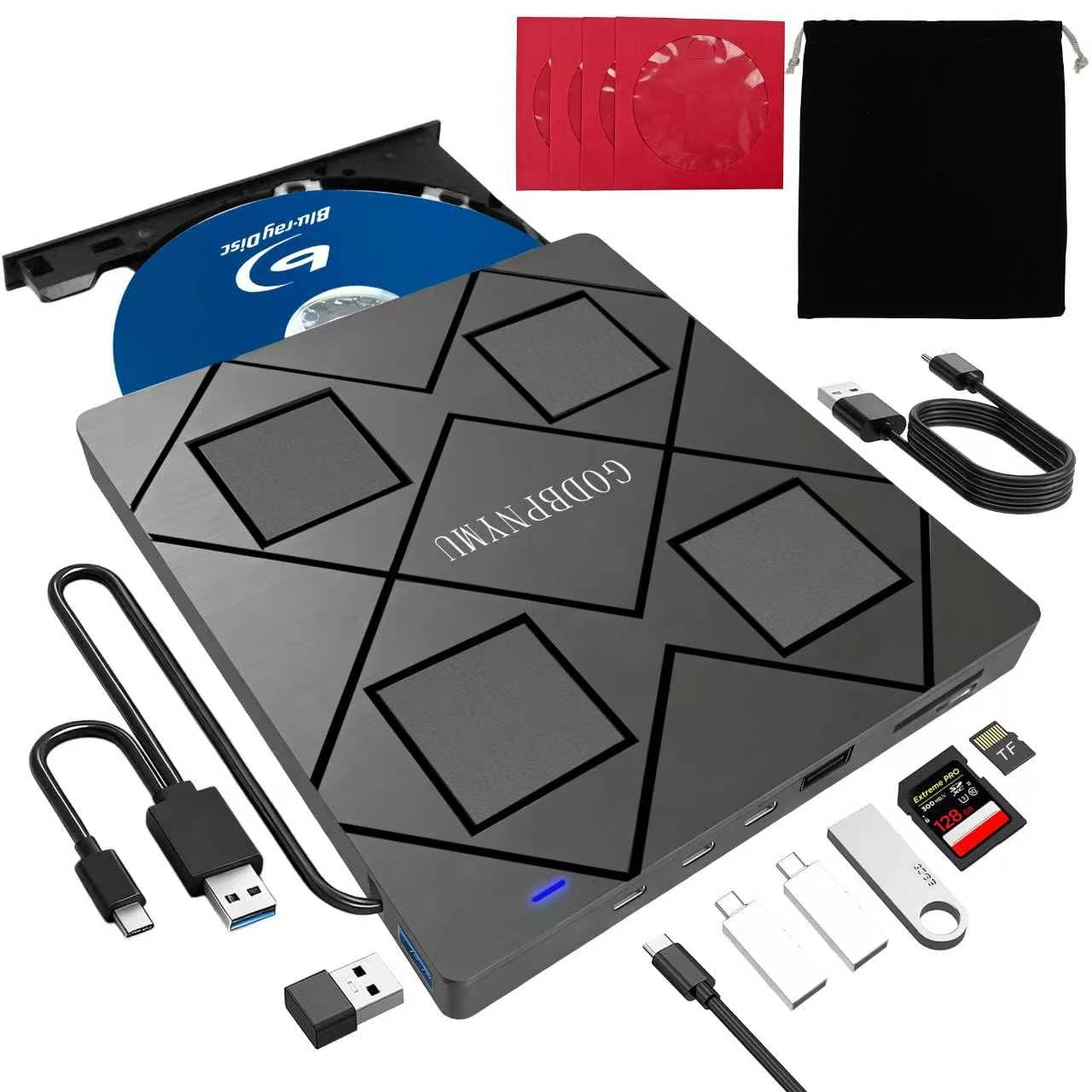
The GODBPNYMU drive is the most feature-dense external Blu-ray solution on this list. Beyond reading and writing BD/DVD/CD discs at 6X BD read and 8X DVD write, it functions as a fully featured USB hub with two USB-C ports, a USB 3.0 port, a USB 2.0 port, and a combined SD/TF card slot. This makes it a genuine all-in-one peripheral for users who want to consolidate a card reader and a drive into one device.
The drive is exceptionally slim at just 0.35 inches thick and weighs only 300 grams. It ships with a carrying case and four CD sleeves, making it a travel-ready kit for professionals who need to access optical media on the road. The dual USB-A and USB-C cables ensure compatibility with even the newest MacBooks and ultrabooks that lack traditional USB-A ports.
Crucially, this unit supports 3D Blu-ray playback (with appropriate software) and reads BD-XL discs up to 100GB. Note that it does not support 4K UHD discs, and maximum BD write speed is 6X. The hub ports are ideal for connecting a wired mouse and a flash drive simultaneously, effectively replacing the need for a separate USB splitter.
Why it’s great
- 8-in-1 hub design adds significant connectivity beyond disc playback
- Includes a carrying case and disc sleeves for organized travel
- Supports BD-XL 100GB read and 3D Blu-ray playback
Good to know
- SD and TF cards cannot be read simultaneously
- May require a powered USB connection for stable high-speed burns
4. Vantec NexStar DX2 USB 3.0 External Enclosure

If you already own a compatible 5.25-inch internal SATA Blu-ray drive, the Vantec NexStar DX2 provides the cleanest path to turning it into an external USB unit. This second-generation enclosure features an aluminum alloy casing that dissipates heat efficiently and dampens the vibration and noise from spinning optical media. The internal SATA cable is flexible, accommodating drives with SATA connectors in non-standard positions.
The enclosure supports any 5.25-inch optical drive up to 185 mm in depth, which covers virtually every standard Blu-ray and DVD burner. It connects via USB 3.0 with a data transfer rate of up to 5 Gbps, which is more than sufficient for 6X Blu-ray read speeds. A 12V, 3A AC adapter is included to ensure the drive receives adequate power, unlike some bus-powered enclosures that struggle with BD writing.
Users report that the enclosure is truly plug-and-play on both Windows 11 and Linux, with no driver installation required. The hot-swap capability means you can attach and detach the drive without restarting your computer. The build quality is sturdy, with a matte black finish that resists fingerprints. The only minor complaint is that the included adhesive feet can peel off under heavy use.
Why it’s great
- Premium aluminum alloy build reduces noise and vibration
- Flexible SATA cable fits drives with off-center connectors
- Includes a dedicated AC adapter for consistent power delivery
Good to know
- Optical drive is not included — you supply your own internal SATA drive
- Adhesive feet may detach over time in a backpack
5. CENMATE 5.25 Blu-Ray/CD/DVD SATA Drive Enclosure
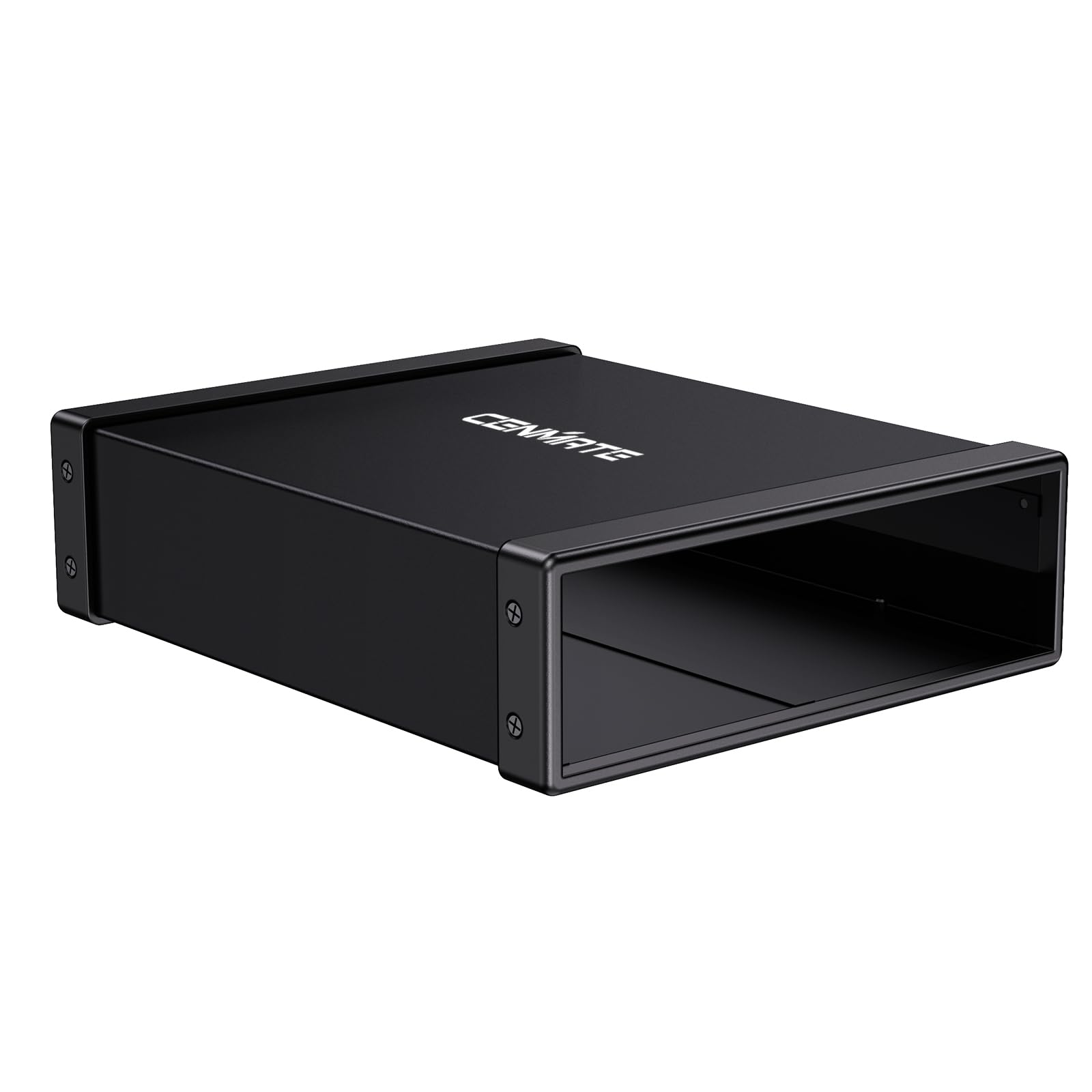
The CENMATE enclosure is the most affordable way to repurpose an old internal Blu-ray or DVD drive into an external USB peripheral. It supports any 5.25-inch SATA drive with a depth of up to 171 mm, which covers the majority of standard desktop optical drives. The aluminum alloy casing helps manage heat and reduces operational noise compared to a bare plastic enclosure.
Connection is handled via USB 3.0, offering a theoretical data transfer rate of 5 Gbps, which is adequate for seamless Blu-ray movie playback. The enclosure supports hot swapping, so you can connect and disconnect the drive without rebooting. The package includes a USB cable and a power adapter, ensuring that SATA Blu-ray drives with higher power demands will function reliably.
Customers have successfully used this enclosure to give a second life to older ASUS and LG Blu-ray drives, noting instant recognition on Windows 11 and macOS. Some users report occasional buffering during DVD movie playback, which may be related to the drive’s age rather than the enclosure. The included screwdriver is very small, so you will want a standard Phillips head for assembly.
Why it’s great
- Very affordable entry point for externalizing an existing drive
- Aluminum shell helps dampen vibration and dissipate heat
- Includes both a USB 3.0 cable and a power adapter
Good to know
- Only fits drives with a maximum depth of 171 mm
- Included screwdriver is too small for installation screws
6. Vinpower Digital LG GH24NSD0D Internal SATA Drive

The LG GH24NSD0D is a purpose-built duplication-grade DVD and CD burner that prioritizes write stability and media compatibility. While it does not support Blu-ray, it is an excellent companion drive for a PC that already has a Blu-ray reader, or for users who primarily need a reliable burner for DVD and CD archival work. The drive is manufactured by HLDS (Hitachi-LG Data Storage) with support from Vinpower Digital.
The key feature is enhanced recording control and powerful read functionality. The drive has an extensive database of media specs, allowing it to optimize write strategies for different brands of blank discs. This reduces write errors and improves the longevity of burned media. It also supports M-Disc technology, which promises archival data retention for up to 1,000 years on compatible discs.
This is a bare drive intended for duplication markets, so it comes in a plain box without retail packaging. It connects via SATA and is immediately recognized on Windows and Linux. Users report it works perfectly inside a desktop PC case or inside a SATA-to-USB enclosure. The 2 MB cache helps ensure smooth burns even on slower systems.
Why it’s great
- Duplication-grade build quality for stable, error-free burns
- M-Disc support for long-term archival storage
- Works reliably in Linux and Windows with no driver issues
Good to know
- Does not read or write Blu-ray discs of any kind
- Bulk packaging without retail accessories or software
7. Plextor PX-891SAF 24X SATA DVD/RW Drive

The Plextor PX-891SAF is a specialized internal DVD/CD burner that excels at one thing: creating high-quality, reliable disc backups. It does not support Blu-ray, but it is the best option on this list for users who need a rock-solid DVD burner with archival capabilities. The drive features secure media speed stability and stable recording control, which prevent buffer underruns and ensure consistent write quality across an entire disc.
The standout feature is archival burning capability for M-Disc media. This allows the drive to burn specialty discs that are chemically engineered to last for centuries, not just decades. The 1.5 MB cache memory helps maintain a steady data stream during the burn process, and the drive includes noise reduction technology for quieter operation compared to standard OEM DVD burners.
Users praise the robust build quality, noting that the SATA connection ensures quick data transfers and reliable detection on both Windows and Linux systems. The drive supports a full range of DVD and CD formats, including dual-layer DVD+R/DVD-R, DVD-RAM, and CD-RW. If your workflow centers on creating M-Disc DVD backups rather than playing Blu-ray movies, this drive provides the highest level of burning precision available at its price tier.
Why it’s great
- Archival-grade M-Disc support for long-term data preservation
- PlexWriter firmware ensures precise burn control and media stability
- Quieter operation than many generic SATA DVD burners
Good to know
- Blu-ray discs are not supported in any capacity
- Does not include any bundled software for burning or playback
FAQ
Why does my PC not recognize my new Blu-ray drive?
Can any Blu-ray drive for PC play 4K Ultra HD discs?
What software do I need to play a Blu-ray movie on my PC?
Does the interface matter for Blu-ray playback quality?
What is the difference between a slimline and a half-height Blu-ray drive?
Final Thoughts: The Verdict
For most users, the blu-ray player for pc winner is the BUNUD External Blu Ray Drive because it offers the best balance of plug-and-play USB connectivity, true 6X BD-R write speed, and a slim portable design that works with both USB-A and USB-C ports. If you want to upgrade an existing laptop with a clean internal installation, grab the Panasonic UJ240. And for maximum versatility with a built-in card reader and USB hub, nothing beats the GODBPNYMU 8-in-1.

Mo Maruf
I created WellFizz to bridge the gap between vague wellness advice and actionable solutions. My mission is simple: to decode the research and give you practical tools you can actually use.
Beyond the data, I am a passionate traveler. I believe that stepping away from the screen to explore new environments is essential for mental clarity and physical vitality.