Our readers keep the lights on and my smoothie glass nicely filled. As an Amazon Associate, I earn from qualifying purchases.
The difference between a print that sells and one that gets tossed often comes down to a single spec: the color gamut and ink formulation. A wide-format printer using a 10-color pigment set produces archival gallery prints, while a 6-color dye-based unit creates vibrant snapshots that fade within a few years. Choosing the wrong ink system for your medium—fine art paper, canvas, or polyester blanks—wastes hundreds on consumables before you nail the first proof.
I’m Mohammad Maruf — the founder and writer behind WellFizz. My research focuses on printhead technologies, ink chemistry, and color management workflows to match artists and creators with the right hardware for their specific output goals.
When you need studio-quality results without spending more on test prints than on the printer itself, finding the best art printers means understanding the tradeoffs between dye-based color vibrancy and pigment-based longevity, not just comparing page-per-minute numbers.
How To Choose The Best Art Printers
Art printers are not one-size-fits-all. A photographer printing high-gloss landscapes needs a completely different ink set and paper path than a textile artist creating sublimated T-shirts. Before browsing models, lock in your primary medium and output size to avoid overpaying for features you don’t need or missing capabilities that matter.
Ink Type: Pigment vs. Dye vs. Sublimation
Pigment inks suspend color particles in a resin carrier, producing prints that resist fading for 100 years or more under glass. They are the professional standard for fine art and gallery sales. Dye-based inks dissolve color into liquid, creating brighter, more saturated images but with a lifespan of 15–30 years. Sublimation inks are a specialized pigment subset designed to transfer onto polyester fabrics and coated hard goods via heat—useless for paper but essential for merchandise. If you sell prints that must hold value, choose pigment. If you make photo albums or decorations that stay in a frame, dye is acceptable and cheaper.
Color Channels: How Many Inks Matter
Entry-level art printers use 6 ink channels (CMYK plus two light shades) to reduce grain in highlights. Mid-range models use 8 to 10 channels, adding gray, violet, or red to expand the gamut and eliminate metamerism. A 10-channel printer like the Epson P700 produces noticeably smoother skies, richer blacks, and more accurate skin tones than a 6-channel unit. The tradeoff is higher initial ink cost and more frequent nozzle checks. For artists printing reproductions or photographers selling prints, the extra channels pay for themselves in fewer rejected proofs.
Media Handling: Sheets, Rolls, and Thickness Limits
Fine art papers often exceed 0.5 mm in thickness and may have deckled edges. Many multi-purpose printers fail to feed them reliably. Dedicated art printers accept media up to 1.5 mm thick and include straight-through rear paper paths to avoid curling. If you print on canvas, heavy watercolor paper, or bristol board, prioritize models with multiple feed options—front tray for plain paper, rear slot for heavy sheets, and optional roll holders for panoramic prints. Printers that force you to hand-feed every thick sheet quickly become frustrating in any production workflow.
Quick Comparison
On smaller screens, swipe sideways to see the full table.
| Model | Category | Best For | Key Spec | Amazon |
|---|---|---|---|---|
| Epson SureColor P700 | Pigment | Fine art prints up to 13″ | 10-color MicroPiezo AMC | Amazon |
| Canon imagePROGRAF PRO-310 | Pigment | Gallery-quality 13″ prints | 9-color Lucia PRO II | Amazon |
| Canon PIXMA PRO-200S | Dye | High-gloss photo prints | 8-color dye system | Amazon |
| Epson Expression Photo XP-980 | Dye | Home photo prints up to 11×17″ | 6-color Claria Photo HD | Amazon |
| Epson SureColor F170 | Sublimation | Custom merchandise printing | PrecisionCore printhead | Amazon |
| Brother Sublimation Printer | Sublimation | DIY apparel and mugs | Artspira app workflow | Amazon |
| Epson Stylus Photo R2000 | Pigment | CD/DVD art and 13″ prints | 8-color UltraChrome Hi-Gloss 2 | Amazon |
| HP DesignJet T210 | Large Format | Posters and technical drafts | 24-inch roll feed | Amazon |
| HP DesignJet T630 | Large Format | Architectural plans and maps | 36-inch roll with stand | Amazon |
| Epson EcoTank Pro ET-16650 | Supertank | High-volume color documents | Pigment ink, 500-sheet tray | Amazon |
| Epson Artisan 1430 | Dye | Scrapbooking and 12×12″ prints | 6-color Claria ink | Amazon |
In‑Depth Reviews
1. Epson SureColor P700 13-Inch Printer

The Epson P700 uses the UltraChrome PRO10 ink set with a dedicated violet channel that expands the color gamut beyond what most 8-color printers can reach. The MicroPiezo AMC printhead delivers droplets with precise placement, producing smooth gradients and deep shadow detail on both glossy and fine art papers. The 4.3-inch touchscreen and interior LED make media changes straightforward even in dim studio lighting.
A standout design choice is the separate nozzles for Photo Black and Matte Black inks. You no longer waste ink swapping between black types when switching from glossy paper to cotton rag—the printer simply selects the correct nozzle. The roll paper adapter is a separate purchase, but sheet feed handles media up to 1.5 mm thick, which covers most fine art papers.
Initial ink cartridges ship at about 25 percent capacity, so expect to replace them sooner than the full packages suggest. Carbon Black Driver technology boosts Dmax on glossy surfaces, delivering black density rivaling higher-priced 17-inch models. For artists selling limited-edition prints, the claimed 200-year color permanence provides genuine archival confidence.
Why it’s great
- Violet ink expands gamut beyond standard CMYK
- Dedicated matte and photo black nozzles eliminate ink waste when switching paper types
- Supports media up to 1.5 mm thick for heavy watercolor papers
Good to know
- Initial ink cartridges are starter sets with limited capacity
- Roll paper adapter is not included and sold separately
- Multi-page printing requires manual initiation per sheet
2. Canon imagePROGRAF PRO-310 Wireless Photo Printer

The PRO-310 represents Canon’s pigment-ink flagship for the 13-inch format. Its 9-color Lucia PRO II ink system includes the Chroma Optimizer, a clear coating that improves gloss uniformity and scratch resistance. This is critical for prints displayed in open frames without glass, where high-gloss and matte areas normally create an undesirable sheen contrast.
Setup is surprisingly fast for a 31.6-pound machine—users report wireless connection to 5 GHz networks without issues and prints that match calibrated monitor brightness out of the box. The anti-clogging system and skew correction reduce wasted paper during long print runs. After 45 prints of mixed sizes, ink levels showed moderate consumption, though the initial cartridges are not full capacity.
The main limitation is the driver software, which restricts custom paper sizes compared to previous Pro-series models. Users migrating from the Pro-100 note slower print speeds and a more complex menu for ink replacement. If you need to batch-print 200+ prints monthly, the PRO-310’s build quality supports that workload, but the UI friction may slow your cadence.
Why it’s great
- Chroma Optimizer eliminates gloss differential on coated papers
- Deep black density with Matte Black enhancement for dark area reproduction
- Anti-clogging system reduces maintenance in moderate climates
Good to know
- Driver limits custom paper size flexibility compared to older Pro-100
- Ink replacement process requires multiple button presses
- Paper feed may struggle with very thick cardstock in high-volume settings
3. Canon PIXMA PRO-200S Professional 13″ Printer

The PRO-200S uses an 8-color dye-based ink system to produce exceptionally bright, high-saturation prints on glossy and luster papers. Dye inks absorb into the paper coating rather than sitting on top, which creates a more continuous tonal transition. Print speeds are competitive: a bordered 8×10 comes out in 53 seconds, and an A3+ print takes about 90 seconds.
Wireless setup can be finicky. Users report that the Canon phone app forces a complex configuration path that sometimes conflicts with existing WiFi networks. Once connected, the Canon app and Print Studio Pro plugin provide reliable color management. The 3.0-inch color LCD is basic but sufficient for checking ink levels and paper settings.
Ink consumption is the principal drawback. Canon’s dye cartridges hold less volume than equivalent pigment sets, and the printer does not accept third-party refills. After about 30 8.5×11 prints, the black cartridge typically drops below 50 percent. For studios producing fewer than 50 prints per month, the ink cost is manageable. For heavy output, the per-print cost climbs quickly.
Why it’s great
- Brilliant color saturation ideal for glossy photo papers
- Fast print speeds for a dedicated photo printer
- Quiet operation suitable for home studio use
Good to know
- Ink cartridges are small and expensive to replace frequently
- No support for 11×14 paper size despite 13-inch capability
- Wireless setup can be confusing and may require USB fallback
4. Epson Expression Photo XP-980 Wireless Printer

The XP-980 is a compact all-in-one that fits on a standard desk and produces 11×17 borderless prints using six Claria Photo HD inks. The extra Light Cyan and Light Magenta channels smooth out highlights, reducing the grain visible in plain sky or skin gradients. It scans and copies at 48-bit color depth, making it a practical hub for a small studio or home office.
Paper handling includes separate trays for plain and photo paper plus a rear specialty feed. The 4.3-inch color touchscreen makes media selection intuitive. Wireless connectivity over Wi-Fi Direct works without a router—useful for outdoor events or pop-up galleries. The 11-second 4×6 print speed is genuinely fast for proof sheets.
Cleaning cycles consume a third of a cartridge per color. Users who print weekly report excellent results; those who use it sporadically risk wasting ink on maintenance. Also, the photo tray is somewhat fiddly to load correctly—cards can feed at an angle if not perfectly aligned.
Why it’s great
- All-in-one functionality with scanner and copier saves desk space
- 6-color dye system produces smooth highlights with minimal grain
- Wi-Fi Direct enables router-free printing from mobile devices
Good to know
- Frequent idle periods cause ink-wasting cleaning cycles
- Photo tray requires careful alignment to avoid angled feeding
- Ink levels deplete noticeably after initial setup cartridges
5. Epson SureColor F170 Dye-Sublimation Printer
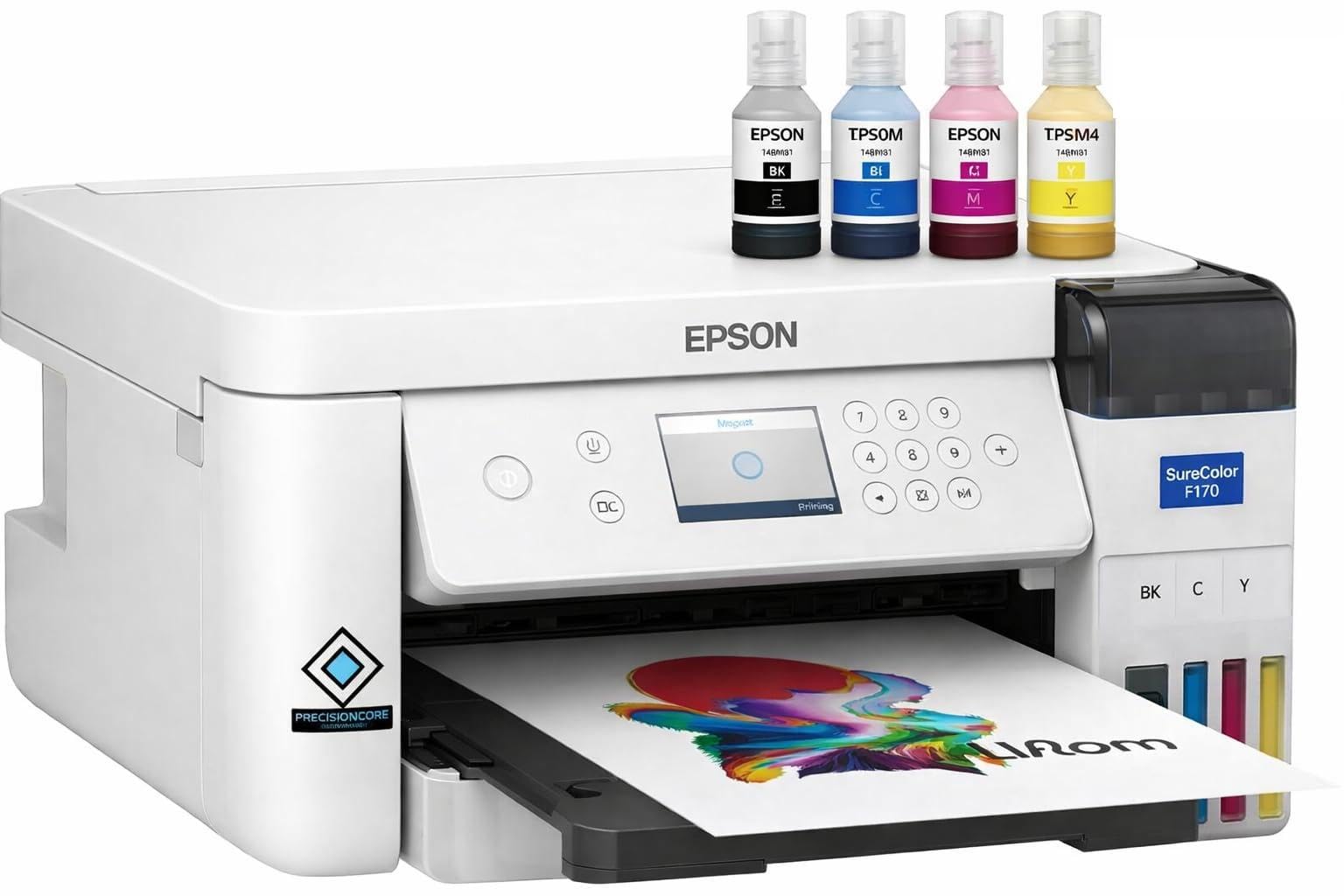
The F170 is purpose-built for sublimation transfer printing on coated polyester items—mugs, T-shirts, tumblers, and ceramic tiles. It uses four Epson UltraChrome DS inks formulated to vaporize under heat and bond with polymer surfaces. The PrecisionCore printhead delivers consistent droplet placement, which translates into sharp edged text and fine details on final transfers.
Setup takes about 25 minutes with clear instructions, but no paper is included, so you need to purchase sublimation paper separately. The 150-sheet auto-feed tray is dust-resistant, reducing speckling on sensitive transfer sheets. Wi-Fi and USB connectivity work reliably with Windows and macOS, and the Epson iPrint app allows direct printing from iOS.
This is a dedicated sublimation printer—once you load the sublimation ink, the unit cannot print standard documents without damage to the printhead. The ink bottles use an auto-stop fill mechanism to prevent spills. Users report that the included ink set lasts for dozens of full-color transfers before replacement, making the cost per item competitive for small batch merchandise.
Why it’s great
- Dedicated sublimation ink system for vibrant, permanent transfers
- Auto-stop ink bottles eliminate messy refills
- Compact footprint fits small workshop spaces
Good to know
- Cannot print standard documents after loading sublimation ink
- No borderless printing—transfer paper always has margins
- Return not possible once ink is loaded due to leak risk in transport
6. Brother Sublimation Printer (SP1)

Brother’s entry into sublimation centers on the Artspira mobile app, which provides over 100 built-in designs and allows import of up to 20 custom images. The printer uses four Brother Genuine Sublimation Ink cartridges in cyan, magenta, yellow, and black. Print quality after heat transfer produces bold, bright colors with fine detail retention on polyester fabrics and coated substrates.
A key advantage is the self-cleaning printhead mechanism that activates on power-up, reducing clogs between uses. The included sublimation paper starter pack gets you through the first batch of projects. The dual paper feed—front tray and rear slot—handles mug-sized sheets and larger transfers without manual feeding.
The Artspira app is limited to phone and tablet screens, which makes complex design work frustrating. Users who need precise vector layouts will need a desktop software like Silhouette Studio or CorelDRAW, then transfer via the app. Connecting the printer to a phone initially required Brother chat support for some users, but once paired, the workflow is smooth.
Why it’s great
- Self-cleaning heads reduce maintenance downtime
- Artspira app offers ready-to-print sublimation designs
- Lower ink cost per milliliter than comparable Sawgrass models
Good to know
- App-only design interface is cramped on mobile screens
- Bluetooth pairing issues may require customer support
- No desktop design software included for complex layouts
7. Epson Stylus Photo R2000 Wireless Printer

The R2000 is one of the few remaining printers with dedicated CD and DVD printable media support, making it essential for musicians, filmmakers, and packaging artists who need direct-to-disc printing. The UltraChrome Hi-Gloss 2 pigment set includes red and orange channels alongside standard CMYK and light cyan/light magenta, expanding the gamut compared to 6-color systems.
Paper handling accepts roll and cut-sheet media up to 13 inches wide, and the rear feed supports media up to 1.3 mm thick, including canvas and board. The auto-selecting black ink system chooses matte or photo black depending on the paper profile, so you don’t waste ink swapping manually. Ethernet and Wi-Fi 802.11n provide stable wired or wireless networking.
The driver software is dated and complex, with many options that can confuse first-time users. Some firmware versions show temperamental behavior with third-party paper profiles, requiring manual color adjustments. The printhead includes an ink-shaker mechanism that reduces clogging even after weeks of idle use, a feature Epson carried forward from its pro lab printers.
Why it’s great
- Direct CD/DVD face printing with included tray
- Red and orange ink channels expand gamut for vibrant skin tones and sunsets
- Ink-shaker mechanism prevents clogs during idle periods
Good to know
- Driver software is complex and not beginner-friendly
- Gloss optimizer cartridge depletes quickly
- Some wireless connection issues reported with macOS
8. HP DesignJet T210 24-Inch Plotter

The T210 is a 24-inch wide-format printer designed for posters, maps, and technical line drawings. The roll feed and automatic horizontal cutter allow continuous printing of long banners without manual trimming. Print speed reaches 45 seconds per A1/D-size print, making it suitable for small print shops and educational institutions with moderate volume.
HP Click software provides PDF error checking and auto-nesting, which arranges multiple print jobs on a single roll to minimize paper waste. The printer uses HP 712 and 713 ink cartridges, and HP reports 95 percent less ink consumed in maintenance routines compared to older DesignJet models. Connectivity includes Gigabit Ethernet, USB 2.0, and Wi-Fi b/g/n with HP Smart app support for remote printing.
Ink cartridge availability is a real friction point. HP OEM cartridges are not stocked in most retail stores and require online ordering, with delivery times exceeding a week in some regions. The printer refuses third-party cartridges entirely. For users who need consistent large-format output, the T210’s print quality and speed justify the supply chain annoyance.
Why it’s great
- 24-inch roll feed with automatic cutter for uninterrupted poster production
- HP Click nesting software reduces paper waste across multiple jobs
- Low maintenance ink consumption compared to previous generation DesignJets
Good to know
- Ink cartridges are HP-only and not widely available in stores
- Replacement cartridges take over a week to ship in many areas
- Sheet feed for 13×19 paper requires an optional accessory
9. HP DesignJet T630 36-Inch Plotter

The T630 is the larger sibling of the T210, supporting 36-inch wide rolls that handle full-size architectural blueprints, detailed maps, and large event posters. The included automatic sheet feeder and media bin with stand create a complete workstation out of the box. The auto-switch between sheet and roll feed simplifies jobs that require mixed media sizes.
Print quality on technical line drawings is exceptional—crisp, accurate lines with no overspray or bleeding at edges. For color posters and renders, the 48-bit color depth produces smooth gradients and accurate Pantone matching when using calibrated profiles. The HP Click software suite includes the same paper-saving nesting and error-checking features as the T210.
Reliability feedback is mixed. One user reported receiving a unit that failed to function after two replacements. The majority, however, describe easy setup, reliable Wi-Fi, and significant cost savings for home businesses printing plans and sewing patterns. The printer is heavy and requires dedicated floor space—it is not a desktop model. For anyone printing A0 or larger sheets weekly, the T630 pays for itself quickly.
Why it’s great
- 36-inch roll capacity handles full-size blueprints and posters without tiling
- Stand and media bin included for an all-in-one large-format solution
- Accurate line quality for technical and architectural printing
Good to know
- Large footprint requires designated floor space
- Some units experienced out-of-box failures requiring support
- HP OEM ink supply chain is restrictive and slow
10. Epson EcoTank Pro ET-16650 Wide-Format Supertank
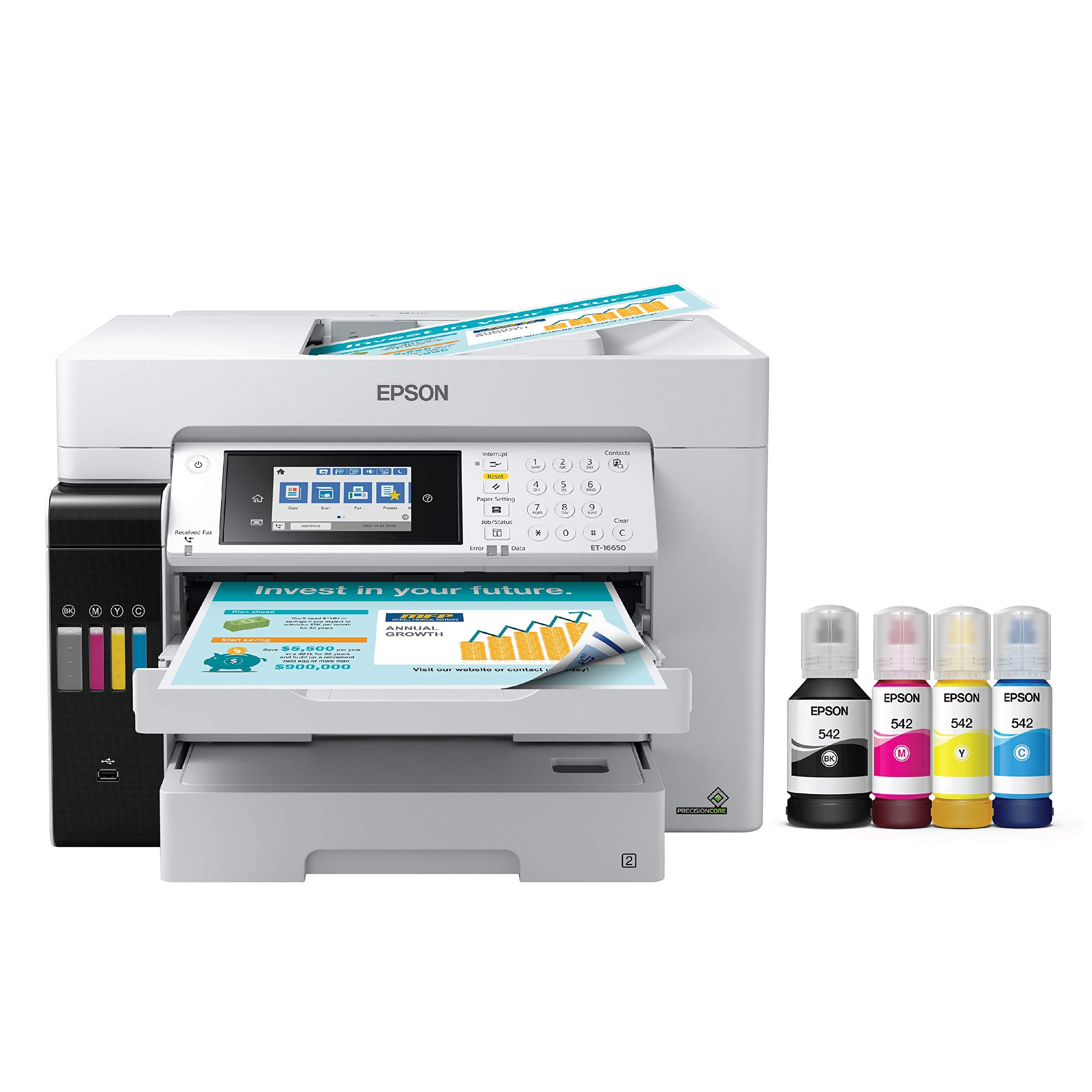
The ET-16650 is a business-class Supertank that prints, scans, copies, and faxes on media up to 13×19 inches. Its DURABrite pigment inks are instant-dry and water-resistant, making them suitable for mixed-use environments where documents must survive handling. The 500-sheet paper capacity across two front trays plus a rear feed keeps large jobs running without constant reloading.
Ink savings are the primary draw. Each replacement ink bottle yields up to 7,500 black pages or 6,000 color pages, reducing per-page cost to approximately 2 cents for color. The included set of bottles fills the tanks completely, and the two-year unlimited ink promotion (with qualifying registration) effectively eliminates consumable costs for the initial ownership period.
Printhead failure has been reported by some users within the first year, and Epson warranty service has denied claims citing colored ink in the tubes—a known design issue with certain production batches. It is best understood as a high-volume document machine that can produce acceptable wide-format prints, not as a studio-grade art printer.
Why it’s great
- Extremely low ink cost per page with high-yield bottles
- Print and scan up to 13×19 inches with borderless capability
- Two-year unlimited ink promotion saves hundreds in first ownership period
Good to know
- Printhead failures have been reported within warranty period
- Color gamut is narrower than dedicated photo printers with more ink channels
- Large footprint requires a sturdy stand or substantial desk space
11. Epson Artisan 1430 Wide-Format Printer

The Artisan 1430 remains a cult favorite among scrapbookers and invitation designers because it prints borderless 12×12 inch layouts—a standard scrapbook page size that many newer printers skip. The 6-color Claria ink system produces bright, saturated colors on glossy photo paper and premium matte cardstock. CD and DVD face printing is built in, extending its usefulness for multimedia packaging.
The printer supports continuous ink supply systems (CISS) from third-party vendors, which dramatically drops the per-page cost. Users report running CISS setups for years without issues, though the included starter cartridges use Epson proprietary chips that prevent generic refills until replaced with chip-reset cartridges. Wireless printing works from iOS and Android via the Epson iPrint app after initial USB setup.
The Artisan 1430 is an older design—it uses a USB-B connection for setup, lacks automatic duplex printing, and the default color profile can appear somewhat muted before adjusting to the “Epson Vivid” setting. The paper feed occasionally pulls multiple sheets, especially with lightweight paper. For artists who primarily need 12×12 output and are comfortable with manual color calibration, this remains an affordable workhorse.
Why it’s great
- Borderless 12×12 inch printing for standard scrapbook formats
- Compatible with affordable continuous ink supply systems
- CD/DVD printing capability for multimedia projects
Good to know
- Older design with no automatic duplex printing
- Default color profile appears muted until adjusted to Vivid setting
- Paper feed can pull multiple sheets with lightweight cardstock
FAQ
Is pigment ink really necessary for art prints that I sell?
Can I use a standard office inkjet printer for art reproductions?
What does Dmax mean and why does it matter for black-and-white prints?
How many prints can I expect from a full set of ink cartridges?
Final Thoughts: The Verdict
For most users, the best art printers winner is the Epson SureColor P700 because it delivers a 10-color pigment gamut in a compact 13-inch package with dedicated matte and photo black nozzles. If you want a Canon workflow with the Chroma Optimizer coating for glossy prints, grab the Canon imagePROGRAF PRO-310. And for high-volume merchandise production through sublimation, nothing beats the Epson SureColor F170 for consistent transfer quality at a competitive entry price.

Mo Maruf
I created WellFizz to bridge the gap between vague wellness advice and actionable solutions. My mission is simple: to decode the research and give you practical tools you can actually use.
Beyond the data, I am a passionate traveler. I believe that stepping away from the screen to explore new environments is essential for mental clarity and physical vitality.