Our readers keep the lights on and my smoothie glass nicely filled. As an Amazon Associate, I earn from qualifying purchases.
The promise of an all-in-one computer is a clean desk and a single power cord, but the reality involves a maze of processor choices, screen sizes, and memory configurations. Cutting through the confusion to find the right balance of power and usability for your home or office requires a sharp eye on specs that actually matter for your daily workflow.
I’m Mohammad Maruf — the founder and writer behind WellFizz. My deep market research and analysis of hardware specifications across dozens of models help me separate the truly capable all-in-one computers from the ones that cut corners to reach a tempting sticker price.
Whether you need a family workstation, a creative powerhouse, or a simple machine for browsing and streaming, finding the best all-in-one computers comes down to matching your workload to the right processor, memory ceiling, and display quality.
How To Choose The Best All-In-One Computers
An all-in-one computer is a long-term investment in your daily environment. The right choice balances processing power, memory capacity, and display quality for the way you actually work and play.
Screen Size and Resolution
Screen size defines your daily experience. A 21.5-inch model is compact enough for small desks and dorm rooms, while a 27-inch display offers generous screen real estate for multitasking and media consumption. Full HD (1920×1080) is standard at these sizes, and it remains crisp and readable for most productivity tasks. For creative professionals working with high-resolution images or video, a larger panel with higher sRGB coverage will deliver color accuracy that budget panels cannot match.
Processor and Memory Balance
The processor is the engine, but memory is the workspace. Entry-level Intel N-series or Celeron processors handle web browsing, document editing, and video streaming without complaint. Step up to an Intel Core i5 or i7, or an AMD Ryzen 5 or 7, if you run demanding spreadsheets, photo editing software, or multiple applications simultaneously. Pair that processor with at least 8GB of RAM for basic use; 16GB is the safe zone for power users, and 32GB ensures future-proofing for heavy multitasking and creative applications.
Storage Type and Connectivity
A solid-state drive is non-negotiable. SATA SSDs offer a massive speed boost over old hard drives, but NVMe PCIe SSDs cut boot times to seconds and make large file transfers feel instantaneous. Look for at least 512GB of storage for a general-use machine, and 1TB or more if you store photos, videos, or large software libraries. Connectivity matters more than most buyers assume: modern Wi-Fi 6 or 6E and Bluetooth 5.2 or 5.3 keep your wireless peripherals and internet connection fast and stable, while a good selection of USB-A and USB-C ports saves you from reaching for a hub every time you plug in a drive or printer.
Quick Comparison
On smaller screens, swipe sideways to see the full table.
| Model | Category | Best For | Key Spec | Amazon |
|---|---|---|---|---|
| HP All-in-One 27″ Touch | Premium | Power users, creative pros | 64GB DDR5 / 4TB SSD | Amazon |
| Dell Inspiron 7710 | Premium | Multimedia & light gaming | NVIDIA GeForce MX550 | Amazon |
| Lenovo IdeaCentre 27″ | Premium | Professional multitasking | 32GB DDR5 / i7-13620H | Amazon |
| ASUS V470 Touch | Mid-Range | Touchscreen productivity | 16GB DDR5 / 1TB SSD | Amazon |
| HP 24 Touchscreen | Mid-Range | Home & school touch tasks | Touch Display / 1TB SSD | Amazon |
| Dell 24 AIO | Mid-Range | Office reliability | DDR5 RAM / 5MP+IR cam | Amazon |
| HP 24 AMD Ryzen 7 | Mid-Range | Home office performance | Ryzen 7 7730U / 16GB | Amazon |
| Acer Aspire C27 | Mid-Range | Everyday speed & gaming | 120Hz Display / Ryzen 7 | Amazon |
| Lenovo IdeaCentre 24″ | Value | Budget-friendly multitasking | 16GB RAM / N100 CPU | Amazon |
| Lenovo 24″ V100 | Value | Entry-level home use | 8GB DDR4 / 512GB SSD | Amazon |
| HP 22-dg0340 | Value | Compact basic computing | Intel N200 / 21.5″ FHD | Amazon |
In‑Depth Reviews
1. HP All-in-One 27″ Touchscreen Desktop

This is the ceiling of the all-in-one category. The Intel Core Ultra 7 processor with 12 cores handles video transcoding, heavy spreadsheet calculations, and even light 3D modeling without hesitation, while the 64GB of DDR5 RAM ensures you never think about closing a browser tab again. The 27-inch Full HD IPS touchscreen with three-sided micro-edge bezels makes the display feel expansive, and the adjustable height stand finally addresses the ergonomic complaint that plagues most AIOs.
HP included a Full HD IR camera with Windows Hello facial recognition for secure, instant logins, and the Zoom certification guarantees reliable performance for professional video calls. The 4TB NVMe SSD is massive enough to store your entire media library and still have room for future projects. Connectivity is modern with Wi-Fi 6 and Bluetooth 5.3, plus a mix of USB Type-C and Type-A ports at 5Gbps speeds.
Buyers coming from older AIOs will notice the immediate responsiveness of DDR5 memory and the smoothness of the touch interface. The included keyboard is compact and battery-powered, though some users with larger hands found the reduced key travel and missing dedicated function row less comfortable for extended typing sessions.
Why it’s great
- Massive 64GB DDR5 RAM for extreme multitasking
- Height-adjustable 27-inch touchscreen with slim bezels
- Fast 4TB NVMe SSD eliminates storage worries
Good to know
- Premium investment that reflects its top-tier specs
- Compact keyboard may not suit users who prefer full-size layouts
2. Dell Inspiron 7710 All-in-One

The Dell Inspiron 7710 brings a rare sight in the all-in-one space: a dedicated NVIDIA GeForce MX550 GPU. This 2GB discrete graphics card enables light to moderate photo and video editing, as well as casual gaming at 1080p, without bogging down the system memory. Paired with the Intel Core i7-1255U processor and 32GB of DDR4 RAM, this machine handles creative workflows that would choke an integrated graphics system.
The 27-inch Full HD touchscreen display features narrow four-side borders that make the screen feel nearly bezel-free, and the innovative triangle stand with a keyboard parking space underneath keeps your desk clean and organized. The built-in low blue light and flicker-free panel is a welcome feature for users who spend long hours in front of the screen.
Real-world performance from verified buyers highlights the easy setup and the massive improvement in speed over older desktop computers. The included keyboard and mouse are considered basic and many users chose to upgrade them immediately, but the core hardware — the CPU, GPU, and memory configuration — delivers on the promise of a capable all-in-one for creative and professional use.
Why it’s great
- Dedicated NVIDIA MX550 GPU for creative apps and light gaming
- 32GB RAM and 1TB SSD for demanding workflows
- Innovative stand with keyboard parking space
Good to know
- Basic keyboard and mouse feel cheap compared to the hardware
- No optical drive, common across modern AIOs
3. Lenovo IdeaCentre 27″ AIO

The Lenovo IdeaCentre 27 is engineered for professional-grade multitasking. The Intel Core i7-13620H processor packs 10 cores (6 Performance and 4 Efficiency) capable of reaching 4.9GHz, which makes quick work of compiling code, rendering video previews, and running multiple virtual desktops. The 32GB of DDR5-5200 RAM provides a wide memory bandwidth that keeps the system fluid even under heavy loads, and the 512GB PCIe 4.0 NVMe SSD delivers rapid file transfers.
The 27-inch Full HD IPS display covers 99% of the sRGB color space, offering accurate colors for photo editing and design work. The three-side borderless design with anti-glare coating reduces reflections in bright rooms. The inclusion of HARMAN speakers and a 5MP webcam with dual microphones makes this a strong choice for teleconferencing and media consumption.
Business users will appreciate the Windows 11 Pro operating system, firmware TPM 2.0, and the adjustable stand for ergonomic positioning. However, a small number of buyers reported a defective unit within the first few days, which is a quality-control variance worth noting when investing in this tier.
Why it’s great
- 10-core i7 processor and 32GB DDR5 for heavy workloads
- 99% sRGB display with anti-glare coating
- Windows 11 Pro and TPM 2.0 for business security
Good to know
- 512GB storage may fill up quickly for media-heavy users
- Reports of early defects, though rare
4. ASUS V470 All-in-One

The ASUS V470 brings a 27-inch Full HD touchscreen to a mid-range configuration that doesn’t sacrifice core performance. The Intel Core i5-13420H processor and 16GB of DDR5 RAM deliver snappy responsiveness for multitasking across office applications, web research, and media streaming. The 1TB PCIe SSD offers generous storage without the immediate need to manage files.
The anti-glare touchscreen is the standout feature here, allowing for intuitive navigation through Windows 11 without reaching for the mouse. ASUS equipped this model with AI noise-canceling technology for clearer video calls, a 1080p Full HD camera that physically tucks away when not in use, and Dolby Atmos speakers that fill a room with well-defined audio. Connectivity is modern with Wi-Fi 6E and Bluetooth 5.3.
Verified buyers consistently praise the build quality and the space-saving all-in-one design. The wired keyboard and mouse are functional but many users prefer wireless replacements. The stand does not offer height adjustment, so users who need precise ergonomic positioning may need to place the unit on a riser or mount.
Why it’s great
- 27-inch anti-glare touchscreen with intuitive controls
- DDR5 RAM and 1TB SSD for smooth daily performance
- AI noise-canceling microphones and retractable webcam
Good to know
- Non-adjustable stand limits ergonomic tweaking
- Some pre-installed bloatware needs removal
5. HP 24 Touchscreen All-in-One

This HP 24-inch touchscreen AIO hits the sweet spot for family computing and remote learning. The Intel Processor N100 is an efficient quad-core chip that handles web browsing, document editing, and video streaming effortlessly, while the 16GB of DDR4 RAM keeps multiple tabs and applications running smoothly. The 1TB PCIe SSD provides ample storage for family photos, school projects, and software installations without running out of space.
The 23.8-inch Full HD IPS touchscreen with anti-glare technology makes it easy for kids to interact with educational apps and for adults to swipe through documents. The integrated HP True Vision 720p HD privacy camera includes temporal noise reduction and a physical shutter for privacy, and the dual array microphones pick up voices clearly during Zoom calls or online classes.
Buyers appreciate the quick setup and professional white design that blends into home and office environments. The wired keyboard and mouse are functional out of the box, though some users wished for a wireless solution. The processor is not designed for heavy creative software or gaming, but for school, work, and entertainment, this is a well-rounded package.
Why it’s great
- Touchscreen is excellent for family interaction and education
- 16GB RAM and 1TB SSD at a practical price point
- Privacy camera shutter and noise reduction for calls
Good to know
- N100 processor limits heavier creative workloads
- Wired peripherals included are basic
6. Dell 24 All-in-One EC24250

Dell brings its enterprise desktop reliability to the all-in-one form factor with the EC24250. The Intel Core 3 Processor 100U with 8GB of DDR5 RAM delivers a noticeable improvement in responsiveness over older office machines, while the 512GB SSD ensures quick boot times and snappy application launches. The Core 3 is a solid modern processor designed for the demands of a busy office workflow, not just basic web browsing.
The 23.8-inch Full HD IPS display features Dell ComfortView Plus, which reduces harmful blue light emissions without washing out colors. The 5MP infrared camera with HDR technology provides crisp, well-lit images for video calls, and the Dolby Atmos-capable dual Bluetooth speakers deliver clear audio for conferencing. The 1-year onsite service means Dell will come to you if a hardware issue arises.
Long-time Dell customers praise the consistent build quality and the familiar user experience. The absence of a second USB port for the wireless keyboard was a frustration for some, as the single receiver occupied the only port. Performance is well-suited for office tasks, research, and light media work.
Why it’s great
- DDR5 RAM and modern Core 3 processor for office speed
- ComfortView Plus reduces eye strain effectively
- Excellent 5MP IR camera for professional video calls
Good to know
- 8GB RAM is entry-level for power multitaskers
- Wireless keyboard issues reported due to single USB receiver
7. HP 24″ All-in-One AMD Ryzen 7

The AMD Ryzen 7 7730U processor in this HP 24-inch AIO delivers the best CPU performance in its price tier. With 8 cores and 16 threads reaching up to 4.5GHz, it handles intensive spreadsheet calculations, photo editing in Lightroom, and multiple cloud-based applications simultaneously without lag. The 16GB of DDR4 RAM is sufficient for home office productivity, and the 512GB PCIe SSD ensures quick data access.
The 23.8-inch Full HD display with ultra-slim three-sided micro-edges achieves an 89% screen-to-body ratio, making the screen feel larger than its measured size. The pop-up privacy camera with HP Video Controls allows you to physically block the lens when not in use, and the dual array microphones with advanced noise reduction keep your voice clear during calls.
Verified buyers describe this as excellent value for a home office machine. The Ryzen 7 processor outperforms many similarly priced Intel options in multi-threaded tasks. The speakers are adequate but not impressive, and the keyboard and mouse are basic. The stand is not height-adjustable, which may require a monitor riser for optimal ergonomic alignment.
Why it’s great
- AMD Ryzen 7 7730U delivers top-tier multi-core performance
- Pop-up privacy camera and noise-canceling microphones
- Slim bezel design with high screen-to-body ratio
Good to know
- Speakers are basic, keyboard and mouse are entry-level
- Non-adjustable stand may need a riser
8. Acer Aspire C27 AIO

The Acer Aspire C27 stands out with a 27-inch Full HD IPS display that refreshes at 120Hz, a feature almost unheard of in this price bracket. The higher refresh rate makes cursor movement, scrolling, and window animations feel noticeably smoother, which benefits both productivity and casual gaming. The AMD Ryzen 7 5700U octa-core processor with Radeon graphics handles everyday multitasking and light creative work with ease.
The 16GB of DDR4 memory and 1TB PCIe SSD provide a balanced configuration for users who store large files locally. The port selection is generous with front-facing USB-C and USB-A ports for easy access, plus DisplayPort and HDMI outputs for connecting an external monitor. The 2MP webcam includes a privacy shutter, and the dual microphones pick up audio well for video calls.
Buyers rave about the display quality and the overall speed of the system. Some users noted that the USB ports located at the bottom of the chassis are less convenient for frequent plugging and unplugging. The included keyboard and mouse are basic but usable, and the build quality is solid for the price point.
Why it’s great
- 120Hz IPS display provides ultra-smooth visual experience
- Ryzen 7 5700U and 16GB RAM for strong daily performance
- Large 1TB SSD, front-facing USB ports, and privacy shutter
Good to know
- Bottom-mounted USB ports can be awkward to reach
- Display not as color-vibrant as premium competitors
9. Lenovo IdeaCentre 24″ AIO V100

The Lenovo IdeaCentre V100 distinguishes itself in the budget tier with 16GB of RAM, double the memory of most entry-level competitors. Paired with the Intel N100 quad-core processor and a 512GB PCIe SSD, this configuration is well-suited for multitasking across browser tabs, office applications, and video streaming without the stutter that plagues 8GB systems. The 23.8-inch Full HD IPS anti-glare display with 99% sRGB coverage delivers accurate colors for document work and media.
The connectivity suite includes Wi-Fi 6, Bluetooth 5.2, Gigabit Ethernet, and a USB-C port with 10Gbps transfer speeds. The slim design with tilting stand keeps the desk clean, and the lack of an optical drive is standard for this category. Windows 11 Home comes pre-installed.
Buyers highlight the excellent value, with several noting they found open-box or discounted units for even less. The camera quality is a common limitation — it works for video calls but is not high-resolution. The wired keyboard and mouse are basic, and some units shipped missing the mouse, which required contacting the seller.
Why it’s great
- 16GB RAM at an entry-level price point is exceptional
- 24-inch IPS display with anti-glare and good color coverage
- Modern Wi-Fi 6 and USB-C connectivity
Good to know
- Webcam quality is basic for video calls
- Some units arrived with missing accessories
10. Lenovo 24″ All-in-One V100
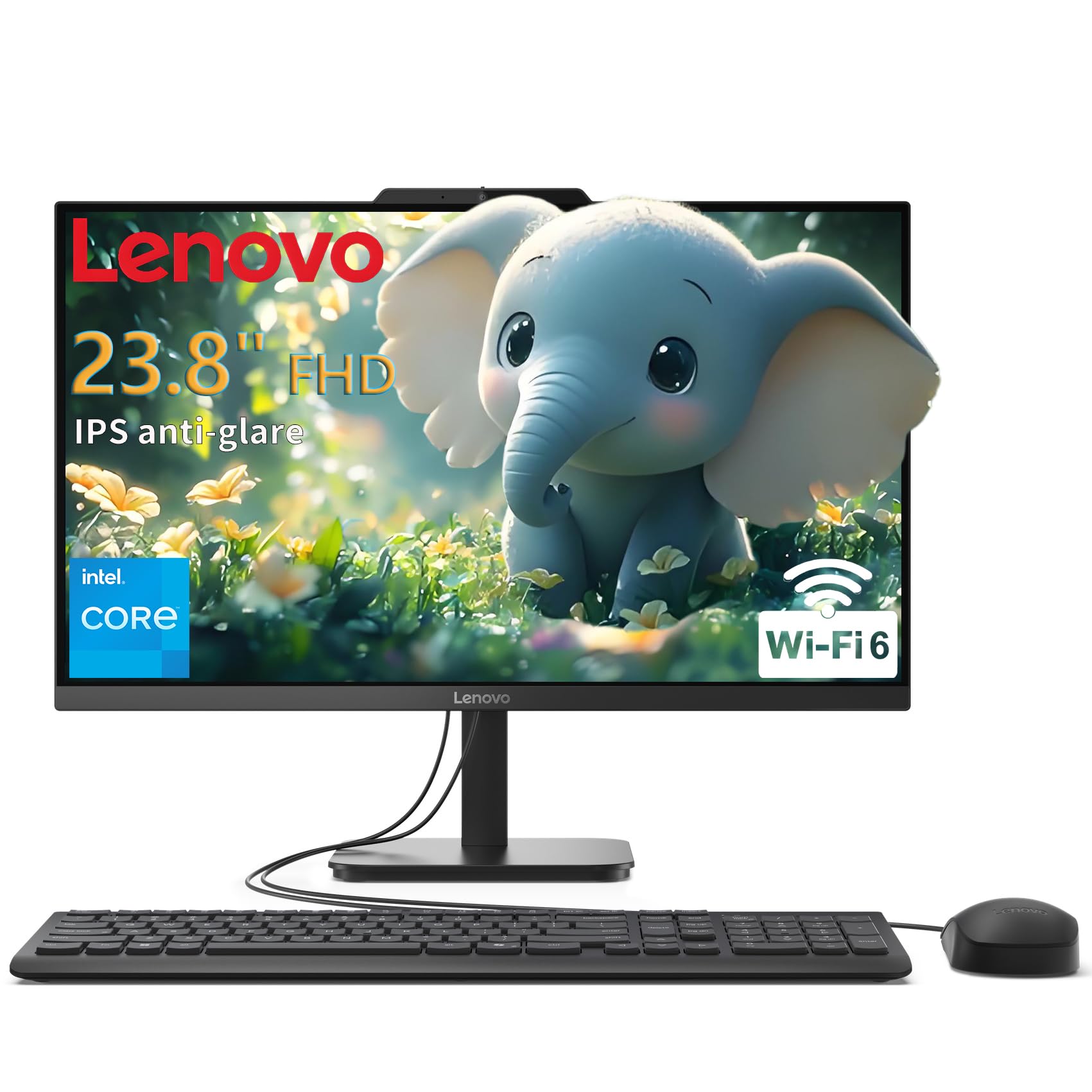
The Lenovo 24″ V100 is a clean, no-frills all-in-one designed for users who need a capable machine for email, web browsing, and document editing without paying for extra horsepower they won’t use. The Intel N100 quad-core processor handles basic productivity tasks efficiently, and the 8GB of DDR4 RAM is sufficient for casual multitasking. The 512GB PCIe SSD ensures fast boot times and responsive application loading.
The 23.8-inch Full HD IPS anti-glare display with 250 nits brightness provides a clear, comfortable viewing experience for long work sessions. The port selection is practical with USB-C, USB-A 3.2, USB-A 2.0, and HDMI-out for connecting a second display. Wi-Fi 6 and Bluetooth 5.2 keep wireless connections fast and stable.
Buyers describe the setup as quick and easy, with several noting the great value for the price. The wired keyboard and mouse are functional but unremarkable. This is an excellent choice for students, seniors, or anyone who needs a reliable desktop without diving into complex configuration.
Why it’s great
- Space-saving AIO design eliminates desktop clutter
- Sharp 24-inch IPS display with anti-glare coating
- Reliable performance for basic productivity and browsing
Good to know
- 8GB RAM limits heavy multitasking
- Wired peripherals are entry-level quality
11. HP 22-dg0340 All-in-One
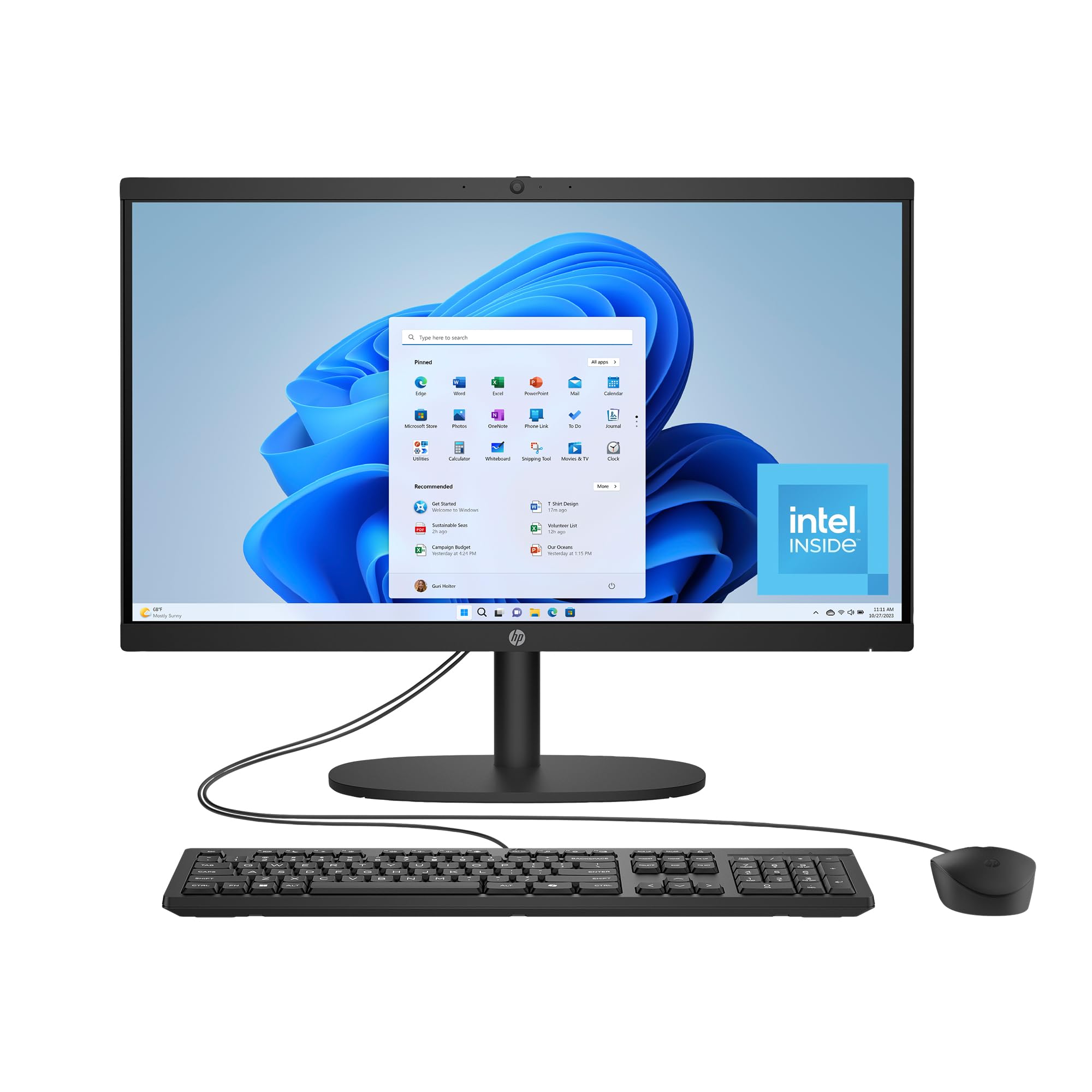
The HP 22-dg0340 is the most compact all-in-one on this list, with a 21.5-inch Full HD VA display that fits easily on small desks, kitchen counters, or dorm room surfaces. The Intel Processor N200, a slight step up from the N100, offers capable performance for web browsing, streaming, and document work. The 8GB of RAM and 512GB SSD provide enough memory and storage for a family’s secondary computer or a student’s primary machine.
HP designed this model with environmental responsibility in mind, using post-consumer recycled and ocean-bound plastics, and it carries EPEAT Gold and ENERGY STAR certifications. The DC Dimming technology eliminates screen flicker for more comfortable viewing, and the manual camera shutter provides privacy when the webcam is not in use. Wi-Fi 6 and Bluetooth 5.3 ensure modern wireless connectivity.
Buyers praise the easy setup and the sleek, streamlined appearance. A few reported that the included mouse developed issues after two weeks. This is a good starting point for users who prioritize a small footprint and a low entry cost over raw processing power.
Why it’s great
- Ultra-compact 21.5-inch design for tight spaces
- Flicker-free DC Dimming technology for eye comfort
- Environmentally conscious manufacturing with recycled materials
Good to know
- 8GB RAM and VA panel are entry-level specs
- Included mouse reliability has been inconsistent
FAQ
Can I upgrade the RAM in an all-in-one computer?
Is a 120Hz display worth it on an all-in-one?
How does an integrated GPU differ from a dedicated GPU in an AIO?
Final Thoughts: The Verdict
For most users, the best all-in-one computers winner is the HP 24″ AMD Ryzen 7 because it delivers exceptional processor performance, ample 16GB of RAM, and a sharp display at a sweet spot that balances capability and cost. If you want a touchscreen for family interaction and education, grab the HP 24 Touchscreen. And for creative professionals who need a dedicated GPU and generous memory, nothing beats the Dell Inspiron 7710.

Mo Maruf
I created WellFizz to bridge the gap between vague wellness advice and actionable solutions. My mission is simple: to decode the research and give you practical tools you can actually use.
Beyond the data, I am a passionate traveler. I believe that stepping away from the screen to explore new environments is essential for mental clarity and physical vitality.