Our readers keep the lights on and my smoothie glass nicely filled. As an Amazon Associate, I earn from qualifying purchases.
Finding a desk that doesn’t wobble when you type and leaves your bank account intact used to mean scouring flea markets or settling for a flimsy fold-up. The market has shifted: you no longer need a four-figure budget to get a workspace that feels solid, includes thoughtful extras like power outlets or storage, and actually fits a modern setup.
I’m Mohammad Maruf — the founder and writer behind WellFizz. I’ve spent years analyzing furniture specs, sorting through thousands of customer reports on frame stability, surface durability, and motor performance to identify the desks that deliver real value without hidden compromises.
This guide breaks down the best options across different needs and budgets — from compact gaming desks with LED strips to motorized standing models with memory presets — to help you find a best affordable computer desk that genuinely upgrades your daily workflow.
How To Choose The Best Affordable Computer Desk
Before you click “add to cart,” three factors decide whether a desk will feel like a permanent upgrade or a temporary compromise. Frame construction, surface material, and real-world dimensions matter much more than flashy extras.
Frame Stability: The Crossbar Test
The single biggest predictor of wobble is whether the metal frame includes a crossbar connecting the legs beneath the desktop. Desks without crossbars — especially those under 48 inches wide — often develop front-to-back sway the moment you lean on an edge. Look for powder-coated steel frames with at least one horizontal brace; it turns a shaky desk into one that stays planted during intense typing or gaming sessions.
Surface Quality vs. Particle Board
Most desks in this tier use particle board or MDF with a laminated or carbon-fiber-style finish. The key difference is edge sealing and thickness. Boards that are 15mm or thicker with sealed edges resist sagging and chipping far longer than thinner 12mm panels. A carbon fiber textured surface adds scratch resistance and a slight water-repellent quality — useful if you occasionally set down a drink.
Built-in Power and Cable Management
Power strips built into the desktop are a genuine convenience, but placement matters. A strip located underneath the right side of the monitor shelf keeps cables out of sight and within reach without cluttering your typing area. Verify the outlet count and USB port type — some models still use older USB-A only, while newer options include a USB-C fast-charging port.
Quick Comparison
On smaller screens, swipe sideways to see the full table.
| Model | Category | Best For | Key Spec | Amazon |
|---|---|---|---|---|
| EnHomee 56.5″ Office Desk | Mid-Range | Home Office with Printer Storage | 40″ x 7″ monitor stand for dual monitors | Amazon |
| COMHOMA Electric Standing Desk | Premium | Ergonomic Sit-Stand Workflows | Motorized height range 28.3″-48″, 176 lb capacity | Amazon |
| Grandder Gaming Desk 47″ | Mid-Range | Compact Gaming with USB-C Charging | Alloy steel frame, carbon fiber surface | Amazon |
| Korfile 47″ Gaming Desk | Mid-Range | High Storage & RGB Customization | 5 fabric drawers, 22 light effects | Amazon |
| Lufeiya Black L Shaped Desk | Mid-Range | Corner Spaces & Small Offices | L-shape with 2 shelves + 4 drawers | Amazon |
| AODK 48″ Gaming Desk | Budget | Quick Setup with Reversible Shelf | Full-length monitor shelf, carbon fiber top | Amazon |
| Lufeiya Small Desk 32″ | Budget | Tight Spaces & Teen Rooms | 32″ width with LED strip and power strip | Amazon |
In‑Depth Reviews
1. EnHomee 56.5″ Office Desk with Drawers and Printer Space
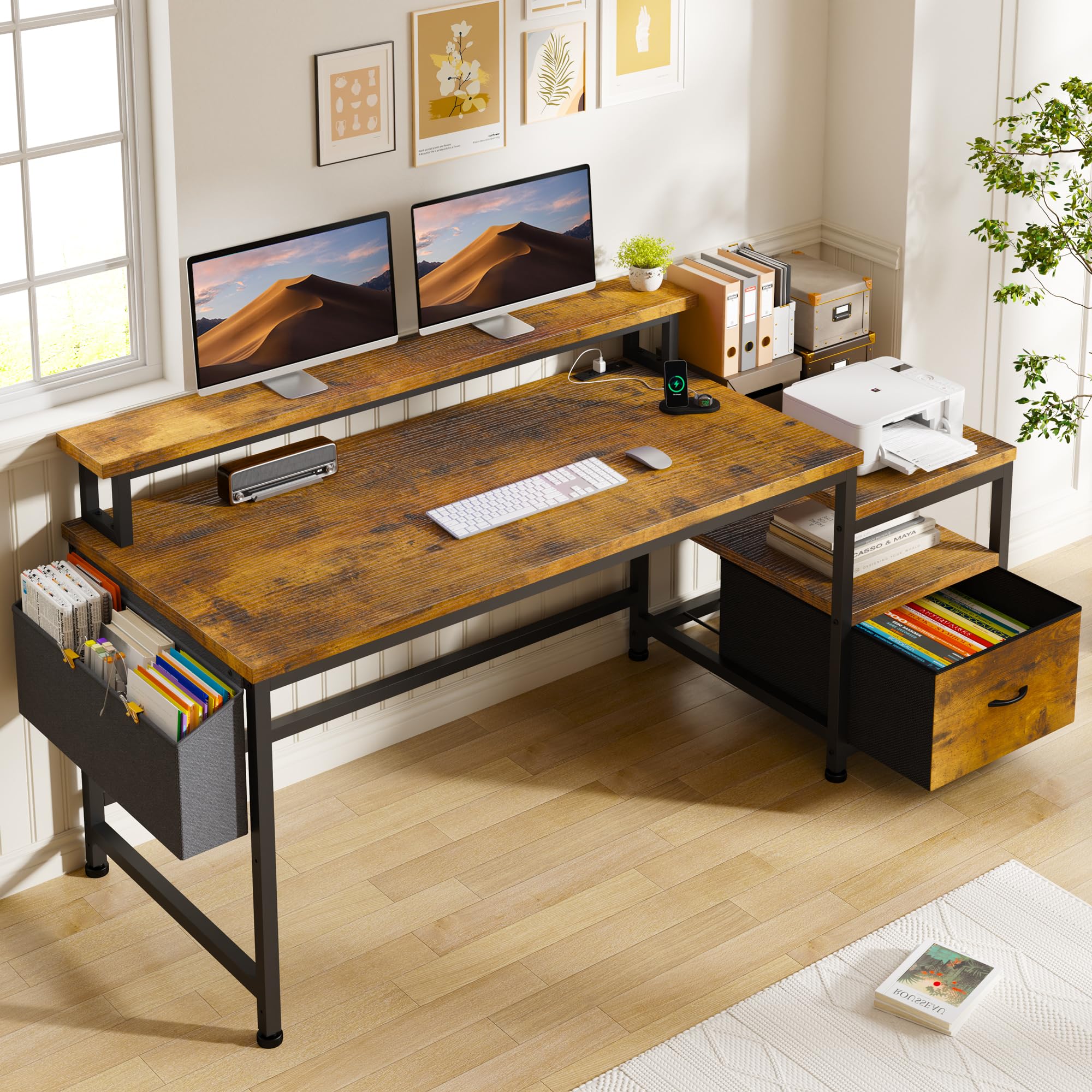
The EnHomee desk earns the top spot because it solves the two biggest complaints in this price tier: lack of genuine storage and insufficient monitor support. The 40-inch-long monitor stand comfortably holds two screens side by side, and the included fabric file drawer organizes A4 documents without taking up floor space. The printer shelf underneath keeps bulky equipment off the main work surface — a rare feature at this level.
Build quality is reassuring for a sub-100-dollar desk. The powder-coated metal frame mates to a thick wooden tabletop with minimal flex, and the crossbar design keeps front-to-back movement almost nonexistent during heavy typing. The built-in power strip offers three standard outlets and two USB ports, positioned beneath the monitor shelf so cables stay hidden.
Assembly is straightforward with clear multilingual diagrams; most users report completing it solo in under an hour. The rustic brown finish hides fingerprints well and fits both home-office and dorm aesthetics. If you need a single desk that handles dual monitors, a printer, and daily paperwork without clutter, this is the most balanced option available.
Why it’s great
- Long 40-inch monitor stand fits two monitors
- File drawer + printer shelf keep clutter contained
- Very stable frame with minimal wobble
Good to know
- Fabric drawer won’t handle heavy binders over time
- LED lighting is not included — you add your own strip
2. COMHOMA Electric Standing Desk with Drawers
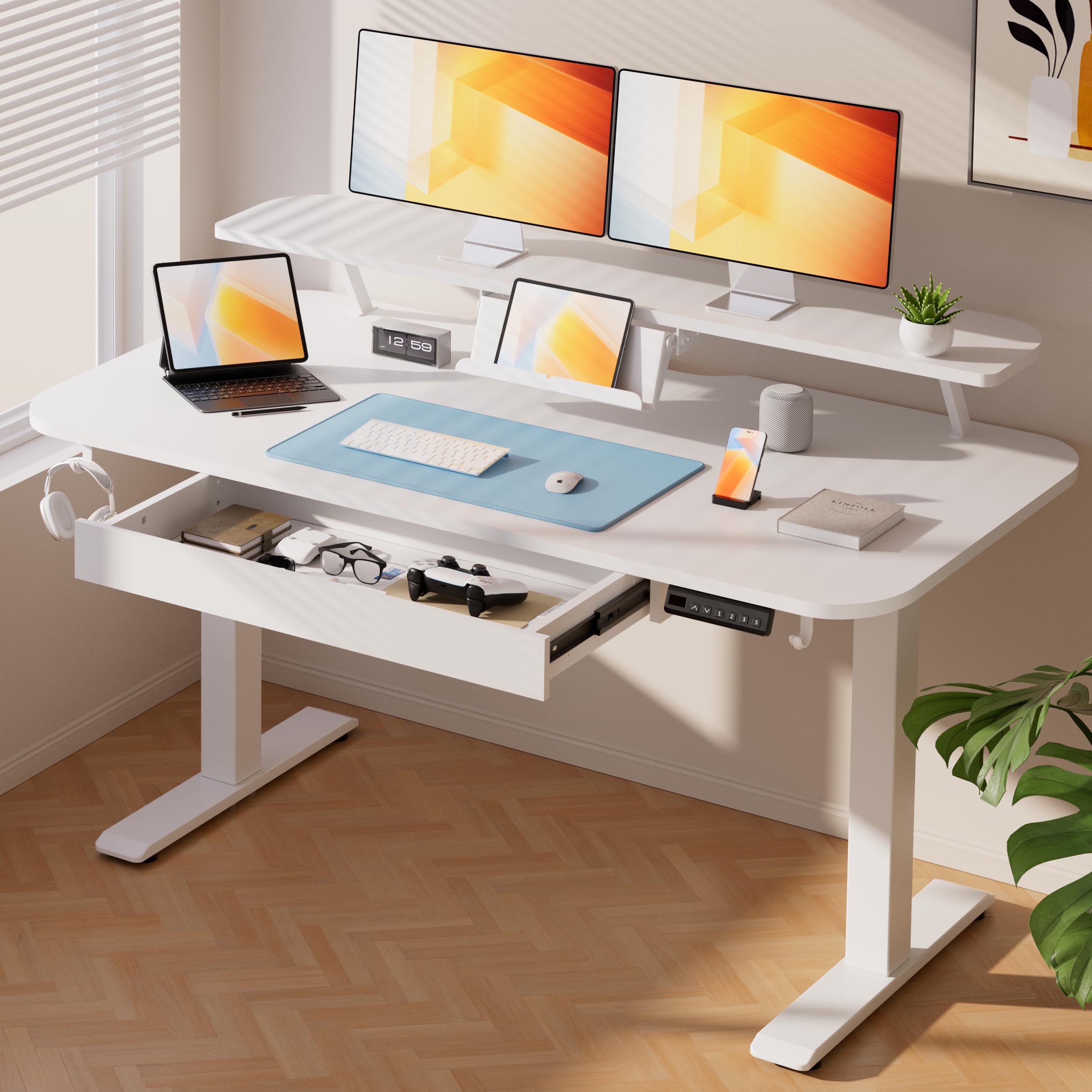
The COMHOMA is the only motorized standing desk in this lineup, and it raises the bar for what “affordable” can mean in the ergonomic category. The single-motor lift system operates at under 55 decibels and transitions from 28.3 to 48 inches in about 15 seconds. Three memory presets let you save your preferred sitting and standing heights, so switching postures doesn’t require holding a button mid-task.
Stability is impressive for a budget standing frame — the T-shaped alloy steel base supports up to 176 pounds with almost no lateral shake at full extension. The white MDF desktop (FSC-certified) includes a built-in pull-out drawer for pens and small supplies, plus a foldable laptop stand and a separate monitor shelf that keeps your primary screen at a healthy eye level.
At 48 inches wide, it fits standard home-office setups without overwhelming a smaller room. Assembly requires two people for the column insertion step, but the included tools and video guide make the process painless. For anyone who sits for long stretches and wants to alternate between seated and standing work, this desk delivers premium ergonomics without the premium price tag.
Why it’s great
- Quiet motor with three memory presets for quick height changes
- 176 lb load capacity with very stable T-frame design
- Built-in drawer and foldable laptop stand save desktop space
Good to know
- Assembly requires two people for the heaviest parts
- White finish shows smudges more readily than darker surfaces
3. Grandder Gaming Desk 47″ with Power Outlet and LED Light

The Grandder desk packs features typically reserved for higher-priced models into a compact 47-inch footprint. The carbon fiber textured top resists scratches and spills, and the alloy steel frame with crossbars gives it solid stability — no sway when you lean on the front edge during a tense gaming moment. The standout inclusion is the power outlet with both USB-A and USB-C fast charging, letting you juice a modern phone or tablet without a separate adapter.
Storage flexibility is above average: a reversible shelf and a full-width cloth drawer install on either side, plus two slidable iron hooks for hanging headphones or a bag. The included LED strip runs the length of the desk and can be controlled via remote or app, offering adjustable brightness and color cycling that doesn’t feel tacky. Assembly takes around an hour, though using your own screwdriver helps avoid stripping the included Allen-head screws.
The only real compromise is the LED strip adhesive, which some users reinforce with double-sided tape. At 47 inches, the desk fits snugly into small bedrooms and dorm corners while still leaving room for a full-sized keyboard and a 27-inch monitor on the stand. It’s the smartest choice for a gamer or student who wants all the bells and whistles on a compact footprint.
Why it’s great
- USB-C fast charging port built into the desktop
- Carbon fiber surface is scratch-resistant and easy to clean
- Reversible shelf and headphone hooks offer flexible storage
Good to know
- LED strip adhesive may require re-securing out of the box
- Assembly takes longer than average due to many small parts
4. Korfile 47″ Gaming Desk with Power Outlets and LED Lights
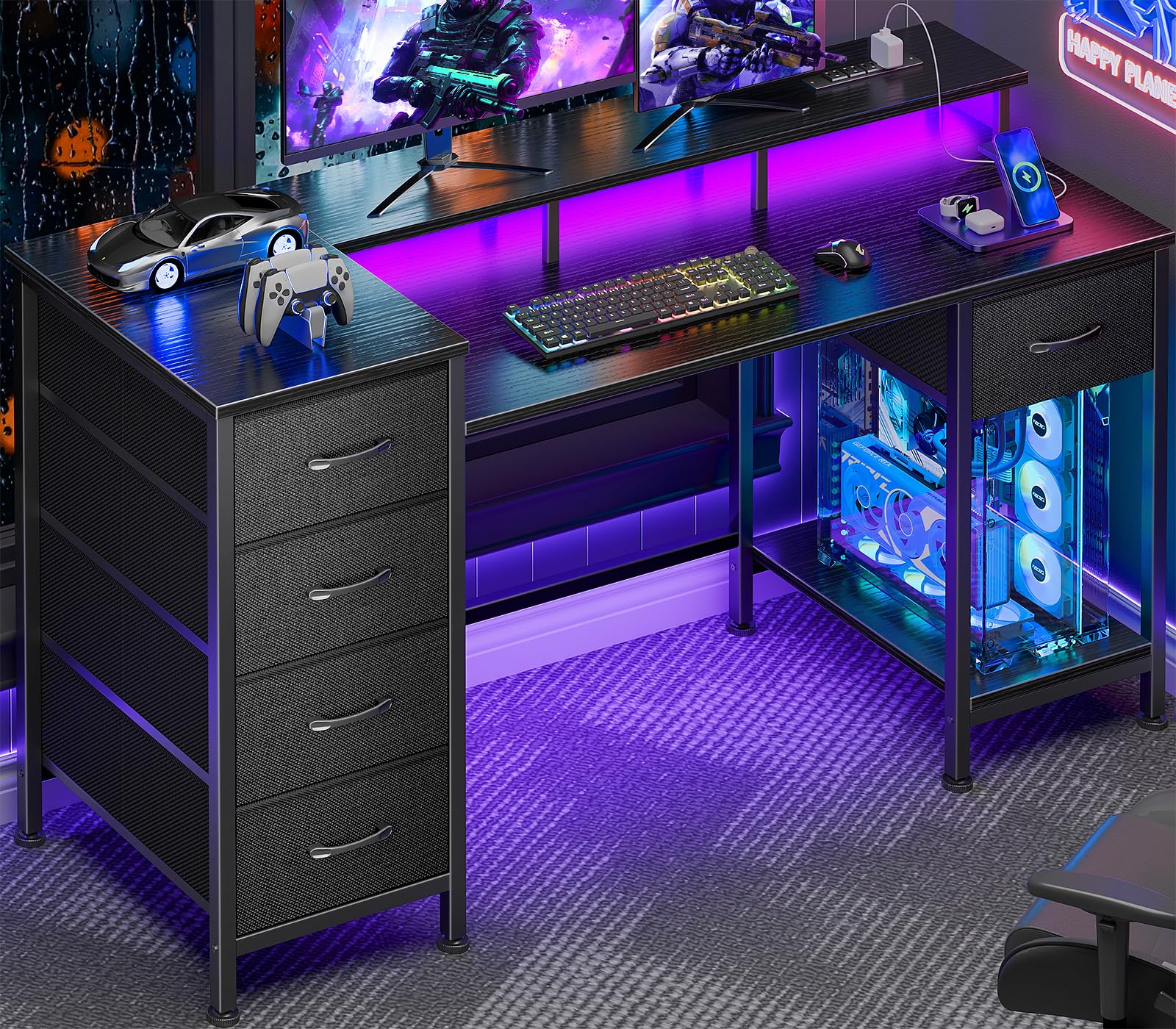
If storage is your priority, the Korfile leads the pack with five non-woven fabric drawers that can be mounted on either side, or even stacked top-to-bottom. That flexibility lets you tailor the desk to your room’s layout — put all drawers on the left for a clear leg space on the right, or split them into two stacks. The drawers are large enough for notebooks, small gadgets, and office supplies, though they won’t support heavy items over time.
The integrated RGB strip offers 22 lighting effects, controlled by a simple touch sensor, and the power strip houses two USB ports and three AC outlets. The full-length monitor stand raises screens to a comfortable viewing angle while creating a trench underneath for hiding cable clutter. Build quality is solid: the powder-coated steel frame includes crossbars, and the desktop is thicker than typical particle board at roughly 15mm.
Assembly is well-documented with labeled parts, but some users note that over-tightening screws into the wood panels can strip the threads — hand-tighten until snug. The Korfile works best for a home office or a student setup where paper, peripherals, and small electronics need permanent homes without adding a separate bookshelf.
Why it’s great
- Five fabric drawers with four mounting configurations for ultimate layout flexibility
- 22 lighting effects provide extensive RGB customization
- Thick desktop with sealed edges resists sagging
Good to know
- Fabric drawers sag under heavy books or binders
- LED strip adhesive can weaken in humid conditions
5. Lufeiya Black L Shaped Desk with LED Lights
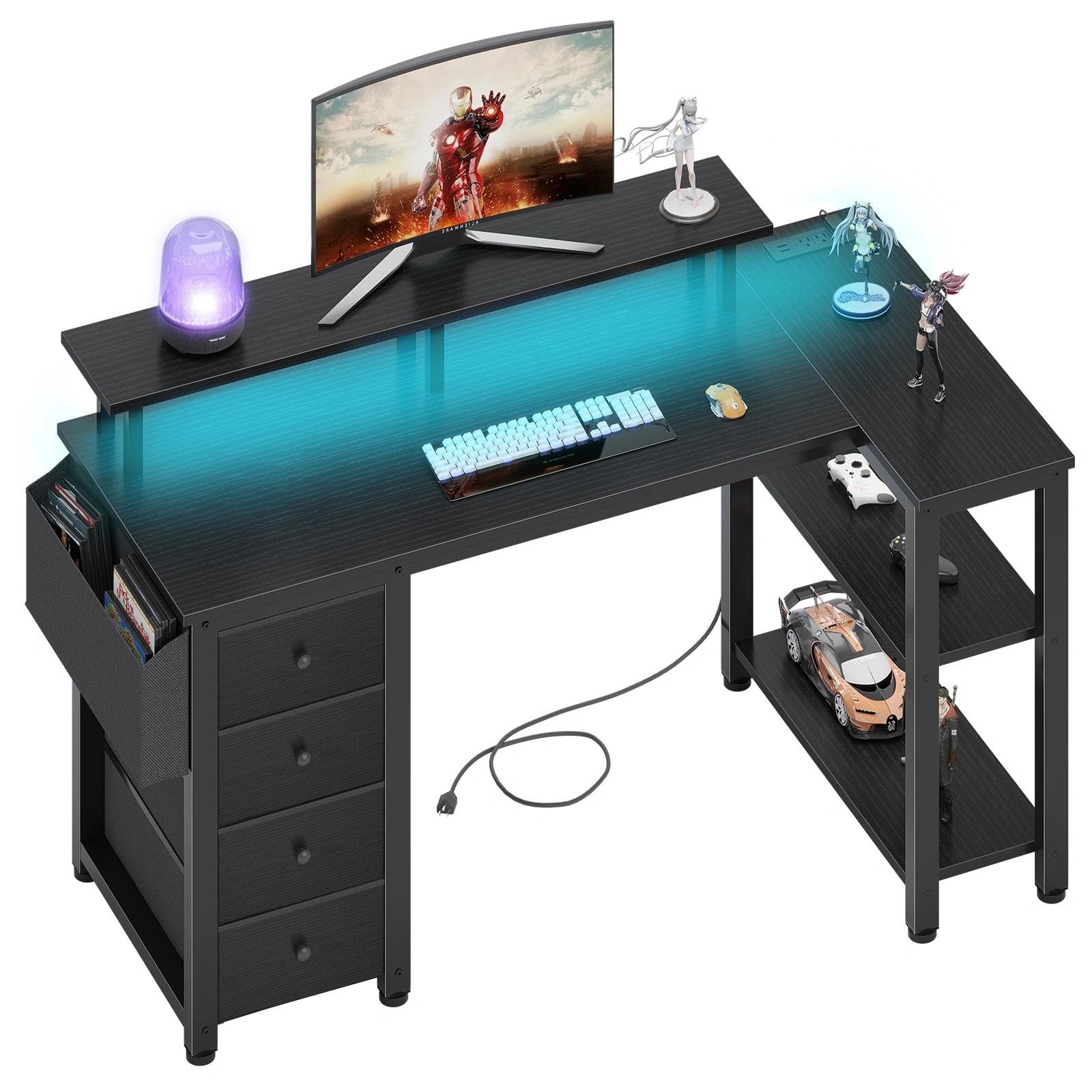
The Lufeiya L-shaped desk is purpose-built for corner spaces that would otherwise go unused. It fits into a 90-degree corner and provides two distinct work zones — a primary typing area and a secondary leg for a laptop or writing. The L-design also hides cables naturally behind the corner column, which is a huge advantage over straight desks where cables run across the back edge.
Storage comes via four fabric drawers and two open shelves, all of which can be installed on either side for left- or right-handed orientations. The built-in RGB LED strip has 7 colors and 4 dynamic modes, and the power strip includes three outlets and two USB ports — more than enough for a monitor, desktop PC, phone charger, and desk lamp. The monitor stand is full-width and raised enough to slide a keyboard underneath when not in use.
Assembly takes longer than a straight desk due to the L-bracket connection, but the included instruction booklet is clear. The desk feels sturdy at the joint, though the far ends can bounce slightly if the frame isn’t fully tightened. For a small apartment or a shared home office where every square inch counts, this L-shape delivers capability well beyond its size.
Why it’s great
- L-shape design turns unused corners into productivity space
- Three outlets and two USB ports offer ample charging capacity
- Customizable drawer/shelf placement for left or right orientation
Good to know
- Assembly requires more time due to the L-shaped bracket
- Far ends of the desk can wobble if frame screws aren’t fully seated
6. AODK 48″ Gaming Desk with LED Lights
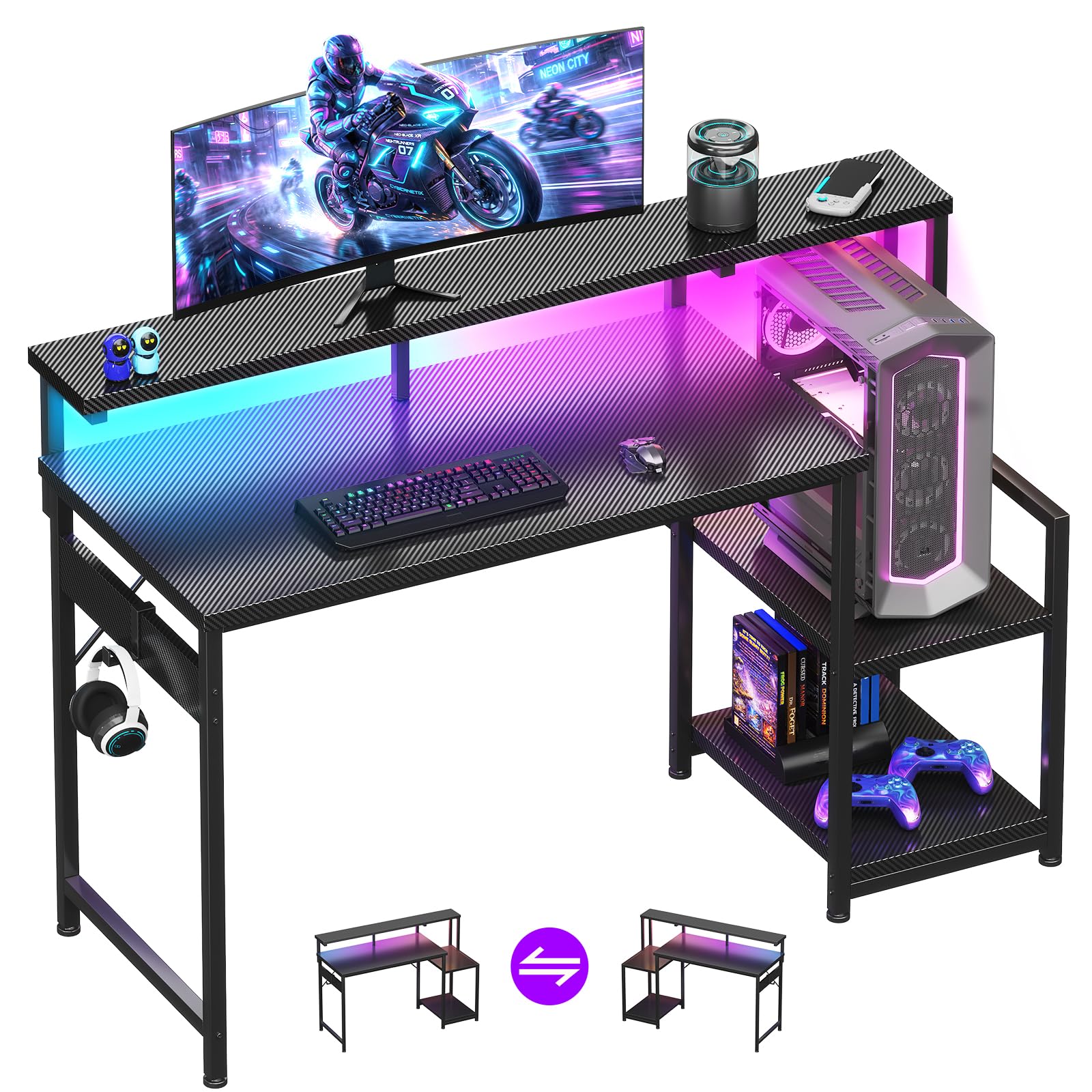
The AODK 48-inch desk is the no-frills choice for someone who wants a clean, gaming-oriented workspace without paying for drawers or outlets they don’t need. The carbon fiber textured surface is the highlight — it looks sharp, resists fingerprints, and handles incidental spills without staining. The full-length monitor shelf is wide enough for a 27-inch screen plus a small lamp, and the shelf itself houses a slim LED strip with 10 static colors and 10 dynamic modes.
The reversible storage shelf installs on either side and adjusts to two heights, so you can place a PC tower below and a controller or game case above. The metal frame feels sturdy, though it lacks a crossbar — some users report minor wobble during aggressive typing, especially if the desk isn’t against a wall. Assembly is straightforward with clear instructions, and most people finish in about 45 minutes.
At roughly 69 dollars, this is one of the most affordable ways to get a 48-inch gaming surface with a carbon fiber finish and LED ambiance. It works best in a teen’s bedroom or a secondary gaming station where you don’t need heavy storage, but you do want a desk that looks and feels more premium than its price suggests.
Why it’s great
- Carbon fiber surface is scratch-resistant and easy to wipe clean
- Reversible adjustable shelf accommodates PC tower or accessories
- Wide monitor shelf improves viewing angle and reduces neck strain
Good to know
- No crossbar under the desktop — can wobble under aggressive use
- Main desk depth is shallow, making you sit closer to the screens
7. Lufeiya Small Desk 32″ with Power Outlets and LED Lights

The Lufeiya 32-inch desk is built for the tightest spaces — dorm rooms, small alcoves, or a child’s bedroom where every inch matters. Despite its compact size, it includes features typically reserved for larger desks: a built-in power strip with two outlets and two USB ports, plus an RGB LED strip with 7 colors and 4 dynamic modes. The monitor stand lifts a laptop or small monitor to a healthier viewing height while creating a hidden channel for cable management underneath.
The structure is made from thick particle board with a powder-coated metal frame, and it includes a removable storage bag and two headphone hooks. Weight is low enough that one person can easily move it around the room. Assembly takes about 30 minutes with the provided tools — no extra screwdriver needed. The main downside is stability: because the desktop is narrow and the frame has no crossbar, the desk can wobble left-to-right during heavy gaming or typing. Some users secure it to the wall with Velcro strips for a rock-solid feel.
This desk is not for a dual-monitor workstation or heavy daily use. But for a teen’s first gaming setup, a compact writing desk, or a laptop-only workspace, it packs surprising utility into a very small footprint at a very accessible price point.
Why it’s great
- Fits in extremely tight spaces that can’t accommodate 47-inch desks
- Built-in power strip and RGB LEDs in a very compact form
- Lightweight and easy to move or reconfigure
Good to know
- Lacks a crossbar — can wobble during fast-paced gaming
- Only one monitor fits on the stand; no room for dual screens
FAQ
Will a 47-inch desk fit a 27-inch monitor and a tower?
How do I fix a wobbling desk without returning it?
Final Thoughts: The Verdict
For most users, the best affordable computer desk winner is the EnHomee 56.5″ Office Desk because it combines a long monitor stand for dual screens, a file drawer, a printer shelf, and a stable frame — all without exceeding the mid-range budget. If you want ergonomic sit-stand flexibility, grab the COMHOMA Electric Standing Desk. And for a compact gaming-focused setup with USB-C charging in a small space, nothing beats the Grandder 47″ Gaming Desk.

Mo Maruf
I created WellFizz to bridge the gap between vague wellness advice and actionable solutions. My mission is simple: to decode the research and give you practical tools you can actually use.
Beyond the data, I am a passionate traveler. I believe that stepping away from the screen to explore new environments is essential for mental clarity and physical vitality.