Our readers keep the lights on and my smoothie glass nicely filled. As an Amazon Associate, I earn from qualifying purchases.
The moment you slot a high-power GPU into a case with choked airflow, you’ve already surrendered performance to heat soak. Cheap cases aren’t just about looks—they dictate your component lifespan, noise floor, and upgrade path. Getting the thermal balance right from the start is the only way to protect a build that actually works.
I’m Mohammad Maruf — the founder and writer behind WellFizz. I spend my time dissecting case geometry, fan hub layouts, and clearance tolerances to find the enclosures that don’t cut corners where it counts.
Whether you’re planning a quiet workstation or a high-airflow gaming rig, this guide ranks the top models that deliver real cooling and build quality without draining your budget. These are the best affordable pc cases you can buy right now.
How To Choose The Best Affordable PC Case
Picking a case on price alone is the fastest way to trap hot air inside your chassis. You need to evaluate the sheet metal gauge, fan support layout, and clearances before you click buy. Here are the three factors that separate a smart purchase from a regret.
Front Panel Design: Mesh vs. Solid
A sealed glass or solid metal front panel looks clean but starves intake fans. Mesh front panels allow unrestricted airflow, keeping your CPU and GPU cooler under load. For a high-performance build on a budget, always prioritize a fully meshed front over aesthetics.
Pre-Installed Fans: Count and Type
Budget cases often include one or two basic fans that barely move air. Look for models that pack at least three fans, and check if they are standard or reverse-blade designs. Reverse-blade side fans pull air in without showing the ugly hub—better thermal performance and better looks without extra cost.
Clearance for Long-Term Upgrades
A short case that barely fits your current GPU will force you to replace the entire chassis when you upgrade. Aim for at least 340mm GPU clearance and 160mm CPU cooler height. A case that supports a 360mm top radiator also gives you the option to switch to liquid cooling later without buying a new enclosure.
Quick Comparison
On smaller screens, swipe sideways to see the full table.
| Model | Category | Best For | Key Spec | Amazon |
|---|---|---|---|---|
| MONTECH XR-B | Mid-Tower | Balanced airflow & premium finish | 3x ARGB fan (2 reverse), 360mm rad | Amazon |
| Lian Li V100 | Mid-Tower | Builder-friendly layout & display stand | 4x 120mm ARGB fans, 420mm GPU | Amazon |
| MUSETEX Y6 | Mid-Tower | Showcase build with max fans included | 6x ARGB fans (2 reverse), 400mm GPU | Amazon |
| FOIFKIN F600 | Mid-Tower | Dual-chamber with triple 360mm rad support | 7x ARGB fans, 400mm GPU | Amazon |
| FOIFKIN F1 | Mid-Tower | Budget dual-chamber with 6 RGB fans | 6x ARGB fans, dual-chamber layout | Amazon |
| DARKROCK EC2 | Mid-Tower | Value pick with USB-C and mesh front | 1x fan, supports 8 total, mesh panel | Amazon |
| Zalman T6 | Mid-Tower | Optical drive compat & low-cost ATX | 1x 120mm fan, 5.25″ ODD bay | Amazon |
In‑Depth Reviews
1. MONTECH XR-B

The MONTECH XR-B delivers a mature wood-grain I/O panel and dual tempered glass sides in a compact mid-tower that still swallows high-end hardware. It ships with three pre-installed ARGB fans—two reverse-blade units on the side for intake and one regular fan at the rear—pushing airflow straight across your GPU without the usual fan-hub glare.
GPU clearance reaches the 40-series comfortably, and the top can mount a 360mm radiator without crowding the motherboard tray. The magnetic dust filters at every intake point keep the interior clean far longer than most budget cases, and the unified front-panel connector cuts build time noticeably.
Build quality is higher than its price bracket suggests. The steel doesn’t flex under pressure, the glass panels align cleanly, and the cable-routing grommets hold cables tight. For anyone building a mid-to-high-end rig on a realistic budget, this case offers the best balance of thermal performance, aesthetics, and long-term value.
Why it’s great
- Three ARGB fans (2 reverse blade) provide excellent intake
- Top magnetic dust filter and full mesh panels keep dust low
Good to know
- Glass panel arrived with minor scratches for some users
- Side panel fit is tight and requires careful handling
2. Lian Li V100

The Lian Li V100 is a builder’s dream. It arrives with four pre-installed 120mm ARGB PWM fans and a dedicated slanted display platform on the PSU shroud for collectibles. The tool-less side panels pop off without any screwdriver work, and the back-connect motherboard support cleans up the visible cable clutter.
GPU clearance stretches to 420mm—enough for any current flagship card—and CPU coolers up to 178mm fit without touching the glass. The integrated 26-LED ARGB strip syncs with motherboard software for full-spectrum control, and the daisy-chained fan wiring simplifies the build process dramatically.
Thermal performance is strong thanks to the mesh front and three side intakes, though the fans can get audible at max RPM. Cable management is excellent, but the rear panel can bulge if you over-stuff it. For a case that costs less than most premium options, the Lian Li V100 feels substantially more expensive than it is.
Why it’s great
- 420mm GPU clearance accommodates the largest cards
- Tool-less panel removal and pre-wired fans speed up builds
Good to know
- Fans are loud at full speed without manual curve adjustment
- Bulkier cables can make the back panel hard to close
3. MUSETEX Y6

The MUSETEX Y6 goes all-in on visual impact. The 270-degree dual tempered glass panels give you a panoramic view of your hardware, and the six pre-installed PWM ARGB fans (two reverse-blade on the side) keep airflow strong without blocking the look. The white colorway breaks the monotony of black boxes on the market.
Internally, the Y6 supports GPUs up to 400mm and CPU coolers up to 176mm. The top mounts a 360mm radiator easily, and the power supply cavity offers 200mm of depth. All six fans are speed-adjustable via motherboard software, giving you fine control over noise and thermal performance.
Cable management is adequate but requires planning—pre-routing wires before installing the motherboard saves time. The magnetic dust filters on top and bottom prevent dust buildup effectively. For a builder who wants maximum fan count and a show-quality look without breaking the bank, the Y6 is a standout option.
Why it’s great
- Six pre-installed ARGB fans provide strong out-of-box cooling
- Full-view glass panels make interior displays pop
Good to know
- Cable management is tight for ATX boards; plan ahead
- Fan connector is a 6-pin ribbon, limiting individual color control
4. FOIFKIN F600

The FOIFKIN F600 packs seven pre-installed 120mm ARGB PWM fans (six reverse-blade for intake) into a dual-chamber mid-tower with a panoramic 270-degree tempered glass design. This is a case built for maximum cooling and visual transparency—the dual-chamber hides the PSU and drives, keeping the main chamber clean.
Compatibility is generous: it fits GPUs up to 400mm, PSUs up to 220mm, and supports three 360mm radiators simultaneously. The steel chassis feels sturdy even before components are installed, and the pre-wired fans are daisy-chained for quick assembly. The I/O includes USB-C 3.0 and two USB 2.0 ports.
The stock fans are decent but not top-tier—airflow is adequate for mid-range builds, but enthusiasts may want to upgrade the fan set later. The dual-chamber also limits storage to one HDD and two SSDs. For the price, you get a premium fish-tank aesthetic with excellent radiator flexibility that few competitors match.
Why it’s great
- Seven pre-installed fans with dual-chamber design keep cables hidden
- Supports three 360mm radiators simultaneously
Good to know
- Stock fans are average; upgrading can improve airflow noticeably
- Storage capacity limited to 1 HDD + 2 SSDs
5. FOIFKIN F1
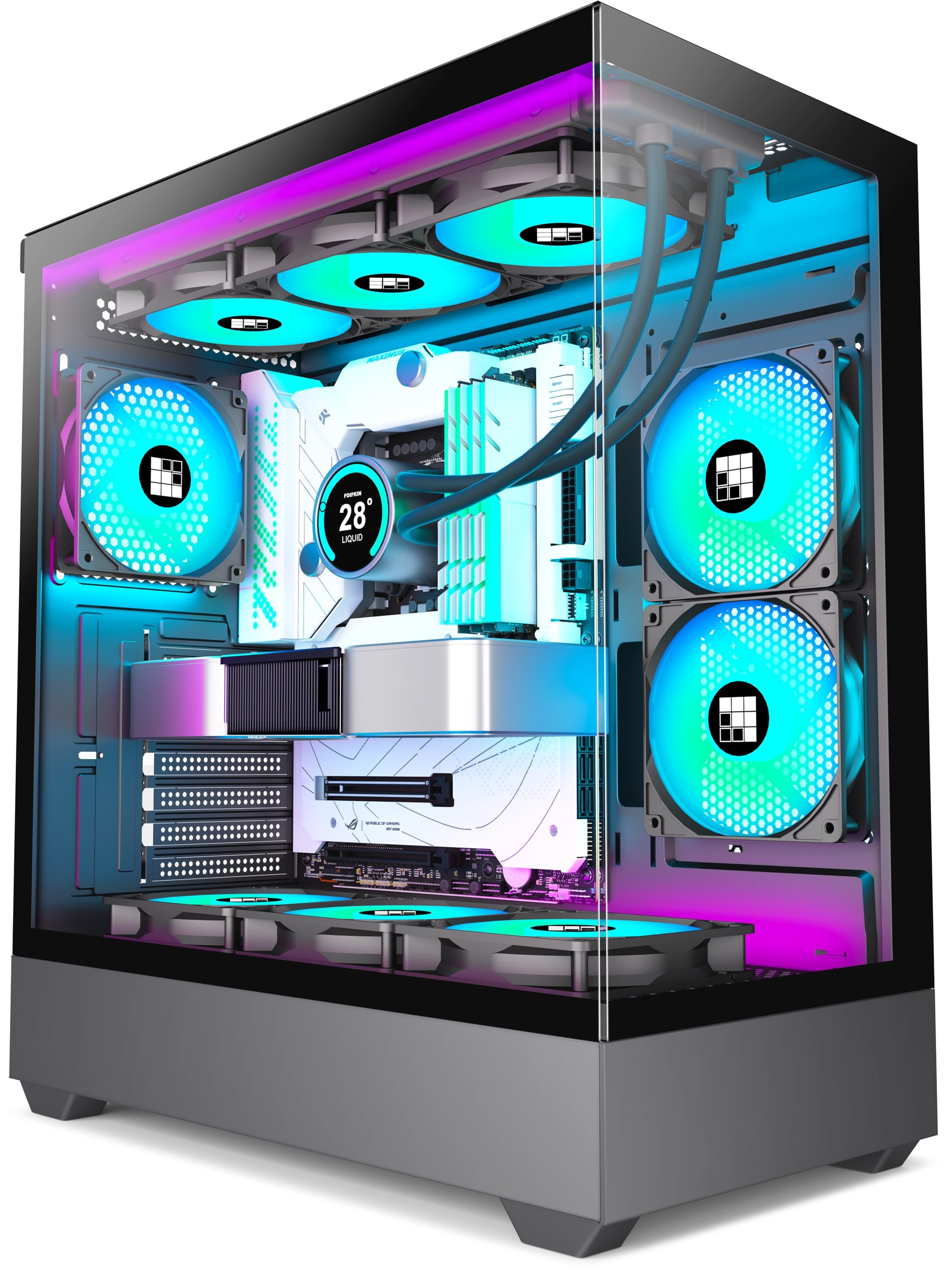
The FOIFKIN F1 brings dual-chamber architecture to the budget segment with six pre-installed 120mm ARGB PWM fans (five reverse-blade) and full tempered glass panels. The separation of the PSU chamber from the main compartment improves thermals and cable routing, making the build look far cleaner than its price suggests.
It supports ATX/M-ATX/ITX motherboards, GPUs up to 400mm, and 360mm top radiators. The I/O includes USB-C 3.0 and two USB 2.0 ports. The fans are quiet at idle and produce a faint pleasant hum under load, and the overall chassis is lightweight but doesn’t feel flimsy.
The fan hub uses a non-standard connector that may require an adapter for some motherboard RGB headers, and the included hardware bag lacks extra fan screws. Still, for anyone building a first gaming PC or a mid-range workstation, the F1 delivers an astonishing amount of hardware for the cost.
Why it’s great
- Six ARGB fans with dual-chamber layout at a very low cost
- Spacious interior fits large CPU coolers and long GPUs
Good to know
- Fan connector is non-standard; may need adapter for some boards
- No extra fan screws included; plan your mounting
6. DARKROCK EC2

The DARKROCK EC2 is a compact mid-tower that prioritizes modern connectivity and airflow without gimmicks. It includes one rear exhaust fan and supports up to eight 120mm fans total, with a fully meshed front panel and magnetic dust filters on top and bottom. The tempered glass side panel uses a hinge mechanism for tool-less access.
Motherboard support covers ATX, M-ATX, and ITX, and GPU clearance reaches 340mm—enough for most current graphics cards. The Type-C port on the front I/O is a standout feature at this price point, ensuring compatibility with modern peripherals without an adapter. The design is understated and clean, without aggressive gamer styling.
The metal panel is thin and can bend if over-tightened, and the case ships with only one fan, so you’ll need to budget for additional fans to achieve good airflow. Cable management is decent with ample tie-down points. For builders who want USB-C and clean aesthetics on a tight budget, the EC2 is a solid foundation.
Why it’s great
- Type-C front port at an entry-level price is rare
- Hinged glass side panel for quick internal access
Good to know
- Only one fan included; additional fan purchase is recommended
- Thin metal can bend if screws are over-tightened
7. Zalman T6

The Zalman T6 is a traditional ATX mid-tower that brings back the 5.25-inch optical drive bay—a feature that has nearly vanished from modern cases. The hairlined mesh front and side panels improve airflow over older designs, and the powder-coated steel chassis resists corrosion. It fits ATX, mATX, and Mini-ITX boards.
The case ships with one 120mm rear fan and can hold three additional fans (including one on the side panel). Storage options include two 2.5-inch bays, one 3.5/2.5-inch combo bay, and the external 5.25-inch bay. The I/O panel offers one USB 3.0 and two USB 2.0 ports.
The metal is thin, and the back panel can feel flimsy. Some users report that the expansion slot covers are hard to remove and leave sharp edges. The top-mounted PSU position adds stability but makes cable routing tighter. This case is best for budget-sensitive builders who still want optical drive support and don’t mind working with basic materials.
Why it’s great
- Rare 5.25″ ODD bay support for legacy drive users
- Lightweight and corrosion-resistant powder-coated steel
Good to know
- Thin metal can flex; expansion slot covers may leave sharp edges
- Only 1 fan included; top-mounted PSU limits cable management space
FAQ
Can I fit a 360mm radiator in an affordable mid-tower case?
Is a mesh front panel really better than a solid glass front for cooling?
How many fans do I actually need for a mid-range gaming PC?
Final Thoughts: The Verdict
For most users, the best affordable pc cases winner is the MONTECH XR-B because it delivers three pre-installed ARGB fans, a dual tempered glass design, and excellent airflow in a compact mid-tower that doesn’t cut corners on build quality. If you want a builder-friendly layout with a display stand and premium engineering, grab the Lian Li V100. And for the highest fan count and panoramic show-quality look, nothing beats the MUSETEX Y6.

Mo Maruf
I created WellFizz to bridge the gap between vague wellness advice and actionable solutions. My mission is simple: to decode the research and give you practical tools you can actually use.
Beyond the data, I am a passionate traveler. I believe that stepping away from the screen to explore new environments is essential for mental clarity and physical vitality.