Our readers keep the lights on and my smoothie glass nicely filled. As an Amazon Associate, I earn from qualifying purchases.
The search for a budget tablet for note taking is often a compromise between a responsive pen and a usable day-to-day operating system. You either get a cheap stylus that skips across a glossy screen or you pay a premium for a name brand that often feels like overkill.
I’m Mohammad Maruf — the founder and writer behind WellFizz. I have spent the last several quarters cross-referencing hardware specifications, pressure sensitivity data, display refresh rates, and real-world battery endurance to find the absolute best value for anyone putting stylus to screen.
Every product on this list was evaluated for pen latency, screen texture, and raw writing utility. After weeks of deep analysis, I have narrowed the market down to nine strong contenders that prove a budget tablet for note taking does not have to sacrifice build or feel.
How To Choose The Best Budget Tablet For Note Taking
Not every cheap tablet is built for handwriting. A budget-friendly note-taking device must nail three things: a responsive stylus, a screen that offers some friction, and software that handles handwriting without lag. Here is what to look for when shopping this specific category.
Pen Technology: Active vs Passive vs Battery-Free
The stylus is the entire point. An active pen with at least 4096 levels of pressure sensitivity will feel natural for handwriting and basic sketching. Battery-free pens, like the S Pen or the X3 Pro Pencil, are ideal because they never need charging and offer lower latency. Avoid capacitive styluses—they lack precision and palm rejection, which kills the note-taking experience.
Screen Texture: Glossy, Matte, or E Ink
A standard glossy LCD display feels slippery and produces glare. For writing, you want a nano-etched or matte screen that provides paper-like drag. E Ink displays take this further with zero backlight glare and a paper-white appearance, but they are restricted to monochrome and slower refresh rates. The right choice depends on whether you need color apps or a pure writing sanctuary.
Operating System and Software Ecosystem
Android tablets allow you to run the Google Play store for drawing apps, note apps like OneNote and Nebo, and media streaming. E Ink tablets run on stripped-down Android that prioritizes reading and note apps but cannot handle high-performance games or video. Decide if you need a general-purpose device or a dedicated notebook replacement.
Quick Comparison
On smaller screens, swipe sideways to see the full table.
| Model | Category | Best For | Key Spec | Amazon |
|---|---|---|---|---|
| Samsung Galaxy Tab S6 Lite | Android LCD | Students & college notes | 8192 pressure levels (S Pen) | Amazon |
| TCL NXTPAPER 11 Gen 2 | Android Matte LCD | Eye comfort & reading | 4096 pressure levels (T-PEN) | Amazon |
| Lenovo Idea Tab | Android LCD | Study apps & multitasking | 90Hz refresh rate | Amazon |
| Amazon Kindle Scribe | E Ink (10.2”) | Reading & long-form note taking | 300 PPI Paperwhite display | Amazon |
| XPPen Magic Note Pad | Android Matte LCD | Color digital notebook | 16384 pressure levels (Pencil 2) | Amazon |
| XPPen Magic Note Pad (Standalone) | Android Matte LCD | Sketching & color notes | 16384 pressure levels & tilt | Amazon |
| Lenovo Idea Tab Pro | Android LCD (12.7”) | Large-screen work & content | 3K resolution (2944×1840) | Amazon |
| Penstar eNote 2 | E Ink (Pen-only) | Focus & distraction-free writing | 300 PPI PureView display | Amazon |
| VIWOODS AiPaper | E Ink (10.65”) | AI-assisted long-form study | 2560×1920 (Carta 1300) | Amazon |
In‑Depth Reviews
1. Samsung Galaxy Tab S6 Lite (Renewed)

The Galaxy Tab S6 Lite remains a benchmark for budget note-taking because Samsung included a battery-free S Pen with 8192 levels of pressure sensitivity right in the box. The 10.4-inch LCD display offers a 16:10 aspect ratio that works well for split-screen note taking and textbook reading. An aluminum build gives it a premium feel that masks its entry-level price point.
Performance is driven by a 2.3 GHz processor and 64 GB of storage. For note-taking apps, web browsing, and document editing, the speed is adequate. The 6840 mAh battery delivers up to 13 hours of mixed use, which covers a full day of classes. Palm rejection works reliably, and the S Pen attaches magnetically for easy storage.
The renewed model arrives with minor cosmetic wear, but the core functionality remains fully intact. The LCD is vibrant, and the AKG-tuned speakers with Dolby Atmos provide solid audio for lecture playback. It is a proven formula that prioritizes writing and portability over raw gaming power.
Why it’s great
- Battery-free S Pen with 8192 pressure levels and low latency
- Light aluminum body and magnetic pen holder
- Long battery endurance for full-day note taking
Good to know
- Refurbished condition may show minor wear
- Not suitable for high-end gaming or heavy multitasking
- No AMOLED display; LCD is good but not exceptional
2. TCL NXTPAPER 11 Gen 2

The TCL NXTPAPER 11 Gen 2 differentiates itself with a nano-etched matte display that dramatically reduces glare and simulates the feel of writing on paper. The 11-inch 2K LCD uses TCL’s NXTPAPER 4.0 technology with TÜV-certified low blue light and DC dimming, making it much easier on the eyes during long study sessions. The included T-PEN stylus offers 4096 pressure levels and attaches magnetically to the frame.
Inside, the MediaTek Helio G80 processor paired with 8 GB of RAM plus an additional 8 GB of virtual RAM handles note apps, streaming, and basic productivity without stutter. The 128 GB of storage is expandable up to 1 TB. The 8000 mAh battery with 18W PD fast charging delivers a full day of use, and reverse charging lets you top up your phone.
Real-world feedback confirms the screen quality as the standout feature. The matte finish makes reading PDFs and ebooks a pleasure, and the three display modes—Regular, Color Paper, and Ink Paper—adapt the screen to different tasks. The main caveats are a boot time that some find slow and mediocre speakers that benefit from Bluetooth headphones.
Why it’s great
- Industry-leading matte NXTPAPER display with anti-glare coating
- Three display modes optimized for reading, writing, and streaming
- Large 8000 mAh battery with reverse charging capability
Good to know
- Boot up is slower than average for the price tier
- Speakers are adequate but lack depth
- No guarantee of long-term Android OS updates
3. Lenovo Idea Tab

The Lenovo Idea Tab is purpose-built for students, shipping with a Tab Pen and a folio case inside the box. The 11-inch 2.5K IPS touchscreen runs at a smooth 90Hz refresh rate, which reduces pen lag and makes scrolling through documents feel fluid. The MediaTek Dimensity 6300 processor provides a significant performance boost over budget SoCs, handling split-screen note taking and app switching without hesitation.
Storage starts at 256 GB, which is generous for a mid-range tablet, and the 7216 mAh battery delivers up to 12 hours of video playback. Lenovo preloads four note-taking apps—Lenovo AI Note, Squid, Nebo, and MyScript Calculator—so you can start writing immediately. The included pen is comfortable and exhibits no noticeable lag in apps like Clip Studio Paint for light sketching.
The TÜV Rheinland Low Blue Light certification helps reduce eye strain during long study sessions. The quad Dolby Atmos-tuned speakers produce clear sound for lectures and video. The folio case feels a bit flimsy, but the core tablet hardware is excellent. It is a strong all-rounder that prioritizes writing fluency and smooth visuals.
Why it’s great
- High 90Hz refresh rate for smooth pen and scrolling
- Generous 256 GB storage and 8 GB RAM
- Four pre-installed note-taking apps ready to use
Good to know
- Included folio case is basic and not very sturdy
- Charging speed depends on your own power brick
- Not optimized for heavy gaming or rendering apps
4. Amazon Kindle Scribe (Like-New)

The Kindle Scribe merges Amazon’s eReader ecosystem with a digital notebook. The 10.2-inch 300 PPI Paperwhite display is front-lit and glare-free, providing a reading and writing experience that feels identical to real paper. The Premium Pen requires no charging and includes a dedicated eraser and shortcut button, making it one of the most intuitive writing tools available.
Battery life is exceptional—weeks of reading and days of active writing per charge. The AI notebook tools allow you to summarize and refine handwritten notes. Active Canvas technology creates space for your notes within Kindle books, so you can annotate directly on the page. Importing and marking up PDFs is straightforward.
The like-new refurbished unit looks and functions like a brand new device, with the same warranty. The 16 GB storage is sufficient for thousands of books and extensive notebooks. The main trade-off is the lack of color and the limited app ecosystem compared to Android tablets. It is purpose-built for focused reading and handwriting.
Why it’s great
- Exceptional 300 PPI paper-white display with front lighting
- Premium Pen with eraser and shortcut button
- Weeks of battery life in a distraction-free environment
Good to know
- No color display; limited to grayscale
- Not a full Android tablet; limited to Amazon and basic apps
- Note export is clunky with no direct Evernote or OneNote sync
5. XPPen Magic Note Pad (3-in-1)

The XPPen Magic Note Pad is a 10.95-inch Android tablet built specifically for note-taking and digital drawing. Its AG nano-etched LCD display uses TCL NXTPAPER 3.0 technology to cut ambient light interference by up to 95%, creating a paper-like texture that feels natural under the stylus. The X3 Pro Pencil 2 features an impressive 16384 pressure sensitivity levels with a soft nib for varied stroke weight.
The tablet offers three color modes—Monochrome LCD, Light Color, and Nature Color—accessible via a dedicated X-key. The 90Hz refresh rate ensures smooth line transitions without ghosting. Powered by Android 14 with 6 GB of RAM and 128 GB of storage, it can run Google Play apps for note-taking, PDF annotation, and light media consumption. The native XPPen Notes app includes handwriting-to-text conversion, voice recording, AI assistance, and cloud backup to OneDrive or Google Drive.
Weighing only 495g at 7mm thick, it is highly portable. The 8000 mAh battery lasts a full day, though heavy drawing drains it faster than standard note-taking. The included magnetic folio case holds the pen securely. The main drawback is the narrow viewing angle of the etched glass, which is intentional to reduce glare but requires a direct front-facing view.
Why it’s great
- Outstanding 16384 pressure sensitivity with battery-free stylus
- Three color modes and anti-glare etched screen for reading
- Native note app with AI, handwriting conversion, and cloud sync
Good to know
- Narrow optimal viewing angle due to etched glass
- Battery drains faster when running drawing or color apps
- Not as smooth as pure e-ink for long-form reading
6. XPPen Magic Note Pad (Standalone)
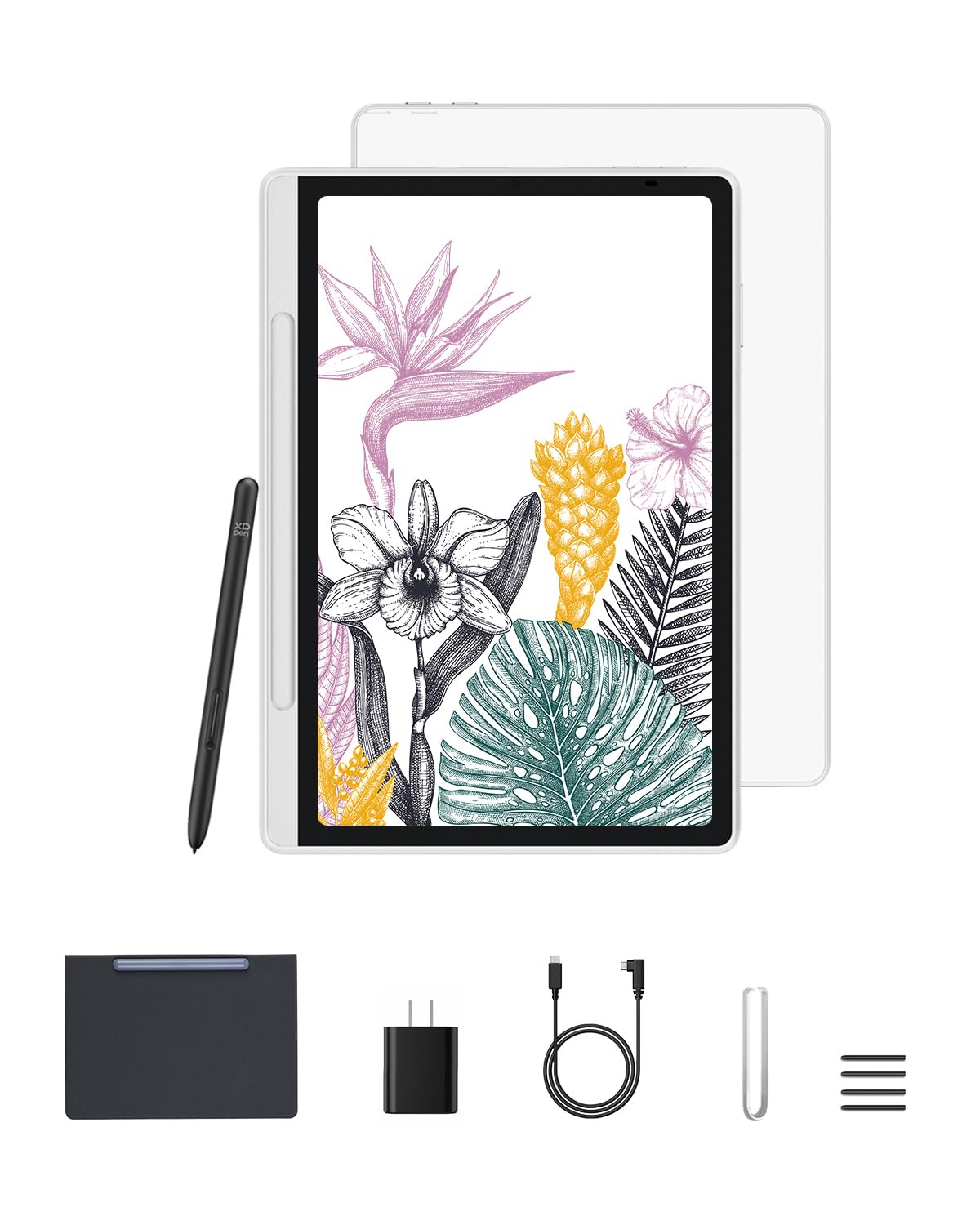
This standalone version of the XPPen Magic Note Pad doubles down on the sketching experience. The 10.95-inch X-Paper display with AG nano-etching delivers true paper friction, and the X3 Pro Pencil 2 supports 16384 pressure levels plus tilt recognition for natural shading. The 90Hz refresh rate eliminates line lag, making it competitive with dedicated drawing tablets.
The three color modes (Natural, Light Color, Black & White) let you switch between vibrant color notes, muted sketching, and reading mode. The TÜV-certified low blue light and anti-glare coating reduce eye strain during long sessions. It runs on Android 14 with Google Play access, so you can download drawing apps like Clip Studio Paint or Sketchbook. The pre-installed XPPen Notes app is included for life.
At 495g and 7mm thick, it is highly portable, and the battery-free stylus means you never need to pause for charging. The magnetic pen holder is strong. Battery life is adequate for a day of use, though some users report around 4% overnight drain. The included flip case lacks a built-in stand, which is a minor inconvenience for desk use.
Why it’s great
- Premium stylus with 16384 levels and tilt support for shading
- Excellent paper-like screen texture with anti-glare properties
- Full Android 14 with Google Play and lifetime XPPen Notes app
Good to know
- Battery shows minor overnight drain in standby
- Included folio cover does not function as a kickstand
- Narrow viewing angle is intentional but noticeable off-axis
7. Lenovo Idea Tab Pro

The Lenovo Idea Tab Pro is a large-screen option for users who want a big canvas for note-taking and media consumption. Its 12.7-inch 3K LCD display (2944×1840) with a 90Hz refresh rate provides sharp text and vibrant colors. The MediaTek Dimensity 8300 processor offers near-flagship performance, handling multiple productivity apps and light gaming with ease.
The included Tab Pen Plus supports Google Circle to Search, letting you search images or text by circling them directly on the screen. The 10200 mAh battery offers impressive endurance, easily lasting through a full day of use. The quad JBL Dolby Atmos speakers deliver rich sound for video lectures and entertainment. Wi-Fi 6E provides fast, modern connectivity.
The 16:10 aspect ratio makes the tablet wide in landscape mode, similar to a small laptop screen. It is heavy enough that one-handed use is impractical. The included folio case is functional but basic. The 45W fast charging requires Lenovo’s proprietary charger to reach full speed; standard USB-C chargers will charge it much more slowly. This is the best choice for users who need a massive canvas and raw processing power.
Why it’s great
- Large 12.7-inch 3K display with 90Hz refresh for writing
- Powerful Dimensity 8300 processor with Wi-Fi 6E
- Long battery life with 10200 mAh capacity
Good to know
- Heavy and cumbersome for one-handed use
- Requires proprietary 45W charger for fast charging
- No GPS module for standalone navigation
8. Penstar eNote 2

The Penstar eNote 2 is a dedicated digital notebook that refuses to be a general-purpose tablet. Its 10.3-inch 300 PPI E Ink display is pen-only—there is no touch functionality. This eliminates accidental inputs and forces you into a focused writing flow. The PureView screen technology delivers one of the whitest and brightest E Ink backgrounds available, closely mimicking the contrast of real paper.
The package includes two B5 digital styli, each with four spare nibs and an additional 10-nib kit, totaling 18 spare nibs. The stylus offers 8192 levels of pressure sensitivity, and the MyScript handwriting engine converts notes to editable text in real time. The AI voice-to-text feature supports 52 languages and can generate structured meeting summaries. Nine reprogrammable physical shortcut keys speed up navigation.
The 128 GB internal storage is generous for handwritten notes and documents. Cloud sync works with Google Drive, OneDrive, and Dropbox. The device supports over 30 document formats including PDF and EPUB. The main drawback is the fragility of the chassis—some users report cracks from drops of a few feet. It is the purest writing-focused E Ink tablet at this price point.
Why it’s great
- Exceptional pen-only E Ink display with bright white background
- Two styli included with 18 spare nibs for years of use
- AI voice-to-text and handwriting conversion with physical keys
Good to know
- Chassis is vulnerable to damage from accidental drops
- No touch capability; requires adaptation from standard tablets
- Limited calendar and email integration compared to full Android
9. VIWOODS AiPaper Bundle
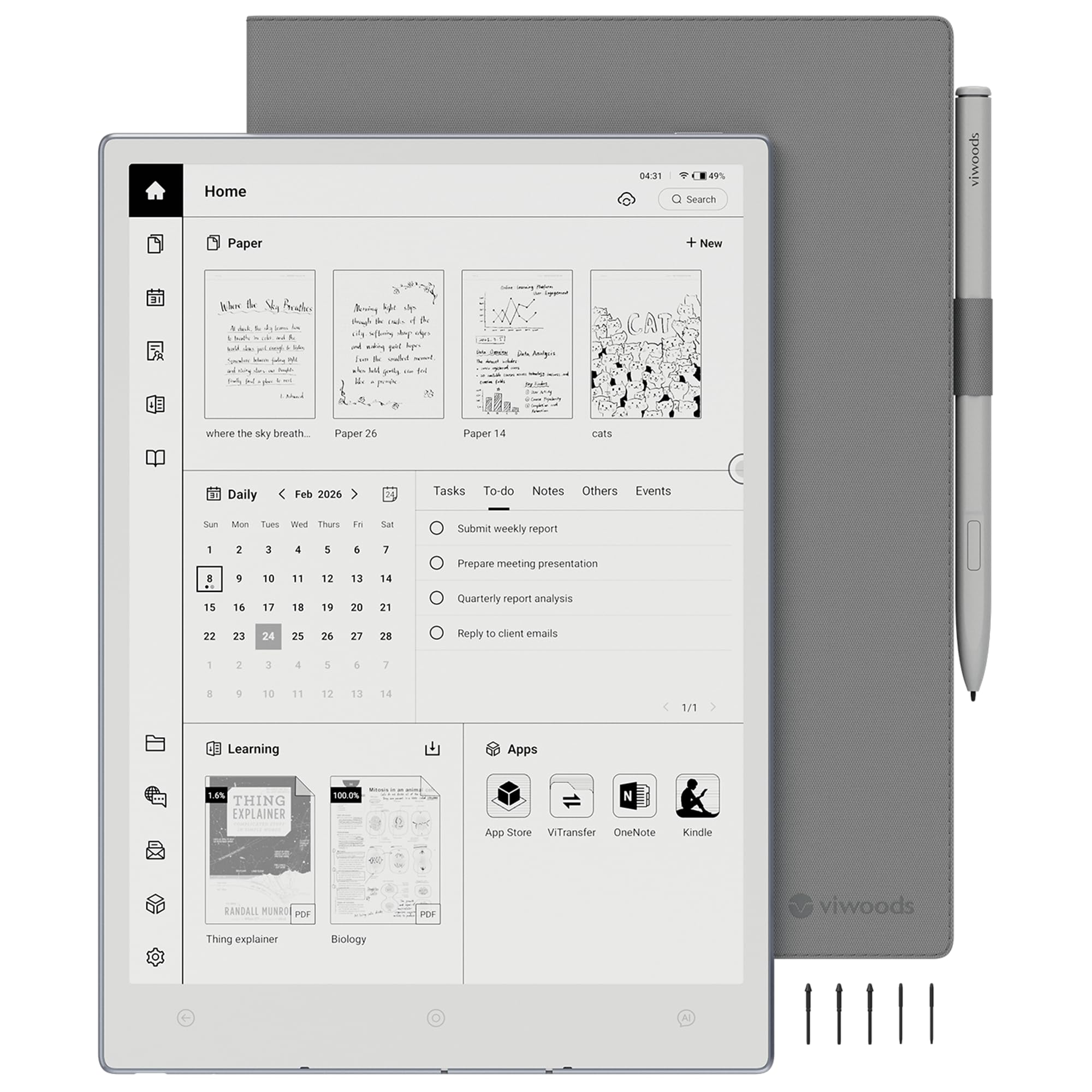
The VIWOODS AiPaper is an ultra-thin E Ink tablet designed for long-form reading and note-taking. At just 4.5mm thick and 370 grams, it is lighter than a standard paperback notebook. The 10.65-inch Carta 1300 E Ink display with 2560×1920 resolution provides exceptional crispness with minimal ghosting. The absence of a backlight means the screen background is naturally white and gentle on the eyes.
The W2 Stylus Pro offers 4096 pressure levels with a 750-micron pen gap, delivering a responsive writing feel. The AI-assisted tools include automatic note summarizing, to-do list generation, and handwriting-to-text conversion. The device runs a streamlined version of Android 13, which provides access to the Google Play Store for apps like the Kindle reader and Adobe PDF reader. The 128 GB storage offers ample space for documents and books.
Battery life is measured in weeks, and the included folio cover provides adequate protection. The minimalist design prioritizes a calm, distraction-free workspace. Some early software bugs have been reported, including text loss and calendar issues, but firmware updates have addressed many of these concerns. It is an excellent choice for users who prioritize portability, screen clarity, and a focused writing environment.
Why it’s great
- Ultra-portable 4.5mm profile and 370g weight
- High-resolution Carta 1300 display with minimal ghosting
- AI-assisted note tools with handwriting conversion and summaries
Good to know
- No built-in front light for reading in total darkness
- Early software experienced bugs; updates ongoing
- Limited cloud sync integration compared to full Android tablets
FAQ
Are 4096 pressure levels enough for professional note-taking?
Can I use a budget note-taking tablet for watching movies and browsing?
What is the main advantage of a matte display for note-taking?
Final Thoughts: The Verdict
For most users, the budget tablet for note taking winner is the Samsung Galaxy Tab S6 Lite because it combines a proven battery-free S Pen, a sturdy aluminum build, and reliable Android software at a price that undercuts almost everything else in the category. If you want a paper-like matte screen that is easier on your eyes, grab the TCL NXTPAPER 11 Gen 2. And for a distraction-free writing experience with weeks of battery life, nothing beats the Penstar eNote 2.

Mo Maruf
I created WellFizz to bridge the gap between vague wellness advice and actionable solutions. My mission is simple: to decode the research and give you practical tools you can actually use.
Beyond the data, I am a passionate traveler. I believe that stepping away from the screen to explore new environments is essential for mental clarity and physical vitality.