Our readers keep the lights on and my smoothie glass nicely filled. As an Amazon Associate, I earn from qualifying purchases.
The frustration of a cursor that lags, a click that clacks through a silent library, or a battery dying mid-presentation is a daily reality for anyone tethered to a laptop, tablet, or multi-monitor setup. Choosing a wireless pointer is no longer just about cutting the cord—it’s about matching the right sensor, ergonomic curve, and connection protocol to your specific workflow to eliminate friction entirely.
I’m Mohammad Maruf — the founder and writer behind WellFizz. I specialize in dissecting hardware specifications for everyday electronics, focusing on the measurable differences in sensor accuracy, battery longevity, and build materials that separate a truly productive device from one that ends up in a drawer.
Whether you are upgrading from a basic wired unit or seeking a replacement for a failing wireless model, this guide breaks down the essential specs and real-world performance of the top contenders to help you find your ideal bluetooth mouse for a seamless, quiet, and precise computing experience.
How To Choose The Best Bluetooth Mouse
Selecting the right wireless pointer requires looking past the brand name and focusing on three key pillars: how it connects, how it feels in your hand for eight hours, and how long it lasts before needing a charge or battery swap. The market splits between traditional optical sensors and niche trackball designs, each with a different impact on desk space and wrist strain.
Connectivity Protocol: Bluetooth vs. 2.4GHz vs. Tri-Mode
Bluetooth is the simplest option for laptops and tablets, requiring no USB port. However, a mouse that supports a 2.4GHz USB receiver offers a more stable, lag-free connection, which is crucial for tasks where cursor precision is critical. Tri-mode models let you switch between two Bluetooth channels and the receiver, allowing seamless hopping between a PC, Mac, and iPad without re-pairing.
Sensor Technology and DPI Range
Optical sensors with adjustable DPI (typically 800 to 4800) let you dial in cursor speed. A lower DPI is ideal for precision work like photo editing, while a higher DPI suits large multi-monitor setups. Trackball sensors flip the script—your thumb or finger moves the ball directly, reducing arm and shoulder motion, which is excellent for users with carpal tunnel concerns or tight desk spaces.
Ergonomics and Button Layout
An ergonomic shape isn’t just about a curved top—look for a contoured thumb rest, anti-slip side grips, and a hand orientation that matches your dominant hand. The number of programmable buttons (usually five to eight) and the inclusion of a horizontal scroll wheel can drastically speed up spreadsheet navigation and macro mapping for productivity users.
Quick Comparison
On smaller screens, swipe sideways to see the full table.
| Model | Category | Best For | Key Spec | Amazon |
|---|---|---|---|---|
| PHILIPS SPK7858 | Premium Ergonomic | Productivity Spreadsheets | 500 mAh / Dual Scroll | Amazon |
| SABLUTE MAM1 Pro | Trackball | Reducing Wrist Strain | 0/18° Tilt / 4800 DPI | Amazon |
| HP 400 Quiet | Mid-Range Quiet | 24-Month Battery Life | 6000 DPI / 24mo Battery | Amazon |
| iClever Dual-Mode | Budget Performance | All-Day Comfort Value | 2400 DPI / 50-Day Charge | Amazon |
| XBG B15pro | Feature-Rich Entry | Budget Tri-Mode Setup | 500 mAh / LED Display | Amazon |
In‑Depth Reviews
1. PHILIPS Ergonomic Wireless Mouse (SPK7858)

The PHILIPS SPK7858 is engineered specifically for the right-handed productivity user who lives inside spreadsheets and design software. Its standout feature is the dual scroll wheel setup: a tactile main wheel for vertical navigation and a dedicated thumb-side horizontal wheel for slicing through wide Excel columns or video timelines without dragging the mouse across the desk.
Under the hood, the 500 mAh battery delivers roughly 25 days of heavy 8-hour use, and an emergency five-minute charge provides an hour of tracking—a genuine safety net for the forgetful user. The adjustable 800-4000 DPI optical sensor offers five distinct levels, letting you swap between pixel-precise photo edits and fast multi-monitor sweeps instantly.
The contoured right-handed shell with an anti-slip thumb rest minimizes fatigue during long sessions, while the noise-reduced switches deliver truly library-quiet clicks. The inclusion of both USB-A and USB-C adapters in the dual 2.4G receiver eliminates the need for dongles or hubs, making this a seamless choice for modern laptops.
Why it’s great
- Dual scroll wheels speed up horizontal spreadsheet navigation dramatically.
- Emergency top-up feature is a genuine productivity saver on a low battery.
- Comes with both USB-A and USB-C receivers for universal compatibility.
Good to know
- Right-handed only design excludes left-handed users.
- The dotted scroll wheel texture can feel abrasive to some users.
2. SABLUTE MAM1 Pro Trackball Mouse

The SABLUTE MAM1 Pro takes a completely different approach to cursor control by replacing the traditional optical sensor with a thumb-operated trackball. This design eliminates the need to move your arm or wrist across the desk, instead requiring only thumb motion to glide the cursor across the screen—a game-changer for users with carpal tunnel sensitivity or limited desk real estate.
Its most distinct physical feature is the adjustable tilt mechanism, allowing you to lock the shell at 0° (flat) or 18° (angled). The 18° angle positions your hand in a more natural handshake posture, reducing forearm pronation and the pressure on the ulnar nerve. The rechargeable battery easily lasts multiple weeks on a single charge, and the soft ambient backlight can be toggled off for distraction-free work.
With eight programmable buttons and five DPI levels ranging from 800 to 4800, you can map macros for specific tasks and adjust tracking speed on the fly. It supports triple-device switching via two Bluetooth channels and a 2.4G receiver, which stores neatly in the magnetic base. Note that first-time trackball users should expect a one-to-two-week adaptation period.
Why it’s great
- The adjustable tilt angle (0°/18°) genuinely reduces wrist and forearm strain.
- Eight buttons offer extensive programmability for advanced workflows.
- Excellent battery life with a magnetic base for receiver storage.
Good to know
- Trackball requires a dedicated adaptation period for new users.
- Thumb-operated design may cause discomfort for users who prefer finger trackballs.
3. HP 400 Quiet Wireless Mouse
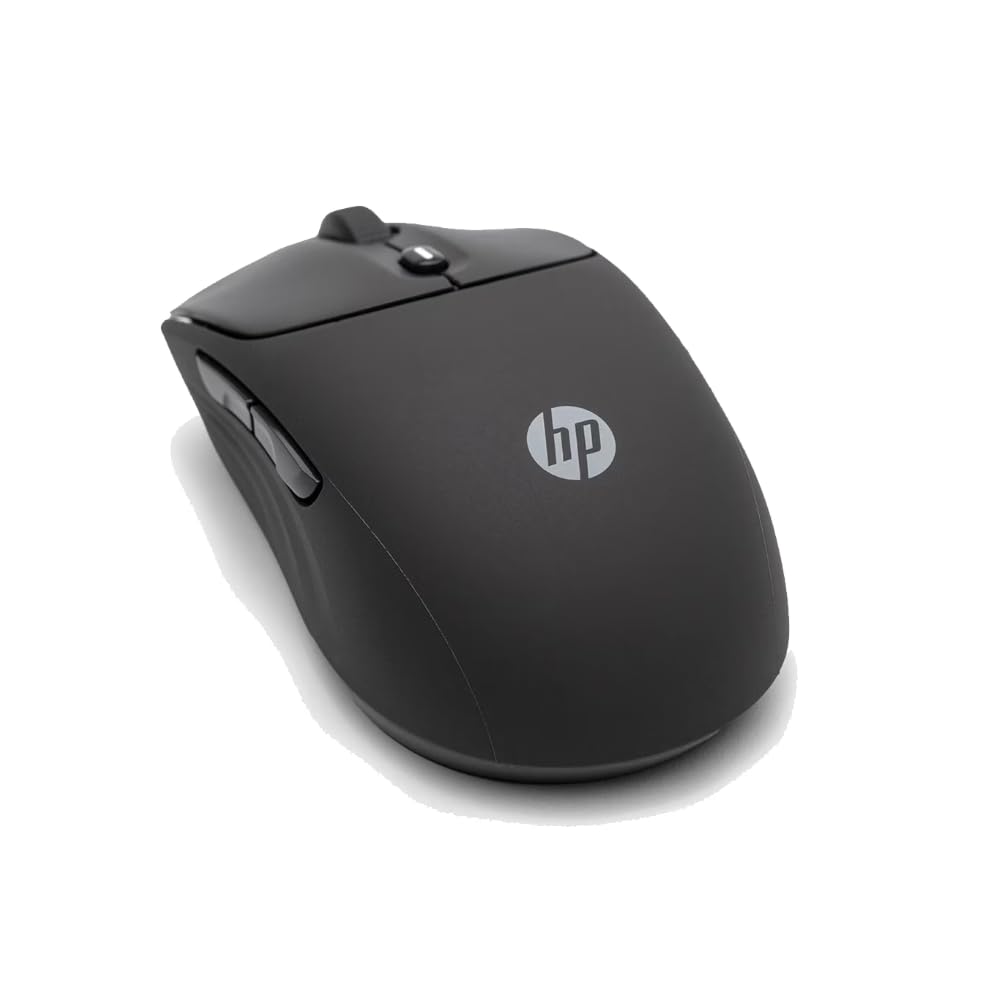
The HP 400 Quiet Wireless Mouse is a study in practical, no-fuss design. Its headline feature is the 24-month battery life from a single AA battery, which removes the anxiety of finding a charging cable mid-workday. HP claims this longevity is achieved through an efficient auto-sleep mechanism that activates after a period of inactivity.
The ambidextrous shape, wrapped in a soft silicone rubber coating, makes it easy to sanitize and comfortable for both left and right-handed users. The silicone finish also adds a tactile, non-slip grip that feels distinctly different from the hard plastic used on most mice. The mouse offers a maximum DPI of 6000, which is remarkably high for its class, ensuring smooth tracking even on challenging surfaces like glass.
Connectivity is handled via Bluetooth or a 2.4GHz dongle, and the Microsoft Wheel integration on the center button provides a convenient shortcut for accessing Windows features. At its core, this is an eco-conscious device, made with at least 40% post-consumer recycled materials and packaged in FSC-certified cardboard.
Why it’s great
- Two-year battery life from a single AA battery is the best in class.
- Soft silicone exterior is comfortable, grippy, and easy to clean.
- Ambidextrous design and recycled materials broaden its appeal.
Good to know
- No internal rechargeable battery means relying on disposables or eneloops.
- Lacks a dedicated DPI button on the top surface for quick adjustment.
4. iClever Dual-Mode Wireless Mouse

The iClever Dual-Mode mouse occupies a sweet spot for users who want a comfortable, reliable pointer without spending for premium branding. Its contoured shape is designed to reduce hand fatigue by roughly 50% compared to flat mice, and the black-gold aesthetic adds a subtle touch of style to any desk setup. The ambidextrous body accommodates most hand sizes comfortably.
Performance is handled by an 800-2400 DPI optical sensor, which is plenty for general office work, web browsing, and even some light creative tasks. The dual-mode connectivity lets you pair via Bluetooth or the included 2.4G USB dongle, switching between three devices with a single button press. The USB-C fast charging fills the internal battery in two hours and provides up to 50 days of typical use.
The silent click technology keeps the noise level below 30dB, making it suitable for libraries and open offices. The six buttons include forward and back navigation keys, though some users report accidentally pressing the side buttons during a standard grip. Overall, it delivers a premium feel at a price that undercuts many competitors.
Why it’s great
- Excellent battery life, often requiring only a few charges per year.
- Comfortable shape for large hands with a premium matte finish.
- USB-C charging eliminates the need for proprietary cables.
Good to know
- Side buttons are easily triggered accidentally during a standard grip.
- Scroll wheel lacks an infinite-spin mode for rapid scrolling.
5. XBG B15pro Tri-Mode Mouse

The XBG B15pro packs a surprising amount of technology into a compact and affordable package, starting with its integrated LED screen. This tiny display shows the current DPI level (800/1000/1200/1600/2400), real-time battery percentage, and active connection mode, eliminating the guesswork common to mice without software dashboards.
The tri-mode connectivity supports Bluetooth 5.0, Bluetooth 4.0, and a 2.4GHz dongle, allowing you to pair with three devices simultaneously and switch between them in under a second. This makes it exceptionally useful for users juggling a desktop PC, a laptop, and a tablet throughout the day. The built-in 500 mAh battery is recharged via USB-C, and the mouse automatically enters sleep mode after five minutes of inactivity.
Ergonomically, it features a contoured thumb rest and arched palm support with a matte finish that resists fingerprints. The silent buttons retain a tactile click feel without disturbing nearby colleagues. While the software does not allow button remapping, the physical controls are responsive, and the overall build quality punches well above its entry-level price point.
Why it’s great
- On-mouse LED display shows DPI and battery status without software.
- Tri-mode connectivity allows seamless switching between three devices.
- Quiet, tactile clicks with a comfortable contoured grip for travel.
Good to know
- Buttons are not remappable via any software utility.
- The auto-sleep timer is not adjustable from the hardware.
FAQ
Is a trackball mouse better for carpal tunnel syndrome?
Can I use a Bluetooth mouse without a USB receiver?
What DPI setting is best for a 4K monitor?
How do I know if my mouse is charging while plugged in?
Final Thoughts: The Verdict
For most users, the bluetooth mouse winner is the PHILIPS Ergonomic SPK7858 because it combines a dedicated horizontal scroll wheel, emergency fast-charge, and dual USB-A/C receivers into a package that genuinely accelerates spreadsheet and productivity workflows without compromise. If you need to reduce wrist strain and free up desk space entirely, grab the SABLUTE MAM1 Pro Trackball. And for the user who wants a no-compromise battery life that lasts years on a single AA, nothing beats the HP 400 Quiet.

Mo Maruf
I created WellFizz to bridge the gap between vague wellness advice and actionable solutions. My mission is simple: to decode the research and give you practical tools you can actually use.
Beyond the data, I am a passionate traveler. I believe that stepping away from the screen to explore new environments is essential for mental clarity and physical vitality.