Our readers keep the lights on and my smoothie glass nicely filled. As an Amazon Associate, I earn from qualifying purchases.
Standard letter-sized documents force architects, designers, and small business owners to either sacrifice detail or tile print across multiple pages. An A3 printer eliminates that compromise by handling tabloid (11×17) up to super-B (13×19) media, letting you see full schematics, marketing mockups, and spreadsheets in their intended layout without awkward scaling.
I’m Mohammad Maruf — the founder and writer behind WellFizz. I’ve spent years analyzing office hardware supply chains and breaking down the engineering specs that separate a reliable daily driver from a firmware-locked headache that eats printheads and blocks third-party toner.
To help you cut through the jargon-heavy product pages and find a model that genuinely fits your workflow, I’ve compiled this analysis of the best a3 printer options currently on the market.
How To Choose The Best A3 Printer
Picking an A3 printer is not the same as picking a standard desktop inkjet. The wider media path, higher expected volume, and unique consumable costs demand a sharper set of evaluation criteria. Here are the three spec categories that matter most.
Print Engine: Inkjet vs. Laser vs. DTF
For general office work and CAD drawings, an inkjet such as the Epson WorkForce Pro series uses Heat-Free PrecisionCore to reduce warmup time and energy consumption while delivering pigment-based inks that resist smudging on wide-format prints. Laser engines like the Canon imageCLASS and Brother MFC series excel at crisp monochrome text and sustained high-volume runs because toner doesn’t dry out or clog over idle weekends. If you are producing custom apparel transfers, a dedicated DTF printer like the MZK model uses CMYK plus white ink for direct-to-film workflows and demands more maintenance attention than either inkjet or laser.
Media Handling and Duplex Support
An A3 printer must physically accommodate paper up to 13×19 inches without curling or skewing. Automatic duplex (two-sided printing) is not universal on A3 models; some printers only duplex up to 11×17 while others handle 13×19 on both sides. Check the rear paper path — a straight-through rear feed is critical for thick cardstock and watercolor paper. The input tray capacity should match your daily volume: a 250-sheet tray works for light use, while a 500-sheet dual-tray setup suits a shared office environment.
Firmware Policy and Consumable Lock-In
Many modern printers use firmware updates to block non-genuine toner cartridges, a practice that can increase your per-page cost significantly. Epson and HP have been particularly aggressive with these updates, and some users report that declining firmware updates fixes the issue but may leave the printer vulnerable. Brother and Canon tend to have more permissive policies, though they still recommend genuine supplies. If you plan to use third-party cartridges or high-yield alternatives, prioritize models with a track record of firmware stability or verified workarounds.
Quick Comparison
On smaller screens, swipe sideways to see the full table.
| Model | Category | Best For | Key Spec | Amazon |
|---|---|---|---|---|
| Epson WF-7840 | Inkjet All-in-One | Wide-format office + scan/fax | 500-sheet capacity / 13×19 print | Amazon |
| Epson WF-7310 | Inkjet Print-Only | Low-cost wide-format B&W + color | 25 ppm black / 12 ppm color | Amazon |
| HP LaserJet 3101sdw | Monochrome Laser | High-volume B&W document teams | 35 ppm / 250-sheet tray | Amazon |
| Brother HL-L3220CDW | Color Laser Print-Only | Compact color business prints | 19 ppm color / auto duplex | Amazon |
| HP Color LaserJet 3201dw | Color Laser Print-Only | Fast color office output | 26 ppm color / dual-band Wi-Fi | Amazon |
| Canon MF665Cdw | Color Laser All-in-One | Reliable color office hub with warranty | 26 ppm / 50-sheet 2-sided ADF | Amazon |
| Canon D1620 | Monochrome Laser All-in-One | Ultra-high volume B&W offices | 45 ppm / 2,300-sheet max capacity | Amazon |
| Brother MFC-L3780CDW | Color Laser All-in-One | Small business color workflow | 31 ppm / single-pass duplex scan | Amazon |
| MZK A3 DTF | DTF Direct-to-Film | Custom apparel and textile printing | 2880×1440 dpi / 86 lb weight | Amazon |
In‑Depth Reviews
1. Epson WorkForce Pro WF-7840 Wireless All-in-One

For the user who needs wide-format printing up to 13×19, scanning, copying, and faxing in one chassis, the WF-7840 delivers a rare combination of capacity and connectivity. Its PrecisionCore Heat-Free inkjet technology produces 25 ppm in black and 12 ppm in color, which is respectable for an A3 all-in-one, and the 500-sheet paper capacity keeps the machine running during long print runs without constant reloading. The 50-page auto document feeder supports two-sided scanning, making multi-page invoice sets and schematics easier to digitize.
The DURABrite Ultra pigment inks dry instantly and resist smudging on coated and uncoated wide-format media, which is a tangible advantage for CAD plots and marketing collateral that get handled immediately after printing. Built-in dual-band Wi-Fi, Ethernet, Wi-Fi Direct, and support for Apple AirPrint and Mopria mean you can place this printer anywhere on the network without a dedicated print server. The 4.3-inch color touchscreen simplifies navigation through scan-to-email and shortcut workflows.
Long-term users report that the printer has handled over 12,000 pages across four years with a mix of branded and generic inks, though Epson’s aggressive firmware update prompts (which can block third-party cartridges) are a recurring frustration. The unit is physically large and heavy, so confirm your desk or cart can support it before purchasing. If you accept the occasional firmware nuisance, this is the most versatile single-machine A3 solution in its class.
Why it’s great
- Full A3 all-in-one with print, copy, scan, fax
- 500-sheet paper capacity handles high-volume workflows
- Pigment inks resist smudges on large-format prints
Good to know
- Firmware updates may block third-party ink cartridges
- Heavy footprint requires dedicated shelf or cart
- Scanner setup requires computer-based activation
2. Epson WorkForce Pro WF-7310 Wide-Format Printer
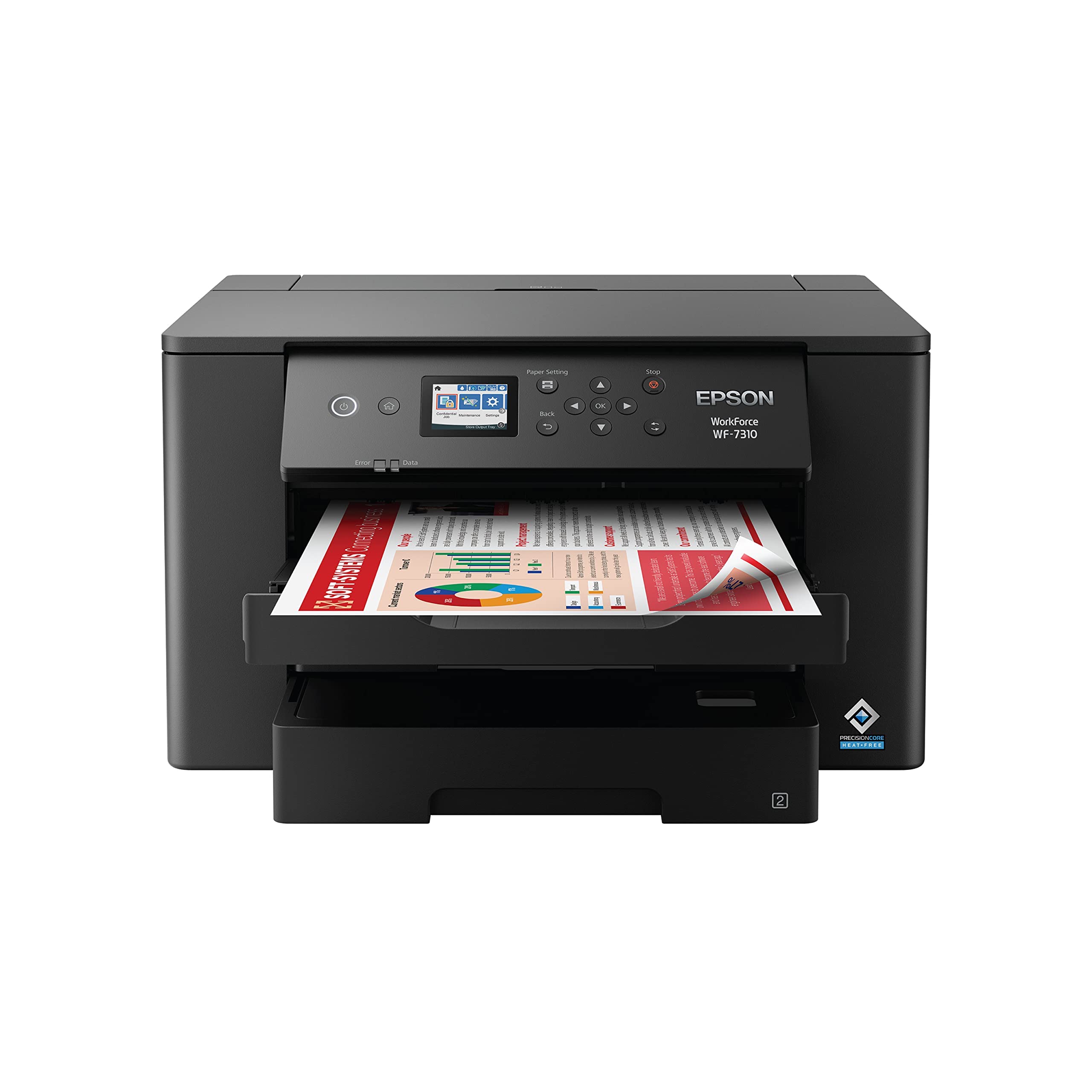
The WF-7310 strips away the scanner and fax hardware to deliver the same PrecisionCore Heat-Free print engine as the WF-7840 at a lower entry cost. If your workflow is print-only and you already own a standalone document scanner, this single-function approach avoids paying for features you won’t use. It prints at the same 25 ppm black and 12 ppm color speeds across A3 media up to 13×19, and the auto duplex function works reliably for both letter and tabloid pages.
Artists and small business owners appreciate how the DURABrite Ultra pigment inks handle textured media — one reviewer confirmed clean watercolor paper feeding with no jams, which is a meaningful test for anyone printing fine-art reproductions or handmade cardstock. The 500-sheet paper capacity is split across two 250-sheet trays and a rear feed slot, giving you flexibility to load different media types simultaneously. The 2.4-inch color display is adequate for basic settings, and the Epson Smart Panel App handles setup and monitoring from a phone.
The trade-off is that this model uses the same firmware architecture as the WF-7840, meaning Epson’s cartridge authentication updates can still block third-party consumables. You also lose the integrated ADF and flatbed scanner, so if you ever need to digitize a wide-format document, you will need a separate scanning solution. For users who print A3 pages in volume and already have a scanning strategy, this is the most cost-effective Epson wide-format printer available.
Why it’s great
- Lower entry cost by removing scanner/fax hardware
- Reliable media path for textured and thick paper
- 500-sheet dual-tray system for mixed media workflows
Good to know
- No built-in scanner or document feeder
- Same firmware lock-in risks as other Epson models
- Small display may feel cramped for advanced settings
3. HP LaserJet Pro MFP 3101sdw

For teams that print high volumes of black-and-white documents — contracts, reports, bulletins — the HP LaserJet Pro MFP 3101sdw delivers 35 ppm with a 50-sheet auto document feeder and automatic duplex printing. Its monochrome laser engine produces sharp, consistent text even on recycled paper, and the first page out in 7 seconds means you are not waiting around for warmup. The 250-sheet input tray is standard for the class, and the white chassis keeps the footprint compact enough for a shared office counter.
Reviewers praise the wireless reliability: the printer reconnects to Wi-Fi automatically after power outages, which is a small but critical detail in an office where downtime costs money. The HP Smart app handles mobile printing and monitoring without requiring a USB tether, and the LED control panel offers clear status indicators. Multiple users have noted that declining firmware updates preserves compatibility with lower-cost third-party toner cartridges, though HP’s default position is to recommend genuine supplies.
The main limitation is that this is a monochrome machine — if you need color A3 output, look elsewhere. Some users have reported that initial setup can be delayed by carrier shipping issues rather than the product itself, and the 250-sheet tray may feel undersized for a 10-person office that runs daily print jobs over 200 pages. For pure B&W reliability at a mid-range price point, this is one of the most straightforward choices on the market.
Why it’s great
- Fast 35 ppm monochrome output with 7-second first page
- Rock-solid Wi-Fi reconnection after power cycling
- Automatic duplex printing and 50-sheet ADF included
Good to know
- No color printing capability
- 250-sheet tray may require frequent refills in busy offices
- HP firmware can block third-party toner updates
4. Brother HL-L3220CDW Color Laser Printer

The Brother HL-L3220CDW packs a full-color laser print engine into a 15.7-inch cube, making it one of the most space-efficient color lasers that still handles tabloid (11×17) output. At 19 ppm for both color and black-and-white, it is not the fastest in this roundup, but its compact size and 250-sheet input tray make it a natural fit for a home office or small team that needs professional color documents without dedicating half a desk to the machine. The auto duplex feature works reliably for double-sided color brochures.
Brother’s TN229 toner series offers standard, high-yield, and super-high-yield cartridges, giving you flexibility to shift per-page cost based on volume. The printer’s heavy chassis (around 50 pounds) dampens vibration and keeps prints aligned, which matters for 11×17 layouts where even a millimeter of skew is visible. Wireless setup is straightforward for Windows and Android users, though Mac users have reported needing to create a self-signed certificate for driver communication — a workaround that requires some technical comfort.
The HL-L3220CDW is print-only, so there is no scanner, copier, or fax. If your workflow requires those functions, you will need a separate device. Some users also note that high-resolution files (300 DPI or above) or filenames with unusual characters can cause the print queue to silently drop jobs on certain macOS versions. If you need network scanning or heavy-duty A3 color production, this compact laser is better suited as a dedicated color print station alongside a monochrome workhorse.
Why it’s great
- Smallest color laser footprint for A3 capability
- Flexible toner yield options reduce per-page cost
- Reliable duplex with minimal skew on tabloid paper
Good to know
- No scanner, copier, or fax functions
- Mac setup may require certificate workaround
- Heavy unit at ~50 pounds, not easily moved
5. HP Color LaserJet Pro 3201dw

When your office needs full-color prints at 26 ppm with minimal warmup, the HP Color LaserJet Pro 3201dw delivers those speeds using the next-generation TerraJet toner formulation that produces more vivid color saturation on coated stocks. It is a print-only device (no scanner or fax) with a 250-sheet input tray and automatic duplex, making it a straightforward color-output station for a workgroup that already has a dedicated copier or scanner elsewhere. Dual-band Wi-Fi with self-reset automatically reconnects after network interruptions, reducing help-desk tickets.
The TerraJet system is designed to deliver higher page yields in a physically smaller cartridge, which helps offset the historically high cost of HP color toner. Early reviews indicate that the starter cartridges produce excellent output quality, but replacement cartridges (the HP 218a series) have drawn criticism for inconsistent print density and fading after only a few hundred pages. Multiple users report spending hundreds on toner only to see degraded output, which suggests that total cost of ownership deserves careful calculation before committing to this model.
Customer support experiences have been polarizing — some buyers report fast replacements and helpful phone support, while others describe a cycle of refurbished replacements that fail again within months. The compact, clean white design fits modern offices, and print speeds genuinely hold at 25-26 ppm in real-world use. If you are willing to use only HP genuine cartridges and accept some risk on replacement quality, this is a fast color laser for document-heavy environments that do not require photographic color accuracy.
Why it’s great
- Fast 26 ppm color output with TerraJet vivid toners
- Dual-band Wi-Fi with automatic reconnect feature
- Compact footprint for a color laser in this speed class
Good to know
- Replacement toner quality complaints from multiple users
- Print-only unit — no scan or copy functions
- Firmware update policy blocks third-party cartridges
6. Canon Color imageCLASS MF665Cdw

The Canon imageCLASS MF665Cdw is a 4-in-1 color laser that prints, scans, copies, and faxes at 26 ppm in both monochrome and color, with a 50-sheet auto document feeder that handles two-sided scanning in a single pass. That single-pass duplex ADF is a genuine time-saver for offices that digitize double-sided contracts or multi-page reports — it scans both sides simultaneously rather than flipping the page, cutting processing time nearly in half. The 250-sheet standard cassette plus a 1-sheet multipurpose tray covers most daily on-demand loads.
Canon bundles a 3-year limited warranty, which is longer than the typical 1-year coverage from competitors and signals confidence in the print engine’s durability. The 5-inch color touchscreen gives you an Application Library interface that can shortcut to your most-used scan destinations and copy settings, reducing the number of screen taps per job. The Canon PRINT app supports both Apple AirPrint and Mopria for mobile device printing, and the toner yield (075 series) offers standard and high-capacity options for right-sizing your supply costs.
Setup is straightforward for Windows and Linux users — one reviewer had it running on Zorin within an hour after a driver update — but Mac users have reported intermittent software conflicts that cause print jobs to stall mid-queue. The color reproduction is less punchy than HP’s TerraJet output, though it is more than adequate for business graphics and internal presentations. Some users also find the touchscreen interface slower than button-based controls. If you need a durable color all-in-one with a strong warranty and single-pass duplex scanning, this is the pick.
Why it’s great
- Single-pass duplex ADF cuts scanning time in half
- 3-year limited warranty provides long-term peace of mind
- Intuitive 5-inch color touchscreen with customizable shortcuts
Good to know
- Mac software compatibility has been inconsistent
- Color output less vivid than some competing laser engines
- Standard 250-sheet tray may need upgrading for high volume
7. Canon imageCLASS D1620 Monochrome Laser

For offices that burn through thousands of black-and-white pages per week, the Canon imageCLASS D1620 prints at 45 ppm with a maximum paper capacity of 2,300 sheets (base 550 plus optional cassette modules). That throughput makes it one of the fastest monochrome lasers in the A3-capable space, and the 3-year warranty reinforces its suitability for demanding environments like legal firms, accounting departments, and school administration. The D1620 also functions as a scanner and copier, with a 50-sheet ADF and auto duplex.
Users consistently report that the D1620 is “plug in and use” — no subscription required, no aggressive firmware gatekeeping, and no forced account registration. The Canon Genuine Toner 121 yields approximately 5,000 pages per cartridge, and the print engine has proven reliable across six-plus years of weekly use; one reviewer noted constant homeschooling output since 2019 with zero issues. The touchscreen interface, while basic by modern standards, is responsive enough for copy density adjustments and scan-to-email configuration.
The primary catch is that the D1620 is strictly monochrome — if you ever need color output, you will need a separate device. The unit is also large and heavy, designed for a dedicated copier station rather than a compact desk. Scan-to-email setup requires navigating the Remote UI and may need one call to Canon support to configure correctly. For any buyer whose primary need is fast, reliable, high-volume B&W output with A3 capability, this machine is the gold standard in its category.
Why it’s great
- Blazing 45 ppm monochrome engine with 2,300-sheet capacity
- Three-year warranty and long-term reliability record
- No subscription or firmware lockdown for third-party toner
Good to know
- Monochrome only — no color output available
- Large footprint requires dedicated floor or counter space
- Scan-to-email configuration may require support call
8. Brother MFC-L3780CDW Color All-in-One

The Brother MFC-L3780CDW is a full-color laser all-in-one designed for small businesses that need print, copy, scan, and fax in one machine with speeds up to 31 ppm in both black and color. Its single-pass duplex copy and scan function processes both sides of a document in one pass, which is ideal for digitizing two-sided contracts and client forms without manual re-feeding. The 250-sheet standard tray is supplemented by a manual feed slot for envelopes and heavyweight media.
Brother’s TN229 toner series — available in standard, high-yield, and super-high-yield — lets you scale consumable costs to match your monthly volume. The refresh subscription trial is optional and not required for normal operation; many users simply buy high-yield cartridges and manage replacements manually without ever touching the subscription program. Wireless connectivity covers dual-band Wi-Fi, Gigabit Ethernet, Wi-Fi Direct, and USB, giving you deployment flexibility across different office layouts. Alexa integration is a novelty but not essential for most workflows.
Setup is straightforward for Windows and Android users — AirPrint works instantly for iOS devices — though a few users noted that a hidden protective sheet under the toner cartridges must be removed before first use to avoid blank pages. The print quality is excellent for business documents but not designed for high-end photographic reproduction; colors are accurate enough for proposals and promotional materials. Replacement cartridge costs are on the higher side, and the subscription program’s terms have frustrated some users when payment methods changed. For a balanced color laser AIO that prioritizes speed and ease of use, this Brother model is a strong contender.
Why it’s great
- Fast 31 ppm color output with single-pass duplex scanning
- Flexible TN229 toner yields for cost-per-page control
- Dual-band Wi-Fi, Ethernet, and USB connectivity options
Good to know
- Replacement cartridges are relatively expensive
- Subscription program policies have caused user frustration
- Not suitable for photo-quality color reproduction
9. MZK A3 DTF Printer
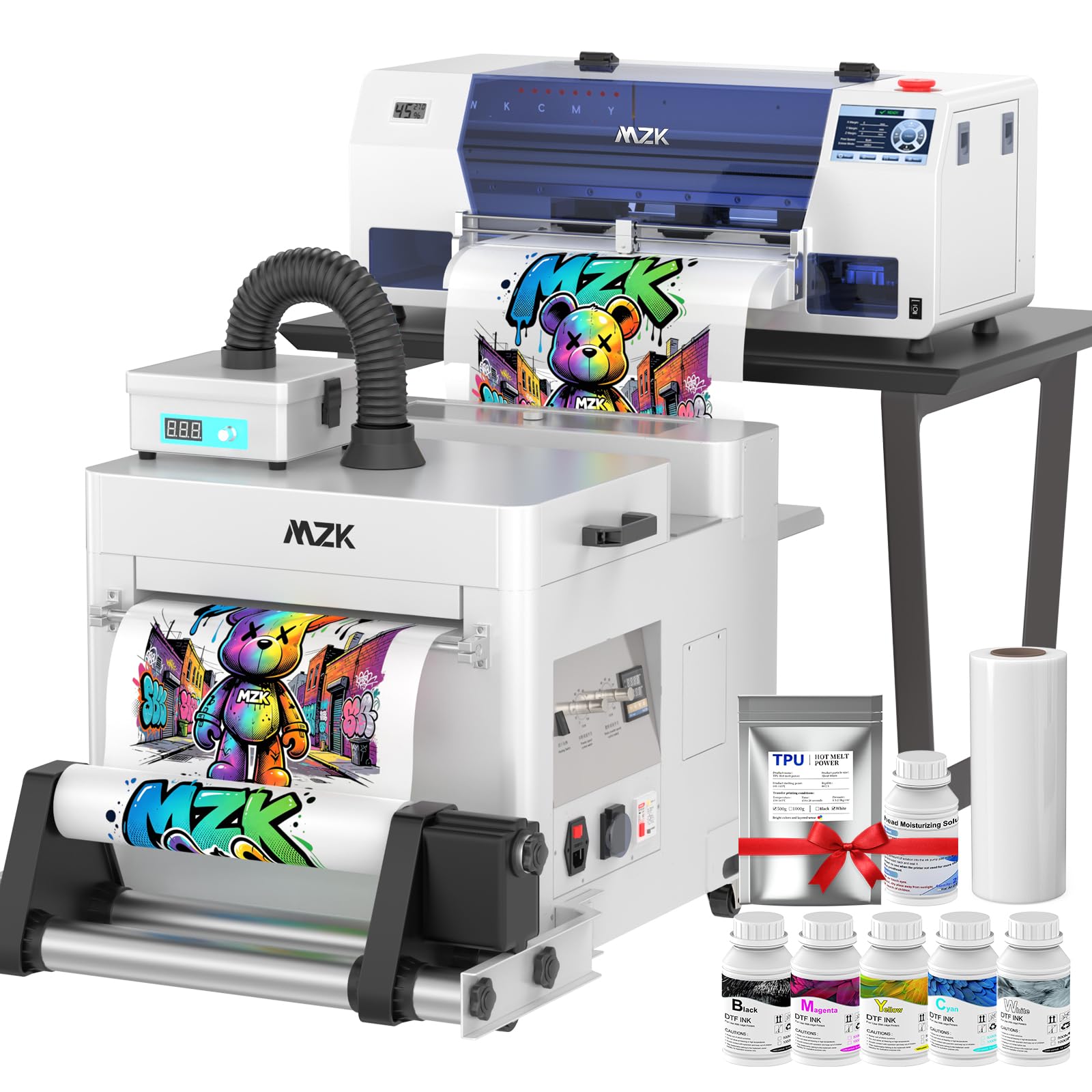
The MZK A3 DTF Printer is a direct-to-film machine built for custom apparel shops, print-on-demand businesses, and t-shirt studios that need to transfer designs onto cotton, polyester, denim, and other fabrics. Its Epson i3200 industrial printhead pushes a 2880×1440 dpi resolution at speeds roughly five times faster than entry-level L1800-based DTF printers, completing an A3 design in about two minutes. The G7 color calibration and included ICC curves ensure that screen colors match the final print more consistently than consumer-grade transfer printers.
Unlike standard office printers, this unit requires ongoing maintenance of CMYK plus white ink circulation — the continuous white ink stirring system prevents pigment sedimentation, and the “Holiday Mode” auto-cleaning function runs periodic nozzle purges during downtime to prevent clogs. The 5-inch multi-function touchscreen gives you direct control over print settings, ink flow, and maintenance cycles. The included 2-year ink and powder program sends five 250ml bottles of ink plus 500g of hot melt powder every two months, covering a significant portion of consumable cost.
This is a specialized production tool, not a general office printer. It weighs 86 pounds, requires a dedicated workspace with good ventilation, and demands a willingness to learn DTF workflow basics (film printing, powder application, heat press transfer). Customer support from MZK is heavily praised in user reviews, with responsive technical engineers who help with initial setup and troubleshooting. If your goal is selling custom apparel and the learning curve does not intimidate you, this machine offers industrial-grade output at a fraction of the cost of commercial DTF systems.
Why it’s great
- Industrial i3200 printhead delivers 5x faster output than L1800 models
- G7 color calibration and ICC profiles ensure accurate color matching
- Included 2-year ink and powder program reduces supply costs
Good to know
- Requires dedicated space and willingness to learn DTF workflow
- Heavy 86-pound unit not suitable for mobile use
- Ongoing maintenance needed for white ink circulation system
FAQ
Can I use third-party ink or toner in an A3 printer?
What paper sizes are actually supported in the auto duplex mode?
Do I need a dedicated scanner or can an all-in-one handle A3 scanning?
Final Thoughts: The Verdict
For most users, the best a3 printer winner is the Epson WorkForce Pro WF-7840 because it combines full A3 printing, scanning, copying, and faxing with a 500-sheet capacity and reliable PrecisionCore technology at a mid-range price. If you want pure speed and no color complexity, grab the Canon imageCLASS D1620. And for custom apparel production, nothing beats the MZK A3 DTF Printer.

Mo Maruf
I created WellFizz to bridge the gap between vague wellness advice and actionable solutions. My mission is simple: to decode the research and give you practical tools you can actually use.
Beyond the data, I am a passionate traveler. I believe that stepping away from the screen to explore new environments is essential for mental clarity and physical vitality.