Our readers keep the lights on and my smoothie glass nicely filled. As an Amazon Associate, I earn from qualifying purchases.
A mismatched keyboard and mouse chain your workflow to a single desk, a single device, and a single cable. You lose time hunting for the USB receiver, tolerate click noise that breaks your focus, and accept wrist fatigue from gear designed for short bursts, not full workdays. The right Bluetooth combo fixes all of that — it lets you float between your laptop, tablet, and phone without plugging anything in, and it matches the quiet rhythm of a shared office or a late-night home desk.
I’m Mohammad Maruf — the founder and writer behind WellFizz. I’ve spent years cutting through the spec sheets and marketing claims on Amazon to isolate what actually separates a reliable Bluetooth keyboard and mouse from one you’ll regret within a month: switch connectivity, battery architecture, key switch type, and palm support geometry.
This guide ranks the most refined bluetooth keyboard and mouse combos on the market, balancing multi-device switching, silent operation, and ergonomic design so you can match the right set to your desk setup and daily workload.
How To Choose The Best Bluetooth Keyboard And Mouse
A Bluetooth keyboard and mouse is a long-term desk fixture. The wrong pick gives you a battery that dies mid-call, a mouse that lags when you switch to Bluetooth, or a keyboard that lacks the numpad you need for spreadsheets. Focus on three anchor specs before anything else.
Connection Protocol: Bluetooth 5.0 vs. 2.4GHz vs. Dual-Mode
Bluetooth 5.0 offers solid range and lower power draw than older versions, but some operating systems, particularly Linux and older Windows builds, handle Bluetooth stacks inconsistently. A combo with a 2.4GHz USB receiver provides a lag-free fallback for the primary computer. Dual-mode sets (like the Samsers and ProtoArc KM60) let you hot-swap between a 2.4GHz desktop and a Bluetooth tablet without re-pairing. If you switch between three devices daily, dual-mode is non-negotiable.
Key Switch Type: Scissor-Switch vs. Low-Profile Mechanical
Scissor-switch keyboards (found on the Samsers, Logitech MK650, and Macally) deliver a short, quiet stroke with a crisp bottom-out — ideal for open offices and fast typists who want minimal finger travel. Low-profile mechanical switches (Satechi SM3) add tactile feedback and a deeper sound profile without the full height of a traditional mechanical board. The trade-off: mechanical boards are heavier, louder, and more expensive. For a shared workspace, prioritize scissor-switch silence; for a personal desk where feel matters most, go low-profile mechanical.
Ergonomics: Wrist Rest, Split Frame, and Mouse Contour
A flat keyboard forces your wrists into ulnar deviation. An integrated padded wrist rest (ProtoArc KM60, Logitech MK650) or a curved split frame (ProtoArc EKM01 Plus) reduces that bend significantly. Mouse ergonomics matter equally — a sculpted right-handed shape beats an ambidextrous flat puck for long sessions. Look for adjustable DPI (1000-2400 is the useful range) and side buttons you can program for forward/back navigation. If you type more than four hours a day, skip the budget flat sets and invest in a combo with real contour support.
Quick Comparison
On smaller screens, swipe sideways to see the full table.
| Model | Category | Best For | Key Spec | Amazon |
|---|---|---|---|---|
| ProtoArc EKM01 Plus | Premium Ergonomic | All-day typing with wrist strain relief | Split curved frame + memory foam wrist rest | Amazon |
| Logitech MK955 Signature Slim | Premium Slim | Large hands & quiet multi-device switching | SmartWheel scroll + SilentTouch 90% quieter clicks | Amazon |
| Logitech MK650 Combo for Business | Mid-Range Secure | IT-secure environments & long battery life | Logi Bolt Secure Connections + 36-month keyboard battery | Amazon |
| Satechi SM3 Mechanical | Premium Mechanical | Typists who want tactile feedback with backlight | Low-profile brown switches + white LED backlight | Amazon |
| Macally Premium Mac Combo | Mid-Range Mac | MacBook/iMac users wanting aluminum aesthetic | 110 scissor-switch keys + 20 macOS shortcut keys | Amazon |
| ProtoArc KM60 | Mid-Range Value | Budget-conscious buyers needing a wrist rest | Leather-texture wrist rest + 63g ultra-light mouse | Amazon |
| Samsers Wireless Combo | Entry-Level Dual-Mode | Users wanting 2.4GHz & Bluetooth on a tight budget | Dual Bluetooth 5.0 + 2.4GHz + 280mAh/300mAh batteries | Amazon |
In‑Depth Reviews
1. ProtoArc EKM01 Plus

The EKM01 Plus uses a curved, split keyframe that angles your wrists naturally — no forced pronation, no ulnar deviation. The scooped keycaps match fingertip contours, while the cushioned memory foam wrist rest supports the palm base rather than compressing the carpal tunnel. This is the only combo in the mid-to-premium range that tackles ergonomics at the skeletal level, not just with a detachable pad.
Connectivity covers dual Bluetooth plus a 2.4GHz USB receiver, switching between three devices via a single press. The 500mAh batteries in both keyboard and mouse recharge through USB-C, and auto-sleep kicks in after 30 minutes of inactivity. The sculpted mouse includes a thumb rest and forward/back buttons, though some users report accidental rear button presses during heavy clicking sessions.
Keystrokes are quiet and responsive with scissor-switch internals — not as tactile as a mechanical board, but discreet enough for shared workspaces. The full-size layout includes a numeric keypad and spans 20.75 inches wide, so measure your desk before ordering. For anyone logging six-plus hours of typing daily, this is the most ergonomic investment in the category.
Why it’s great
- Curved split frame reduces wrist strain dramatically
- Memory foam wrist rest stays supportive through long shifts
- USB-C rechargeable with 30-min auto-sleep power save
Good to know
- Very wide footprint (20.75 inches) — not for compact desks
- Forward/back mouse buttons positioned above thumb; can be hit accidentally
- No backlighting on the keys
2. Logitech MK955 Signature Slim

Logitech’s MK955 takes the laptop-style low-profile keyboard and mates it with the M750 L mouse, which uses SilentTouch technology to reduce click noise by 90 percent. The keyboard keys are whisper-quiet with a short, crisp travel that feels familiar to anyone coming from a MacBook or Ultrabook. The full-size layout includes a numeric keypad and dedicated media keys, all under a graphite finish made from 48 percent post-consumer recycled plastic.
The M750 L mouse is contoured for larger hands — wider than the standard Signature mouse, with a SmartWheel that auto-shifts between notched scrolling and free-spin mode. You can pair via Bluetooth or the Logi Bolt USB receiver and switch between three devices with one tap. The Logi Options+ app lets you customize shortcuts for the keyboard and mouse buttons, including copy, paste, and screen capture.
Battery life runs on replaceable AA cells — 24 months for the mouse and 36 months for the keyboard, which edges out rechargeable combos in long-term convenience. The only drawback is the lack of a wrist rest on the keyboard itself; you will need a separate pad for optimal ergonomics during all-day sessions.
Why it’s great
- SilentTouch mouse clicks are nearly inaudible in an open office
- SmartWheel auto-switches between clicky and free-spin scrolling
- AA batteries last up to 36 months — no charging cables needed
Good to know
- No built-in wrist rest on the keyboard
- Logi Bolt receiver required for secure mode; Bluetooth only for general use
- Setup of additional computers with the Bolt dongle is poorly documented
3. Logitech MK650 Combo for Business

The MK650 is engineered for IT-managed environments where connection security and fleet deployment take priority over flashy features. Logi Bolt technology uses Bluetooth Low Energy with Security Mode 1, Level 4 encryption, and the receiver refuses to pair with non-Bolt devices — a meaningful barrier against keylogging in corporate or government settings. The keyboard includes a subtle 2-inch integrated palm rest that softens wrist angle without adding bulk.
Typing feel is scissor-switch, very light, and very quiet — comparable to an IBM Selectric in key actuation force, which reduces finger fatigue during marathon documentation sessions. The mouse uses Logitech’s SmartWheel for automatic scrolling mode switching and has a contoured shape with soft rubber side grips. AA batteries power both units, with the keyboard lasting up to 36 months and the mouse up to 24 months.
The main compromise is the lack of Bluetooth-only mode for devices without a USB-A port, and the function keys default to media controls rather than F-keys — you must hold Fn+Esc to toggle function lock. For a home user who does not need enterprise security, the Logitech MK955 or ProtoArc KM60 delivers a similar typing experience at a comparable or lower cost.
Why it’s great
- Enterprise-grade encryption with Logi Bolt secure connection
- Ultra-light scissor-switch keys reduce typing strain
- Integrated palm rest and contoured mouse for all-day comfort
Good to know
- Function keys default to media controls; requires toggle to revert
- No backlighting and no rechargeable battery — AA-powered only
- Bluetooth-only mode unavailable; receiver needed for initial setup
4. Satechi SM3 Mechanical Keyboard

The SM3 is the only mechanical keyboard in this lineup, using low-profile brown switches that deliver a tactile bump at actuation without the loud click of full-height blues. The aluminum case adds weight and stability — no flex when you type aggressively. White LED backlighting offers 14 patterns and three brightness levels, giving the desk a subtle premium glow without the rainbow distraction of gaming gear.
Connectivity is versatile: dual Bluetooth 5.0 channels, a 2.4GHz USB receiver, and a USB-C wired mode — switch between up to four devices. The 2500mAh battery is the largest in the group, supporting weeks of mixed-use charge. The keyboard ships with both Mac and Windows keycaps (including two extra Alt keys) so you can match your OS layout immediately. Note: the mouse is not included — this is a keyboard-only purchase.
The low-profile design keeps the typing angle flat, which reduces wrist extension compared to tall mechanical boards, but there is no integrated wrist rest. Some users report Bluetooth input lag on Windows PCs; using the included USB dongle or wired mode eliminates the issue entirely. For typists who want a satisfying tactile feel and a premium build, the SM3 is the clear mechanical leader.
Why it’s great
- Low-profile brown switches offer tactile feedback without loud noise
- 2500mAh battery lasts weeks on a single charge
- Includes both Mac and Windows keycap sets in the box
Good to know
- Mouse not included — keyboard-only purchase
- Bluetooth input lag present on some Windows PCs; dongle or wired mode recommended
- No integrated wrist rest
5. Macally Premium Bluetooth Combo

Macally’s combo is purpose-built for Mac users who want Apple-like aesthetics — an aluminum silver finish that matches the iMac and MacBook Pro — but with more features than the Magic Keyboard offers. The 110-key keyboard includes 20 macOS shortcut keys for Mission Control, brightness, and volume controls, and the scissor-switch keys are quieter and have a slightly deeper travel than Apple’s butterfly switches.
The mouse is ambidextrous and silent, with three DPI modes (1200/1600/2000) and a scroll wheel that clicks without the hollow echo of Apple’s Magic Mouse. Bluetooth pairs with up to three devices, and the keyboard and mouse each have built-in rechargeable batteries — 800mAh for the keyboard and 300mAh for the mouse. Charging is via Micro-USB, a dated connector choice that feels out of place in 2025.
Battery life runs about two to three weeks on a full charge, with the mouse draining faster than the keyboard — a common complaint. The lack of a low-battery indicator leaves you guessing until the cursor stops moving. For the price, this is the most faithful Mac-oriented combo available, though the ProtoArc KM60 offers similar performance with USB-C charging at a lower cost.
Why it’s great
- Aluminum design blends perfectly with Apple desktop setups
- 20 macOS-specific shortcut keys boost workflow
- Silent mouse with three adjustable DPI levels
Good to know
- Micro-USB charging (not USB-C) feels outdated
- No low-battery indicator — mouse may cut out without warning
- Battery life averages 2-3 weeks; mouse drains faster than keyboard
6. ProtoArc KM60
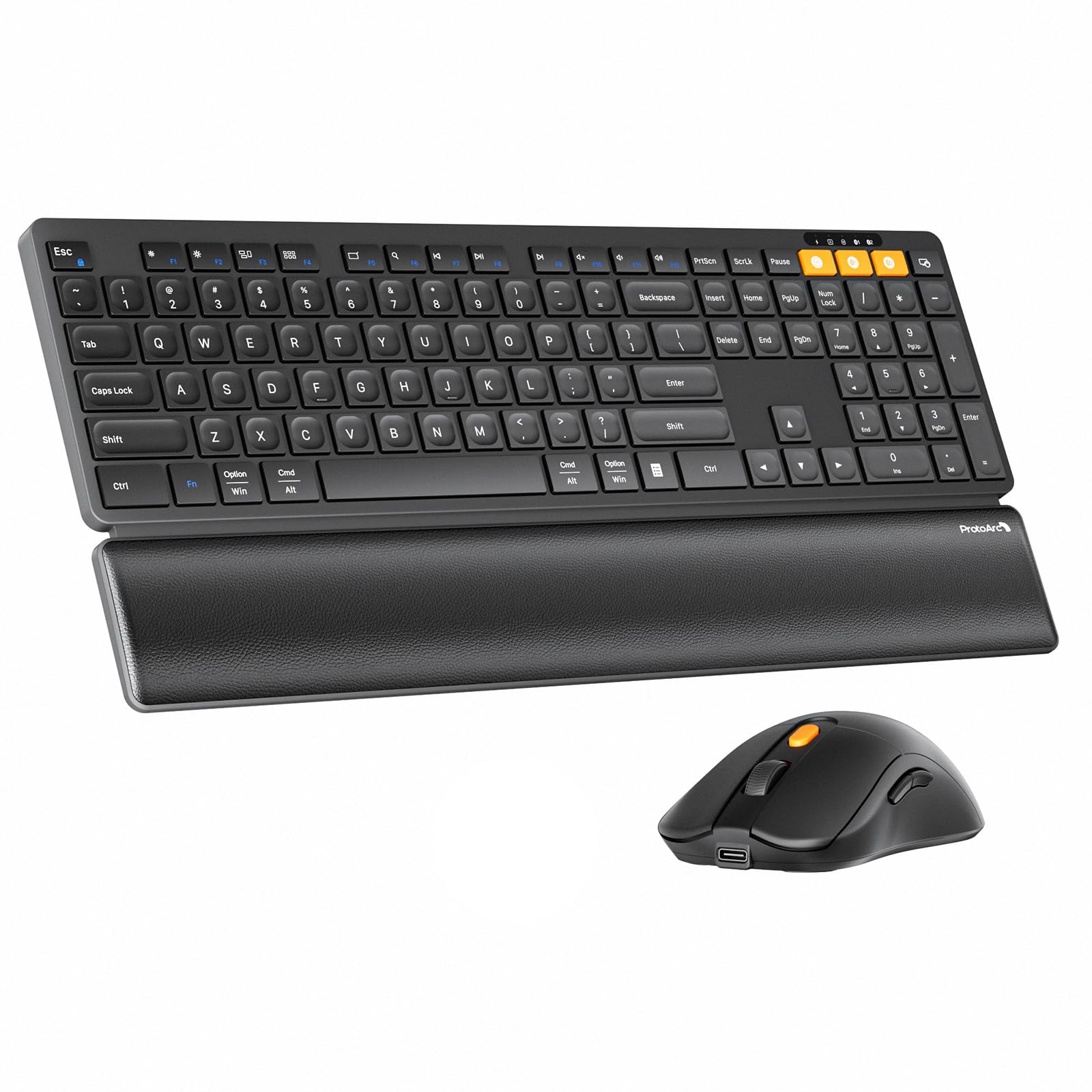
The KM60 undercuts most ergonomic combos by a wide margin while still delivering a leather-textured wrist rest, dual Bluetooth plus 2.4GHz connectivity, and a full-size keyboard with a numeric keypad. The scissor-switch keys are quiet and responsive, and the 63-gram mouse is noticeably lighter than the competition — reducing drag during rapid cursor movements across multiple monitors.
Three DPI levels (1000/1600/2400) on the mouse give you control over cursor speed without software, and the Type-C rechargeable batteries (500mAh keyboard, 300mAh mouse) charge fully in about two hours. The keyboard adds 12 dedicated multimedia function keys accessible via the Fn row, though by default the F-keys themselves control media. A press of Fn+ESC toggles between F-key and media modes.
A small number of Mac users report reversed CMD and Option keys on macOS Tahoe, and the mouse’s device-switch button sits on the bottom, making connection swaps inconvenient. For the price, the KM60 delivers 90 percent of the ergonomic benefit of the EKM01 Plus in a flat, non-split format — making it the best entry point for someone who wants wrist support without the split-frame premium.
Why it’s great
- Leather-textured wrist rest improves typing posture significantly
- 63-gram mouse reduces hand fatigue during long cursor sessions
- Type-C rechargeable with fast two-hour charging
Good to know
- Mouse device-switch button located on bottom — inconvenient for multi-device users
- Some Mac users report reversed modifier keys on macOS Tahoe
- No backlighting on the keys
7. Samsers Wireless Keyboard and Mouse Combo

The Samsers combo packs dual Bluetooth 5.0 channels plus a 2.4GHz receiver into sub-45-dollar territory, making it the most affordable way to connect a keyboard and mouse to three devices simultaneously. The keyboard features a low-profile scissor-switch with a built-in phone holder slot at the top — a clever spot for a second screen during video calls or reference reading, though it requires removing your phone case to fit.
Battery specs are surprisingly solid: a 280mAh battery in the keyboard and 300mAh in the mouse, both charging via USB-C. Real-world endurance from user reports lands at about two weeks of mixed use before a recharge is needed. The mouse has four adjustable DPI levels and a standard contoured shape that fits right-handed users comfortably, though forward/back buttons sit close to the thumb and may be pressed accidentally during regular use.
The keyboard sits completely flat with no adjustable tilt legs, so you will need a separate stand and wrist rest to avoid wrist strain during long sessions. Keycap durability feels lower than the ProtoArc or Logitech units — expect some keycap wobble after several months. For the price, it is a remarkable value for multi-device switching, but the ergonomic compromises make it best suited for occasional use or a secondary desk.
Why it’s great
- Dual Bluetooth 5.0 plus 2.4GHz — connects to three devices at once
- Built-in phone holder saves desk space for multitasking
- USB-C rechargeable with decent battery life for the price
Good to know
- No adjustable tilt legs — keyboard sits flat, requires extra ergonomic support
- Phone slot requires removing most phone cases
- Keycap durability is so-so; wobble may develop over months of heavy use
FAQ
Can I use a Bluetooth keyboard and mouse with a tablet or smartphone?
How do I fix Bluetooth lag on the keyboard?
Should I get rechargeable or AA-battery combo?
What does multi-device switching mean and how does it work?
Final Thoughts: The Verdict
For most users, the bluetooth keyboard and mouse winner is the ProtoArc EKM01 Plus because its split curved frame and memory foam wrist rest eliminate the hand strain that flat keyboards cause during full-day typing sessions. If you want silent operation and seamless multi-device switching in a slim profile, grab the Logitech MK955 Signature Slim. And for a reliable budget-friendly entry into dual-mode connectivity, nothing beats the Samsers Wireless Combo for pure value per dollar.

Mo Maruf
I created WellFizz to bridge the gap between vague wellness advice and actionable solutions. My mission is simple: to decode the research and give you practical tools you can actually use.
Beyond the data, I am a passionate traveler. I believe that stepping away from the screen to explore new environments is essential for mental clarity and physical vitality.