Our readers keep the lights on and my smoothie glass nicely filled. As an Amazon Associate, I earn from qualifying purchases.
A streaming camera needs to lock focus the moment you lean into frame and keep your skin tones natural under harsh key lights or an RGB glow. Buying a general-purpose webcam for this task usually means trading autofocus speed for low-light quality, or getting sharp 4K video that falls apart when you move quickly. The best cameras in this category combine a physically large sensor with fast phase-detection autofocus and uncompressed video output so your stream looks clean whether you are doing a seated podcast or an active fitness session.
I’m Mohammad Maruf — the founder and writer behind WellFizz. My research process involves tearing down every spec sheet for sensor size, autofocus architecture, HDMI versus USB output paths, and streaming platform compatibility so you never have to guess which camera actually delivers on its marketing claims.
After analyzing the autofocus systems, sensor sizes, and connectivity options of nine different models, the right camera for streaming comes down to matching your production scale with a sensor and autofocus system that will not drop frames or lose your face during a live broadcast.
How To Choose The Best Camera For Streaming
Streaming places demands on a camera that casual video calls do not: continuous autofocus while you move, consistent exposure under changing lighting, and a clean HDMI or USB signal that your encoder can read without latency. Understanding three core specs will narrow your options quickly.
Sensor Size and Low-Light Performance
A larger physical sensor captures more light per pixel, which matters when your streaming setup relies on a single key light or you stream in a room with mixed ambient lighting. Cameras with a 1/1.3-inch or 1-inch sensor deliver visibly cleaner shadows and less noise at modest gain levels compared to the 1/2.8-inch sensors found in most traditional webcams. Do not chase megapixels — a 4K image from a tiny sensor looks grainier than a 1080p image from a larger one.
Autofocus Architecture — PDAF vs Contrast Detection vs AI Tracking
Phase-detection autofocus (PDAF) measures focus distance optically and responds in roughly 0.2 seconds, which is critical for streamers who lean into the frame or hold objects near the lens. Contrast detection is slower and hunts in dim light. AI tracking adds a second camera or software-based subject recognition to pan, tilt, or zoom digitally, but its reliability depends on lighting consistency. If you move around an entire room, a physical PTZ camera with AI tracking is the correct tool.
Video Output and Connectivity
Uncompressed or minimally compressed video over USB 3.0 preserves the full sensor readout so your streaming software gets a clean signal. Some webcams apply internal compression that degrades fine detail. HDMI output bypasses USB bandwidth limits entirely and is standard on PTZ and mirrorless-style streaming cameras. Built-in flash memory that stores your exposure and framing settings is a quality-of-life feature that prevents the camera from resetting when you plug it into a different computer.
Quick Comparison
On smaller screens, swipe sideways to see the full table.
| Model | Category | Best For | Key Spec | Amazon |
|---|---|---|---|---|
| Insta360 Link 2 Pro | Premium PTZ | AI tracking with bokeh | 1/1.3-inch sensor | Amazon |
| Elgato Facecam 4K | Studio Webcam | DSLR-style control | 4K60 uncompressed | Amazon |
| Razer Kiyo V2 | 4K Webcam | Low-light with Sony STARVIS | 4K30 / 1080p60 | Amazon |
| Canon PowerShot V10 | Compact Cam | On-the-go vlogging | 1-inch CMOS sensor | Amazon |
| Tenveo VL12U | Pro PTZ | Large venue streaming | 12X optical zoom | Amazon |
| TONGVEO PTZ | Budget PTZ | Church streaming | 20X optical zoom | Amazon |
| Logitech 4K Webcam | Premium Webcam | All-purpose streaming | 4K HDR / Windows Hello | Amazon |
| Razer Kiyo V2 X | Value Webcam | 1440p gaming streams | 1440p60 / auto focus | Amazon |
| EMEET PIXY | AI PTZ | Affordable AI tracking | Dual-camera / PDAF | Amazon |
In‑Depth Reviews
1. Insta360 Link 2 Pro

The Link 2 Pro pairs a large 1/1.3-inch sensor with a real physical PTZ mechanism that pans and tilts to follow you across a room. That sensor captures roughly 60 percent more light than a typical 1/2.8-inch webcam sensor, which means your shadows stay clean even when you rely on a single ring light. The AI tracking uses the gimbal to keep you centered rather than cropping the frame, so you never lose resolution when you move.
Its built-in natural bokeh mode simulates a shallow depth of field without requiring a mirrorless camera body, and the dual-mic beamforming array isolates your voice from room noise like air conditioning or keyboard clicks. The 4K resolution at 30 frames per second is standard, but the sensor’s dynamic range handling in HDR mode gives your skin tones a realistic look that most webcams flatten.
Setup takes under five minutes with the Link Controller software, and it integrates directly with Stream Deck for preset switching. The only physical drawback is the short USB-C cable included in the box — you will likely need a longer run for a typical desktop arrangement. It also does not support Windows Hello or ARM-based Windows systems, so check your host platform before buying.
Why it’s great
- Large sensor delivers excellent low-light clarity without extra lighting
- Physical PTZ tracking keeps you framed without cropping the 4K image
- Natural bokeh and HDR create a professional depth-of-field look
Good to know
- USB-C cable is too short for most desktop setups
- No Windows Hello or ARM-based Windows support
2. Elgato Facecam 4K

Elgato’s Facecam 4K is built for streamers who want complete control over exposure, white balance, and focus without the camera overriding their settings. The Sony STARVIS 2 CMOS sensor captures 4K video at 60 frames per second with no internal compression, so your streaming software receives the full sensor readout. The manual focus ring is tactile and precise, letting you set your focal plane once and never worry about autofocus hunting during a live show.
The 49mm lens filter thread is a unique feature — you can attach a polarizer to cut glare from glasses or a variable ND filter to control depth of field in bright light. Camera Hub software lets you save multiple profiles to the onboard flash memory, meaning your exposure and color settings follow the camera even when you plug it into a different machine. That flash memory also stores firmware, so updates are not lost on reboot.
One trade-off is that the lens is quite wide at 20mm equivalent, so you need to sit closer than most webcams to fill the frame. Digital zoom is available but drops you out of 4K resolution. The included USB-C cable is long enough for most setups, but the camera is picky about using a direct motherboard port rather than a hub for full bandwidth.
Why it’s great
- Uncompressed 4K60 video preserves every detail for your encoder
- 49mm filter thread allows polarizers and ND filters
- Onboard flash memory saves settings independently of software
Good to know
- Manual focus requires you to set and lock distance before streaming
- Wide 20mm lens may not suit close-up face framing
3. Razer Kiyo V2
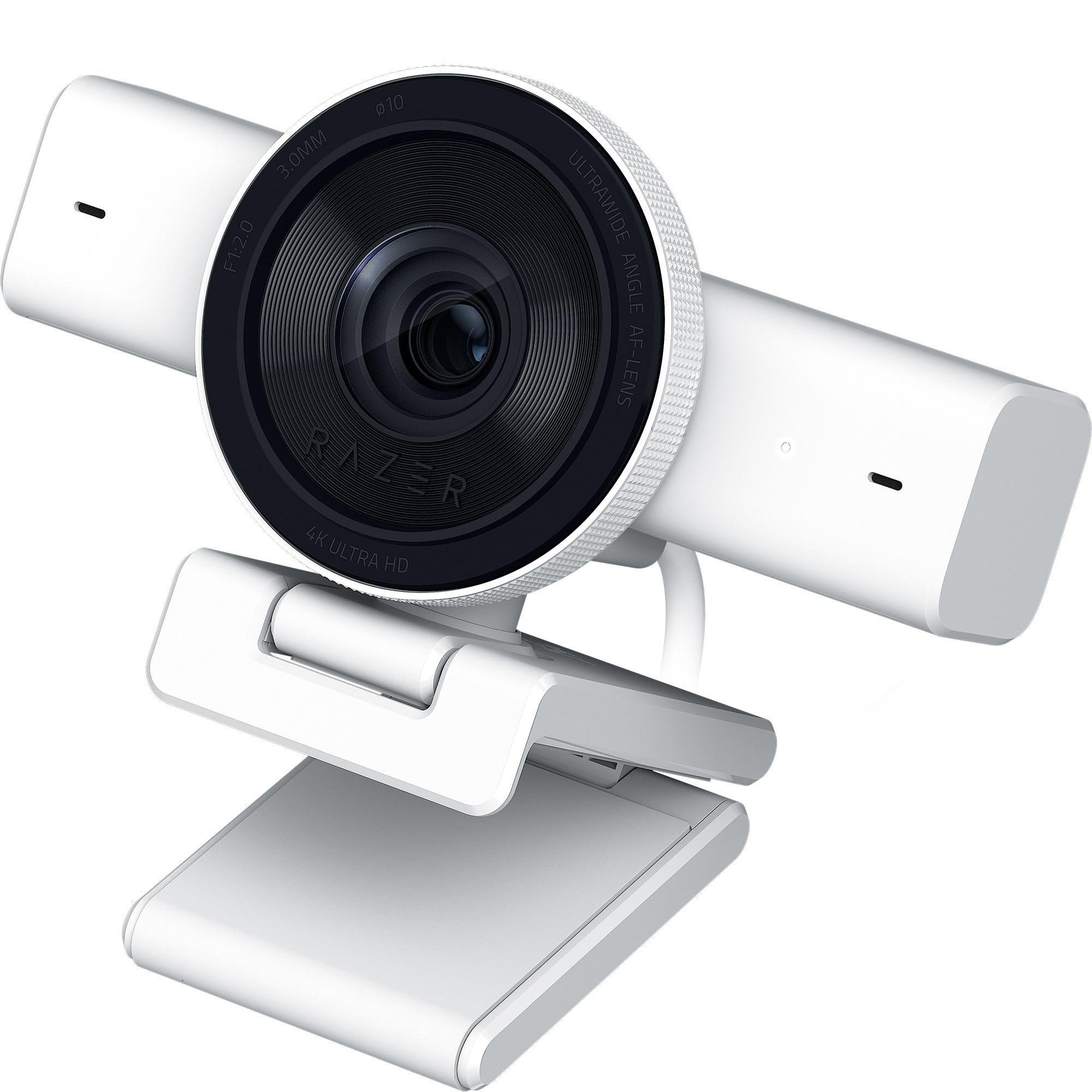
The Kiyo V2 uses a Sony STARVIS sensor, a well-regarded CMOS architecture known for its sensitivity in dim conditions. At 4K resolution you get 30 frames per second, but dropping to 1080p unlocks 60 fps with the same sensor clarity. The AI-powered auto-framing digitally pans and zooms to keep your face centered as you move — it is not a physical PTZ, but the tracking is smooth enough for seated streams and desk demonstrations.
Razer Synapse software gives you access to manual ISO and shutter speed controls, which is rare at this tier. One-click image enhancement adjusts exposure, white balance, and noise reduction automatically for users who do not want to tweak settings. The ultrawide angle lens covers a full desk setup without barrel distortion at the edges, which helps if you want to show keyboard work or product close-ups.
The metal body feels solid and the universal pivoting mount grips monitors securely. Some users report the camera runs warm when left plugged in for extended periods, and the Synapse software has occasional quirks with profile persistence. It ships with a lifetime license for Camo Studio, which adds virtual background and virtual green screen functionality.
Why it’s great
- STARVIS sensor handles low-light and RGB battlestations well
- Manual ISO and shutter control in Synapse software
- Ultrawide lens captures desk area with minimal distortion
Good to know
- Camera stays warm during long streaming sessions
- AI auto-framing is digital zoom, not a physical gimbal
4. Canon PowerShot V10

The PowerShot V10 is a dedicated vlogging camera that doubles as a streaming webcam via its micro-HDMI or USB-C output. Its 1-inch back-illuminated CMOS sensor is physically larger than every webcam on this list except the Insta360, which gives it exceptional low-light performance and natural color science straight out of the box. The fixed 19mm wide-angle lens is equivalent to a compact camera field of view — great for full-body shots or tight rooms.
The built-in stand folds forward or backward to prop the camera on any flat surface, and the front-facing flip screen lets you frame yourself without a separate monitor. Three stereo microphones with a center noise-canceling channel capture clean audio, though you will still want a dedicated lavalier or shotgun mic for polished streams. Image stabilization (IS On, IS Enhanced, or IS Off) smooths handheld movement if you move the camera around.
Battery life is decent for a compact camera but not infinite — expect roughly one hour of continuous 4K recording before needing the USB-C charger. The lack of optical zoom means you cannot change focal length without moving the camera physically. It also lacks a lens cover, so a small case or lens cap is advisable for transport.
Why it’s great
- 1-inch sensor outperforms all webcam sensors for noise and dynamic range
- Built-in stand and flip screen make desk-free streaming easy
- Canon color science delivers natural skin tones with minimal tweaking
Good to know
- No optical zoom — you must physically move the camera to change framing
- Battery life is limited; continuous streaming requires USB power
5. Tenveo VL12U

The Tenveo VL12U is a broadcast-ready PTZ camera that outputs 4K video at 30 frames per second over HDMI, USB 3.0, and RJ45 with Power over Ethernet. The 12X optical zoom lens with a 78-degree wide-angle field of view lets you capture a full stage or room and then zoom in on a speaker without losing detail. The AI humanoid and face auto-tracking keeps a subject centered whether they walk across a stage or stand at a podium.
The 1/2.8-inch CMOS sensor is smaller than the flagship options, but the advanced ISP processing and 12X optical zoom make this camera ideal for medium-to-large rooms where you need reach. You can save up to 255 preset positions and recall them instantly via the included IR remote or a connected control surface. The PoE feature simplifies cable management — one Ethernet cable carries power, video, and control data.
There is no built-in microphone, so you must pair it with a separate audio system. The PTZ controls in some third-party software like OBS can be erratic if you use the plugin; the standalone PTZ Optics software works more reliably. The metal housing and Red Dot Award design give it a professional look that fits well in a house of worship or conference room.
Why it’s great
- 12X optical zoom reaches distant subjects without digital artifacts
- PoE simplifies cabling with power, video, and control over one cable
- 255 preset positions for quick multi-angle streaming
Good to know
- No built-in microphone — requires external audio
- OBS plugin PTZ controls may behave erratically
6. TONGVEO PTZ Camera System
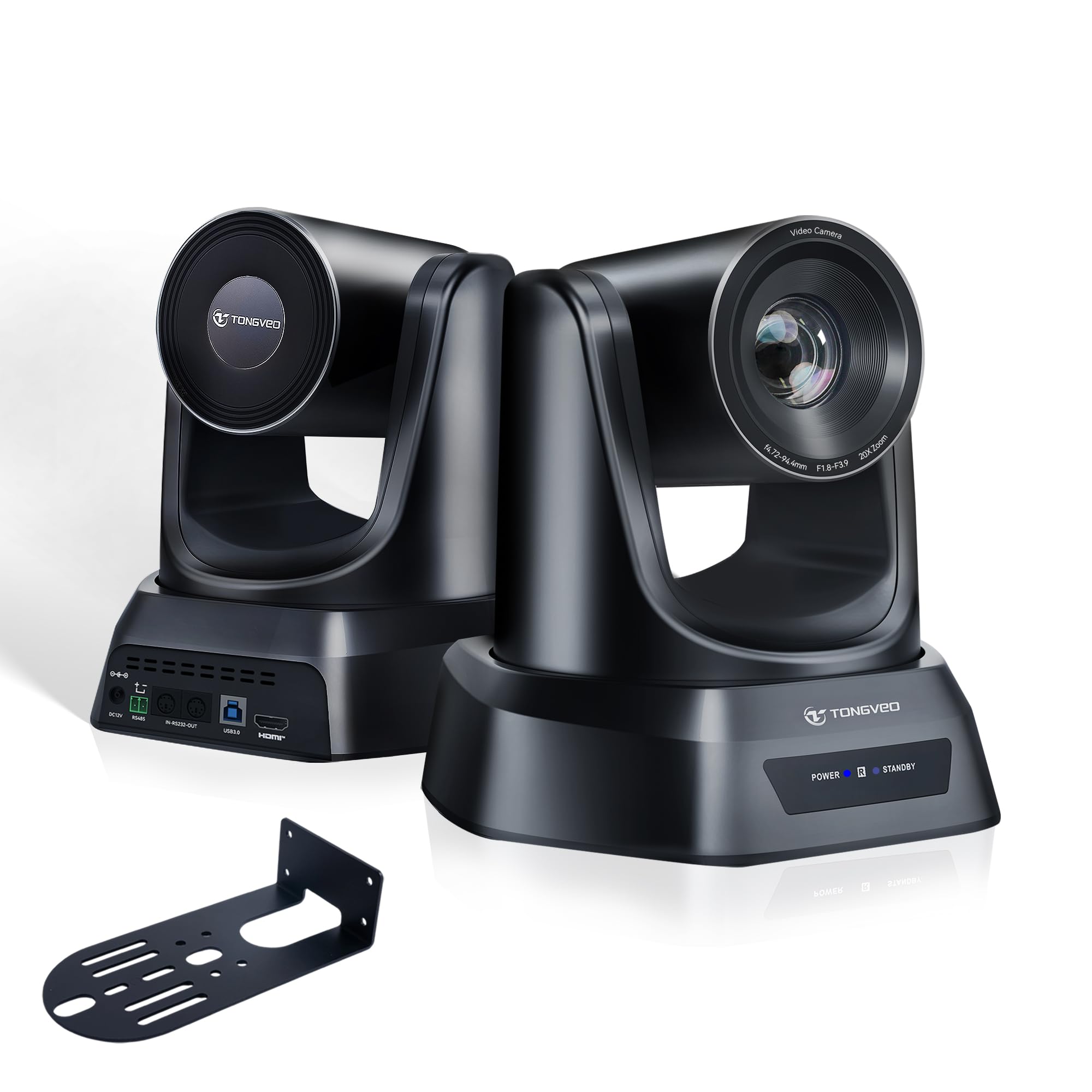
The TONGVEO PTZ camera offers a 20X optical zoom at a remarkably accessible price point, making it a popular choice for church streaming and educational settings. It captures 1080p video at 60 frames per second, which is sufficient for HD streaming and gives you smooth motion without the bandwidth demands of 4K. The 1/2.8-inch CMOS sensor performs well in moderately lit indoor spaces.
AI auto-tracking supports single-person follow and multi-person auto-framing, adjusting pan, tilt, and zoom to keep everyone visible. The motorized PTZ mechanism covers 350 degrees of pan and 180 degrees of tilt with near-silent operation, and you can save up to 255 preset positions for quick angle switching. It includes HDMI and USB 3.0 outputs for plug-and-play compatibility with OBS, vMix, Zoom, and Teams.
Some users report that the included software links can be difficult to access, and customer support responsiveness has been inconsistent. The motorized tracking works well at slow speeds but may lag with sudden movements. It is best suited for static or slow-moving presenters rather than fast-paced, dynamic streams.
Why it’s great
- 20X optical zoom at a very accessible price
- HDMI and USB 3.0 outputs for broad compatibility
- Quiet PTZ motor with 255 preset positions
Good to know
- Customer support and software access can be inconsistent
- Tracking may lag with fast or sudden movement
7. Logitech 4K Webcam

Logitech’s 4K webcam is a proven workhorse that combines a 4K sensor with RightLight 3 HDR technology, which handles backlit and low-light situations better than any other auto-exposure system in this category. The 5X HD zoom is digital, but the sensor resolution means you can crop in without introducing obvious artifacts. It outputs up to 90 frames per second at reduced resolutions, giving you slow-motion capture options for specific content.
Three field-of-view presets — 90, 78, and 65 degrees — let you switch between a wide room shot and a tighter face frame without moving the camera. Dual omni-directional mics with noise cancellation suppress background hum, though dedicated streamers will want a separate microphone. Windows Hello integration is a bonus for secure login, and the privacy shade physically blocks the lens when not in use.
The detachable universal mounting clip is adequate but does not grip thick monitors as securely as some competitors. Logitech Sync and Logi Tune software are straightforward, but the firmware must be updated on first use — the camera ships with an older version that can cause stuttering at 4K. The mic array picks up voice clearly but lacks the directional isolation of a dedicated USB microphone.
Why it’s great
- RightLight 3 HDR handles backlight and low light reliably
- Three FOV presets adapt to different streaming scenarios
- Windows Hello integration for secure, password-free login
Good to know
- Requires firmware update out of the box for stable 4K performance
- Mount clip is basic and may not grip thick monitors well
8. Razer Kiyo V2 X

The Kiyo V2 X offers a strong middle ground between resolution and frame rate by delivering 1440p video at 60 frames per second. This resolution sits between standard 1080p and resource-heavy 4K, giving your stream a noticeably sharper image without overtaxing your encoder or internet upload speed. The auto-focus is fast enough to keep up with minor movements like leaning forward to type or reaching for a drink.
Razer Synapse software provides simple presets for color, brightness, and contrast, plus manual fine-tuning controls for more advanced users. The wide-angle lens captures a generous field of view — you can zoom in for a close-up face shot or zoom out to show your full desk and peripherals. The built-in mic is clear enough for casual streaming but lacks the directional isolation needed for professional voice work.
The integrated privacy shutter twists to cover the lens when you step away, and the universal pivoting mount works on monitors and tripods alike. Some users report occasional black screen flicker with certain USB configurations — connecting directly to a USB 3.0 port instead of a hub usually resolves the issue. The video quality holds up well at the 1440p ceiling but softens noticeably if you try to use it at 4K upscaling.
Why it’s great
- 1440p60 provides clear video without 4K bandwidth demands
- Fast auto-focus handles small dynamic movements well
- Privacy shutter and wide-angle lens add flexibility
Good to know
- Video quality softens beyond 1440p resolution
- Occasional flicker with certain USB hubs
9. EMEET PIXY

The EMEET PIXY uses a dual-camera system — one main 4K imaging camera with a 1/2.55-inch Sony sensor and a secondary AI camera dedicated to face detection and exposure optimization. Phase-detection autofocus locks in roughly 0.2 seconds, which is significantly faster than the contrast-detection systems found on most entry-level webcams. The PTZ motor covers 310 degrees of pan and 180 degrees of tilt, giving it a wide range of motion despite its compact body.
Gesture control is a practical addition — holding an open palm in front of the camera for two seconds activates tracking without touching any software. The three-mic array offers three sound modes: Live Mode filters steady background noise for streams, Noise Canceling Mode blocks irregular sounds like keyboard clicks, and Original Sound Mode captures full ambient detail for music sessions. This flexibility means you can match the mic behavior to your content without buying separate hardware.
The EMEET Studio software lets you save preset positions, adjust FOV between 1080p and 2K (FOV is locked at 4K), and use a built-in AIGC shot list creator. Some users note that the AI tracking can be slow in very dim conditions and the included instructions are sparse, with QR codes linking to unhelpful pages. The clip-on mount is stable but the camera works best on a tripod for full PTZ range.
Why it’s great
- PDAF autofocus locks in 0.2 seconds, avoiding focus hunting
- Dual-camera AI optimizes exposure and skin tones dynamically
- Three-mic array with selectable sound modes adapts to content
Good to know
- AI tracking performance drops in low-light conditions
- Instructions are sparse and QR code links can be unhelpful
FAQ
What sensor size should I prioritize for low-light streaming?
Is 4K at 30fps better than 1080p at 60fps for streaming?
Do I need a PTZ camera or is a fixed webcam enough?
Final Thoughts: The Verdict
For most users, the camera for streaming winner is the Insta360 Link 2 Pro because its 1/1.3-inch sensor, physical PTZ tracking, and natural bokeh cover the widest range of streaming styles from desk shows to full-room movement. If you want uncompressed video output and manual lens filter control, grab the Elgato Facecam 4K. And for a compact on-the-go option with a 1-inch sensor, nothing beats the Canon PowerShot V10.

Mo Maruf
I created WellFizz to bridge the gap between vague wellness advice and actionable solutions. My mission is simple: to decode the research and give you practical tools you can actually use.
Beyond the data, I am a passionate traveler. I believe that stepping away from the screen to explore new environments is essential for mental clarity and physical vitality.