Our readers keep the lights on and my smoothie glass nicely filled. As an Amazon Associate, I earn from qualifying purchases.
Converting 8mm film reels or Hi8 tapes into sharable digital files is a race against time — the magnetic particles on those old reels degrade every year, and the playback equipment grows harder to find. The right converter bridges that gap without introducing noise, dropped frames, or washed-out color that ruins the moment you finally wanted to preserve.
I’m Mohammad Maruf — the founder and writer behind WellFizz. Over a decade of analyzing hardware specs for the home archive market has taught me exactly which digitization chips, sensor resolutions, and frame-handling algorithms separate a usable transfer from a frustrating glitch-fest.
Whether you’re facing a box of Super 8 reels, a stack of 8mm cassette tapes, or a trove of 35mm slides, this guide breaks down the actual hardware that turns analog memories into clean digital files, helping you find best 8mm to digital converter for your specific media type.
How To Choose The Best 8mm To Digital Converter
Selecting the right converter depends entirely on the physical media you’re digitizing — a device built for scanning 3‑inch Super 8 reels frame-by-frame won’t work with an 8mm video cassette, and a tape converter that needs a working camcorder won’t help with loose film reels. Focus on the media format first, then match the hardware to the rest of your workflow.
Match the Converter to Your Media Type
8mm film reels (Super 8 or Standard 8) require a dedicated film scanner with a spool mechanism that pulls the film strip past a fixed sensor, capturing each frame as a still image that gets assembled into an MP4. 8mm video cassettes (Video8, Hi8, or Digital8) need a converter with composite RCA or S-Video input that records the analog signal from a playback deck — you cannot feed a video cassette directly into a reel-based scanner.
Resolution and Bitrate: The Real Quality Limiters
For film scanners, the sensor’s native resolution determines how much grain and detail survive the transfer. A 13MP CMOS sensor captures more information than a 2MP one, though interpolation figures (like “22MP”) only stretch the existing data — they don’t create new detail. For tape converters, look for adjustable bitrate settings: a higher bitrate (15 Mbps or more) preserves motion clarity and avoids the blocky artifacts that plague low-bitrate MP4 files.
Standalone Operation vs. Computer-Dependent Workflows
Most modern converters write directly to an SD card or USB drive, eliminating the need for a computer during capture. This matters when you’re processing dozens of reels or tapes in one sitting. Film scanners usually include a preview screen so you can frame and focus before committing. Tape converters with a built-in display let you monitor the recording in real time, catching dropouts or tracking issues early.
Quick Comparison
On smaller screens, swipe sideways to see the full table.
| Model | Category | Best For | Key Spec | Amazon |
|---|---|---|---|---|
| KODAK REELS Digitizer | Premium Film Scanner | Large batch Super 8 reels | 5″ LCD, 8.08MP sensor | Amazon |
| Magnasonic FS81 | Premium Film Scanner | 3″ to 7″ reel conversion | 2.3″ screen, 1080p output | Amazon |
| ClearClick Video2Digital 3.0 | Mid-Range Tape Converter | Hi8 and camcorder tapes | 5″ screen, 128GB USB drive | Amazon |
| DigitPro Video to Digital 3.0 | Mid-Range Tape Converter | Hi8/VHS with 4K capture | 5″ OLED, 2000mAh battery | Amazon |
| HP Touch Screen Film Scanner | Mid-Range Film Scanner | 35mm slides and negatives | 5″ touch LCD, 13MP sensor | Amazon |
| Wolverine Titan 8-in-1 | Mid-Range Film Scanner | 35mm/110/APS slides and negatives | 4.3″ screen, 20MP sensor | Amazon |
| ZUZONG 8 Port RCA to HDMI | Budget Tape Converter | Multi-console retro gaming | 8 RCA inputs, 1080p output | Amazon |
In‑Depth Reviews
1. KODAK REELS 8mm & Super 8 Films Digitizer

The KODAK REELS Digitizer transforms 3, 5, 7, and even 9-inch Super 8 reels into 1080p MP4 files without needing a computer. Its 8.08-megapixel sensor captures frame-by-frame with adjustable exposure, sharpness, and tint, giving you manual control over the final look. The large 5-inch LCD makes framing and monitoring dead simple, and the automated feed mechanism handles batch runs efficiently.
Users report that a 3-minute reel takes about 30 minutes to digitize, while a 400-foot roll can take several hours — this is not a fast process, but the quality justifies the wait. The device includes a universal supply reel, adapters, and a dusting cloth, though you’ll need to supply your own SD card. The frame-by-frame capture means you catch broken sprocket holes before they cause skipped frames.
Some firmware tweaks can improve the output bitrate for users comfortable with technical adjustments, but out of the box the default settings produce clean transfers. The lack of audio capture is a limitation if your films include a magnetic sound stripe, but for straight visual preservation this is the most capable consumer-grade film scanner available.
Why it’s great
- Frame-by-frame capture catches damaged perforations
- 5-inch LCD with touch buttons for easy navigation
- Adjustable exposure, sharpness, and tint per reel
Good to know
- No audio capture for sound-striped film
- Scan time is roughly 10:1 versus playback duration
- Requires babysitting for films with fragile sprocket holes
2. Magnasonic Super 8/8mm Film Scanner FS81

The Magnasonic FS81 is purpose-built for 3, 5, and 7-inch Super 8 and Standard 8 reels, converting them to 1080p MP4 files with a single button press. The 2.3-inch LCD is small but adequate for framing and monitoring scans, and the included RCA video-out cable lets you preview on a larger TV. It scans video only with no audio support, which is standard for consumer reel digitizers in this class.
Scan times average around 35 minutes for a 3-inch reel and up to 90 minutes for a 400-foot 7-inch reel. The unit’s auto-frame alignment works well on clean film, but old reels with tape splices or curled edges may need manual adjustment using the brightness, sharpness, and framing controls. The 4.4-pound chassis stays planted during operation, though the 12-inch width requires dedicated desk space.
Multiple long-term users have successfully processed over 100 reels with the FS81, noting that the results depend heavily on the film’s original condition. The built-in LED light source remains consistent across scans, and the SD card slot accepts cards up to 32GB. The lack of HDMI output is a minor inconvenience for modern displays, but the composite out gets the job done.
Why it’s great
- Auto-frame alignment works well on undamaged film
- Adjustable brightness, sharpness, and framing
- Includes RCA video-out for TV preview
Good to know
- No HDMI output or audio capture
- LCD screen is small for detailed inspection
- Manual adjustment needed for taped or curled film
3. ClearClick Video2Digital 3.0 Bundle Edition

The ClearClick Video2Digital 3.0 is a standalone tape-to-digital converter that records RCA or S-Video input from a working camcorder, VCR, or Hi8 deck directly onto a USB flash drive or microSD card. The 5-inch preview screen lets you monitor the capture in real time, and the built-in rechargeable battery means you can digitize without being tethered to a wall outlet. The bundle includes a 128GB USB drive, giving you ample space before you need to offload.
Video is recorded as MP4 at 720×480 or 640×480 pixels — this device does not upscale, so the quality you get is exactly what your source deck outputs. Users who transferred 50+ Hi8 tapes report zero dropped frames and reliable auto-stop functionality that trims dead air. The included VideoPad editing software adds the ability to trim clips and adjust audio after capture, though the device works perfectly without it.
The 2-year warranty and US-based tech support from ClearClick add peace of mind, especially if you’re processing a large archive. The unit is compact at 6.2 x 3.5 x 1 inches, fitting easily next to a camcorder setup. Just remember that you must supply a working playback deck — this is a recorder, not a tape player.
Why it’s great
- Built-in 5-inch screen for live monitoring
- Records directly to USB or microSD, no computer needed
- Rechargeable battery for portable capture
Good to know
- Max recording resolution is 720×480, not HD
- Requires a working camcorder or VCR as source
- Auto-stop timer sets exact minutes per file
4. DigitPro VHS to Digital Converter 3.0
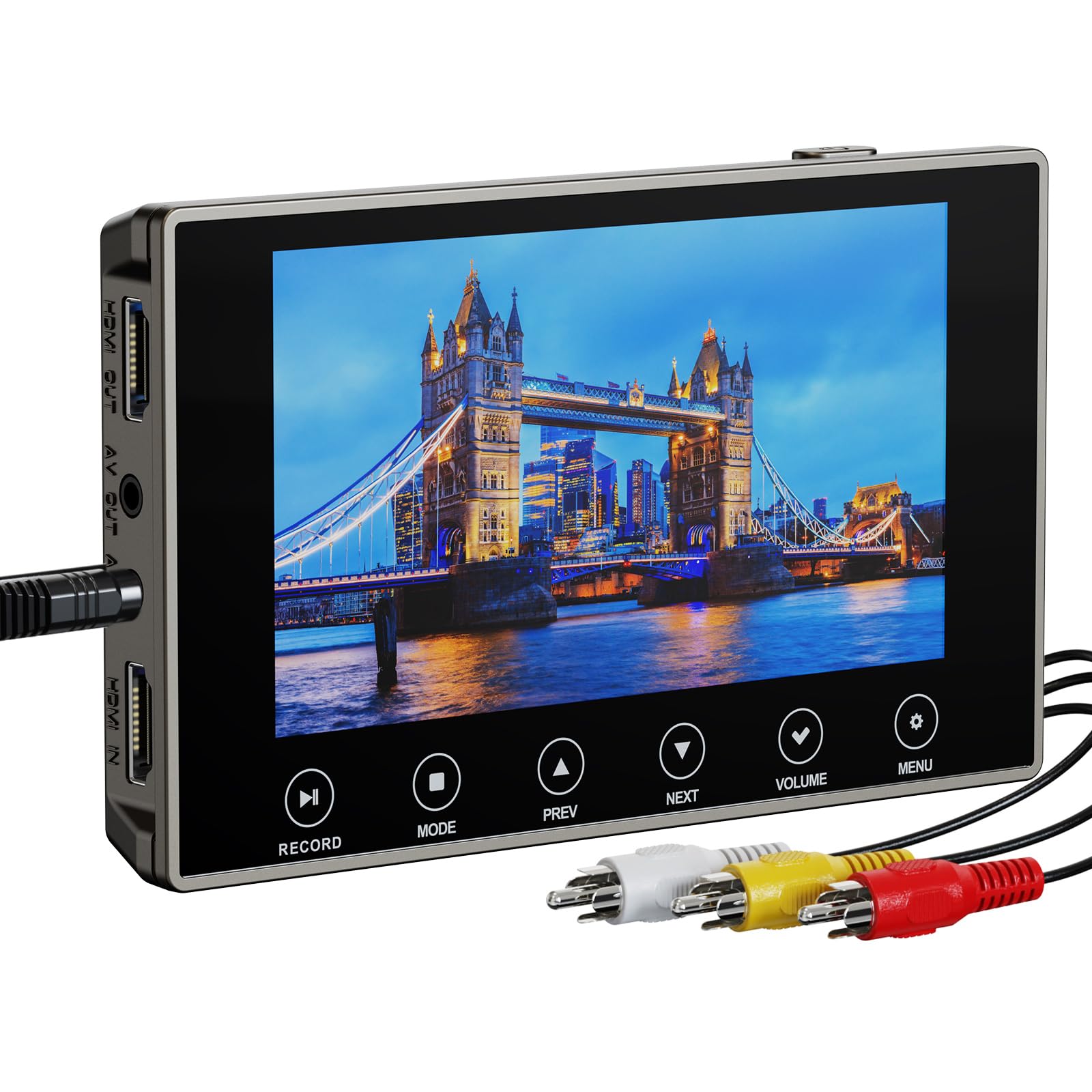
The DigitPro 3.0 captures analog video from Hi8, VHS, and MiniDV sources and records it as 4K, 1080p, or 720p MP4 files to a microSD card or USB drive. The 5-inch OLED screen provides a sharp preview with touch-button controls, and the built-in 2000mAh battery delivers up to 3 hours of continuous playback or capture. A 3.5mm microphone jack lets you add live narration over the footage as it records.
The 4K recording resolution uses a next-gen digitization chip that upscales the analog signal — you’re not getting true 4K from an 8mm tape, but the higher bitrate reduces compression artifacts compared to standard 720p capture. Users report that the OLED screen makes it easy to spot tracking issues or dirty heads during capture, and the HDMI output allows real-time viewing on a TV.
Some users experienced input detection issues with older camcorders, particularly Sony Digital8 and Sharp 8mm models, where the yellow adapter produced a “No input signal” message. Checking compatibility with your specific camcorder model before purchase is recommended. The lifetime warranty from DigitPro provides a safety net, but customer support responsiveness has been mixed.
Why it’s great
- 4K upscaling reduces macroblocking artifacts
- 5-inch OLED screen with touch-sensitive controls
- Built-in battery for untethered operation
Good to know
- Input detection may fail with certain camcorder models
- 4K is upscaled, not native 4K from analog source
- Customer service response is inconsistent
5. HP Touch Screen Film & Slide Scanner HPFS500

The HP HPFS500 digitizes 35mm, 126, and 110 slide and negative strips using a 13MP CMOS sensor with 22MP interpolation, outputting high-resolution JPEG files directly to an SD card. The 5-inch touch LCD supports all-angle viewing and includes a gallery mode that turns the scanner into a digital picture frame. USB-C power lets you run it from a laptop or wall adapter, and the quick-load tray makes swapping film strips fast.
The touch interface simplifies cropping, rotating, and adjusting color balance on the fly, which is especially useful when scanning decades-old negatives with unpredictable fading. The 2889 dpi optical resolution captures fine grain without oversharpening, though some users note that default red saturation can be heavy — easily corrected in post-processing. The device is compact at 5.7 x 4.66 x 3.54 inches, fitting into a small drawer when not in use.
Users who scanned 2,000 slides over a weekend report that the workflow is efficient once you get into a rhythm. The lack of an included SD card is a minor oversight, and dust accumulation on the sensor requires occasional cleaning with compressed air. For family photo archives, this is the most user-friendly dedicated film scanner on the market.
Why it’s great
- Touch LCD with intuitive crop and color controls
- 2889 dpi captures fine negative grain
- Gallery mode doubles as a digital picture frame
Good to know
- No SD card included in the package
- Default red saturation may need software correction
- Dust on sensor requires occasional cleaning
6. Wolverine Titan 8-in-1 20MP Film to Digital Converter

The Wolverine Titan is an 8-in-1 film scanner that handles 35mm, 110, 126, and Advantex APS slides and negatives, outputting 20MP JPEG files in roughly three seconds per frame. The bundle includes a 32GB SD card, a 6-foot HDMI cable, and a cleaning brush, so you have everything you need out of the box. The 4.3-inch screen provides a clear preview of each frame before saving.
The color balance out of the box tends toward oversaturation and a slight yellow cast, but this is adjustable in post-processing software. The scanning process itself is reliable: users report digitizing hundreds of slides without hardware failures, though the first unit occasionally needs replacement due to quality control variance. The HDMI output allows viewing on a larger display, and the included adapters cover most common film formats.
Performance is fastest in the 35mm format — switching to 110 or APS requires changing the internal adapter, which is straightforward but adds a minute between batches. The cleaning brush helps keep the sensor dust-free between sessions. For mixed-media family archives, this is a capable workhorse at its price tier, as long as you budget a little time for color correction.
Why it’s great
- Three-second scan time per frame
- Includes 32GB SD card and HDMI cable
- Supports 35mm, 110, 126, and APS formats
Good to know
- Color balance tends toward oversaturation
- Quality control varies between units
- Manual swap required between different film formats
7. ZUZONG 8 Port RCA to HDMI Converter

The ZUZONG 8 Port RCA to HDMI Converter switches between eight composite video sources and outputs a single 1080p 60Hz HDMI signal. It is designed for retro gaming consoles like N64, SNES, PS1, and Xbox, but also works with VCRs, camcorders, and CCTV cameras. The 10-bit 162MSPS analog-to-digital converter automatically detects the input format and upscales to 1080p, making it a versatile hub for any RCA device.
The aluminum housing is compact at 8 x 2.9 x 1.5 inches, and the included IR remote lets you switch between ports from across the room. Aspect ratio switching (4:3 or 16:9) is accessible via the remote, and the device supports PAL, NTSC, and SECAM formats. Users report zero lag on retro consoles, making it suitable for real-time gaming as well as video capture.
This is strictly an RCA-to-HDMI converter — it cannot convert HDMI back to RCA, and it does not record or save digital files. The 8-port hub is ideal if you have multiple camcorders or VHS decks that you want to feed into a single digitizer like the ClearClick. For users who only need to digitize one tape at a time, a single-port converter may be more cost-effective.
Why it’s great
- Eight RCA inputs in a single compact hub
- 10-bit ADC provides clean composite-to-HDMI conversion
- IR remote with 4:3/16:9 aspect ratio control
Good to know
- Does not record or capture — passthrough only
- Not reversible (HDMI to RCA not supported)
- Handshake issues with some older analogue consoles
FAQ
Can I convert 8mm video cassette tapes directly into a film scanner?
Why do some converters output at 720×480 instead of 1080p?
How long does it take to digitize one 8mm film reel?
Final Thoughts: The Verdict
The best 8mm to digital converter winner for most buyers is the KODAK REELS Digitizer because it handles Super 8 and Standard 8 reels up to 9 inches with automated frame-by-frame capture and a large 5-inch LCD for easy monitoring. If you are digitizing Hi8 or camcorder tapes, grab the ClearClick Video2Digital 3.0 for its reliable real-time recording and included 128GB USB drive. And for anyone with a mixed collection of 35mm slides and negatives, nothing beats the HP Touch Screen Film Scanner for its intuitive touch controls and high native sensor resolution.

Mo Maruf
I created WellFizz to bridge the gap between vague wellness advice and actionable solutions. My mission is simple: to decode the research and give you practical tools you can actually use.
Beyond the data, I am a passionate traveler. I believe that stepping away from the screen to explore new environments is essential for mental clarity and physical vitality.