Our readers keep the lights on and my smoothie glass nicely filled. As an Amazon Associate, I earn from qualifying purchases.
Finding a keyboard that feels responsive and doesn’t break your rhythm—or your desk space—boils down to switch type, build material, and layout. The keyboard market is flooded with mushy membrane boards that wear out fast, making a smart investment in the right mechanical or high-quality wireless model the only real move for daily comfort.
I’m Mohammad Maruf — the founder and writer behind WellFizz. I’ve spent years analyzing the internal components of budget peripherals, from actuation force curves to keycap longevity, so you don’t have to guess which model delivers consistent performance.
After weighing switch feel, connectivity, and build quality across a range of affordable options, these picks represent the most dependable budget keyboard choices available right now.
How To Choose The Best Budget Keyboard
Picking the right keyboard on a budget means identifying which corners to cut and which specs matter most for your daily use. Prioritize switch type and build quality over flashy branding.
Switch Type Determines Feel
Linear switches like Cherry MX Red equivalents provide smooth, quiet keystrokes ideal for gaming and fast typing. Tactile switches offer a bump for feedback, which some typists prefer for accuracy. Membrane keyboards feel mushy and register presses less consistently over time.
Layout Size Affects Desk Space
Full-size boards include a numpad but take up significant space. Tenkeyless (TKL) layouts remove the numpad for a balanced middle ground. 60% keyboards drop the function row and arrow keys entirely—best for minimalists and gamers who want maximum mouse room.
Keycap Material and Durability
PBT keycaps resist yellowing and the shiny wear that plagues ABS caps. Double-shot injection molding ensures legends never fade, even after heavy daily use—a key sign of longevity in a budget board.
Hot-Swappable Sockets for Upgradability
Hot-swappable boards let you replace switches without soldering, extending the keyboard’s lifespan. This feature is increasingly common in budget mechanical keyboards and allows for custom feel adjustments later.
Quick Comparison
On smaller screens, swipe sideways to see the full table.
| Model | Category | Best For | Key Spec | Amazon |
|---|---|---|---|---|
| Microsoft Designer Compact | Wireless Membrane | Multi-device productivity | 78-Key Compact Layout | Amazon |
| TMKB 60% Mechanical | Wired Mechanical | Entry-level gaming/typing | 61-Key Red Linear Switch | Amazon |
| Razer Huntsman Mini SE | Optical Mechanical | Ultra-fast competitive gaming | 1.0mm Optical Actuation | Amazon |
| Womier WK61 V2 | Hot-Swappable Mechanical | Customization and acoustics | Hot-Swappable 61 Key | Amazon |
| FIRSTBLOOD AK992 | Full Layout Mechanical | Office work with numpad | 98-Key + Volume Knob | Amazon |
In‑Depth Reviews
1. Microsoft Designer Compact Keyboard

The Microsoft Designer Compact brings a low-profile, scissor-switch typing feel similar to the Apple Magic Keyboard but optimized for Windows and Mac users. The chassis is impressively rigid for a membrane board, with no flex during aggressive typing. Key travel is shallow but crisp, providing a consistent tactile response that beats most rubber-dome keyboards in this range.
Bluetooth pairing supports up to three devices with seamless switching via a dedicated button—ideal for workflows involving a desktop, laptop, and tablet. The battery runs on a single CR2032 coin cell, which users report lasting well over nine months under mixed work and gaming use.
The soft-touch keycaps do smudge easily, and the lack of a numeric keypad will frustrate spreadsheet users. The expressive input key offers quick emoji access, though it cannot be remapped. Overall, this is the strongest wireless option for those who prioritize a clean workspace and multi-device fluidity over mechanical switch feel.
Why it’s great
- Twist-free aluminum top chassis with excellent rigidity
- Effortless three-device Bluetooth switching
Good to know
- Soft-touch keys show smudges quickly
- No backlighting for low-light use
2. TMKB 60% Mechanical Keyboard
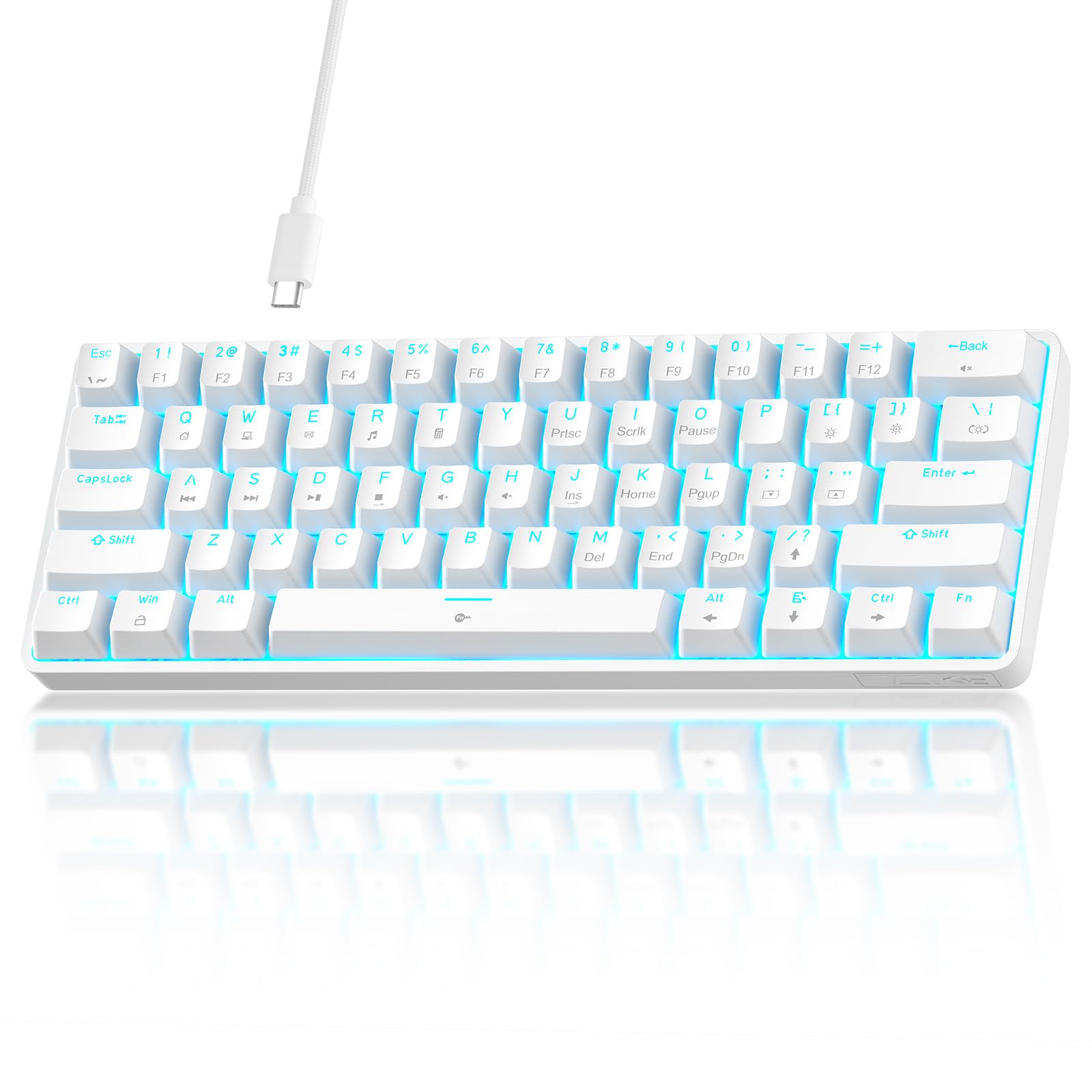
The TMKB 60% Mechanical Keyboard delivers a genuine linear red switch experience at a price point that undercuts most beginner mechanical boards. The 45g actuation force feels light and smooth, making rapid double-taps in shooters feel effortless. Anti-ghosting covers 61-key rollover, ensuring every simultaneous press registers correctly during intense gaming sessions.
Double-shot keycaps resist fading, and the detachable USB-C cable makes storage and replacement simple. The white plastic housing has a clean aesthetic, though the LED backlighting is limited to a single blue color. The foldable feet provide two tilt angles for ergonomic adjustment.
The main compromise is the lack of hot-swappable switches, meaning you cannot swap in different switch types later. The single-color backlight also limits customization for users wanting RGB. Despite these trade-offs, it remains a solid wired option for gamers who want a compact, responsive board without fussing with software.
Why it’s great
- True linear mechanical switches at entry-level pricing
- Detachable USB-C for easy cable replacement
Good to know
- Keys are not hot-swappable
- Only single-color blue backlight
3. Razer Huntsman Mini Special Edition (Renewed)
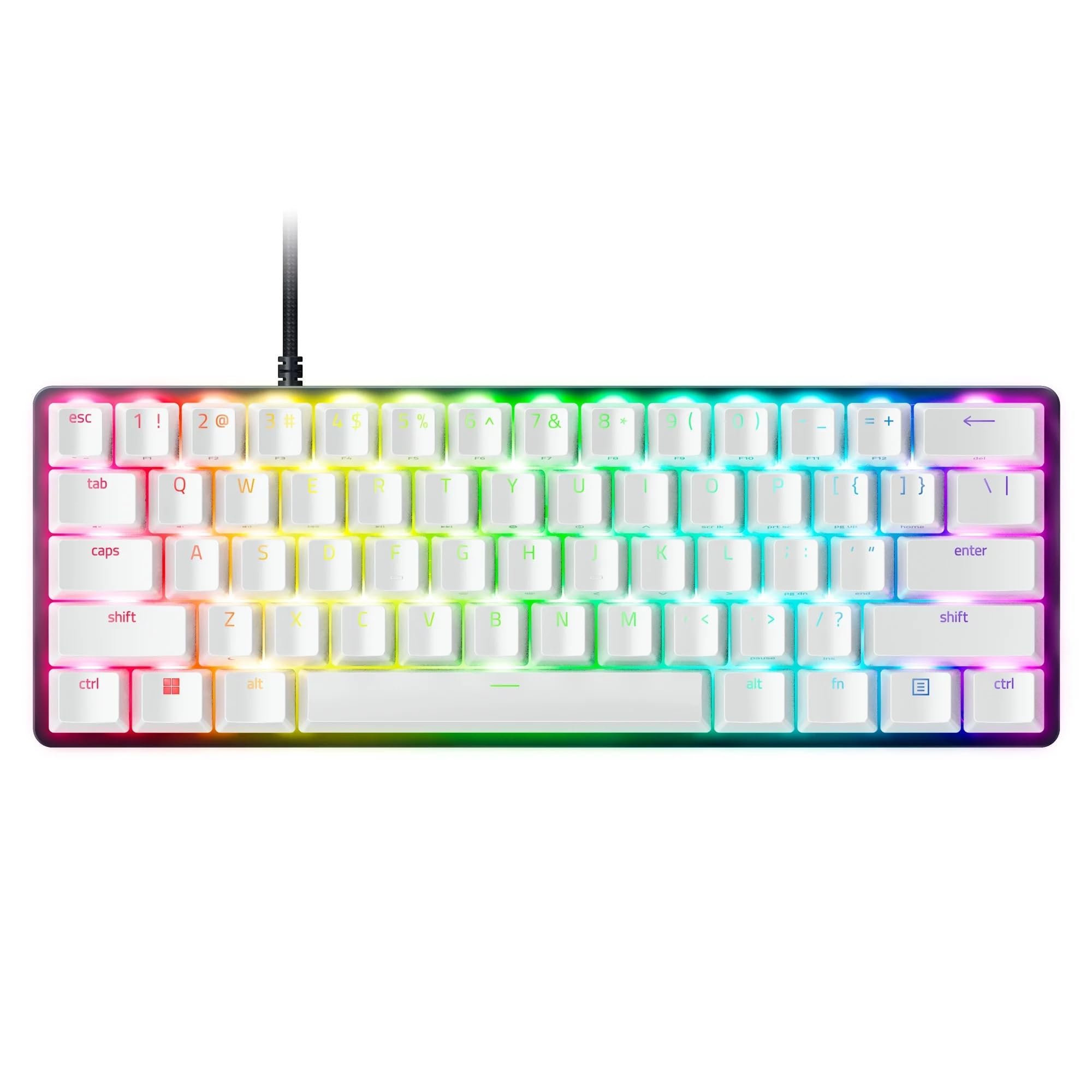
The Razer Huntsman Mini uses optical beam-based actuation to register key presses at 1.0mm—shorter than the standard mechanical 2.0mm actuation point. This results in noticeably faster input registration, which competitive gamers will feel immediately. The matte aluminum top frame adds structural rigidity that prevents chassis flex even under heavy key slams.
Oil-resistant doubleshot PBT keycaps are a premium touch, resisting the grime and shine that plague standard ABS caps after prolonged use. Razer Chroma RGB provides 16.8 million colors with per-key backlighting, fully syncing with supported games and smart home devices.
Buying renewed means potential savings, and user reports indicate units arrive in near-mint condition. The Razer Synapse software is necessary for macro programming and can be occasionally buggy. The linear optical switches produce a smooth sound profile that is quieter than clicky alternatives but still audible. A strong pick for those who want flagship speed without paying full retail.
Why it’s great
- Optical actuation at 1.0mm for fastest response times
- Oil-resistant PBT keycaps resist long-term grime
Good to know
- Razer Synapse software can be buggy
- Renewed product with limited warranty window
4. Womier WK61 V2 Mechanical Keyboard

The Womier WK61 V2 stands out for its hot-swappable switch sockets, allowing you to swap in Gateron, Cherry, or Kailh 3-pin switches without soldering. This makes it the most future-proof budget board for users who want to experiment with different feels over time. Multi-layer sound-dampening foam inside the case significantly reduces hollow resonance, producing a creamy, thocky acoustics profile that budget boards rarely achieve.
The frosted translucent bottom cover diffuses RGB lighting evenly around the desk, creating a glow effect that looks more premium than the price suggests. The included sublimation keycaps allow basic color customization, and the board is compatible with PC, PS4, Xbox Series X|S, and Xbox One.
The Womier software for macro and RGB customization is functional but less intuitive than premium brands. The wired-only connection might disappoint users wanting Bluetooth. However, for those prioritizing acoustic tuning and switch flexibility at this price range, the WK61 V2 punches well above its weight.
Why it’s great
- Hot-swappable sockets allow switch upgrades without soldering
- Sound-dampening foam eliminates hollow case noise
Good to know
- No Bluetooth or wireless connectivity
- Customization software is basic
5. FIRSTBLOOD AK992 Retro Wired Mechanical Keyboard

The FIRSTBLOOD AK992 packs a full 98-key layout with a dedicated numpad and a multimedia volume knob, all within a footprint that is narrower than a standard full-size board. This is the obvious choice for spreadsheet users or anyone who needs quick access to number entry without switching layers. The modified red linear switches offer a soft and light keystroke with a rated lifespan of 60 million presses.
Hot-swappable sockets accept Cherry, Gateron, and Kailh 3-pin switches, giving you the ability to customize tactility later. The side light strips and 20 ice-blue backlight modes add visual flair despite the single-color limitation. The gasket-mounted structure reduces cavity echo for a cleaner typing sound compared to tray-mount budget boards.
The non-standard keycap layout means replacing the bottom row caps with aftermarket sets requires extra attention. The blue-only backlight may feel limiting to RGB enthusiasts. Still, for an office or home workstation that demands numpad productivity without paying premium prices, the AK992 is a well-rounded mechanical workhorse.
Why it’s great
- Full 98-key layout with numpad saves desk space
- Gasket mount reduces hollow resonance for better acoustics
Good to know
- Non-standard bottom row complicates keycap replacement
- Single-color blue backlight only
FAQ
Are linear red switches better for gaming than tactile switches?
What is the difference between a 60% and a tenkeyless keyboard?
Can I use a wireless budget keyboard for competitive gaming?
Final Thoughts: The Verdict
For most users, the budget keyboard winner is the Womier WK61 V2 because it combines hot-swappable sockets, multi-layer sound dampening, and genuine mechanical switches at a price that undercuts most competitors. If you want a full layout with a numpad for office work, grab the FIRSTBLOOD AK992. And for ultra-fast competitive gaming, nothing beats the optical speed of the Razer Huntsman Mini Special Edition in this price bracket.

Mo Maruf
I created WellFizz to bridge the gap between vague wellness advice and actionable solutions. My mission is simple: to decode the research and give you practical tools you can actually use.
Beyond the data, I am a passionate traveler. I believe that stepping away from the screen to explore new environments is essential for mental clarity and physical vitality.