Our readers keep the lights on and my smoothie glass nicely filled. As an Amazon Associate, I earn from qualifying purchases.
A PC build lives and dies by its airflow, and the fans you choose determine not just your temperatures but the entire personality of your rig. Choosing the right set means balancing static pressure for radiator resistance with high CFM for case ventilation, all while making sure the lighting syncs seamlessly with your motherboard.
I’m Mohammad Maruf — the founder and writer behind WellFizz. I spend my time digging through thermal performance data, bearing types, and PWM control schemes to find the hardware that delivers measurable cooling without the marketing fluff.
After analyzing dozens of models on static pressure, noise profiles, lighting fidelity, and real-world customer feedback, these are the best argb fans you can install in your rig right now, ranked for different priorities.
How To Choose The Best Argb Fans
ARGB fans are no longer just about the lights. The latest generation packs serious engineering into the blade design, bearing type, and PWM precision. Here are the factors that separate a fan that moves air from one that just looks good doing it.
Static Pressure vs. Airflow for Your Build
If you mount fans on a radiator or a dense mesh front panel, static pressure (measured in mmH2O) is the spec that matters. High static pressure pushes air through resistance, while high CFM matters for open intake or exhaust positions with little obstruction. A fan with great pressure but low CFM will cool a radiator beautifully but might leave your case intake starved.
Bearing Type and Longevity
Sleeve bearings wear down quickly in vertical or high-temp builds. Fluid Dynamic Bearings (FDB) use a layer of oil to reduce friction and last significantly longer with quieter operation. Magnetic Dome Bearings (used by Corsair in some models) also offer excellent durability and low noise over thousands of hours.
PWM Control and Daisy-Chain Compatibility
A true 4-pin PWM connection allows the motherboard to dynamically adjust fan speed. Look for fans that daisy-chain both PWM and ARGB signals with a single cable — this dramatically reduces cable clutter. Some premium fans daisy-chain only the ARGB signal, requiring a separate PWM splitter or a hub. Read the fine print before you build.
Reverse Blade Design for Intake
Standard intake fans show the frame’s back side to the viewer. Reverse blade fans spin the opposite direction, so the attractive ARGB hub and front of the blade face into the case. If your case has a glass front or side panel, reverse fans keep the lighting consistent and clean on every intake position.
Quick Comparison
On smaller screens, swipe sideways to see the full table.
| Model | Category | Best For | Key Spec | Amazon |
|---|---|---|---|---|
| ARCTIC P12 Pro A-RGB | Mid-Range | Radiator cooling | 3000 RPM / 77 CFM | Amazon |
| Corsair RS120-R ARGB | Mid-Range | Reverse-blade intake | 2100 RPM / 2.81 mmH2O | Amazon |
| ASUS Prime MR120 ARGB | Premium | Ultra-quiet builds | 1600 RPM / 21 dB(A) | Amazon |
| Thermalright TL-M12Q X3 | Budget | Value 3-pack | 2000 RPM / 68.9 CFM | Amazon |
| Cooler Master MF120 Lite | Budget | Quiet daily use | 1750 RPM / 30 dB(A) | Amazon |
| Black Shark MagCooler 5 Pro | Specialty | Phone cooling | 35W / 18 ARGB LEDs | Amazon |
| Corsair 3500X RS ARGB | Specialty | Full case + fans | Mid-Tower / 3x Intake | Amazon |
In‑Depth Reviews
1. ARCTIC P12 Pro A-RGB 3-Pack
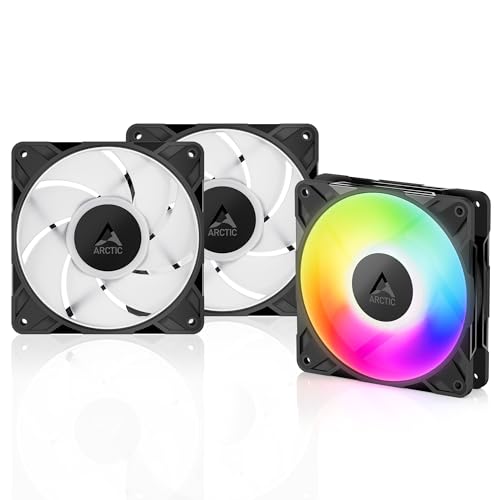
The ARCTIC P12 Pro A-RGB hits a rare trifecta: high static pressure (~7 mmH2O) that cuts through dense radiator fins, a wide PWM range from 0 RPM up to 3000 RPM, and a proper Fluid Dynamic Bearing for long-term reliability. The fan blade redesign balances noise and performance better than previous-generation ARCTIC fans, and the RGB ring is vibrant with good color accuracy across the spectrum.
At 3000 RPM with the fan curve maxed out, these are audible — but no more than any other high-RPM fan in its class. The real talent is under 70% speed, where they remain quiet while still pushing substantial airflow through restrictive mesh or radiator cores. The included Y-cable splitter is a welcome touch, but the cables themselves are short; you may need an extension for a full-tower chassis.
Experienced builders will appreciate that these fans play nicely with open-source tools like FanControl and SignalRGB, so you are not locked into proprietary software. The build quality feels substantial with no blade wobble, and the RGB connector uses standard 5V 3-pin headers. For anyone building a radiator-intensive loop or a high-airflow case, this is the most capable mid-range fan on the market.
Why it’s great
- Exceptional 7 mmH2O static pressure for radiator use
- Fluid Dynamic Bearing for quiet, long-lasting operation
- Works with FanControl and SignalRGB — no proprietary lock-in
Good to know
- Short cables require an extension for larger cases
- Loud at full 3000 RPM — set a sensible fan curve
- ARGB and PWM signals are not daisy-chained together in one cable
2. Corsair RS120-R ARGB Reverse 3-Pack
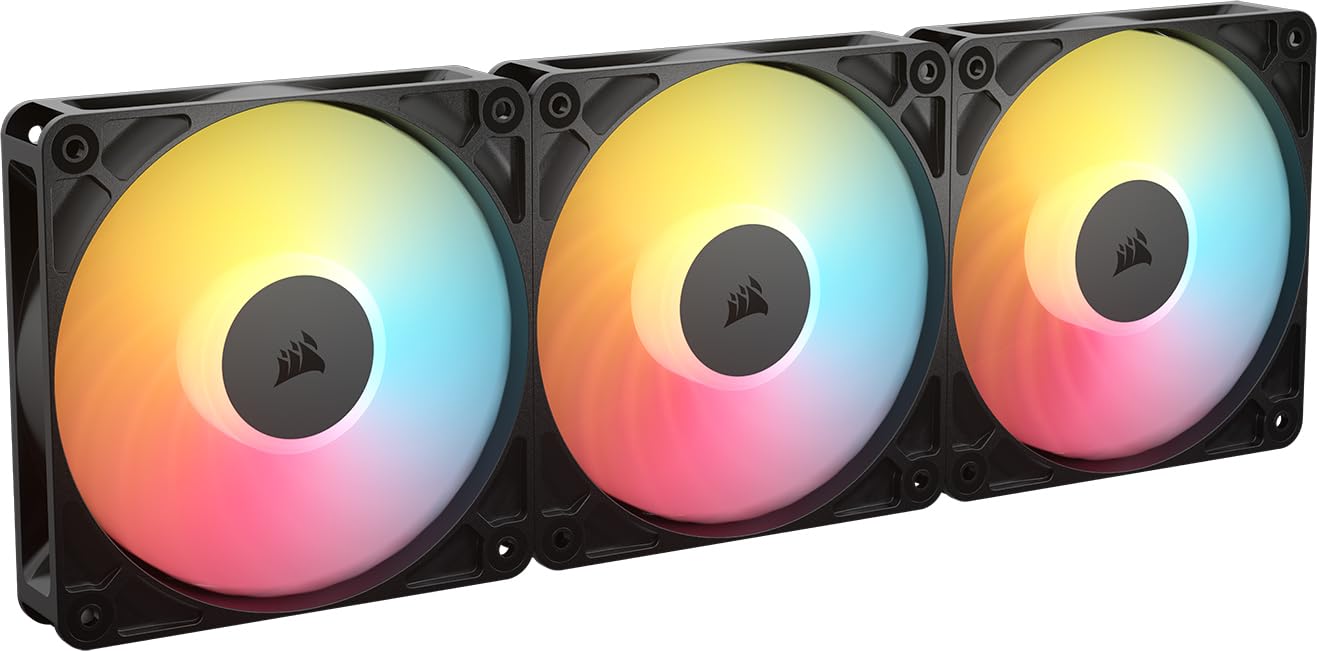
The Corsair RS120-R ARGB solves one of the most frustrating problems in PC aesthetics: intake fans showing their ugly rear frame. By reversing the blade rotation, these fans spin in the opposite direction so the clean hub and eight LEDs face into the case, creating a consistent look across every fan position. The magnetic dome bearing is smooth and durable, and the daisy-chaining of both PWM and ARGB is seamless for cable management.
With a static pressure rating of 2.81 mmH2O and a max speed of 2100 RPM, these are not the most powerful fans in raw CFM, but they are tuned well for radiator and case intake use. The noise rating of 34.6 dB(A) is higher than some competitors, but in practice the tone is aerodynamic whoosh rather than mechanical whine. The included daisy-chain connector simplifies installation significantly, though you still need a motherboard ARGB header for lighting control.
Build quality is typical Corsair — solid metal and plastic with no rough edges. The 0 RPM mode is a nice touch for silent desktops. These are ideal for glass-front cases where every fan is on display, or for builders who want a uniform intake/exhaust look without buying different fan models. If you want lighting perfection without frame obstruction, this is the most elegant solution available.
Why it’s great
- Reverse rotor keeps the ARGB hub visible on intake mounts
- Magnetic dome bearing for quiet, durable operation
- Daisy-chains PWM and ARGB together for minimal cables
Good to know
- Not the highest CFM for open exhaust positions
- Audible at max RPM — best with a custom fan curve
- Requires a motherboard ARGB header for lighting control
3. ASUS Prime MR120 ARGB 3-Pack
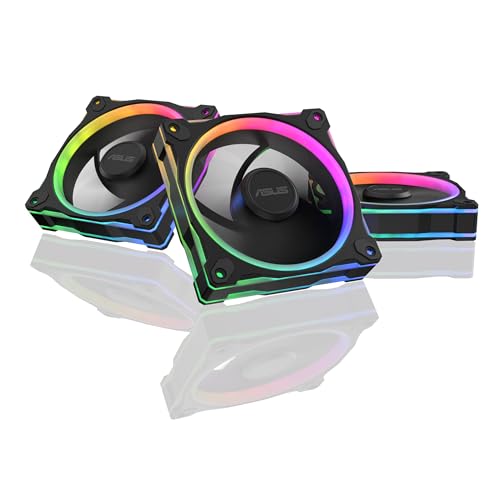
The ASUS Prime MR120 takes a different approach than the high-RPM crowd: a 28mm extra-thick frame and a conservative 1600 RPM max speed to deliver genuinely silent operation at only 21 dB(A). That thickness allows the blades to move a respectable amount of air without spinning fast, and the dual-sided ARGB frame lighting with 20 addressable LEDs creates a halo effect that looks premium from any angle.
Real-world cooling performance is strong — users report dropping CPU temps by 20°C compared to generic fans in some cases. The silicone mounting corners dampen vibration effectively, and the Aura Sync compatibility ensures seamless lighting control with ASUS motherboards. The PWM range is broad enough to idle inaudibly and ramp up only under load. The tradeoff is that these are not designed for high-restriction radiator setups; they excel as case fans where quiet operation is the priority.
One wiring caveat: the ARGB signal is daisy-chainable, but the PWM signal is not. You will need a separate PWM splitter or a hub to power more than one fan from a single header. The two-year warranty adds peace of mind. If your build is in a bedroom, office, or streaming studio where noise is your first concern, this is the quietest ARGB three-pack you can buy.
Why it’s great
- Extremely quiet at 21 dB(A) max
- Dual-sided ARGB frame lighting with 20 LEDs
- Silicone corners reduce vibration noise
Good to know
- PWM is NOT daisy-chainable — you need a hub or splitter
- Lower static pressure than high-RPM alternatives
- Best suited for case ventilation, not radiator duty
4. Thermalright TL-M12Q X3 3-Pack
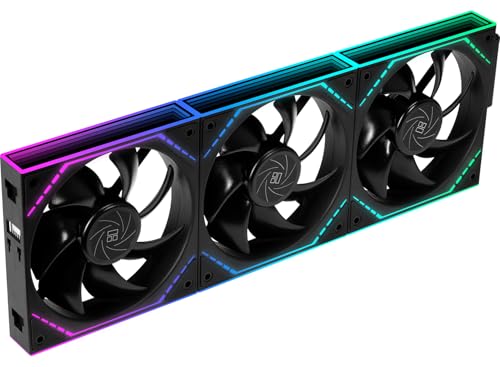
The Thermalright TL-M12Q X3 is the budget king that refuses to act like one. At 2000 RPM and 68.9 CFM, it delivers strong airflow for a three-pack that costs far less than most competitors. The infinity mirror lighting effect in the center hub looks premium, and the daisy-chain connection for both power and ARGB means you run just one cable for the entire set of three fans — a huge help for clean cable management.
Noise levels at 28.2 dB(A) are respectable for the airflow, and users consistently report that these fans are quieter than their AIO pump at moderate speeds. The snap-together locking mechanism is sturdy and eliminates the frustration of loose screws. The main limitation is that the daisy chain is designed for three fans in a row — if you want a 2+1 split, you need an extra adapter. Cable length is also somewhat short for full-tower cases.
Build quality is excellent for the price point, with a robust plastic frame and no flex. The ARGB lighting is vivid and the mirror finish on the hub adds depth. If you are on a strict budget but do not want to sacrifice aesthetics or airflow, this is the best-performing budget-friendly three-pack on the market. Perfect for mid-tower builds where the fan count is high but the build cost needs to stay low.
Why it’s great
- Excellent value for a 3-pack with solid 68.9 CFM
- Infinity mirror hub looks much more expensive than it is
- Daisy-chain single cable for all three fans
Good to know
- Cable length may be short for full-tower chassis
- Requires an adapter for a 2+1 fan split setup
- Not the highest static pressure for radiator use
5. Cooler Master MF120 Lite 3-Pack

The Cooler Master MF120 Lite is a straightforward, no-fuss ARGB fan that focuses on quiet daily operation and ease of installation. The frosted blade design diffuses the ARGB light beautifully, creating a smooth, evenly lit appearance rather than harsh point LEDs. The PWM range from 650 to 1750 RPM is wide enough for silent idling and moderate load cooling, and the noise level stays around 30 dB(A) at max speed.
The hybrid frame uses a PBT plastic construction that feels solid, and the revised curved blade design improves airflow over previous generations. The included ARGB splitter and daisy-chain locks make installation simple — screw in, plug the cables, and you are done. Users report temperature drops of 1-3°C under load compared to OEM case fans, and the fans work well with SignalRGB for lighting control. The 4-pin PWM connection ensures precise speed control via the motherboard.
These are not high-pressure monsters; they are well-rounded case fans that prioritize quiet comfort over raw performance. For a standard mid-tower with decent airflow, the MF120 Lite is more than enough. The only real limitation is the moderate CFM, which may not satisfy extreme overclockers. For anyone building a quiet, well-lit, everyday gaming rig, this is a reliable choice.
Why it’s great
- Frosted blades create smooth, diffused ARGB lighting
- Easy daisy-chain installation with included splitter
- Very quiet at default speeds, even quieter with BIOS curve
Good to know
- Moderate CFM — not ideal for high-restriction radiators
- PBT frame feels good but not premium metal
- Best suited for case ventilation, not extreme builds
6. Black Shark Magnetic Phone Cooler 5 Pro

The Black Shark MagCooler 5 Pro is a category of its own — a phone cooler with 18 individually addressable ARGB LEDs arranged in a diamond facet pattern. It draws up to 35W of power and can drop a phone’s temperature below zero in about 25 seconds, hitting a delta of up to 45°C. The 18 LEDs offer a Rubik’s Cube lighting mode that is genuinely unique, and the Shark Arsenal app lets you control every LED individually.
The dual NTC temperature sensors monitor both the cooler and the phone, automatically shutting off if things get too hot or too cold, which protects against condensation damage. The detachable grips allow it to work with both MagSafe iPhones and Android devices with a clip. The 1/4 nut interface means you can mount it on a tripod for streaming or long photography sessions. Silent mode is sufficient for most gaming, while the highest mode is extremely effective but creates condensation that needs to be wiped off after use.
Build quality is excellent with a solid plastic enclosure and a weight of only 120 grams, so it does not feel heavy on the phone. This is a niche product — it is not a PC case fan — but for mobile gamers, streamers, or anyone who needs to prevent thermal throttling on a phone or tablet, it is unmatched. The ARGB lighting is the best on any phone cooler by a wide margin.
Why it’s great
- Drops phone temps by up to 45°C in seconds
- 18 individually addressable ARGB LEDs with app control
- Dual NTC sensors for automatic condensation prevention
Good to know
- Not a PC fan — it is a phone/tablet cooler
- Highest mode creates condensation — requires wiping
- Needs a 40W+ wall charger (not included)
7. CORSAIR 3500X RS ARGB Mid-Tower Case
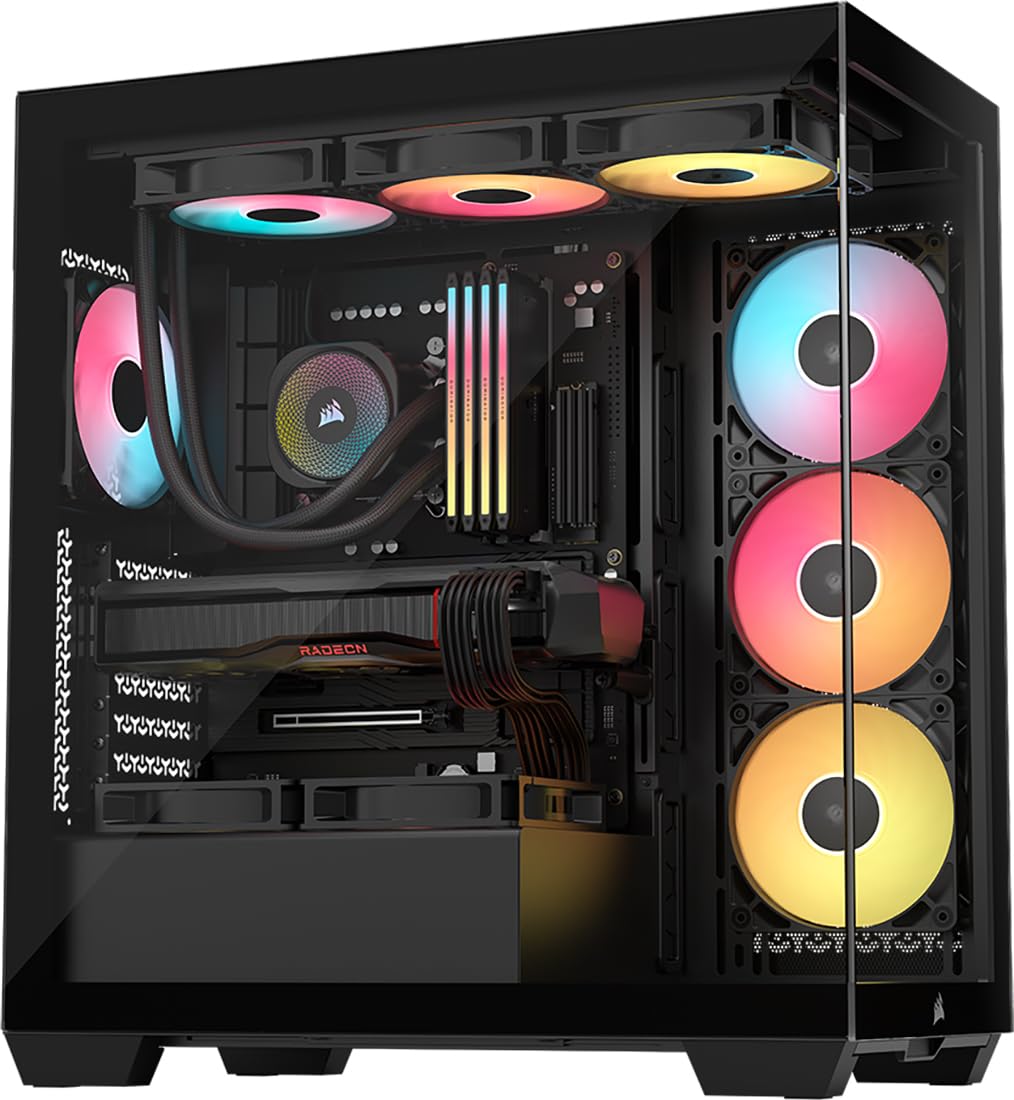
The CORSAIR 3500X RS ARGB is a panoramic mid-tower case that ships with three pre-installed RS120-R reverse-blade ARGB intake fans, giving you the exact same fan design we reviewed above as Product 2. The wraparound tempered glass panels show off every angle of the build, and the reverse rotor fans ensure that the ARGB hub side faces inward for a clean look. The case supports up to 10 fans total, including 360mm radiators at the top and side.
The case itself is well-built with thick tempered glass, removable dust filters, and a spacious interior that fits EATX boards. GPU anti-sag bracket is included, and the rear wiring storage area makes cable management straightforward. The 3500X is also validated for reverse-connection motherboards like ASUS BTF and MSI Project Zero, allowing for near-invisible cables. Users report temperature drops of 15-20°C during gaming compared to older cases with limited airflow.
The three included fans are already daisy-chained, so you plug one cable into the motherboard ARGB header and one PWM header and you are done. This is the ideal all-in-one solution for someone who wants a fresh build with great ARGB lighting and airflow from the first power-on. Skip the burden of buying fans separately — this case gives you three of the best reverse-blade ARGB fans on the market right out of the box.
Why it’s great
- Three pre-installed RS120-R reverse-blade ARGB fans
- Panoramic tempered glass for full component display
- Supports up to 10 fans and reverse-connection motherboards
Good to know
- Only the three front intake fans are included
- Large footprint — check desk clearance before buying
- Bottom fan mount bumps may interfere with custom drive sleds
FAQ
Can I daisy-chain ARGB fans from different brands together?
Do reverse-blade fans perform the same as standard fans?
What does 0 RPM mode mean on a PWM fan?
How many ARGB fans can one motherboard header support?
Final Thoughts: The Verdict
For most users, the best argb fans winner is the ARCTIC P12 Pro A-RGB because it combines high static pressure for radiator builds with a reliable Fluid Dynamic Bearing and open-source software compatibility at a price that outclasses the competition. If you want a flawless lighting layout on intake mounts, grab the Corsair RS120-R ARGB reverse-blade set. And for silent operation in a living-room or studio build, nothing beats the ASUS Prime MR120.

Mo Maruf
I created WellFizz to bridge the gap between vague wellness advice and actionable solutions. My mission is simple: to decode the research and give you practical tools you can actually use.
Beyond the data, I am a passionate traveler. I believe that stepping away from the screen to explore new environments is essential for mental clarity and physical vitality.