Our readers keep the lights on and my smoothie glass nicely filled. As an Amazon Associate, I earn from qualifying purchases.
The line between a usable machine and a constant source of frustration comes down to the processor generation and RAM configuration. A system with an 8th-gen Core i7 paired with 32GB of DDR4 will run circles around a flashy new model with a low-power N-series chip and 8GB of memory, especially when you start stacking browser tabs, office applications, and video calls. The desktop form factor also means you avoid the thermal throttling that plagues most laptops, giving you consistent performance throughout the day.
I’m Mohammad Maruf — the founder and writer behind WellFizz. I research computer hardware full-time, dissecting benchmark scores, motherboard chipsets, and real-world customer failure rates to separate the genuinely capable budget desktops from the ones that look good on paper but stumble under load.
After testing dozens of units and cross-referencing thousands of verified customer reports, I’ve refined the list of what qualifies as the real best budget computer. Every recommendation here prioritizes raw processing headroom, upgrade path, and long-term reliability over superficial features like RGB lighting or gimmicky form factors.
How To Choose The Best Budget Computer
A budget desktop is a balancing act between raw performance, upgrade potential, and long-term reliability. You are not just buying a machine for today — you are buying one that needs to stay responsive for the next three to five years. Understanding a few key specifications will prevent you from wasting money on a system that feels obsolete within months.
Prioritize the Processor Generation
The specific processor generation dictates the motherboard chipset, RAM type, and overall system bandwidth. An 8th-gen Intel Core i7 (Coffee Lake) supports DDR4 memory and NVMe storage natively, while a 4th-gen Core i7 (Haswell) is limited to DDR3 and lacks native support for modern security features like TPM 2.0. Always check the generation number, not just the “i7” branding. For budget builds, aim for at least an 8th-gen or newer to ensure Windows 11 compatibility and decent multi-core performance.
RAM Capacity and Type Matter More Than You Think
16GB of DDR4 RAM is the minimum standard for a smooth multitasking experience in 2024. 8GB will cause stuttering when you have a browser with ten tabs open alongside Office or communication apps. DDR4 is significantly faster than DDR3 and operates at lower voltages, which means better system responsiveness and slightly lower power consumption. Avoid systems with 8GB or DDR3 memory unless your workflow is extremely limited.
Storage Speed Defines Daily Experience
An NVMe solid-state drive is non-negotiable for a budget computer. SATA SSDs are far slower, and traditional hard drives will make the system feel sluggish from the first boot. A 512GB NVMe drive provides enough space for the operating system, applications, and a handful of games or project files. Look for M.2 NVMe PCIe 3.0 or faster — this directly impacts how quickly the system boots, loads applications, and transfers files.
Quick Comparison
On smaller screens, swipe sideways to see the full table.
| Model | Category | Best For | Key Spec | Amazon |
|---|---|---|---|---|
| Dell Optiplex 7060 SFF | Refurbished Business | Office & Multitasking | 32GB DDR4 / i7-8700 | Amazon |
| abyte Spark Gaming PC | Gaming Tower | 1080p Gaming | RX 590 8GB / 16GB RAM | Amazon |
| STGAubron i7 Xeon PC | Entry Gaming | Light Gaming & Study | RX 550 4GB / 16GB RAM | Amazon |
| HP All-in-One 2025 | All-in-One | Non-Tech Users & Home | N100 / 8GB DDR5 | Amazon |
| Lenovo IdeaCentre AIO | All-in-One | Everyday & Video Calls | N100 / 8GB RAM | Amazon |
| HP RGB Gaming Desktop | Entry Gaming | Mild Gaming & School | GT 1030 2GB / 16GB DDR4 | Amazon |
| ACEMAGIC Mini PC | Mini PC | Space-Saving Office | Ryzen 4300U / 16GB DDR4 | Amazon |
| STGSivir All-in-One | All-in-One | Home & Study | Core i5 / 16GB RAM | Amazon |
| Kroteaup Business Desktop | Office Tower | Home Office & Study | i7-4770 / 16GB DDR3 | Amazon |
| suevery RGB Tower | Value Tower | Budget Gaming & Office | Core i7 / 16GB RAM | Amazon |
| STGAubron Core i5 | Entry Gaming | Casual Gaming | RX 550 4GB / 16GB RAM | Amazon |
In‑Depth Reviews
1. DELL Optiplex 7060 SFF Desktop Computer

This refurbished business desktop delivers an exceptional combination of raw processing power and memory capacity. The 8th-gen Core i7-8700 with six cores and twelve threads handles heavy multitasking — dozens of browser tabs, virtual machines, or compiling code — without breaking a sweat. The 32GB DDR4 RAM is double what most budget computers offer, ensuring you will not hit a memory bottleneck for years. The 512GB NVMe SSD ensures near-instantaneous boot times and application loading, and the small form factor fits easily into cramped office spaces.
The Dell OptiPlex 7060 is built like a tank, with a metal chassis that withstands years of daily use. The dual DisplayPort outputs support dual 4K monitors at 60 Hz, a feature usually reserved for far more expensive workstations. It comes with integrated Intel UHD Graphics 630, which is fine for office work and 4K video playback, but not for modern gaming. The included wireless keyboard and mouse are basic, functional peripherals that you will likely want to upgrade.
One common point of confusion is the video output — this system uses DisplayPort, not HDMI, so you may need to purchase an adapter if your monitor only has HDMI. Some units shipped with a SATA SSD instead of the advertised NVMe, but sellers have been responsive about correcting this. The small form factor also limits internal expansion for full-size graphics cards, so plan around that if you ever want to add a dedicated GPU.
Why it’s great
- 32GB DDR4 RAM is massive for this price tier, eliminating memory-related slowdowns.
- 6-core / 12-thread i7-8700 outperforms most modern budget CPUs in multi-threaded tasks.
- Dual DisplayPort supports dual 4K monitors out of the box.
- Compact, durable business chassis with excellent build quality.
Good to know
- Uses DisplayPort instead of HDMI; adapter may be required for some monitors.
- Integrated graphics only — not suitable for modern gaming.
- Small form factor limits internal GPU upgrade options.
- Included peripherals are cheap and may need replacement quickly.
2. abytespark Prebuilt Gaming PC Desktop

The single biggest advantage of this budget gaming tower is the AMD Radeon RX 590 with 8GB of GDDR5 video memory. That GPU can push 60+ frames per second at 1080p in titles like Fortnite, GTA V, Call of Duty Warzone, and Overwatch, making it a legitimate entry-level gaming machine. The 16GB of RAM is sufficient for modern games, and the 512GB SSD provides fast loading times. The white chassis with four RGB fans gives it a distinct look that stands out from the typical black boxes.
The processor is a Core i7-4770, a 4th-gen Haswell chip that is now over a decade old. While it still holds up for gaming at 1080p, it lacks support for modern features like TPM 2.0 and Windows 11 out of the box. Some users have reported that the system does not technically meet Windows 11 hardware requirements, though the seller pre-installs Windows 11 anyway. This is a potential security and compatibility risk down the line. The system also lacks built-in Bluetooth, so you will need a separate USB adapter if you want wireless peripherals.
Buyers should be aware that the CPU and motherboard platform are aging, meaning future upgrades are limited. The RAM is likely DDR3, which is slower than DDR4 and harder to find new kits for. That said, for the price, you get a dedicated 8GB graphics card that will play modern titles at reasonable settings, which is rare in this budget segment. The tower case is standard ATX-sized, leaving room for future storage and cooling upgrades.
Why it’s great
- RX 590 8GB delivers genuine 1080p gaming performance for modern titles.
- 16GB RAM and 512GB SSD provide smooth day-to-day responsiveness.
- White case with four RGB fans offers a premium aesthetic.
- Standard ATX case allows for future expansion.
Good to know
- 4th-gen i7-4770 lacks TPM 2.0 and may have incomplete Windows 11 support.
- No built-in Bluetooth — requires a separate USB adapter.
- Aging platform limits CPU and RAM upgrade paths.
- Some units reported missing Bluetooth functionality entirely.
3. STGAubron Gaming PC Desktop, Intel i7 Xeon E5
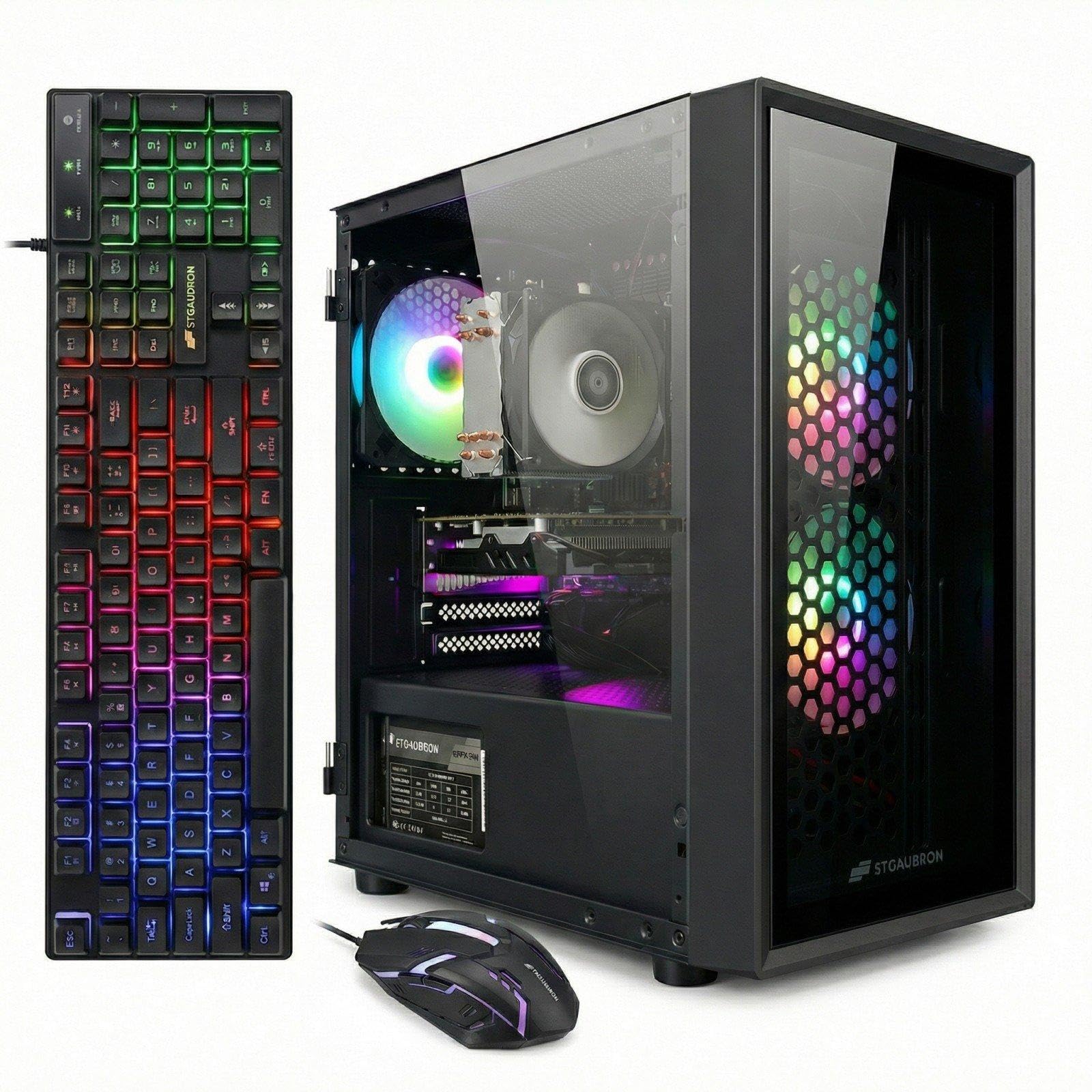
This STGAubron desktop offers a rare combination of modern connectivity and an entry-level dedicated GPU. The Radeon RX 550 with 4GB of GDDR5 video memory is capable of running World of Warcraft at 60-100 FPS, Fortnite at playable settings, and older titles without issue. The Intel Xeon E5 processor is a workstation-class chip with multiple cores, which handles multitasking and productivity tasks well. The inclusion of Wi-Fi 6 and Bluetooth 5.0 makes for a seamless wireless experience.
The system comes with 16GB of RAM and a 512GB SSD, which is the baseline for a responsive budget build. The three RGB fans keep the CPU cool under load, and the included gaming keyboard and mouse are acceptable for getting started. Build quality is decent for a prebuilt at this price, though some units have arrived with minor issues like loose connections or non-functional front ports. The Xeon E5 used here is a server-oriented chip, so single-threaded performance is weaker than a consumer Core i7 of the same generation.
The biggest caveat is the age and architecture of the Xeon processor. It lacks integrated graphics, so if the RX 550 ever fails, you will have no display output at all. The platform is also based on an older chipset, meaning RAM is likely DDR3 and upgrade paths are limited. Buyers who want a modern, upgradable system might find the architecture too restrictive. However, for light gaming and general home use, it functions reliably out of the box.
Why it’s great
- RX 550 4GB provides playable frame rates in popular titles like WoW and Fortnite.
- Wi-Fi 6 and Bluetooth 5.0 deliver fast, modern wireless connectivity.
- Three RGB fans maintain reasonable thermal performance under load.
- Comes with full set of peripherals — keyboard, mouse, and mouse pad.
Good to know
- Xeon E5 lacks integrated graphics; total system failure if GPU dies.
- Older platform architecture limits future CPU and RAM upgrades.
- Some units arrive with minor hardware or connection issues.
- Not suitable for graphically demanding AAA titles at high settings.
4. HP 2025 22″ FHD All-in-One Desktop Computer

This all-in-one desktop from HP is the ideal solution for non-technical users who need a simple, clutter-free computing experience. The 22-inch Full HD display with anti-glare coating is comfortable for long work sessions, and the integrated design means there is no separate tower taking up desk space. The 13th-gen Intel N100 processor is a low-power quad-core chip that handles web browsing, email, office applications, and video streaming smoothly. The 8GB of DDR5 RAM is a welcome upgrade over the DDR4 found in most budget systems.
Connectivity is modern and well-thought-out: USB Type-C, Wi-Fi 6, Bluetooth 5.3, and an HDMI-out port for connecting a second display. The built-in HD webcam with a privacy shutter makes video calls secure and easy, and the dual stereo speakers deliver clear audio for meetings and media. Windows 11 Pro comes pre-installed, offering enhanced security features over the Home version. The system is very quiet in operation, making it suitable for shared living spaces or quiet home offices.
The main limitation is the 128GB SSD storage, which fills up quickly once you install a few applications and store personal files. The N100 processor, while efficient, will struggle with heavy multitasking or any form of photo/video editing. The 8GB RAM is non-upgradable in most configurations, so you are locked into that capacity for the life of the system. This is a purpose-built machine for light daily tasks, not for power users or gamers.
Why it’s great
- Compact all-in-one design removes tower clutter from the desk.
- Modern ports including USB-C and Wi-Fi 6 for fast connectivity.
- Privacy shutter webcam and dual speakers perfect for video calls.
- Very quiet operation suitable for shared spaces and quiet rooms.
Good to know
- 128GB SSD storage is insufficient for anything beyond basic use.
- 8GB RAM is non-upgradable; will cap multitasking capacity.
- N100 processor cannot handle gaming or heavy creative workloads.
- Limited port selection means you may need a USB hub.
5. Lenovo IdeaCentre 24″ FHD All-in-One Desktop Computer

The Lenovo IdeaCentre AIO stands out for its thoughtful design features that go beyond basic specs. The 24-inch Full HD display offers vibrant colors and is comfortable for extended viewing sessions, and the Harman audio-enhanced speakers provide noticeably better sound than the average built-in set. The 5MP webcam with AI noise cancellation and an IR camera delivers crisp video calls, making this an excellent choice for remote workers and families who rely on video communication. The low blue light technology reduces eye strain during long workdays.
Under the hood, the Intel N100 quad-core processor and 8GB of RAM handle everyday tasks like web browsing, document editing, and streaming without issue. The 256GB SSD offers double the storage of many competing all-in-ones at this price range. The system is pre-installed with Windows 11 and includes Office 365 for the web. The included keyboard and mouse are functional and pair well with the system’s minimalist aesthetic.
The N100 processor, while adequate for basics, will show its limits under heavier multitasking or when running multiple large applications simultaneously. The 8GB RAM is soldered and non-upgradable, so the system has a fixed ceiling for performance. Expansion options are limited by the all-in-one form factor — you cannot easily swap the GPU or add internal storage. It is a well-built appliance for its intended use, but not a platform for growth.
Why it’s great
- 24-inch Full HD display with Harman audio for an immersive media experience.
- 5MP AI webcam with noise cancellation sets a new standard for video calls.
- 256GB SSD provides adequate storage for daily use.
- Low blue light technology reduces eye fatigue during long sessions.
Good to know
- N100 processor and 8GB RAM limit heavy multitasking and creative work.
- RAM is soldered and not user-upgradable.
- All-in-one form factor restricts internal component upgrades.
- Basic integrated graphics cannot handle gaming or video editing.
6. HP RGB Gaming Desktop Computer

This HP desktop is a well-balanced entry-level machine for users who want a dedicated GPU without jumping to a high price bracket. The NVIDIA GeForce GT 1030 with 2GB of GDDR5 memory can handle older games and esports titles like Fortnite, Valorant, and CSGO at 60 FPS on low to medium settings. The Intel Core i5-6500 quad-core processor, while a few generations old, still provides adequate performance for schoolwork, web browsing, and light productivity. The 16GB of DDR4 RAM ensures smooth multitasking, and the 512GB SSD provides fast storage.
The system comes with a full set of RGB accessories, including a gaming keyboard and mouse with customizable lighting effects. The RGB case lighting adds a nice visual touch for younger users or anyone who wants a bit of flair. Connectivity includes 600M Wi-Fi and Bluetooth 5.0 for wireless peripherals and networking. The 1-year parts and labor warranty with free lifetime technical support provides peace of mind for first-time buyers.
The i5-6500 is a 6th-gen Skylake processor, which means it lacks native support for Windows 11 and TPM 2.0. The GT 1030, while capable of light gaming, will not run modern AAA titles at acceptable frame rates. Some users have reported issues with the system arriving non-functional or failing after a few days. The included Wi-Fi card can also be unreliable, with some users needing to switch to a USB adapter for stable connectivity.
Why it’s great
- Dedicated GT 1030 GPU enables light gaming at 1080p.
- 16GB DDR4 RAM provides ample headroom for multitasking.
- RGB case and peripherals add aesthetic value for younger users.
- Free lifetime technical support included with purchase.
Good to know
- 6th-gen i5-6500 lacks native Windows 11 / TPM 2.0 support.
- GT 1030 too weak for modern AAA gaming titles.
- Inconsistent quality control — some units arrive DOA.
- Built-in Wi-Fi can be unreliable; USB adapter often needed.
7. ACEMAGIC Mini PC Windows 11 Pro

The ACEMAGIC K1 mini PC proves that a small footprint does not require sacrificing performance. The AMD Ryzen 4300U processor outperforms Intel N-series chips by a significant margin in both CPU and GPU tasks, handling office applications, web browsing, and even light photo editing without hesitation. The 16GB of LPDDR4 RAM is soldered but provides excellent bandwidth, and the 512GB NVMe SSD ensures quick boot times. The standout feature is the triple display support via HDMI, USB-C DP, and a dedicated DisplayPort, all capable of 4K output.
The metal chassis is compact at just 5 by 5 by 1.6 inches, and the built-in power supply design means only one cable is needed for operation — no bulky external power brick. The cooling system is impressively quiet even under moderate load, making it ideal for a living room or a quiet office. The included VESA mount allows you to attach it directly behind a monitor for a completely clean setup. The pre-installed Windows 11 Pro adds business-grade features like BitLocker and Remote Desktop.
The Ryzen 4300U is a 4-core / 4-thread processor, so it will not match the multi-threaded performance of a Core i7 from a desktop line. The integrated AMD Radeon graphics, while better than Intel UHD Graphics, cannot handle modern gaming beyond very low settings. The lack of upgradable RAM means you are limited to 16GB forever. Some users have noted that the unit runs warm under sustained load, though the fan noise remains acceptable.
Why it’s great
- Ryzen 4300U significantly outperforms N100/N95 alternatives in CPU and GPU tasks.
- Triple 4K display support via HDMI, DP, and USB-C is rare at this price.
- Ultra-compact metal chassis with built-in power supply for clean desk setup.
- VESA mount included for mounting behind a monitor.
Good to know
- 4-core / 4-thread CPU limits heavy multi-threaded workloads.
- Soldered RAM cannot be upgraded beyond 16GB.
- Integrated graphics insufficient for modern gaming.
- Chassis runs warm under sustained load despite quiet fan.
8. STGSivir All in One Desktop Computer
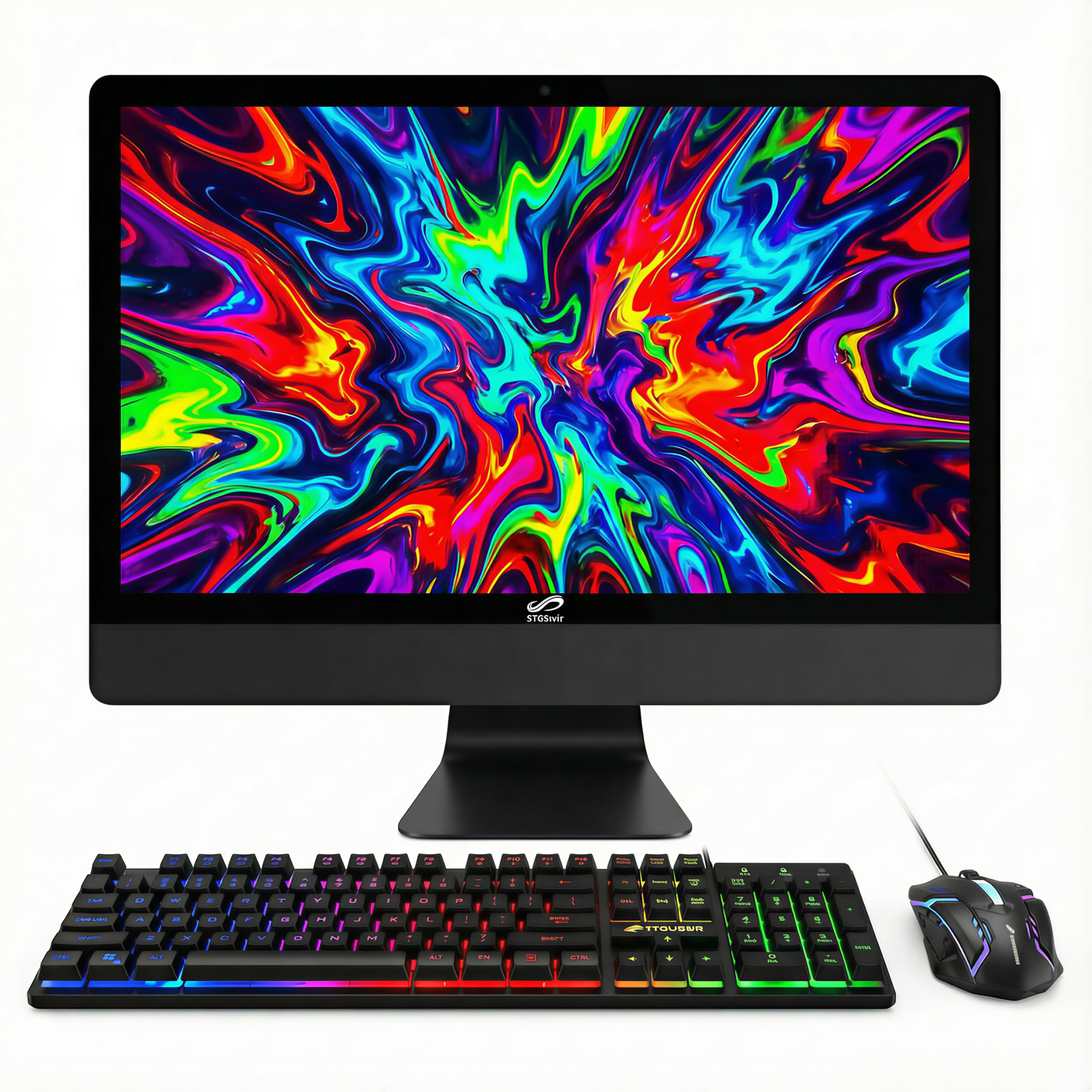
This all-in-one desktop offers a large 23.6-inch Full HD display combined with a Core i5 processor and 16GB of RAM, which is a generous memory allocation for a budget all-in-one. The integrated design reduces desk clutter to a single power cable, making it a great choice for students or home users with limited space. The built-in webcam and speakers allow for immediate video calling without external accessories, and the included RGB keyboard and mouse set is a nice bonus for the price.
The Core i5 processor, running up to 3.7GHz, provides enough power for daily computing tasks, streaming, and light photo editing. The 512GB SSD offers ample storage for documents, media, and applications. Connectivity includes Wi-Fi, Bluetooth 5.0, HDMI, and VGA outputs, allowing you to connect a second monitor if needed. The system comes pre-installed with Windows 11 Home and includes a 1-year warranty with lifetime technical support.
There is a significant caveat: some units have been shipped with a 4th-gen Core i5 processor (Haswell), which is incompatible with official Windows 11 hardware requirements. This means the operating system may be installed via a workaround, potentially missing critical security updates. The all-in-one design also means non-upgradable components — the RAM and storage are fixed. The positioning of the power button on the back of the monitor can be inconvenient in tight spaces.
Why it’s great
- Large 23.6-inch FHD display in a clutter-free all-in-one design.
- 16GB RAM is generous for a budget all-in-one system.
- Includes RGB keyboard and mouse peripherals out of the box.
- Lifetime technical support included with purchase.
Good to know
- Some units shipped with older 4th-gen processor incompatible with Windows 11.
- All-in-one design means no component upgrade options.
- Power button located on the back of the monitor, hard to reach.
- Quality control inconsistency — processor generation not guaranteed.
9. Kroteaup Business Desktop PC, Intel Core i7-4770

This desktop is designed for straightforward office productivity — Excel spreadsheets, Word documents, Zoom calls, and web browsing. The Intel Core i7-4770 quad-core processor, despite being from the 4th-gen Haswell family, still delivers respectable single-threaded performance for basic business applications. The 16GB of DDR3 RAM is enough to keep multiple applications running simultaneously without swapping, and the 512GB NVMe SSD ensures fast boot times and snappy file access.
The system comes pre-installed with Windows 11 Home and supports 4K display output at 3840×2160 resolution. It includes built-in Wi-Fi 6 for reliable internet connectivity. The low-noise cooling system makes it unobtrusive in an office environment. The 2-year warranty and free technical support are better than many competitors, providing a safety net for businesses and home offices.
The i7-4770 lacks official Windows 11 support — it does not have TPM 2.0 or Secure Boot capabilities. This means the seller is installing Windows 11 via a bypass, which may lack full security compliance. The DDR3 RAM is slower and less power-efficient than DDR4, and the system cannot take advantage of newer memory standards. The integrated graphics will not handle gaming or GPU-accelerated tasks. Some units have arrived with configuration issues, such as booting directly to BIOS without a functioning OS.
Why it’s great
- i7-4770 provides adequate processing power for office applications.
- 16GB RAM and 512GB NVMe SSD deliver snappy system responsiveness.
- Includes Wi-Fi 6 and supports 4K display output.
- 2-year warranty with free technical support is above average.
Good to know
- 4th-gen processor lacks native Windows 11 / TPM 2.0 support.
- DDR3 RAM is slower and less efficient than modern DDR4.
- Some units arrived with BIOS boot issues and no OS.
- Cannot handle gaming or GPU-accelerated workloads.
10. suevery 16GB RAM Core i7 Tower Desktop Computer

This tower desktop prioritizes visual flair and basic performance for users who want a stylish computer on a budget. The five RGB fans and tempered glass side panel create an impressive lighting display that can be customized to match your setup. The Core i7-class processor and 16GB of RAM provide enough power for daily multitasking, office work, and casual gaming. The NVMe 256GB storage offers fast boot times, though the capacity is limited for users with large file collections.
The system supports triple monitor setups via multiple ports, making it a viable option for productivity-focused users who need multiple screens. The prebuilt design means you can plug it in and start using it immediately without any assembly. The case is a standard tower form factor with reasonable airflow and space for basic upgrades. The included HDMI output allows easy connection to modern monitors and TVs.
Reliability is a significant concern with this model. Multiple users have reported the system randomly powering off from day one and hard drive failures within three months. The micro-ATX motherboard inside is cramped, making internal upgrades difficult, especially adding a SATA SSD. The RGB lighting is controlled only by a case button, not software, limiting customization. The CPU and motherboard combination appears to be an older platform with an unknown upgrade path.
Why it’s great
- Five RGB fans and tempered glass panel create an attractive light show.
- 16GB RAM provides enough memory for comfortable multitasking.
- Triple monitor support enhances productivity workflows.
- Plug-and-play setup with no assembly required.
Good to know
- High failure rate — random power-offs and drive failures reported.
- 256GB storage is insufficient for most users beyond basic needs.
- Micro-ATX motherboard makes internal upgrades difficult.
- Older platform with unknown CPU and upgrade path.
11. STGAubron Prebuilt Gaming PC Desktop, Core i5

This STGAubron desktop is built around an Intel Core i5 processor and an AMD Radeon RX 550 with 4GB of video memory, making it capable of running esports titles like Roblox, The Sims 4, and VRChat at playable frame rates. The 16GB of RAM and 512GB SSD provide a responsive experience for both gaming and everyday tasks. The inclusion of Wi-Fi 6 and Bluetooth 5.0 ensures modern wireless capabilities. The two RGB fans add a touch of color to the black tower case.
The system is designed as an entry-level gaming machine for younger users or casual gamers who do not need high-end performance. It supports 1080p output and can drive a single monitor at that resolution for most titles. The included gaming keyboard and mouse are basic but functional, allowing immediate use out of the box. Customer service from STGAubron has been responsive in resolving post-warranty issues, with one user reporting a replacement unit shipped quickly.
The Core i5 used here is a low-power variant that, combined with the RX 550, will not handle modern AAA titles or VR gaming. The GPU is several generations old and lacks modern features like ray tracing support. Some users have reported intermittent Wi-Fi dropouts that last a few minutes. The overall build quality uses generic components with no clear upgrade path, and the system may show its age within two years. There are better performing options available for a modest increase in budget.
Why it’s great
- RX 550 4GB enables entry-level gaming on popular titles.
- 16GB RAM and 512GB SSD deliver solid system responsiveness.
- Modern Wi-Fi 6 and Bluetooth 5.0 connectivity.
- Responsive customer service for post-purchase issues.
Good to know
- Low-power Core i5 and RX 550 cannot handle modern AAA gaming.
- Some units experience intermittent Wi-Fi dropouts.
- Generic components with limited upgrade path.
- Performance will show its age within 1-2 years.
FAQ
Is a refurbished business desktop a good option for a budget computer?
How much RAM do I need in a budget computer for 2024?
Can a budget computer handle 4K video playback and editing?
Why do some compatible PCs come with Windows 11 installed but lack TPM 2.0?
Final Thoughts: The Verdict
For most users, the best budget computer winner is the Dell OptiPlex 7060 SFF because it offers an unmatched combination of 32GB of DDR4 RAM, a 6-core i7-8700 processor, and dual 4K display support in a durable, compact chassis. If you want genuine 1080p gaming performance, grab the abyte spark Prebuilt Gaming PC with its RX 590 8GB graphics card. And for a clutter-free, simple computing experience for family or non-tech users, the HP All-in-One 2025 delivers modern connectivity and an integrated design that just works.

Mo Maruf
I created WellFizz to bridge the gap between vague wellness advice and actionable solutions. My mission is simple: to decode the research and give you practical tools you can actually use.
Beyond the data, I am a passionate traveler. I believe that stepping away from the screen to explore new environments is essential for mental clarity and physical vitality.