Our readers keep the lights on and my smoothie glass nicely filled. As an Amazon Associate, I earn from qualifying purchases.
The jump from a standard 60Hz office panel to a 4K high refresh rate monitor is not a subtle upgrade—it is a fundamental shift in how your eyes track motion and how your brain registers spatial awareness in fast-paced games. Every millisecond of input lag and every hertz of refresh bandwidth translates directly into visible target acquisition speed. This purchase demands a clear-eyed understanding of panel technology, response time performance, and variable refresh rate implementation, because picking the wrong combination wastes both GPU horsepower and your budget.
I’m Mohammad Maruf — the founder and writer behind WellFizz. I analyze display hardware specifications, panel timing characteristics, and real-world gaming performance data to separate marketing spec sheets from measurable daily-use advantages.
Whether you are optimizing for competitive esports, immersive single-player visual fidelity, or a dual-purpose workstation and gaming setup, finding the right best 4k high refresh rate monitor requires matching specific panel strengths to your actual use case instead of just chasing the highest number on the spec sheet.
How To Choose The Best 4K High Refresh Rate Monitor
Selecting the right monitor in this category is a game of trade-offs between panel type, refresh rate ceiling, response time, and color accuracy. A 144Hz IPS panel delivers a very different experience than a 240Hz OLED panel, even at the same 4K resolution. Understanding these core differences prevents the disappointment of pairing a high-end GPU with a panel that cannot keep up.
Panel Technology: IPS vs. VA vs. OLED
IPS panels remain the most balanced choice for mixed-use scenarios, offering wide viewing angles and consistent color reproduction without the contrast limitations of older LCD technology. VA panels provide deeper black levels and higher native contrast ratios, which benefit darker game environments, but they often suffer from slower pixel response transitions in dark shades, causing visible dark-level smearing. OLED panels deliver instant pixel response (0.03ms GtG), perfect blacks, and infinite contrast, but they require burn-in management and come at a premium price. For a 4K high refresh rate monitor used for both work and gaming, a high-quality Fast IPS panel is the safest starting point.
Refresh Rate vs. Response Time: Two Separate Metrics
A 240Hz refresh rate is meaningless if the pixel response time cannot complete a full color transition within the 4.16ms window between frames. Look for panels that advertise 1ms GtG response times, but understand that this figure is often measured at optimal overdrive settings. Real-world response times vary based on the specific gray-to-gray transition. OLED panels achieve 0.03ms GtG across nearly all transitions, eliminating motion blur entirely at any refresh rate. For most buyers, a 144Hz IPS panel with a genuine 1ms response time provides a superior experience to a 165Hz VA panel with slower pixel transitions.
Variable Refresh Rate (VRR) Compatibility
G-Sync compatibility and FreeSync Premium are not created equal across all monitors. G-Sync Compatible (not G-Sync Ultimate) operates over HDMI and DisplayPort using the Adaptive-Sync standard, but validation varies by manufacturer. FreeSync Premium includes a minimum 120Hz refresh requirement and low framerate compensation (LFC), which prevents stuttering when frame rates drop below the monitor’s variable refresh range. If you own an NVIDIA GPU, prioritize monitors with official G-Sync Compatible certification. AMD GPU owners benefit from FreeSync Premium Pro, which adds HDR support into the VRR pipeline.
Connectivity and Bandwidth Constraints
Driving 4K at high refresh rates requires DisplayPort 1.4 with Display Stream Compression (DSC) or HDMI 2.1. Without DSC, DisplayPort 1.4 is limited to 4K 120Hz with 8-bit color. HDMI 2.1 supports 4K 144Hz at 10-bit color without compression. Check your GPU’s output ports—many older HDMI 2.0 ports cannot exceed 4K 60Hz. USB-C with DisplayPort Alt Mode is a growing feature, but bandwidth is shared with power delivery, so verify that your laptop supports the required DP version for full refresh rate output.
Quick Comparison
On smaller screens, swipe sideways to see the full table.
| Model | Category | Best For | Key Spec | Amazon |
|---|---|---|---|---|
| LG 27G810A-B | IPS | Dual-Mode Gaming | 180Hz UHD / 360Hz FHD | Amazon |
| LG 32GX850A-B | OLED | Glossy OLED Clarity | 165Hz 0.03ms GtG | Amazon |
| Samsung Odyssey G7 G70D | IPS | Smart TV + Gaming | 144Hz 1ms GtG | Amazon |
| ASUS ROG Strix XG27UCG | IPS | Dual-Mode Precision | 160Hz UHD / 320Hz FHD | Amazon |
| Samsung Odyssey G7 G70F | IPS | Dual-Mode Flexibility | 180Hz UHD / 360Hz FHD | Amazon |
| Dell 32 Plus S3225QC | QD-OLED | Console + Media | 120Hz 0.03ms GtG | Amazon |
| MSI MPG 321URXW | QD-OLED | Ultimate Gaming Clarity | 240Hz 0.03ms GtG | Amazon |
| ASUS ROG Swift PG32UCDM | QD-OLED | Premium HDR Gaming | 240Hz 0.03ms GtG | Amazon |
| CRUA 32″ Curved | VA | Curved Immersion | 240Hz 1ms MPRT | Amazon |
| INNOCN GA27W1Q | QD-OLED | Budget OLED Gaming | 240Hz 0.03ms GtG | Amazon |
| ASUS ROG Strix XG49VQ | VA | Ultrawide Productivity | 144Hz 3840×1080 | Amazon |
In‑Depth Reviews
1. LG 27G810A-B 27-Inch UltraGear 4K IPS Gaming Monitor

The LG 27G810A-B strikes the hardest balance between price, performance, and flexibility in the 4K high refresh rate category. Its Dual Mode capability lets you toggle between native 4K at 180Hz for visually rich single-player titles and Full HD at 360Hz for competitive shooters where every millisecond of input lag matters. This is the same Fast IPS panel technology found in LG’s higher-end UltraGear lineup, delivering 95% DCI-P3 color coverage and a reliable 1ms GtG response time across the entire refresh range.
VESA DisplayHDR 400 certification provides decent highlight punch, though it is not a substitute for true OLED HDR. The 27-inch size at 4K delivers a pixel density of roughly 163 PPI, which makes text sharp enough for productivity work without requiring scaling adjustments. The adjustable stand offers height, tilt, swivel, and pivot adjustments, which is rare at this price tier. NVIDIA G-Sync Compatible and AMD FreeSync Premium support ensure tear-free operation regardless of your GPU brand.
The only meaningful trade-off is the absence of OLED-level contrast, but that is expected at this price. Buyers who are anxious about OLED burn-in or who need a single monitor for both competitive gaming and all-day office work will find the LG 27G810A-B offers the most versatile feature set without compromise in either use case. The built-in fan may produce audible noise in a completely silent room, but game audio easily masks it.
Why it’s great
- Dual Mode allows seamless switch between 4K 180Hz and FHD 360Hz via hotkey.
- Bright 400-nit IPS panel with 95% DCI-P3 delivers vibrant, accurate colors.
- Fully adjustable ergonomic stand with height, tilt, swivel, and pivot.
Good to know
- IPS black levels are typical, not competitive with OLED or VA panels.
- Fan noise is noticeable in quiet environments at close range.
2. LG 32GX850A-B 32-Inch UltraGear Glossy OLED Gaming Monitor

The LG 32GX850A-B represents a significant value proposition in the OLED gaming monitor segment, pairing a glossy WOLED panel with Micro Lens Array+ technology that pushes typical brightness to 275 nits. The glossy finish eliminates the hazy look of matte anti-glare coatings, making in-game highlights and text look sharper and more immediate. With a 1.5M:1 contrast ratio and VESA DisplayHDR True Black 400 certification, black levels are truly infinite, and shadow detail in dark game scenes is virtually artifact-free.
Dual Mode operates between 4K at 165Hz and Full HD at 330Hz, giving competitive players the option to push maximum frame rates in esports titles without switching monitors. The 0.03ms GtG response time is below the threshold of human perception, meaning there is zero motion blur even during the fastest camera pans. The monitor is also triple UL-certified for anti-glare, flicker-free performance, and low blue light, which makes extended gaming sessions noticeably less fatiguing than standard LCD panels.
The 32-inch size at 4K provides a dense 140 PPI, which is excellent for both gaming and productivity. Text clarity is generally good, though some users may notice minor color fringing on small fonts—a common trait across WOLED panels. The stand is fully adjustable, and the overall build quality includes a metal border that feels more substantial than the plastic chassis of some competitors. This is the cheapest entry point into 4K OLED high refresh rate gaming, and it delivers nearly all the picture quality benefits of panels costing significantly more.
Why it’s great
- Glossy WOLED panel delivers perfect blacks and vibrant colors without matte haze.
- Dual Mode (165Hz 4K / 330Hz FHD) covers both high-fidelity and competitive gaming.
- Triple UL certification reduces eye strain for long sessions.
Good to know
- Peak brightness is lower than some QD-OLED competitors at 275 nits typical.
- Text clarity may show slight color fringing on small fonts at standard viewing distance.
3. Samsung 27” Odyssey G7 (G70D) 4K IPS Gaming Monitor

The Samsung Odyssey G7 G70D stands apart from the crowd because it integrates a full smart TV platform (Tizen) directly into the monitor, including Samsung Gaming Hub support for cloud streaming services like Xbox Game Pass and NVIDIA GeForce NOW. This makes it a compelling choice for users who want a single display that can serve as a PC gaming monitor, a console screen, and a standalone streaming device without piping audio through a separate computer. The 27-inch Fast IPS panel delivers 144Hz at 4K UHD with a 1ms GtG response time and G-Sync Compatible certification for smooth variable refresh rate operation.
Color performance is strong with 99% DCI-P3 coverage, and the DisplayHDR 400 certification provides enough brightness range to make HDR content look noticeably better than standard SDR. The NQM AI Processor performs 4K upscaling on lower-resolution content streamed through the smart TV apps, which improves clarity when watching YouTube or Netflix without a PC source. The built-in Dynamic Black Equalizer automatically adjusts black levels in dark game scenes, giving you visibility into shadowy areas without washing out the entire image.
The trade-off for the smart TV integration is a slightly dimmer image compared to dedicated productivity monitors like Samsung’s Viewfinity line, and some users report the remote control interface can feel cluttered compared to a clean OSD. The monitor also runs warmer than typical IPS panels, and the absence of a USB-C port limits its utility as a laptop docking solution. If you want a monitor that can operate independently of a PC for media consumption, the G70D is a unique and well-executed hybrid.
Why it’s great
- Built-in Tizen smart platform eliminates need for external streaming device.
- Fast IPS panel with 144Hz and 1ms GtG provides smooth, clear motion.
- Dynamic Black Equalizer improves visibility in dark game scenes without washout.
Good to know
- No USB-C port limits laptop connectivity options.
- Smart TV setup requires signing in and may display ads on the home screen.
4. ASUS ROG Strix 27” 4K Gaming Monitor (XG27UCG)

The ASUS ROG Strix XG27UCG differentiates itself through its Dual Mode implementation: 4K at 160Hz or Full HD at 320Hz, with the switch triggered via a single hotkey. The Fast IPS panel delivers a 1ms GtG response time, and the Extreme Low Motion Blur Sync (ELMB SYNC) technology allows ELMB to operate simultaneously with variable refresh rate, which is rare in this segment. This means you get both motion blur reduction and tear-free operation without having to choose between the two features.
Color performance is excellent with 130% sRGB and 95% DCI-P3 coverage, and the advanced gray-scale tracking ensures smooth color gradation without banding in gradient-heavy scenes. The DisplayWidget Center software allows mouse-based OSD adjustments, removing the need to fiddle with physical buttons. The stand offers full ergonomic adjustment including height, swivel, rotation, and tilt, and the rear RGB lighting adds a subtle aesthetic touch for battlestation builders.
The HDMI 2.1 port is limited to 4K 120Hz on most GPUs, so achieving the full 160Hz requires DisplayPort 1.4 with DSC, which introduces negligible latency but is worth noting for console users. The monitor is G-Sync Compatible and has been validated by users across multiple GPU generations with no reported flicker or frame-skipping issues. If Dual Mode and simultaneous ELMB-with-VRR are your priority, ASUS has nailed the execution here better than most competitors at this price tier.
Why it’s great
- ELMB Sync runs alongside variable refresh rate for blur-free, tear-free motion.
- Dual Mode hotkey switches between 4K 160Hz and FHD 320Hz instantly.
- DisplayWidget Center software allows OSD control via mouse for easy adjustments.
Good to know
- Full 160Hz requires DisplayPort 1.4 with DSC; HDMI caps at 120Hz.
- RGB lighting cannot be fully disabled without turning off the rear logo.
5. Samsung 27” Odyssey G7 G70F 4K Gaming Monitor

The Samsung Odyssey G7 G70F takes the Dual Mode concept and pushes the upper limit to 360Hz in Full HD mode, making it the fastest 4K panel in the mid-range tier for competitive gaming. When you switch to Full HD, the pixel response becomes even snappier, and the 360Hz refresh rate effectively eliminates all perceived motion blur in esports titles like Valorant, Overwatch 2, or Counter-Strike 2. In native 4K mode, the 180Hz refresh rate is a meaningful step above the common 144Hz ceiling, providing smoother desktop navigation and more responsive gameplay in graphically intensive titles.
The Fast IPS panel maintains consistent color reproduction across wide viewing angles, and HDR10 support adds depth to highlights and shadows without the need for aggressive local dimming. The Auto Source Switch+ feature automatically detects which device is active and switches input accordingly, which is a small but noticeable quality-of-life improvement for multi-device setups. The stand provides full ergonomic adjustment including height, tilt, pivot, and swivel.
The monitor lacks built-in speakers, which is a notable omission at this price point, especially given Samsung’s inclusion of smart TV features in the G70D variant. Some users report a slow wake-from-sleep delay of several seconds, which can be annoying in dual-monitor setups where the secondary display lags behind the primary. If you want the highest Dual Mode refresh ceiling without jumping to OLED pricing, the G70F delivers the best raw frame rate capability in its class.
Why it’s great
- Dual Mode reaches 360Hz in FHD, the highest in this mid-range tier.
- Fast IPS panel delivers consistent colors and 1ms GtG response.
- Auto Source Switch+ simplifies multi-device input management.
Good to know
- No built-in speakers require external audio solution.
- Wake-from-sleep delay can be several seconds longer than competitors.
6. Dell 32 Plus 4K QD-OLED Monitor S3225QC
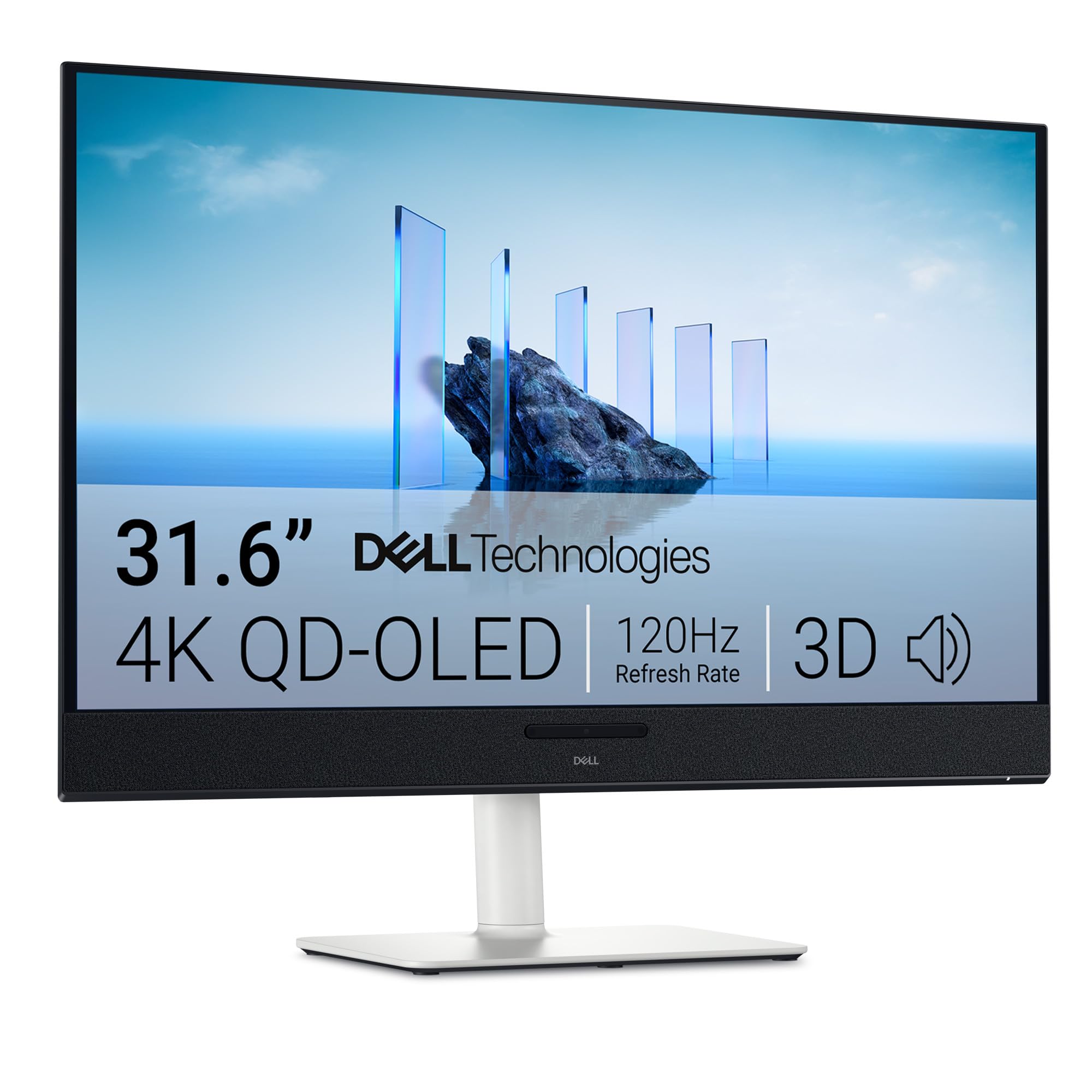
The Dell 32 Plus S3225QC is a QD-OLED monitor tuned primarily for console gamers and media enthusiasts, offering 4K resolution at 120Hz with a 0.03ms GtG response time and VESA DisplayHDR True Black 400 certification. The 32-inch QD-OLED panel delivers a 1.5M:1 contrast ratio, infinite black levels, and 99% DCI-P3 color gamut coverage. The combination of Dolby Vision support and the 120Hz refresh rate makes this an exceptional companion for Xbox Series X or PlayStation 5, which natively support 4K 120Hz output in many titles.
The standout feature is the built-in spatial audio system with five 5W speakers and AI-driven head tracking, which creates a convincing 3D soundstage without requiring a separate soundbar or headphones. Connection is simplified through a single USB-C cable that supports up to 90W power delivery to a laptop, making it a clean desktop solution for users who switch between a work laptop and a gaming console. The stand offers full ergonomic adjustment, and the ash white color scheme stands out from the black slab aesthetic of most gaming monitors.
The 120Hz refresh rate ceiling means PC gamers who want 144Hz or higher will need to look elsewhere, and the single HDMI 2.1 port limits multi-console setups. Some users have reported HDMI handshake issues at 120Hz that require manual input re-selection. For console gaming and media consumption where 120Hz is the standard, the S3225QC delivers the best image quality in its class at a price that undercuts most 32-inch OLED competitors.
Why it’s great
- QD-OLED panel with Dolby Vision delivers stunning HDR and infinite contrast.
- Five-speaker spatial audio system eliminates need for external sound.
- USB-C with 90W PD simplifies single-cable laptop connectivity.
Good to know
- 120Hz refresh cap is lower than most high-refresh PC gaming monitors.
- HDMI 2.1 handshake can cause flicker at 120Hz for some users.
7. MSI MPG 321URXW QD-OLED 32-Inch 4K Gaming Monitor

The MSI MPG 321URXW represents the current high-water mark for 4K high refresh rate gaming monitors, combining a 31.5-inch QD-OLED panel with a 240Hz refresh rate and a 0.03ms GtG response time. The Quantum Dot OLED implementation delivers 99% DCI-P3 color coverage with a Delta E ≤2 color accuracy rating, making it equally viable for color-critical creative work as it is for competitive gaming. The VESA ClearMR 13000 rating confirms that motion clarity is effectively artifact-free even during the most demanding fast-paced scenes.
The fanless graphene heatsink design improves panel durability and allows for a slimmer chassis profile without active cooling noise. OLED Care 2.0 software includes pixel refresh, panel protection, and taskbar brightness management to mitigate burn-in risk over long-term use. Connectivity is future-proof with DisplayPort 1.4a and HDMI 2.1 ports both supporting 4K at 240Hz, plus a USB-C port with 90W power delivery for laptop charging. The built-in KVM function allows seamless switching between two connected devices using a single keyboard and mouse.
The white color finish is distinctive but may not suit every desk aesthetic, and the stand adjustment range is narrower than some competitors, lacking the full vertical range of premium alternatives. Some Mac users have reported a handshake issue when connecting two of these monitors, requiring a firmware-driven workaround to disable DSC. For gamers who want uncompromised 4K speed with OLED contrast and professional-grade color accuracy, the MPG 321URXW is the definitive choice in this generation.
Why it’s great
- 240Hz refresh on QD-OLED delivers the fastest 4K gaming experience available.
- Fanless graphene heatsink eliminates cooling noise and extends panel life.
- Built-in KVM and 90W USB-C simplify multi-device desk setups.
Good to know
- White finish may not match all desk or peripheral color schemes.
- Mac dual-monitor setup requires disabling DSC for stable operation.
8. ASUS ROG Swift 32” 4K QD-OLED Gaming Monitor (PG32UCDM)

The ASUS ROG Swift PG32UCDM is the benchmark against which all other 4K OLED gaming monitors are measured, combining a 32-inch QD-OLED panel with a 240Hz refresh rate, 0.03ms GtG response time, and ASUS’s custom heatsink with graphene film for enhanced thermal management and burn-in resistance. The 1000-nit peak brightness and VESA DisplayHDR 400 True Black certification deliver HDR performance that dramatically exceeds what any IPS or VA panel can produce, with specular highlights that pop against perfectly black backgrounds.
The anti-reflective coating on the glossy panel surface is well-tuned, producing only minimal reflections even in moderately lit rooms, while maintaining the clarity and depth that glossy finishes provide. The uniform brightness setting ensures consistent luminance across the entire panel, which is critical for productivity work where brightness hotspots are distracting. The three-year warranty includes burn-in coverage, which addresses the single biggest concern buyers have about OLED longevity. The stand is fully adjustable, and the overall build quality uses metal reinforcements that feel significantly more premium than any plastic-clad competitor.
The price is positioned at the top of the 4K OLED market, and the monitor lacks built-in speakers, which feels like an oversight at this price tier. The DisplayWidget Center software allows mouse-based access to OLED Care features and settings, which is convenient but unnecessary for most users after initial configuration. If budget is not the primary constraint and you want the absolute best image quality, motion clarity, and build quality available in a 4K high refresh rate monitor, the PG32UCDM is the definitive recommendation.
Why it’s great
- 1000-nit peak brightness on QD-OLED delivers reference-class HDR performance.
- Custom heatsink and graphene film provide best-in-class burn-in protection.
- Three-year warranty with burn-in coverage eliminates OLED longevity concerns.
Good to know
- No built-in speakers at this premium price point is a notable omission.
- Glossy finish may show reflections in rooms with direct overhead lighting.
9. CRUA 32″ Curved 4K VA Gaming Monitor

The CRUA 32-inch Curved Gaming Monitor offers the highest refresh rate (240Hz) at the lowest entry price point in this roundup, using a VA panel with a 1500R curvature and native 4K UHD resolution. The VA panel technology provides a 3000:1 native contrast ratio, which is three times higher than typical IPS panels, resulting in visibly deeper blacks and better shadow detail in dark game scenes. The 120% sRGB color gamut (8-bit + FRC) produces vibrant colors suitable for both gaming and streaming media consumption.
The 240Hz refresh rate is genuinely usable in this configuration because the VA panel’s response times, while slower than IPS or OLED, are sufficient to avoid objectionable smearing at this refresh rate. AMD FreeSync support reduces tearing without introducing the input lag penalty of fixed V-Sync. The monitor includes HDMI 2.1 and DisplayPort 1.4 inputs, along with PIP/PBP functionality for multitasking across two video sources. The white color scheme with RGB backlighting gives it a distinct aesthetic that stands out from the black monitor crowd.
The biggest compromise is the lack of ergonomic adjustments—tilt is limited to -5° to 15° with no height adjustment, swivel, or pivot. The built-in speakers are present but produce weak, tinny audio that will most likely remain unused. The OSD menu navigation without a remote requires some patience, and the stand assembly is fiddly for larger hands. For buyers who prioritize curve immersion and the highest refresh rate at the lowest cost, the CRUA delivers a functional experience that punches above its price tier in raw specifications.
Why it’s great
- 240Hz refresh rate at this price point is unmatched in the 4K curved segment.
- 3000:1 VA contrast ratio delivers deeper blacks than equivalent IPS panels.
- 1500R curve provides immersive field of view for gaming and media.
Good to know
- No height adjustment or swivel limits ergonomic customization.
- Built-in speakers produce weak audio; an external speaker is recommended.
10. INNOCN 27″ 4K QD-OLED Gaming Monitor (GA27W1Q)

The INNOCN GA27W1Q brings QD-OLED performance to a lower price tier than the major brands, offering a 27-inch 4K panel with a 240Hz refresh rate and 0.03ms GtG response time at a significant discount to ASUS and MSI equivalents. The QD-OLED panel delivers 99% DCI-P3 color coverage, a 1.5M:1 contrast ratio, and 1.07 billion colors (10-bit), producing image quality that is indistinguishable from panels costing hundreds more. The monitor includes two DisplayPort inputs, two HDMI ports, and a USB-C connection, providing flexible multi-device connectivity.
The MAC-View mode adjusts the OSD color profile to match Apple’s color space, reducing the color mismatch that often occurs when connecting a MacBook to a non-Apple display. The RGB LED atmosphere lights on the rear add a gaming aesthetic, and the stand provides height, tilt, swivel, and pivot adjustment. The monitor is G-Sync Compatible and supports FreeSync, covering both GPU ecosystems without compatibility issues.
The build quality does not match the premium feel of ASUS or LG—the chassis uses thinner plastic, the external power brick is bulky, and the OSD menu navigation is less intuitive than more polished competitors. The included speakers are poor, producing flat, quiet audio that is not suitable for gaming. If the priority is getting QD-OLED image quality at the lowest possible price, the GA27W1Q delivers the same panel performance as flagship monitors while cutting corners only on non-panel aspects like build materials and firmware polish.
Why it’s great
- QD-OLED panel at this price undercuts major brand competitors by a significant margin.
- MAC-View mode provides accurate color matching for Apple device users.
- Full ergonomic adjustment stand with height, tilt, swivel, and pivot.
Good to know
- Build quality uses thinner plastics than premium-tier competitors.
- Bulky external power brick and poor OSD navigation feel budget-grade.
11. ASUS ROG Strix XG49VQ 49” Curved Gaming Monitor

The ASUS ROG Strix XG49VQ takes a different approach to 4K by using a 49-inch super ultra-wide panel with a 32:9 aspect ratio at DFHD (3840×1080) resolution, effectively replacing a dual-monitor setup with a single curved display. The 1800R curvature wraps around your peripheral vision, creating an immersive field of view that is particularly effective in racing simulators and flight games. The 144Hz refresh rate and FreeSync 2 HDR support ensure smooth, tear-free motion, and the DisplayHDR 400 certification with 90% DCI-P3 coverage provides decent color performance for a VA panel.
The sheer width of the 49-inch panel allows it to function as an ultrawide monitor for gaming while simultaneously displaying productivity tools like Discord, Spotify, or a web browser in side-by-side partitions using software like FancyZones. The stand includes height, swivel, and tilt adjustments, and VESA mount compatibility allows for desk arm installation to save desk space. The VA panel’s native contrast ratio delivers better black levels than typical IPS ultrawides, improving immersion in dark game scenes.
The 1080p vertical resolution is a hard limitation—3840×1080 provides the same pixel height as a standard 1080p monitor, which means less vertical screen real estate than a 32-inch 16:9 panel. The pixel density is low enough that individual pixels are visible at normal viewing distance, and HDR performance is mediocre compared to modern OLED or even good IPS monitors. G-Sync compatibility is limited, with reported flickering issues when used with NVIDIA GPUs. This monitor is specifically suited to users who prioritize screen width and immersion over pixel density and color accuracy.
Why it’s great
- 49-inch 32:9 aspect ratio replaces dual monitors with a single curved display.
- 1800R curvature creates immersive field of view for racing and flight simulators.
- Height, swivel, and tilt stand with VESA mount provides flexible placement.
Good to know
- 1080p vertical resolution results in visible pixel structure at normal viewing distance.
- G-Sync compatibility is limited and may cause flickering with NVIDIA GPUs.
FAQ
Can a standard HDMI 2.0 cable run 4K at 144Hz?
Is G-Sync Compatible the same as G-Sync Ultimate?
Do I need HDMI 2.1 for a 4K high refresh rate monitor?
Final Thoughts: The Verdict
For most users, the best 4k high refresh rate monitor winner is the LG 27G810A-B because it delivers Dual Mode flexibility, a bright and color-accurate Fast IPS panel, and a fully adjustable stand at a price that represents the best value in the category. If you want the infinite contrast and instant response of OLED at a reasonable price, grab the LG 32GX850A-B which offers glossy WOLED performance with Dual Mode support. And for uncompromised 4K speed with professional-grade color accuracy and burn-in warranty coverage, nothing beats the ASUS ROG Swift PG32UCDM.

Mo Maruf
I created WellFizz to bridge the gap between vague wellness advice and actionable solutions. My mission is simple: to decode the research and give you practical tools you can actually use.
Beyond the data, I am a passionate traveler. I believe that stepping away from the screen to explore new environments is essential for mental clarity and physical vitality.