Our readers keep the lights on and my smoothie glass nicely filled. As an Amazon Associate, I earn from qualifying purchases.
If your home office or small team runs on documents, the weekly frustration of a dried-out inkjet or a Wi-Fi handshake that drops mid-job is a productivity leak you don’t need. A monochrome laser printer sidesteps the liquid-ink hassle entirely, delivering crisp, smudge-resistant text at speeds that keep pace with a real workday.
I’m Mohammad Maruf — the founder and writer behind WellFizz. I’ve spent the last several months cross-referencing Amazon reviews, spec sheets, and real-world failure reports to find the printers that actually hold up under daily use without nickel-and-diming you on toner.
After filtering more than 50 models down to the nine that consistently deliver, this guide gives you the full breakdown on the best black and white laser printer for every kind of workspace.
How To Choose The Best Black and White Laser Printer
A monochrome laser printer is a long-term investment in your workflow. The wrong pick means slow output, frustrating connectivity, or expensive toner refills that eat into your savings. Here are the three factors that separate a workhorse from a headache.
Print Speed and First-Page-Out Time
Speed is measured in pages per minute (ppm) for continuous printing, but the metric that affects you most is first-page-out time (FPOT). A printer that wakes from sleep and spits out the first page in under 8 seconds feels instant. Models rated at 30 ppm or higher handle daily document loads without a backlog.
Total Cost of Ownership (Toner and Drum)
The printer’s purchase price is only half the equation. Look at the page yield of the included starter cartridge, then check standard and high-yield replacement toner costs. A printer that uses a separate drum unit (like many Brother models) can be cheaper over two years because you replace only the toner, not the drum every time.
Connectivity and Paper Handling
Decide whether you need Wi-Fi, Ethernet, or plain USB before you buy. An all-in-one with scan and copy saves desk space and eliminates a second device, but a dedicated print-only unit is simpler and often faster. Paper capacity is another bottleneck: a 150-sheet tray means refilling every few days in a busy office, while a 250-sheet tray buys you a week of uninterrupted work.
Quick Comparison
On smaller screens, swipe sideways to see the full table.
| Model | Category | Best For | Key Spec | Amazon |
|---|---|---|---|---|
| HP LaserJet Pro MFP 3101sdw | All-in-One | Small teams needing scan/copy | 35 ppm, 50-sheet ADF | Amazon |
| Brother MFC-L2820DW | All-in-One | Compact office with fax | 36 ppm, 2.7″ touchscreen | Amazon |
| Brother HL-6210DW | Print Only | High-volume business printing | 50 ppm, 520-sheet tray | Amazon |
| HP LaserJet Pro 4001n | Print Only | Ethernet/USB office workgroup | 42 ppm, HP Wolf Security | Amazon |
| Canon imageCLASS LBP246dw II | Print Only | Speed-focused monochrome jobs | 42 ppm, 5-line LCD | Amazon |
| Brother HL-L2480DW | All-in-One | Home office with cloud apps | 36 ppm, dual-band Wi-Fi | Amazon |
| Canon imageCLASS MF284dw | All-in-One | Budget-friendly all-in-one | 35 ppm, ADF, mobile print | Amazon |
| Canon imageCLASS MF264dw | All-in-One | Light use with Apple devices | 30 ppm, AirPrint, voice | Amazon |
| HP LaserJet M209d | Print Only | Wired, no-Wi-Fi setups | 30 ppm, auto duplex | Amazon |
In‑Depth Reviews
1. HP LaserJet Pro MFP 3101sdw

With print speeds up to 35 ppm and a 50-sheet auto document feeder, it handles multi-page scan-and-copy workflows without making you stand at the machine. The integrated HP Wolf Pro Security is a real bonus for any office that handles sensitive documents.
Wireless performance is notably stable — users report it reconnects automatically after a power outage, a simple reliability check that many competitors fail. The 250-sheet input tray is standard for this tier, but the optional paper tray expansion lets you grow capacity as your workload increases. Setup is straightforward, and the companion app avoids the bloatware that plagues some consumer printers.
The main trade-off is HP’s firmware policy: the printer is designed to reject non-HP toner cartridges. Some users suggest skipping firmware updates to preserve the option of third-party toner, but that’s a workaround, not a feature. The starter toner yields roughly 1,000 pages, so budget for a high-yield replacement early in ownership.
Why it’s great
- Reliable wireless with fast reconnect after outages
- Security features suitable for small business document handling
- Quiet operation for a shared office space
Good to know
- Firmware blocks third-party toner cartridges
- Auto document feeder can jam with more than 25 sheets
- Starter toner yield is lower than some competitors
2. Brother MFC-L2820DW

The Brother MFC-L2820DW crams print, copy, scan, and fax into a footprint that won’t dominate your desk. At 36 ppm with a 50-page auto document feeder, it keeps up with moderate office volumes while the 2.7-inch touchscreen makes navigation genuinely pleasant. The dual-band wireless (2.4 and 5 GHz) gives you flexibility to avoid congested networks.
Brother’s separate toner-and-drum design is a long-term cost advantage — you replace only the toner cartridge (TN830 or TN830XL) and swap the drum every 45,000 pages. Users consistently report that after the initial setup hurdle—which can be confusing due to sparse instructions—the printer runs flawlessly for months. The mobile app integration with Google Drive, Dropbox, and Evernote adds real value if you work across multiple devices.
It does require a bit of patience during the initial Wi-Fi connection. Several reviews note that the setup guide is too brief, and you may need to enter your network credentials manually rather than relying on WPS. Once connected, though, it is a quiet, reliable workhorse that rarely jams and produces sharp text.
Why it’s great
- Low long-term cost with separate drum and toner system
- Large 2.7-inch color touchscreen for easy operation
- Quiet operation with strong print quality
Good to know
- Initial Wi-Fi setup instructions are insufficient
- Assembly guide unclear for complete beginners
3. Brother Professional HL-6210DW

The Brother HL-6210DW is built for volume. With a 50 ppm engine and a standard 520-sheet tray that expands to 1,660 sheets, this printer is aimed squarely at small-to-medium businesses that churn through reams of documents daily. The metal internal chassis gives it a tank-like feel compared to the plastic-heavy consumer alternatives.
Print quality is crisp and consistent on text, and the auto duplex function works without slowing the engine noticeably. The ultra-high-yield TN920UXXL cartridge delivers up to 18,000 pages, which translates to dramatically lower cost per page versus standard-yield cartridges. Security features including secure print release and network-level authentication make it suitable for regulated environments.
One issue that surfaces in reviews is a firmware-related password lockout that can leave the printer inaccessible after an update. The fix involves accessing hidden menus to disable deep sleep mode, which is not documented in the quick setup guide. If you plan to run this printer in a simple plug-and-print mode, it performs beautifully; just be cautious with firmware updates.
Why it’s great
- Exceptional page yield from ultra-high-yield toner
- Expandable paper capacity handles high-volume days
- Metal chassis for long-term durability in busy offices
Good to know
- Firmware updates can cause password lockout issues
- Photo and grayscale reproduction shows some banding
4. HP LaserJet Pro 4001n
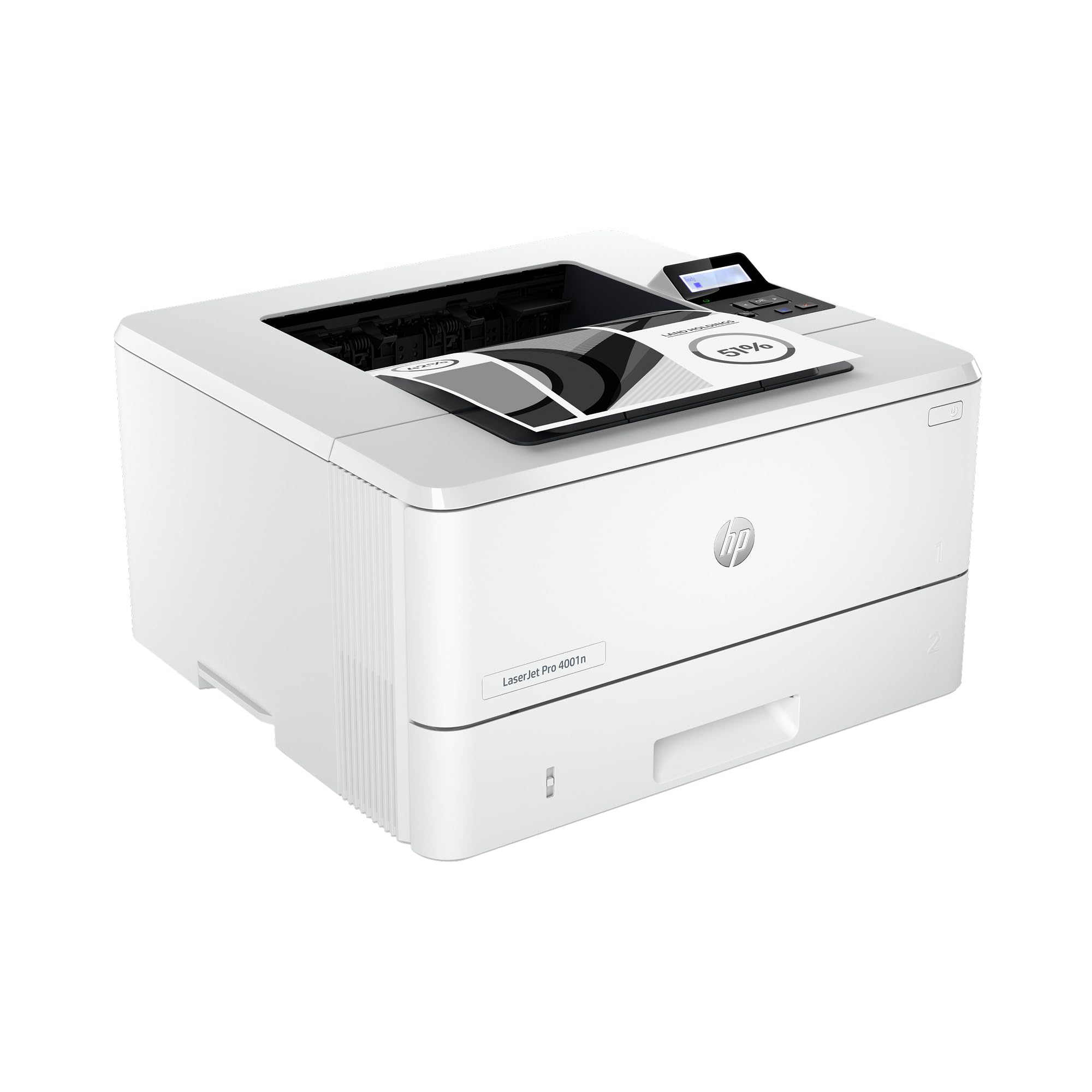
The HP LaserJet Pro 4001n is a pure print machine for wired office environments. It connects via Ethernet or USB—no Wi-Fi radio on board—which is actually an advantage if you want a fixed network address without the headaches of wireless interference. Speeds reach 42 ppm with a first-page-out time that feels immediate.
HP built this model for up to 10 users, and the included HP Wolf Pro Security adds a layer of protection that small businesses with sensitive client data will appreciate. The high-yield 148X cartridge yields roughly 9,500 pages, pushing the cost per page well below what you’d get from the starter cartridge. The 250-sheet input tray is adequate for a small workgroup, though heavy users will want the optional extra tray.
Some units have shipped with firmware glitches that cause persistent page size or paper type errors, requiring a support call to HP. When working correctly, it’s a fast and dependable printer that integrates easily with Windows and Mac environments through standard drivers.
Why it’s great
- Wired-only design eliminates Wi-Fi reliability issues
- Enterprise-grade security features included
- Fast print speed with low cost per page on high-yield toner
Good to know
- Firmware glitches reported on some units
- No wireless or duplex out of the box (manual duplex only)
5. Canon imageCLASS LBP246dw II
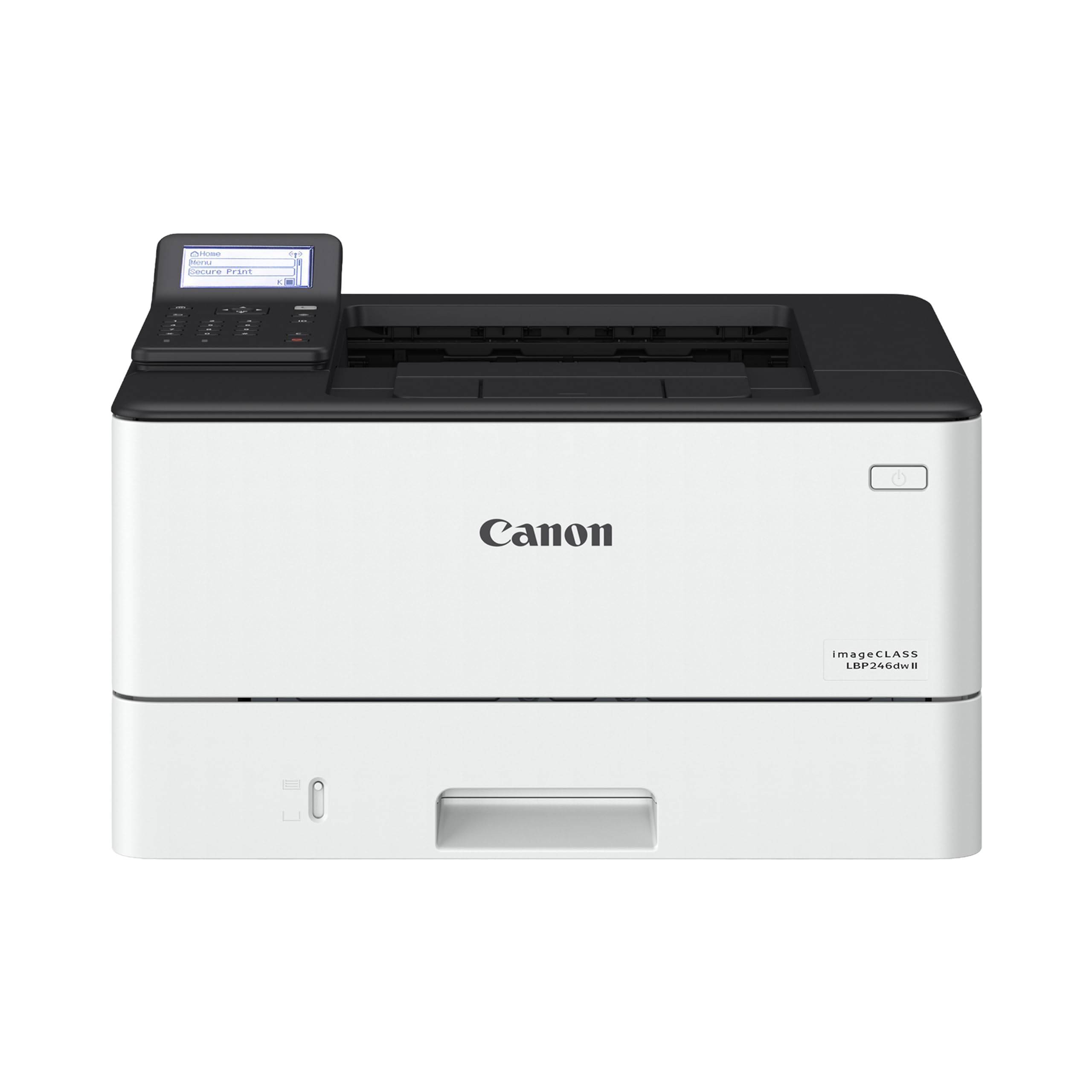
The Canon imageCLASS LBP246dw II is a single-function printer that prioritizes raw output speed. At 42 ppm with a first-page-out time of about 5 seconds, it’s one of the fastest monochrome printers in this roundup for getting a single-page document out the door. The 250-sheet standard cassette plus a 100-sheet multipurpose tray gives you flexibility for envelopes and specialty media.
Print quality on fine text and grayscale graphics is excellent, making it a strong candidate for legal, medical, or architectural offices where document clarity matters. The expandable paper capacity—an optional 550-sheet cassette—lets you scale up without upgrading the whole machine. Setup via USB is plug-and-play, but users report that the wireless configuration and the Remote UI are less intuitive than they should be.
Installation frustrations are the most common complaint. One reviewer reported spending hours troubleshooting a Windows 11 connection that failed repeatedly before finding a workaround in a forum. Once the printer is on the network, however, it performs reliably with fast duplex and consistently sharp output.
Why it’s great
- Very fast first-page-out and duplex speed
- Superb print quality on fine fonts and grayscale
- Expandable paper capacity for growing offices
Good to know
- Wireless setup is cumbersome and unintuitive
- User manual lacks detailed troubleshooting index
6. Brother HL-L2480DW

The Brother HL-L2480DW is the most balanced all-in-one in this lineup, delivering 36 ppm with a 2.7-inch touchscreen and seamless cloud app integration. It prints, scans, and copies in a compact black chassis that fits easily on a small desk. The dual-band wireless (2.4/5 GHz) gives you flexibility to choose the less congested band, and the manual feed slot handles envelopes without tray swaps.
Brother’s TN830/TN830XL toner system keeps running costs reasonable, and the Refresh subscription trial means you never hit an empty cartridge on a deadline. Users report straightforward setup with Apple devices and reliable wireless performance over many months—a stark contrast to the Wi-Fi dropouts common with some HP models. The print quality is noticeably sharper than any inkjet in this price range.
The only real drawback is the noise level. While not disruptive, the printer is audibly louder during operation than the Canon MF284dw. If you share a very small office, the fan and paper movement sounds are noticeable. For most home offices, though, the trade-off for reliability and speed is well worth it.
Why it’s great
- Reliable dual-band wireless with consistent connectivity
- Excellent print quality outperforms similarly priced inkjets
- Cloud app integration for Google Drive, Dropbox, Evernote
Good to know
- Noticeably louder operation than some competitors
- No manual feed slot for thick media
7. Canon imageCLASS MF284dw

The Canon imageCLASS MF284dw delivers a strong all-in-one package at a very accessible price point. At 35 ppm with a 35-sheet auto document feeder, it competes directly with the Brother HL-L2480DW on speed and features. The high-capacity toner option means fewer replacements, and the first-page-out time of under 5 seconds makes it feel snappy in daily use.
Canon’s Print App, AirPrint, and Mopria support give you solid mobile printing coverage. Users describe it as a quiet, dependable workhorse that produces crisp text and handles duplex printing efficiently. The plastic build of the paper cassette feels less substantial than the Brother’s, but the internals are reliable and the 250-sheet tray capacity is standard for its class.
There is a risk of receiving a unit that is not authorized for sale in the USA, which can void Canon’s technical support. Several verified purchasers experienced this problem, where the wireless setup failed and registration revealed the unit was intended for another market. Buy from an authorized Canon seller to avoid this, and plan to update the firmware immediately upon arrival to stabilize the wireless connection.
Why it’s great
- Very fast first-page-out time for quick print jobs
- High-yield toner option keeps replacement intervals long
- Quieter operation than many Brother models
Good to know
- Some units sold are not US-authorized, voiding support
- Plastic paper cassette feels less durable than metal alternatives
8. Canon imageCLASS MF264dw

The Canon imageCLASS MF264dw is a compact monochrome all-in-one that plays especially well with Apple devices. At 30 ppm, it’s not the fastest in this list, but it supports AirPrint, the Canon PRINT Business app, and even voice control through Amazon Alexa. For a light-use home office where print volume is under 100 pages per week, it’s a capable and quiet partner.
The starter toner yields about 1,700 pages, which is competitive for the price class. Users who run generic toner report good results after a year of use, though Canon officially recommends only their own cartridges. The scanner is fast and wireless, and the duplex printing works reliably once configured. The setup process is subtle; some users needed to call Canon support to get the Wi-Fi password prompt to appear.
A recurring irritation is the printer’s tendency to jam when feeding legal-size paper unless the output tray is manually adjusted first. The scanner is also single-sided only. If your workflow involves double-sided legal scanning or high-volume print runs, the MF264dw will feel constrained. For straightforward letter-size documents and occasional scanning, it’s a solid entry-level choice.
Why it’s great
- Excellent Apple device compatibility with AirPrint
- Includes voice control via Amazon Alexa
- Reliable with generic toner for lower running costs
Good to know
- Scanner is single-sided only
- Legal paper jams if output tray is not manually adjusted
9. HP LaserJet M209d

The HP LaserJet M209d strips away everything unnecessary: no Wi-Fi, no touchscreen, no color. It is a pure, wired monochrome printer with automatic duplex and a USB cable included in the box. At 30 ppm, it keeps pace with most home offices, and the compact footprint (8 inches wide) means it tucks into tight desk corners easily.
What the M209d loses in connectivity, it gains in reliability. Users report that the USB connection eliminates the “offline printer” headache entirely. You plug it in, it prints, and it keeps printing without Wi-Fi dropouts or network conflicts. The print quality is sharp and professional, and the auto duplex speed is among the fastest in its class for two-sided printing.
The catch is Mac compatibility. This model does not support macOS 12.x or later (including Sequoia), which makes it a Windows-only device as of current driver availability. HP also blocks non-HP cartridges via firmware, so you’re locked into HP’s toner ecosystem. If you run Windows and want a no-fuss, hardwired printer that won’t disappear from your device list, the M209d delivers.
Why it’s great
- USB-only connection eliminates Wi-Fi reliability problems
- Fastest-in-class auto duplex for two-sided printing
- Very compact footprint for small desks
Good to know
- Not compatible with recent macOS versions
- HP firmware blocks third-party toner cartridges
FAQ
How many pages can a black and white laser printer typically print per minute?
Is it worth paying more for a printer with automatic duplex printing?
Can I use generic toner in an HP laser printer?
What is the difference between a drum unit and a toner cartridge?
Do all black and white laser printers work with Mac computers?
Final Thoughts: The Verdict
For most users, the best black and white laser printer winner is the Brother HL-L2480DW because it combines reliable dual-band wireless, a responsive touchscreen, and low running costs from the separate drum system. If you need blazing speed for a busy office, grab the Brother HL-6210DW. And for a wired-only, no-hassle workhorse in a tiny footprint, nothing beats the HP LaserJet M209d.

Mo Maruf
I created WellFizz to bridge the gap between vague wellness advice and actionable solutions. My mission is simple: to decode the research and give you practical tools you can actually use.
Beyond the data, I am a passionate traveler. I believe that stepping away from the screen to explore new environments is essential for mental clarity and physical vitality.