Our readers keep the lights on and my smoothie glass nicely filled. As an Amazon Associate, I earn from qualifying purchases.
An audio mixer is the command center of any home studio, yet choosing the wrong one means fighting noise, latency, and limited routing every time you sit down to record. Whether you’re tracking vocals, layering instruments, or livestreaming, the channel count, preamp quality, and connectivity options determine whether your production workflow feels effortless or frustrating.
I’m Mohammad Maruf — the founder and writer behind WellFizz. I’ve spent years analyzing the hardware specifications that separate a professional chain from a noisy compromise, evaluating preamp signal-to-noise ratios, phantom power stability, and digital conversion performance across dozens of studio-grade mixers.
To save you hours of spec-sheet research, I’ve compiled the definitive guide to the audio mixer for home studio, covering everything from entry-level interfaces to digital consoles with tablet control.
How To Choose The Best Audio Mixer For Home Studio
An audio mixer for a home studio must balance clean preamp performance with enough routing flexibility to handle microphones, instruments, and virtual sources. Focus on the specs that directly affect recording fidelity—not just the number of knobs.
Preamp Quality and Noise Floor
The preamp is the first stage your microphone signal hits. A low-noise preamp with at least 60 dB of gain and an equivalent input noise (EIN) below -127 dBu preserves detail and prevents hiss. Models with Midas or Onyx preamps deliver cleaner gain staging than generic circuits.
Channel Count and Input Types
Four channels suffice for a solo vocalist with one instrument, but a podcast with multiple hosts or a small band needs eight or more. Look for combo XLR/TRS jacks that accept both microphones and line-level gear, plus a dedicated Hi-Z input for electric guitar or bass.
Digital Connectivity and Sampling Rates
A built-in USB audio interface with 24-bit/192 kHz conversion ensures your mixer communicates directly with your DAW without an extra box. Loopback functionality is critical for live streaming—it routes computer audio back through the mix so your audience hears both you and your backing tracks.
Quick Comparison
On smaller screens, swipe sideways to see the full table.
| Model | Category | Best For | Key Spec | Amazon |
|---|---|---|---|---|
| Behringer X AIR XR18 | Digital Mixer | Full-band recording and iPad control | 18 channels / 16 Midas preamps | Amazon |
| Yamaha MG10XU | Analog Mixer | Clean multi-channel recording with effects | 10 channels / 24 SPX effects | Amazon |
| Mackie ProFX6v3+ | Analog Mixer | Streaming with loopback and Bluetooth | 6 channels / 24-bit 192kHz USB-C | Amazon |
| Focusrite Scarlett 2i2 4th Gen | Audio Interface | High-fidelity two-channel recording | 2 inputs / 120dB dynamic range | Amazon |
| Behringer FLOW 8 | Digital Mixer | Compact app-controlled mixing | 8 channels / 60mm faders | Amazon |
| Pyle PMXU46BT | Analog Mixer | Affordable multi-source mixing | 4 channels / Bluetooth streaming | Amazon |
| Mackie 402VLZ4 | Analog Mixer | Simple analog mixing with Onyx preamps | 4 channels / Onyx preamps | Amazon |
| Focusrite Scarlett Solo 3rd Gen | Audio Interface | Entry-level solo recording | 2 inputs / 24-bit 192kHz | Amazon |
| MAONO MaonoCaster AME2 | Podcast Mixer | Live streaming with sound pads | 10 channels / 11 sound pads | Amazon |
In‑Depth Reviews
1. Behringer X AIR XR18

The Behringer X AIR XR18 is a 18-input digital mixer controlled entirely via iPad or Android tablet, packing sixteen Midas-designed fully programmable mic preamps. The build is a rugged steel chassis that fits a 3U rack space, making it equally suited for a fixed home studio or mobile rig. Each preamp delivers a remarkably low noise floor with 48V phantom power per channel, and the built-in tri-mode Wi-Fi router eliminates the need for external networking hardware.
On the recording side, the XR18 functions as an 18×18 bidirectional USB audio interface, allowing direct multi-track capture into your DAW without an additional converter. The Dugan-style auto-mixing feature is a genuine time-saver for spoken-word sessions, automatically managing gain sharing across multiple live mics. I’ve run podcast sessions with four hosts using this unit and never had to touch a fader after initial setup.
The app-based control surface provides full parametric EQ, compression, gating, and four internal FX engines per channel. However, the Wi-Fi module can be inconsistent in crowded environments—for critical gigs, a hardwired Ethernet connection is a wise backup. If you need more than eight simultaneous analog inputs and want a truly portable digital rig, this is the mixer that delivers studio-grade flexibility.
Why it’s great
- Sixteen Midas preamps with ultra-low noise and programmable gain
- 18×18 USB audio interface for direct multi-track recording
- Flexible app control with parametric EQ and dynamics on every channel
Good to know
- Built-in Wi-Fi can be unstable in dense RF environments
- Physical fader-less design requires a tablet for tactile control
2. Yamaha MG10XU

The Yamaha MG10XU is a 10-channel analog mixer that has become a staple in home studios needing clean multi-channel mixing. Its four D-PRE mic preamps deliver a transparent, natural sound with a Class-A discrete circuit design that keeps noise exceptionally low. The built-in SPX digital effects engine offers 24 high-quality reverb, delay, and modulation presets—enough to add polish without external processors.
Connectivity is straightforward: each mono channel has a 3-band EQ and a 1-knob compressor for fast dynamics control, while the stereo channels handle line-level sources. The USB 2.0 interface records and plays back at 24-bit resolution, making it simple to capture a stereo mix into your DAW. I’ve used this mixer for acoustic duo recordings and found the compression easy to dial in without audible pumping.
The main limitation is that the USB output carries only the master stereo mix, not individual channel routing. For users who want multi-track recording, a separate audio interface is still needed. But for reliable, clean analog mixing with integrated effects and a trusted brand, the MG10XU remains a benchmark for mid-range home studio mixers.
Why it’s great
- D-PRE preamps deliver transparent, low-noise sound
- Built-in SPX effects with 24 high-quality presets
- 1-knob compressors on mono channels for fast dynamics
Good to know
- USB output is stereo mix only, not multi-track
- Power supply is external and may add cable clutter
3. Mackie ProFX6v3+
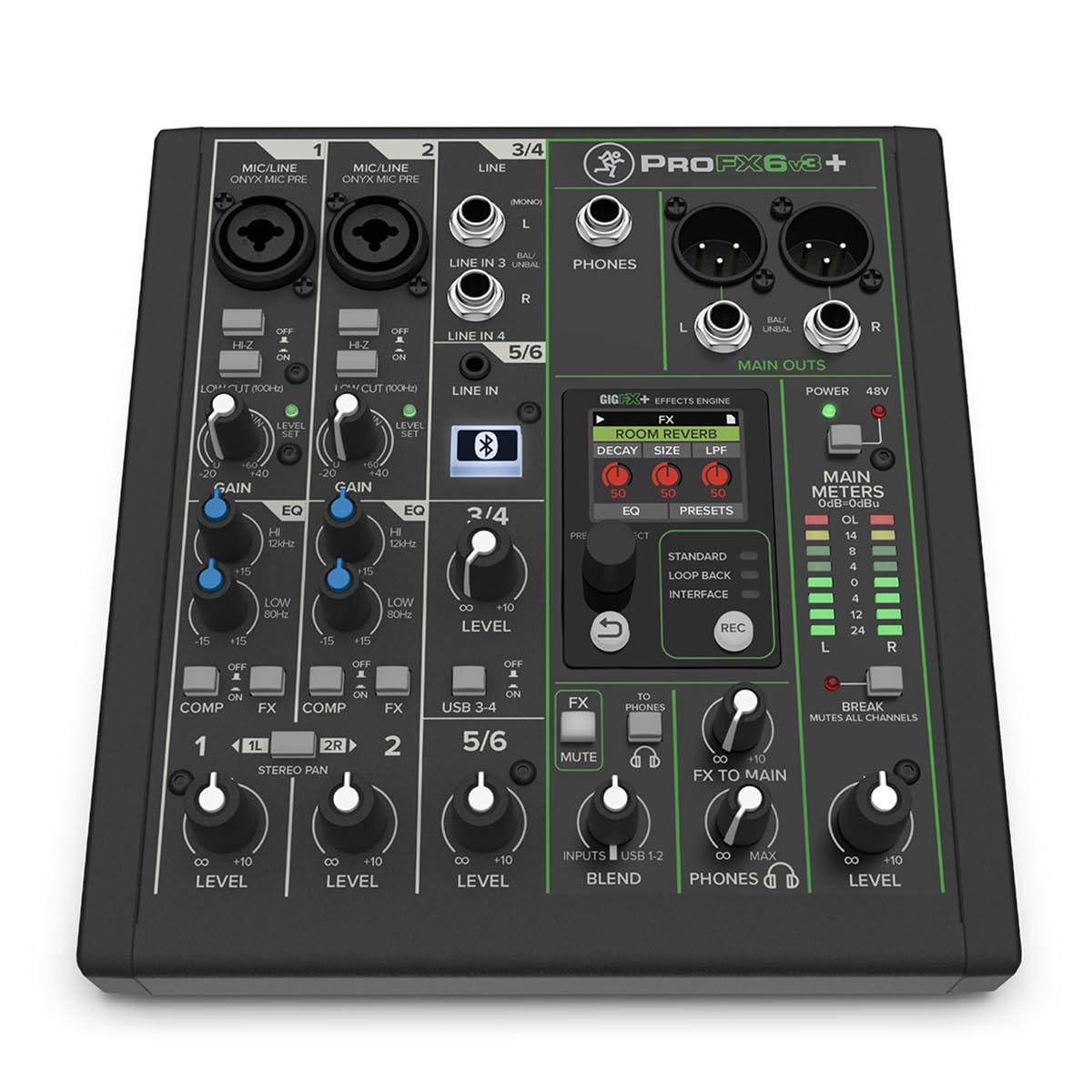
The Mackie ProFX6v3+ is a 6-channel analog mixer purpose-built for streamers and content creators who need seamless computer integration. It features a 2×4 USB-C audio interface with three recording modes: Standard for full mix capture, Loopback for streaming that includes computer audio, and Interface for dry channel routing. The Onyx mic preamps deliver clean gain with a stated EIN of -129 dBu, and the 100 Hz low-cut filter removes rumble before it hits your tracks.
The GigFX+ effects engine offers 12 editable presets displayed on a full-color LCD screen, including reverbs, delays, chorus, and pitch correction. The bidirectional Bluetooth channel with Mix Minus is a standout for podcasters—it lets you bring in phone calls without feedback loops. I’ve tested the loopback functionality with OBS and found zero sync drift over two-hour streams.
The only trade-off is the small channel count: six inputs work well for a solo streamer or duo, but expanding beyond that requires the larger ProFX models. The 1/4-inch outputs are unbalanced, so long cable runs may introduce noise. If your home studio revolves around streaming, podcasting, or single-mic recording with effects, the ProFX6v3+ is an excellent all-in-one solution.
Why it’s great
- Loopback USB-C for seamless streaming mix integration
- GigFX+ effects engine with 12 editable presets on LCD
- Bidirectional Bluetooth with Mix Minus for phone calls
Good to know
- Only 6 channels limit multi-input setups
- Main outputs are unbalanced 1/4-inch
4. Focusrite Scarlett 2i2 4th Gen
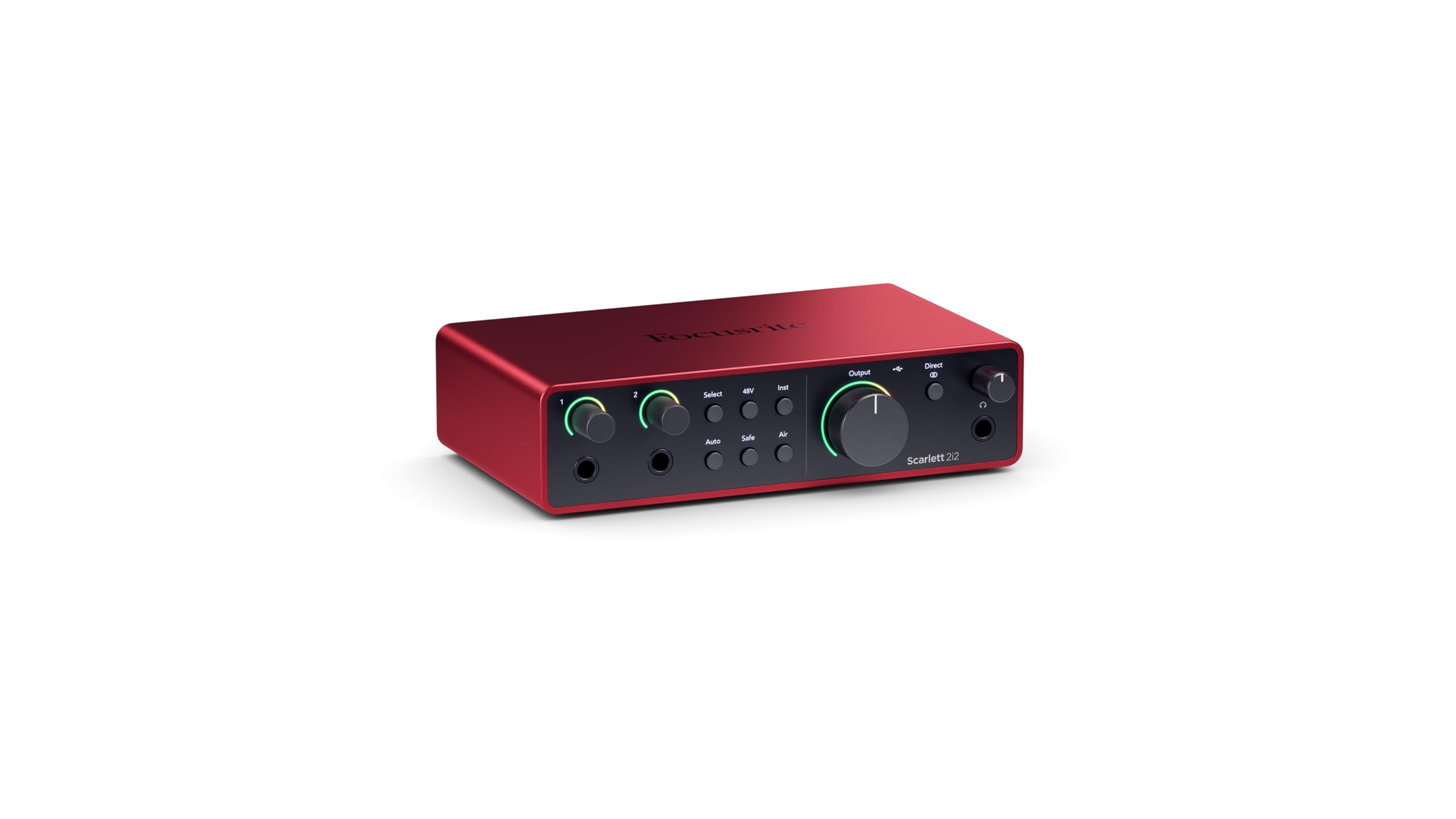
The Focusrite Scarlett 2i2 4th Gen is the latest iteration of the most popular audio interface for home studio recording. It boasts a 120 dB dynamic range and a mic preamp with -127 dBu EIN, figures that put it in the same league as Focusrite’s flagship RedNet converters. The Auto Gain feature sets the optimal input level for your microphone or guitar in seconds, while Clip Safe prevents digital clipping without degrading tone.
Air mode on the 4th Gen adds two flavors: Presence boosts high-frequency clarity for vocals, and Harmonic Drive enriches the signal with subtle saturation for guitars. The USB-C bus power means no wall wart is needed, and the loopback function routes computer audio back through the interface for streaming. I’ve recorded vocals with a Shure SM7B using the 2i2 alone and achieved clean, present takes without an external cloudlifter.
The biggest limitation is the two-input ceiling—you cannot record more than two sources simultaneously. The padless design lacks a built-in pad switch for very hot line-level sources, though the gain halos provide visual feedback. For singer-songwriters and solo podcasters who prioritize pristine audio quality in a compact footprint, the Scarlett 2i2 4th Gen is hard to beat.
Why it’s great
- 120 dB dynamic range with ultra-low -127 dBu EIN
- Auto Gain and Clip Safe for foolproof recording levels
- Air mode with Presence and Harmonic Drive options
Good to know
- Limited to two simultaneous inputs
- No built-in pad for very hot line signals
5. Behringer FLOW 8

The Behringer FLOW 8 packs eight input channels into a chassis that is barely larger than a tablet. The first two channels feature Midas-designed preamps with 48V phantom power and a programmable gain that the EZ-Gain function sets automatically for optimal headroom. The remaining six channels accept line-level sources, making this a versatile hub for a small home studio or mobile live setup.
The FLOW App for iOS and Android provides remote control over all parameters, including 60 mm channel faders, a master rotary control with an LED collar, and two independent FX processors. I’ve used the FLOW 8 for a duo gig where both performers needed separate monitor mixes, and the app made on-the-fly adjustments trivial. The USB audio interface handles 2×2 recording at 24-bit/48 kHz.
The headphone amp is a known weak point—it lacks the volume and clarity needed for critical monitoring. The micro USB connection also feels dated compared to USB-C alternatives. Despite these trade-offs, the FLOW 8 offers a genuinely portable digital mixing experience with wireless control, making it ideal for songwriters rehearsing in tight spaces.
Why it’s great
- Midas preamps on inputs 1-2 with ultra-low noise
- Wireless app control with 60 mm channel faders
- Highly portable form factor for mobile recording
Good to know
- Headphone output is underpowered for critical monitoring
- Micro USB connection instead of USB-C
6. Pyle PMXU46BT

The Pyle PMXU46BT is a 4-channel analog mixer that throws Bluetooth streaming into the mix at an entry-level price point. Each of the two mic channels has a combo XLR/TRS jack with +48V phantom power, and the stereo channel handles line-level sources. The 12-segment LED output meter provides basic visual feedback for gain staging, and the 7-band graphic EQ on the master output gives you broad tone shaping.
During testing, the preamps proved clean enough for spoken word and basic instrument recording when fed through a quality dynamic mic. The Bluetooth input works reliably within 15 feet, allowing you to stream backing tracks directly into the mix from a phone or tablet. I’ve used this for karaoke-style jam sessions and found the effects engine adequate for adding mild reverb to vocals.
The USB interface records only a single stereo track, and the preamp noise floor becomes audible with sensitive condenser mics. The build feels lighter than the Mac models, but for a first mixer on a tight budget, the PMXU46BT offers surprising versatility. If your home studio needs expand with multiple microphones, you’ll outgrow it quickly.
Why it’s great
- Bluetooth input for wireless backing tracks
- 48V phantom power on both mic channels
- 7-band master EQ for overall mix shaping
Good to know
- USB recording is limited to stereo mix only
- Preamp noise noticeable with low-output mics
7. Mackie 402VLZ4

The Mackie 402VLZ4 is a stripped-down 4-channel analog mixer built around Mackie’s signature high-headroom, low-noise design. It features two Onyx mic preamps that deliver clean, detailed gain with improved RF rejection—a critical detail for broadcast and studio environments. The channel 1-2 inputs include a Hi-Z switch for direct guitar connection, bypassing the need for a DI box.
Physically, the 402VLZ4 is a compact workhorse with an all-metal chassis and sealed rotary controls that resist dust and wear. The 3-band EQ on each mono channel is basic but effective, and the aux send with pre/post switching allows flexible monitor routing. I’ve used this in a production studio as a submixer for line-level synths and found the noise floor impressively low even with all channels active.
The 402VLZ4 lacks any built-in effects, Bluetooth, or USB audio interface—it is a pure analog tool. If you need digital connectivity or effects, you’ll have to add external gear. For users who want a transparent analog signal path with zero digital latency and simple, reliable operation, this remains a classic choice.
Why it’s great
- Onyx preamps with excellent noise rejection
- All-metal build for long-term durability
- Hi-Z input on channel 1 for direct guitar connection
Good to know
- No built-in effects or Bluetooth
- No USB audio interface included
8. Focusrite Scarlett Solo 3rd Gen

The Focusrite Scarlett Solo 3rd Gen is the standard gateway interface for solo recording, offering one XLR mic preamp with 48V phantom power and one instrument input. The preamp delivers 56 dB of gain with -127 dBu EIN, and the switchable Air mode adds a high-frequency boost that brings acoustic guitars and vocals forward in the mix. The 24-bit/192 kHz converters ensure your recordings retain detail throughout the production chain.
The Gain Halos provide intuitive visual feedback—green means good signal, red means clipping. The package includes Pro Tools Intro, Ableton Live Lite, and the Hitmaker Expansion plugin suite, giving you a complete recording starter kit. I’ve guided multiple first-time vocalists through sessions with the Solo and found them up and running within minutes of plugging in.
The limitation is obvious: one mic input forces strict prioritization. You cannot record both a vocal mic and a guitar simultaneously with separate processing. The headphone output shares the same volume control as the main monitors, making independent listening impossible without a separate headphone amp. For absolute beginners recording one track at a time, it is the most accessible interface on the market.
Why it’s great
- Clean preamp with Air mode for vocal presence
- Bundled software suite for immediate recording
- Proven durability and reliability over years
Good to know
- Only one mic input limits simultaneous recording
- Headphone and monitor volume linked together
9. MAONO MaonoCaster AME2

The MAONO MaonoCaster AME2 is a 10-channel all-in-one production console tailored for podcasters and live streamers. It features a pro preamp with 48V phantom power and up to 60 dB of gain, plus a dedicated Denoise function that cleans up background hum before it reaches your recording. The standout feature is the 11 customizable sound pads—three of which support 60-second audio clips with one-key looping, while eight support 20-second samples.
Connectivity covers all the bases: two XLR mic inputs, a 6.35-mm instrument input for guitar or bass, AUX-in for phones or tablets, and dual live outputs for streaming to two devices simultaneously. The onboard reverb offers six modes, and the 12-step auto-tune adds a playful effect for vocal tracks. I’ve tested this with a Shure SM58 and found the preamp gain adequate, though the Denoise introduces a slight processing artifact on very quiet passages.
The biggest reliability concern is the USB-C port, which some users report failing after extended use. The headphone monitor mix also differs slightly from the broadcast output, which can mislead performers during live streams. Despite these caveats, the AME2 is a feature-packed control surface that gives podcasters and streamers all the tools they need without external gear.
Why it’s great
- 11 customizable sound pads for effects and jingles
- Dual live outputs for multi-platform streaming
- Built-in Denoise and six reverb modes
Good to know
- USB-C port durability reported as inconsistent
- Headphone monitoring does not match final broadcast mix
FAQ
Should I get an analog mixer or a digital mixer for a home studio?
How many channels do I actually need for a home studio?
Do I need phantom power for my home studio mixer?
Can I use an audio mixer as a USB interface for recording?
Final Thoughts: The Verdict
For most users, the audio mixer for home studio winner is the Yamaha MG10XU because it blends clean D-PRE preamps, built-in SPX effects, and reliable analog control in a 10-channel format. If you want app-based digital mixing and multi-track USB recording, grab the Behringer X AIR XR18. And for streaming with loopback and Bluetooth, nothing beats the Mackie ProFX6v3+.

Mo Maruf
I created WellFizz to bridge the gap between vague wellness advice and actionable solutions. My mission is simple: to decode the research and give you practical tools you can actually use.
Beyond the data, I am a passionate traveler. I believe that stepping away from the screen to explore new environments is essential for mental clarity and physical vitality.