Our readers keep the lights on and my smoothie glass nicely filled. As an Amazon Associate, I earn from qualifying purchases.
You bought a 4K television for the deep blacks and vibrant colors, only to have the built-in smart interface lag, stutter, and run out of storage within weeks. The streaming dongle you plugged in overheats after an hour, and the OS pushes ads for services you don’t want. The core hardware—the RAM, the codec support, the Wi-Fi antenna—simply wasn’t built for sustained high-bitrate playback.
I’m Mohammad Maruf — the founder and writer behind WellFizz. I’ve analyzed dozens of streaming platforms, benchmarked real-world interface speeds, and dissected the hardware specs that determine whether a box handles Dolby Vision FEL or chokes on a simple 4K MKV file.
After evaluating seven top contenders across performance benchmarks, format support, and real customer experiences, this guide narrows down the field to help you find the best android tv box for your home theater, gaming needs, or budget-conscious setup.
How To Choose The Best Android TV Box
An Android TV box is effectively a small computer for your television. The processor (CPU), RAM, and storage dictate its ability to handle 4K streaming, gaming, and multitasking. Prioritize hardware that matches your primary use case—whether that’s local media playback, cloud gaming, or just a snappy UI for streaming apps.
Processor and RAM for Smooth 4K Playback
The CPU and GPU combination determines how well the box decodes modern video codecs. A minimum of 2GB of RAM is necessary for navigating Android TV without stuttering; 3GB or 4GB provides comfortable headroom for gaming or running a Plex server in the background. Look for a modern chipset that supports AV1 decoding, as this codec is rapidly becoming the standard on YouTube and major streaming services.
Audio and Video Format Support
Not all “4K HDR” boxes are equal. Check for official Dolby Vision support (Profile 5, 7, and 8) and Dolby Atmos pass-through if you have a home theater receiver. For local file playback, devices with native support for DTS:X, TrueHD, and high-bitrate MKV containers avoid the judder and audio sync issues that plague cheaper streamers.
Quick Comparison
On smaller screens, swipe sideways to see the full table.
| Model | Category | Best For | Key Spec | Amazon |
|---|---|---|---|---|
| NVIDIA Shield TV Pro | Streaming Box | Gaming & Home Theater | AI Upscaling, 3GB RAM | Amazon |
| Dune HD Pro Vision 4K | Media Player | Local File Playback | VS10, HD Audio, 64GB | Amazon |
| Google TV Streamer 4K | Streamer | Clean Google OS & Smart Home | 32GB Storage, 22% Faster CPU | Amazon |
| Xiaomi TV Box S 3rd Gen | TV Box | Budget 4K & USB Playback | WiFi 6, 2GB RAM | Amazon |
| Amazon Fire TV Stick 4K Max | Streaming Stick | Wi-Fi 6E & Alexa Integration | 16GB Storage, Wi-Fi 6E | Amazon |
| KP1 Google Certified TV Box | TV Box | Entry-Level Google TV | Android 11, 2GB RAM | Amazon |
| Google Chromecast (2022) | Streaming Stick | Travel & Casting | 4K HDR, Pouch Included | Amazon |
In‑Depth Reviews
1. NVIDIA Shield TV Pro

The NVIDIA Shield TV Pro remains the gold standard in the category, and its hardware proves why. The Tegra X1+ processor paired with 3GB of RAM handles 4K AI upscaling in real-time, turning 1080p content into crisp, near-native 4K visuals without introducing artifacts. This feature alone separates it from every other box—streaming services with compressed 1080p feeds look dramatically sharper.
For home theater enthusiasts, the Shield offers full Dolby Vision support (including Profile 7 FEL, a rarity) and Dolby Atmos pass-through via HDMI. The two USB 3.0 ports allow you to attach a massive external hard drive or a USB DAC for high-resolution audio playback, making it the most versatile media hub available. Users report it handles high-bitrate 4K Blu-ray remuxes without a single stutter.
The included remote is motion-activated with backlit buttons and includes a locator feature, though some users note the learning curve for its button layout. While the storage is only 16GB internally, the USB ports make expansion effortless. For the best performance, you’ll want to connect via its Gigabit Ethernet port rather than Wi-Fi for heavy file transfers.
Why it’s great
- Best-in-class AI upscaling technology for HD to 4K conversion.
- Full Dolby Vision, Atmos, and DTS:X pass-through support.
- Built-in Plex Media Server capability.
Good to know
- Higher entry price compared to streaming sticks.
- Only 16GB internal storage; expansion requires USB drive.
2. Dune HD Pro Vision 4K

The Dune HD Pro Vision 4K is designed for the local media file enthusiast who demands pristine video quality without relying on a NAS. Its S905X4-J processor and VS10 video engine optimize conversion between SDR, HDR, and Dolby Vision, ensuring content looks correct on any display, including projectors. It even supports the newer AV1 codec, which cuts bitrate requirements by up to 50% for the same video quality.
What makes this box a powerhouse is its passive cooling—the entire metal chassis acts as a heatsink with no fan noise. It decodes HD audio formats (TrueHD, DTS-HD MA) into multichannel PCM for older AVRs that lack eARC, and it automatically switches frame rates to match content. The 64GB internal storage is generous, and it accepts USB drives up to 20TB without hiccups.
While the UI is lean, the built-in Android 11 interface is stable. Some users note that the internal player can introduce judder on 23.976fps content, easily fixed by switching to Kodi as the default player. The Dune Control mobile app mirrors the on-screen menu, perfect for selecting files from the couch. If you prioritize file-based playback over streaming apps, this is your box.
Why it’s great
- Silent, fanless design with excellent thermal management.
- Full VS10 video processing and AV1 codec support.
- 64GB internal storage and support for very large USB drives.
Good to know
- Internal player may judder on certain frame rates; Kodi alternative recommended.
- Not ideal for heavy cloud gaming or demanding Android games.
3. Google TV Streamer 4K

The Google TV Streamer 4K is a direct and mature response to the frustrations of locked-down streaming sticks. It runs a clean, unadulterated Google TV OS with a 22% faster processor than the previous generation and double the memory. The interface organizes content from every subscribed service on one home screen, with tailored recommendations that actually reflect your viewing history.
With 32GB of storage, you have ample room for installing multiple streaming apps, games, and sideloaded tools without running out of space. The redesigned remote includes a customizable button and a “find my remote” feature. For smart home users, the built-in home panel lets you check live camera feeds and dim lights without pausing your show—a convenience that competes directly with the Echo ecosystem.
Setup is seamless from an Android phone, and the streamer supports Dolby Vision and Dolby Atmos. The lack of USB ports is a notable omission compared to the Shield, meaning you cannot attach external storage easily. Ethernet is included, and the Wi-Fi connection is stable. The Ethernet port is standard, and wired connection performance is smooth with zero lag.
Why it’s great
- Smooth, ad-light Google TV interface with personalized recommendations.
- 32GB storage for apps and games.
- Integrated smart home hub with live camera feed support.
Good to know
- No USB ports for external storage expansion.
- Remote buttons are unlabeled, requiring memorization.
4. Xiaomi TV Box S 3rd Gen
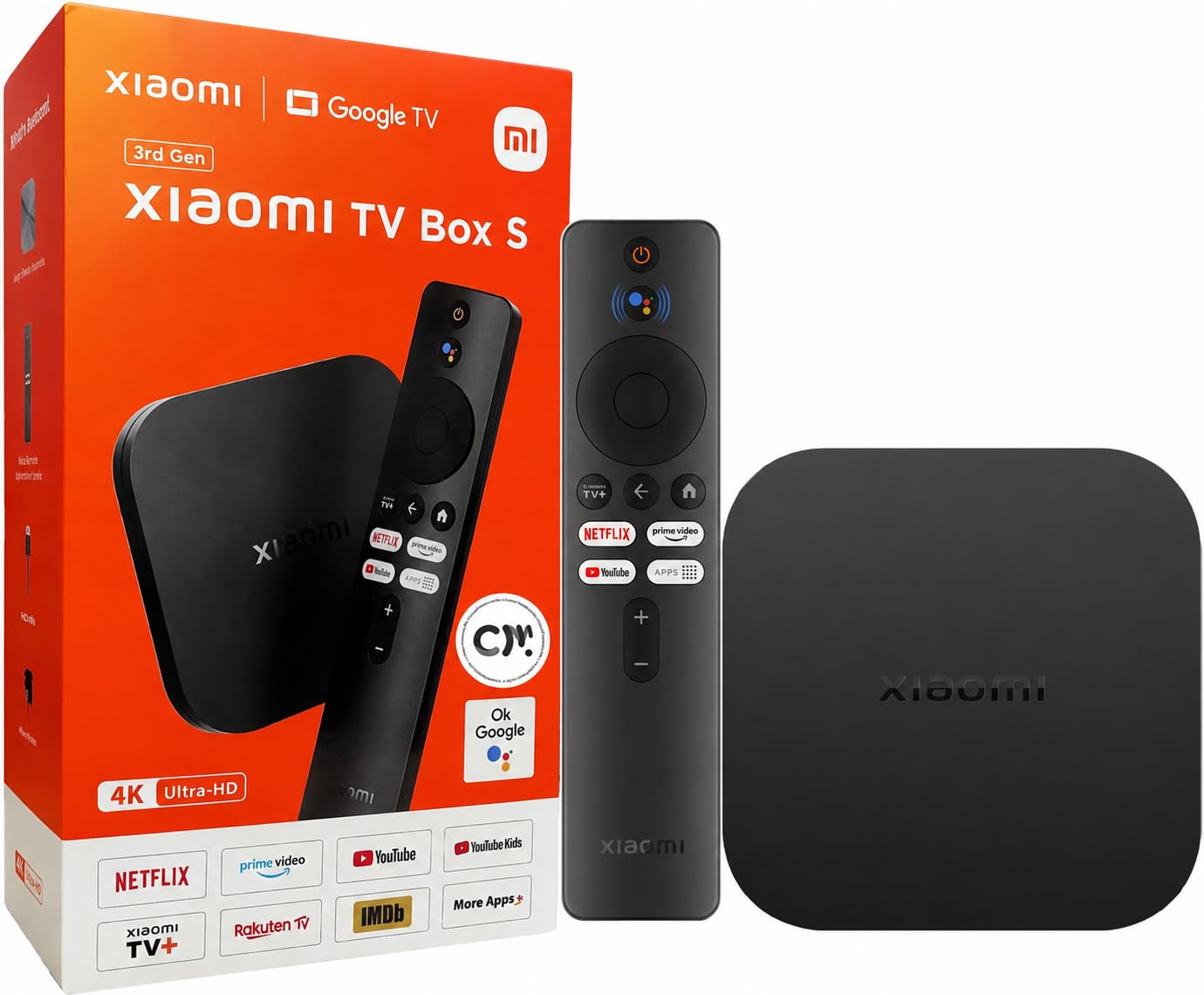
The Xiaomi TV Box S 3rd Gen brings true 4K UHD streaming with Dolby Vision and DTS:X support at a price point that challenges the value of many entry-level sticks. Its 6nm processor is efficient enough to handle 4K HDR10+ content smoothly, and the inclusion of Wi-Fi 6 ensures a fast, stable wireless connection even in congested living spaces. The 360° Bluetooth remote supports voice control via Google Assistant.
Where this box truly shines is in local playback. Users report that it resolves choppy video when playing 4K movies directly from a USB hard drive connected to the TV—a common issue with built-in smart TV software. By routing the content through the Xiaomi Box via HDMI, playback becomes fluid with proper Dolby Vision rendering. Kodi and VLC are recommended for handling MKV files that the native player cannot process.
The 2GB of RAM is adequate for streaming and basic multitasking, but heavy gaming or running multiple background apps may test its limits. Some users have reported a quirk where the power button turns the device on but not off reliably—this seems to be a software issue rather than a hardware defect. For the price, you get a surprisingly capable box that outperforms the built-in features of many mid-range TVs.
Why it’s great
- Exceptional 4K HDR and Dolby Vision playback for the price.
- Wi-Fi 6 support for better wireless streaming performance.
- Handles high-bitrate local USB files smoothly with Kodi.
Good to know
- Inconsistent power-off behavior reported by multiple users.
- 2GB RAM limits heavy multitasking or gaming.
5. Amazon Fire TV Stick 4K Max

The Amazon Fire TV Stick 4K Max is the most powerful streaming stick on the market, and its support for Wi-Fi 6E gives it an edge for users with compatible routers. The new Fire TV interface (2026 update) is modern and fast, getting you to your entertainment quickly without the lag that plagued older Fire Sticks. Quad-core processing ensures lightning-fast app launches and fluid navigation through 4K menus.
For gamers, this stick supports Xbox Game Pass cloud gaming and Amazon Luna, allowing you to stream AAA titles like Call of Duty directly to your TV without a console. The 16GB of storage is double that of standard Fire Sticks, giving you more room for games and apps. The included Alexa Voice Remote with dedicated channel buttons makes browsing live TV effortless, and the Ambient Experience feature turns your TV into an art display when idle.
Users praise the picture quality with Dolby Vision and HDR10+, noting it handles high-bitrate 4K Jellyfin Direct Play without stuttering. The down side is the heavily ad-supported home screen—Amazon pushes its own content aggressively. Some users report issues with the short power cable and difficulty removing pre-installed Amazon apps from the task bar. If you can tolerate the ads, you get a powerful, compact device.
Why it’s great
- Fastest wireless connectivity with Wi-Fi 6E support.
- Xbox Game Pass and Amazon Luna cloud gaming capable.
- 16GB storage for more apps and games.
Good to know
- Home screen is cluttered with Amazon ad promotions.
- Cannot remove pre-installed Amazon apps from the interface.
6. KP1 Google Certified TV Box
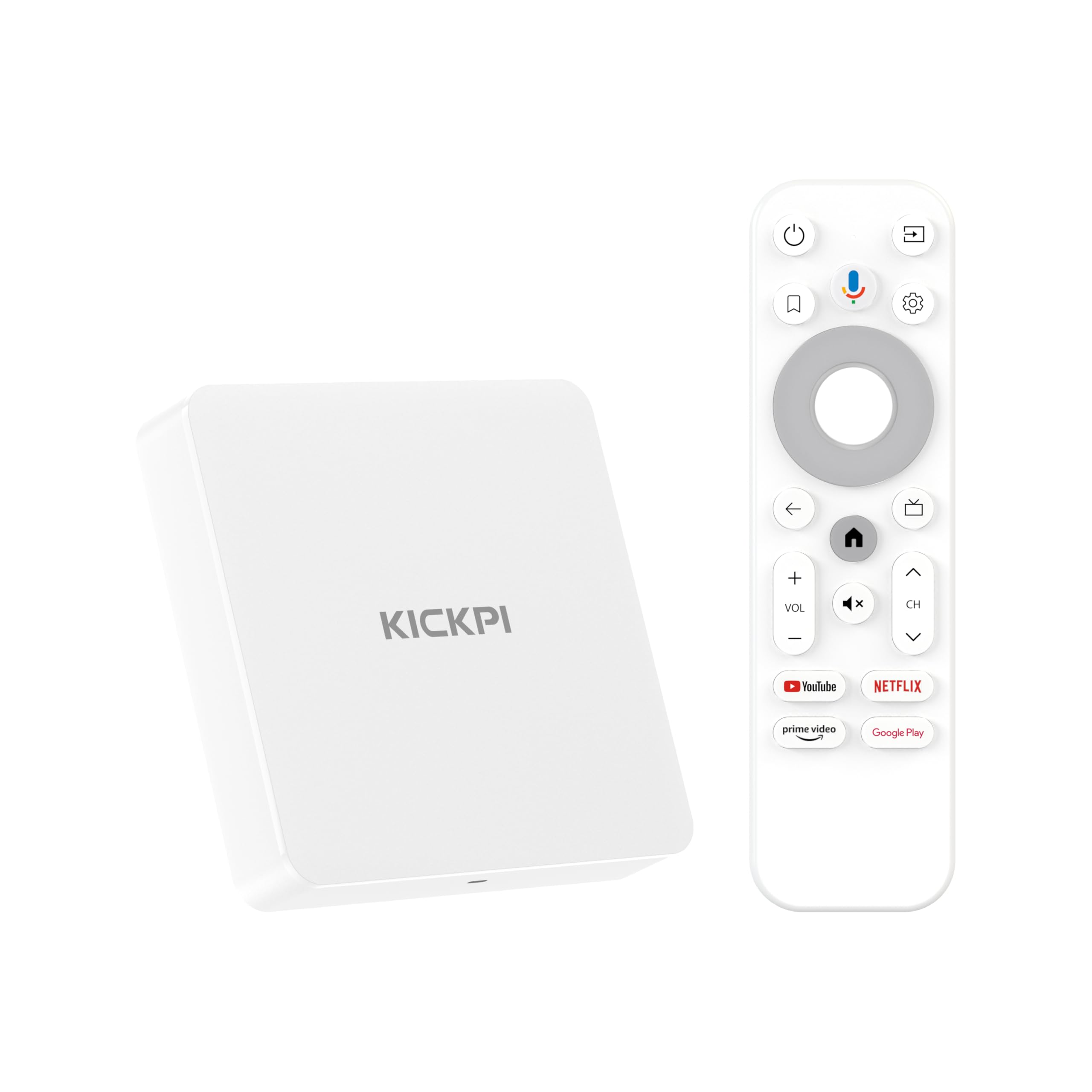
The KP1 Google Certified TV Box is a true Android TV device—not a Fire OS or modified Linux interface. It comes with Android 11 out of the box (with a path to Android 12), Google Chromecast built-in, and full access to the Google Play Store. This means you can run Netflix, Amazon Prime, Disney+, and any DRM-protected app at full 4K HDR resolution without compatibility issues.
With 2GB of RAM and 32GB of storage, this box offers plenty of space for apps and games. The built-in HDMI cable simplifies setup—just plug it into your TV’s HDMI port and connect to Wi-Fi. Users report that it works well with side-loaded productivity apps like Google Keep, Photos, and Gmail when using an alternate launcher. The included voice remote with dedicated YouTube and Prime Video buttons is responsive and comfortable.
However, some users have encountered an audio delay when streaming certain movies and live channels, which does not appear on a Fire TV Stick using the same app. VPN and IPTV performance can be inconsistent initially but smooths out with configuration. For the price, it delivers a clean, open Android TV experience that is hard to beat if you want to avoid the Amazon and Roku walled gardens.
Why it’s great
- True Google Certified Android TV with full Play Store access.
- Compact design with built-in HDMI cable and voice remote.
- 32GB storage for apps and side-loaded content.
Good to know
- Audio delay reported on some streaming apps.
- VPN/IPTV may require initial tuning for stable performance.
7. Google Chromecast (2022)

The Google Chromecast with Google TV (2022) is a compact streaming stick that delivers the full Google TV experience in a portable form factor. It supports 4K HDR with Dolby Vision, providing a clean, sharp picture on any compatible HDMI-equipped television. The included pouch and cleaning cloth make it an ideal travel companion—perfect for upgrading hotel TV experiences or visiting friends’ homes.
Setup is quick and straightforward: plug it into the HDMI port, connect to Wi-Fi, and use the included voice remote to navigate. The home screen aggregates content from all your subscriptions—Netflix, HBO Max, Prime Video, and more—into personalized recommendations. It easily casts from your phone or tablet, making it convenient for sharing vacation photos or mirroring your Meta Quest gameplay on a larger screen.
While it performs well for streaming and casting, it lacks the raw power of a dedicated TV box for local file playback. The remote is simple without backlit buttons, and some users find it difficult to disable the Google Assistant voice control entirely. For its intended use as a simple, no-fuss streaming device that travels well, it is a solid, affordable choice.
Why it’s great
- Highly portable with included pouch and cleaning cloth.
- Clean Google TV interface with personalized streaming recommendations.
- Easy casting from Android and iOS devices.
Good to know
- Not as powerful for local file playback or gaming.
- No Ethernet port; relies entirely on Wi-Fi.
FAQ
Does an Android TV Box need a VPN for streaming?
Why does my Android TV Box stutter during 4K playback?
Can I play Dolby Vision content on any TV with an Android TV Box?
Final Thoughts: The Verdict
For most users, the best android tv box winner is the NVIDIA Shield TV Pro because it combines unmatched AI upscaling, full codec support, and gaming performance. If you want pure local media playback mastery, grab the Dune HD Pro Vision 4K. And for a clean, ad-light Google TV experience with smart home integration, the Google TV Streamer 4K is your best bet.

Mo Maruf
I created WellFizz to bridge the gap between vague wellness advice and actionable solutions. My mission is simple: to decode the research and give you practical tools you can actually use.
Beyond the data, I am a passionate traveler. I believe that stepping away from the screen to explore new environments is essential for mental clarity and physical vitality.