Our readers keep the lights on and my smoothie glass nicely filled. As an Amazon Associate, I earn from qualifying purchases.
That fleeting moment — a baby’s first laugh, a sunset on vacation, a candid shot at a party — deserves more than digital obscurity. You want it in your hands, tacked to a fridge, or slipped into a wallet. A Bluetooth photo printer is the tool that bridges the gap between your camera roll and the physical world, letting you create tangible keepsakes in under a minute without a single wire.
I’m Mohammad Maruf — the founder and writer behind WellFizz. I’ve spent over a decade researching portable printing technologies, from thermal dye-sublimation to zero-ink ZINK methods, analyzing how print resolution, paper size, and connectivity stability impact the real-world user experience.
Whether you are scrapbooking, journaling, or handing out party favors, finding the best bluetooth photo printer means balancing print quality, size, and running costs for your specific creative habits.
How To Choose The Best Bluetooth Photo Printer
Before scrolling through dozens of models, lock in the three variables that define your experience: printing technology, media size, and connectivity reliability. These factors dictate everything from the vibrancy of a sunset print to whether the printer will even connect at a picnic without Wi-Fi.
Printing Technology: Dye-Sublimation vs. ZINK
Dye-sublimation (dye-sub) heats CMYK dyes so they permeate the paper, producing rich, continuous-tone, waterproof, and fade-resistant prints. ZINK (Zero Ink) technology uses embedded dye-crystal layers in the paper itself — no ink cartridge needed. ZINK is convenient and compact, but the resulting prints have a slightly chalky texture and limited color gamut. If you value long-lasting, glossy photos, prioritize a dye-sub model.
Paper Size and Portability
Pocket-sized printers output 2×3-inch stickers — perfect for journals, scrapbooks, or handing out small keepsakes. If you want borderless 4×6-inch prints that look like traditional photo lab output, you will step up to a slightly larger unit. Your intended use (locket-sized vs. frame-ready) sets the size threshold.
Connectivity and App Ecosystem
True Bluetooth printers connect directly to your phone without an external network — crucial for travel, camping, or parties. Many models also create a local Wi-Fi hotspot for faster file transfer. Check whether the companion app supports filters, borders, collages, or AR video playback if those features matter to your creative workflow.
Quick Comparison
On smaller screens, swipe sideways to see the full table.
| Model | Category | Best For | Key Spec | Amazon |
|---|---|---|---|---|
| Fujifilm Instax Mini Link 3 | Dye-Sub | Instant Polaroid aesthetic | 1.0 ppm, USB-C charging | Amazon |
| iDPRT CP4100 | Dye-Sub | Budget 4×6 bulk printing | 300 DPI, 108 sheets included | Amazon |
| YOTON Photo Printer | Dye-Sub | AR video nostalgia | Wi-Fi hotspot, 5 ppm color | Amazon |
| Liene Pearl N200 Pro | Dye-Sub | AI-enhanced sticker prints | 2×3 adhesive paper, 300 dpi | Amazon |
| Polaroid Hi-Print Bundle | Dye-Sub | 2nd gen dye-sub stickers | 2×3 size, ~50 sec per print | Amazon |
| HPRT CP4100 | Dye-Sub | Versatile 4×6 with AR | 300 DPI, 108 sheets & 2 ribbons | Amazon |
| Canon Ivy 2 | ZINK | Ultra-compact sticker printer | ZINK no-ink tech, 110 sheets | Amazon |
| Liene M100 Bundle | Dye-Sub | High-volume 4×6 home printing | 180 sheets + 5 cartridges | Amazon |
| HP Envy Photo 7975 | Inkjet | All-in-one home office + photos | Auto-Duplex, 15 ppm B&W | Amazon |
In‑Depth Reviews
1. Fujifilm Instax Mini Link 3

The Fujifilm Instax Mini Link 3 nails the sweet spot between fun and fidelity. It uses Instax film — a well-known dye-sub variant — to deliver that warm, slightly soft Polaroid vibe that scrapbookers and party hosts love. Setup is genuinely fast via the app, and USB-C charging means one less proprietary cable to carry.
Print speed sits at roughly one photo per minute, which is typical for this film format, and the “Click to Collage” feature lets you combine multiple phone shots onto one frame. The battery arrived fully drained for some users, so factor in a short charge before your first print session.
Build quality is robust, and the Clay White finish looks clean on any tabletop. No film is included in the box, so you must buy Instax Mini packs separately. For anyone craving that tactile, retro photo experience with modern Bluetooth convenience, this is the gold standard.
Why it’s great
- Iconic Instax film quality with warm color rendering
- USB-C charging and compact, durable build
- Fun collage and editing features inside the app
Good to know
- Battery may arrive fully discharged
- Film packs sold separately — no starter sheets included
2. iDPRT CP4100

The iDPRT CP4100 delivers true 4×6 dye-sublimation prints at a price that undercuts most full-size photo printers. Out of the box you get 108 sheets and two ink ribbons, which is a generous starter pack. The “HeyPhoto” app handles filters, borders, and even ID photo templates.
Connectivity works through a local Wi-Fi direct connection rather than pure Bluetooth — the app walks you through pairing via the phone’s Wi-Fi settings. Once connected, a 4×6 print completes in about 60 seconds with 300 DPI resolution. Colors are vivid, and the protective overcoat resists fingerprints and light water splashes.
The beige, compact body weighs 2.4 kg, making it portable but not pocket-sized. Some users reported that certain photos wouldn’t appear in the app gallery, likely a software quirk. For anyone who wants frame-ready prints without paying premium-brand prices, this is a strong contender.
Why it’s great
- 108 sheets and 2 ribbons included for immediate use
- Excellent 300 DPI image clarity with protective coating
- App supports ID photo layouts and AR video printing
Good to know
- Requires Wi-Fi direct connection setup, not standard Bluetooth
- Occasional app gallery glitches preventing photo selection
3. YOTON Photo Printer

The YOTON printer differentiates itself with a dedicated AR feature: you can print a still from a video clip, then scan that print with the app to replay the original moving footage. It is a genuinely novel way to keep memories alive beyond a static image. The unit itself is compact at just over 5 inches wide.
Print quality is excellent for the size, rivaling larger desktop dye-sub models. The company uses a built-in Wi-Fi hotspot for connection, which bypasses unreliable home networks. However, the setup process is finicky — the app demands location permissions, and users report difficulty pairing with iPhones. A 2.4GHz Wi-Fi environment is required.
The bundle includes 54 sheets of 4×6 paper and one ink ribbon rated for 40-50 prints. Build quality feels slightly light, but the finish is sleek. Patience during the initial connection is the price you pay for AR printing capability in this price bracket.
Why it’s great
- AR video scan feature brings still prints to life
- Vibrant dye-sub output comparable to full-size printers
- Self-hosted Wi-Fi hotspot avoids network interference
Good to know
- Setup is complicated; strict 2.4GHz band requirement
- App demands extensive location and file permissions
4. Liene Pearl N200 Pro
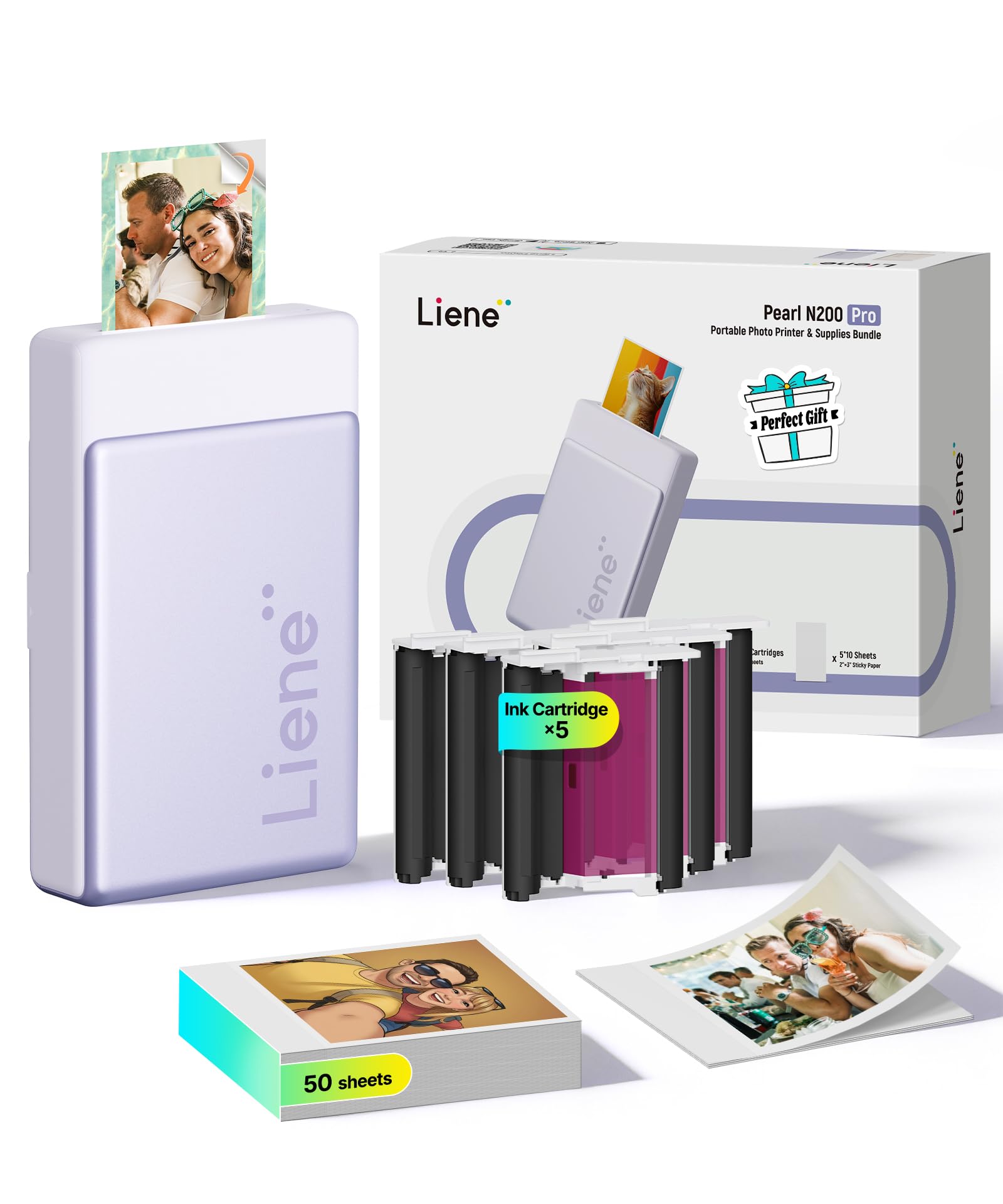
The Liene Pearl N200 Pro is a mini sticker printer that punches above its size. Its 2×3 adhesive-backed prints use dye-sublimation rather than ZINK, resulting in richer colors and sharper edges than most mini printers. The AI feature in the app can reimagine your portrait with different artistic backgrounds — a unique twist for custom stickers.
Setup relies on Bluetooth, and the app auto-connects quickly once paired. Print time is under a minute per sticker, and the battery supports roughly 27 prints per charge. The InstaPic mode lets you shoot through the app and print in one action, bypassing the photo album — handy at parties.
Refill cartridges are more affordable than ZINK paper packs, though each cartridge yields only about 5 prints rather than the advertised 10. The purple finish is fun, but the unit is slightly wider than a phone, so it won’t slip into a tight jeans pocket.
Why it’s great
- Superior dye-sub quality in a tiny sticker format
- AI background replacement for creative portraits
- InstaPic one-touch shoot-and-print workflow
Good to know
- Print count per cartridge is closer to 5 than 10
- Adhesive backing attracts dust if not stored properly
5. Polaroid Hi-Print + Paper Bundle (2nd Gen)

The Polaroid Hi-Print 2nd Generation bundle includes the printer plus two packs of paper (40 sheets total), making it a true grab-and-go kit. It uses dye-sub cartridge technology embedded in the paper pack — there are no separate ink cartridges to swap. Each print emerges in under 50 seconds with the signature Polaroid color science.
Bluetooth pairing is fast and the app offers filters, borders, text, emoticons, and even a passport photo mode. The 2×3 business-card-size prints have a self-adhesive backing, ideal for planners, journals, or decorating a laptop. Users consistently praise the reliability — no paper jams and consistent color output.
The bundle pricing is fair for what you get, though the long-term cost per print is higher than generic ZINK paper packs. The white finish is clean, but the unit is slightly taller than competing mini printers. For Polaroid fans wanting a modern Bluetooth upgrade, this is a safe bet.
Why it’s great
- Paper and ink combined in one cartridge for zero-mess swaps
- Fast, reliable pairing with consistent print quality
- Versatile app with passport, collage, and sticker modes
Good to know
- Higher per-print cost compared to generic ZINK alternatives
- Printer is slightly taller than pocket-size rivals
6. HPRT CP4100

The HPRT CP4100 mirrors the iDPRT in size and technology but adds a polished beige design and an AR video printing feature through the “Heyphoto” app. The 300 DPI dye-sub engine produces true-to-life colors with a glossy, waterproof finish. The bundle includes 108 sheets and two ribbons — an immediate value proposition.
Connectivity is Wi-Fi direct, so no internet is required once the printer creates its own hotspot. The app supports multiple print sizes (6, 5, 3, 2, 1 inch) within the same 4×6 paper, which saves on waste when printing passport photos or mini stickers. Print time is roughly one minute per sheet.
User feedback is overwhelmingly positive about print quality and ease of setup in both Android and iOS environments. The protective layer truly resists smudging. The only meaningful trade-off is that the unit requires a power outlet — not fully battery-powered — so it is more of a desktop companion than a pack-in-a-backpack device.
Why it’s great
- Generous 108-sheet starter kit with two ink ribbons
- Multi-size printing and AR video scan within the app
- Scratch-proof, water-resistant protective coating on prints
Good to know
- Requires a wall outlet; no internal battery for true portability
- Larger footprint than pocket-sized mini printers
7. Canon Ivy 2

The Canon Ivy 2 is the quintessential pocket sticker printer — roughly the size of a computer mouse and weighing almost nothing. It uses ZINK (Zero Ink) technology, so there are no cartridges to replace; the color crystals are embedded in the paper itself. The bundle includes 110 adhesive-backed sheets, a protective case, and a USB cable.
Print quality is good for the format, with Canon’s second-generation Ivy offering improved skin tone rendition and contrast compared to the original. The LED light bar provides visual feedback during charging and printing. The app is straightforward, and Bluetooth pairing is instantaneous with iOS and Android.
The catch is inherent to ZINK technology: prints have a matte, slightly less vibrant finish compared to dye-sub, and colors can appear muted under some lighting. The per-sheet cost is generally lower than Instax film, but the tactile feel is less glossy. For bullet journaling, gift tags, or kid crafts, the Ivy 2 is the most portable option available.
Why it’s great
- No ink cartridges to buy; only ZINK paper packs
- Pocket-sized portability with peel-and-stick backing
- Fast charging in roughly 45 minutes
Good to know
- ZINK prints are less vibrant and more matte than dye-sub
- Best results depend on correct paper storage away from heat
8. Liene M100 Bundle

The Liene M100 is tailored for users who crank through 4×6 prints — the bundle packs 180 sheets and 5 ink cartridges, enough for a sizable family album or a weekend event. It employs dye-sublimation with 300 DPI quality, and the final protective layer resists water and scratches. The printer creates its own Wi-Fi hotspot for direct connection.
Print speed averages about one minute per sheet, and the app includes a queue feature that lets you batch up to 20 prints before the unit needs a cooldown. The app also provides step-by-step guidance for any paper jams. Professional photographers have praised the archival-grade output with minimal color adjustment.
Color calibration out of the box trends slightly warm (yellowish cast), but correction within the app is straightforward. The unit is AC-powered, so it is best suited for a desk or craft table. For high-volume home printing without the recurring cost of proprietary brand cartridges, this bundle delivers exceptional value.
Why it’s great
- 180 sheets and 5 ink ribbons — best per-print value in this guide
- Archival-quality dye-sub with scratch-resistant coating
- Batch printing queue with app-guided troubleshooting
Good to know
- Slight warm color cast may require app-based adjustment
- Must be plugged into a power outlet; no battery
9. HP Envy Photo 7975

The HP Envy Photo 7975 is a full-featured all-in-one inkjet that handles printing, scanning, and copying in a single chassis. It includes a dedicated photo tray for borderless 4×6 prints, an automatic document feeder, and AI-powered web-page cropping. Wireless setup through the HP Smart App takes under ten minutes.
Print quality for documents is sharp at up to 15 ppm black, and photo output is vibrant thanks to the 4-ink system (CMYK). The 2.1-inch color touchscreen simplifies navigation. The included three-month Instant Ink trial keeps running costs low initially, though subscription costs add up after the trial.
The HP Envy is bulkier than any dedicated photo printer here and uses traditional inkjet cartridges that can clog if left idle. Some users report finicky reliability with repeated units. For a household that needs to print both school reports and high-quality family photos, this is the only multi-function option on the list.
Why it’s great
- Versatile print, scan, and copy in one machine
- Dedicated photo tray for borderless 4×6 output
- AI-based web-page cropping saves paper and ink
Good to know
- Larger footprint requires dedicated desk space
- Ink cartridges can clog if left unused for long periods
FAQ
Do Bluetooth photo printers need Wi-Fi to work?
Which prints last longer: dye-sub or ZINK?
Can I print passport-size photos with a Bluetooth printer?
What paper sizes are available for portable photo printers?
Final Thoughts: The Verdict
For most users, the best bluetooth photo printer winner is the Fujifilm Instax Mini Link 3 because it pairs iconic Instax film quality with a polished app experience and rugged build. If you want vibrant 4×6 prints with low per-sheet costs, grab the iDPRT CP4100. And for the most portable sticker-printing solution with no cartridges to buy, nothing beats the Canon Ivy 2.

Mo Maruf
I created WellFizz to bridge the gap between vague wellness advice and actionable solutions. My mission is simple: to decode the research and give you practical tools you can actually use.
Beyond the data, I am a passionate traveler. I believe that stepping away from the screen to explore new environments is essential for mental clarity and physical vitality.