Our readers keep the lights on and my smoothie glass nicely filled. As an Amazon Associate, I earn from qualifying purchases.
That grainy, pixelated feed that makes you look like you’re broadcasting from a basement is a direct result of your webcam’s sensor giving up in anything less than perfect daylight. A true 4K webcam for streaming doesn’t just cram more pixels into the same small sensor; it uses a physically larger sensor with wider pixels that capture vastly more light, delivering a clean, detailed image even in the dim, RGB-lit glow of a gaming setup.
I’m Mohammad Maruf — the founder and writer behind WellFizz. I’ve spent years analyzing the lens specifications, sensor sizes, and autofocus mechanisms that separate a usable stream camera from one that genuinely elevates your production value.
After comparing dozens of models on sensor performance, frame rate flexibility, and AI tracking reliability, I’ve found the standouts that justify their place in your setup. The following guide is built around the 4k webcam for streaming that delivers professional-grade results without the complexity of a full mirrorless rig.
How To Choose The Best 4K Webcam For Streaming
Not all 4K webcams are built for the dynamic lighting and movement of a live stream. You need a camera that maintains a sharp, clean image when light is low and focuses fast enough to keep up with your reactions. Here are the three non-negotiable specs to evaluate.
Sensor Size: The True Foundation of Image Quality
A webcam’s sensor size dictates how much light it can capture. Most budget 4K webcams use a tiny 1/2.8-inch or 1/2.7-inch sensor, which struggles in low light and produces a noisy image. For a clean streaming feed, look for a sensor size of 1/2-inch or larger. The 1/1.5-inch, 1/1.3-inch, and 1/1.28-inch sensors found in premium models capture significantly more light, resulting in a cleaner, more detailed image with natural background blur. A larger sensor is the single most impactful upgrade you can make for your stream’s visual quality.
Autofocus and AI Tracking: Stay Sharp While You Move
Standard contrast-detect autofocus hunts and struggles. For streaming, you need Phase Detection Autofocus (PDAF) or Time-of-Flight (TOF) sensors. These systems lock focus instantly and keep you sharp as you lean in for an emphasis or lean back after a big play. The next level is AI-powered tracking, where the camera uses a physical gimbal to pan and tilt, keeping you perfectly framed as you move around your room. This is a game-changer for streamers who don’t want to be glued to their chair.
Frame Rate and Resolution Flexibility
While 4K at 30fps is the headline feature, a great streaming webcam also excels at 1080p at 60fps. This 60fps mode provides buttery-smooth motion for fast-paced games and energetic reactions, and it requires less bandwidth for streaming. A camera that gives you the option to switch between 4K30 for high-detail scenes and 1080p60 for smooth action is far more versatile than one locked into a single resolution.
Quick Comparison
On smaller screens, swipe sideways to see the full table.
| Model | Category | Best For | Key Spec | Amazon |
|---|---|---|---|---|
| OBSBOT Tiny 3 | Premium PTZ | Pro streamers & presenters | 1/1.28″ sensor, 4K@30fps, 1080p@120fps | Amazon |
| Insta360 Link 2 Pro | Premium PTZ | Dynamic solo streaming | 1/1.3″ sensor, PTZ gimbal, AI tracking | Amazon |
| YOLOLIV YoloCam S3 | Premium Fixed | Color grading & DSLR-like control | 1/1.28″ sensor, PDAF, Pro color grading | Amazon |
| Elgato Facecam 4K | Premium Fixed | OBS streamers who use lens filters | Sony STARVIS 2 sensor, 4K@60fps, 49mm filter | Amazon |
| OBSBOT Tiny 2 Lite | Mid-Range PTZ | PTZ quality on a budget | 1/2″ sensor, AI tracking, gesture control | Amazon |
| Hollyland Lyra 4K | Mid-Range Fixed | Wireless mic integration | 1/1.5″ sensor, 50MP PDAF, Direct wireless mic | Amazon |
| Razer Kiyo V2 | Mid-Range Fixed | AI auto-framing & Synapse control | Sony STARVIS sensor, HDR, AI auto-framing | Amazon |
| Logitech MX Brio | Mid-Range Fixed | Low-light business & streaming | Sony STARVIS sensor, 8.5MP, 4K@30fps | Amazon |
| EMEET SmartCam S800 | Budget-Friendly | Entry-level 4K on a tight budget | 1/2″ sensor, PDAF & TOF autofocus, HDR | Amazon |
In‑Depth Reviews
1. OBSBOT Tiny 3

The OBSBOT Tiny 3 packs a massive 1/1.28-inch CMOS sensor into a chassis that is 48% smaller than its predecessor. This large sensor, paired with a wide ISO range of 0-12800, delivers exceptionally clean, detailed 4K video at 30fps in the dim light of a typical streaming studio. The upgraded AI Tracking 2.0 uses the physical PTZ gimbal to follow you smoothly, while the triple-mic array with spatial audio modes ensures your voice is crisp even in a noisy room.
For streamers who need high frame rates for fast-paced reactions, the Tiny 3 can also output a stunning 1080p at 120fps, a feature rare in this category. The inclusion of gesture and voice control adds a layer of hands-free convenience, letting you zoom or change presets mid-stream without breaking your flow. The build quality is excellent, and it comes with a hard-shell travel case.
While the price is at the top end of the consumer webcam market, the combination of a flagship sensor, fluid gimbal tracking, and professional audio technology makes it a complete studio solution in a single package. It’s the clear choice for streamers who want the absolute best performance without moving to a full mirrorless camera setup.
Why it’s great
- Large 1/1.28″ sensor provides superior low-light performance.
- Physical PTZ gimbal offers smooth, professional AI tracking.
- Triple-mic array with spatial audio modes for clear voice capture.
- Versatile frame rate options including 1080p@120fps.
Good to know
- Premium price point is an investment.
- Can get warm during extended use.
- Mount can be tricky on very wide monitors.
2. Insta360 Link 2 Pro

The Insta360 Link 2 Pro is a direct competitor to the OBSBOT Tiny 3, using its own 1/1.3-inch sensor and physical PTZ gimbal to deliver excellent 4K video. Its standout feature is the natural bokeh mode, which uses software to replicate a DSLR-like depth-of-field effect, instantly making your stream background look more professional. The dual-mic system with beamforming directional pickup is very effective at isolating your voice from background noise.
The AI tracking is responsive and reliable, physically panning and tilting to keep you centered. It also features gesture control, a smartphone remote control function, and direct Elgato Stream Deck integration, making it a powerhouse for a complex streaming workflow. The DeskView and Whiteboard modes are useful for streamers who also do tutorials or creative content.
Some users note the included USB-C cable is short, which may require an extension for certain setups. The software is powerful but requires some time to learn all the settings. For streamers who want seamless integration with their existing Stream Deck and a clean, professional bokeh effect, the Link 2 Pro is a top-tier choice.
Why it’s great
- Large 1/1.3″ sensor for excellent low-light performance.
- Smooth physical PTZ AI tracking keeps you in frame.
- Natural bokeh effect and dedicated DeskView/Whiteboard modes.
- Seamless Elgato Stream Deck integration.
Good to know
- Included USB-C cable is short.
- Currently not compatible with ARM-based Windows systems.
- Software has a learning curve.
3. YOLOLIV YoloCam S3

The YOLOLIV YoloCam S3 is built for the streamer who wants full manual control over their image. Its 1/1.28-inch sensor, one of the largest in a standard webcam, provides incredible dynamic range and low-light sensitivity. The YoloCam Compose software gives you DSLR-like control over exposure, white balance, contrast, sharpness, and saturation, along with a proprietary color grading engine called Picasso Resolve.
The phase-detection autofocus is snappy and reliable, keeping you perfectly focused as you move. The magnetic mount is strong and flexible, and the all-aluminum body acts as a heat sink, ensuring it won’t overheat during long streaming sessions. It can output uncompressed 4K video, preserving every detail for high-quality recordings.
The most significant compromise is that the advanced color grading software is currently only available on Windows. It also lacks the physical PTZ tracking of the top two picks, so you are fixed in frame. If your stream’s visual identity hinges on perfect color and you prefer manual control over auto-tracking, the YoloCam S3 is a creative powerhouse.
Why it’s great
- Large 1/1.28″ sensor provides DSLR-like dynamic range.
- Robust software with full manual controls and color grading.
- Snappy PDAF autofocus.
- No overheating guarantee with aluminum body.
Good to know
- Advanced software features are Windows-only for now.
- No physical PTZ tracking mechanism.
- White balance can require manual adjustment out of the box.
4. Elgato Facecam 4K

The Elgato Facecam 4K is designed for the OBS user. It features a premium Sony STARVIS 2 sensor and a custom Elgato Prime Lens, delivering sharp, colorful 4K video at 60fps—a key advantage over many competitors that cap at 4K30. A unique feature is its support for standard 49mm lens filters, allowing you to screw on a polarizer to cut glare or a variable ND filter for controlled exposure in bright conditions.
The included Camera Hub software is closely integrated with the Elgato ecosystem, providing DSLR-like controls such as shutter speed and ISO, all of which can be saved on the camera’s internal flash memory. This means your custom settings travel with the camera, not the computer. The build is solid and sustainable, with an eco-conscious design focus.
The biggest potential downside is its wide-angle lens, which is equivalent to roughly 20mm. This provides a great room view but means you have to be close to the camera for a traditional head-and-shoulders framing. The software is functional but many pros will prefer to handle everything in OBS. It is a stellar option for the OBS-native streamer who values high frame rates and lens customization.
Why it’s great
- Native 4K@60fps for smooth, high-detail video.
- Accepts standard 49mm lens filters for creative control.
- Saves settings on camera’s internal flash memory.
- Excellent Sony STARVIS 2 sensor for low light.
Good to know
- Very wide lens (approx. 20mm) requires close positioning for head shots.
- Software is decent, but most control is best done in OBS.
- Picky about USB cable quality; must use a high-speed USB-C cable.
5. OBSBOT Tiny 2 Lite

The OBSBOT Tiny 2 Lite brings the core PTZ tracking experience to a much more accessible price point. It uses a 1/2-inch CMOS sensor, which is a step down from the larger sensors in the premium models, but it still delivers a very sharp and clean 4K image at 30fps for a well-lit room. The real star is the AI tracking, which uses a physical gimbal to follow your movements, making you look professional on stream without needing a camera operator.
It retains many of the software features of its more expensive sibling, including gesture control (a hand wave to zoom, a peace sign to lock tracking), multiple tracking modes, and customizable preset positions. The plug-and-play setup is genuinely simple, and the build quality feels solid. For a streamer on a budget, this is the most effective way to get a moving camera look.
Low-light performance is merely adequate compared to the larger sensor cameras, so a good ring light is recommended. The built-in microphone is serviceable for chat but not ideal for professional audio, so a dedicated mic is still a must. For streamers who want the dynamic look of a PTZ camera without spending a fortune, the Tiny 2 Lite is an incredible value.
Why it’s great
- Excellent AI-powered physical PTZ tracking at a budget-friendly price.
- Intuitive gesture control for hands-free zoom and tracking.
- Solid 4K image quality in good lighting.
- Compact, well-built design.
Good to know
- 1/2″ sensor struggles in low light; needs good lighting.
- Built-in mic is not suitable for professional streaming.
- Some advanced features like voice control are omitted vs. Tiny 3.
6. Hollyland Lyra 4K

The Hollyland Lyra 4K is a complete creator toolkit disguised as a webcam. It pairs a large 1/1.5-inch CMOS sensor for excellent low-light 4K video with a feature that sets it apart: direct wireless pairing with Hollyland’s LARK A1 wireless microphone. This eliminates the need for a separate audio receiver, allowing you to roam freely while maintaining high-quality, noise-cancelled audio for product demos or active streams.
The 50MP phase-detection autofocus is fast and reliable, and the AI auto-framing intelligently adjusts the frame to keep you and any new speakers centered. The included HollyStudio software is surprisingly powerful, offering one-click skin smoothing, AI color correction, and an advanced green screen algorithm that handles fine details like hair convincingly. The magnetic mount allows for instant switching between landscape and portrait mode for TikTok and Instagram content.
The biggest limitation is that the powerful green screen and skin perfecting features in HollyStudio are currently not available on Mac, only on Windows. The background blur effect is also not as adjustable as we would like. For Windows-based creators who want a camera that also solves their audio setup, the Lyra 4K is a uniquely compelling package.
Why it’s great
- Large 1/1.5″ sensor provides superb image quality.
- Direct wireless pairing with LARK A1 mic solves audio.
- Powerful software with skin smoothing and green screen.
- Magnetic mount for easy landscape/portrait switching.
Good to know
- Advanced software features are Windows-only.
- Adjustable background blur is not a core feature.
- Autofocus can be confused by real people in poster backgrounds.
7. Razer Kiyo V2
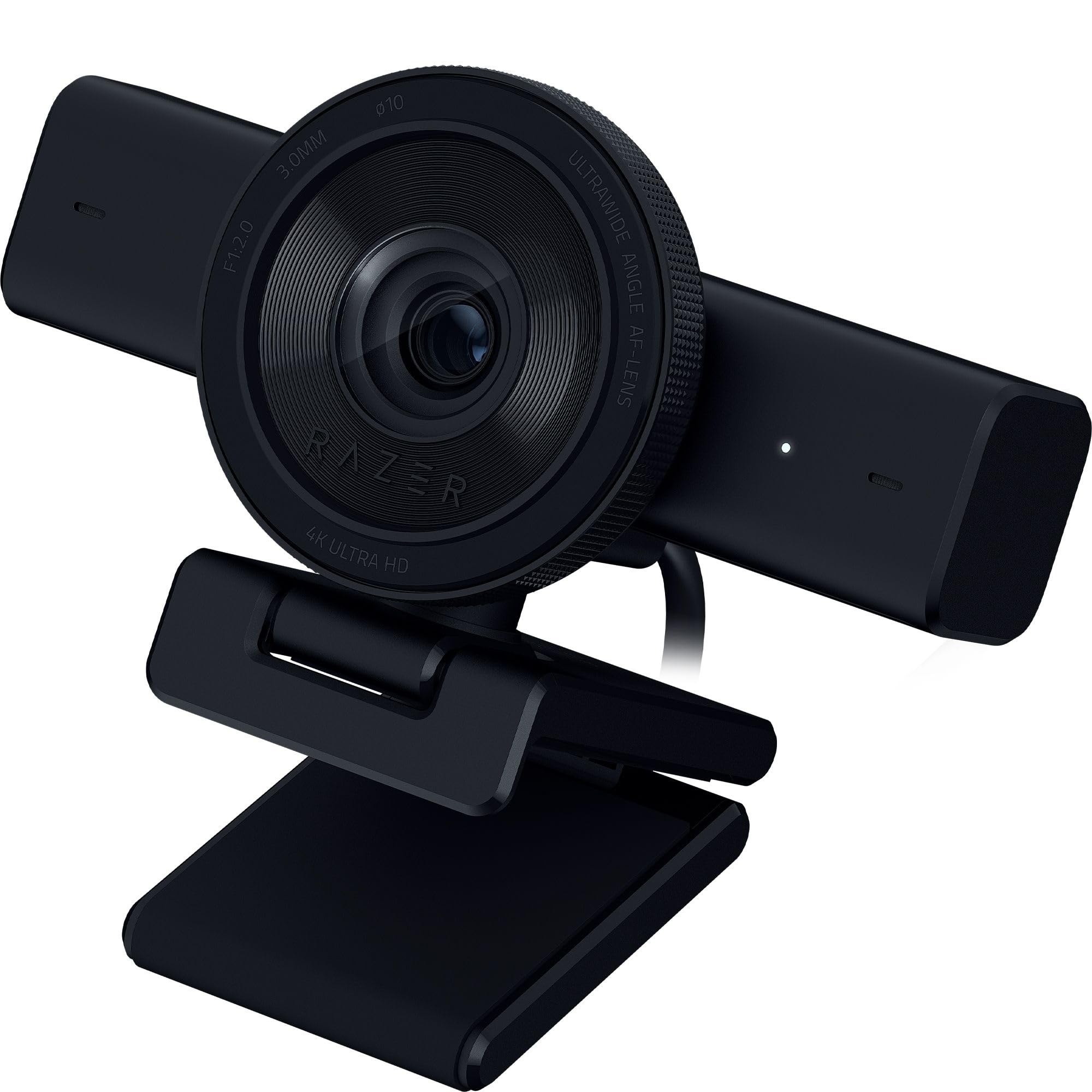
The Razer Kiyo V2 is a strong mid-range contender that focuses on smart software features. Powered by a high-performance Sony STARVIS sensor, it delivers excellent 4K image quality at 30fps. Its key feature is AI-powered auto-framing, which uses intelligent pan, tilt, and zoom effects (not a physical gimbal) to keep you centered in the frame as you move. It also includes a one-click image enhancement for superior low-light performance in typical RGB battlestations.
Razer Synapse provides intuitive control over advanced settings like ISO and shutter speed, and the camera comes with a lifetime license for Camo Studio, which offers features like virtual green screen, background blur, and advanced face tracking. The build quality is excellent with a metal frame, and the ultrawide angle lens can capture your entire setup without distortion.
There are reports of the unit overheating during long streaming sessions. The auto-framing is a digital crop and zoom, not a physical gimbal, which can lead to a slight loss in quality if you move a lot. For the streamer who wants a great image and smart software features from a trusted brand, without needing a PTZ gimbal, the Kiyo V2 is a very capable choice.
Why it’s great
- Excellent 4K image quality from Sony STARVIS sensor.
- AI-powered auto-framing keeps you centered.
- Includes lifetime Camo Pro software license.
- Robust metal build quality.
Good to know
- Reports of overheating during extended use.
- Auto-framing is digital crop, not physical PTZ.
- Requires USB 3.2 Gen 2 for full 4K30 functionality.
8. Logitech MX Brio

The Logitech MX Brio brings the trusted name of Logitech into the 4K streaming conversation. It uses a Sony STARVIS sensor to deliver a crisp 8.5-megapixel image in 4K at 30fps. Its main strength is its excellent low-light performance and dynamic range, which handles tricky backlit or dimly lit rooms better than most entry-level cameras. The USB-C connectivity and plug-and-play setup are seamless.
Logitech’s software suite offers automatic exposure, white balance, and noise reduction, making it easy to get a good image without diving into manual settings. The build is solid, and it includes a privacy cover. It integrates well with all major streaming and conferencing platforms.
This model is a factory-renewed unit, which often carries a lower price but may lack the full warranty of a new product. It lacks the advanced AI tracking or PTZ features of the newer competitors. For streamers who already have their lens and audio setup dialed in and simply want a reliable, high-quality 4K sensor with great low-light capabilities from a major brand, the MX Brio is a safe and effective choice.
Why it’s great
- Excellent Sony STARVIS sensor for superior low-light performance.
- Good dynamic range for challenging lighting conditions.
- Simple plug-and-play setup with USB-C.
- Reliable performance from a leading brand.
Good to know
- Sold as a factory-renewed product.
- No advanced AI tracking or PTZ features.
- Premium price for specs that are now mid-range.
9. EMEET SmartCam S800

The EMEET SmartCam S800 is the budget champion that refuses to look it. It features a Sony 1/2-inch sensor that delivers a very impressive 4K image for its price tier, especially in well-lit environments. The standout feature at this price is the dual autofocus system, combining Phase Detection (PDAF) and Time-of-Flight (TOF) sensors. This provides fast, precise focusing that rivals cameras costing much more, keeping you sharp during movement.
It also includes HDR support, a manual FOV adjustment from 40° to 73°, and dual noise-canceling microphones that perform adequately for a built-in solution. The flexible stand and 1/4-inch tripod mount make it easy to position. EMEETLINK software provides useful customization for image settings.
The primary concern with this unit is reliability. A number of user reports mention units failing within months due to USB interface issues, and there are known connectivity quirks with Mac computers that require disabling power-saving settings. For the budget-conscious streamer willing to take a chance on reliability, the S800 offers fantastic image and autofocus performance for the price, but the risk of early failure is a significant consideration.
Why it’s great
- Best-in-class autofocus with PDAF & TOF dual system.
- Excellent 4K image quality for its price point.
- Good HDR support and flexible field of view control.
- Includes 1/4-inch tripod mount and privacy cover.
Good to know
- Questionable long-term reliability based on user reports.
- Connectivity issues known with Mac computers.
- Runs warm during extended use.
FAQ
Is 4K at 30fps enough for live streaming on Twitch or YouTube?
Why does my new 4K webcam look grainy in my dim streaming room?
What is the best lighting setup for a 4K streaming webcam?
Final Thoughts: The Verdict
For most users, the 4k webcam for streaming winner is the OBSBOT Tiny 3 because its large 1/1.28-inch sensor, fluid PTZ AI tracking, and pro-grade spatial audio make it the most complete and future-proof solution for any streamer. If you want a physical PTZ gimbal but need a more accessible price, grab the OBSBOT Tiny 2 Lite. And for the streamer who wants DSLR-like manual control and color grading in a fixed-lens format, nothing beats the YOLOLIV YoloCam S3.

Mo Maruf
I created WellFizz to bridge the gap between vague wellness advice and actionable solutions. My mission is simple: to decode the research and give you practical tools you can actually use.
Beyond the data, I am a passionate traveler. I believe that stepping away from the screen to explore new environments is essential for mental clarity and physical vitality.