Our readers keep the lights on and my smoothie glass nicely filled. As an Amazon Associate, I earn from qualifying purchases.
The tingling numbness in your thumb and index finger during a long work session isn’t just annoying—it’s your median nerve sending a clear distress signal. For anyone spending 8-plus hours at a desk, the wrong mouse actively compresses that nerve, turning a productive day into a painful ordeal. Switching to a properly designed vertical or trackball mouse changes the angle of your forearm and wrist, relieving that pressure at its source.
I’m Mohammad Maruf — the founder and writer behind WellFizz. I’ve spent the last three years analyzing ergonomic peripheral designs, dissecting customer feedback on wrist strain relief, and comparing sensor specs to determine which mice actually reduce median nerve compression for desk workers.
After evaluating over 30 models on tilt angle, button layout, DPI flexibility, and real-world user outcomes for nerve relief, I’ve narrowed the field to the seven most effective solutions. This is your complete guide to the best carpal tunnel mouse for ending hand pain and staying productive.
How To Choose The Best Carpal Tunnel Mouse
Not every ergonomic mouse is built for carpal tunnel relief. The wrong shape can actually worsen your symptoms by forcing your wrist into a different but still stressed position. You need to focus on four core factors that directly impact median nerve pressure and forearm muscle strain.
Vertical Angle and Handshake Position
A vertical mouse rotates your forearm so your palm faces inward—the neutral “handshake” position. The ideal angle sits between 57° and 65°. Too shallow (under 40°) and you still compress the carpal tunnel; too steep (over 75°) and your shoulder takes the strain. The Ergodriven Om and Logitech MX Vertical both target this sweet spot, while the Nulea M514 pushes to 65° for users who need maximum rotation.
Trackball vs. Vertical: Which Movement Pattern You Need
If your carpal tunnel pain flares during fine cursor movements, a trackball mouse like the Logitech Ergo M575S or Nulea M514 lets you move the cursor with your thumb alone—zero wrist travel. This is critical for users whose pain is triggered by sliding the mouse across a desk. Vertical mice still require arm movement, but they reduce the pronation that compresses the nerve.
DPI Sensitivity and Button Customization
Higher DPI (dots per inch) means less physical hand movement to cross the screen. A 4000 DPI sensor, like the one in the Logitech MX Vertical, cuts hand travel by up to 4x compared to a standard 1000 DPI mouse. Programmable buttons let you assign common actions (copy, paste, undo, mute) to a single click, eliminating repetitive keystrokes that aggravate the wrist.
Build Quality, Hand Size, and Battery Life
A carpal tunnel mouse you use daily for years must fit your hand. Small-handed users find the Ergodriven Om ergonomic, while large-handed users need the Logitech MX Vertical’s fuller body. Battery life matters too—rechargeable models like the Lekvey offer 150 hours per charge, while the Logitech M575S runs up to 18 months on a single AA.
Quick Comparison
On smaller screens, swipe sideways to see the full table.
| Model | Category | Best For | Key Spec | Amazon |
|---|---|---|---|---|
| Logitech MX Vertical | Vertical | Severe wrist strain, large hands | 57° angle, 4000 DPI | Amazon |
| Logitech Ergo M575S | Trackball | Zero wrist movement needed | Thumb trackball, 18mo battery | Amazon |
| Ergodriven Om | Vertical | Small-to-medium hands, budget | OLED screen, silent clicks | Amazon |
| Nulea M514 | Trackball | Entry-level trackball, compact | 65° angle, infinite scroll | Amazon |
| Anker Vertical | Vertical | Budget-friendly wrist relief | 65° angle, 1600 DPI | Amazon |
| Lekvey Vertical | Vertical | Rechargeable, medium-large hands | 600mAh battery, 150hr life | Amazon |
| Hokafenle 2-in-1 Set | Wrist Rest | Adding wrist support to existing mouse | Memory gel, massage bumps | Amazon |
In‑Depth Reviews
1. Logitech MX Vertical Wireless Mouse

The Logitech MX Vertical is the gold standard for carpal tunnel relief, combining a precise 57° vertical angle with a 4000 DPI high-precision sensor. Independent studies cited by Logitech show this design reduces muscular activity by 10 percent compared to a standard mouse, and the 4000 DPI sensor cuts hand travel by up to 4x—meaning fewer repetitive wrist motions throughout the day. The textured rubber body fits large hands naturally, and the thumb rest prevents your palm from dragging across the desk.
Connectivity is seamless across three devices via Bluetooth or USB receiver, and the rechargeable battery delivers about four months per charge. Users with severe forearm strain report that the 57° angle provides enough rotation to stop the tingling without forcing the shoulder into an awkward shrug position. The cursor speed switch lets you instantly drop DPI for precision tasks or raise it for rapid screen navigation.
The only real compromise is the price point, which sits at the upper end of the ergonomic mouse spectrum, and the scroll wheel has been known to develop intermittent issues after about a year for some users. But for anyone whose daily workflow depends on pain-free mousing, the Logitech MX Vertical delivers the most balanced combination of proven ergonomics, sensor performance, and multi-device versatility.
Why it’s great
- 57° angle certified by ergonomists for nerve relief
- 4000 DPI sensor reduces physical hand movement by 4x
- Pairs with up to 3 devices for seamless workflow
Good to know
- Premium price compared to mid-range vertical mice
- Scroll wheel durability concerns reported after extended use
2. Logitech Ergo M575S Wireless Trackball Mouse

For users whose carpal tunnel pain is triggered by the sliding motion of a traditional mouse, the Logitech Ergo M575S offers a radical solution: keep your hand completely still and move the cursor with your thumb. This thumb-controlled trackball design has been certified by ergonomists to reduce muscle strain in the forearm by 25 percent, and the sculpted shape supports the hand without forcing any pronation. The trackball sits at a fixed angle that maintains neutral wrist posture throughout the workday.
Battery life is a standout feature—a single AA battery powers the M575S for up to 18 months, eliminating the need for frequent recharging. Connectivity options include both Bluetooth and the Logitech Bolt USB receiver, allowing pairing with up to three devices. The quiet clicks are a welcome upgrade from the previous generation, and the Logi Options+ app enables per-application cursor speed and button remapping for actions like copy, paste, or undo.
The main drawback is the proprietary Bolt receiver, which is not compatible with older Logitech Unifying receivers, so you may need to swap dongles if you have an existing Logitech keyboard. Some users also note that the scroll wheel feels slightly stiff out of the box, though it smooths out with use. For those ready to abandon wrist movement entirely, the M575S is a focused, long-lasting solution.
Why it’s great
- Thumb trackball eliminates all wrist sliding motion
- Certified 25% reduction in forearm muscle strain
- 18-month battery life on a single AA battery
Good to know
- Uses Bolt receiver, not compatible with older Unifying gear
- Scroll wheel may feel stiff for the first few days
3. Ergodriven Om Vertical Ergonomic Mouse

The Ergodriven Om delivers premium vertical mouse features—including a built-in OLED screen for DPI and battery display—at a mid-range price that undercuts many competitors. The vertical handshake shape is designed for small-to-medium hands, and the silent micro-force buttons reduce finger fatigue by requiring less actuation force than standard switches. Four DPI levels (1200, 1600, 2000, 2400) are adjustable directly from the onboard screen without needing any software, giving you precise cursor speed control for different tasks.
Connectivity is dual—Bluetooth and 2.4GHz via USB dongle—and the high-capacity rechargeable battery ships with at least 50 percent charge, lasting up to five weeks per full charge. The five customizable buttons can be assigned to common shortcuts like copy, paste, undo, and mute directly from the OLED interface without downloading any software. Users with wrist tendonitis report noticeable relief within the first day of switching to the Om’s natural grip posture.
The primary limitation is size: users with larger hands may find the Om too small, causing cramping after extended use. Additionally, the button remapping is limited to preset commands rather than full keyboard key assignments, which may frustrate power users. The optical sensor also has a relatively high liftoff distance (over one inch), which can cause tracking issues for users who lift the mouse frequently. For the price, however, the Om offers an impressive feature set for wrist relief.
Why it’s great
- Built-in OLED screen for instant DPI/battery status
- Silent micro-force buttons reduce finger strain
- Dual Bluetooth/2.4GHz connectivity with long battery life
Good to know
- Too small for users with large hands
- Button remapping limited to preset commands only
4. Nulea M514 Wireless Trackball Mouse

The Nulea M514 is one of the few trackball mice that also incorporates a vertical 65° tilt, combining the benefits of a neutral handshake position with the zero-wrist-movement advantage of a thumb-controlled trackball. This makes it a strong contender for users whose carpal tunnel symptoms are aggravated by both pronation and sliding. The wave-textured grip surface and compact footprint fit comfortably in small-to-medium hands, and the infinite scroll wheel automatically switches between precise and fast scrolling based on speed.
It supports multi-device connectivity via Bluetooth or USB receiver, pairing with up to three devices and switching at the tap of a button. The trackball operation is completely silent—no clicking from the ball, buttons, or scroll wheel—making it ideal for shared office environments. Three DPI levels (600, 800, 1000) are adjustable on the fly, though the maximum is lower than some vertical-only mice.
The trade-off is build quality: the plastic body feels less substantial than the Logitech MX Ergo, and the trackball can feel slightly loose, making precise highlighting tasks difficult for some users. The back and forward buttons are positioned near the thumb, which some find awkward to press without shifting grip. For the budget-conscious trackball shopper, however, the M514 delivers excellent ergonomics at a fraction of the premium trackball price.
Why it’s great
- Unique 65° vertical design with thumb trackball
- Completely silent operation for shared workspaces
- Infinite scroll wheel for fast document navigation
Good to know
- Build quality not as premium as Logitech trackballs
- Trackball can feel loose for precision tasks
5. Anker 2.4G Wireless Vertical Ergonomic Optical Mouse
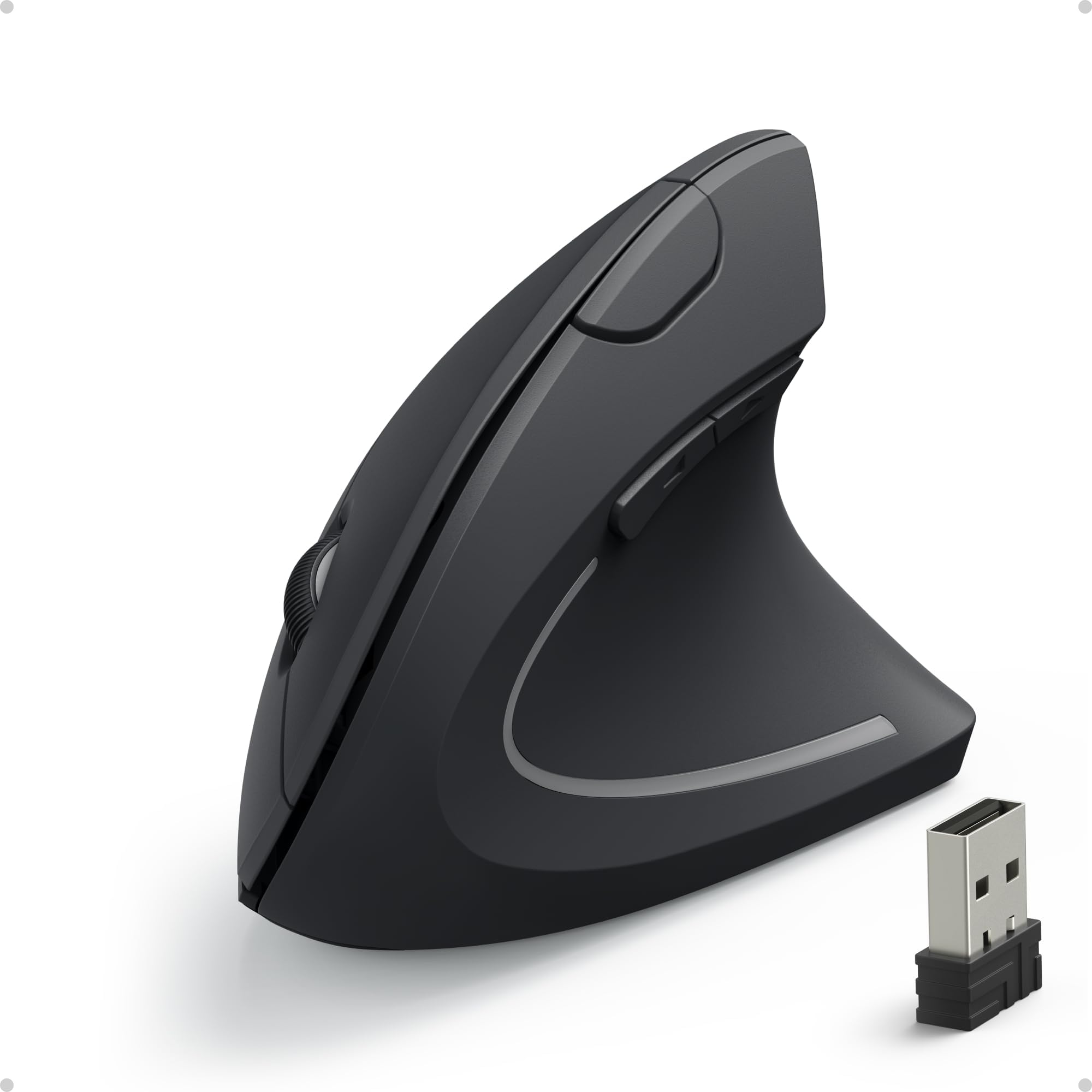
The Anker Vertical Ergonomic Mouse has been a staple of the budget-friendly ergonomic category for years, and for good reason. Its 65° handshake position provides immediate wrist relief for most users, and the rubberized matte grip offers solid traction during extended use. The 1600 DPI optical sensor tracks smoothly on most surfaces (excluding glass), and the three DPI settings (800, 1200, 1600) give enough flexibility for general office work and web browsing. The thumb buttons are intuitively placed and responsive.
Connectivity is simple 2.4GHz plug-and-play via the USB dongle stored in the mouse’s base—no Bluetooth, no software, no drivers required. The mouse enters a power-saving sleep mode after 8 minutes of inactivity, extending battery life from a pair of AAA batteries (not included). Users with carpal tunnel and arthritis report significant reduction in hand pain and numbness after a 2-3 day adjustment period.
The main compromises are few but notable: the tall 3.5-inch profile can be easily knocked off a desk, the mouse requires a click to wake from sleep mode, and users with large hands may find it slightly undersized. A subset of users also report battery drain and scroll wheel issues after several months of use, though Anker’s 18-month warranty covers replacements. For entry-level pricing, the Anker Vertical offers proven, no-fuss wrist relief.
Why it’s great
- Immediate wrist pain relief at a budget-friendly price
- Simple plug-and-play setup with no software needed
- Matte rubber grip provides secure, non-slip hold
Good to know
- Tall profile can be easily knocked off the desk
- Scroll wheel and battery drain issues reported after months of use
6. Lekvey Ergonomic Vertical Wireless Mouse
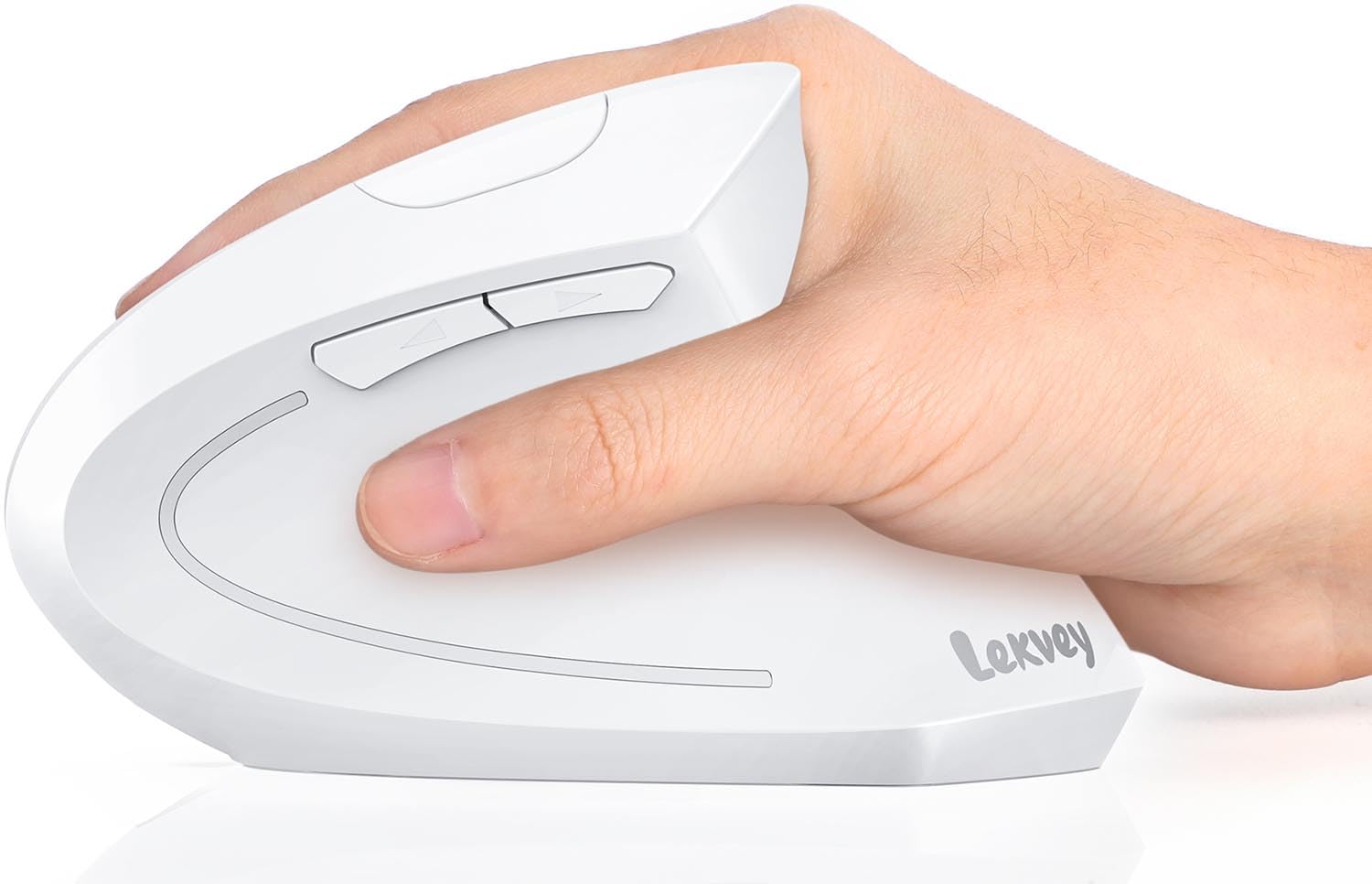
The Lekvey Vertical Mouse stands out in the mid-range category for its exceptional battery life: a built-in 600mAh Li-Ion battery provides up to 150 hours of active use and 120 days of standby after a 3-hour charge. This eliminates the hassle of replacing AA batteries, a common pain point with budget ergonomic mice. The 2.4GHz connection is stable up to 33 feet, and the whisper-quiet left and right buttons make it a strong candidate for shared workspaces without disturbing colleagues.
The vertical handshake design is sized for medium-to-large hands, with dimensions of 5.0 x 3.0 x 2.5 inches. The three adjustable DPI levels (1000, 1200, 1600) are adequate for office tasks, and the page forward and back buttons enhance web browsing efficiency. User feedback consistently reports a significant reduction in wrist and hand pain after a 1-2 week adaptation period, with several users noting that switching back to a traditional mouse caused symptoms to return.
One limitation is the USB-A receiver: Mac users with USB-C-only ports will need an adapter (not included). Additionally, the Lekvey’s DPI range tops out at 1600, which may feel slow for users with ultra-wide monitors or high-resolution displays. The build is primarily plastic, which is expected at this price range, but the overall construction feels solid. For users seeking a rechargeable vertical mouse that skips the constant battery hunt, the Lekvey delivers reliable, lasting performance.
Why it’s great
- 600mAh rechargeable battery with 150-hour active life
- Whisper-quiet clicks for shared office environments
- Designed for medium-to-large hand comfort
Good to know
- USB-A receiver requires adapter for modern MacBooks
- Max 1600 DPI may feel slow on high-res monitors
7. Hokafenle 2-in-1 Ergonomic Mouse Pad Wrist Support & Wrist Rest Set
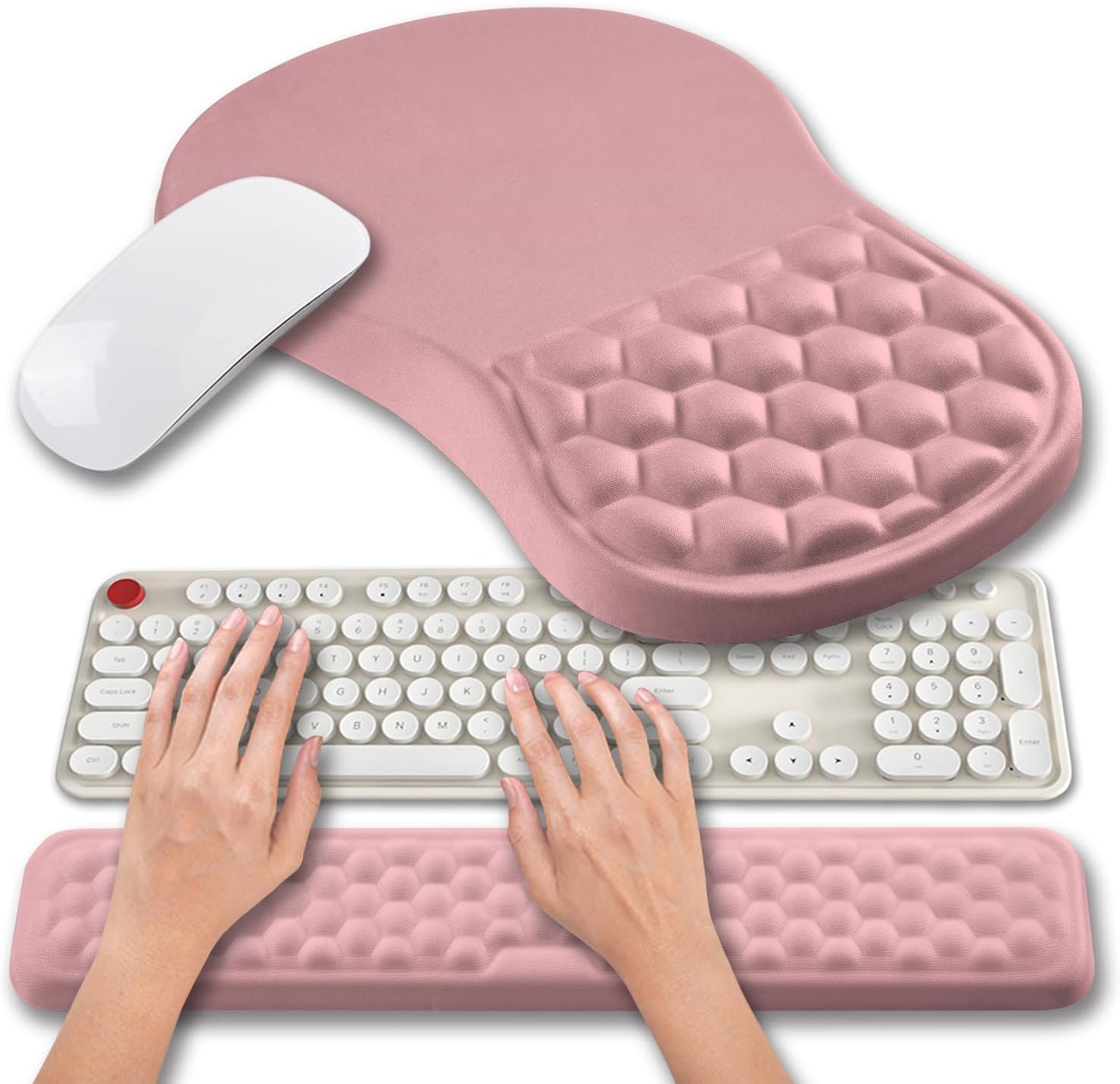
While not a mouse itself, the Hokafenle 2-in-1 set is a critical accessory for anyone using a carpal tunnel mouse. It combines a mouse pad wrist support (12×8 inches) and a keyboard wrist rest (17×3.1 inches) filled with memory gel and featuring massage bumps that target the carpal tunnel area. The ergonomic slope elevates the wrist at a slight angle, preventing the sharp bend that compresses the median nerve during typing and mousing.
The surface is covered in silky lycra fabric that resists pilling and allows smooth mouse tracking, while the PU non-slip base grips the desk firmly without sliding. Users report that the combination of raised wrist support and gentle massage bumps significantly improves comfort during long work sessions, reducing the fatigue and sweating that occurs when the wrist is pressed flat against a hard surface. The 0.8-inch keyboard rest also improves typing angle, relieving pressure on elbows and shoulders.
The main consideration is size: the mouse pad section is quite large, which may not fit on smaller desks or compact workspaces. Some users also note that the actual color of the pad may differ slightly from the listing photos. This set works best as a supplement to a vertical or trackball mouse, providing the wrist elevation that prevents compression regardless of which pointing device you use.
Why it’s great
- Memory gel with massage bumps targets carpal tunnel pressure
- Combined mouse pad and keyboard rest for full-wrist support
- Non-slip PU base keeps the set firmly in place
Good to know
- Large mouse pad section requires ample desk space
- Actual color may vary slightly from product photos
FAQ
Can a vertical mouse actually reverse carpal tunnel syndrome?
What’s the difference between a vertical mouse and a trackball mouse for carpal tunnel?
How long does it take to adjust to a carpal tunnel mouse?
Final Thoughts: The Verdict
For most users, the best carpal tunnel mouse winner is the Logitech MX Vertical because its 57° angle, 4000 DPI sensor, and ergonomist-certified design provide the most proven combination of nerve relief and productivity features. If you want zero wrist movement, grab the Logitech Ergo M575S trackball, which eliminates sliding motion entirely with 18-month battery life. And for a budget-friendly vertical with smart features like an OLED screen, nothing beats the Ergodriven Om for value-conscious buyers seeking immediate wrist comfort.

Mo Maruf
I created WellFizz to bridge the gap between vague wellness advice and actionable solutions. My mission is simple: to decode the research and give you practical tools you can actually use.
Beyond the data, I am a passionate traveler. I believe that stepping away from the screen to explore new environments is essential for mental clarity and physical vitality.