Our readers keep the lights on and my smoothie glass nicely filled. As an Amazon Associate, I earn from qualifying purchases.
The gap between hobbyist and production-level desktop printing has collapsed. Printers that hit 600 mm/s, self-level with a single touch, and handle engineering-grade materials now sit comfortably on a desk without demanding a second mortgage or a dedicated workshop. Choosing the right machine means deciding how much you value speed, material versatility, print volume, and post-processing time — and making that call before the filament spool runs dry.
I’m Mohammad Maruf — the founder and writer behind WellFizz. Over the past few years, I’ve analyzed dozens of FDM and resin printer specs, comparing acceleration figures, nozzle temperatures, build volumes, and thermal management systems to understand what separates a reliable workhorse from a frustrating paperweight.
Whether you are prototyping functional parts, printing detailed miniatures, or running a small classroom lab, this breakdown of the best at home 3d printer options will help you match a machine to your actual workflow.
How To Choose The Best At Home 3D Printer
Picking a home 3D printer comes down to four core factors: print technology, build volume, speed and acceleration, and material compatibility. Resin printers deliver unmatched detail for miniatures and jewelry but require ventilation and post-processing. FDM printers handle larger functional parts and are simpler to run in a living space. Your choice should align with what you actually plan to print most days.
Print Technology: FDM vs Resin
FDM (fused deposition modeling) melts a plastic filament and lays it down layer by layer. It is the dominant home format because it is clean, uses affordable spools of PLA or PETG, and can produce strong mechanical parts. Resin printing uses a UV-curable liquid and a high-resolution LCD screen to cure each layer. The surface finish is far smoother, but the resin itself is messy, requires gloves and a wash/cure station, and emits fumes that demand a ventilated space or an enclosure with active carbon filtration.
Build Volume and Footprint
For FDM, a 220 mm cube is the entry-level sweet spot. That fits most helmets, small mechanical brackets, and phone stands. A 256 mm or 260 mm cube opens up larger one-piece prints like drone frames or full-size cosplay armor pieces without splitting the model in software. Resin build volumes are typically smaller — around 6 to 9 inches on the longest axis — because the LCD screen and resin vat scale up in cost quickly. Measure your desk before buying; some enclosed FDM printers are nearly two feet deep and weigh over 60 pounds.
Speed, Acceleration, and Input Shaping
Maximum print speed (measured in mm/s) is a marketing figure. Real-world throughput depends on acceleration (mm/s²), which determines how fast the print head changes direction. A printer that boasts 600 mm/s but only accelerates at 2,000 mm/s² will never actually reach that speed on small or detailed parts. Look for acceleration above 10,000 mm/s² and input shaping (vibration compensation) — that combination dramatically cuts print times on models with lots of sharp corners and retractions without introducing ghosting.
Material Compatibility and Hotend Temperature
A standard 240°C hotend handles PLA, PETG, and basic TPU. If you want to print ABS, ASA, polycarbonate, or nylon, you need a hotend rated for at least 300°C and a heated enclosure to prevent warping. For carbon-fiber-reinforced filaments, a hardened steel nozzle is mandatory to avoid abrasive wear. Resin printers are more limited in material choice — most use standard or tough 405 nm resins, with some supporting engineering resins that cost significantly more per liter.
Quick Comparison
On smaller screens, swipe sideways to see the full table.
| Model | Category | Best For | Key Spec | Amazon |
|---|---|---|---|---|
| Bambu Lab P1S | FDM Enclosed | Reliable multi-material prints | 500 mm/s, 20,000 mm/s² accel | Amazon |
| Creality K2 Combo | FDM Enclosed | 16-color prints with CFS | 600 mm/s, 20,000 mm/s² accel | Amazon |
| ELEGOO Centauri Carbon | FDM Enclosed | Carbon fiber and engineering filaments | 500 mm/s, 320°C nozzle | Amazon |
| Bambu Lab A1 | FDM Open | Silent desk operation | 10,000 mm/s² accel, ≤48 dB | Amazon |
| FLASHFORGE Adventurer 5M | FDM Open | First printer for small projects | 600 mm/s, 20,000 mm/s² accel | Amazon |
| QIDI PLUS4 | FDM Enclosed | High-temp engineering materials | 65°C chamber, 370°C hotend | Amazon |
| ANYCUBIC Photon Mono M7 Pro | Resin | Ultra-high-detail miniatures | 14K resolution, 170 mm/h speed | Amazon |
| ELEGOO Mars 5 Ultra | Resin | Beginner-friendly resin printing | 9K resolution, 150 mm/h speed | Amazon |
| Entina Tina2 Plus | FDM Compact | Kids and classroom beginners | 250 mm/s, pre-assembled | Amazon |
In‑Depth Reviews
1. Bambu Lab P1S

The Bambu Lab P1S is the closest thing to an appliance-grade desktop printer at a mid-range price. Its CoreXY architecture delivers a genuine 500 mm/s print speed with 20,000 mm/s² acceleration, supported by input shaping that eliminates ghosting on sharp-cornered models. The fully enclosed body maintains a stable thermal environment for ABS and ASA, while the auto bed leveling system gets the first layer right every time without manual probing. Setup takes under 30 minutes out of the box, and the Bambu Studio slicer handles the rest with well-tuned default profiles.
Multi-color printing requires the optional AMS unit, which supports up to 16 colors across four AMS modules. The AMS works reliably with PLA and PETG, automatically switching filaments mid-print without user intervention. The P1S also includes a filament runout sensor and power-loss recovery, so a spool running dry or a brief outage doesn’t ruin a multi-hour build. The 260 mm³ build volume fits most cosplay helmets and functional prototypes without splitting the model.
Some users report that TPU can be finicky through the AMS, and the touchscreen interface occasionally feels sluggish during menu navigation. The chamber fan is adequate but not as powerful as dedicated enclosure cooling systems found on printers in a higher tier. For a home user who wants consistent quality across PLA, PETG, and ABS without spending hours calibrating, the P1S delivers a near-frictionless experience.
Why it’s great
- True CoreXY speed with vibration compensation
- AMS multi-color system is mature and reliable
- Auto bed leveling works with zero user tuning
- Enclosed chamber enables ABS/ASA prints
Good to know
- AMS requires separate purchase for multi-color
- TPU can struggle with AMS feed mechanism
- Touchscreen interface is slightly slow
2. Creality K2 Combo (A)

The Creality K2 Combo is a direct challenge to the Bambu ecosystem, delivering a 600 mm/s maximum print speed with 20,000 mm/s² acceleration inside a fully enclosed frame. Its standout feature is the Creality Filament System (CFS), a multi-spool dry box that auto-feeds up to four filaments per unit and supports RFID-tagged Creality spools for automatic material presets. Hook up four CFS units and you get 16-color printing without manual swaps. The 260 mm³ build volume is generous for a desktop machine, and the die-cast aluminum frame keeps vibration low even at high speeds.
The K2 Combo arrives 95% pre-assembled — you attach the screen and spool holder, run the auto-leveling routine, and print within an hour. The smart auto-leveling probe only checks the bed area relevant to your print, which speeds up the process significantly compared to full-mesh probes. The built-in AI camera detects spaghetti failures and empty build plate conditions, sending alerts through the Creality Cloud app. The step-servo motors on the extruder and X/Y axes improve extrusion consistency compared to traditional stepper drivers.
On the downside, the K2 Combo is heavy at 65.9 pounds, making it a semi-permanent desk fixture rather than something you move around. The Creality app library has minimal free files, and some users found that standard-sized spools don’t fit the CFS rollers without printed adapters. A few early units had bed adhesion issues that required firmware updates to resolve. For users who want multi-color capability out of the box without buying add-ons separately, the K2 Combo offers the best integrated package at this tier.
Why it’s great
- CFS dry box with RFID auto-feed for easy multi-color
- 600 mm/s speed with reliable step-servo motors
- Smart auto-leveling probes only the print area
- AI camera detects print failures in real time
Good to know
- Extremely heavy at nearly 66 pounds
- Some spools need printed adapters for CFS rollers
- Creality app has limited free file selection
3. ELEGOO Centauri Carbon

The ELEGOO Centauri Carbon delivers enclosed CoreXY performance at a price point that undercuts most competitors by a significant margin. Its rigid die-cast aluminum frame and automatic vibration compensation keep print quality consistent even during the 500 mm/s, 20,000 mm/s² sprints that make it five times faster than a typical bed-slinger. The 320°C brass-hardened steel nozzle is ready for carbon-fiber-reinforced filaments straight out of the box, and the dual-sided PEI plate offers a dedicated surface for PLA that minimizes warping at lower bed temperatures.
The machine arrives fully assembled and pre-calibrated. After attaching the spool holder and running the initial boot-up wizard, users can start a print within minutes. The built-in HD camera with dual LED lighting enables real-time monitoring and time-lapse capture through the ElegooSlicer or mobile app. The 256 mm³ build volume is ample for large functional parts like drone frames, RC car chassis, or full-size prop replicas. The enclosed chamber also helps with ABS and ASA, though it lacks active chamber heating for high-end materials like polycarbonate.
Some early users reported a USB-C cable design flaw on the hotend that caused communication errors after extended use, though newer units have addressed this with a revised cable routing. The slicer can struggle with very complex STL files on older laptops, crashing during mesh processing. The Centauri Carbon is heavy at 38.5 pounds, and the printer shakes noticeably during high-speed moves, though the vibration compensation handles the visual artifacts well. For the price, this is the best entry point into enclosed high-speed FDM.
Why it’s great
- Enclosed CoreXY with die-cast frame at a budget-friendly price
- 320°C nozzle handles carbon fiber filaments out of the box
- Auto vibration compensation eliminates ghosting at high speed
- Dual-sided PEI plate with optimized PLA surface
Good to know
- Early units had USB-C cable issues on hotend
- Slicer can crash processing complex STL files
- Printer shakes noticeably during fast moves
4. Bambu Lab A1

The Bambu Lab A1 redefines what an entry-level printer can do, combining active motor noise cancelation with a 10,000 mm/s² acceleration that prints a benchy in under 20 minutes. Unlike the enclosed P1S, the A1 is an open-frame bed-slinger, but its full-auto calibration handles Z-offset, bed leveling, and flow rate compensation without any user input. The active flow rate compensation algorithm adjusts extrusion in real time based on sensor readings, resulting in consistently smooth top surfaces and dimensionally accurate parts over hundreds of hours of use.
The open design keeps the A1 under 48 dB during operation, quiet enough to sit on a desk next to a workspace without being distracting. The 1-Clip quick-swap nozzle makes switching between 0.4 mm and 0.2 mm nozzles a 10-second process, and the magnetic dual-sided PEI plate flexes to pop prints off easily. The optional AMS Lite adds multi-color capability at a lower cost than the full AMS used on the P1S, though it lacks the dry-box enclosure. Users report reliable performance over 1,500+ hours with consistent part quality across PLA, PETG, and basic TPU.
The A1 cannot print ABS or ASA because it lacks an enclosure, and higher-temperature materials like polycarbonate are out of reach with the standard hotend. The 256 mm³ build volume is generous, but the open frame means the printer needs a stable, draft-free surface to maintain layer adhesion on tall parts. For a home user who values silence, simplicity, and the option to add multi-color later, the A1 is the best open-frame choice on the market.
Why it’s great
- Active noise cancelation keeps it whisper-quiet
- Full-auto calibration with real-time flow compensation
- Quick-swap nozzle makes maintenance fast
- Proven reliability over 1,500+ print hours
Good to know
- Open frame limits material to PLA, PETG, TPU
- AMS Lite lacks dry-box enclosure for humidity control
- Draft-prone areas can cause bed adhesion issues on tall prints
5. FLASHFORGE Adventurer 5M

The FLASHFORGE Adventurer 5M packs CoreXY speed into a compact, beginner-focused package. Its maximum 600 mm/s speed with 20,000 mm/s² acceleration is backed by vibration compensation that keeps print quality clean even during rapid direction changes. The one-click full-auto leveling system calibrates the bed in under two minutes, and the dual-sided PEI coating plate provides excellent adhesion for PLA and PETG without glue stick or tape. The 220 mm³ build volume is smaller than some competitors, but it fits most starter projects — phone cases, figures, small tools, and educational models.
The direct-drive extruder uses a quick-detachable 280°C nozzle that swaps in seconds, and the 50-watt heating element brings the nozzle to 200°C in 35 seconds, reducing wait time between prints. A filament runout sensor and power-loss recovery are both included, giving beginners safety nets for overnight prints. The open frame design means the printer needs a draft-free spot, but the all-metal chassis is stiff enough to minimize ringing artifacts. Users with a year of ownership report consistent print quality without significant wear or calibration drift.
On the downside, the Adventurer 5M cannot connect to 5 GHz Wi-Fi networks, which limits wireless file transfer options for some home networks. The firmware occasionally freezes during long prints, requiring a manual reboot, and the touchscreen can be slow to respond. There is no official enclosure kit available, so printing ABS or ASA requires a DIY solution. For a first printer focused on small projects and ease of use, the Adventurer 5M offers a polished, low-friction experience.
Why it’s great
- CoreXY speed with vibration compensation at an entry-level price
- One-click auto leveling works reliably every time
- Fast 35-second nozzle heat-up reduces downtime
- Compact footprint fits small desks and classrooms
Good to know
- No 5 GHz Wi-Fi support for file transfer
- Firmware freezes occasionally during long prints
- No official enclosure kit for ABS or ASA
6. QIDI PLUS4

The QIDI PLUS4 is engineered for users who need to print engineering-grade materials like PPS-CF, PPA-CF, and polycarbonate at home. Its second-generation active chamber heating system uses a 400-watt heater with air circulation and dual-layer insulation to maintain a stable 65°C internal temperature, dramatically reducing warping and delamination on high-temp filaments. The 80-watt hotend with a multi-metal integrated throat nozzle reaches 370°C, enabling reliable extrusion of carbon-fiber and glass-fiber composites that would destroy standard brass nozzles. The build volume measures 12 x 12 x 11 inches, one of the largest at this tier.
The PLUS4 uses an independent dual-motor Z-axis with 10 mm lead screws and a 6 mm thick aluminum bed platform, giving it excellent dimensional stability. The open-source Klipper firmware allows full control over acceleration, pressure advance, and input shaping through a web interface, appealing to users who want to tweak every parameter. The integrated filament cutter is compatible with the optional QIDI BOX multi-filament feeder for future multi-color upgrades. Setup takes about 10 minutes, and the Qidi Studio slicer offers tuned profiles for over 20 material types.
Quality control is the main concern. Some units arrive with factory-jammed hotends, loose bed leveling screws, or OTA update failures that require manual USB flashing. Customer support response times vary, and replacement parts can take days to ship. The printer lacks a filament runout sensor, which is a surprising omission at this price point. For experienced makers who want high-temp capability and Klipper flexibility, the PLUS4 delivers unmatched material versatility, but beginners may find the reliability gap frustrating.
Why it’s great
- 65°C active chamber heating for true engineering material printing
- 370°C hotend handles carbon and glass fiber composites
- Open-source Klipper firmware for full control
- Large 12 x 12 x 11 inch build volume
Good to know
- No filament runout sensor included
- Quality control issues reported on initial units
- OTA firmware updates can fail, requiring USB recovery
7. ANYCUBIC Photon Mono M7 Pro

The ANYCUBIC Photon Mono M7 Pro is a resin printer built for users who demand the highest possible surface detail from a desktop machine. Its 14K monochrome LCD delivers a 13312 x 5120 pixel resolution with a 16.8 x 24.8 μm XY pixel size, enough to reproduce 0.3 mm diameter holes with clean edges. The COB LighTurbo 3.0 light source uses Fresnel lenses and front-facing reflectors to maintain over 90% light uniformity across the entire build area, eliminating the edge-dim effect common on older resin printers. Standard resin prints at 130 mm/h, while high-speed resin reaches 170 mm/h with 0.1 mm layer thickness.
The M7 Pro includes several smart features that simplify the resin workflow. A dynamic temperature-controlled vat keeps resin at the optimal viscosity for consistent layer curing. The auto-fill and one-key recycle system pumps resin into the vat and drains it back into the bottle after printing, reducing waste and cleanup. Six types of intelligent detection monitor component connections, resin levels, failed prints, and release film lifespan. The 8.77 x 4.96 x 9.05 inch build volume is generous for resin, fitting multiple miniatures or a single large bust in one run.
Reliability is the biggest risk. Multiple users report high failure rates over time, with the print bed gear breaking due to software leveling errors and random false error messages that can’t be cleared without a factory reset. Customer service is based in China, and the language barrier combined with time zone differences makes warranty claims slow. The resin auto-feeder on some units never worked out of the box. For users who accept the gamble and get a functional unit, the print quality is outstanding — but the failure rate makes it a risky recommendation for anyone who needs consistent output.
Why it’s great
- 14K resolution produces exceptional surface detail
- 170 mm/h print speed for resin is class-leading
- Dynamic temperature control improves print consistency
- Auto-fill and recycle system reduces resin waste
Good to know
- High failure rate and reliability concerns reported
- Customer support is slow due to overseas location
- Resin auto-feeder may not work out of the box
8. ELEGOO Mars 5 Ultra
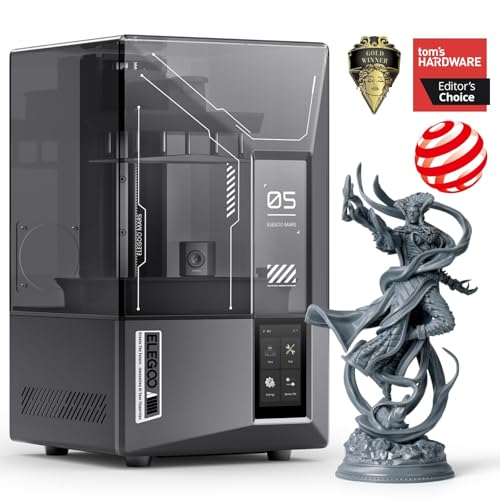
The ELEGOO Mars 5 Ultra makes resin printing accessible for first-time users without sacrificing detail. Its 7-inch 9K monochrome LCD achieves an 18 μm XY resolution that captures fine surface textures on miniatures, jewelry molds, and dental models with sharp edges. The tilt release technology peels each layer from the release film at an angle rather than lifting the entire build plate, reducing peel forces and enabling a fast 150 mm/h print speed without compromising accuracy. The smart mechanical sensor detects resin shortages and leveling failures, alerting the user before a failed print wastes an entire vat of resin.
The self-check and automatic leveling functions eliminate the manual bed-leveling ritual that frustrates many resin beginners. The build plate uses self-zeroing mechanism that registers its position automatically after each print. The built-in AI camera monitors the build plate during printing, detecting empty plates or model warps in real time and sending alerts through the ELEGOO app. Wi-Fi file transfer and cluster printing let a single user manage multiple Mars 5 Ultra machines from one device. The 6.04 x 3.06 x 6.49 inch build volume is adequate for most miniatures and small production runs.
The camera’s usefulness is limited — it sits at an angle that can be blocked by large prints or low-resolution video, and the AI detection results vary depending on lighting conditions and resin color. The lid lacks hinges, so users must set it aside manually during print retrieval, and the resin spout design makes pouring cleanly a bit awkward. Some users report that prints can fail to stick to the build plate after repeated use, though cleaning the plate with isopropyl alcohol usually resolves this. For the price, the Mars 5 Ultra offers the best balance of resolution, speed, and beginner-friendly features in the resin category.
Why it’s great
- 9K resolution captures fine detail in miniatures and models
- Tilt release enables 150 mm/h fast printing
- Smart auto-leveling and self-check for easy setup
- Wi-Fi cluster printing for managing multiple machines
Good to know
- AI camera can be blocked by large prints
- Lid lacks hinges for easy access
- Resin spout design makes pouring messy
9. Entina Tina2 Plus

The Entina Tina2 Plus is a compact, fully assembled FDM printer designed specifically for kids, beginners, and classroom use. It arrives out of the box with a TF card of preloaded models, a spool of white PLA filament, and zero assembly required — open the box, plug it in, and start printing within minutes. The 40-second ceramic hotend heats up fast, and the auto-leveling dual Z-axis system keeps the first layer consistent without any manual adjustment. The PEI spring steel build plate flexes to pop prints off easily, making it safe and simple for young users to retrieve their creations.
Wi-Fi connectivity integrates with the Poloprint Cloud app, which provides access to over 1,500 printable models and supports mobile slicing and remote print control. The compact 11.4 x 8.6 x 8.6 inch footprint fits on a standard student desk, and the partial enclosure separates the hotend and moving components from direct contact for supervised safety. The 250 mm/s print speed is fast enough for a 10-year-old to see results within an hour, keeping their attention span engaged. The printer works with Windows, macOS, Linux, and Chromebook, so it integrates into most school IT environments.
The Poloprint app is the weakest link. Several users report Wi-Fi disconnection errors, registration failures, and limited functionality for uploading custom STL files directly to the app. The app can also be confusing for younger children — one parent noted that the interface was too complex for a 9-year-old to navigate alone. The printer only includes a small sample of white filament, so additional spools are needed for any color variety. For a supervised classroom or a patient parent helping a child, the Tina2 Plus offers a solid out-of-box experience, but the app reliability needs improvement.
Why it’s great
- Fully assembled and prints within minutes of unboxing
- Compact footprint fits school desks and small workspaces
- Partial enclosure adds safety for supervised use
- 250 mm/s speed keeps kids engaged with fast results
Good to know
- Poloprint app has Wi-Fi and registration issues
- App interface is too complex for young children alone
- Only includes sample white filament, no color variety
FAQ
What is the real difference between a 9K and a 14K resin printer?
Do I need a separate enclosure for an open-frame FDM printer?
How much ventilation does a resin 3D printer need at home?
Can I print metal parts with an at home 3D printer?
Final Thoughts: The Verdict
For most users, the best at home 3d printer winner is the Bambu Lab P1S because it combines enclosed CoreXY speed, reliable auto-leveling, and a mature AMS multi-color ecosystem in a package that works right out of the box with no tuning. If you want integrated multi-color printing without buying add-ons, grab the Creality K2 Combo. And for print-in-place engineering materials like carbon-fiber nylon with active chamber heating, nothing beats the QIDI PLUS4.

Mo Maruf
I created WellFizz to bridge the gap between vague wellness advice and actionable solutions. My mission is simple: to decode the research and give you practical tools you can actually use.
Beyond the data, I am a passionate traveler. I believe that stepping away from the screen to explore new environments is essential for mental clarity and physical vitality.