Our readers keep the lights on and my smoothie glass nicely filled. As an Amazon Associate, I earn from qualifying purchases.
Finding a router under constant pressure from multiple devices, walls, and streaming demands without spending a fortune is the central challenge of home networking. A weak signal or intermittent drops can turn a simple task into a daily frustration, and the market is flooded with options that promise speed but deliver inconsistency.
I’m Mohammad Maruf — the founder and writer behind WellFizz. I’ve spent years analyzing router hardware specifications, from beamforming arrays and OFDMA efficiency to actual throughput under load, to separate marketing claims from real-world performance.
This guide distills that research into a focused selection of models that balance cost, coverage, and reliability, helping you find a best cheap router that won’t leave you frustrated by page loads or buffering.
How To Choose The Best Cheap Router
Selecting a budget-friendly router is about prioritizing the specs that impact daily use, not chasing the highest number on the box. A model that supports Wi-Fi 6 and has a tri-core processor will typically handle streaming and gaming better than an older dual-band AC router, even if the latter claims a higher theoretical speed.
Wi-Fi Generation and Throughput
Wi-Fi 6 (802.11ax) offers tangible improvements in network efficiency, especially in homes with many connected devices. Technologies like OFDMA and MU-MIMO allow the router to communicate with multiple gadgets simultaneously, reducing lag and improving responsiveness. Even on a budget, a Wi-Fi 6 router provides better real-world performance than a comparable Wi-Fi 5 (802.11ac) model under the same network load.
Coverage and Beamforming
A router’s ability to cover your living space depends on antenna configuration and beamforming technology, not just advertised square footage. Models with multiple fixed antennas and active beamforming focus the signal toward connected devices rather than broadcasting it evenly in all directions, which helps overcome interference from walls and furniture. For larger homes, a mesh system offers flexibility by allowing you to add additional nodes.
Processing Power and Ports
The processor inside the router manages all traffic, prioritizes data, and handles security protocols. A tri-core or dual-core processor at 1.5 GHz or higher ensures smooth performance across simultaneous activities like video calls, streaming, and gaming. Also check for gigabit Ethernet ports; a budget router with only 10/100 Fast Ethernet ports will bottleneck any internet plan over 100 Mbps.
Quick Comparison
On smaller screens, swipe sideways to see the full table.
| Model | Category | Best For | Key Spec | Amazon |
|---|---|---|---|---|
| TP-Link Archer AX10 | Mid-Range | Budget Wi-Fi 6 upgrade | 1500 Mbps, Tri-core 1.5 GHz | Amazon |
| TP-Link Archer AX20 | Mid-Range | Stability and coverage | 1800 Mbps, QoS settings | Amazon |
| Tenda RX12Pro | Mid-Range | High speed on a budget | AX3000, 6dBi antennas | Amazon |
| Google Wifi (1-pack) | Mid-Range | Entry-level mesh setup | AC1200, 1500 sq ft coverage | Amazon |
| Netgear RAX50 | Premium | Gaming and heavy usage | AX5400, 2500 sq ft, USB 3.0 | Amazon |
| Netgear RAX36 | Premium | Large home coverage | AX3000, 2000 sq ft | Amazon |
| Amazon eero 6+ | Premium | Simple mesh for gigabit | Wi-Fi 6, 1 Gbps, 160 MHz | Amazon |
In‑Depth Reviews
1. TP-Link Archer AX10

The TP-Link Archer AX10 brings Wi-Fi 6 to a price point that makes upgrading from an old AC router a no-brainer. Its tri-core 1.5 GHz processor handles the OFDMA and MU-MIMO traffic shaping that keeps multiple devices running smoothly without the buffer wheel appearing during peak hours. The dual-band design delivers up to 1201 Mbps on the 5 GHz band, which is plenty for 4K streaming and online gaming on a gigabit fiber connection.
Where this router shines is in the practical details: beamforming focuses the signal toward your devices instead of wasting energy broadcasting into empty space, and the Tether app makes initial setup a five-minute task. Refurbished units, as tested here, often arrive looking like new and perform identically to retail versions once a factory reset and firmware update are applied. Users report wireless speeds jumping from 50-150 Mbps to 500-800 Mbps when replacing an older router on the same gigabit plan.
One consistent note from buyers is to use the IP address directly rather than the tplinkwifi.net URL for first-time configuration, and to perform a factory reset before connecting. The three external antennas provide solid coverage for a medium-sized home, though large multi-story houses may still benefit from a mesh system. The Archer AX10 is a legitimate entry point into Wi-Fi 6 that costs less than many older AC routers.
Why it’s great
- Wi-Fi 6 with OFDMA for efficient multi-device handling
- Tri-core processor prevents lag under heavy loads
- Beamforming focuses signal for better range
Good to know
- Best performance after a factory reset and firmware update
- Initial setup may require IP address instead of web URL
2. TP-Link Archer AX20

The Archer AX20 steps up to AX1800 speeds and delivers a rock-solid connection that users describe as fire-and-forget reliable. Its Wi-Fi 6 foundation reduces network congestion compared to previous-generation routers, and the built-in QoS settings are a standout feature for anyone who has ever experienced lag during a video call. Prioritizing traffic for services like Microsoft Teams or Zoom makes a tangible difference when someone else in the house is streaming or downloading a large file.
Setup is straightforward through the TP-Link Tether app, and the four gigabit Ethernet ports ensure that wired connections to game consoles or desktop PCs hit full speed without bottlenecking. Refurbished units in this lineup have been praised for looking like new and performing identically to brand-new stock. Once configured, the AX20 maintains stable connections across 20-plus devices without needing periodic reboots, a common issue with older routers at this price point.
One detail that matters for tinkerers: while some online claims suggest OpenWRT support, that is incorrect for this model—the AX20 uses TP-Link’s own firmware. That said, the web-based configuration interface is robust and does not require a forced login, giving you full control over network settings. For anyone seeking a straightforward, stable Wi-Fi 6 router with excellent per-device prioritization, the AX20 is a compelling choice.
Why it’s great
- Effective QoS settings for prioritizing video calls and streaming
- Four gigabit Ethernet ports for wired connections
- Stable performance with no routine reboots needed
Good to know
- Does not support OpenWRT firmware
- No printed instructions included in refurbished packaging
3. Tenda RX12Pro
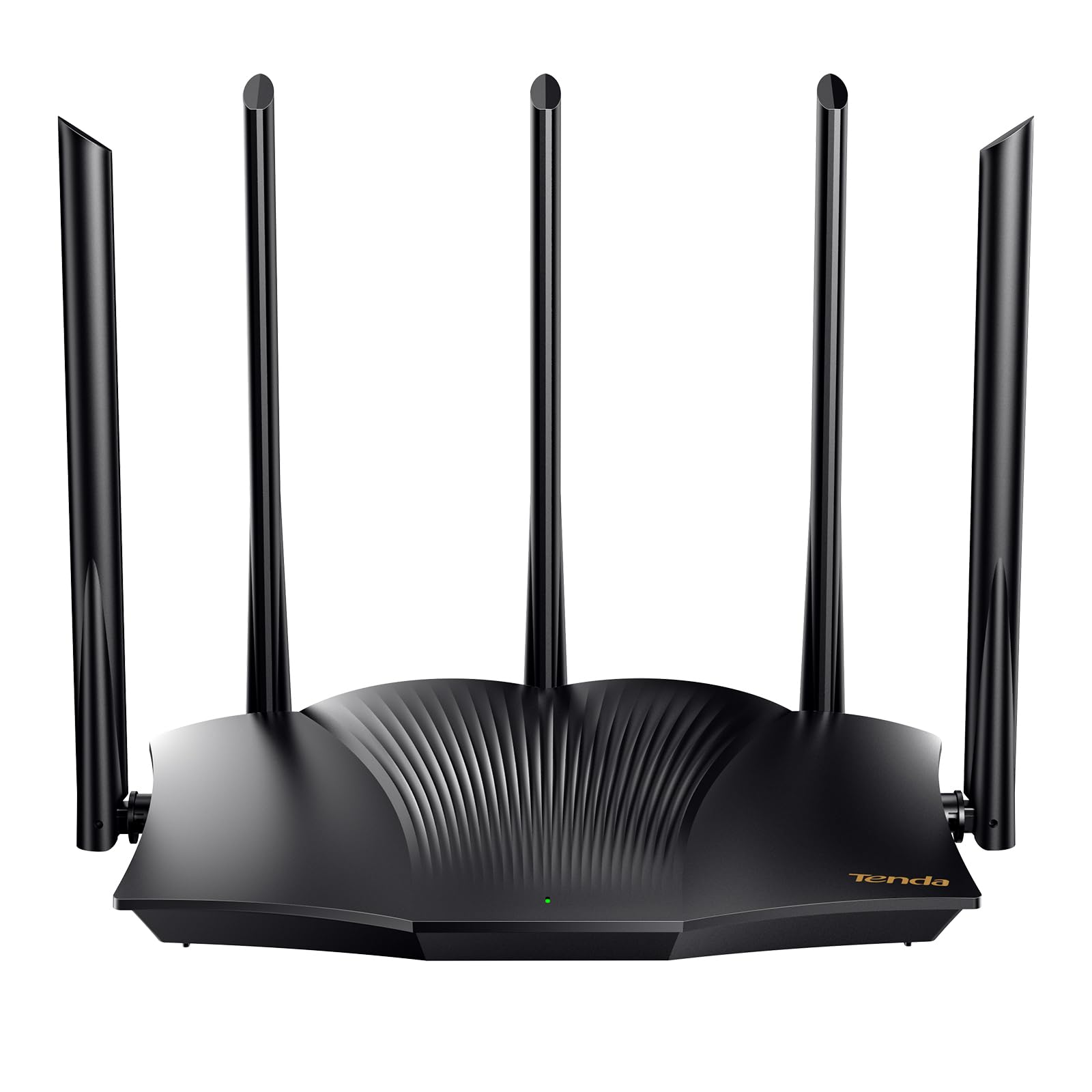
The Tenda RX12Pro packs AX3000 speeds into a chassis that rivals routers costing significantly more. With up to 2402 Mbps on the 5 GHz band and 574 Mbps on 2.4 GHz, it delivers the raw throughput needed for 4K streaming and large downloads without waiting. Five external 6dBi high-gain antennas and signal enhancement modules combine to push coverage throughout a medium-to-large home, and the Wi-Fi+ feature allows multiple units to mesh together without complex configuration.
Where this router differentiates itself is in its VPN capabilities—it supports OpenVPN, WireGuard (via firmware update), and PPTP/L2TP out of the box, giving users a secure tunnel back to their home network without needing a separate VPN router. The one-click intelligent diagnosis tool on the web interface can identify and fix common network interruptions, which is helpful for less technical users. Multiple working modes (router, AP, repeater) add flexibility for expanding coverage.
Customer experiences are mixed on range, with some users reporting excellent coverage across a long ranch house and others noting weak signal strength in certain layouts. The key takeaway is that the RX12Pro performs best as an access point or in open floor plans; dense walls may require repositioning. A notable tip from buyers: after connecting the router, restart your modem to ensure proper internet handshake. The Tenda offers exceptional speed per dollar for those who prioritize throughput over brand recognition.
Why it’s great
- AX3000 speeds for under
- Full VPN support including WireGuard
- Multiple operating modes for flexible deployment
Good to know
- Range can be inconsistent in homes with many walls
- Requires modem restart after initial connection
4. Google Wifi (1-pack)

Google Wifi takes a fundamentally different approach: instead of one powerful broadcaster, it uses a mesh system where multiple points work together to blanket your home in consistent coverage. A single puck covers up to 1500 square feet, and each additional point seamlessly expands the network without requiring manual configuration. This makes it an ideal entry-level mesh solution for apartments or smaller homes where a single traditional router leaves dead zones in certain rooms.
Setup through the Google Home app takes about 15 minutes, and the system intelligently routes traffic to avoid drop-offs as you move through the space. Parental controls let you pause Wi-Fi to specific devices, restrict content, and set screen time limits—all managed from your phone. The automatic updates keep the network secure without any user intervention, and the system can be expanded later by adding more Google Wifi or Nest Wifi points if you move to a larger home.
One practical consideration: the Google Wifi uses internal antennas rather than external ones, which keeps the design clean but means range per node is limited compared to a traditional router with high-gain antennas. In a 2800 square foot house with 16-inch adobe walls, users found that a single puck matched the range of an older Apple router, but adding two more access points at 30-40 feet apart was necessary for full coverage. For a small space or as a starter for eventual expansion, the Google Wifi delivers on ease and reliability.
Why it’s great
- Simple mesh setup with expandability
- Parental controls and guest network built into the app
- Automatic firmware updates for security
Good to know
- Single puck range limited in homes with thick walls
- Connecting 2.4 GHz-only devices may require moving away from the node
5. Netgear RAX50 Nighthawk

The Netgear RAX50 is a six-stream AX5400 router designed for homes that demand high throughput across many devices simultaneously. It covers up to 2500 square feet and handles up to 25 devices, making it suitable for gaming setups, multiple 4K streams, and heavy web conferencing workloads. The four external antennas and beamforming technology work together to maintain signal strength even when devices are spread across different floors.
A key differentiator is the USB 3.0 port, which allows you to connect a storage drive and access files from anywhere on the network or remotely—essentially creating a personal cloud without a separate NAS device. The Nighthawk app manages the router and includes features like traffic prioritization for gaming, though the setup process now requires the app rather than offering a browser-based alternative. The refurbished units in this tier have been reported as like-new with all accessories included.
A few buyers have noted compatibility issues when using the RAX50 with certain ISP modems, and the forced app-based setup is a point of frustration for those who prefer web configuration. Netgear’s Armor security subscription is aggressively marketed and adds an additional ongoing cost if you want advanced threat protection. For those who value raw performance and USB storage capability, the RAX50 delivers genuine premium-tier speed at a fraction of the original retail price when purchased refurbished.
Why it’s great
- AX5400 speeds for heavy multi-device households
- USB 3.0 port for network-attached storage
- Covers up to 2500 square feet
Good to know
- Setup requires phone app, no browser option available
- Netgear Armor security is a paid subscription
6. Netgear RAX36 Nighthawk

The Netgear RAX36 is a four-stream AX3000 router that provides up to 3 Gbps wireless speed and covers 2000 square feet, making it a strong candidate for larger homes with multiple devices. Users in a 2500 square foot home with corner router placement report seamless coverage extending into the backyard, with four TVs, five phones, multiple computers, and smart devices all connected simultaneously without slowdowns. The four gigabit Ethernet ports provide fast wired connections for game consoles and desktop PCs.
Setup is manageable through the Nighthawk app, though some users opt for manual configuration via a web browser to bypass occasional app bugs. The router includes built-in VPN support and a USB 3.0 port for network storage. Customer reviews consistently mention strong speed performance, with one buyer achieving 550-600 Mbps down and 450-490 Mbps up on an ISP-limited connection, and another reporting that the router covers a 3400 square foot space.
A notable drawback is that a small number of units have required a firmware update and factory reset to stabilize after exactly 30 days of use. This highlights the importance of updating firmware immediately after setup. The RAX36 does not include a built-in modem, so you will need a separate cable modem with a coax input. For those who need reliable coverage across a large home and can tolerate a slightly involved initial setup, the RAX36 offers excellent bang for the buck.
Why it’s great
- Strong coverage across 2000-3400 square feet
- Built-in VPN and USB 3.0 port
- Handles 25+ devices without slowdown
Good to know
- Some units require firmware update and reset after 30 days
- No built-in modem; requires separate cable modem
7. Amazon eero 6+ (1-pack)

The Amazon eero 6+ is a mesh router that supports internet plans up to a gigabit and covers up to 1500 square feet per node, with the ability to connect 75+ devices. It uses Wi-Fi 6 on the 160 MHz radio channel to deliver faster connectivity than standard Wi-Fi 6 routers, and the patented TrueMesh technology intelligently routes traffic to reduce drop-offs and dead spots. Setup takes about 15 minutes through the eero app, and the system receives automatic updates to maintain security.
A standout feature is the built-in smart home hub that supports Thread and Zigbee devices, eliminating the need for separate hubs for compatible lights, locks, and sensors. The eero 6+ also includes SQM (Smart Queue Management) which limits large downloads to prevent bandwidth starvation for real-time applications like video calls—a feature that remote workers will appreciate. Users report that a two-pack of eero 6+ nodes provides coverage equivalent to three older Airport routers, with consistently strong speeds throughout the home.
One known limitation is incompatibility with MyQ garage door openers and some other 2.4 GHz-only smart home devices, as the eero creates a single dual-band network without a dedicated 2.4 GHz SSID. Temporary workarounds exist but can be frustrating for smart home enthusiasts. Additionally, initial setup requires cellular reception for registration, which may be an issue in areas with poor cell signal. For those who value simplicity, mesh scalability, and a built-in smart home hub, the eero 6+ is a versatile and future-proof choice.
Why it’s great
- Simple mesh setup with 15-minute installation
- Built-in Zigbee and Thread smart home hub
- SQM prevents bandwidth hogging during video calls
Good to know
- Incompatible with some 2.4 GHz-only devices like MyQ
- Setup requires cellular reception for registration
FAQ
Is a Wi-Fi 6 router worth it if I don’t have gigabit internet?
Will a refurbished router perform as well as a new one?
How many devices can a cheap router handle before slowing down?
Final Thoughts: The Verdict
For most users, the best cheap router winner is the TP-Link Archer AX10 because it delivers genuine Wi-Fi 6 performance, a tri-core processor, and beamforming at a price that undercuts older AC routers. If you want mesh simplicity with a built-in smart home hub, grab the Amazon eero 6+. And for raw AX3000 speed and VPN support on a budget, nothing beats the Tenda RX12Pro.

Mo Maruf
I created WellFizz to bridge the gap between vague wellness advice and actionable solutions. My mission is simple: to decode the research and give you practical tools you can actually use.
Beyond the data, I am a passionate traveler. I believe that stepping away from the screen to explore new environments is essential for mental clarity and physical vitality.