Our readers keep the lights on and my smoothie glass nicely filled. As an Amazon Associate, I earn from qualifying purchases.
The problem with most dedicated film scanners is that the ones cheap enough to buy on impulse produce scans that look like they were taken with a webcam from 2002, while the units capable of true archival quality cost as much as a used compact car. Between those extremes lies the actual buying decision for anyone facing a shoebox of Kodachrome slides or a stack of 35mm negatives, where the goal is extracting real detail—not just a digital copy but a file that justifies the effort of digitizing hundreds of frames.
I’m Mohammad Maruf — the founder and writer behind WellFizz. I analyze the optical sensor technology, dynamic range, and software ecosystems that separate a usable film scanner from a frustrating one, and I have zero tolerance for marketing numbers that don’t survive a 100-percent crop.
If you’re looking for a dedicated machine that converts 35mm film and slides to digital JPEGs without tying up a flatbed for hours, understanding the distinctions between CCD versus CMOS sensors, interpolated versus true optical resolution, and the real-world effectiveness of infrared dust removal will determine whether you end up with a keeper or a regret. After combing through hundreds of user reports and comparing the technical specs that actually govern image quality, this guide to the best 35mm film and slide scanner narrows the field to nine models that each serve a different priority—speed, resolution, workflow, or investment value.
How To Choose The Best 35mm Film And Slide Scanner
Selecting a dedicated film scanner is a decision driven by your intended output size, your tolerance for manual cleanup, and whether you value scanning speed over absolute fidelity. Every model in this category makes a trade-off between those three factors, and knowing which trade-off aligns with your reality is the difference between a purchase you use for years and one that collects dust after one weekend.
Optical Sensor Type: CCD vs. CMOS
The sensor is the heart of the scanner. CCD sensors, found in the Plustek 8200i SE, deliver superior dynamic range and color depth because they capture light with higher signal-to-noise ratio. CMOS sensors, which power most standalone budget and mid-range units, are cheaper to manufacture and allow for smaller enclosures but often produce flatter contrast and noisier shadows, especially on underexposed slides. If you plan to print larger than 8×10 or work with challenging exposure, a CCD-based scanner is non-negotiable.
True Optical Resolution vs. Interpolated Megapixels
A scanner that advertises “22MP” or “25MP” is almost certainly reporting interpolated resolution—software upscaling of a much lower native capture. Optical resolution is measured in true dots per inch. The Plustek’s 7200 dpi is genuine optical resolution that resolves individual film grain. Most dedicated film scanners in the – range have a native resolution around 1800 to 3200 dpi, which is adequate for 4×6 prints and social media but will not extract every grain detail from fine-grain stock. Always look for the optical resolution spec and treat interpolated numbers as marketing noise.
Infrared Dust and Scratch Removal
Infrared-based cleaning, branded as iSRD by SilverFast, works by detecting physical defects on the film surface—dust, scratches, hair—that block or scatter infrared light differently than the dye layers of color film. It is highly effective on color negatives and slides but must be disabled for black-and-white film because the silver grains in B&W emulsion also block infrared, causing the software to interpret actual image detail as a defect and erase it. If your archive includes a mix of color and monochrome film, look for a scanner that lets you toggle this feature easily.
Standalone Operation vs. Computer-Dependent Workflow
Standalone scanners with a built-in LCD screen and SD card slot let you digitize without a computer, which is convenient for non-technical users and high-volume batch work in a living room setting. However, the on-board processing in these units is typically limited—color correction, brightness, and crop adjustments are basic. Computer-dependent scanners, specifically the Plustek, rely on software like SilverFast or VueScan to manage color profiles, multi-exposure, and dust removal at a professional level. The standalone approach prioritizes speed and simplicity; the software-bound approach prioritizes output quality and fine control.
Quick Comparison
On smaller screens, swipe sideways to see the full table.
| Model | Category | Best For | Key Spec | Amazon |
|---|---|---|---|---|
| Plustek OpticFilm 8200i SE | Premium CCD | Archival-quality scans with dust removal | 7200 dpi optical resolution | Amazon |
| HP Touch Screen Film & Slide Scanner – 7in | Premium Standalone | Large preview and HDMI output to TV | 7-inch LCD touch display | Amazon |
| HP Touch Screen Film & Slide Scanner – 5in | Mid-Range Standalone | Compact 5-inch touchscreen workflow | 13MP CMOS sensor | Amazon |
| KODAK Slide N SCAN | Mid-Range Standalone | Continuous fast-load tray for 135/126/110 | 22MP interpolated output | Amazon |
| ClearClick Virtuoso 2.0 | Mid-Range Standalone | Second-gen reliability with 5-inch screen | 3200 dpi interpolated resolution | Amazon |
| Kodak SCANZA | Mid-Range Standalone | Super 8/8mm film support via adapters | 7200 dpi interpolated resolution | Amazon |
| Magnasonic FS70 | Entry Standalone | Wide format support at a budget price | 25MP interpolated, CCD sensor | Amazon |
| KEDOK 4-in-1 | Entry Standalone | Includes name card and document scanning | 22MP interpolated, 4800 dpi | Amazon |
| ION Pics 2 SD | Budget Standalone | Simple SD-based operation for large batches | 2500 dpi optical resolution | Amazon |
In‑Depth Reviews
1. Plustek OpticFilm 8200i SE

The Plustek 8200i SE is the only scanner in this roundup that delivers true 7200 dpi optical resolution from a CCD sensor, paired with a 48-bit color depth that captures shadow detail most dedicated film scanners clip entirely. The built-in infrared channel—activated through SilverFast SE Plus—detects and removes dust and scratches on color negatives and slides without softening image detail, a feature that alone saves hours of manual retouching per roll. The dynamic range hits 3.6 Dmax, which is the highest figure among these nine models and directly translates to scans that retain highlight and shadow information from contrasty slide film like Velvia.
Workflow is computer-dependent, meaning you must install SilverFast or an alternative like VueScan on a Windows or Mac machine. The bundled SilverFast SE Plus is powerful but has a steep learning curve—its multi-exposure feature can pull detail from dense Kodachrome frames that other scanners render as solid black. Scan speed is deliberate rather than fast: a single frame at 3600 dpi with dust removal takes roughly 30 seconds, while a 7200 dpi scan with dual-pass multi-exposure can extend past 6 minutes per frame. This is a commitment scanner, not a batch-speed marvel.
The film carrier is a rigid plastic insert with click-stops, and some users report that repeated use can cause the tabs to crack. Customer reports indicate that the included carrying bag and compact footprint make it easy to store, but the USB 2.0 connection—not USB-C—requires an adapter for modern laptops. For anyone serious about extracting every grain of detail from 35mm film, the 8200i SE is the benchmark that other models are compared against.
Why it’s great
- True 7200 dpi optical CCD sensor resolves individual film grain
- Infrared dust/scratch removal drastically reduces post-processing time on color film
- 3.6 Dmax dynamic range captures highlight and shadow detail other scanners miss
Good to know
- Slow per-frame scan speed at maximum resolution
- Proprietary software (SilverFast) requires a learning investment
- USB 2.0 interface—not USB-C—needs an adapter for modern laptops
2. HP Touch Screen Film & Slide Scanner – 7in
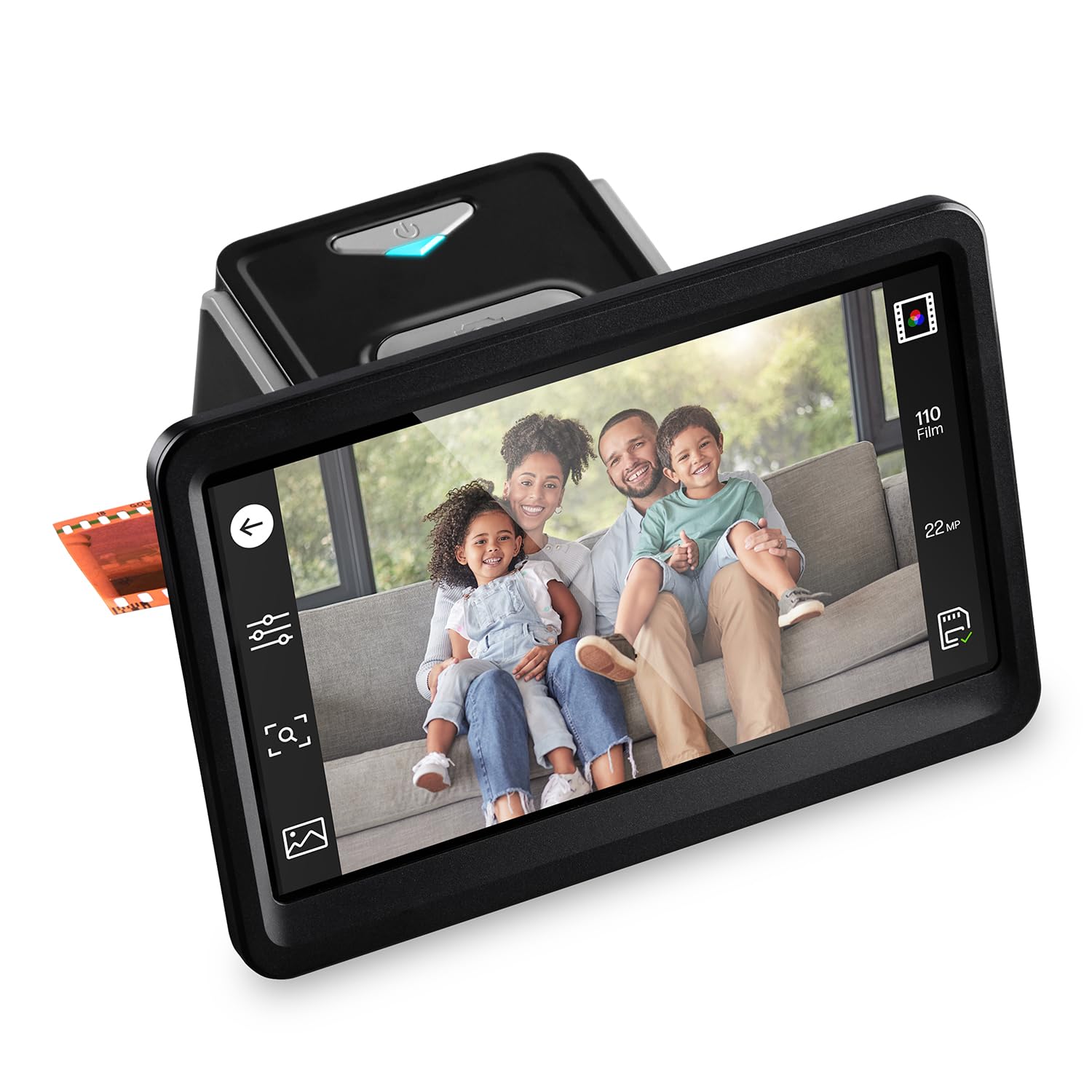
The 7-inch color LCD touch display on this HP model is the largest screen in this category, providing a preview area that makes it genuinely usable as a digital picture frame when not actively scanning. The tilting mechanism lets you adjust the viewing angle, which is useful when you have multiple family members gathered around to identify old negatives. The quick-feed loading tray accepts 135, 126, and 110 formats plus 50mm slides, and the unit operates completely without a computer—powered via USB-C, with scans saved directly to an SD card.
Image quality is driven by a 13-megapixel color CMOS sensor with 22MP interpolated output. On-screen editing tools let you adjust brightness, color, and crop before saving, though the crop function is reported to be less precise than doing the same adjustment in post-processing software. The included HDMI output allows you to display scanned images on a television in real-time, which is a crowd-pleaser during family archiving sessions. The 22MP interpolation from a 13MP native sensor means the output files are large enough for 8×10 prints, but pixel-level sharpness does not match a dedicated CCD scanner.
The plastic film adapters feel somewhat fragile, but no widespread jamming issues have been reported. Customer feedback consistently emphasizes the ease of unboxing and setup—multiple users note that the hardest part was unwrapping the packaging. The 1-year limited warranty from HP provides a safety net, though some users feel the price is high for a CMOS-based standalone unit. If your priority is an intuitive touchscreen interface with large preview and HDMI sharing, this HP delivers that specific combination better than anything else in this list.
Why it’s great
- 7-inch tilting touchscreen is the largest preview display available
- HDMI output enables real-time slideshow sharing on a TV
- Computer-free operation with USB-C power simplifies setup
Good to know
- 22MP output is interpolated, not true optical resolution
- Plastic film adapters feel less durable than metal alternatives
- On-screen crop tool is imprecise compared to post-processing
3. HP Touch Screen Film & Slide Scanner – 5in

The 5-inch version of HP’s touchscreen scanner shares the same 13MP CMOS sensor and 22MP interpolated output as its larger sibling but in a more compact chassis that weighs only 13.4 ounces. The all-angle touch display allows you to tilt and rotate the screen for comfortable previewing, and the gallery mode transforms the unit into a small digital picture frame when not in active scanning use. It supports the same 135, 126, and 110 negative formats plus 50mm slides, all loaded through a quick-feed tray system.
Color accuracy out of the box is respectable, with default settings producing images suitable for sharing without heavy editing. Some users report that red saturation runs slightly high, but this can be corrected either through the scanner’s onboard brightness and color controls or in a few seconds of post-processing. The unit is powered via USB-C, which is a welcome modern standard, and saves directly to an SD card. One experienced user noted that they reliably digitized over 2,000 slides across two months without hardware failure, which speaks to the build reliability for high-volume home use.
The dust accumulation on slides is a recurring observation—since the scanner does not feature infrared cleaning, any dust on your film will appear in the final JPEG. The included cleaning brush helps, but for heavily soiled slides, you will want to use compressed air or a microfiber cloth before scanning. The 1-year warranty provides limited coverage, but the user reviews overwhelmingly report satisfaction with the ease of use and the quality-to-effort ratio. If you want a compact standalone scanner with a responsive touch interface and don’t mind atmospheric dust in scans, this HP is a logical mid-range pick.
Why it’s great
- Compact and lightweight design at just over 13 ounces
- USB-C power simplifies cable management with modern devices
- Touchscreen gallery mode doubles as a small digital picture frame
Good to know
- No infrared dust removal—surface debris appears in final scans
- Red saturation can be high out of the box
- SD card required for operation, not included
4. KODAK Slide N SCAN

The KODAK Slide N SCAN is one of the most popular standalone film scanners on the market, and for good reason: the continuous-load tray system lets you feed slides or negative strips in rapid succession without opening and closing a door each time. The 5-inch LCD screen provides a bright, wide-angle preview with a gallery mode that turns the unit into a digital picture frame between scanning sessions. It supports 135, 126, and 110 negatives and slides, with adapters included for each format.
Image quality is typical for the CMOS-based standalone category: 22MP interpolated output from a lower native sensor. Users consistently describe the results as perfect for 8×10 prints and family sharing but note that grain structure appears blocky when viewed at 100 percent on a monitor. The onboard editing options are basic—brightness and color adjustment, plus date/time stamping—but there is no fine control over contrast curves or sharpening. The USB-C power input is a modern convenience, and the unit is compact enough to fit in a small drawer when not in use.
A known software quirk: the screen may freeze after transferring scanned images to a computer, requiring a power cycle to resume scanning. This is an inconvenience in a high-volume session but not a dealbreaker for most users. The unit requires a low-volume SD or SDHC card up to 32GB (SDXC cards are not supported). Multiple reviewers note that this scanner makes an excellent gift for older family members who want to digitize archives without learning new software. For its combination of speed, format support, and straightforward operation, the Slide N SCAN remains a top contender in the mid-range standalone tier.
Why it’s great
- Continuous-load tray enables rapid consecutive slide scanning
- 5-inch screen with gallery mode doubles as a picture frame
- USB-C powered and works without any computer connection
Good to know
- Screen may freeze after transferring files to a computer
- Requires low-volume SDHC card, not SDXC
- Interpolated 22MP output shows blocky grain at 100 percent view
5. ClearClick Virtuoso 2.0

The second-generation ClearClick Virtuoso improves on the original with a larger 5-inch preview screen and refined firmware that reduces the software hiccups reported in the first version. It scans 35mm negatives and slides plus 110 and 126 formats, converting them to 22MP interpolated JPEGs that are stored on an SD card (not included). The standalone operation means you never need a computer, though the Mini HDMI output lets you preview scans on a TV when connected with the appropriate cable.
Scanning speed is a strength here: users consistently report processing a full 36-exposure roll of slides in under ten minutes. The brightness and RGB color controls are responsive, though the saturation is noticeably high by default—some users dial it back immediately. The plastic buttons do feel slightly cheap, but in over 500 scans, the unit has not shown any electronic failure in customer reports. The absence of internal memory means you must always have an SD card inserted, and the unit will not function without one.
The 2-year warranty from ClearClick, extendable to 3 years with registration, provides above-average peace of mind for this price tier. A minor but repeatedly noted detail: the auto-exposure tends to over-brighten already well-exposed slides, so manual brightness adjustment is recommended for optimal results. The Virtuoso 2.0 is not for pixel peepers, but for anyone wanting a fast, reliable standalone scanner with a generous preview screen and minimal learning curve, it delivers excellent value for the investment.
Why it’s great
- Fast scan speed—up to a roll of 36 slides in under 10 minutes
- Mini HDMI output enables TV preview for group viewing
- 2-year warranty extendable to 3 years, better than most competitors
Good to know
- Default saturation is high and often needs adjustment
- Auto-exposure tends to over-brighten well-exposed slides
- SD card not included and the unit cannot operate without one
6. Kodak SCANZA

The Kodak SCANZA distinguishes itself from the Slide N SCAN by using a CCD optical sensor—a detail that those paying attention will recognize as important for color fidelity—and by including adapters for Super 8 and 8mm film in addition to the standard 35mm, 126, and 110 formats. The 3.5-inch TFT LCD is noticeably smaller than the 5-inch panels on competing models, but the tilt mechanism helps compensate by letting you angle the display to reduce glare. The bundled HDMI cable, USB power cable, and cleaning brush make it one of the better-equipped packages in terms of accessories.
Image quality from the CCD sensor is a step above the CMOS-based alternatives in this price range, with more natural color reproduction and better shadow retention. The interpolated resolution (14MP native, 22MP upscaled) is sufficient for 4×6 and 8×10 prints but falls apart at higher magnification. Users scanning black-and-white film will appreciate that the CCD sensor produces less noise in mid-tone regions compared to CMOS units. The infrared dust removal found in the Plustek is absent here, so slide preparation is critical.
Customer feedback reveals a specific quality-control concern: shipping packaging from some sellers is inadequate, with reports of units arriving with impact damage. The 7200 dpi figure listed in the specs is interpolated, not optical, so do not expect Plustek-level detail. The unit is Mac and PC compatible via USB, and the included HDMI and composite video cables provide flexible output options. For anyone archiving Super 8 or 8mm film who wants a dedicated CCD-based scanner without jumping to the professional price bracket, the SCANZA is one of the few options that fills that niche.
Why it’s great
- CCD sensor produces better color accuracy than CMOS competitors
- Supports Super 8 and 8mm film, rare in this price category
- Includes HDMI and composite video cables for flexible output
Good to know
- 3.5-inch screen is small for comfortable previewing
- No infrared dust removal requires pre-cleaning slides
- Reported packaging quality issues from certain sellers
7. Magnasonic All-in-One FS70

The Magnasonic FS70 is a CCD-based standalone scanner that supports 35mm, 110, 126, Super 8, and 8mm film formats, giving it one of the widest format compatibility lists in its price tier. The 5-inch TFT LCD display is bright and clear, and the unit includes fast-loading inserts for each format that eliminate the friction of swapping adapters mid-session. The headline 25MP interpolated resolution is the highest number in this bracket, but it is software-upscaled from a native CCD sensor resolution that produces files suitable for 8×10 prints.
Scan speed is a highlight: users report processing roughly 100 slides in an hour, which translates to about 36 seconds per frame including loading time. The on-board brightness and RGB color controls are functional, though the software interface for selecting resolution (13MP or 25MP) and film type is straightforward. The internal 64MB memory is too small for any significant scanning session—you will need an SD card up to 128GB, which is not included. One curious note: multiple users report that the 13MP and 25MP resolution settings produce nearly identical output files in terms of perceived detail, suggesting the higher resolution setting uses heavy compression that negates the pixel count advantage.
The 1-year full manufacturer’s direct warranty is a solid inclusion, and the unit is backed by a brand with established customer service. Some users report the image quality as acceptable for social media and small prints but not for critical viewing. The CCD sensor does give the FS70 an edge in color separation over CMOS alternatives in the same price tier, but the heavy JPEG compression is a limiting factor. For the user who needs the broadest format support at a budget-friendly price point and understands that 25MP is a marketing number, the FS70 covers more ground than most competitors.
Why it’s great
- CCD sensor offers better color separation than similarly priced CMOS units
- Fast-loading inserts for 35mm, 110, 126, Super 8, and 8mm formats
- 5-inch LCD display provides a clear preview during scanning
Good to know
- 13MP and 25MP settings produce nearly indistinguishable results
- Internal 64MB memory is insufficient for practical use without an SD card
- JPEG compression is heavy, limiting fine detail retention
8. KEDOK 4-in-1 Film & Slide Scanner

The KEDOK distinguishes itself by adding business card and photo scanning to the standard film and slide capabilities, making it a true 4-in-1 device. The 5-inch LCD screen provides a wide viewing angle for previewing, and the 22MP interpolated output is standard for this tier. The inclusion of an 8GB SD card in the box is a thoughtful touch that eliminates one of the common frustrations with standalone scanners—the need to buy a card separately before you can start scanning.
Build quality is the main area of concern here. User reports mention that the scanner glass scratches easily, which directly impacts image quality on subsequent scans. One unit failed to power on entirely due to a loose Micro USB-C connection. The plastic housing feels light at 2.2 kilograms (including packaging), and the overall impression is that KEDOK prioritized feature count over material durability. Customer support responsiveness is inconsistent, with some users receiving replacement units and others reporting no response to inquiries.
When the unit works, it works reasonably well. The scanning software offers simple options for film type, color/brightness adjustment, and resolution selection. The 3-year warranty is the longest in this comparison, but the value of that warranty depends entirely on the manufacturer’s ability to honor it. The KEDOK is a legitimate option for someone who needs to scan slides, negatives, documents, and photos with a single machine and can accept some risk on long-term reliability. The included cleaning cloth, brush, and multiple film holders make the unboxing experience feel complete.
Why it’s great
- 4-in-1 functionality covers film, slides, photos, and business cards
- 8GB SD card included, so no immediate additional purchase needed
- 3-year warranty is the longest in this roundup on paper
Good to know
- Scanner glass scratches easily, affecting future scan quality
- Build quality is inconsistent, with some units failing to power on
- Customer support response times are variable
9. ION Pics 2 SD

The ION Pics 2 SD is the oldest design in this lineup, having been on the market for years, and its longevity speaks to a simple value proposition: it works, it includes an SD card, and it requires no computer setup. The 2500 dpi optical resolution is low by modern standards—you will not use these files for prints larger than 5×7—but the 5.1MP scans are adequate for social media sharing and small photo books. The unit handles 35mm negatives, 35mm slides, and photos up to 5×7 inches.
The interface is as basic as it gets: insert a slide or negative strip, adjust brightness and RGB hue if needed, and press the scan button to save to the included 2GB SD card. One user digitized 800 slides with this unit, describing the process as time-consuming but effective. A known quirk: the bright lamp bleeds through the edges of photo holders, so users recommend placing a piece of thick cardstock behind photos to prevent light leakage from washing out the image. The unit runs on AA batteries or the included AC adapter, which is a rare flexibility.
Reliability is a split issue: some users report the unit locking up after a handful of scans and becoming completely unusable, while others have scanned hundreds of slides without incident. ION’s technical support has been described as unhelpful in resolving these failures. The 5.1MP sensor produces files averaging around 1.5MB even at the highest quality setting, indicating heavy compression that limits post-processing flexibility. For someone with a small collection and zero tolerance for software complexity who accepts that the output quality is firmly in the “good enough” category, the Pics 2 SD is a functional entry point.
Why it’s great
- Extremely simple operation with no computer or software needed
- Includes 2GB SD card and AC adapter in the box
- Can run on AA batteries for true portable use
Good to know
- Low 2500 dpi optical resolution with heavy JPEG compression
- Reliability is inconsistent, with some units failing early
- Customer support reviews are poor when issues arise
FAQ
Can I scan 35mm film and then print an 11×14 photo from it?
How does the infrared dust removal work and should I always enable it?
Final Thoughts: The Verdict
For most users, the best 35mm film and slide scanner winner is the Plustek OpticFilm 8200i SE because it is the only model in this roundup that combines a true CCD sensor, 7200 dpi optical resolution, and infrared dust removal, making it capable of genuine archival-quality output. If you want a computer-free workflow with a large preview screen and HDMI sharing for family gatherings, grab the 7-inch HP Touch Screen Scanner. And for the best balance of speed, format support, and price specifically for slides without requiring archival-grade resolution, nothing beats the KODAK Slide N SCAN.

Mo Maruf
I created WellFizz to bridge the gap between vague wellness advice and actionable solutions. My mission is simple: to decode the research and give you practical tools you can actually use.
Beyond the data, I am a passionate traveler. I believe that stepping away from the screen to explore new environments is essential for mental clarity and physical vitality.