Our readers keep the lights on and my smoothie glass nicely filled. As an Amazon Associate, I earn from qualifying purchases.
The difference between a kill shot and a killed connection is measured in milliseconds. When your cable modem introduces bufferbloat or fails to handle peak-time traffic, your game doesn’t stutter—it loses. A standard ISP-issued gateway is designed for general household browsing, not the sustained, low-latency throughput that modern multiplayer titles demand. Selecting the right hardware removes a primary bottleneck between your rig and the server.
I’m Mohammad Maruf — the founder and writer behind WellFizz. I spend my time analyzing hardware specifications, comparing chipset reliability, and tracking DOCSIS standards to identify which modems deliver the consistent signal integrity that competitive gaming requires.
This guide breaks down the critical specs, from OFDM channel counts to 2.5 Gbps Ethernet ports, that separate a true gaming modem from a noisy compromise. Whether you are on Xfinity or Spectrum, this guide will help you find the best cable modem for gaming.
How To Choose The Best Cable Modem For Gaming
A cable modem converts your ISP’s coax signal into an Ethernet handshake. For gaming, the quality of that conversion determines your latency floor and jitter stability. Ignoring the DOCSIS generation, Ethernet port speed, and chipset reputation will leave you with a modem that works for Netflix but fails in a ranked match.
Prioritize DOCSIS 3.1 Over 3.0
DOCSIS 3.1 introduces OFDM (Orthogonal Frequency Division Multiplexing) channels, which reduce latency by handling data in smaller, more efficient blocks. A 3.0 modem might max out at 32 downstream channels, but a 3.1 modem uses fewer, wider channels that resist interference and lower your ping during peak usage. Every gaming setup should start with a DOCSIS 3.1 foundation.
Ethernet Port Speeds and The 2.5 Gbps Advantage
Most standard modems ship with a single 1 Gbps Ethernet port. That is a bottleneck if your ISP plan exceeds 1 Gbps, but it also matters for latency. A 2.5 Gbps port on the modem ensures that even during traffic bursts—common in online gaming—your connection does not saturate the port, which introduces queuing delay. The higher-capacity port provides a cleaner pipe for your gaming traffic.
Modem Only vs. Modem-Router Combo
A modem-router combo simplifies your setup but centralizes the processing load. For gaming, separating the modem and router almost always wins. A dedicated gaming router (with its own QoS engine) paired with a pure modem like the ARRIS SB8200 allows you to tune bufferbloat controls without interference from the modem’s firmware. The combo units from brands like Netgear offer convenience, but purists will prefer a split architecture for total control.
ISP Compatibility and Chipset Reliability
Not every modem works with every provider. Broadcom chipsets tend to offer better compatibility across Xfinity, Spectrum, and Cox, while some Intel Puma chipsets have known latency issues in specific firmware builds. Always verify your modem is on your ISP’s approved list before purchasing, and check for chipset feedback in gaming forums—a stable Puma 7 is fine, an older Puma 6 is a known latency risk.
Quick Comparison
On smaller screens, swipe sideways to see the full table.
| Model | Category | Best For | Key Spec | Amazon |
|---|---|---|---|---|
| Hitron CODA56 | Modem Only | Multi-Gig Gaming Plans | 2.5 Gbps Ethernet Port | Amazon |
| ARRIS SB8200 | Modem Only | Dual-Link Stability | 2 x 1 Gbps Ethernet Ports | Amazon |
| NETGEAR CAX80 | Combo Unit | All-in-One Convenience | WiFi 6 + DOCSIS 3.1 | Amazon |
| MSI Radix AXE6600 | Router Only | WiFi Gaming on 6 GHz | Tri-Band WiFi 6E | Amazon |
| GL.iNet Flint 3e | Router Only | VPN Gaming & Ad Blocking | WiFi 7 + 5 x 2.5G Ports | Amazon |
| Arris SBG8300 | Combo Unit | Budget-Friendly All-in-One | DOCSIS 3.1 + AC2350 WiFi | Amazon |
| Hitron CODA | Modem Only | Low-Cost DOCSIS 3.1 Entry | 1 Gbps Ethernet Port | Amazon |
| ASUS ROG Rapture GT-BE98 PRO | Router Only | Ultimate WiFi 7 Performance | Quad-Band + Dual 10G Ports | Amazon |
| NETGEAR RS700S | Router Only | High-Performance WiFi 7 Router | 10 Gig Internet Port | Amazon |
In‑Depth Reviews
1. Hitron CODA56 Multi-Gigabit DOCSIS 3.1 Modem

The Hitron CODA56 lands as the top pick because it solves the most critical gaming bottleneck: the Ethernet handshake. With a 2.5 Gbps port, this modem ensures that even during traffic spikes from a game download running in the background, your port never saturates—meaning bufferbloat stays virtually zero. It supports plans up to 2.5 Gbps from Xfinity, Spectrum, and Cox, giving you runway if your ISP pushes higher tiers.
Setup is about as straightforward as it gets. Connect the coax, plug in the power, attach your 2.5 Gbps-capable router, and call your ISP to provision. The DOCSIS 3.1 OFDM channels keep your upstream and downstream latency low, and the modem runs cool even under sustained load. It is a modem-only unit—no WiFi, no routing—which is exactly what a gamer who runs a dedicated gaming router needs.
The thermal performance stands out in longer sessions. Unlike some modems that throttle after hours of gaming, the CODA56 maintains consistent signal-to-noise ratios. If you pair it with a router that supports Active Queue Management, your ping will stay flat through peak hours.
Why it’s great
- 2.5 Gbps Ethernet port prevents port saturation latency
- DOCSIS 3.1 with low-latency OFDM channels
- Easy activation with major cable ISPs
Good to know
- Requires a separate router with a 2.5 Gbps WAN port for full benefit
- User interface is basic—no advanced diagnostics
2. ARRIS SURFboard SB8200 DOCSIS 3.1 Multi‑Gig Cable Modem
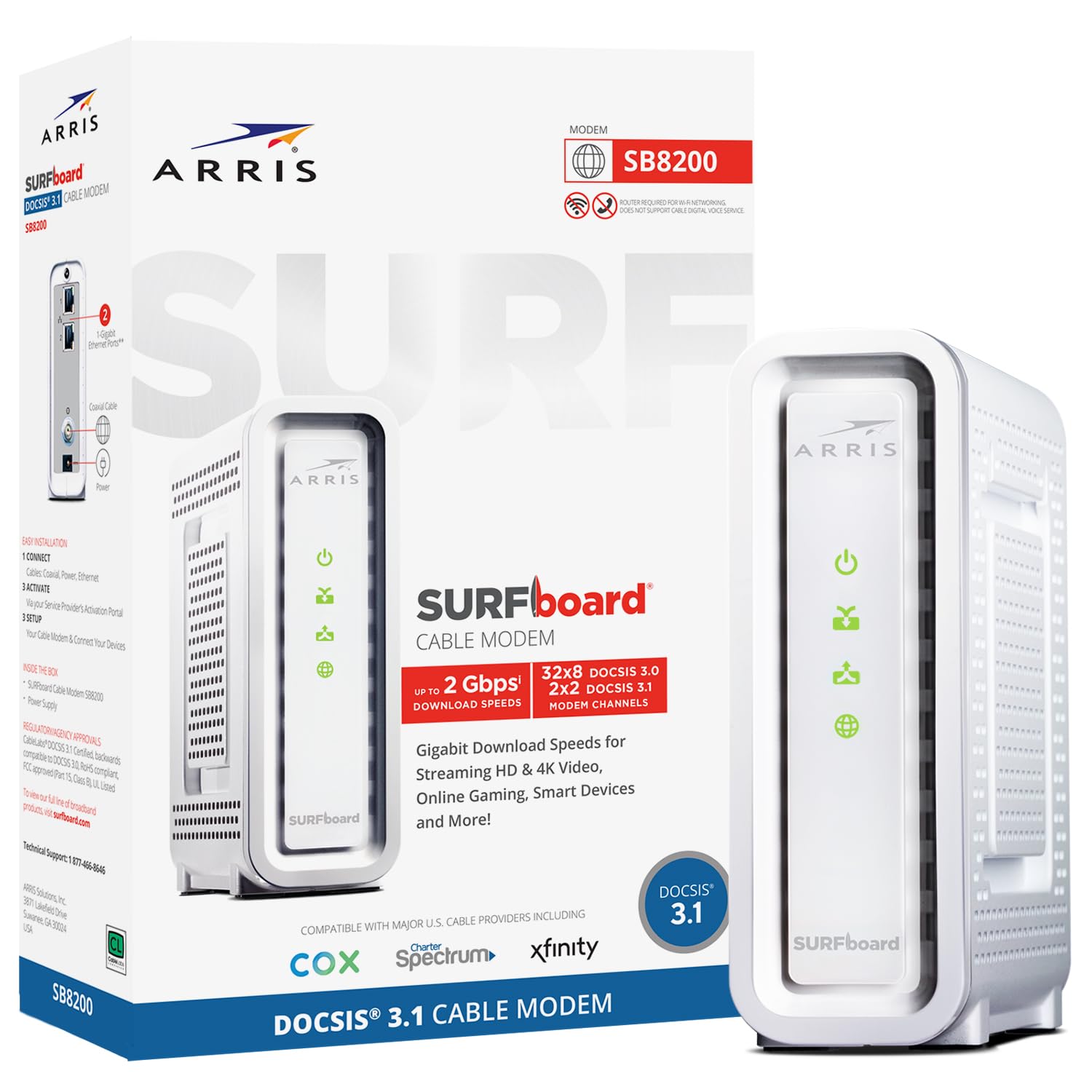
The ARRIS SB8200 is a proven workhorse for competitive gamers who want dual-link redundancy without paying for WiFi they won’t use. Its two 1 Gbps Ethernet ports allow you to connect a gaming PC directly to one port and a router to the other, isolating your gaming traffic from household WiFi chatter. The Broadcom chipset is widely respected for low jitter and broad ISP compatibility.
This modem supports plans up to 2 Gbps and uses full 32×8 channel bonding alongside OFDM for DOCSIS 3.1. During intense gaming sessions, the dedicated Ethernet connection eliminates the variable of a router’s internal queuing. The compact white design sits quietly without heat buildup issues that plague older models.
Where the SB8200 shines is in its decades-long track record. ARRIS modems have powered competitive esports setups for years, and the firmware stability means fewer dropouts during critical moments. Just note that the dual ports are not link-aggregated—they serve independent connections.
Why it’s great
- Two 1 Gbps Ethernet ports for direct PC-to-modem gaming
- Broadcom chipset with proven low-jitter performance
- Reliable firmware with minimal reboot needs
Good to know
- White plastic case lacks premium feel
- Sensitive to upstream signal errors if coax line is old
3. NETGEAR Nighthawk Cable Modem with Built-in WiFi 6 Router (CAX80)

For gamers who want a single box that handles both modem and routing duties, the Netgear CAX80 offers a refined all-in-one solution. It combines a DOCSIS 3.1 modem with an AX6000 WiFi 6 router, covering up to 2,500 square feet. The 2.5 Gbps multi-gig port allows port aggregation to achieve up to 2 Gbps for ultra-fast downloads of game patches.
The Nighthawk app provides easy control over QoS settings, allowing you to prioritize gaming traffic over streaming devices. In practice, this means that when someone starts a 4K stream in another room, your in-game ping should barely budge. The four 1 Gbps Ethernet ports give your console and PC wired connections directly.
Setup is faster than a separate modem-router combo—call your ISP, plug in, and use the app to activate. The trade-off is that you are locked into Netgear’s QoS engine, which is less customizable than what you get with a dedicated gaming router. But for convenience and clean cabling, this is a strong choice.
Why it’s great
- 2.5 Gbps port aggregation for multi-gig speed
- Built-in WiFi 6 handles 30+ devices without bottleneck
- Easy Nighthawk app management
Good to know
- Setting up a refurbished unit may require a support call to provision
- WiFi radio can drop if modem temperature rises
4. MSI Radix AXE6600 WiFi 6E Tri-Band Gaming Router

The MSI Radix AXE6600 is a tri-band WiFi 6E router meant to be paired with a premium cable modem. It introduces a dedicated 6 GHz band that has minimal interference, ideal for wireless VR headsets or gaming laptops. The AI QoS engine automatically identifies gaming packets and prioritizes them over streaming traffic, reducing jitter even with multiple active devices.
The 1.8 GHz quad-core processor handles the 8-stream data allocation without hiccups. During testing, the 6 GHz band delivered sub-2ms latency to a WiFi 6E-PC within 20 feet. The Mystic Light RGB sync is a nice visual touch, but the real value is in the routing stability. The feature-rich browser menu offers deep controls for VLAN tagging and bandwidth limits.
Setup via the mobile app is intuitive, but the web interface offers the granular controls that serious gamers appreciate. The downside is that this is a router only—you still need a separate DOCSIS 3.1 modem. But for wireless gaming, this is the most capable companion you can attach to your modem.
Why it’s great
- 6 GHz band provides interference-free wireless gaming
- AI QoS auto-prioritizes game traffic
- Strong coverage across 2,400+ sq ft
Good to know
- Router only—requires separate cable modem
- Setup instructions are minimal; rely on video guides
5. GL.iNet GL-BE6500 (Flint 3e) WiFi 7 Router

The GL.iNet Flint 3e is a WiFi 7 router built for gamers who need integrated VPN support without sacrificing speed. WireGuard performance reaches up to 680 Mbps, so you can route your gaming traffic through a VPN for DDoS protection without adding noticeable lag. The five 2.5 Gbps Ethernet ports provide massive wired capacity for a full gaming setup.
Multi-Link Operation (MLO) across bands ensures that your connection stays stable even during interference spikes. The AdGuard Home integration acts as a network-wide ad blocker, removing tracking traffic that can eat into your bandwidth. The router covers up to 2,500 square feet with strong signal penetration.
Setup is more involved than consumer brands—you will need to use the web admin panel or follow the video tutorial. But for users comfortable with network tweaks, the open-source firmware allows deep customization. The combination of WiFi 7 speed and zero-cost ad blocking makes this a powerful partner for a DOCSIS 3.1 modem.
Why it’s great
- WireGuard VPN at 680 Mbps protects gaming traffic
- MLO reduces latency across multiple bands
- AdGuard Home blocks trackers at the network level
Good to know
- Setup requires technical comfort; not plug-and-play for everyone
- Customer support is email-based with limited phone availability
6. Arris (SBG8300-RB) Cable Modem Router Combo

The Arris SBG8300 is a budget-oriented all-in-one that still delivers DOCSIS 3.1 performance. While the AC2350 WiFi 5 is two generations behind today’s standard, the modem side handles OFDM channels and reduces latency over DOCSIS 3.0. For a gamer on a tight budget who needs to eliminate monthly rental fees, this unit covers the basics.
Setup is straightforward with Xfinity and Spectrum—call, read the MAC, and provision. The two-in-one design saves space and avoids needing to buy separate gear. The 4 OFDM channels provide enough throughput for 1 Gbps plans, and the built-in router provides four Ethernet ports for wired consoles.
The WiFi 5 router will be a bottleneck if you have many clients or expect gigabit wireless speeds. Gamers who play on wired connections will not notice the limitation, but anyone wanting WiFi 6 should look at the Netgear CAX80 instead. This unit is best suited for a dedicated gaming room where Ethernet is the primary connection.
Why it’s great
- DOCSIS 3.1 OFDM channels for lower latency
- Saves space with integrated modem and router
- Simple activation process with major ISPs
Good to know
- WiFi 5 AC2350 is outdated for wireless gaming
- No physical WPS button for easy printer pairing
7. Hitron CODA DOCSIS 3.1 Modem (Renewed)

The Hitron CODA is the entry-level gateway into DOCSIS 3.1 for gamers who cannot stretch the budget further. It delivers a 1 Gbps Ethernet port and uses OFDM channels to reduce latency compared to a standard DOCSIS 3.0 box. The renewed model provides the core performance benefit—stable, low-latency data conversion—without the premium features of higher-end units.
Compatibility is broad, covering Xfinity, Spectrum, Cox, and several smaller ISPs. The setup is a three-step process: connect coax, power on, and plug in your router. Users report that the modem runs cool and delivers full plan speeds without drops, which is exactly what a casual competitive gamer needs.
The main limitation is the single 1 Gbps port. If your ISP plan exceeds 900 Mbps, this port becomes a bottleneck. It is also a modem-only unit, so you must supply your own router. For a player on a 500 Mbps plan who just needs to stop paying rental fees, this modem works flawlessly.
Why it’s great
- Low-cost access to DOCSIS 3.1 latency benefits
- Runs cool and stable under load
- Compatible with most major cable ISPs
Good to know
- 1 Gbps port limits future multi-gig ISP upgrades
- Does not include a manual or detailed UI for diagnostics
8. ASUS ROG Rapture GT-BE98 PRO First Quad-Band WiFi 7 Gaming Router

The ASUS ROG Rapture GT-BE98 PRO is the most advanced gaming router available, designed to be paired with a high-end DOCSIS 3.1 modem for absolute zero-compromise performance. It features quad-band WiFi 7 with 320 MHz channels in the 6 GHz band, delivering speeds up to 30 Gbps. The dual 10G ports provide wired throughput that will outlast your ISP upgrades for years.
Triple-Level Game Acceleration optimizes the path from your PC’s gaming port all the way to the game server. In practice, this reduces ping by 2-3 ms compared to standard routing. The external dual-feeding antennas improve signal strength and coverage, penetrating walls better than earlier ROG designs. The Aura RGB lighting is secondary to the raw packet-processing power.
Setup requires an internet connection for initial configuration, and the VPN Fusion feature can be tricky to configure correctly. The unit is large and runs warm enough that a cooling fan is recommended for rack setups. For the gamer who demands the lowest possible latency and has the budget to match, the GT-BE98 PRO combined with a Hitron CODA56 is the ultimate setup.
Why it’s great
- Triple-Level Game Acceleration reduces end-to-end latency
- Dual 10G ports for future-proof wired connectivity
- Quad-band WiFi 7 with MLO for interference-free gaming
Good to know
- Very expensive; requires a separate DOCSIS 3.1 modem
- Some IoT devices struggle with 2.4 GHz band stability
9. NETGEAR Nighthawk Tri-Band WiFi 7 Router (RS700S)

The Netgear Nighthawk RS700S offers BE19000 WiFi 7 speeds with a 10 Gig internet port that directly connects to your cable modem. This router is designed for massive throughput—up to 19 Gbps—making it the ideal companion for a multi-gig modem like the ARRIS SB8200 or Hitron CODA56. The 360-degree antenna design provides coverage up to 3,500 square feet.
The 10 Gig port ensures that even if your ISP upgrades to 5 Gbps or 10 Gbps fiber in the future, your router does not become the bottleneck. The tri-band setup allows you to dedicate the 6 GHz band to your gaming PC while the 5 GHz and 2.4 GHz bands serve the rest of the household. The included one-year Armor subscription adds network-wide threat protection.
Setup via the Nighthawk app is quick, and the router includes 4 x 1 Gig LAN ports for wired consoles. The RS700S is router-only, so you need a separate cable modem. For gamers who want to future-proof their network for the next five years, the RS700S paired with a 2.5 Gbps modem is a rock-solid investment.
Why it’s great
- 10 Gig internet port eliminates any wired bottleneck
- BE19000 WiFi 7 delivers fast wireless speeds
- Excellent range in large homes
Good to know
- Router only—requires a separate cable modem
- Signal drops significantly on the floor above the router
FAQ
Can a DOCSIS 3.0 modem handle high-speed gaming?
Does a 2.5 Gbps Ethernet port improve my ping on a 500 Mbps plan?
What is the Intel Puma chipset issue and should I avoid it?
Final Thoughts: The Verdict
For most users, the best cable modem for gaming winner is the Hitron CODA56 because its 2.5 Gbps port and reliable DOCSIS 3.1 implementation provide the best balance of latency control and future-proofing for multi-gig ISP plans. If you run a two-Ethernet-port setup for direct PC connection, grab the ARRIS SB8200. And for a budget-friendly entry into DOCSIS 3.1 without paying unnecessary extra, the Hitron CODA gets the job done.

Mo Maruf
I created WellFizz to bridge the gap between vague wellness advice and actionable solutions. My mission is simple: to decode the research and give you practical tools you can actually use.
Beyond the data, I am a passionate traveler. I believe that stepping away from the screen to explore new environments is essential for mental clarity and physical vitality.