Our readers keep the lights on and my smoothie glass nicely filled. As an Amazon Associate, I earn from qualifying purchases.
Choosing a 32-inch monitor demands weighing resolution, refresh rate, and panel type against your budget and daily tasks. The wrong pick leads to eye strain, missed detail in HDR content, or motion blur during fast-paced gaming, so understanding the trade-offs matters before you commit to a purchase.
I’m Mohammad Maruf — the founder and writer behind WellFizz. I’ve spent years analyzing display specs, reading panel reviews, and cross-referencing real-world performance metrics to help buyers navigate choices like these with clarity.
Whether you’re editing color-critical work, gaming at high refresh rates, or building a home office, this guide covers the top models to help you find the best 32 inch monitor for your specific workflow and setup.
How To Choose The Best 32 Inch Monitor
A 32-inch monitor sits in the sweet spot between immersive viewing and desk compatibility, but the range of specs can be confusing. Understanding your primary use case, along with a few key technical attributes, makes the decision much more straightforward.
Resolution: QHD vs 4K at 32 Inches
At 32 inches, 1080p is too soft for most users. QHD (2560×1440) offers sharp text and a large workable area, making it ideal for gaming and office work without demanding extreme graphics card power. 4K UHD (3840×2160) delivers exceptional detail and is the standard for color-accurate creative work, video editing, and productivity, though it requires a more powerful GPU for smooth gaming.
Refresh Rate, Response Time, and Panel Type
Refresh rate (measured in Hz) determines how many times the screen updates per second — 60Hz is fine for office use, while 120Hz and above offers silky motion for gaming. Response time (measured in milliseconds) affects motion clarity; lower is better for fast action. VA panels offer the best contrast with deep blacks, IPS panels have superior color accuracy and viewing angles, and Fast IPS combines quick response with color fidelity.
Quick Comparison
On smaller screens, swipe sideways to see the full table.
| Model | Category | Best For | Key Spec | Amazon |
|---|---|---|---|---|
| Samsung Odyssey G50D | Mid-Range | Competitive gaming & ergonomics | 180Hz, 1ms GtG, Fast IPS | Amazon |
| ASUS ROG Strix XG32UCG | Premium | High-end gaming & dual-mode use | 4K 160Hz / FHD 320Hz Dual Mode | Amazon |
| Dell S3225QS | Mid-Range | Productivity & mixed media | 4K 120Hz, VA, FreeSync Premium | Amazon |
| ASUS ProArt PA329CV | Premium | Color-critical creative work | 4K 60Hz, IPS, ΔE < 2 accuracy | Amazon |
| KTC H32S25E | Mid-Range | High-refresh gaming on a budget | 240Hz, QHD, 1000R curve | Amazon |
| LG 32GS60QC-B | Mid-Range | Immersive curved gaming | 180Hz, 1ms GtG, 1000R VA | Amazon |
| KTC 32 Inch 2K (White) | Budget | Office work & casual gaming | 120Hz OC, QHD, IPS Panel | Amazon |
| AOC CQ32G4VE | Budget | Bargain curved gaming | 180Hz, 0.5ms MPRT, QHD VA | Amazon |
| SANSUI 32-Inch Curved | Budget | Entry-level QHD gaming | 180Hz, 1ms OD, QHD VA | Amazon |
In‑Depth Reviews
1. Samsung Odyssey G50D Series 32-Inch

The Samsung Odyssey G50D combines a Fast IPS panel with a 180Hz refresh rate and 1ms GtG response time, making it one of the most responsive QHD 32-inch monitors available. VESA DisplayHDR 400 certification delivers better contrast and highlights than typical entry-level HDR, and the 178-degree viewing angles ensure color consistency across the screen.
The fully adjustable stand — with tilt, swivel, pivot, and height adjustments — sets it apart from cheaper alternatives that only tilt. G-Sync compatibility and AMD FreeSync work together to eliminate tearing and stuttering, giving competitive gamers a fluid experience in fast-paced titles like Valorant or Call of Duty. The Eye Saver Mode reduces blue light without washing out colors, useful for longer sessions.
Some users report needing to calibrate the default color settings out of box, and adaptive sync has been noted to affect color balance on certain units. Still, the combination of build quality, adjustability, and raw speed makes this the strongest all-around pick for gamers who also want a desk-friendly ergonomic setup.
Why it’s great
- 180Hz Fast IPS with minimal motion blur
- Fully adjustable ergonomic stand (height, pivot, swivel)
- DisplayHDR 400 for brighter highlights
Good to know
- Default factory calibration may oversaturate colors
- Back ring attachment can be fussy
2. ASUS ROG Strix 32” 4K HDR (XG32UCG)

The ASUS ROG Strix XG32UCG stands out with its dual-mode functionality, letting you switch between native 4K at 160Hz and Full HD at 320Hz at the press of a button. The Fast IPS panel hits a 0.3ms minimum response time, and ELMB Sync works alongside variable refresh rate to eliminate both ghosting and tearing — a rare combo even at this price tier.
Color coverage reaches 95% DCI-P3 and 130% sRGB, with the semi-gloss screen making HDR content pop more than typical matte finishes. The fully adjustable stand supports tilt, swivel, pivot, and height, plus a tripod socket for mounting a webcam or mic arm directly. USB-C with DisplayPort Alt Mode simplifies connecting a laptop with single-cable video, data, and charging.
The monitor ships with a DisplayPort cable and an ROG pouch, but no HDMI cable. Some users note that KVM switching can be finicky depending on connected devices, and the dynamic contrast may need tweaking to avoid washing out dark details. For those wanting both crisp 4K desktop space and ultra-smooth 320Hz competitive play in one panel, this is an impressive hybrid.
Why it’s great
- Dual-mode 4K 160Hz / FHD 320Hz for versatility
- 0.3ms response time with ELMB Sync
- USB-C PD and tripod socket for creators
Good to know
- KVM behavior can be inconsistent
- Requires manual calibration for best HDR
3. Dell 32 Plus 4K Monitor (S3225QS)

The Dell S3225QS brings 4K resolution and a 120Hz refresh rate together on a 1500:1 contrast ratio VA panel, making it a strong contender for users who want both sharp productivity and smooth motion without paying premium prices. The 1500R curvature and ultra-thin bezels create a refined profile that looks clean on a desk, while the built-in speakers deliver deeper bass and better clarity than most monitor audio solutions.
AMD FreeSync Premium keeps frame pacing smooth during gaming, and the improved ComfortView Plus reduces blue light below 35% without the yellow tint common on other eye-care modes. The ash white finish stands apart from the standard black options in this category. The stand supports tilt and height adjustments, giving solid ergonomic flexibility out of the box.
The VA panel’s black level and contrast are excellent for movies and dark games, but viewing angles are narrower than IPS, so color shifts if viewed from the side. The included HDMI cable is only 1.8 meters, which may be short for some desk setups. For anyone seeking a large 4K screen with a high refresh rate for mixed use, this Dell delivers outstanding value.
Why it’s great
- 4K 120Hz VA with deep blacks and high contrast
- Built-in speakers with improved frequency response
- ComfortView Plus reduces blue light without yellow tint
Good to know
- VA panel has narrower viewing angles than IPS
- No USB-C connectivity for laptop users
4. ASUS ProArt Display PA329CV

The ASUS ProArt PA329CV is built for color accuracy from the ground up, factory calibrated to Delta E < 2 and covering 100% sRGB and 100% Rec.709. The 32-inch 4K IPS panel delivers consistent colors across the full 178-degree viewing range, and the 400 cd/m² brightness handles well-lit rooms without washing out highlights. Calman Verification adds confidence for professionals in photography, video editing, or graphic design.
Connectivity is robust for a creative workflow: USB-C with 96W Power Delivery charges a laptop and carries video through a single cable, while the built-in USB 3.1 hub (four Type-A ports) keeps peripherals connected. The stand offers height, tilt, swivel, and pivot rotation, making it easy to switch between landscape and portrait orientations for coding or long documents.
The 60Hz refresh rate and lack of HDR certification mean this is not aimed at gamers. Some units have required a firmware update to fix USB-C display issues, and the glossy color report is included but not individually matched to every panel. For color-critical work where accuracy matters more than motion smoothness, this ProArt remains a reliable reference monitor.
Why it’s great
- Factory-calibrated Delta E < 2 with Calman Verification
- 96W USB-C Power Delivery for single-cable laptops
- Full ergonomic stand with pivot rotation
Good to know
- Limited to 60Hz, not suitable for high-refresh gaming
- Some units may need firmware update for USB-C
5. KTC 32 Inch 240Hz Curved Gaming Monitor (H32S25E)

The KTC H32S25E aggressively targets the high-refresh market with a 240Hz panel and 1ms response time at a mid-range price. The 1000R curvature wraps around your peripheral vision more steeply than the common 1500R, creating a deeply immersive feel for racing sims, shooters, and open-world games. The 4000:1 contrast ratio from the VA panel produces inky blacks that make dark scenes significantly more engaging.
Adaptive Sync eliminates tearing, and the dual HDMI plus dual DisplayPort inputs give flexibility for multi-device setups like a PC and console side by side. The 2K QHD resolution keeps pixel density high enough for sharp text while demanding less GPU power than 4K, helping maintain those high frame rates in competitive titles.
The stand only offers tilt adjustment, with no height or swivel, which may require a VESA arm for proper desk alignment. Color accuracy out of the box can be overly saturated and may need manual calibration. For the price, getting 240Hz on a curved 32-inch VA panel is rare, making this a strong pick for frame-rate-focused gamers willing to tweak settings.
Why it’s great
- 240Hz refresh rate at a mid-range price point
- 1000R curve and VA contrast for immersion
- Dual HDMI and dual DisplayPort inputs
Good to know
- Stand is tilt-only, no height or swivel adjustment
- Color calibration needed out of box
6. LG 32GS60QC-B Ultragear

The LG 32GS60QC-B combines a steep 1000R curved VA panel with a 180Hz refresh rate and 1ms GtG response time, targeting gamers who prioritize contrast and peripheral immersion. The 3000:1 native contrast ratio produces deep black levels that make horror games and cinematic cutscenes look far more dramatic than typical IPS monitors, and the 99% sRGB coverage keeps colors vibrant without looking oversaturated.
AMD FreeSync ensures tear-free gameplay, and LG’s Black Stabilizer feature lifts visibility in dark areas without ruining overall contrast — useful for spotting enemies in shadows. The three-side virtually borderless design minimizes bezel distraction for multi-monitor setups, and the tilt-adjustable stand provides basic ergonomics.
The stand lacks height and swivel adjustments, which may force a separate VESA mount for proper desk posture. A small subset of users report an auto-brightness feature that can’t be disabled and occasional HDMI handshake issues that are solved by using DisplayPort. For those who want a deeply curved gaming screen with strong contrast at a reasonable price, this LG Ultragear delivers.
Why it’s great
- 1000R curve and 3000:1 VA contrast ratio
- Black Stabilizer enhances dark scene visibility
- Borderless design for immersive multi-monitor setups
Good to know
- Stand only offers tilt, no height or swivel
- Non-disablable auto brightness reported by some users
7. KTC 32 Inch 2K Computer Monitor (White)

This KTC 32-inch monitor uses an IPS panel with QHD resolution and a 120Hz refresh rate (overclocked from 100Hz), making it a solid general-purpose display for office work and casual gaming. The 350 cd/m² brightness and 109% sRGB color gamut area provide punchy visuals, while the Delta E < 2 color accuracy makes it suitable for light photo editing without requiring professional calibration.
Adaptive Sync supports both FreeSync and G-Sync Compatible setups, reducing screen tearing across a wide range of graphics cards. The white color finish offers a clean, modern look that stands out against the sea of black monitors, and the tilt-adjustable stand with VESA 100mm compatibility gives basic mounting flexibility.
The 120Hz limit means competitive gamers chasing 240Hz will want faster options, and only a DisplayPort cable is included, requiring an HDMI cable purchase for console use. A few users report a minor firmware bug where settings reset after the monitor exits rest mode. For users wanting an IPS panel with decent refresh and accurate color at a budget-friendly price, this KTC delivers balanced performance.
Why it’s great
- IPS panel with wide viewing angles and ΔE < 2 accuracy
- 120Hz overclockable refresh rate for smooth motion
- Distinctive white color design for desktop aesthetics
Good to know
- Only DP cable included, no HDMI in box
- Firmware bug may reset settings after rest mode
8. AOC CQ32G4VE 32″ Curved Gaming Monitor

The AOC CQ32G4VE packs a 1500R curved QHD VA panel with a 180Hz refresh rate and a 0.5ms MPRT response time into one of the most aggressive price points in this category. The 120% sRGB coverage and 80,000,000:1 SmartContrast ratio produce vibrant, richly detailed images that make games and video content pop, with VA’s inherent contrast delivering deeper blacks than IPS alternatives at the same price.
Dual DisplayPort 1.4 and dual HDMI 2.0 ports provide flexible connectivity for PC and console setups, and AOC’s LowBlue Mode and Flicker-Free technology help reduce eye fatigue during long sessions. The 3-year zero-bright-dot warranty, advance replacement policy, and 1-year accidental damage coverage add peace of mind that’s rare in this price tier.
Out-of-the-box HDR performance is underwhelming and best avoided, and the stand is minimal with only tilt adjustment, lacking the stability of more expensive models. Some users note that the on-screen display menu can be cumbersome to navigate. For budget-conscious buyers who want a curved, high-refresh 1440p display with solid warranty support, this AOC offers tremendous value.
Why it’s great
- 180Hz curved VA with 0.5ms MPRT at low price
- Excellent warranty: 3-year zero-dead-pixel and advance replacement
- Dual DP 1.4 and dual HDMI inputs for multiple devices
Good to know
- HDR mode is not worth using
- Stand is basic with limited ergonomics
9. SANSUI 32-Inch Curved Gaming Monitor
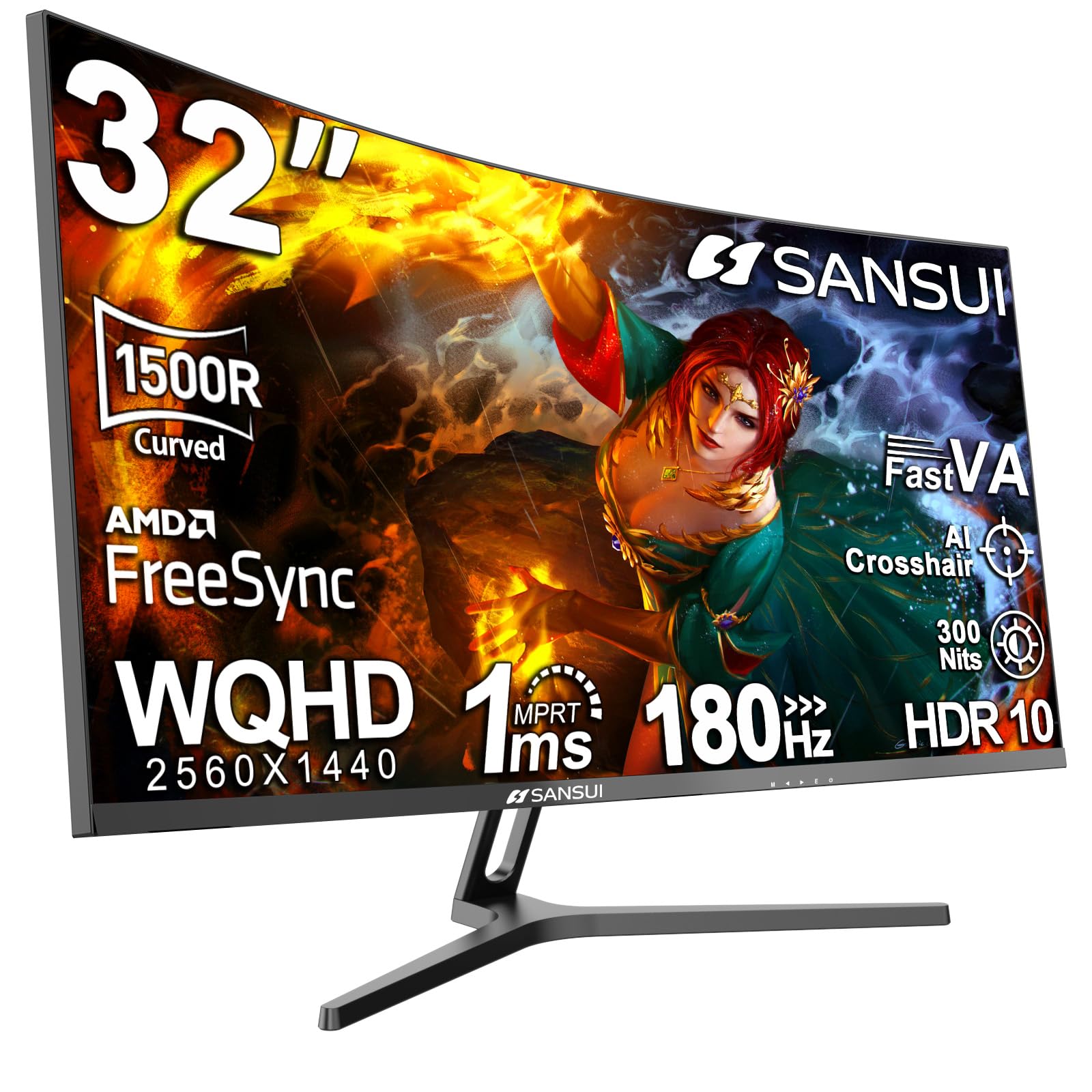
The SANSUI 32-inch curved monitor offers a 1500R VA panel in QHD resolution with a 180Hz refresh rate and 1ms OD response time at an entry-level price that undercuts most competitors. The 125% sRGB and 95% DCI-P3 coverage produce vivid colors that exceed the typical budget standard, while the 300-nit brightness is sufficient for indoor use without glare issues. The curve enhances peripheral immersion without feeling too aggressive for productivity tasks.
FreeSync support ensures smooth frame pacing, and the inclusion of two HDMI ports along with two DisplayPort 1.4 connections allows multi-device switching without unplugging cables. SANSUI backs the monitor with a 30-day money-back guarantee and lifetime technical support, along with free replacement for defects during that window.
The stand is limited to tilt only, and the VA panel’s viewing angles mean color shifts if viewed from the side. A small number of users have noted corner clouding on dark screens, though the responsive customer service team has replaced affected units quickly. For someone wanting a curved 1440p high-refresh monitor on a strict budget, this SANSUI delivers surprising performance.
Why it’s great
- QHD 180Hz curved VA with 95% DCI-P3 coverage
- Very competitive price for the spec set
- Responsive customer service and warranty support
Good to know
- Stand is tilt-only, no height or swivel
- Potential corner clouding on dark screens in rare units
FAQ
Is QHD or 4K better for a 32-inch monitor used for both work and gaming?
Does a curved 32-inch monitor help with eye strain or immersion?
What stand features should I prioritize on a 32-inch monitor?
Final Thoughts: The Verdict
For most users, the best 32 inch monitor winner is the Samsung Odyssey G50D because it delivers a fast 180Hz IPS panel with a fully adjustable stand and DisplayHDR 400 at a reasonable price. If you want 4K resolution for creative work and media consumption, grab the Dell S3225QS. And for color-critical professionals needing factory-calibrated accuracy, nothing beats the ASUS ProArt PA329CV.

Mo Maruf
I created WellFizz to bridge the gap between vague wellness advice and actionable solutions. My mission is simple: to decode the research and give you practical tools you can actually use.
Beyond the data, I am a passionate traveler. I believe that stepping away from the screen to explore new environments is essential for mental clarity and physical vitality.