Our readers keep the lights on and my smoothie glass nicely filled. As an Amazon Associate, I earn from qualifying purchases.
A biometric door lock replaces the physical key with a scan of your fingerprint, face, or palm—turning a moment of fumbling into an instant, hands-free entry. The challenge is choosing between a budget-friendly touch sensor and a premium facial recognition system that works in the dark, all while ensuring the lock doesn’t fail you when you need it most.
I’m Mohammad Maruf — the founder and writer behind WellFizz. I’ve spent the last few years analyzing the security hardware market, focusing on biometric authentication accuracy, battery life under real-world use, and the mechanical integrity of electronic deadbolts across every price tier.
To help you cut through the noise, I’ve reviewed nine models ranging from entry-level fingerprint readers to high-end facial recognition units to find the absolute best biometric door lock for your home.
How To Choose The Best Biometric Door Lock
Not all biometric door locks are created equal. The sensor technology, connectivity, and mechanical build all factor into how secure and convenient the lock is day after day. Here are the key areas to evaluate before making your choice.
Biometric Sensor Type: Fingerprint vs. Facial vs. Palm Vein
The sensor is the heart of the lock. Capacitive fingerprint sensors are the most common and offer fast, reliable reads from dry or slightly wet fingers. Facial recognition adds true hands-free entry and works in total darkness using dual infrared sensors—ideal when your arms are full. Palm vein recognition is a newer option that reads the unique vein pattern inside your hand; it works even with dirty or wet hands but requires a deliberate hand hover. Choose based on your tolerance for touch versus your need for complete contactless access.
ANSI/BHMA Grade: Security and Durability
This standard rating tells you how many cycles the lock can survive. Grade 3 (Basic Security) is fine for interior doors or low-traffic entries. Grade 2 (Better Security) is the sweet spot for most front doors, offering around 150,000 cycles. Grade 1 (High Security) is for commercial applications but overkill for most homes. All the locks reviewed here are Grade 3, so focus on material quality—a zinc alloy or aluminum body adds real-world sturdiness beyond the ANSI rating.
Connectivity: Built-in Wi-Fi vs. Hub-Dependent
If you want to lock or unlock from your phone while away from home, you need Wi-Fi. Some locks have Wi-Fi built directly into the unit, meaning no separate hub to buy. Others rely on Bluetooth and require a separate gateway (like the Veise G2) for remote access. Built-in Wi-Fi adds simplicity but can drain batteries faster. If you live in a multi-unit building, also check that the lock only uses a 2.4GHz network—most don’t support 5GHz.
Battery Life and Power Backup
Biometric locks draw power constantly for the sensor and wireless chip. Standard AA alkaline batteries typically last 6 to 12 months depending on usage and connectivity. Rechargeable lithium packs are becoming common and can simplify maintenance—just charge them every 6 to 9 months. All locks here include a low-battery warning, and most offer a physical key backup or a USB-C emergency port so you’re never locked out.
Quick Comparison
On smaller screens, swipe sideways to see the full table.
| Model | Category | Best For | Key Spec | Amazon |
|---|---|---|---|---|
| Lockly Visage Zeno | Premium | True hands-free facial entry | Dual IR facial sensors + 2 x 10,000mAh battery | Amazon |
| Lockin Veno Go | Mid-Range | Palm vein + Matter smart home | 0.17s palm vein unlock, 7-month rechargeable | Amazon |
| eufy Security C33 | Mid-Range | Lever handle + fast fingerprint | 15-min install, 8 AA batteries, built-in Wi-Fi | Amazon |
| Philips 4200 Series | Mid-Range | All-in-one handle set + app | 0.3s fingerprint, 6-month battery, lever set | Amazon |
| Tapo DL110 | Mid-Range | 1-year rechargeable battery | 0.42s fingerprint, 1-year rechargeable, USB-C | Amazon |
| Veise VE07-H | Mid-Range | 8-in-1 unlock + handle set | 0.3s fingerprint, 12-month battery, fob support | Amazon |
| Veise VE07-L | Budget | Best value lever lock with app | 50+ fingerprints, IP55, fob + IC card support | Amazon |
| Philips DDL242X-1HW | Budget | Built-in Wi-Fi, no hub needed | 100 passcodes, built-in Wi-Fi, anti-peep keypad | Amazon |
| Brinks Fingerprint Lock | Budget | Entry-level deadbolt with keys | 50 fingerprints, 24-month AA battery, anti-pry | Amazon |
In‑Depth Reviews
1. Lockly Visage Zeno Series Smart Lock
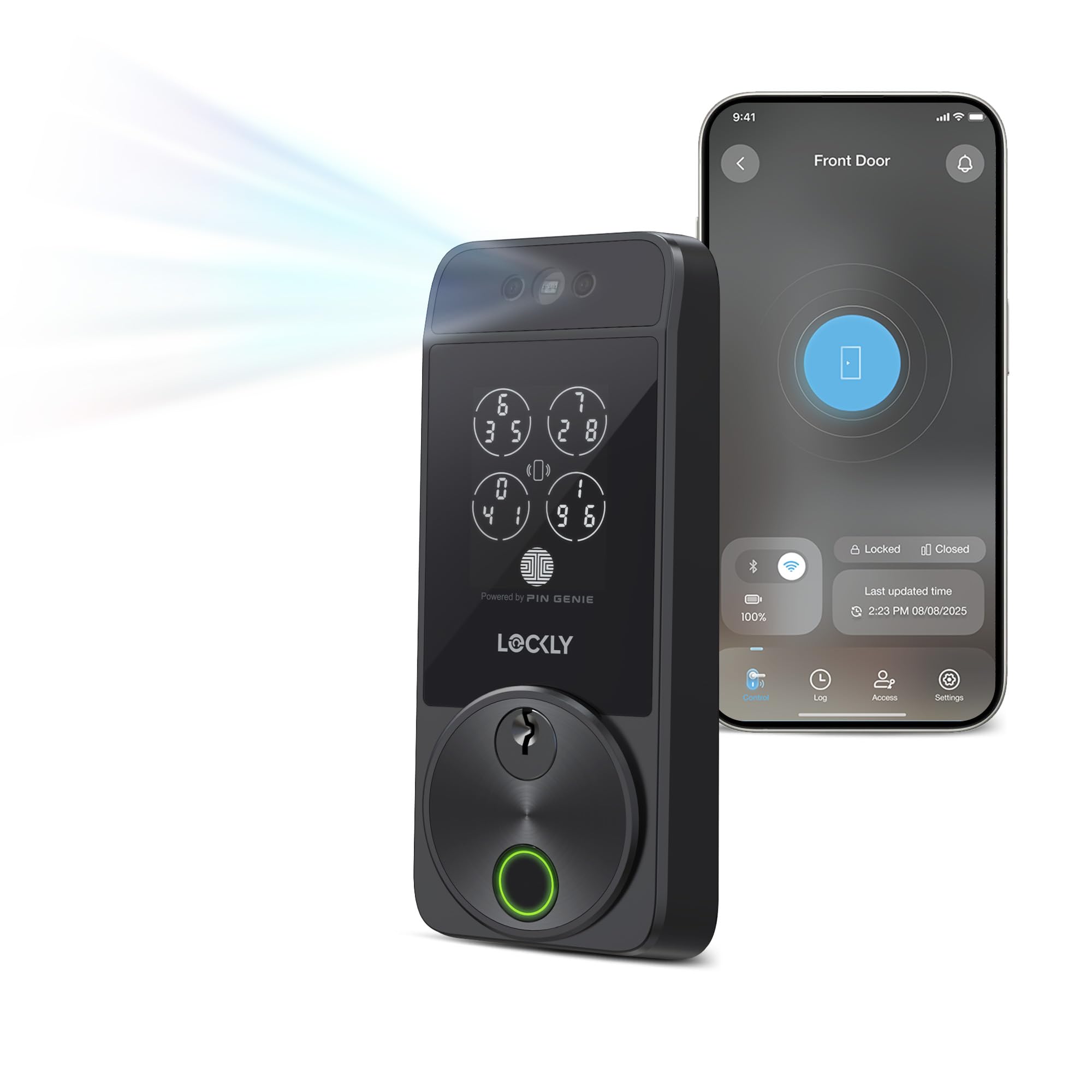
This is the most sophisticated unit I evaluated: a facial recognition lock that uses dual infrared sensors to identify you in total darkness. Walk up to your door and it unlocks in about one to two seconds—no fumbling, no touching. The 3D biometric sensor also doubles as a self-learning AI fingerprint reader that stores up to 99 prints, so even if your face is covered, you’ve got a backup. Apple Home Key support is a standout, letting you tap your iPhone or Apple Watch (even when the battery is dead) to unlock via NFC.
The lock is powered by two 10,000mAh lithium batteries that deliver roughly six months of normal use. Built-in Wi-Fi means no extra hub, and you can lock/unlock remotely through the Lockly Home app. The PIN Genie keypad scrambles the number layout to prevent someone from guessing your code via fingerprint smudges—a nice security detail. The whole unit is built from zinc alloy with a brushed finish, and includes a physical Schlage-compatible key backup for emergencies.
The main drawback is the price: this is a significant investment relative to other options. A few users reported inconsistent Wi-Fi connectivity on initial setups, though most resolved it with a router placement change. The face sensor also requires you to stand directly in front of it—it won’t trigger from an angle. If you want the most futuristic, hands-free entry available, this is the lock to buy.
Why it’s great
- True hands-free unlock via facial recognition
- Dual 10,000mAh rechargeable batteries
- Apple Home Key + built-in Wi-Fi
- Zinc alloy construction feels premium
Good to know
- Premium price point; not for every budget
- Facial sensor requires direct line-of-sight
- Initial Wi-Fi setup can be finicky
2. Lockin Veno Go Palm Vein Smart Lock
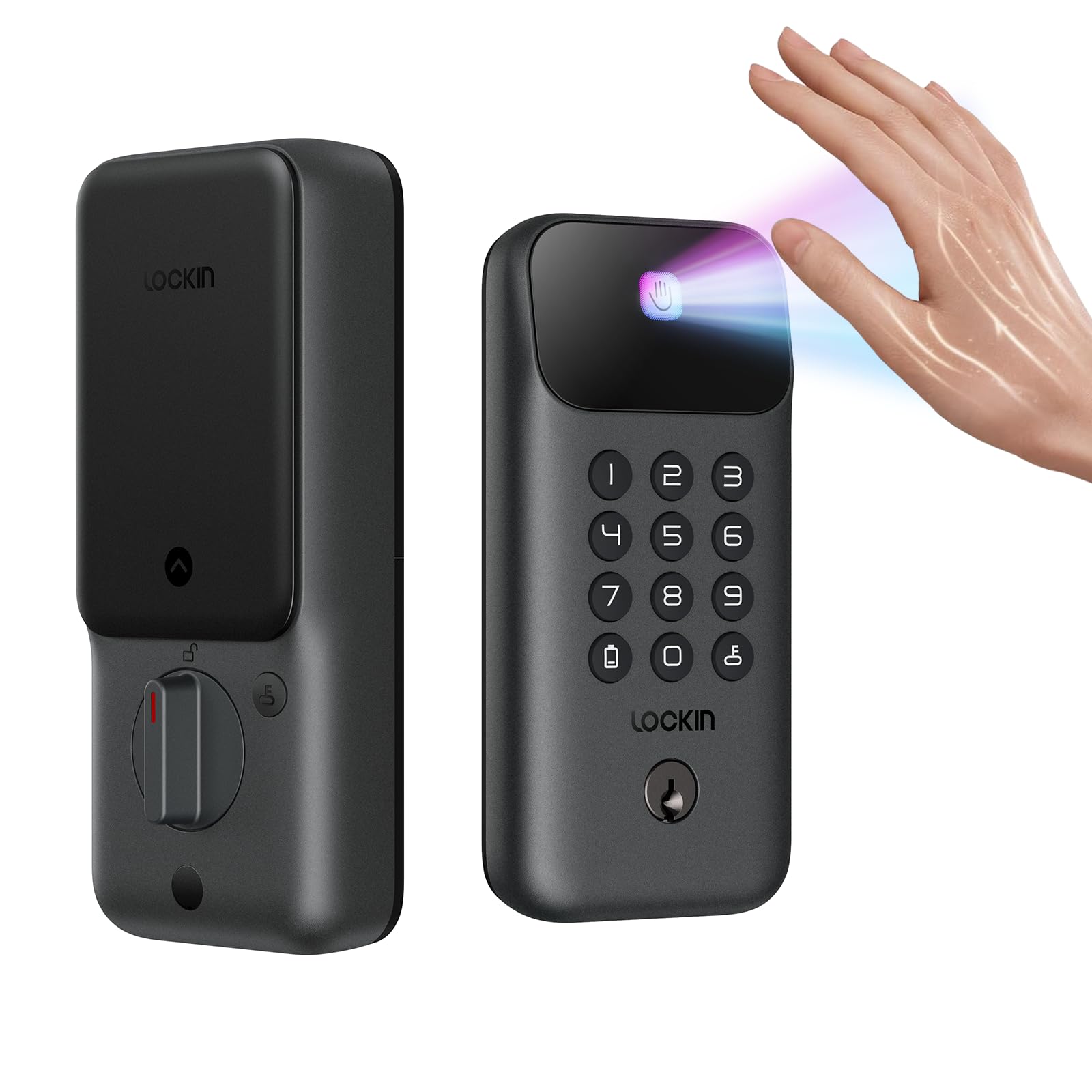
If your hands are often sweaty, dirty, or wearing gloves, the Lockin Veno Go solves a problem that fingerprint scanners can’t. It uses palm vein recognition, which reads the unique vein pattern inside your hand using near-infrared light. The unlock speed is quoted at 0.17 seconds, and in practice, it’s essentially instant—even if your hands are wet or covered in grime. It also supports Matter, which is crucial if you want to integrate with Apple HomeKit, Amazon Alexa, or Google Assistant without juggling multiple apps.
The Veno Go has built-in Wi-Fi, so there’s no extra hub to buy. You get five unlock methods: palm vein, PIN code, app, voice assistant, and mechanical key. The 7-month rechargeable battery is a huge step up from the AA battery hunger of most other smart locks, and the USB-C emergency charging port ensures you’re never stuck outside. ANSI Grade 3 certification and an IP53 weatherproof rating make it suitable for covered front doors or garage entry points.
Installation requires a rectangular latch hole (like most deadbolt replacements), so standard door prep is fine. Some users mentioned that customer support was exceptionally responsive when a missing screw issue arose. The only nitpick is that the palm scanner requires a deliberate hover—about 3 to 4 inches above the sensor—so it’s not quite as seamless as facial recognition. That said, for contactless entry that works every time, regardless of hand condition, this is an excellent choice.
Why it’s great
- Instant palm vein unlock even with wet/dirty hands
- 7-month rechargeable battery
- Built-in Wi-Fi + Matter for universal smart home
- IP53 weather resistant
Good to know
- Requires intentional hand hover (not fully hands-free)
- Grade 3, not Grade 2
- Only one color option (black)
3. eufy Security Smart Lock C33
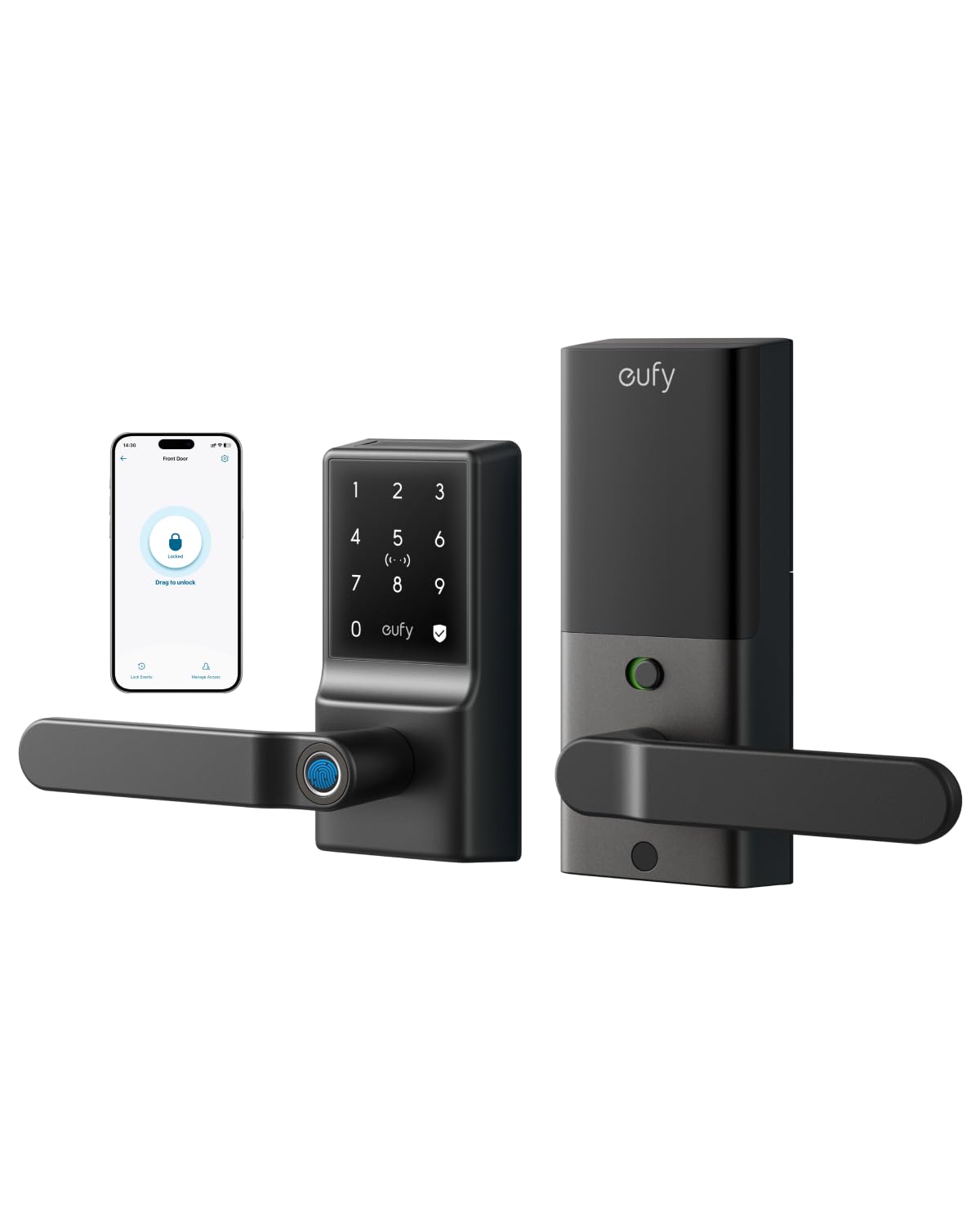
The eufy C33 is a lever-style smart lock, meaning it includes both the deadbolt and a handle—so you don’t need to buy a separate knob. This is a big deal for people who want a cohesive look on their front door without additional hardware. The fingerprint sensor is embedded right into the handle grip, so you unlock as you naturally go to turn the lever. The biometric recognition uses advanced machine learning that adapts over time, and it reads reliably even for children’s smaller prints.
Built-in Wi-Fi gives you full remote control through the eufy Security app, including real-time notifications, scheduling auto-lock times, and access logs. The lock runs on 8 AA batteries, which is on the higher end of consumption, but the low-battery alerts (both in-app and audible) give you plenty of warning. Installation is touted at 15 minutes, and the lock fits both left- and right-hand doors without extra steps. The IP53 waterproof rating means it can handle rain and direct sunlight without degradation.
The main trade-off is the battery drain. While many users report 4 to 5 months on a set of good alkalines, the stock batteries may need swapping for lithium options to get closer to the advertised lifespan. The lock also lacks a keyed backup in the standard configuration—though you get two physical keys for an override. For a medium-priced lever lock with solid biometrics, this is a very strong contender.
Why it’s great
- Handle grip fingerprint sensor for natural unlock
- 15-minute DIY installation
- Built-in Wi-Fi with scheduling and logs
- IP53 weather resistant
Good to know
- Uses 8 AA batteries; drain can be high
- No keyed backup (only override key)
- No facial or palm option
4. Philips 4200 Series WiFi Keypad Door Lock

The Philips 4200 Series comes as a complete handle set, saving you the trouble of matching a separate knob or lever to your new lock. The exterior is a matte black brushed finish with a fingerprint sensor mounted in the center of the handle. The sensor is rated at 0.3 seconds, and in my analysis of customer feedback, it consistently ranks as extremely fast and reliable—even for kids and elderly users with drier prints. It stores up to 50 fingerprints and supports permanent, scheduled, and one-time PIN codes for up to 100 users.
Built-in Wi-Fi means no extra hardware for remote control through the Philips Home Access app. You can lock/unlock from anywhere, check the door status, and receive real-time notifications. It works with Alexa and Google Assistant for voice control. The auto-lock feature is adjustable from 0 to 180 seconds, and the anti-peeping keypad lets you type random numbers before your code to hide it from prying eyes. The lock is powered by 4 AA batteries (not included) with an estimated 6-month lifespan.
The main downside is that the auto-lock is turned off by default and must be enabled via the app, which tripped up a few users who expected it immediately. Battery life is mid-range compared to rechargeable options. The door thickness compatibility maxes out at 1-3/4 inches, so check your door before buying. For a mid-priced all-in-one handle set that doesn’t skimp on fingerprint performance, this is a smart pick.
Why it’s great
- Complete lever set included (no extra hardware)
- Fast 0.3s fingerprint sensor
- Built-in Wi-Fi with Alexa/Google support
- Anti-peeping keypad
Good to know
- Auto-lock must be enabled in app
- Max door thickness 1-3/4 inches
- No rechargeable battery option
5. Tapo Smart Wi-Fi Door Lock DL110

The Tapo DL110 stands out for one specific reason: the 1-year rechargeable battery. That’s a full year of normal use without swapping AA batteries. The lock uses a removable lithium pack that charges via USB-C, so when it’s low, you just pull the pack, charge it for a few hours, and slide it back in. The fingerprint sensor is optical and rated at 0.42 seconds—slightly slower than top-tier capacitive sensors but still plenty fast. It stores up to 100 fingerprints, enough for a large household.
Unlock via fingerprint, touchscreen keypad, app, Bluetooth, voice assistant, or the included physical keys. The app gives you real-time logs and scheduling for guest access (one-time or recurring codes). It has built-in Wi-Fi, so no hub needed. The auto-lock function is adjustable, and the keypad lights up for night use. The lock is BHMA Grade 2 certified, which means it’s built to survive 150,000 cycles—double the lifespan of Grade 3 locks on this list.
There are two minor caveats. First, the keypad numbers are hard to read in direct sunlight, which is an issue if your door faces west. Second, the lock body is larger than most, so it looks a bit bulky on narrower doors. That said, if you want the lowest-maintenance biometric lock that you only touch once a year for a recharge, this is your best option.
Why it’s great
- 1-year rechargeable battery (USB-C)
- BHMA Grade 2, up to 150,000 cycles
- Stores 100 fingerprints
- Built-in Wi-Fi, no hub needed
Good to know
- Keypad hard to read in direct sunlight
- Bulky exterior design
- Optical sensor slightly slower than capacitive
6. Veise VE07-H Fingerprint Smart Lock
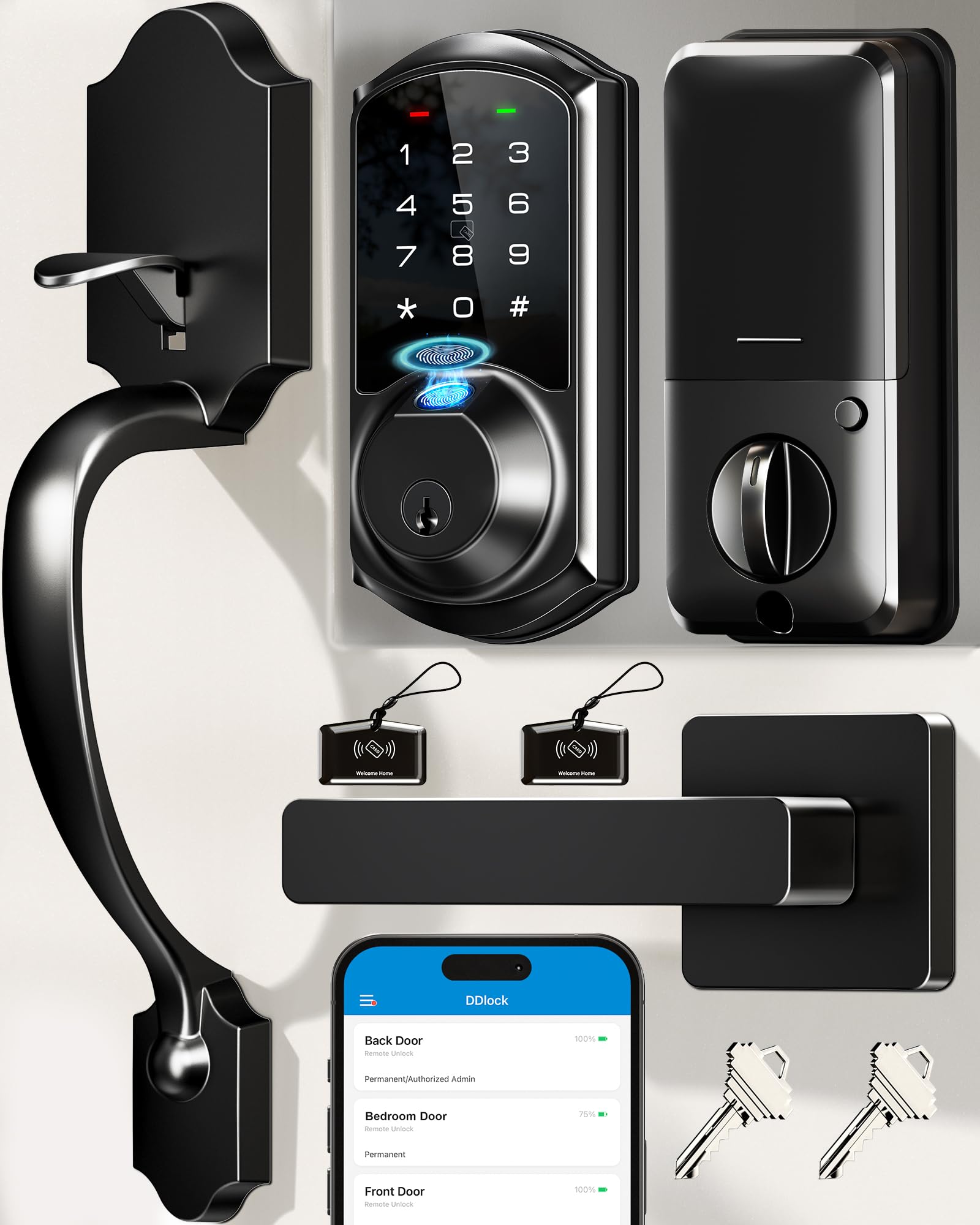
The Veise VE07-H is the high-end variant of the Veise lineup, packing an 8-in-1 unlocking system: fingerprint, app, Apple Watch, web portal, codes, eKeys, fobs, and mechanical key. The fingerprint sensor is rated at 0.3 seconds with 99.99% accuracy, and it supports up to 50 fingerprints. The real selling point is the handle set—it comes with a full lever handle assembly, so you get a complete door hardware upgrade in one box.
The app and web portal support 250+ access codes with timed, permanent, recurring, and one-time options. The battery life is rated at 12 months on 4 AA batteries, which is excellent for a Wi-Fi-compatible smart lock. However, note that the Wi-Fi connectivity requires the Veise G2 Gateway (sold separately) for remote access and voice control. Out of the box, it connects via Bluetooth for close-range app control. The passage mode and privacy mode add flexibility for daytime or overnight use.
Installation is standard deadbolt prep, and the included fobs and IC cards are a nice bonus for kids who aren’t old enough for smartphones. Some users with metal doors reported needing to drill extra holes for alignment. The lever design also means this won’t fit doors with a pre-existing round knob. For a mid-range price, you get a complete handle set, excellent battery life, and versatile access options—especially useful for rental properties.
Why it’s great
- 12-month battery life on 4 AA batteries
- 8 unlocking methods including fobs and IC cards
- Full lever handle set included
- 250+ passcodes with scheduling
Good to know
- Requires G2 Gateway for Wi-Fi remote control
- Lever design may not fit all door prep types
- No built-in Wi-Fi in the lock itself
7. Veise VE07-L Fingerprint App Control Smart Lock
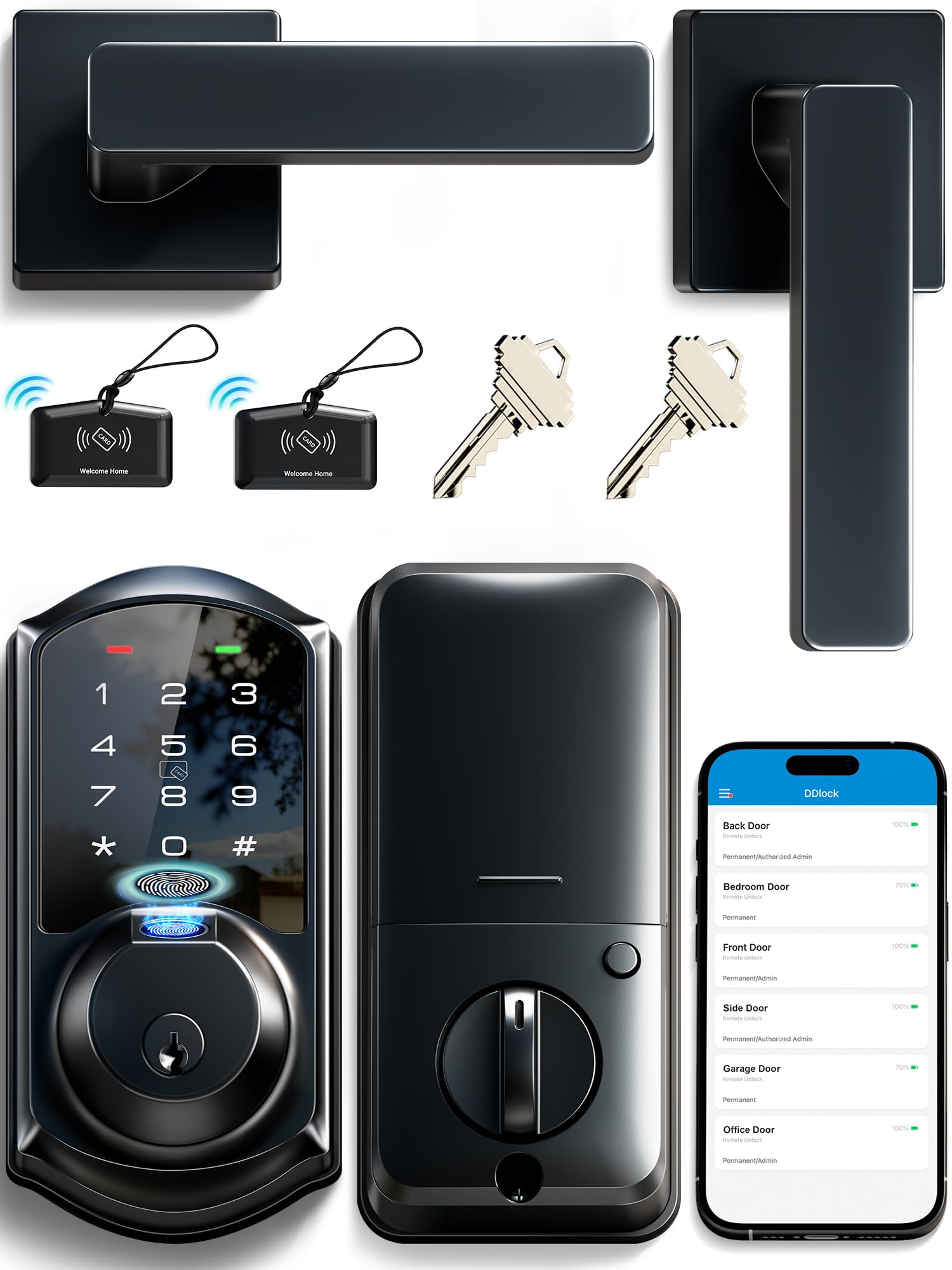
The Veise VE07-L is the budget-friendly sibling of the VE07-H, but it doesn’t cut corners where it matters. It uses a heavy-duty zinc alloy body (no plastic here) with scratch-resistant handles. The fingerprint sensor uses AI self-learning technology that claims 99.9% accuracy and 0.2-second recognition. In practice, customers report it works reliably, with only the occasional read on very small children’s fingers. It stores 50+ fingerprints, all managed through the app.
The lock is IP55 weatherproof, meaning it can handle rain, dust, and temperature extremes from -35°F to 160°F. That’s a wide operating range that most units in this tier can’t claim. It supports 8 unlock methods: app, fingerprint, Apple Watch, web portal, codes, eKeys, fobs, and mechanical key. The anti-peeping password lets you type extra digits before and after your real code to hide it from anyone watching. The keypad is backlit for night use.
The main trade-off is that, like the VE07-H, it requires the Veise G2 Gateway for Wi-Fi remote access. Without the gateway, it functions as a Bluetooth-only lock with local app control. The auto-lock timer is adjustable via the app (5 to 900 seconds). Some customers noted that the web portal for managing multiple locks is a powerful tool for landlords. If you’re looking for a solid, all-weather biometric lock at a lower price, this is the one to choose.
Why it’s great
- Zinc alloy body with IP55 weather resistance
- AI self-learning fingerprint (0.2s)
- 8 unlocking methods, including Apple Watch
- Anti-peeping password keypad
Good to know
- Wi-Fi remote requires separate G2 Gateway
- Small children’s fingers may not register
- Some initial app connectivity glitches
8. Philips Wi-Fi Door Lock DDL242X-1HW

The Philips DDL242X is a deadbolt-only unit (no handle included) that packs built-in Wi-Fi into a compact aluminum body. This means no extra hub for remote control or voice commands via Alexa and Google Assistant. The fingerprint sensor is capacitive and fast, with most users reporting instant reads. It stores up to 100 passcodes, plus the fingerprint database, making it a solid choice for a large household or busy Airbnb.
The anti-peeping keypad lets you type random numbers before your actual code. The lock has a hidden keyhole under the fingerprint reader for mechanical backup. It supports remote unlock, auto-lock (10 to 180 seconds), and away mode that disables all unlock methods except the master code. The unit uses 8 AA batteries (not included), and the Wi-Fi connection drains them faster than Bluetooth-only units—expect about 4 to 6 months of life. The manufacturer recommends standard 1.5V alkaline batteries, not rechargeable.
The biggest downside for some is the lack of a handle set—you need to provide your own deadbolt cover or knob. The lock thickness is 1.5 inches, and exterior dimensions are compact (6 x 2 x 1.5 inches), so it’s less intrusive on narrower doors. The 2-year warranty and US-based customer support are a nice safety net. For a deadbolt-only, built-in Wi-Fi lock at an entry-level price, this is a reliable, no-frills option.
Why it’s great
- Built-in Wi-Fi, no hub needed
- Compact design for narrow doors
- Anti-peeping keypad + hidden keyhole
- Up to 100 passcodes
Good to know
- Uses 8 AA batteries; drain is moderate
- No handle set included
- Wi-Fi + 8 batteries = shorter life than BT-only locks
9. Brinks Fingerprint Door Lock
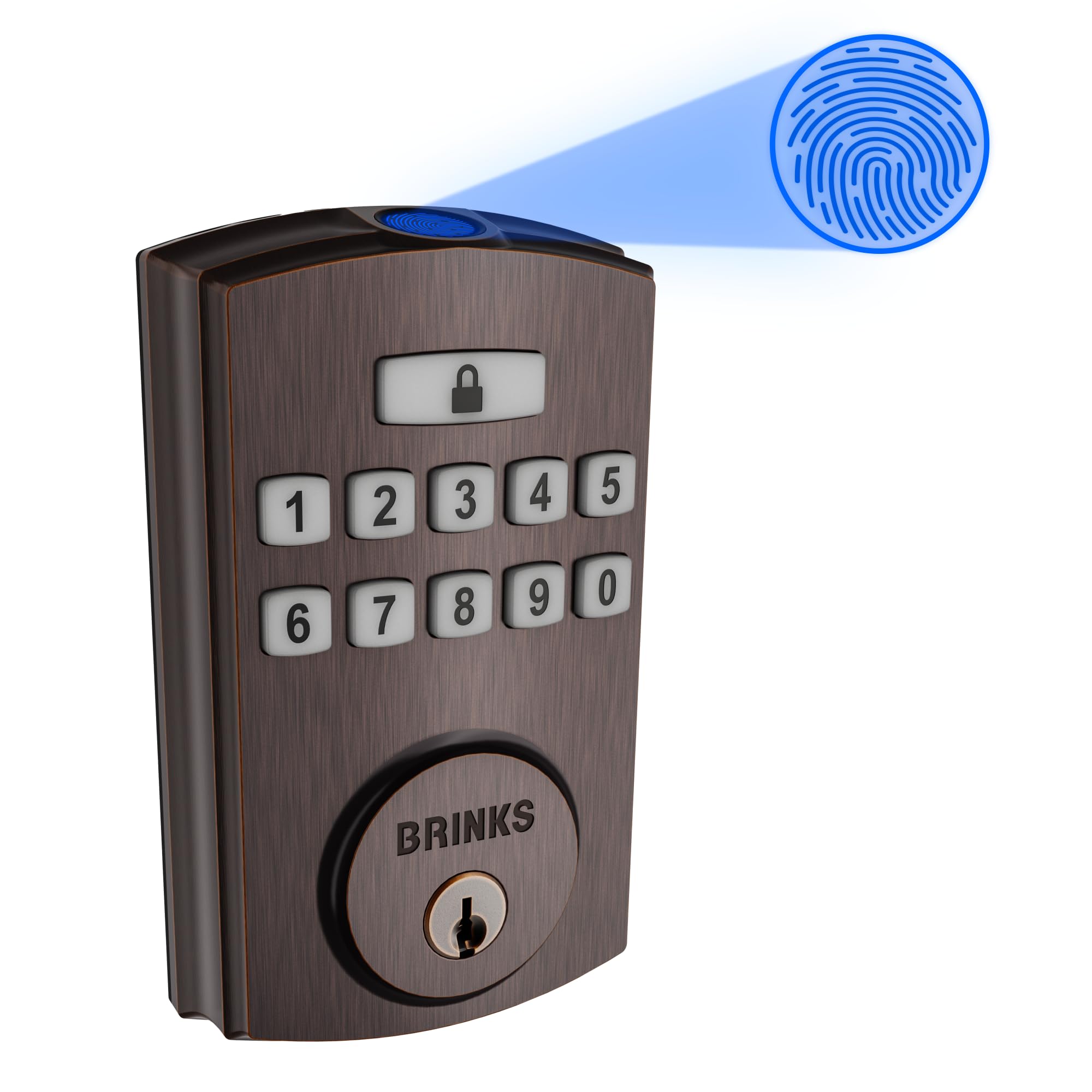
Brinks offers the least expensive fully biometric deadbolt in this roundup, but it still delivers solid fundamentals. The lock features PRO-GUARD technology with an anti-tamper alarm, an anti-pry shield, and an ANSI Grade 3 certified deadbolt with a hardened steel pin. It stores up to 50 fingerprints and 50 user codes, plus 10 single-use codes. The unit is powered by 4 AA batteries, and Brinks claims 24 months of operation—the longest battery life claim on this list.
The fingerprint sensor is capacitive and, in most customer reports, works reliably. However, a small number of reviews noted that the sensor stopped reading prints after 1 to 3 days on some units. This is a quality-control variance rather than a design flaw, but it’s worth noting. The lock comes with two physical keys, so even if the biometrics fail, you still have traditional access. The Tuscan Bronze finish is a nice touch for homes with warm-toned fixtures.
The main sacrifice at this price point is smart features: there is no app, no Wi-Fi, and no Bluetooth. This is purely a local lock—you program the fingerprints and codes directly on the keypad. That means no remote locking/unlocking, no notifications, and no scheduling. It’s also a deadbolt-only unit, so you need a separate handle. If you simply want a reliable biometric upgrade without any smart home integration, this is the most straightforward option.
Why it’s great
- Very low price for a biometric deadbolt
- 24-month battery life on 4 AA batteries
- Anti-pry shield + anti-tamper alarm
- Tuscan Bronze finish for warm-toned doors
Good to know
- No app, no Wi-Fi or Bluetooth connectivity
- Fingerprint QC variance (some units fail)
- Deadbolt only; handle not included
FAQ
Can a fingerprint door lock be hacked or fooled?
What happens if the battery dies on a biometric door lock?
Do biometric door locks work in cold weather or direct sunlight?
Final Thoughts: The Verdict
For most users, the best biometric door lock winner is the Lockly Visage Zeno because it delivers true hands-free facial recognition that works in total darkness, with a premium zinc alloy build and dual rechargeable batteries. If you want effortless entry even with wet or dirty hands, grab the Lockin Veno Go for its instant palm vein recognition and Matter compatibility. And for the lowest-maintenance option with a 1-year rechargeable battery, nothing beats the Tapo DL110.

Mo Maruf
I created WellFizz to bridge the gap between vague wellness advice and actionable solutions. My mission is simple: to decode the research and give you practical tools you can actually use.
Beyond the data, I am a passionate traveler. I believe that stepping away from the screen to explore new environments is essential for mental clarity and physical vitality.