Our readers keep the lights on and my smoothie glass nicely filled. As an Amazon Associate, I earn from qualifying purchases.
You finally bought a sleek new laptop, only to discover a single USB-C port is expected to handle your monitor, external drive, mouse, and charger. That one port becomes a bottleneck, forcing constant plugging and unplugging and killing your workflow. A quality hub transforms that single jack into a fully equipped workstation.
I’m Mohammad Maruf — the founder and writer behind WellFizz. I’ve spent the past dozen years dissecting accessory specs, comparing data transfer rates, and reading thousands of user reports to identify which hubs hold up under daily use.
Whether you need a budget-friendly port expander or a premium multiport solution, the best adapter for usb-c is the one that matches your specific devices, data speeds, and power needs without introducing glitches or dropouts.
How To Choose The Best Adapter For USB-C
Not all USB-C hubs are created equal. A cheap model can drop connections, overheat, or fail to deliver enough power to your laptop. Here are the key factors to weigh before you click “buy.”
Port Selection and Video Output
Count the ports you actually need. If you connect an external monitor, make sure the hub includes an HDMI port and confirm the supported resolution and refresh rate — 4K@30Hz is fine for slides, but 4K@60Hz makes a real difference for video editing and smooth cursor movement. Some hubs have no video output at all, so check carefully.
Power Delivery (PD) Wattage
Look for a hub with at least 85W to 100W PD pass-through if you want to charge a larger laptop while using all ports. Lower wattage models may cause your laptop to drain slowly even when plugged in, especially under heavy load. The PD protocol requires a compatible charger and cable to work at full speed.
Data Transfer Speed
USB 3.0 ports top out at 5Gbps, which is plenty for most peripherals and external SSDs. If you frequently move large video files or run multiple high-speed drives, consider a hub with USB 3.2 Gen 2 at 10Gbps. Keep in mind that bandwidth is often shared across ports — plugging in multiple high-speed devices can drop each connection to slower negotiated speeds.
Quick Comparison
On smaller screens, swipe sideways to see the full table.
| Model | Category | Best For | Key Spec | Amazon |
|---|---|---|---|---|
| Anker 7-in-1 | Premium | Reliable daily use with 4K HDMI | 85W PD, 5Gbps data | Amazon |
| Belkin 5-in-1 | Premium | Travel-friendly aluminum build | 4K HDMI 1.4, 5Gbps data | Amazon |
| Acer 5-in-1 | Mid-Range | Ultra-fast 10Gbps data transfers | 4x USB-C 3.2 Gen 2, no video | Amazon |
| Melelink 10-in-1 | Mid-Range | Maximum port count on a budget | 4K@60Hz HDMI, 100W PD | Amazon |
| Hiearcool 7-in-1 | Budget | Entry-level expansion for MacBooks | 4K@30Hz HDMI, 5Gbps data | Amazon |
In‑Depth Reviews
1. Anker 7-in-1 USB C Hub
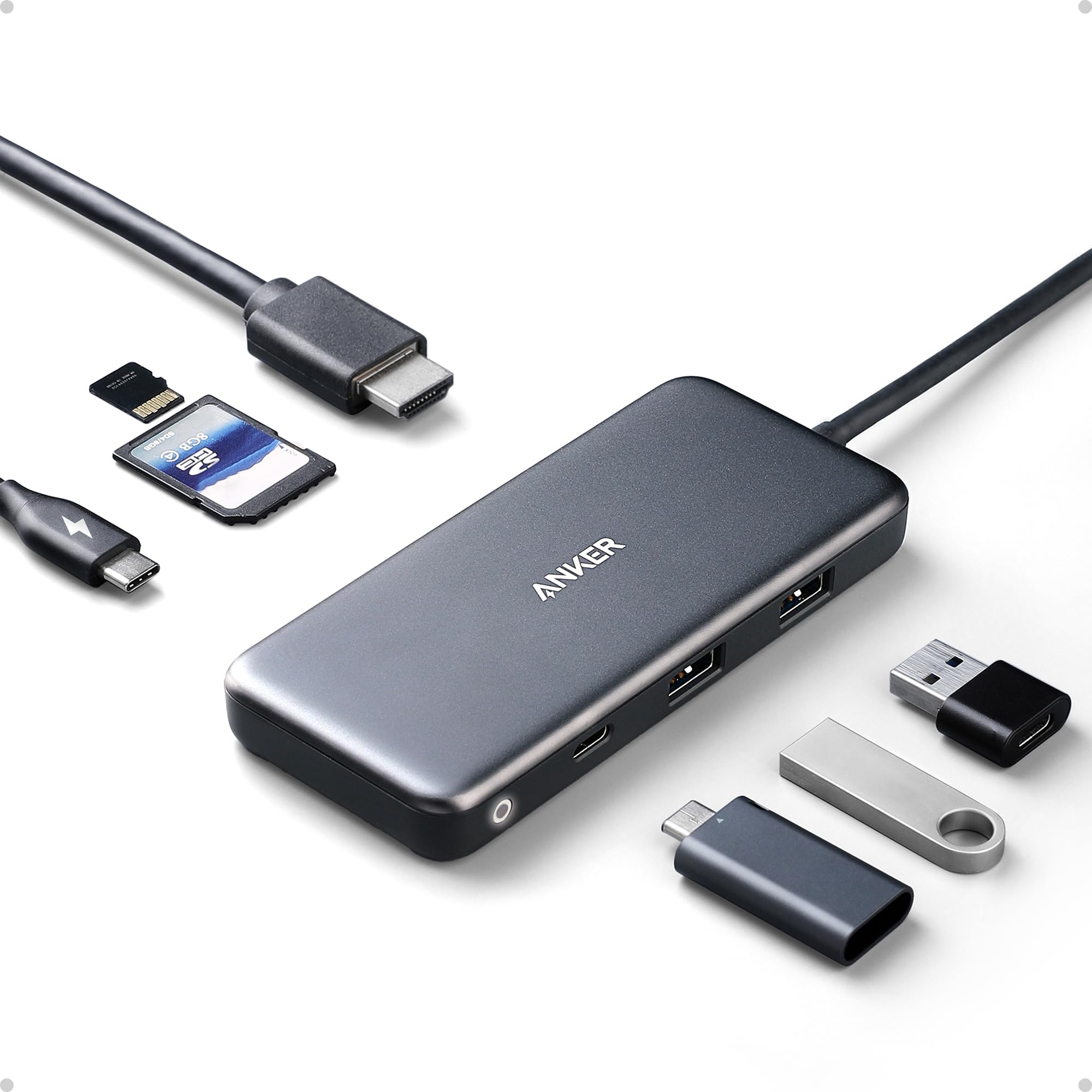
The Anker 7-in-1 is the most battle-tested hub on this list. User reports confirm it surviving three years of daily abuse — drops, scratches, even a run-over by a car — while still delivering full 4K@30Hz video and 5Gbps data through its USB-A and USB-C data ports. The 85W pass-through PD keeps a MacBook Pro charged even when every port is occupied, though Anker recommends a separate 100W power supply to hit that limit reliably.
The port layout is well thought out: two USB-A 5Gbps ports, one USB-C data port, SD and microSD card slots, and a dedicated HDMI output. The plastic enclosure is a minor downgrade from the all-metal competition, but it keeps weight down to 3.5 ounces. Users on Linux Pixelbooks and Android tablets report flawless plug-and-play performance, with the HDMI output working without any driver installation.
The main trade-off is the 4K@30Hz cap. If you need smooth 60Hz output for a high-refresh monitor, this isn’t the hub. Some units arrive with a sticky adhesive residue from the packaging, and the included cable is permanently attached, limiting placement flexibility. Still, for a mid-range hub that simply works year after year, the Anker is hard to beat.
Why it’s great
- Proven long-term durability (3+ years of heavy use)
- Reliable 85W PD pass-through charging
- Compatible with Windows, Mac, Linux, and Android
Good to know
- HDMI limited to 4K@30Hz
- Plastic body feels less premium than aluminum
- Permanent cable can be inconvenient for tight setups
2. Belkin USB-C Hub 5-in-1

Belkin’s 5-in-1 hub strips the port selection to essentials: a 4K HDMI 1.4 port (30Hz), two USB-A 3.1 ports, and dedicated SD and microSD 3.0 card slots. The polished aluminum casing feels dense and premium, measuring just 0.39 inches thick — thin enough to slide into a laptop sleeve without adding bulk. Users specifically praise the dedicated memory card slots, which allow direct transfers from cameras and audio recorders without an extra reader.
Data transfer is capped at 5Gbps across the USB-A ports, which is adequate for most external SSDs and peripherals. Plug-and-play works out of the box with macOS, Windows, and Chrome OS, with no drivers to install. Several users report using it with an iPad Pro for photo and video editing, and the card reader handles UHS-I SD cards at full speed.
The biggest physical complaint is a slightly loose USB-C connector on some units, which can cause intermittent connection loss if the hub is bumped. The 4K@30Hz output is sufficient for office monitors and home theater use but won’t satisfy gamers or video editors needing higher refresh rates. For a sleek, travel-ready hub with solid build quality and reliable SD support, the Belkin is a strong mid-range contender.
Why it’s great
- Slim aluminum design ideal for travel
- Separate SD and microSD 3.0 card slots
- No drivers needed for Mac, Windows, or Chromebook
Good to know
- Loose USB-C connector reported on some units
- HDMI limited to 4K@30Hz
- No PD pass-through for laptop charging
3. Acer 5-in-1 USB C Hub (10Gbps)
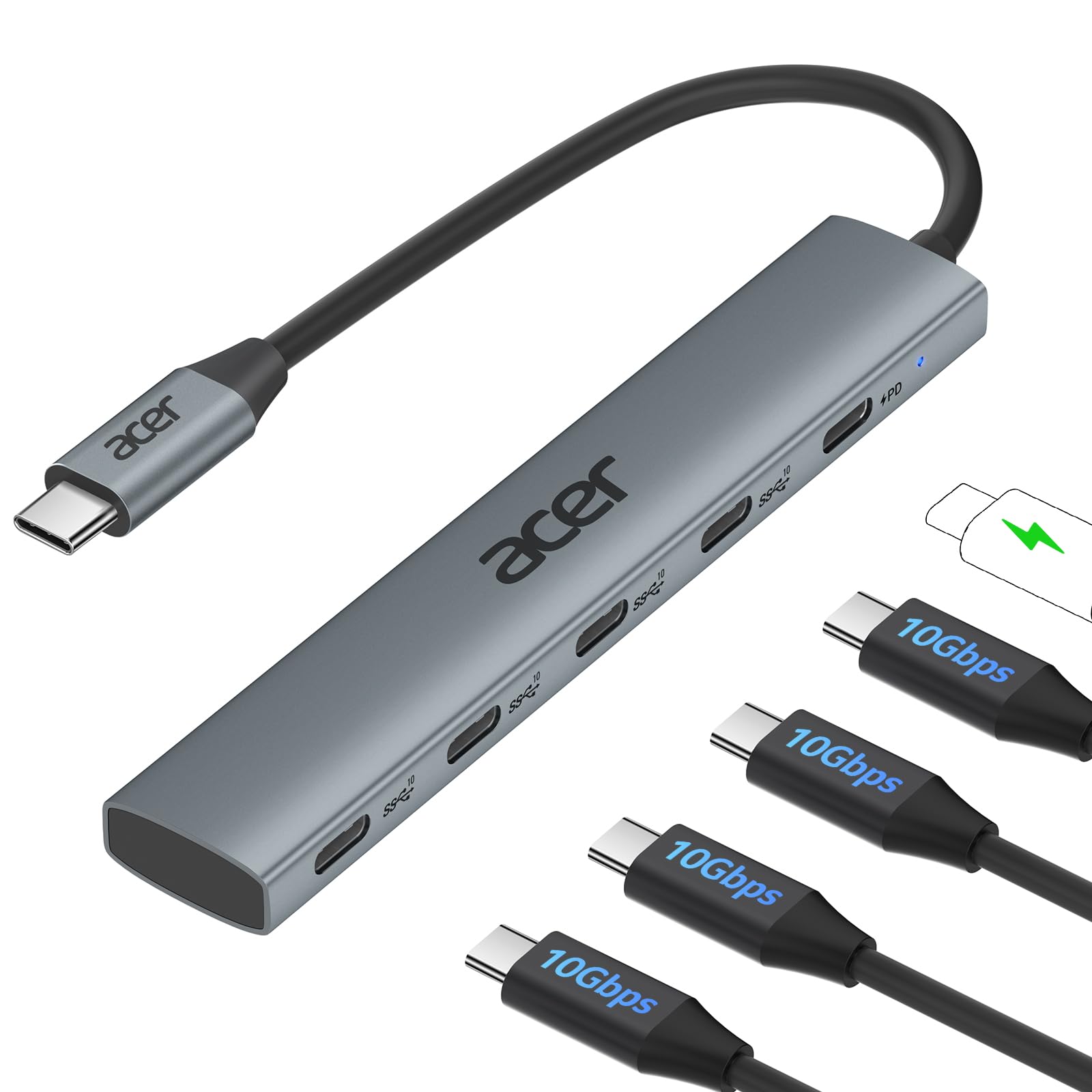
The Acer 5-in-1 is a niche powerhouse for users who prioritize raw data throughput over video output. It features four USB-C 3.2 Gen 2 ports, each capable of 10Gbps transfer speeds — enough to move a 1GB file in about one second. The fifth port is a dedicated 100W PD input that keeps your host laptop charged while the data ports are in use. Mobile DJs and video editors using iPad Pros have reported seamless performance with multiple controllers and capture cards connected simultaneously.
The all-aluminum enclosure provides excellent heat dissipation, which matters when running multiple high-speed drives. It supports plug-and-play on Windows, macOS, Linux, iPadOS, and Android. The key limitation to understand: this hub has no HDMI or DisplayPort output, so you cannot connect an external monitor or TV. It is strictly a data and charging expander.
Bandwidth is shared across the USB-C ports, so connecting two 10Gbps devices at once will negotiate down to lower speeds. The PD port is labeled clearly, but some users initially tried plugging peripherals into it expecting data transfer — only the four numbered ports handle data. For those who need blistering file transfers and don’t require video output, the Acer is a uniquely capable mid-range tool.
Why it’s great
- True 10Gbps USB 3.2 Gen 2 data transfer
- 100W PD pass-through for fast laptop charging
- Compact aluminum body with good heat dissipation
Good to know
- No video output (HDMI/DisplayPort)
- Bandwidth shared across all data ports
- PD port does not support data transfer
4. Melelink 10-in-1 USB C Hub
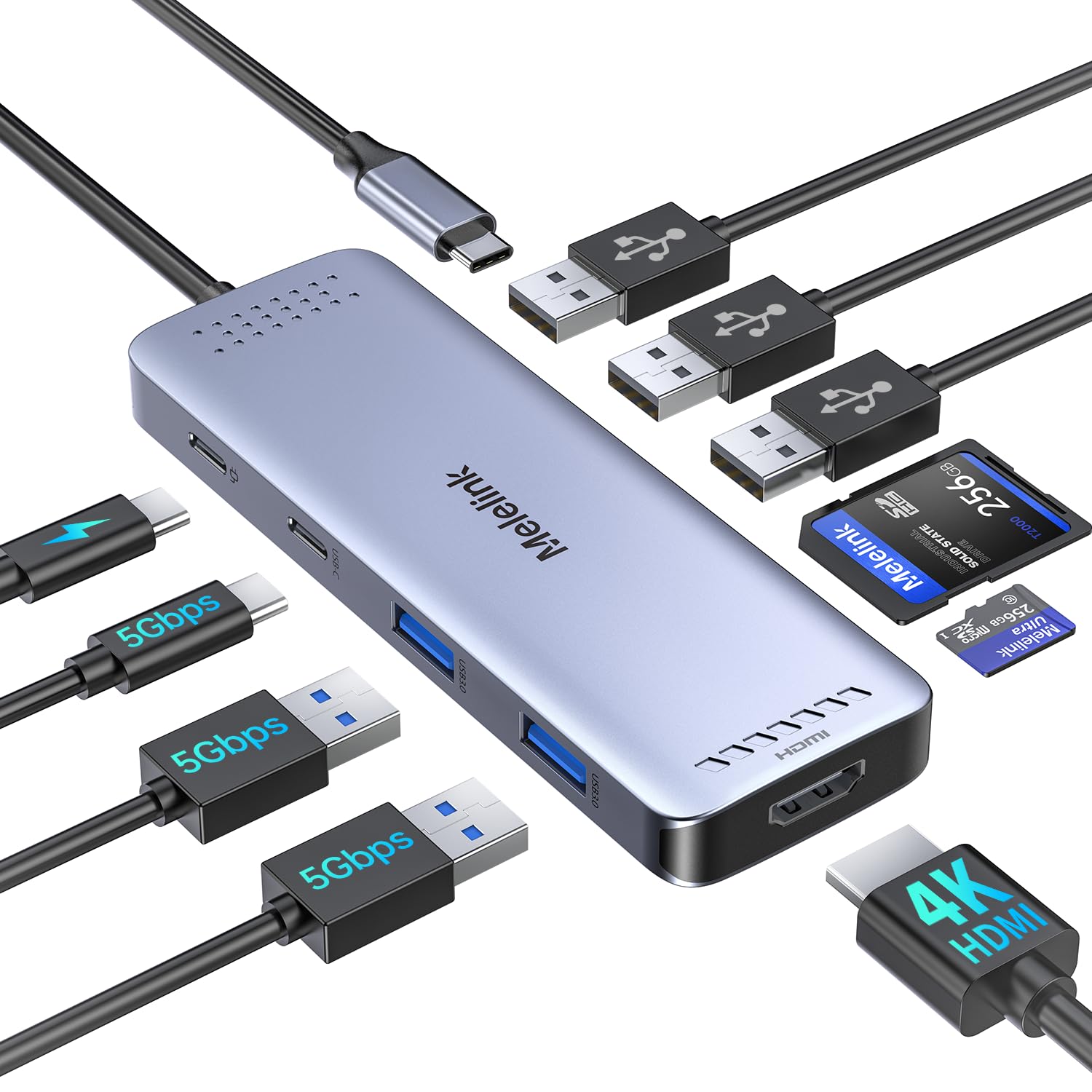
If your desk is a tangle of peripherals, the Melelink 10-in-1 delivers the most ports per dollar in this lineup. It packs a 4K@60Hz HDMI output, two USB 3.0 ports, three USB 2.0 ports, a USB-C data port, a microSD card reader, and 100W PD pass-through. The 4K@60Hz support is a standout feature at this price tier — most competing hubs in the same range only offer 4K@30Hz, making this a genuine advantage for users with high-resolution monitors.
The USB 3.0 ports deliver 5Gbps, while the three USB 2.0 ports are capped at 480Mbps — fine for keyboards and mice but not for external drives. A few users noted that Apple’s SuperDrive doesn’t get enough power through the USB-A ports, so you’ll need a powered hub for optical drives. The hub works reliably with MacBooks, Dell XPS, HP Elitebook, and iPad Pro, with HDMI output running smoothly at 4K without stuttering.
The aluminum body helps with heat management, though the hub can get warm during extended use with multiple devices. One minor software quirk: iPads prompt a “trust this device” confirmation every time the hub is connected. For the price, the Melelink offers an unbeatable combination of port count and high-refresh HDMI output for a mid-range budget.
Why it’s great
- 4K@60Hz HDMI at a budget-friendly price
- 10 total ports including USB-C data and card reader
- 100W PD pass-through keeps laptops charged
Good to know
- USB 2.0 ports are slow (480Mbps)
- Does not power Apple SuperDrive
- iPad prompts “trust” dialog on each connection
5. Hiearcool 7-in-1 USB C Hub

The Hiearcool 7-in-1 is the gateway hub for anyone who just needs a few extra ports without spending much. It offers a 4K@30Hz HDMI output, two USB 3.0 ports at 5Gbps, a USB-C PD port rated at 100W, and SD/microSD card slots. The space-gray aluminum body weighs only 1.8 ounces and measures 0.34 inches thick — slim enough to live permanently in a laptop bag. Users report it works right out of the box with MacBooks, Dell XPS, and even Steam Deck.
The plug-and-play experience is genuinely simple: plug it in, and your monitor, keyboard, and card reader all work immediately. The 100W PD passthrough is generous for an entry-level model, though the USB-C port itself uses a different controller than premium hubs and may negotiate lower speeds with some chargers. Several users reported two to three years of daily use before the USB-C port failed — acceptable longevity for the cost.
The main drawback is the 4K@30Hz HDMI output, which feels dated if you have a modern high-refresh monitor. Some units develop intermittent power delivery issues after extended use, particularly if the hub is frequently hot-plugged. For its low entry price, the Hiearcool delivers exactly what it promises: a functional, compact expansion hub for basic workflow needs.
Why it’s great
- Ultra-light and slim aluminum design
- 100W PD pass-through at a low price
- Works with MacBook, Dell, HP, and Steam Deck
Good to know
- HDMI limited to 4K@30Hz
- USB-C port may fail after 2-3 years of heavy use
- Lower build quality compared to premium brands
FAQ
Will any USB-C hub work with my MacBook Pro M2 or iPad Pro?
Can I use a USB-C hub to charge my laptop and connect a monitor at the same time?
Why does my USB-C hub not detect my external hard drive sometimes?
Final Thoughts: The Verdict
For most users, the best adapter for usb-c winner is the Anker 7-in-1 USB C Hub because it combines reliable 85W PD charging, 4K HDMI, and data ports in a proven package that users trust for years. If you need ultra-fast 10Gbps file transfers without video output, grab the Acer 5-in-1 USB C Hub. And for maximum port count with silky 4K@60Hz output, nothing beats the Melelink 10-in-1 USB C Hub.

Mo Maruf
I created WellFizz to bridge the gap between vague wellness advice and actionable solutions. My mission is simple: to decode the research and give you practical tools you can actually use.
Beyond the data, I am a passionate traveler. I believe that stepping away from the screen to explore new environments is essential for mental clarity and physical vitality.