Our readers keep the lights on and my smoothie glass nicely filled. As an Amazon Associate, I earn from qualifying purchases.
Selecting a camera for an aging parent or loved one is less about resolution and more about response time and ease of use. The right system combines a clear live feed with features like instant call buttons, motion alerts, and secure connections that don’t rely on a home internet setup.
I’m Mohammad Maruf — the founder and writer behind WellFizz. I spend my time analyzing product specifications and market data to identify which monitoring hardware delivers on its promises for real-world caregiver scenarios.
After reviewing dozens of models and thousands of customer reports, this guide breaks down the critical specs and real-world trade-offs to help you choose the best camera for elderly monitoring for your specific caregiving situation.
How To Choose The Best Camera For Elderly Monitoring
The technology inside an elderly monitor goes far beyond a simple video feed. You need to balance connection privacy, ease of interaction for the senior, and the specific alerts that matter most for their safety.
Connection Type: WiFi vs. Direct 2.4 GHz FHSS
A WiFi camera allows remote viewing from anywhere via a phone app, which is ideal for family members who travel or work outside the home. However, many seniors live in areas with spotty internet, or families are concerned about data privacy. Direct 2.4 GHz FHSS systems operate without any internet connection, creating a private closed-loop signal. These systems tend to be more reliable and simpler to set up, but they limit your remote viewing range to approximately 1,000 feet from the camera unit.
Emergency Features: Call Buttons and Motion Detection
The most valuable spec for elderly monitoring is a dedicated SOS call button. When a senior falls or feels unwell, pressing a single large tactile button instantly alerts the caregiver monitor. Look for systems that also offer motion detection alerts, which can notify you if a loved one gets out of bed during the night — a common fall risk. Medication and hydration reminders displayed on the camera unit can provide crucial routine support for seniors with memory challenges.
Screen Size and Two-Way Communication
Caregiver monitors typically range from 2.8 inches to 5 inches. A larger screen makes it easier to see details, but a smaller unit fits in a pocket for moving around the house. Two-way audio is non-negotiable; you need to speak to your loved one to offer reassurance or guidance. Higher-end models include two-way video calling, which allows the senior to see your face, providing powerful emotional comfort.
Quick Comparison
On smaller screens, swipe sideways to see the full table.
| Model | Category | Best For | Key Spec | Amazon |
|---|---|---|---|---|
| CallToU 2-Way Talk | No WiFi | SOS call button & alerts | 2.8″ screen, 720p, 4x zoom | Amazon |
| Aurumbach 4″ AI Screen | WiFi | AI conversation & video calling | 4MP, 355° pan, auto-tracking | Amazon |
| KEENLUK 4.3″ Screen | WiFi | One-button video calling | 1080p, 350° motion detection | Amazon |
| SIYZHOP 4.3″ Screen | WiFi | Two-way video via phone app | HD, 360° rotational view | Amazon |
| Tapo C100 4-Pack | WiFi | Multi-room security coverage | 1080p, 117° FOV, 40ft night | Amazon |
| Elderly Monitor ABM200 | No WiFi | Med reminders & temperature | 5″ screen, PTZ, 3500mAh | Amazon |
| Smart Caregiver Video Monitor | No WiFi | Portable fall prevention | 2.8″ screen, VOX mode | Amazon |
In‑Depth Reviews
1. CallToU 2-Way Talk Baby Monitors for Elderly with Call Button
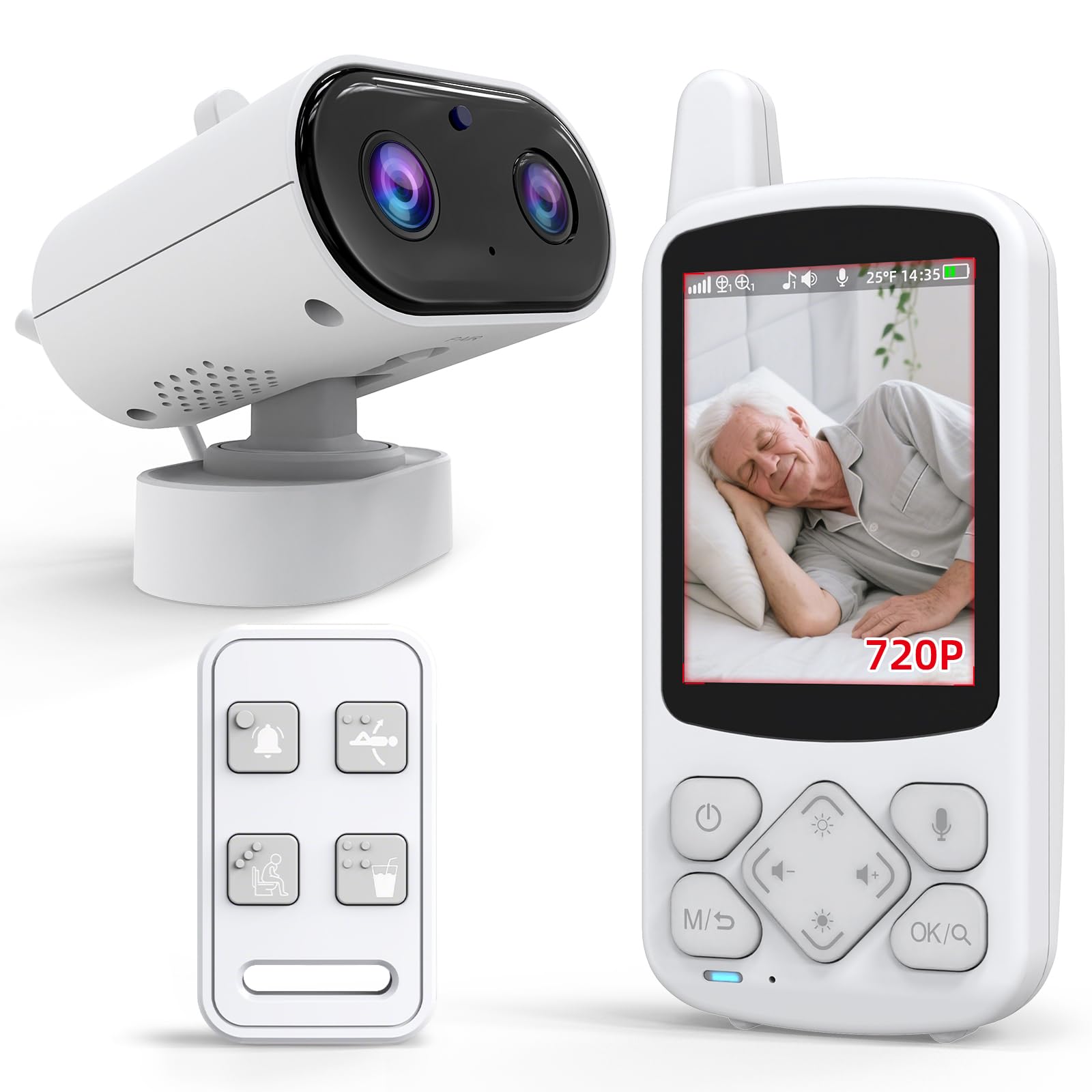
The CallToU system operates on a secure 2.4 GHz FHSS signal, meaning no internet connection is needed for the camera or receiver to function. This is a major advantage for families concerned about hacking or for seniors living in homes with unreliable WiFi. The 2.8-inch portable receiver fits into a pocket, allowing the caregiver to move freely throughout the house while maintaining a live audio-video link.
Its standout feature is the one-press SOS assistive button. When pressed, the monitor emits an immediate audible alarm. The system also includes programmable daily alerts like “drink water” and “move,” which appear on the screen as gentle nudges — a practical benefit for seniors with memory conditions. Infrared night vision provides clear black-and-white visuals in complete darkness, and the 4x digital zoom lets you check for small movements or breathing.
The primary trade-off is the 720p display resolution, which is lower than the 1080p or 4MP options found on WiFi-based competitors. Additionally, some users report that the lowest audio volume setting is still too loud for quiet nighttime use, and the screen brightness cannot be dimmed enough for dark rooms. However, for a dedicated closed-loop system focused on safety alerts, the trade-offs are minimal.
Why it’s great
- No WiFi required for private, interference-free connection
- One-touch SOS button provides immediate caregiver alarm
- Programmable daily alerts for medication and hydration
- Compact portable receiver with long battery life
Good to know
- Only 720p resolution on a 2.8-inch screen
- Lowest audio and brightness settings may still be too high for dark rooms
- Some units have been reported to fail outside the return window
2. Aurumbach Indoor Security Camera with 4″ Screen
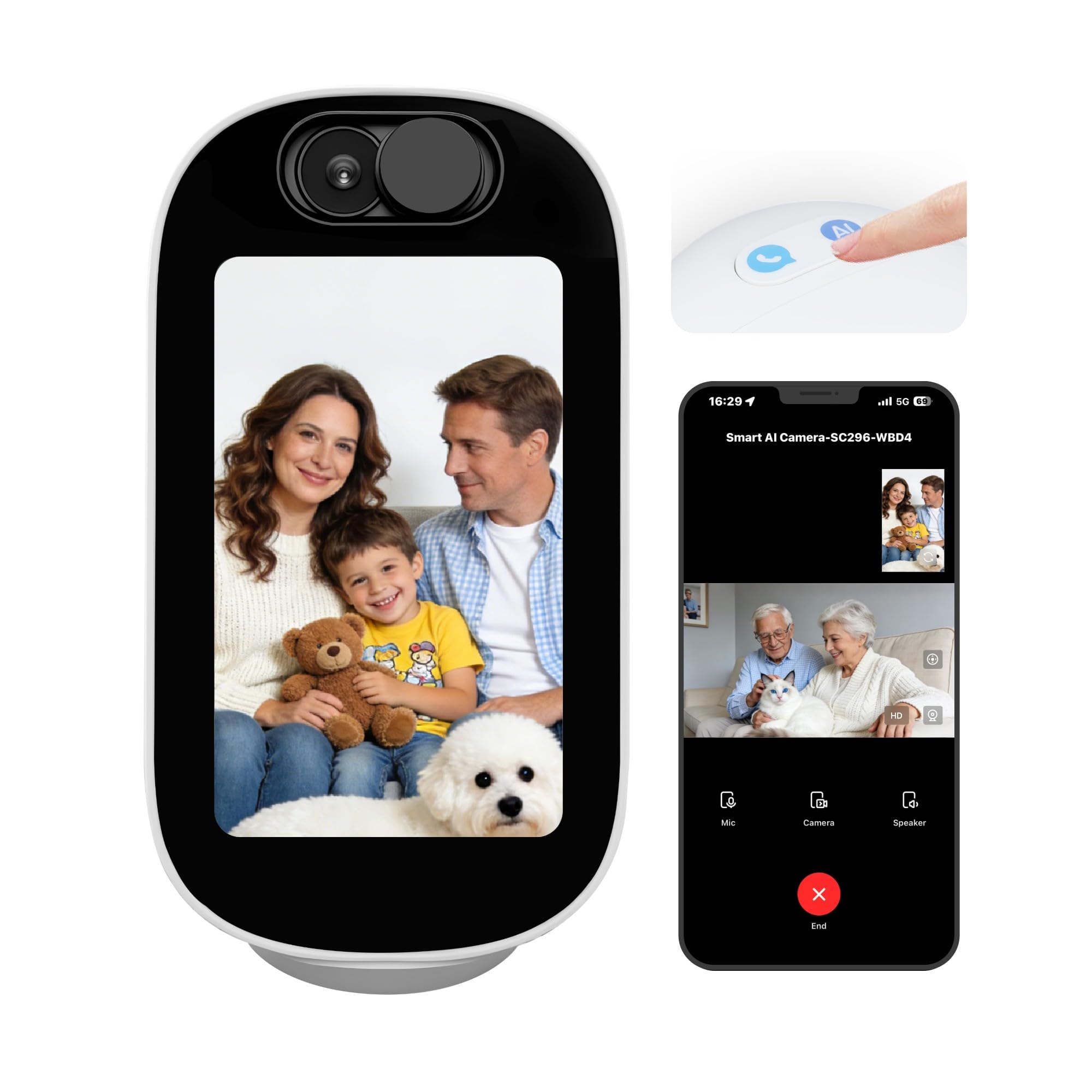
This premium WiFi camera features a built-in 4-inch display on the unit itself, enabling full two-way video calling. This transforms the camera from a passive monitoring device into an active communication hub. The senior can see and speak to the caregiver, reducing feelings of isolation. The AI interaction mode includes voice chat, storytelling, and simple Q&A, which can serve as a companion for seniors who spend long periods alone.
Resolution hits 4MP (about 2.5K), which is significantly sharper than the 1080p and 720p models in this roundup. The motorized head pans 355 degrees and includes auto-tracking, so if the senior moves across the room, the camera follows them without manual adjustment. Dual-band WiFi (2.4 GHz and 5 GHz) ensures the video stream remains stable even on crowded home networks. Motion, human, and baby-crying detection are built in, with push notifications sent straight to the phone.
The main concern with this unit is its reliance on an app (Smart Life) that connects to servers based in Hong Kong — a privacy flag noted by some users. Additionally, a small number of reports indicate the camera stops responding after several days and requires a full reset. For tech-comfortable families who want the highest resolution and interactive features, the trade-off is a greater complexity and potential security consideration compared to a closed-loop system.
Why it’s great
- 4MP resolution (2.5K) with sharp day and night video
- Built-in AI for conversation, storytelling, and Q&A
- 355-degree pan with auto subject tracking
- Dual-band WiFi ensures stable remote streaming
Good to know
- Cloud server location in Hong Kong flagged by some users for privacy
- Some units have stopped responding and required a full reset
- App-based setup is more complex than a dedicated monitor
3. KEENLUK Home Security Camera with 4.3″ Screen

The KEENLUK camera uses a large 4.3-inch screen and a dedicated one-button call feature that directly connects the senior to the caregiver’s phone app. This reduces friction — no need for the senior to navigate a smartphone or a complex menu. The button is tactile and easy for arthritic fingers to press. The camera supports 1080p HD video with a 350-degree wide-angle lens, providing broad coverage of a room.
Motion detection is built in, and alerts are sent to the phone app. The device-to-device calling function also allows family members within the same home to initiate video calls between the camera and the caregiver unit without the senior needing to touch anything. Night vision works automatically in low light, and the entire unit is made of sturdy ABS plastic. The setup process, guided by a QR code scan, takes roughly six minutes for most users.
The biggest recurring issue is with the companion mobile app. Multiple users report persistent WiFi syncing failures, app login errors, and a lack of customer support to resolve them. A few units have stopped functioning after about a month, requiring a full factory reset. For families who can get past the initial setup, the hardware is solid — but the app experience is a genuine risk.
Why it’s great
- One-touch call button — seniors don’t need a smartphone
- 1080p HD video with 350-degree wide-angle coverage
- Device-to-device calling for intercom use within the home
- Quick setup process (around six minutes)
Good to know
- Companion app has frequent WiFi connection and login issues
- Some units stop responding after a month and need a factory reset
- Poor customer support reported for app-related problems
4. SIYZHOP 4.3″ Screen Indoor Security Camera
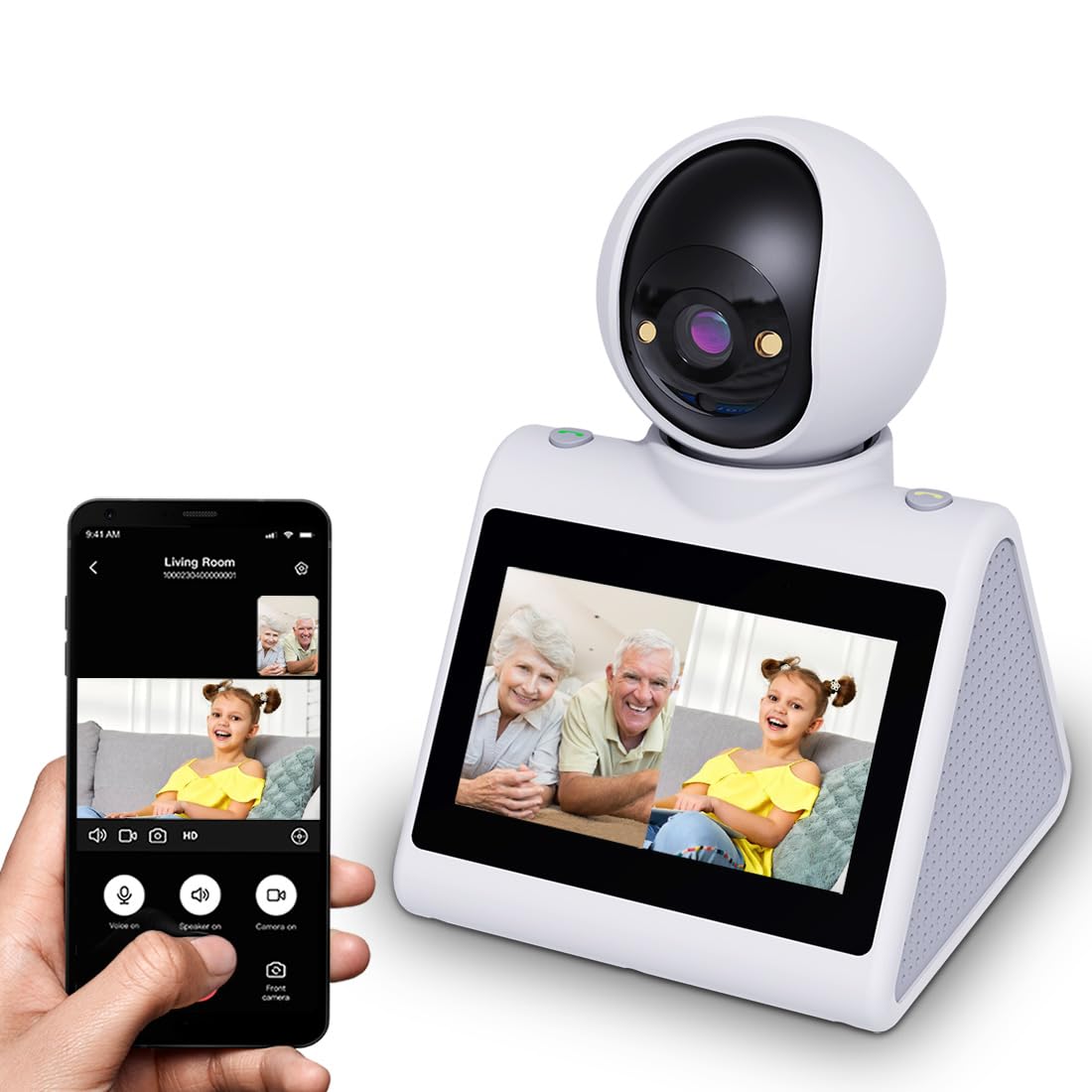
The SIYZHOP camera is designed around a “button calling” feature that allows the senior to initiate a video call directly to a caregiver’s phone. The 4.3-inch display sits on the camera unit itself, making it feel like a dedicated communication device rather than a surveillance camera. It runs on dual-band WiFi (2.4 GHz and 5 GHz), which gives it an edge in homes where the 2.4 GHz band is congested.
The camera provides full 360-degree rotation via the phone app, allowing the caregiver to scan the entire room remotely. Smart alarm reminders can be set for feeding, medication, and bedtime, and these appear as text notifications on the unit’s screen. The two-way audio is clear on both ends, and the night vision is sharp enough for a large bedroom. Multi-user sharing supports up to 10 family members, making it easy for a distributed care network to stay connected.
The durability of this unit is a question mark. Several verified reviews report that after a few months of daily use, the camera develops frequent connection drops that require reinstalling the app. One user experienced a failure with the two-way call feature that could not be resolved. For short-term use or as a secondary option, the feature set is strong, but long-term reliability has drawn criticism.
Why it’s great
- Button calling lets seniors connect without a smartphone
- Dual-band WiFi (2.4 GHz and 5 GHz) for stable streaming
- 360-degree remote room rotation via phone app
- Timed text alerts for medication and daily routines
Good to know
- Some units develop connection drops after a few months
- Two-way call feature has failed on some units without resolution
- Customer service response is inconsistent for hardware issues
5. Tapo 1080P Indoor Wired Security Camera (4-Pack)

This is a 4-pack of wired 1080p cameras from Tapo — a brand well regarded for affordable home security. Each camera offers a 117-degree field of view and infrared night vision up to 40 feet. The key advantage here is coverage: you can place one camera in the living room, one in the bedroom, one in the kitchen, and one in a hallway, giving total visibility of a senior’s daily movement patterns.
Storage is truly subscription-free if you use a microSD card (up to 512 GB per camera). Motion detection sends push notifications to your phone, and the two-way audio is loud and clear. The system works with Amazon Alexa and Google Assistant, so you can say “Show me the living room camera” on an Echo Show. Setup takes under five minutes per camera using the Tapo app, and the included wall mount makes installation straightforward.
These units do not include a dedicated caregiver monitor screen or an SOS call button. They are strictly phone-based security cameras designed for passive monitoring. If your goal is a simple, reliable multi-room setup to check in via your phone, this is the best value. If you need a dedicated screen-based monitor or an emergency alert button, you will need to look at a closed-loop system instead.
Why it’s great
- Four cameras for full multi-room coverage at a low per-unit cost
- No monthly subscription for local microSD recording
- Fast setup and reliable Tapo app with clear notifications
- Works with Alexa and Google Assistant for voice control
Good to know
- No dedicated caregiver monitor — phone-only viewing
- No emergency SOS button or call alert feature
- Wired power — cannot run on battery during power outages
6. Elderly Monitor with Camera and Audio (ABM200)

This dedicated closed-loop system skips WiFi entirely, using a 2.4 GHz FHSS signal to connect the camera to a 5-inch handheld monitor. The screen is the largest of the dedicated monitor options in this guide, making it easier to see details like whether a senior is breathing or has fallen. The camera unit itself includes pan-tilt-zoom (PTZ) remote control, allowing the caregiver to sweep the entire room from the monitor.
A unique feature is the built-in medication and feeding reminder system, which displays alerts directly on the monitor screen. The temperature sensor tracks the room environment and sends an alert if the temperature falls outside a preset range — useful for seniors who may not notice they are too hot or too cold. The one-touch call button is ergonomically designed with raised tactile markers, and pressing it sends distinct SOS, Help, Toilet, Fall, or Water alerts to the monitor. A 3500mAh battery provides extended portable use.
Audio quality is this system’s weak point. Multiple users note the sound is not crisp on the caregiver’s end; while the senior can hear the caregiver clearly, the caregiver may miss subtle sounds like a door opening or a quiet call for help. Some units also suffer from connection drops after a few days, requiring a full re-sync. For a system packed with senior-specific features, the audio limitation is a significant miss.
Why it’s great
- Large 5-inch screen with full PTZ remote control
- Built-in medication, temperature, and feeding alerts
- No WiFi required for a secure, private connection
- Ergonomic call button with distinct alert types
Good to know
- Audio quality from the camera to the monitor is mediocre
- Some units disconnect after days and require re-sync
- Microphone sensitivity may miss soft sounds in the room
7. Smart Caregiver Video Monitor for Elderly Care
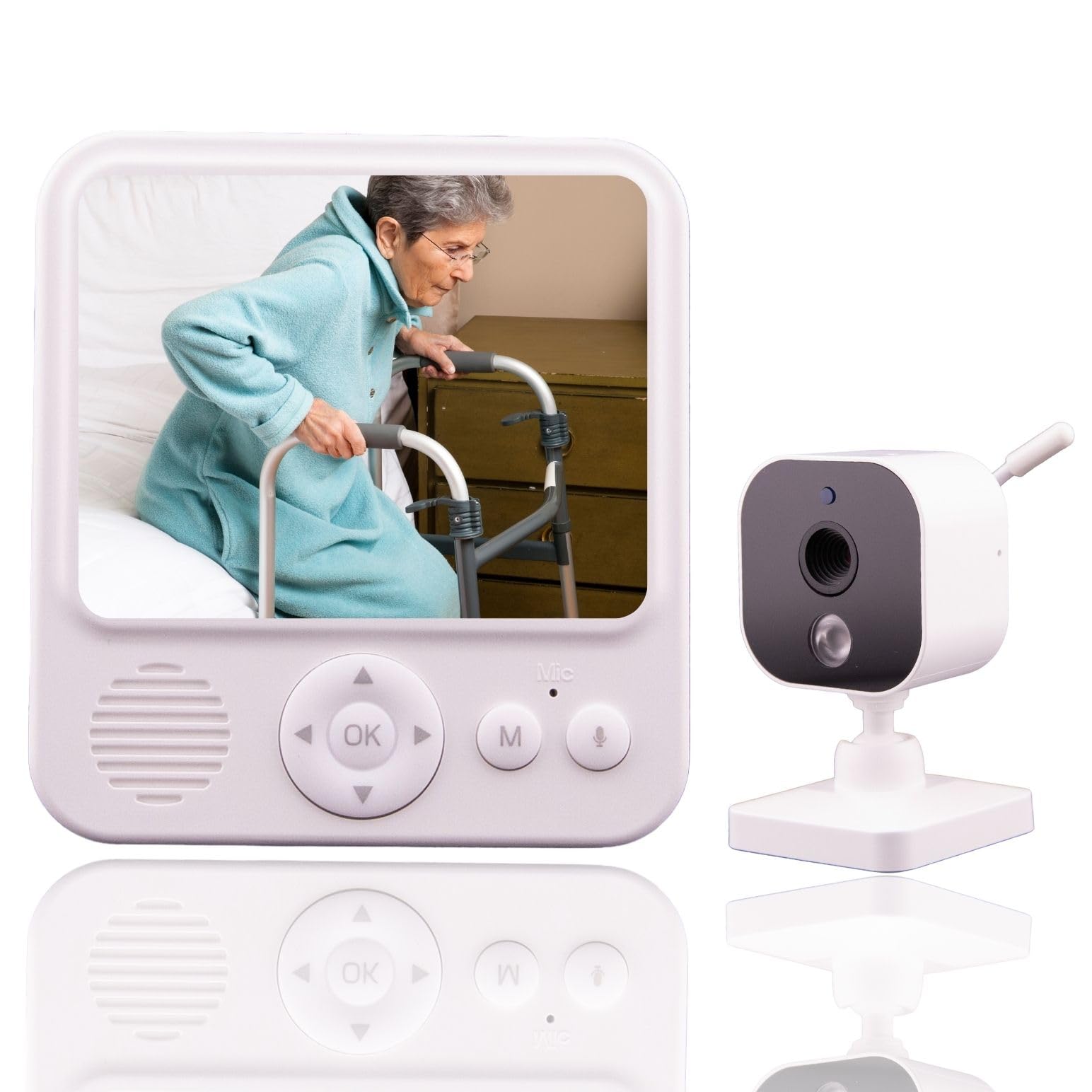
The Smart Caregiver monitor operates entirely without WiFi, using a secure RTSP wireless connection. The camera and monitor pair automatically out of the box. The caregiver unit has a 2.8-inch screen with a belt clip, making it highly portable. VOX (voice-activated) mode keeps the screen off when the room is quiet, preserving battery life, and automatically wakes when sound is detected — this is excellent for overnight monitoring without the screen glare disturbing sleep.
Two-way audio is included, with a push-to-talk button on the monitor and an always-on microphone on the camera. The infrared night vision works reliably in a dark room. The primary use case here is fall prevention and wandering detection — the camera is designed to work alongside other Smart Caregiver bed and chair alerts (sold separately). The simple plug-and-play design means no app setup, no password entry, and no network troubleshooting.
The main drawback is the small screen size and lower resolution, which makes it harder to see fine details like facial expressions or subtle breathing movements. Some users report that after months of continuous daily use, the camera and monitor lose their wireless sync and require a complete power-down restart to reconnect. For a basic, reliable system that prioritizes simplicity and portability, this is a strong entry-level choice.
Why it’s great
- Completely WiFi-free for instant, private setup
- VOX mode extends battery by waking only on sound
- Portable design with belt clip for on-the-go caregivers
- Easy plug-and-play pairing — no app required
Good to know
- Small 2.8-inch screen with lower resolution
- Monitor and camera can lose sync after extended use
- Relies on additional Smart Caregiver products for automated alerts
FAQ
Do I need an internet connection to use an elderly monitoring camera?
What is the most important safety feature for a senior monitoring camera?
Can I use a standard baby monitor for elderly care?
How do I ensure the video feed between the camera and monitor is private?
Final Thoughts: The Verdict
For most users, the best camera for elderly monitoring winner is the CallToU 2-Way Talk System because it combines a secure no-WiFi connection, a one-touch SOS button, and daily routine alerts in a portable package that lets the caregiver move freely. If you want AI-powered conversation and a high-resolution 4MP video calling experience, grab the Aurumbach 4″ AI Screen Camera. And for multi-room coverage with no subscription fees, nothing beats the Tapo C100 4-Pack.

Mo Maruf
I created WellFizz to bridge the gap between vague wellness advice and actionable solutions. My mission is simple: to decode the research and give you practical tools you can actually use.
Beyond the data, I am a passionate traveler. I believe that stepping away from the screen to explore new environments is essential for mental clarity and physical vitality.