Our readers keep the lights on and my smoothie glass nicely filled. As an Amazon Associate, I earn from qualifying purchases.
That expensive OLED panel you just bought deserves a mount that doesn’t sag, wobble, or limit your viewing angles. An articulating TV mount is the only solution for corner installations, bedroom setups, or anyone who wants full control over screen position — but picking a weak bracket means risking your TV’s stability and your family’s safety. The wrong choice introduces a permanent tilt sag or a wobbly arm that never feels solid, regardless of how well you bolted it to the studs.
I’m Mohammad Maruf — the founder and writer behind WellFizz. Over the past decade I’ve analyzed the steel gauge, weight ratings, stud compatibility, and articulation geometry of hundreds of TV mounts to separate the truly rigid designs from the flex-prone ones, so you can buy with total confidence on your first attempt.
Whether you are mounting a massive 120-inch screen or a slim OLED in a tight corner, this guide to the best articulating tv mount will show you exactly which models deliver rock-solid support, smooth motion, and simple installation every single time.
How To Choose Your Articulating TV Mount
Picking the wrong bracket can mean a crooked screen, blocked ports, or a dangerous tip-over hazard. Focus on these four factors to match the mount to your TV and your room layout perfectly.
Weight rating and VESA pattern
Every mount lists a maximum weight capacity — never exceed it, and ideally choose a bracket rated at least 20% above your TV’s actual weight. The VESA pattern (the bolt-hole spacing on the back of your TV, expressed in millimeters) must be fully compatible. Most modern sets fit 400×400 mm or 600×400 mm, but always measure before ordering.
Stud spacing and wall type
Standard US homes have studs at 16″ on center, but older construction or custom walls may use 18″ or 24″ spacing. Confirm your stud layout with a stud finder, then pick a mount whose wall plate matches that spacing exactly. Do not drywall-anchor an articulating arm heavier than a small picture frame — full-motion mounts must be screwed into wood, concrete, or brick.
Extension depth and arm type
The distance from wall to screen matters more than most buyers realize. Shorter dual-arm mounts (16″ to 22″) offer better sag resistance and a lower profile (under 3″ when retracted). Long single-arm mounts (up to 40″) are ideal for corner rooms or extra-wide viewing angles but may introduce lever sag if the steel isn’t thick enough. Measure the viewing distance from your seat to where the screen will sit when fully extended — that’s your minimum arm reach.
Motion range and cable management
Look for tool-free tilt adjustments (typically +5° to -15°) that let you change angles without reaching behind the screen. Swivel range depends on screen size; a 90° swivel with a 65″ TV may not clear a side wall. Built-in cable clips, Velcro straps, or pass-through channels keep HDMI and power cords organized. Some premium mounts even include an integrated power strip with USB ports for a completely tidy install.
Quick Comparison
On smaller screens, swipe sideways to see the full table.
| Model | Category | Best For | Key Spec | Amazon |
|---|---|---|---|---|
| Mounting Dream MD2617 | Mid-Range | Everyday 42″-65″ TVs | Six articulating arms, 16.6″ max reach | Amazon |
| Perlegear Long Arm 37.4″ | Mid-Range | Corner placements, unique room layouts | 37.4″ extended reach, single-stud design | Amazon |
| monTEK Ultra Slim | Mid-Range | Large OLEDs wanting low profile | 1.1″ retracted depth, holds 132 lbs | Amazon |
| USX STAR Heavy Duty | Premium | 85″ to 120″ giant screens | 28″ extension, fits 24″ studs, 220 lbs | Amazon |
| SANUS OLF22 | Premium | Finger-touch smooth motion | 22″ extension, 35° tilt, UL listed | Amazon |
| Perlegear PGLF11 | Premium | Clean builds with built-in power strip | 22″ reach, 3 AC outlets + 2 USB ports | Amazon |
| Mounting Dream MD2285-XL | Premium | Extra-long reach corner setups | 40″ extended reach, 150 lb capacity | Amazon |
In‑Depth Reviews
1. Mounting Dream UL Listed TV Wall Mount MD2617

The Mounting Dream MD2617 earns the top spot because it weaponizes six articulating arms to eliminate sag entirely, even when supporting a 100 lb TV at full extension. Dual-arm designs on each side share the load symmetrically, so you never get the single-arm droop that forces you to re-level the screen after every tilt adjustment. With 16.6″ of reach and a retracted depth of just 2.5″, it keeps big TVs (42–84 inches) tight against the wall while offering enough swing for most living-room seating layouts.
Installation is deceptively fast thanks to a paper template, a bubble level, and pre-labeled hardware bags that prevent the “where did those M8 spacers go?” panic halfway through. The ±4° post-installation leveling is generous enough to correct a stud that sits slightly off. Owners consistently note that after four months of daily use near the 100 lb weight limit, the bracket shows zero flex or loosening — a testament to the cold-formed steel construction.
The only real catch is the tight 16″ stud-spacing requirement. If your wall uses 18″ or 24″ centers, you’ll need to build a plywood backboard across the studs. Also, the tilt range (+5°/-15°) is adequate but not class-leading — corner installations that need extreme down-angle may prefer a long-arm design. For the vast majority of standard living-room setups, this is the most balanced articulating bracket you can buy.
Why it’s great
- Six-arm geometry delivers zero wobble at full extension
- Included paper template and bubble level simplify DIY installation
- Retracts to only 2.5″ for a clean low-profile look
Good to know
- Designed strictly for 16″ stud spacing — no 18″ or 24″ options out of the box
- Single-arm models offer longer reach for corner rooms (this maxes at 16.6″)
2. Perlegear Long Arm TV Wall Mount (37.4″)

The Perlegear Long Arm mount solves the single hardest problem in TV placement: centering a screen on a wall that has no stud within the ideal position. Its single-stud wall plate lets you install virtually anywhere a stud exists, then the 37.4″ articulating arm swings the TV into the perfect spot — even 90° into a corner. The heavy-duty steel construction with a reinforced pivot prevents the lateral wobble that plagues cheaper long-arm brackets.
Tool-free tilt (+5°/-15°) and ±3° post-installation leveling mean you can dial in the angle without needing extra wrenches. Owners consistently praise the “absolutely zero” wobble when supporting 65″ panels at full extension, and the retracted depth of 2.6″ keeps the profile surprisingly slim for such a long arm. The included drilling template and pre-labeled hardware make the process straightforward, though the mount itself is heavy enough to warrant a second pair of hands during the lift.
On the downside, this mount is limited to TVs from 32 to 65 inches and max VESA 400×400 mm, so it won’t work with massive 75″+ panels. The single-stud approach, while flexible, concentrates all the load on one vertical point — you absolutely must hit the center of a wood stud. If your room layout demands corner placement or offset positioning, this is the most stable long-arm option available.
Why it’s great
- 37.4″ reach makes corner installations and offset positioning effortless
- Reinforced central pivot eliminates lateral sag at full extension
- Retracts to 2.6″ for a tidy look when not in use
Good to know
- Maximum screen size is 65″ with VESA up to 400×400 only
- Single-stud design requires precise centering — no margin for error
3. monTEK Ultra Slim TV Wall Mount

The monTEK Ultra Slim is the bracket you choose when the TV needs to disappear into the wall when not in use. It retracts to a startling 1.1″ — barely the thickness of a paperback book — while still offering a full 16.5″ of extension and ±60° of swivel. That slim folded profile gives you a gallery-wall aesthetic without sacrificing the flexibility of a full-motion mount. The 132 lb weight rating and 600×400 mm VESA compatibility mean it supports 83-inch and even some 90-inch OLED panels without strain.
The six-arm hinge mechanism (three per side) maintains parallel vertical alignment even when the TV is fully extended and tilted. A clever Velcro cable-management strap on the back keeps HDMI and power cables tucked out of sight. Owners of 83″ LG G5 series have reported zero sag after months of daily swiveling, noting that the offset loading does not cause the cantilever droop common in thinner profiles. The tilt range (+3°/-12°) is a bit narrower than competitors, but the tool-free adjustment is smooth and clicks into position without drifting.
The tilt friction screws are quite small and require careful tightening — overdo it and the tilt becomes stiff; underdo it and the screen slowly pivots forward on heavier sets. Also, the 1.1″ profile leaves almost no room behind an ultra-thin OLED for a flush-mounted streaming stick. If your priority is the slimmest possible wall-hugging look with most of the full-motion features, the monTEK delivers beautifully.
Why it’s great
- Only 1.1″ deep when retracted – practically flush with the wall
- 132 lb capacity supports large 83-90″ TVs without sag
- Velcro cable management keeps the installation clean
Good to know
- Narrow 3°/-12° tilt range limits extreme downward angles
- Behind-TV clearance is tight for chunky plugs or streaming sticks
4. USX STAR Heavy Duty Full Motion TV Mount
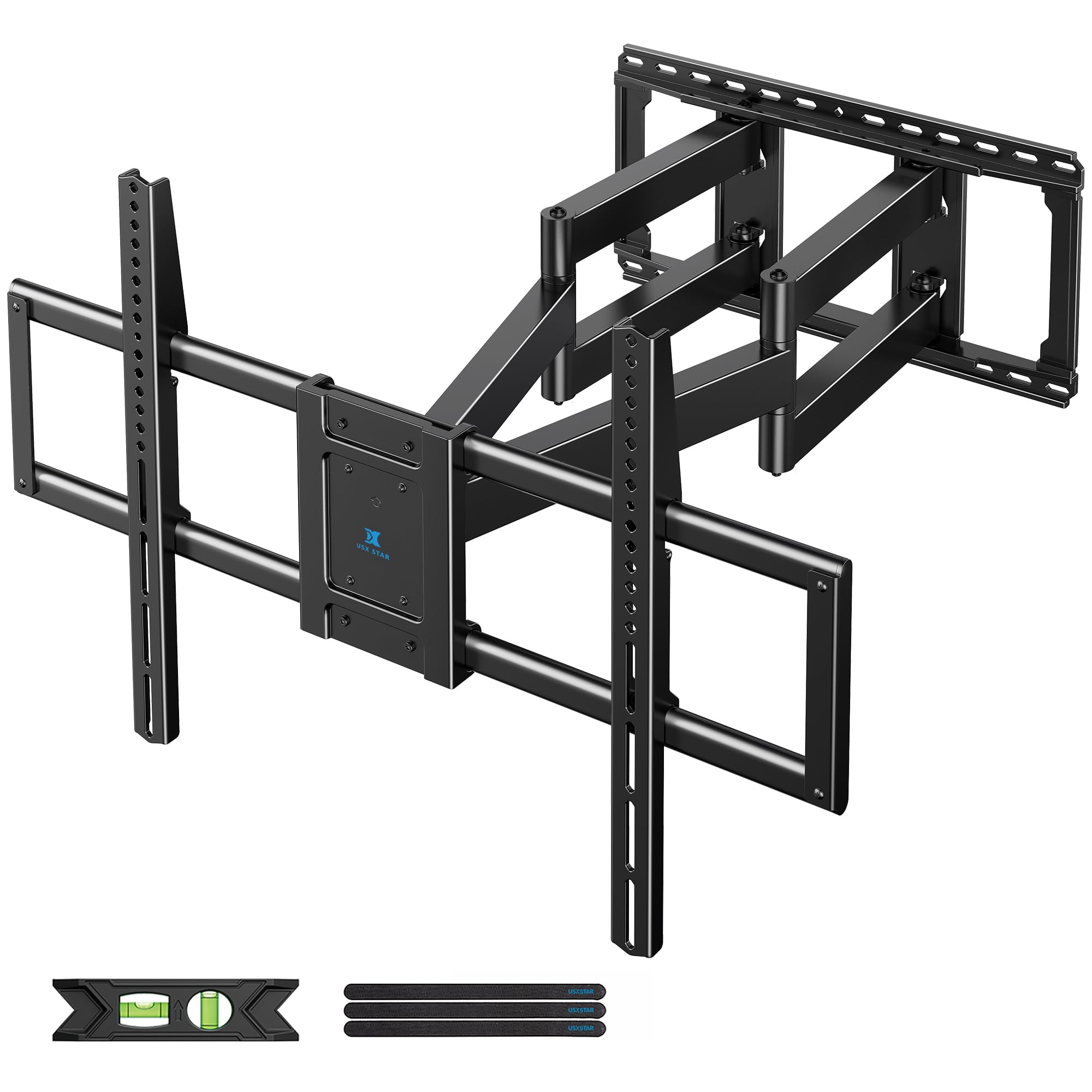
The USX STAR mount is engineered for the rare but growing number of buyers who own 98-inch, 100-inch, and even 120-inch display panels. With a 220 lb weight rating and compatibility with VESA patterns up to 900×600 mm, it laughs at loads that would snap a standard mount. The six-arm articulated design uses thickened cold-rolled steel that keeps a 160-lb screen rock-steady at the full 28″ extension — no sag, no drift, no re-leveling after a tilt adjustment.
What sets this mount apart is the universal stud compatibility: it works with 12″, 16″, 18″, and 24″ wood stud centers, so it fits virtually any residential or commercial framing. A spring-loaded lower latch lets the TV swing away from the wall for cable access without completely dismounting the panel — a huge convenience when adding new HDMI sources later. The tilt range (+10°/-10°) and swivel (±65°) are generous for the size class, and the pre-assembled panel reduces the installation to three basic steps.
The reality of a 28″ extension on a 100″ TV is that the whole assembly projects nearly three feet from the wall — measure your room depth carefully before committing. The pull cords included for unlatching are a bit short for extra-large panels, so you may need zip ties for easier reach. Also, this mount requires three people (or a lift) for installation due to sheer weight. If you own a giant TV, this is the only bracket that handles it properly.
Why it’s great
- 220 lb rating and 900×600 mm VESA support true cinema-sized panels
- Works with 12″ to 24″ stud spacing – universal wall compatibility
- Spring-loaded latch lets you swing TV out for back-panel access
Good to know
- Requires at least two helpers or a mechanical lift for installation
- Pull cords are short for 100″+ screens; zip ties are a workaround
5. SANUS Premium Full Motion TV Mount OLF22
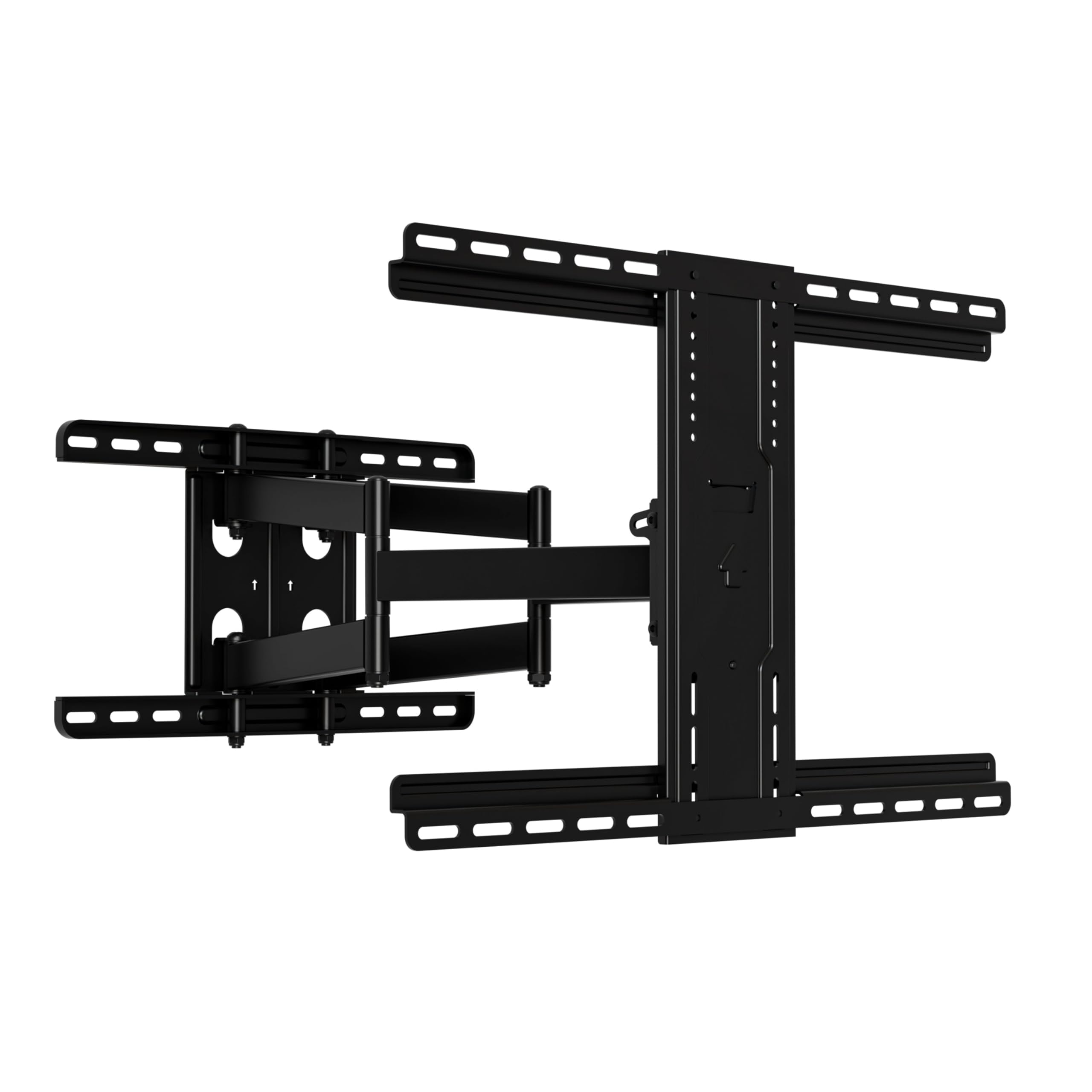
The SANUS OLF22 is the mount you buy when you want the motion experience to feel as premium as the TV itself. Its dual-arm mechanism glides with a fluid, friction-balanced action that requires only a single finger to push, pull, or tilt — no jerking, no sudden resistance, no wobbling after settling. The 22″ extension gives you ample reach for corner seats, and the 35° tilt range is the widest of any mount in this roundup, making it ideal for bedrooms where the TV must aim downward from a high wall position.
Installation is genuinely quick: the wall plate comes pre-assembled, the hardware bag is comprehensive, and the drilling template plus clear manual gets the process under 20 minutes for experienced DIYers. The retracted depth of 2.5″ leaves enough clearance for streaming sticks and soundbar cables behind the screen. UL listing and rigorous safety testing back the 125 lb weight rating, and owners consistently confirm that 75-77″ OLEDs stay perfectly level with zero sag, even after months of daily adjustments.
The most common critique is that the tilt friction clamp requires substantial torque to lock in place, and on heavier TVs (around 80 lbs) the screen can gradually tilt forward if not tightened sufficiently. Also, the M8 screw assortment could be more generous for non-standard TV mounting holes. For the silkiest user experience and the most tilt flexibility in a 22″ bracket, the SANUS is the undisputed leader.
Why it’s great
- Finger-touch motion with zero jerk or wobble at any position
- 35° tilt range is the widest in this review – great for high-wall mounting
- UL listed and safety-tested with a very smooth glide path
Good to know
- Tilt friction clamp needs significant tightening on heavier panels
- M8 screw selection may require purchasing additional sizes for uncommon TVs
6. Perlegear Full Motion TV Wall Mount with Power Strip PGLF11

The Perlegear PGLF11 flips the script by integrating a 3-outlet power strip with two USB ports directly into the mount’s wall plate, solving the cable nightmare that plagues every home theater installation. The 7.87-ft power cord routes neatly behind the screen, so you never need a separate surge protector dangling below the TV. For a family room or media den, this single feature saves hours of cable-management frustration and eliminates visible wires entirely.
Beyond the power strip, the PGLF11 is a capable performer in its own right. The dual articulating arms are 30% thicker than typical mid-range brackets, supporting up to 150 lbs and TVs from 42 to 90 inches. The 22″ extension and 130° smooth swivel provide generous viewing flexibility, and the +5°/-15° tool-free tilt covers both glare reduction and downward angle for elevated mounts. The front support ships pre-assembled, which shaves about 30% off the installation time — you’ll have the TV on the wall in under 30 minutes.
The integrated power strip is not detachable, so if you ever want to replace the mount or rearrange your setup, you’ll be removing the whole assembly. Pushing a large 85″ TV back to collapse the linkages often requires two people — one to guide the screen and one to compress the arms — because the 150 lb-rated steel is stiff by design. For anyone who values a clean, wire-free installation and runs multiple devices behind the TV, the PGLF11 is a peerless choice.
Why it’s great
- Integrated 3-outlet power strip with USB ports eliminates visible cables
- 30% thicker steel arms handle up to 150 lbs without flex
- Pre-assembled front plate cuts installation time significantly
Good to know
- Power strip is permanently attached — not modular or swappable
- Collapsing the arms on a heavy 85″ TV usually requires two people
7. Mounting Dream Long Arm TV Wall Mount MD2285-XL

The Mounting Dream MD2285-XL is the one you pick when you need to bridge a wide gap — pulling a TV 40 inches from the wall to clear a fireplace, an architectural column, or a deep corner. The single long-arm design folds to just 3″ when retracted, but when fully extended it covers an enormous arc, swiveling up to 90° left and right. The 150 lb capacity and VESA compatibility up to 800×400 mm mean it accommodates 75-90″ TVs without breaking a sweat.
Build quality is excellent: the cold-formed steel arm is thick enough that it resists the torsional flex typical of long-reach mounts, and the ±3° post-installation leveling compensates for slightly off-center studs. The tilt range (+5°/-12°) is adequate for glare reduction, and the bubble level and paper template make the install process genuinely sweat-free. Multiple reviewers have mounted heaters and had zero issues even when near the weight limit, calling it “rock solid” after months of use.
The trade-off with any single-arm long-reach design is subtle sag over time. A few users note that after extended periods at full extension, the TV may need a slight releveling — something that dual-arm brackets avoid. Also, the mount is designed primarily for 16″, 18″, and 24″ stud spacing, but if your studs are not perfectly centered, the wide wall brackets may require a timber backboard. If your room demands extreme reach, the MD2285-XL is the most trusted solution in this range.
Why it’s great
- Full 40″ extension solves fireplaces and corner offsets that shorter mounts cannot
- Thick steel construction minimizes torsional wobble for a single-arm design
- Compatible with 16″, 18″, and 24″ stud spacing for broad wall fitment
Good to know
- Single-arm design may need occasional re-leveling after large position changes
- Maximum VESA is 800×400 mm — check your panel’s bolt pattern before buying
FAQ
Can I install an articulating TV mount on drywall without studs?
What is the difference between dual-arm and single-arm articulating mounts?
How do I know if my TV is compatible with a specific mount’s VESA pattern?
Why does my TV sag after I extend the articulating arm?
Final Thoughts: The Verdict
For most users, the best articulating tv mount winner is the Mounting Dream MD2617 because its six-arm design delivers zero-sag support for the widest range of TV sizes at a price that undercuts almost everything else in this review while still feeling premium. If you need a corner or offset placement, grab the Perlegear Long Arm 37.4″ — no other mount solves that specific room-layout problem with such stability. And for a dead-simple, ultra-clean home theater setup with zero visible cables, nothing beats the Perlegear PGLF11 with integrated power strip.

Mo Maruf
I created WellFizz to bridge the gap between vague wellness advice and actionable solutions. My mission is simple: to decode the research and give you practical tools you can actually use.
Beyond the data, I am a passionate traveler. I believe that stepping away from the screen to explore new environments is essential for mental clarity and physical vitality.