Our readers keep the lights on and my smoothie glass nicely filled. As an Amazon Associate, I earn from qualifying purchases.
A budget desk isn’t a compromise on build quality—it’s a deliberate choice for smart space planning. The real challenge is finding a frame that doesn’t wobble, a surface that resists daily wear, and a design that fits your specific room corner or workflow. Too many budget-friendly options skip a sturdy leg frame or a proper cable management solution, leaving you with a desk that sways with every keystroke.
I’m Mohammad Maruf — the founder and writer behind WellFizz. I analyze hundreds of product specifications, assembly reviews, and real-world durability tests to separate desks that hold up from those that sag under a dual-monitor setup.
After comparing frame materials, weight capacities, and ergonomic features across dozens of models, you’ll find a clear winner for your budget desk that balances stability, storage, and easy assembly without inflating the price tag.
How To Choose The Best Budget Desk
A budget desk is a long-term investment in your daily comfort. Skimping on leg structure or surface material will cost you in wobble and wear within months. Focus on these three areas to find a desk that stays solid, organizes your gear, and fits your room without breaking the bank.
Frame and Leg Stability
The single biggest differentiator between a stable budget desk and a shaky one is the leg design. Look for desks with a powder-coated steel frame, an H-shaped base, or a crossbar. These configurations distribute weight evenly and resist lateral movement when you type or rest your arms. Avoid desks with narrow, unbranded tubular legs—they flex under load and amplify wobble on carpeted floors. Check the weight capacity spec: a desk holding 33 pounds feels different than one rated for 180 pounds.
Surface Space and Monitor Shelf Height
A monitor shelf isn’t just for extra storage—it affects your neck posture directly. The ideal shelf places the top of your screen at or slightly below eye level. Desks with a fixed shelf that sits too low force you to hunch, while a full-coverage monitor stand gives you room underneath for a laptop or keyboard when not in use. Measure your monitor’s base depth: a 24-inch deep shelf is comfortable for a 27-inch monitor, but shallower shelves may require a monitor arm.
Integrated Power and Storage Features
Built-in AC outlets and USB ports reduce cable clutter and eliminate the need for a separate power strip. For a budget desk, assess whether the power strip is recessed into the desktop or attached underneath—recessed designs avoid accidental disconnects. Fabric drawers add flexible storage but degrade faster under heavy weight; non-woven fabric drawers are better for papers and cables than for books or heavy peripherals. If you need a PC tower shelf, ensure the cutout width matches your case dimensions to avoid blocking airflow.
Quick Comparison
On smaller screens, swipe sideways to see the full table.
| Model | Category | Best For | Key Spec | Amazon |
|---|---|---|---|---|
| Korfile 47″ with Drawers | Mid-Range | All-in-one storage + LED | 47 in length, 5 fabric drawers | Amazon |
| Korfile 59″ L-Shaped | Mid-Range | Dual-monitor workspace | 180 lb weight capacity | Amazon |
| ODK 53″ L-Shaped | Mid-Range | Compact L-shape with LED | X-shaped steel frame | Amazon |
| Auromie Corner Desk | Mid-Range | Small corners, keyboard tray | Triangle design, built-in outlets | Amazon |
| Dripex 3-Tier Compact | Mid-Range | Vertical storage, small footprint | Solid wood + steel frame | Amazon |
| Lufeiya 32″ with LED | Budget | Teen gaming/study | 32 in width, RGB LED strip | Amazon |
| DUMOS Mobile Standing Desk | Budget | Portability, sit-stand | 28.5–42.5 in height range | Amazon |
In‑Depth Reviews
1. Korfile 47 Inch Gaming Desk with Power Outlets and LED Lights, Black
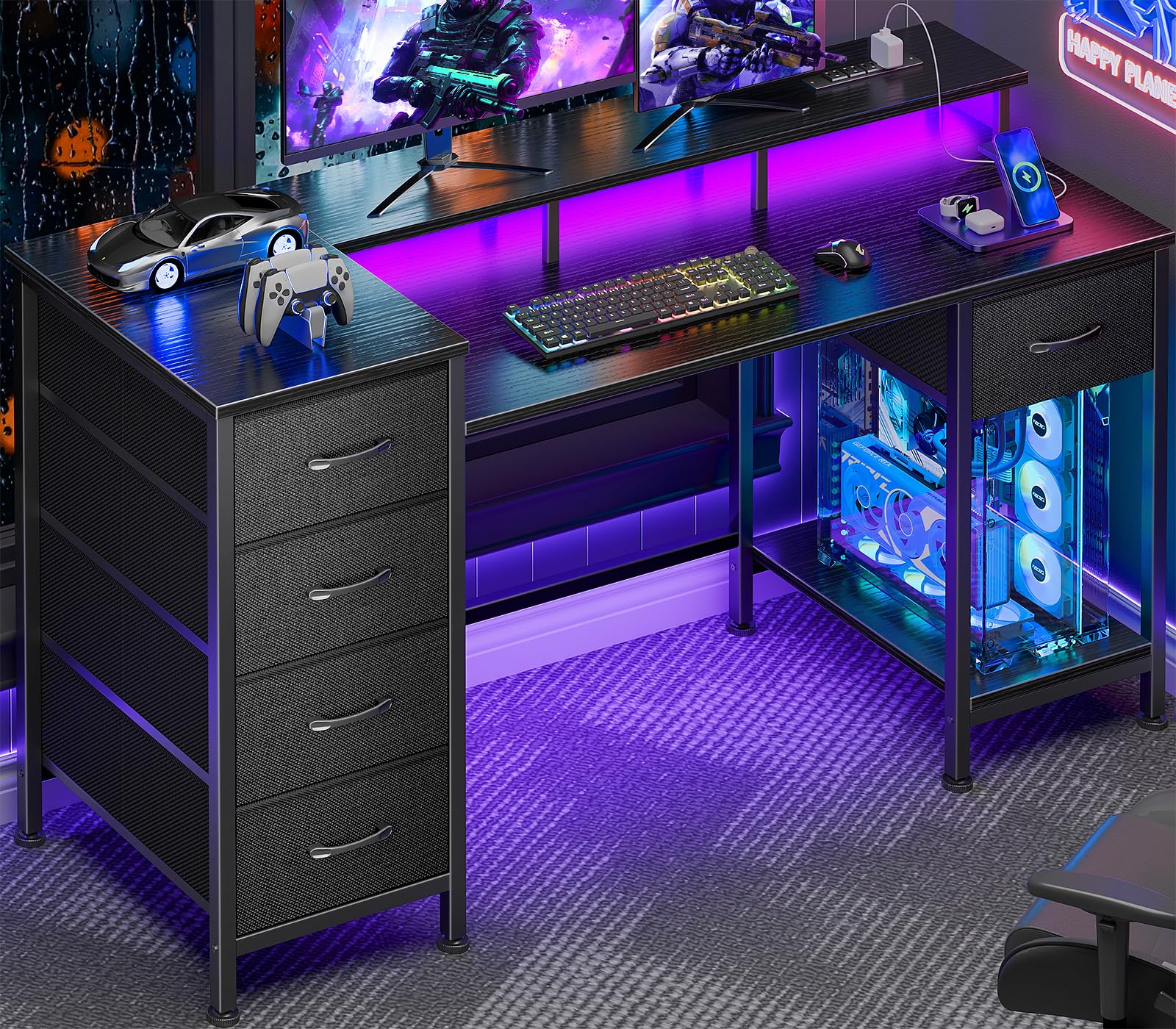
The Korfile 47-inch desk hits the sweet spot of storage and ergonomics with five repositionable fabric drawers and a full-coverage monitor stand that reduces neck strain. The high-rise monitor mount clears desk space underneath for a laptop or keyboard, while the drawers mount in four different positions—left, right, top, or bottom—so you can adapt the layout to your room without losing access to storage. The 22-scene RGB LED strip adds immersive ambient lighting without requiring a separate controller.
The power station includes three AC outlets and two USB ports integrated into the desktop, which eliminates the need for a dangling power strip. Assembly feedback notes that screws should not be over-tightened into the wood core, but most users report a straightforward build with clearly labeled parts. The crossbar steel frame uses a powder-coated finish that resists scratches and provides lateral stability even when the full five-drawer array is loaded with office supplies.
Some users find the non-woven fabric drawers less rigid than plastic or metal alternatives—they perform best with documents, cables, and lightweight peripherals rather than books or tools. The LED strip’s adhesive can weaken over time if repositioned frequently. For a mid-range desk that combines storage, lighting, and power integration in one package, this is a solid balance of versatility and value.
Why it’s great
- Five configurable fabric drawers for flexible storage
- Full-coverage monitor stand improves ergonomic viewing angle
- Three AC outlets and two USB ports recessed in desktop
Good to know
- Fabric drawers sag under heavy loads
- LED strip adhesive may weaken with repositioning
- Monitor arm clamps may not fit the full-coverage shelf
2. Auromie Corner Desk with Charging Station & LED Light, Rustic

The Auromie corner desk is built for tight spaces where every inch counts. Its triangular design fits flush into unused corners, and the included keyboard tray slides out to keep your mouse and keyboard at a comfortable height while saving desktop space for a monitor. The full-size monitor stand elevates the screen to eye level, which reduces hunching during long work sessions. The LED strip offers adjustable colors and modes to match the ambient lighting of the room.
This desk includes a built-in charging station with two AC outlets and two USB ports, positioned behind the monitor shelf so cables stay hidden. The three-tier shelving underneath provides space for a PC tower, printer, or storage bins. Assembly instructions are clear, with labeled parts that correspond to step-by-step diagrams. Most reviewers note that the desk feels sturdy once assembled, though a few report slight wobble when writing vigorously on the main surface.
The particle board finish resists scratches and is easy to wipe clean, but the engineered wood legs are not as robust as a full steel frame. If you plan to use the desk primarily for typing and mouse work, the built-in tray and monitor stand make this an excellent space-saving solution. The keyboard tray is wide enough for a full-size keyboard, but users with extra-wide gaming mice may find the tray a bit snug.
Why it’s great
- Triangle shape maximizes unused corner space
- Built-in keyboard tray improves ergonomic posture
- Two AC outlets and two USB ports hidden behind monitor
Good to know
- Slight wobble during heavy writing on main surface
- Engineered wood legs less rigid than steel alternatives
- Keyboard tray may be narrow for extra-wide gaming mice
3. ODK 53 Inch L Shaped Gaming Desk with LED Lighting, Black

The ODK 53-inch L-shaped desk offers a reversible design that can be assembled with the long side on the left or right, making it adaptable to different room layouts. The X-shaped steel frame provides excellent lateral stability—users report virtually no wobble even under the heavy vibration of sim-racing wheels and dual monitors. The built-in RGB LED strip includes 10 color presets and 8 brightness grades, with a memory function that remembers your last setting after power loss.
The power station delivers three AC outlets and two USB ports, with cable management channels built into the underside to keep cords out of sight. The storage package includes dual shelves, a CPU stand, an iron hook for headphones, and a tool bag for small accessories. Assembly takes about two hours with clearly labeled parts, and most reviewers say the instructions are intuitive. The foot pads are adjustable, which compensates for uneven floors and prevents rocking.
Some users note the desk depth of 18.9 inches is shallower than standard desks, which may feel restrictive for deep monitor stands or full-size keyboards with wrist rests. The side shelf for a printer is also relatively small—a full-size Canon Pixma TR7820 does not fit. For a compact L-shaped desk that prioritizes stability and customizable lighting, this is a strong mid-range option.
Why it’s great
- X-shaped steel frame resists wobble under heavy use
- Reversible L-shape fits left or right corner layouts
- Adjustable foot pads stabilize on uneven floors
Good to know
- 18.9-inch depth is shallow for deep monitor stands
- Side shelf too small for full-size printers
- Assembly requires about two hours
4. Korfile 59 inch L Shaped Computer Desk with Power Outlets, Black
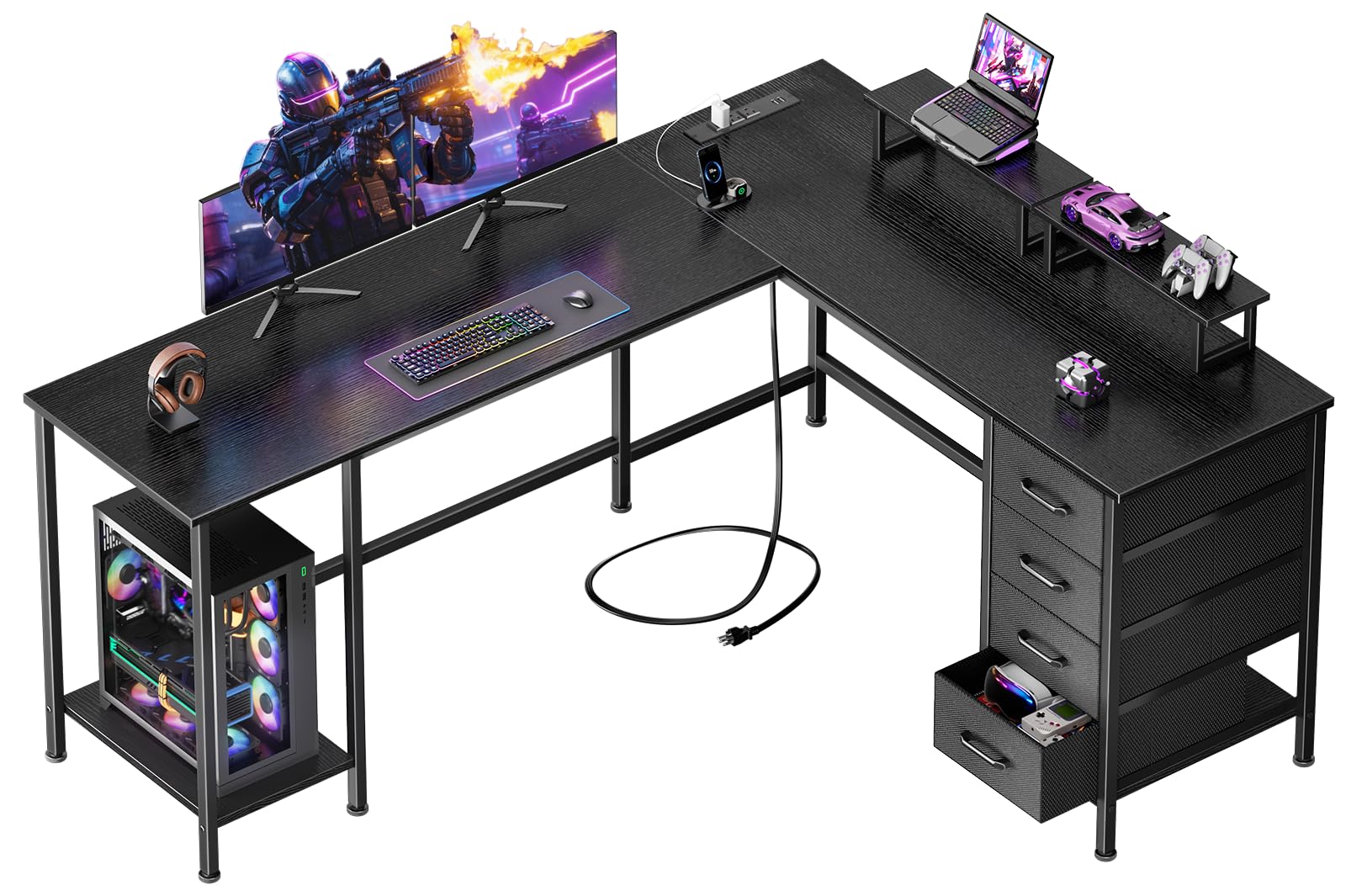
The Korfile 59-inch L-shaped desk is engineered for dual-monitor setups without sacrificing floor space. It ships with two adjustable monitor stands that can be positioned anywhere on the desk to align your screens at eye level, reducing neck rotation. The L-shape is reversible, converting between a corner workstation and a straight configuration depending on your room layout. The four non-woven fabric drawers are fully repositionable, offering flexible storage for paperwork and peripherals.
This desk includes a charging station with three AC outlets, one USB-A, and one USB-C port—a helpful mix for modern devices. The integrated PC tower stand elevates your computer off the floor to reduce dust intake and accidental kicks. The steel frame supports up to 180 pounds, which comfortably handles multiple monitors, a PC tower, and desk accessories. Assembly feedback is positive, with clearly labeled parts and a manual that walks through each step.
Some reviewers note the monitor stands lack rubber feet, which can allow them to slide on the desk surface during use. The fabric drawers, while spacious, degrade faster than wood alternatives under heavy loads. The depth of the desk (18.8 inches) is shallower than standard 24-inch options, so users with deep monitor arms may need to check clearance. For a dedicated dual-screen desk with robust weight capacity, this is a solid mid-range workhorse.
Why it’s great
- Dual adjustable monitor stands for ergonomic multi-screen setup
- Reversible L-shape adapts to corner or straight layouts
- 180 lb weight capacity supports heavy gear
Good to know
- Monitor stands slide on desk surface without rubber feet
- Fabric drawers degrade faster with heavy loads
- 18.8-inch depth limits deep monitor arms
5. Dripex Computer Desk for Small Spaces, 27.5 inch, Black

The Dripex 27.5-inch desk uses a three-tier vertical design to maximize storage in a minimal footprint. The top shelf holds a monitor, the main desktop supports a keyboard and mouse, and the bottom shelf provides space for a printer, books, or a small PC tower. The solid wood desktop paired with an alloy steel frame gives this desk a load-bearing capacity that outmatches similarly sized desks built from particle board alone.
Assembly is straightforward: the package includes an installation manual, all hardware, and tools. The Z-shaped leg piece requires some care during alignment, but most reviewers complete the build in under 30 minutes. The desk measures 31.1 inches tall, which is standard for seated use, and the bottom shelf extends 12 inches deep—ideal for a compact printer or a Mac Mini–sized system. Users with larger PC towers note that the leg design may block the tower from fitting under the bottom shelf.
The desk is lightweight and can be moved easily, but it lacks locking casters—if you need mobility, the DUMOS rolling desk is a better fit. The particle board shelves are sturdy but not waterproof, so spills should be wiped immediately. For a small-space vertical desk that maximizes storage without sacrificing stability, this is a strong mid-range pick.
Why it’s great
- Three-tier vertical design saves floor space
- Solid wood top with steel frame for durability
- Quick 30-minute assembly
Good to know
- Large PC towers may not fit under bottom shelf
- No locking casters for mobility
- Particle board shelves are not waterproof
6. Lufeiya 32 Inch Desk with Power Outlets and LED Lights, Black

The Lufeiya 32-inch desk is a compact entry-level option that includes RGB LED lighting and a built-in power strip with two AC outlets and two USB ports. The monitor stand elevates the screen to eye level, which helps prevent neck strain even in a smaller desk footprint. The desk surface is made from thick particle board with a scratch-resistant and waterproof coating, making it practical for daily use in a teen’s room or a small apartment.
The LED strip offers seven colors and four dynamic modes, controlled via a remote or inline switch. Assembly takes about 25 to 30 minutes with a Phillips screwdriver—tools are included in the box. The included storage bag and headphone hooks are removable, so you can customize the layout. Users note that the desk feels stable even with two 25-inch gaming monitors mounted on the monitor shelf, thanks to the metal frame legs.
Some users wish the USB ports included a USB-C option instead of two USB-A ports. The particle board edges can be sharp along the bottom, so a desk pad or edge trim may be a good addition if you rest your wrists on the edge. For a budget-friendly entry into a gaming desk setup with integrated lighting and power, this desk delivers strong value for the price.
Why it’s great
- Compact 32-inch width fits small rooms
- Built-in RGB LED lights with seven colors
- Two AC outlets and two USB ports built into desktop
Good to know
- USB-A ports only—no USB-C option
- Sharp edges on bottom of particle board
- Some screw holes may require extra force to align
7. DUMOS Small Standing Desk Mobile Portable Rolling Laptop PC Table, 19 Inch, White

The DUMOS mobile standing desk is a compact 19-inch-wide workstation designed for movement. The pneumatic lift allows height adjustment from 28.5 to 42.5 inches, letting you switch between sitting and standing positions without tools. Four silent wheels roll smoothly across tile and low-pile carpet, and two of the wheels lock to keep the desk in place during typing. The MDF desktop is easy to clean and resists stains from coffee rings or marker spills.
This desk is ideal for classroom teachers, remote workers, or anyone who needs to move their workstation between rooms. The H-shaped metal base and the desk’s significant weight contribute to stability—reviewers consistently note it feels solid despite the narrow footprint. Assembly is a three-step process that takes under 15 minutes, and the desk holds up to 33 pounds, which comfortably supports a laptop, a document camera, and writing materials.
On thick carpet, the desk may feel slightly wobbly at full height due to the wheels sinking into the pile. The 19-inch width is narrow—it fits a laptop and a mousepad, but not a full-size monitor and keyboard side by side. Cable management is minimal: there are no integrated clips or channels. For a budget-friendly mobile standing desk that prioritizes portability and smooth height changes, this is a functional choice.
Why it’s great
- Pneumatic height adjustment between sitting and standing
- Silent locking wheels for smooth movement
- Easy three-step assembly in under 15 minutes
Good to know
- 19-inch width too narrow for full-size monitor and keyboard
- Slight wobble on thick carpet at full height
- No integrated cable management
FAQ
How much wobble is acceptable in a budget desk?
Can I use a monitor arm on a budget desk with a monitor shelf?
Final Thoughts: The Verdict
For most users, the budget desk winner is the Korfile 47 Inch with Drawers because it combines flexible storage, a full-coverage monitor stand, and integrated power outlets in a space that fits a standard room. If you want a corner-specific desk with a dedicated keyboard tray, grab the Auromie Corner Desk. And for a mobile sit-stand solution in a tight footprint, nothing beats the DUMOS Mobile Standing Desk.

Mo Maruf
I created WellFizz to bridge the gap between vague wellness advice and actionable solutions. My mission is simple: to decode the research and give you practical tools you can actually use.
Beyond the data, I am a passionate traveler. I believe that stepping away from the screen to explore new environments is essential for mental clarity and physical vitality.