Our readers keep the lights on and my smoothie glass nicely filled. As an Amazon Associate, I earn from qualifying purchases.
The mechanical keyboard revolution has finally arrived in the cubicle, but the market is flooded with backlit gaming rigs that miss the point entirely. A true business board must balance a quiet, durable switch feel with a professional aesthetic that won’t get you side-eye during a client Zoom call.
I’m Mohammad Maruf — the founder and writer behind WellFizz. I’ve spent hundreds of hours cross-referencing switch type, battery capacity, and build materials to isolate the keyboards that survive a decade of spreadsheet warfare without a single failed keystroke.
After combing through thousands of verified reviews, I’ve assembled the definitive list of the best business keyboard options that offer real ergonomic gains and office-appropriate acoustics without sacrificing tactile satisfaction.
How To Choose The Best Business Keyboard
Selecting a keyboard for business use isn’t about flashy RGB or the lightest switch. You need a board that disappears into the workflow — quiet enough for the office, responsive enough for rapid data entry, and built to withstand years of daily abuse without developing chatter or dead keys.
Switch Type and Acoustics
Linear switches (like Cherry MX Red) move smoothly without a tactile bump, making them ideal for fast typists who bottom out hard. Tactile switches (Brown) give a subtle bump that confirms the press without the loud click of a Blue switch. For shared workspaces, look for factory-lubed linear switches or dedicated “Silent” variants that use rubber dampeners to cut noise by 30–40%.
Layout and Key Rollover
Full-size (104-key) layouts have a dedicated numpad for accountants and spreadsheet warriors. 96% layouts compress the numpad slightly to save desk space while retaining arrow keys. Regardless of size, ensure the board supports N-key rollover over USB to prevent ghosting when typing quickly — a common failure in budget membrane keyboards.
Build Quality and Connectivity
Aluminum top plates and gasket-mounted PCBs reduce flex and dampen resonance. For wireless boards, Bluetooth 5.0 or higher ensures stable multi-device pairing, while a detachable USB-C cable allows easy replacement. Battery capacity matters: a 4000 mAh cell can last weeks with backlighting off, whereas smaller batteries need weekly charging.
Quick Comparison
On smaller screens, swipe sideways to see the full table.
| Model | Category | Best For | Key Spec | Amazon |
|---|---|---|---|---|
| Logitech MX Mechanical | Full-Size Wireless | Multi-device professional workflow | Low-profile clicky switches, 15-day battery | Amazon |
| Keychron K4 v2 | 96% Wireless | Mac/Windows hybrid office | 4000 mAh battery, Super Brown switches | Amazon |
| Cherry KC 200 MX | Wired Mechanical | Zero-lag data entry | MX2A Silent Red, 50M actuations | Amazon |
| Apple Magic Keyboard | Wired/Wireless | Mac ecosystem purists | Scissor-switch, 1-month battery | Amazon |
| EWEADN Typewriter | Full-Size Wired | Retro aesthetic & long nails | 104-key, aluminum panel, media knob | Amazon |
| AULA F99 Pro | Tri-Mode 96% | Silent office & gaming | 8000 mAh battery, gasket structure | Amazon |
| HUO JI E-Yooso | 96% Wired | Budget-friendly mechanical entry | 5-layer sound foam, hot-swappable PCB | Amazon |
In‑Depth Reviews
1. Logitech MX Mechanical

The Logitech MX Mechanical uses low-profile clicky switches that deliver the tactile satisfaction of a full-height mechanical board while maintaining a slimmer profile for better wrist ergonomics. The smart backlighting automatically adjusts based on ambient light, and the hand-proximity sensor activates keys the moment you approach — a feature that feels genuinely futuristic in a shared office.
With a 15-day battery life on a full charge (or up to 10 months with backlighting off), the MX Mechanical is built for the professional who needs wireless freedom without plugging in weekly. The USB-C quick charging means even when you forget, a 10-minute top-up gets you back to work. The Logi Bolt receiver provides a dedicated 2.4 GHz connection that avoids Bluetooth interference in crowded tech environments.
The aluminum-reinforced frame provides a solid typing platform with minimal flex. The dedicated Fn row customization via Logi Options+ lets you assign app-specific shortcuts, and the seamless three-device switching makes it a natural fit for multi-OS workflows spanning Windows, macOS, and Linux.
Why it’s great
- Low-profile mechanical feel with satisfying click without excessive noise
- Smart illumination saves battery and looks professional
- Three-device pairing with instant switching via Logi Bolt or Bluetooth
Good to know
- Keycaps are non-replaceable and prone to fingerprints
- White backlight only — no RGB customization
- Premium price point; entry-level users may find better value elsewhere
2. Keychron K4 96% Layout Wireless (v2)

The Keychron K4 v2 is the gold standard for the Mac office worker who also touches a Windows machine. Its Super Brown switches provide a clean tactile bump that’s quieter than Blues but more responsive than Reds, making it a versatile daily driver for both data entry and creative writing. The 96% layout crams a full numpad into a frame that’s four columns narrower than standard full-size boards.
Bluetooth 5.1 provides rock-solid multi-device pairing, and the included 4000 mAh battery delivers up to 240 hours of use with the white backlighting off — enough to last the average worker a full month. The keyboard’s 1.5-inch height is noticeably tall for a low-profile board, so pairing it with a palm rest is strongly recommended for all-day comfort.
The K4 includes both Windows and Mac keycaps in the box, and the rear toggle switch lets you swap between operating systems without software. The aluminum-reinforced ABS frame gives it a sturdy 2.1-pound heft that resists sliding, and the white LED backlight offers 17 static and dynamic modes without the distraction of RGB.
Why it’s great
- Huge battery capacity for long-term wireless use
- Works natively with Mac and Windows out of the box
- Compact 96% design with full numpad functionality
Good to know
- Tall profile — palm rest is almost mandatory
- Condensed numpad zero key is smaller than full-size standard
- No dedicated 2.4 GHz receiver, Bluetooth only
3. Cherry KC 200 MX (Silent Red)

The Cherry KC 200 MX with MX2A Silent Red switches is purpose-built for the open-plan office worker who wants mechanical reliability without alerting the entire floor. The improved MX2A design reduces spring friction and bottom-out noise compared to the previous generation, delivering a linear press that feels smooth rather than scratchy. The laser-etched legends promise to remain legible even after years of heavy use.
This wired board uses a fixed USB-A cable, so you get zero-lag performance and no battery anxiety. The full-size 108-key layout includes dedicated keys for calculator, volume control, and media functions, saving you from reaching for keyboard shortcuts. The anodized aluminum top plate gives it a premium feel and helps dissipate heat, while the two fold-out feet offer two incline angles for basic ergonomic adjustment.
N-key rollover ensures every keystroke registers even during rapid data entry, and the white status LEDs on Caps Lock, Scroll Lock, and Num Lock are restrained enough for professional environments. The KC 200 MX is built around a 50-million-actuation rating on each switch, making it a long-term investment for the desk worker who types all day.
Why it’s great
- MX2A Silent Red switches are genuinely quiet for a mechanical board
- Laser-etched keycaps resist fading over years of use
- Aluminum top plate provides premium stability
Good to know
- Fixed USB-A cable, not detachable or replaceable
- Tilt feet are small and can feel flimsy
- No wireless option — strictly wired
4. Apple Magic Keyboard with Numeric Keypad

The Apple Magic Keyboard remains the definitive choice for the Mac-centric office. Its scissor-switch mechanism under the keycaps delivers a crisp, shallow travel that feels immediate and confident without the wobble of older butterfly designs. The extended layout adds a full numeric keypad and document navigation keys — a must for spreadsheet work — while keeping the overall footprint remarkably compact at just 16.5 inches wide.
Bluetooth pairing is instantaneous with any Apple device, and the internal battery lasts roughly a month on a single charge, with the Lightning port allowing pass-through charging while you type. The keyboard’s 0.1-inch profile is the thinnest in this roundup, making it the most space-efficient option for crowded desks, though the lack of any incline adjustment means some users will miss ergonomic tilt.
At just 1.39 pounds, it’s also the lightest board here — a double-edged sword, as the plastic chassis can feel insubstantial next to aluminum mechanical boards. The white finish is prone to showing smudges and will stain over time, though the keycap legends are double-shot and resistant to wear.
Why it’s great
- Effortless macOS/iOS pairing with zero configuration
- Exceptionally thin and lightweight for travel
- Full month of battery life with the numeric keypad
Good to know
- Scissor switches lack the tactile feedback of a mechanical board
- White finish stains easily and is hard to clean
- No backlighting or adjustable tilt feet
5. AULA F99 Pro Wireless (Silent Version)

The AULA F99 Pro Silent Edition is engineered for the noise-sensitive worker. The gasket-mounted PCB floats on silicone pads, absorbing vibration before it reaches the case, and the five layers of sound-dampening foam turn keystrokes into a muted, thocky sound that reviewers compare to “walking on snow.” The pre-lubed linear switches are factory-treated to eliminate the scratchy feel of unlubed budget switches.
Tri-mode connectivity (Bluetooth 5.0, 2.4 GHz via USB dongle, and wired USB-C) gives you the flexibility to switch between PC, tablet, and phone with a side button. The 8000 mAh battery is the largest in this lineup, promising weeks of use even with the RGB backlighting enabled. The side-printed PBT keycaps are highly durable and sweat-resistant, though they lack top-facing legends, which can be disorienting for touch typists who glance down.
The multi-function control knob lets you toggle between adjusting backlight brightness and controlling media volume, and the 96% layout keeps the numpad without wasting desk space. The included extra switches and keycap puller allow for hot-swap customization, making this a strong choice for the enthusiast who also needs an office-friendly board.
Why it’s great
- Extremely quiet operation — the most office-friendly mechanical board
- Massive 8000 mAh battery with tri-mode wireless
- Hot-swappable PCB for future switch upgrades
Good to know
- Side-printed keycaps have no top legends
- Heavy build at nearly 2.5 pounds
- RGB lights turn off after 1 minute idle on wireless mode
6. EWEADN Wired Typewriter Mechanical Keyboard
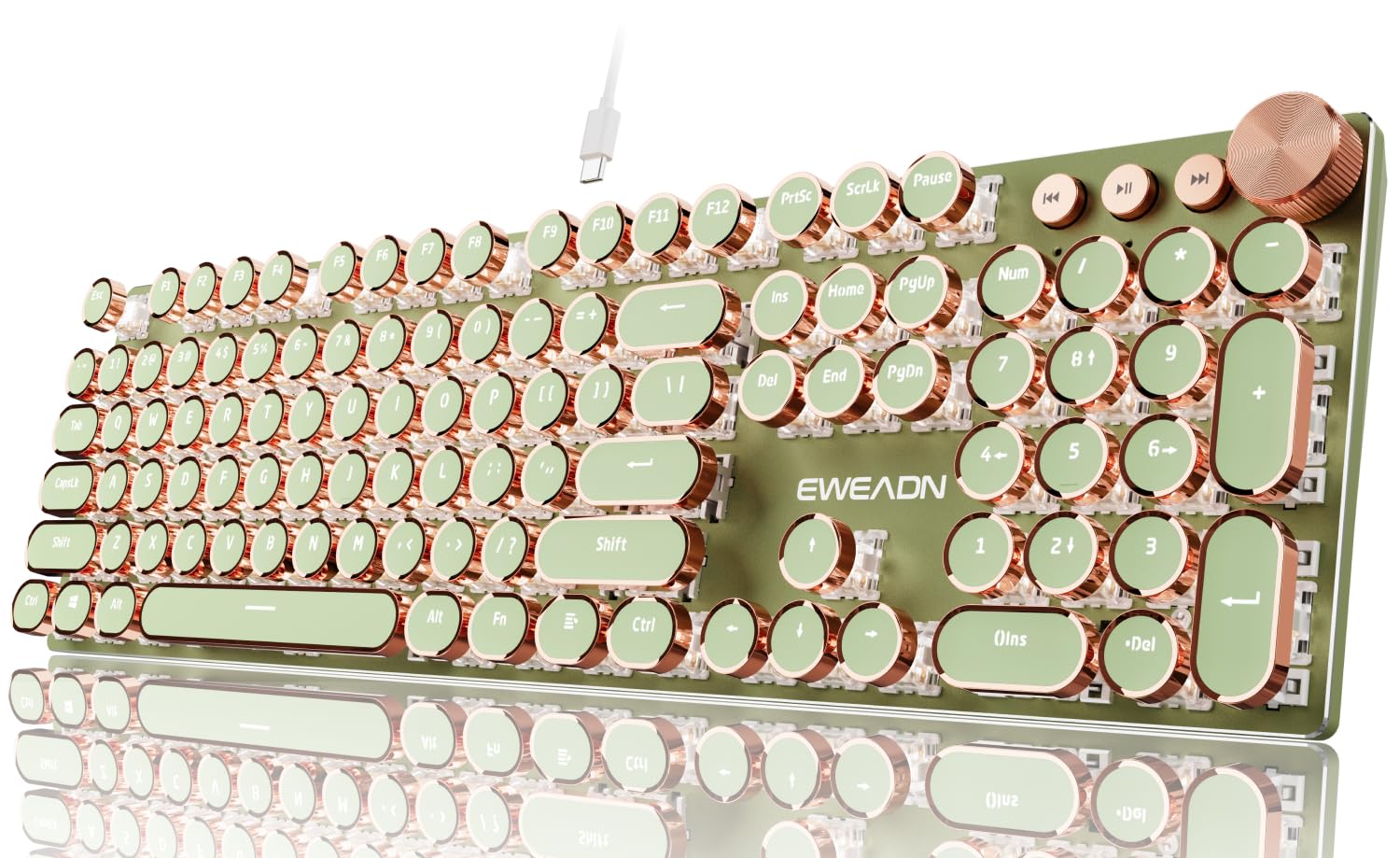
The EWEADN Typewriter keyboard stands out with its vintage round keycaps and heavy-duty aluminum alloy panel, delivering a nostalgic typing experience that also solves a real problem for users with long nails — the wide, concave keycaps prevent fingernails from catching between adjacent keys. The custom pink/white linear switches produce a creamy, low-noise acoustic profile that’s closer to a modern mechanical board than a vintage typewriter.
The 2-in-1 multimedia control knob lets you adjust backlighting or volume with a single rotation, and the 19 white backlight modes add atmosphere without the distraction of RGB. The full-size 104-key layout includes a dedicated numpad, making it functional for accounting work. The wired USB-C connection ensures zero latency and no battery management.
Reviews note that the keyboard is heavier than expected, with some units arriving with cosmetic damage during shipping. The initial batch had ghosting issues, but replacement units appear to resolve this. For the price, the retro aesthetics and unique long-nail-friendly design make it a strong entry-level option for the worker who wants their desk to have personality.
Why it’s great
- Round keycaps are genuinely ergonomic for long nails
- Aluminum panel provides premium stability and weight
- Media knob and full numpad for productivity
Good to know
- Quality control can vary — inspect on arrival
- Fixed USB cable, not hot-swappable
- White backlight only, no RGB customization
7. HUO JI E-Yooso Z-99 Wired Mechanical

The HUO JI E-Yooso Z-99 punches well above its price tier by offering a hot-swappable PCB and a gasket structure with five layers of sound-dampening foam — features usually reserved for boards costing twice as much. The pre-lubed linear switches produce a creamy, satisfying typing sound that reviewers call “obsessively good” for the price, and the 96% layout saves significant desk space while preserving the full numpad.
The double-shot PBT keycaps resist shine and fading over time, and the 15 RGB backlight effects (plus 8 solid colors) give you enough customization for mood lighting without overwhelming the professional environment. The detachable USB-C cable makes it easy to pack for a hybrid office setup. N-key rollover and full anti-ghosting ensure no missed keystrokes during fast data entry.
At 1.9 pounds, it’s solid enough to stay planted during aggressive typing, and the two adjustable height levels provide basic ergonomic tilt. The trade-off for the low price is a fully plastic housing without a metal plate, which means the board has more flexibility than aluminum-reinforced competitors — though the gasket mounting largely compensates for this.
Why it’s great
- Exceptional value for a hot-swappable, gasket-mount mechanical board
- Creamy, quiet typing sound from pre-lubed switches and 5-layer foam
- Detachable USB-C cable for easy portability
Good to know
- Plastic housing flexes more than aluminum alternatives
- Wired only — no wireless option
- RGB brightness is moderate, not blindingly bright
FAQ
Are mechanical keyboards too noisy for an open office?
Should I get a full-size or 96% layout for spreadsheets?
What is N-key rollover and why does it matter for work?
How often should I replace the keycaps on a business keyboard?
Final Thoughts: The Verdict
For most users, the best business keyboard winner is the Logitech MX Mechanical because it combines low-profile mechanical feel, multi-device wireless freedom, and the Logitech ecosystem that pros trust. If you want a silent, mod-friendly platform for an open office, grab the AULA F99 Pro. And for the Mac-centric user who needs seamless integration with a reliable scissor-switch feel, nothing beats the Apple Magic Keyboard with Numeric Keypad.

Mo Maruf
I created WellFizz to bridge the gap between vague wellness advice and actionable solutions. My mission is simple: to decode the research and give you practical tools you can actually use.
Beyond the data, I am a passionate traveler. I believe that stepping away from the screen to explore new environments is essential for mental clarity and physical vitality.