Our readers keep the lights on and my smoothie glass nicely filled. As an Amazon Associate, I earn from qualifying purchases.
A 16-inch laptop represents a serious investment, and the right sleeve is the difference between a pristine device and one riddled with corner dings, screen pressure marks, and fabric scuffs from daily commuting. The market is flooded with thin, unpadded slipcases that offer no real protection, so finding a sleeve with proper shock absorption, a snug internal fit, and a weather-resistant exterior is essential for extending your laptop’s lifespan.
I’m Mohammad Maruf — the founder and writer behind WellFizz. I’ve spent years analyzing the specific construction details, foam densities, and zipper quality that separate a genuinely protective laptop sleeve from a glorified fabric envelope, focusing on how each design holds up under real-world carry conditions.
find your ideal 16 inch laptop sleeve with our expert breakdown of padding, materials, and storage features that actually keep your device safe.
How To Choose The Best 16 Inch Laptop Sleeve
Selecting a sleeve for a 16-inch chassis requires more than just matching the screen size label. You need to consider interior dimensions, padding architecture, closure type, and whether the sleeve is designed to slide into a larger bag or be carried independently. Here are the key factors to evaluate.
Measure Your Laptop Against Internal Dimensions
The advertised “16-inch” fit is often a range, not a guarantee. A sleeve labeled for 16-inch laptops may have an internal cavity of 15.75 x 10.94 inches, which will be too short for a bulkier 16-inch workstation model. Always compare your laptop’s exact width and depth against the sleeve’s internal dimensions listed in the specs, not the marketing description.
Assess Padding Thickness and Corner Protection
A protective sleeve relies on a layer of shock-absorbing foam, typically between 3mm and 8mm thick. The best options feature reinforced corner padding or a full 360-degree foam wrap. Sleeves that feel flimsy or have no discernible thickness when empty will not absorb the energy from a drop or a knock inside a backpack.
Choose the Right Closure and Handle Configuration
Zippers are the most common closure, but their quality varies. Look for metal zippers that glide smoothly and are recessed to avoid scratching adjacent items. If you plan to carry the sleeve without a backpack, a reinforced grab handle is essential. Some sleeves offer a removable or tuck-away handle for flexibility, while others are designed purely as slip-ins for a larger bag.
Quick Comparison
On smaller screens, swipe sideways to see the full table.
| Model | Category | Best For | Key Spec | Amazon |
|---|---|---|---|---|
| Pelican Traveler 16 Inch | Premium | Maximum rugged protection | Compression-molded padded exterior | Amazon |
| DOMISO 16 Inch Turquoise | Premium | Corner protection with style | High-density nylon & corner cushion | Amazon |
| Lacdo 360 Protective Blue | Mid-Range | All-around storage and value | Canvas with waterproof coating | Amazon |
| JETech Dark Grey | Mid-Range | Minimalist backpack-friendly sleeve | Splash-proof exterior with foam cushion | Amazon |
| MOSISO Geometric Black | Budget | Hard-shell EVA for style on a budget | PU EVA shell with bubble foam | Amazon |
In‑Depth Reviews
1. Pelican Traveler Laptop Case/Sleeve 16 Inch

The Pelican Traveler sleeve sets the benchmark for protective capability in this category. Its compression-molded texture exterior provides a rigid shell that absorbs impact energy and resists slipping from your hands or a backpack compartment. The padded interior is lined with an anti-scratch material that prevents chassis scuffs, and the rubberized zipper pulls offer a tactile, confident grip even in wet conditions.
This sleeve is designed as a standalone carrier with a compact footprint — it is lightweight enough for daily commutes but robust enough to handle the rigors of air travel. The weather-resistant build means accidental rain or a splash from a water bottle will not seep through to your device. It fits a wide range of 16-inch laptops including MacBook Pro 16, Dell XPS 16, and HP Spectre, but owners of laptops with protruding vents (like the Lenovo Legion 7i) should confirm internal clearance.
User feedback consistently praises the clam-shell design for its 360-degree cushion and the peace of mind it provides for students and professionals who move between buildings. The absence of a handle means this sleeve is best suited for users who plan to slide it into a larger backpack or briefcase, rather than carrying it on its own.
Why it’s great
- Rigid compression-molded shell offers superior drop protection
- Weather-resistant construction with rubberized zipper pulls
- Anti-scratch liner prevents cosmetic damage
Good to know
- No grab handle — designed primarily as an insert sleeve
- May be too snug for laptops with oversized vent protrusions
2. DOMISO 16 Inch Laptop Sleeve Case Turquoise

The DOMISO sleeve distinguishes itself with a focus on corner reinforcement, a vulnerable area many sleeves neglect. The high-density nylon exterior has a waterproof coating that deflects splashes, while the interior features a shockproof soft lining with added corner padding to absorb impacts from drops. An internal elastic Velcro strap secures the laptop in place, preventing it from sliding around inside the sleeve during transit.
Storage is well-considered — the main compartment accommodates laptops up to 16 inches, and the front pocket is spacious enough for a tablet, planner, or a charger and cable bundle. The stretchable grab handle allows for easy switching between a hand-carry mode and sliding the sleeve into a larger backpack. The turquoise color option is vibrant and matches product images accurately, making it a stylish choice for professionals and students alike.
Customer reviews highlight the full-wrap zipper that unzips completely, allowing the sleeve to lay flat for easy laptop access. The separate accessory pouch included in the front pocket is a thoughtful touch for organizing small peripherals. Some users note that the sleeve is best suited for laptops without oversized charging bricks if you plan to store the brick in the main compartment.
Why it’s great
- Reinforced corner padding for targeted impact protection
- Internal Velcro strap keeps laptop from shifting
- Stretchable handle for flexible carry options
Good to know
- Main compartment may be tight with a bulky charger alongside laptop
- Front pocket is best for flat items, not thick accessories
3. Lacdo 360 Protective 16 Inch Laptop Sleeve Case Blue

The Lacdo sleeve is built around an anti-scratch canvas fabric with a waterproof coating, giving it a rugged, textured feel that resists scuffs and minor abrasions. The interior is lined with a shockproof soft material, and the edges are thickened to provide all-around cushioning. A strong two-way metal zipper glides smoothly and offers quick access from either side, which is a practical feature when the sleeve is packed tightly in a bag.
Storage is a standout feature — the sleeve includes two front zipper pockets and a large rear compartment, giving you room for a small iPad, mouse, charger, cables, pens, and a power bank. This makes it a viable standalone bag for short trips where you don’t want to carry a full backpack. The top grab handle is stretchable and comfortable, allowing you to carry the sleeve as a briefcase when needed.
The navy blue color is described as vibrant and professional, and the overall build quality feels distinctly above its tier — several customers noted it feels like a sleeve priced higher than it is. The slim profile means it slides easily into a briefcase, but the generous pocket layout means you can also use it as your primary carry for a day at the office or campus.
Why it’s great
- Three separate storage pockets for comprehensive organization
- Canvas fabric with waterproof coating resists rain and scuffs
- Thickened edge padding for 360-degree protection
Good to know
- Canvas exterior is not fully waterproof, only splash-resistant
- Handle is stretchable but not reinforced for heavy loads
4. JETech Laptop Sleeve for 16-Inch Notebook Dark Grey

The JETech sleeve is a minimalist design that prioritizes slim packability without sacrificing core protection. The interior features foam cushions that shield against dust, scratches, and minor drops, while the splash-proof exterior handles rain and accidental spills effectively. Its external dimensions of 16.38 x 11.33 x 1.69 inches make it one of the slimmest options in this lineup, designed to slide effortlessly into a backpack or suitcase.
The extra front pocket is positioned for flat items — it holds a charger and cable bundle or a phone, but it is not designed for bulky accessories. The zipper runs along the long side of the sleeve, which means you must remove the sleeve from your backpack to access the laptop. Some users noted the lack of a handle makes it less convenient for standalone carry, but the trade-off is a lighter, more streamlined profile.
Fit is precise for laptops up to 15.75 inches internal width and 10.94 inches depth, so it matches MacBook Pro 16 and similar slim chassis laptops well. The fleecy interior lining is gentle on device surfaces, and the top rim has extra padding for added security. This sleeve is an excellent choice for commuters who keep their laptop inside a larger backpack and want the lightest possible protective layer.
Why it’s great
- Ultra-slim design slides easily into any backpack
- Foam cushion interior absorbs minor impacts
- Splash-proof exterior is easy to clean
Good to know
- No grab handle — difficult to carry independently
- Front pocket is shallow, best for flat accessories only
5. MOSISO Laptop Case 15.6 inch Artistic Geometric Black
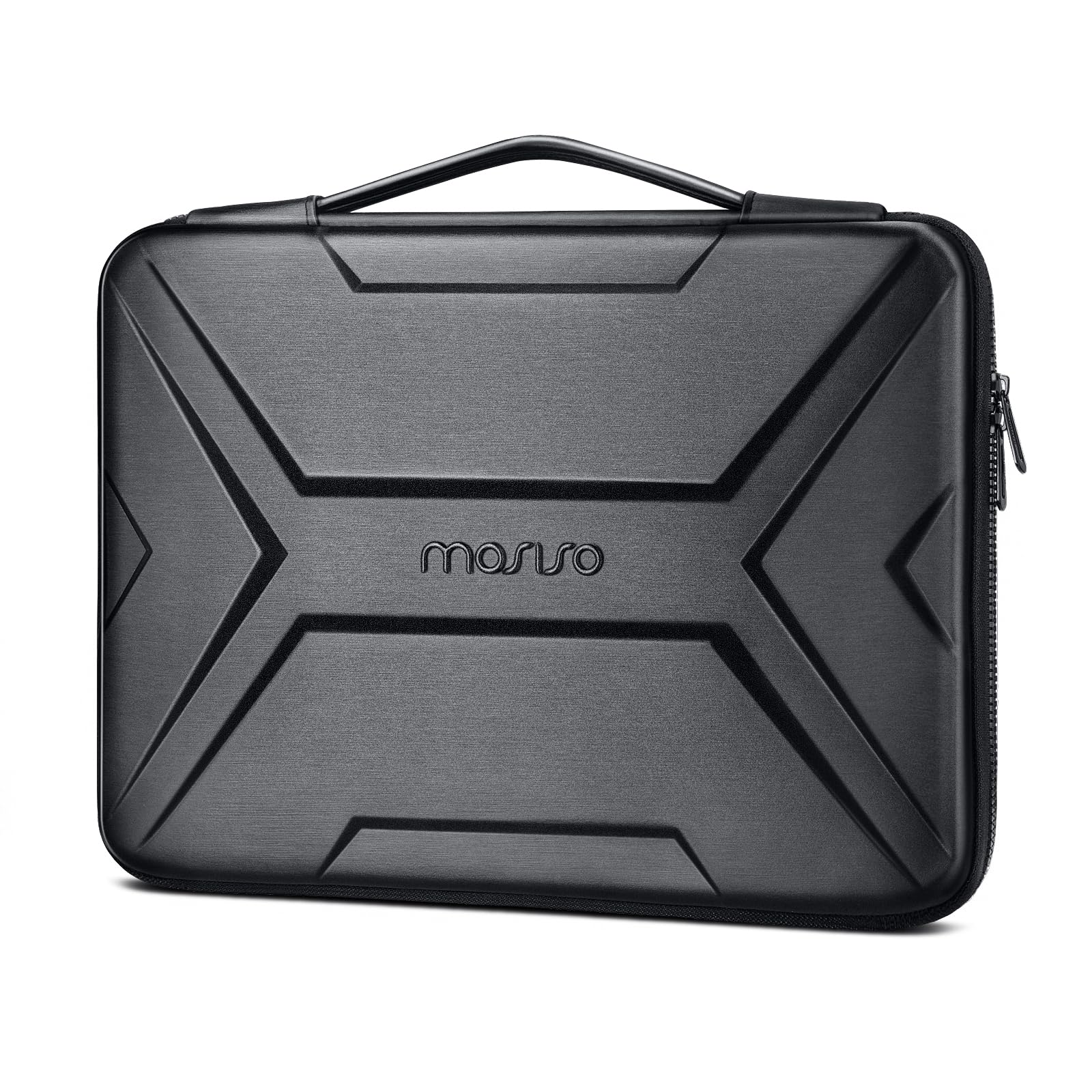
The MOSISO sleeve uses a PU EVA hard shell construction with an artistic geometric pattern, offering a semi-rigid exterior that resists compression and provides a distinct look. The interior features upgraded shock-resistant bubble foam padding that adds a layer of cushion against accidental bumps. The case can be fully opened 180 degrees, which makes it easy to access your laptop without having to fully remove it from the sleeve.
An extendable grab handle allows for briefcase-style carrying, and an internal mesh pocket provides space for a mouse, earphones, pens, or a notepad. The internal dimensions are 15.15 x 10.82 x 1.18 inches, which is tighter than some other sleeves — it fits standard 15.6-inch laptops well, but larger 16-inch workstations with wide bezels may be a squeeze. The hook and loop fastener inside secures the laptop from shifting.
Customer feedback indicates the zipper can be a bit stiff initially, and the sleeve has limited extra room for a charger alongside the laptop in the main compartment. However, the hard shell design offers better crush protection than a soft fabric sleeve, making it a solid choice for students or users who want style and basic impact resistance at a lower investment point.
Why it’s great
- Hard PU EVA shell resists compression and crushing
- 180-degree flat opening for easy laptop access
- Artistic pattern offers unique visual appeal
Good to know
- Internal dimensions are snug for thicker 16-inch laptops
- Zipper can feel stiff during initial use
FAQ
Will a 16-inch sleeve fit my MacBook Pro 16 with a camera bump?
What is the difference between a 360-degree sleeve and a standard sleeve?
Can I fit a gaming laptop with protruding vents in a standard 16-inch sleeve?
Final Thoughts: The Verdict
For most users, the 16 inch laptop sleeve winner is the Pelican Traveler because it provides unmatched rigid protection and weather resistance in a compact form factor. If you want a built-in handle and comprehensive storage pockets for accessories, grab the DOMISO. And for a minimalist, ultra-packable sleeve that slides into any backpack, the JETech is a reliable and affordable choice.

Mo Maruf
I created WellFizz to bridge the gap between vague wellness advice and actionable solutions. My mission is simple: to decode the research and give you practical tools you can actually use.
Beyond the data, I am a passionate traveler. I believe that stepping away from the screen to explore new environments is essential for mental clarity and physical vitality.