Our readers keep the lights on and my smoothie glass nicely filled. As an Amazon Associate, I earn from qualifying purchases.
The problem with most budget scanners isn’t the price—it’s the compromise. You trade speed for affordability, resolution for portability, and often end up with a device that’s barely faster than using your smartphone camera on a stack of papers. A real budget scanner should move at the pace of your desk, not hold it hostage with slow single-pass scans and flimsy paper paths. That means looking past resolution numbers and focusing on the feed mechanism, software reliability, and whether the thing actually works the day you plug it in.
I’m Mohammad Maruf — the founder and writer behind WellFizz. I spend my time dissecting the hardware specs and real-world failure points of compact document scanners so you don’t have to guess whether a wand will survive a box of receipts.
The right choice for most people depends on the volume you scan and the types of documents you handle. That’s exactly where this breakdown of the best budget scanner options comes into play, cutting through the noise to show you which models actually deliver usable scans without constant jams or setup headaches.
How To Choose The Best Budget Scanner
A budget scanner isn’t just about the sticker price. The real cost shows up in how many pages you have to rescan because of a jam, how much time you waste on driver issues, or how often the wand skips a line. Focus on the feeding mechanism first, then the software ecosystem.
Sheet-Fed vs Handheld Wand
For any task involving more than a single document at a time, a sheet-fed scanner wins. Handheld wands require a steady hand, a flat surface, and multiple passes for wide pages. Sheet-fed models pull the paper through at a consistent speed, giving you predictable scan quality without the arm fatigue. Wands are only worth considering if your primary use is scanning bound books or thick pages you can’t tear out.
Optical Resolution and Color Depth
300 dpi is the baseline for readable text. 600 dpi is better for small print or fine details on receipts. 900 dpi and above is overkill for documents—it creates large file sizes with no visible benefit on standard text. Color depth (24-bit or higher) affects how well the scanner handles photos and colored invoices, but budget models often cap this at 24-bit, which is perfectly fine for receipts and forms.
USB Power and Driver Compatibility
A truly portable budget scanner draws power directly from the USB port. No wall wart, no batteries to replace. But this also means you’re tied to a computer. Check that the scanner supports your operating system—Windows, Mac, and ideally Linux if that’s your environment. Some budget models ship with no Mac drivers at all, which can turn a device into a paperweight if you don’t check first.
Quick Comparison
On smaller screens, swipe sideways to see the full table.
| Model | Category | Best For | Key Spec | Amazon |
|---|---|---|---|---|
| Brother DS-740D | Sheet-fed Duplex | Two-sided document scanning on the go | 16 ppm duplex, CCD sensor | Amazon |
| Brother DS-640 | Sheet-fed Simplex | Reliable single-sided mobile scanning | 16 ppm simplex, 1.03 lbs | Amazon |
| Epson Workforce DS-30 | Sheet-fed Portable | Cloud-connected office scanning | 600 dpi, 10-page capacity | Amazon |
| HP HPPS100 | Sheet-fed Simplex | Home office with varied media types | 15 ppm, 3 ounces weight | Amazon |
| Plustek S410 Plus | Sheet-fed Auto-Feed | Button-free scanning for delicate pages | 600 dpi, USB-powered | Amazon |
| ANNCARY Handheld | Handheld Wand | Scanning book pages without spine damage | 900 dpi, 32GB Micro SD support | Amazon |
| Hczrc Handheld | Handheld Wand | Included 16GB card for quick storage | 900 dpi, 2 AA batteries | Amazon |
In‑Depth Reviews
1. Brother DS-740D Duplex Compact Mobile Document Scanner

The Brother DS-740D is the only budget-friendly scanner in this roundup that supports true duplex scanning—meaning it captures both sides of a page in a single pass at 16 pages per minute. That alone makes it the fastest option for two-sided documents, which is the majority of what most people scan: contracts, invoices, printed reports. The CCD sensor provides better depth of field than the CIS sensors found on cheaper wands, so it handles slightly crumpled paper or cards with less distortion.
At 1.43 pounds and powered entirely via micro USB 3.0, this scanner slips into a laptop bag without adding noticeable weight. The Brother iPrint&Scan desktop app handles scan-to-PC, scan-to-cloud, email, and OCR destinations, and the driver support extends to Windows, Mac, and Linux—a rarity in budget hardware. Users report flawless operation after years of use and thousands of pages, which speaks to the build quality.
The tradeoff is that it’s a single-page feeder, not an automatic document feeder (ADF). You load one page at a time, though the continuous scan mode in the software keeps the flow moving. If duplex speed is your priority and you’re willing to feed pages by hand, the DS-740D is the best value in this price range.
Why it’s great
- Duplex scanning in a single pass at 16 ppm saves massive time on two-sided docs
- USB-powered with no wall adapter needed
- Reliable long-term build; handles 5,000+ pages without failure
Good to know
- Single-page feeder—no automatic document tray
- Paper jams if pages are pushed in too hard
2. Brother DS-640 Compact Mobile Document Scanner

The DS-640 is the simplex sibling to the DS-740D—identical speed at 16 ppm, same ultra-compact form factor, and the same USB-powered convenience. The difference is that it scans only one side per pass. For users who rarely handle double-sided paperwork, this is an unnecessary upgrade to duplex, and the DS-640 delivers the same rock-solid reliability at a lower entry point.
The Brother iPrint&Scan software is identical across both models, offering the same OCR, cloud, email, and folder destinations. One review noted the DS-640 digitized over 5,000 documents across 2.5 years with zero hardware issues, including handling credit cards and greeting cards without jamming. The build quality is unmistakably ahead of the budget wands in this list.
What you miss is the ability to scan both sides in one pass. If you’re scanning a batch of double-sided documents, you’ll have to flip and feed each page twice. But for single-sided receipts, letters, or forms, the DS-640 is essentially the same machine at a lower cost. The micro USB 3.0 connection keeps the footprint minimal and travel-ready.
Why it’s great
- Fast 16 ppm simplex scanning with no speed drop for color documents
- Extremely compact at 1.03 pounds and under 12 inches long
- Proven long-term durability over years of use
Good to know
- Simplex only—no two-sided single-pass scanning
- Single-page feeder, no ADF included
3. Epson Workforce DS-30 Portable Document Scanner

The Epson Workforce DS-30 is an established workhorse in the portable sheet-fed category. It scans documents up to legal size, handles business cards and plastic ID cards, and weighs just 0.7 pounds. The key differentiator here is the bundled software suite: Epson Document Capture Pro, ABBYY FineReader, and NewSoft PageManager for Mac. These tools provide one-touch cloud scanning to services like Evernote and email, plus robust OCR for searchable PDFs.
Scan speed is slower than the Brother models—it’s not going to hit 16 ppm, and users report a noticeable lag when starting a scan. The 600 dpi optical resolution is adequate for most document tasks but falls short for detailed photo work. The yellow-to-white color shift mentioned by some users suggests the color calibration isn’t perfect for receipts that fade into warm tones.
Durability is a mixed bag. Several long-term users report the scanner working reliably for a year or more, while others experienced a mechanical failure around 7-8 months where the rollers stopped feeding paper. The USB-powered design and 10-sheet capacity make it convenient for a desk, but if you rely on it for daily travel, the failure reports are worth noting.
Why it’s great
- Bundled OCR software suite is genuinely useful for searchable PDFs
- USB-powered, no external power supply required
- Handles legal-size docs, business cards, and plastic IDs
Good to know
- Slower scan startup compared to direct competitors
- Some units develop roller failure within the first year
4. HP Small USB Document & Photo Scanner HPPS100

The HPPS100 is the lightest sheet-fed scanner in this lineup at just 3 ounces. It delivers simplex scanning at 15 pages per minute, very close to the Brother’s 16 ppm, and supports paper sizes from a tiny 2 x 2.9 inches up to legal 8.5 x 14 inches. That makes it an excellent choice for mixed media scanning—receipts, photos, business cards, and letter-size docs all in one batch without adjusting settings.
HP’s WorkScan software provides auto-scan mode, size detection, and editing tools like crop, background cleanup, and hole removal. Users consistently report easy setup and sharp image quality. The resolution appears locked at 300 dpi through the software, which is fine for documents but a limitation for photo detail. Some users bypass the WorkScan software entirely and use their own scanning software for more control.
The build quality feels lightweight, which makes it highly portable but also raises durability questions for heavy daily use. This is a home-office or occasional-travel scanner, not a field unit meant to survive being tossed in a bag with laptop and cables every day. For the price, it delivers the best speed-to-weight ratio in the simplex category, but the software is basic.
Why it’s great
- Extremely lightweight at 3 ounces—barely noticeable in a bag
- Fast 15 ppm simplex speed with consistent color/black-and-white
- Wide media size range from business cards to legal documents
Good to know
- Software locks resolution at 300 dpi; no higher options
- Build is plastic-light; not ideal for rugged daily carry
5. Plustek Mobile Scanner S410 Plus

The Plustek S410 Plus takes a different approach to budget scanning: it’s a button-free sheet-fed scanner that automatically starts scanning the moment it detects a document. You don’t press anything on the device itself. It runs exclusively off USB bus power and weighs just 0.41 kg, making it feel almost like an accessory rather than a standalone machine. The auto-processing feature saves images and OCR text directly to a designated folder without any clicks.
Where this scanner shines is handling delicate or aged papers. Multiple user reviews highlight its ability to scan fragile old recipes, historical documents, and faded ink without tearing or damaging them—something a roller-based wand might struggle with. The included Plustek DocAction software provides OCR conversion to searchable PDF, Word, or Excel, plus direct saving to FTP or shared folders.
The tradeoff is resolution: 600 dpi is adequate for documents but not for high-quality photo scanning. The build is thin plastic, and some units arrive as returned goods with missing accessories (no storage case). If your primary need is preserving old documents or scanning a backlog of delicate papers, the S410 Plus is worth considering. For general everyday scanning, the Brother models offer better durability and speed.
Why it’s great
- Button-free auto-scan reduces interaction to zero; great for batch jobs
- Gentle feed mechanism handles fragile, aged paper without damage
- OCR software converts scans to editable Word and Excel formats
Good to know
- 600 dpi max resolution—not for archival photo quality
- Thin plastic build; some units arrive with missing parts as open-box returns
6. ANNCARY Portable Document Scanner (900DPI Handheld Wand)
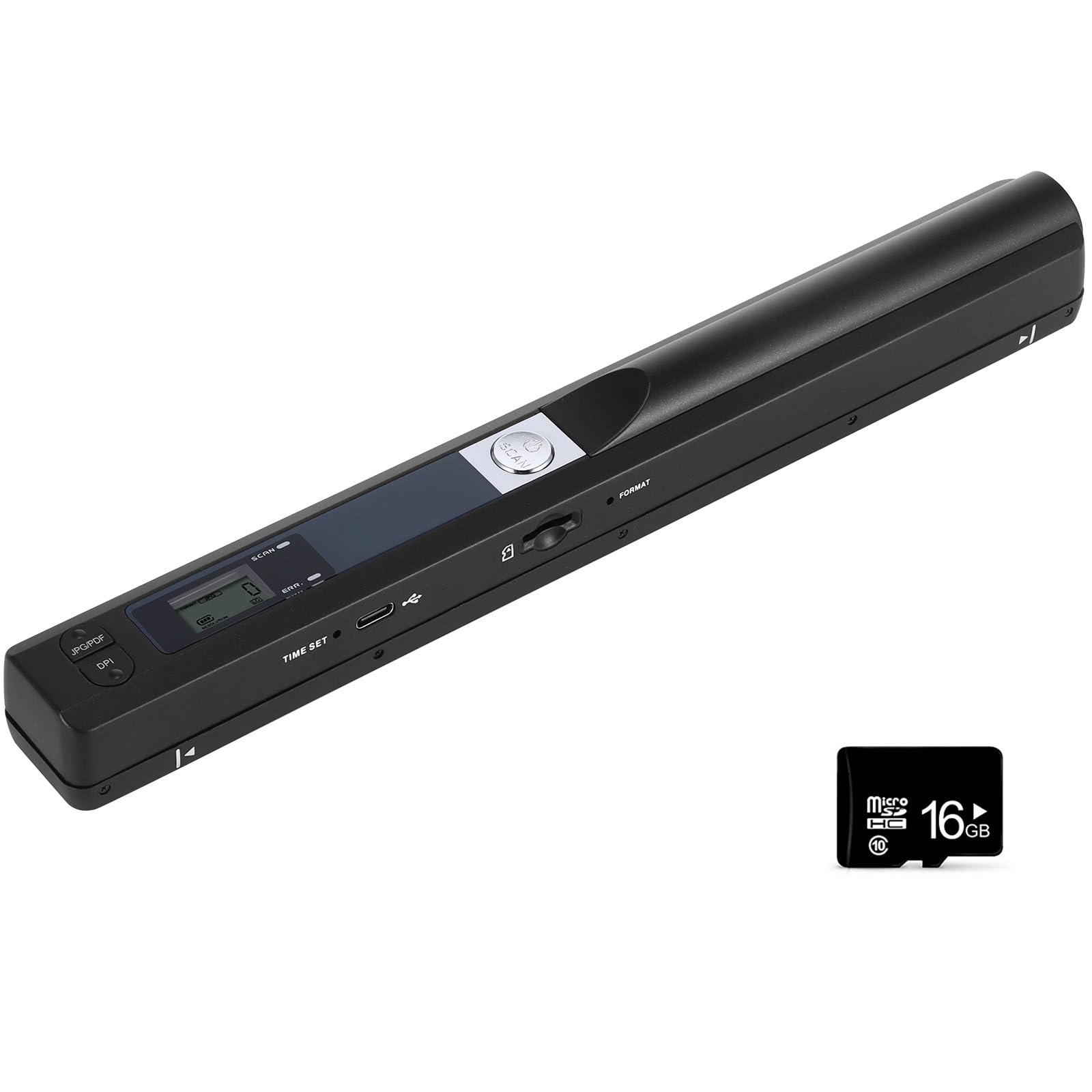
The ANNCARY wand is the entry-level champion for a very specific job: scanning bound documents without damaging the spine. It’s a handheld wand with three selectable resolutions (300/600/900 dpi) and supports Micro SD cards up to 32GB for onboard storage. No driver installation needed on Windows or Mac—it shows up as a mass storage device, so scans are accessible via the USB cable or by pulling the card.
One-button operation and an ergonomic wand shape make it simple to use, but the learning curve is real. You need a steady, consistent speed across the page. If you go too fast or too slow, the image distorts or comes out fragmented. The included ABBYY OCR software is a genuine bonus for this price point—it converts scanned text into editable Word, Excel, PowerPoint, and searchable PDF documents. Users report excellent results for creating study manuals and archiving workbook pages.
The main limit is that you can’t preview scans in real time via USB; you have to scan first and then check the result on your computer. It also requires separate purchase of a Micro SD card. The wand runs on 2 AA batteries, which some users prefer over rechargeable cells for long-term replaceability. For the lowest cost of entry into document scanning, the ANNCARY wand delivers surprising software value, but it demands patience and a steady hand.
Why it’s great
- Includes ABBYY OCR software for editable text conversion
- No driver installation—plug and play as mass storage device
- Ideal for scanning book pages without damaging the spine
Good to know
- No live preview; must scan and then view the file
- Requires separate Micro SD card and 2 AA batteries
7. Hczrc Portable Scanner (Handheld Wand with 16GB Card)

The Hczrc handheld wand distinguishes itself from the ANNCARY by including a 16GB Micro SD card right in the box, removing one of the biggest hidden costs of entry-level wands. It also uses the same 900 dpi max resolution with three selectable levels, saves in JPEG or PDF format, and supports cards up to 32GB for expanded storage. Like the ANNCARY, it requires 2 AA batteries (not included) and works without any software installation.
Lightweight and travel-friendly, this wand is aimed at lawyers, real estate agents, students, and travelers who need to digitize documents on the go without carrying a laptop. The calibration process is important: users recommend pressing the mode button to switch between JPEG and PDF, then the scan button to calibrate the sensor before first use. The green LED confirms the scanner is running. Scan speed is fast in color mode, but the wand struggles with wrinkled paper and requires careful manual pacing for clear results.
The most common complaint is distorted or unusable output when not held perfectly flat and steady. Several users report the device as “junk” because it failed to produce usable scans. This is a pattern with all budget handheld wands—quality depends heavily on technique. The Hczrc includes a display that shows the file count, which helps confirm each scan completed. If you want the absolute lowest entry cost with a memory card included, this is the option, but you’re better off with a sheet-fed model for consistent results.
Why it’s great
- Includes 16GB Micro SD card in the package—one less accessory to buy
- No driver or software installation; plug-and-play on any OS
- Three resolution settings with fast scan speed in color mode
Good to know
- Very sensitive to scan speed; distorted results if not held steady
- Poor performance on wrinkled or textured paper
FAQ
Are budget handheld wands reliable for scanning books?
What is duplex scanning and do I need it?
Can a budget scanner handle business cards and plastic ID cards?
Final Thoughts: The Verdict
For most users, the best budget scanner winner is the Brother DS-740D because it delivers true duplex scanning at 16 ppm with USB power and decades-proven reliability—all at a price that undercuts most single-purpose office scanners. If you only need simplex scanning and want the same build quality, grab the Brother DS-640. And for scanning bound books without damaging the spine, nothing beats the low entry cost of the ANNCARY Handheld Wand with its included OCR software.

Mo Maruf
I created WellFizz to bridge the gap between vague wellness advice and actionable solutions. My mission is simple: to decode the research and give you practical tools you can actually use.
Beyond the data, I am a passionate traveler. I believe that stepping away from the screen to explore new environments is essential for mental clarity and physical vitality.