Our readers keep the lights on and my smoothie glass nicely filled. As an Amazon Associate, I earn from qualifying purchases.
The hunt for a backlit wireless keyboard and mouse combo is a hunt for work surface harmony—you want to banish cable clutter without losing the ability to see your keys in a dim room or late-night session. Too many combos compromise on feel: mushy keys, a laggy mouse, or a backlight so anemic it is useless after sundown.
I’m Mohammad Maruf — the founder and writer behind WellFizz. I have spent years analyzing peripheral architecture, focusing on backlight quality, battery capacity, key switch type, and wireless protocol stability across hundreds of models.
This guide cuts through the noise to match you with the absolute best backlit wireless keyboard and mouse combo for your desk, budget, and daily workflow.
How To Choose The Best Backlit Wireless Keyboard And Mouse Combo
Not every glowing combo delivers a balanced typing and mousing experience. The backlight, battery, wireless connectivity, and ergonomics must work together or you will end up with a desk ornament that frustrates more than it helps.
Backlight Quality and Battery Capacity
The brightness and customizability of the keys’ glow directly affect how usable the combo is in low light. Multi-level brightness and adjustable RGB or single-color modes give you control, but a higher mAh rating on the keyboard battery determines how often you need to plug it in. A 4000mAh keyboard can last weeks between charges with backlighting on, while a smaller cell may require weekly top-ups.
Wireless Protocol and Receiver
Most combos use a single 2.4GHz USB receiver that handles both the keyboard and mouse. This is plug-and-play and nearly lag-free, but check if the receiver is stored neatly inside the mouse or keyboard. Bluetooth options offer multi-device switching, allowing you to toggle between a laptop, tablet, and phone, ideal for a multi-screen workflow.
Typing Feel and Mouse DPI
The keyboard’s key switch type—membrane or scissor—determines actuation force and noise. Quiet, responsive keys are essential for shared workspaces. On the mouse side, adjustable DPI levels (typically 800 to 4800) let you dial in cursor speed. A higher DPI range is better for fast navigation, while lower settings offer precision for detailed work.
Ergonomics and Desk Fit
Look for an integrated or detachable wrist rest on the keyboard and a contoured shape on the mouse that suits your hand size. A full-size layout with a number pad is standard, but if desk space is tight, a compact or tenkeyless design may be better. The overall weight and build material also affect desk stability and portability.
Quick Comparison
On smaller screens, swipe sideways to see the full table.
| Model | Category | Best For | Key Spec | Amazon |
|---|---|---|---|---|
| EDJO MK228 Pro | Mid-Range | Long work sessions with minimal charging | 4000mAh keyboard battery | Amazon |
| Redragon S101M-KS | Premium | Gaming with tri-mode wireless | 4800 DPI programmable mouse | Amazon |
| SABLUTE Ergonomic | Premium | All-day ergonomic typing with faux leather palm rest | 4000mAh battery, wave keys | Amazon |
| VEILZOR RGB Combo | Mid-Range | Budget-friendly RGB with phone holder | USB-C rechargeable, 9 RGB effects | Amazon |
| ProtoArc KM110-A | Premium | Mac and iPad users with aluminum build | Aluminum body, 3-level white backlight | Amazon |
| Logitech MK850 | Premium | Multi-device office productivity | Multi-device, hyper-fast scroll wheel | Amazon |
| Logitech MK955 | Premium | Larger hands and quiet, premium build | SilentTouch, SmartWheel scroll | Amazon |
In‑Depth Reviews
1. EDJO MK228 Pro Wireless Keyboard and Mouse Combo
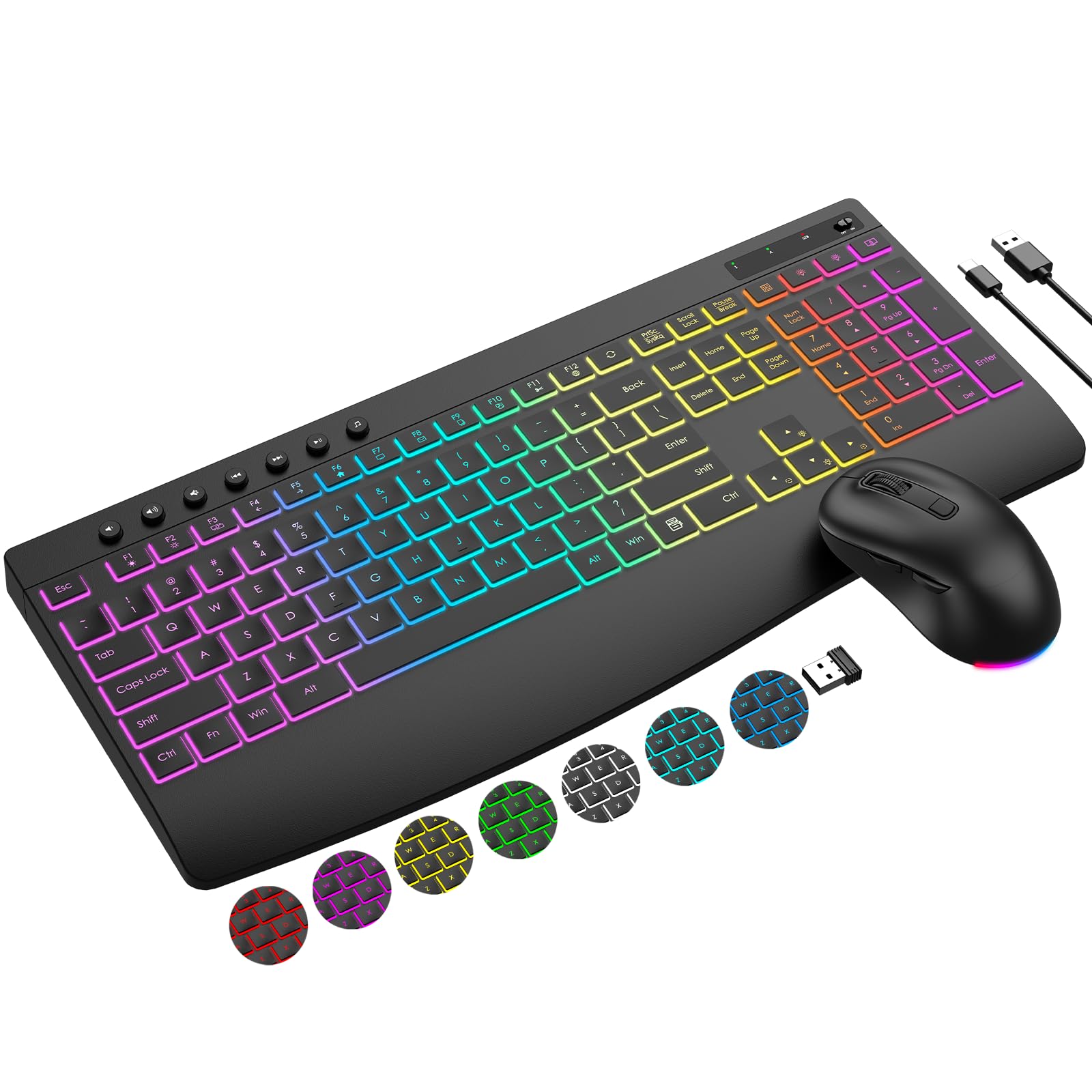
This combo earns the top spot because it nails the two biggest pain points in one go: a massive 4000mAh battery in the keyboard and a 800mAh cell in the mouse. You can leave the charging cable at home for weeks. The nine backlight effects include three lighting modes, seven switchable colors, and five brightness levels, giving you genuine RGB customization that actually works in a dark room.
The keyboard features 19 hotkeys for one-click access to browser functions and calculator, plus a stain-resistant wrist rest. The mouse offers 1000/1600/2400 DPI settings with forward and backward navigation buttons. The shared single USB receiver stored on the back of the mouse keeps the setup tidy. Typing is quiet thanks to the key stabilizers, and the mouse clicks are nearly silent.
Customer feedback consistently praises the reliable connection at up to 33 feet, the comfortable ergonomics for all-day typing, and the exceptional value. A few users noted that the keyboard needs a full charge on arrival to ensure optimal battery life, which is a simple one-time step.
Why it’s great
- Ultra-large 4000mAh battery lasts months per charge
- Full RGB customization with 5-level brightness
- Quiet keys and silent mouse clicks
Good to know
- Keyboard must be fully charged before first use for best battery life
- Backlighting must be manually reactivated after the auto-sleep wakes the keyboard
2. Redragon S101M-KS Wireless Gaming Keyboard and Mouse

The Redragon S101M-KS is a full-fledged gaming combo that refuses to compromise on connectivity. It offers three modes—2.4G, Bluetooth, and wired via USB-C—making it ideal for gamers who want low-latency for desktop play and the freedom to switch to a laptop on the go. The keyboard features 10 dedicated multimedia keys and 12 combo media keys, plus a WIN lock key to prevent accidental game interrupts.
The mouse hits 4800 DPI across five adjustable levels (800/1200/1600/3200/4800), and both the keyboard and mouse are fully programmable via Redragon’s software. You can remap every key, adjust DPI values, and set polling rates from 125 to 1000Hz. The RGB backlighting offers 8 preset patterns with adjustable speed and brightness, though the mouse uses a monochromatic red glow rather than full RGB.
Build quality is robust, and the keys offer a tactile, stable feel that reviewers compare favorably to entry-level mechanicals. The keyboard lasts up to 300 hours with the backlight off. The mouse battery requires more frequent charging, and the keyboard takes up to 10 seconds to reconnect after its sleep mode, which can be a minor annoyance during quick breaks.
Why it’s great
- Tri-mode wireless (2.4G, BT, wired) for maximum flexibility
- Programmable keys and mouse with 4800 DPI
- Excellent tactile feel and sturdy construction
Good to know
- Mouse uses monochromatic red LEDs, not RGB
- Keyboard sleep mode causes a 5-10 second reconnect delay
3. SABLUTE Ergonomic Wireless Keyboard and Mouse Combo

The SABLUTE combo is engineered for comfort-focused users who spend 8+ hours typing. The wave-shaped keys follow the natural arc of your fingertips, reducing reach and strain, while the silky-smooth faux lambskin leather palm rest is sweat-proof and easy to clean. The keyboard offers adjustable front and back stands to support healthy wrist posture whether you are sitting or standing.
The 4000mAh battery is on par with the best in class, and the intelligent auto-sleep feature extends charge cycles to weeks. The RGB mouse offers 6 fixed colors or 5 cycle modes, with three DPI levels (800/1200/1600). The keyboard includes nine shortcut keys for productivity, and the single 2.4GHz USB receiver (with USB-A and USB-C adapters) works with almost any device including PCs, Macs, and tablets.
Users consistently call it a worthy replacement for discontinued ergonomic models like the Logitech K350. The build is heavy and stable, the keys offer nice tactile feedback while staying quiet, and the fast USB-C charging is a convenience. Some users note the enter key feels slightly different from the rest, and the mouse can feel a bit slippery for some hand sizes.
Why it’s great
- Ergonomic wave layout reduces hand strain over long sessions
- Premium faux leather palm rest is durable and sweat-proof
- 4000mAh battery with USB-C charging and auto-sleep
Good to know
- Enter key has a slightly different feel than other keys
- Mouse surface may be slippery for some users
4. VEILZOR Wireless Keyboard and Mouse Combo

The VEILZOR combo stands out for its thoughtful inclusion of a built-in phone holder on the keyboard—a small but meaningful feature for anyone who uses their phone alongside their computer. The RGB backlight offers nine effects with three lighting modes, seven colors, and three brightness levels. The illumination wraps around the keys, though a few users note it is not bright enough for severe eye conditions.
The full-size keyboard features a wrist rest and adjustable tilt legs for ergonomic support. The mouse uses a contoured shape with a thumb rest for improved grip, plus three DPI levels (800/1200/1600). Both devices charge via USB-C and last weeks between charges according to customer reports. The 2-in-1 USB-A/C receiver is stored on the back of the keyboard, and the wireless range reaches 10 meters.
Typing is quiet and responsive, and the mouse clicks are reduced by 99.99% for near-silent operation. Reviewers compliment the bright RGB effects, the easy setup, and the excellent battery life. The mouse wheel on the original unit was reported defective by one user, but the seller’s support team quickly replaced the entire set, indicating good after-sales service.
Why it’s great
- Integrated phone holder on the keyboard for convenient access
- 9 RGB effects with customizable brightness and colors
- Near-silent mouse clicks and quiet key mechanism
Good to know
- Backlight brightness may be insufficient for users with certain eye conditions
- Some units had a defective mouse wheel, though seller support resolved it
5. ProtoArc KM110-A Bluetooth Keyboard and Mouse for Mac
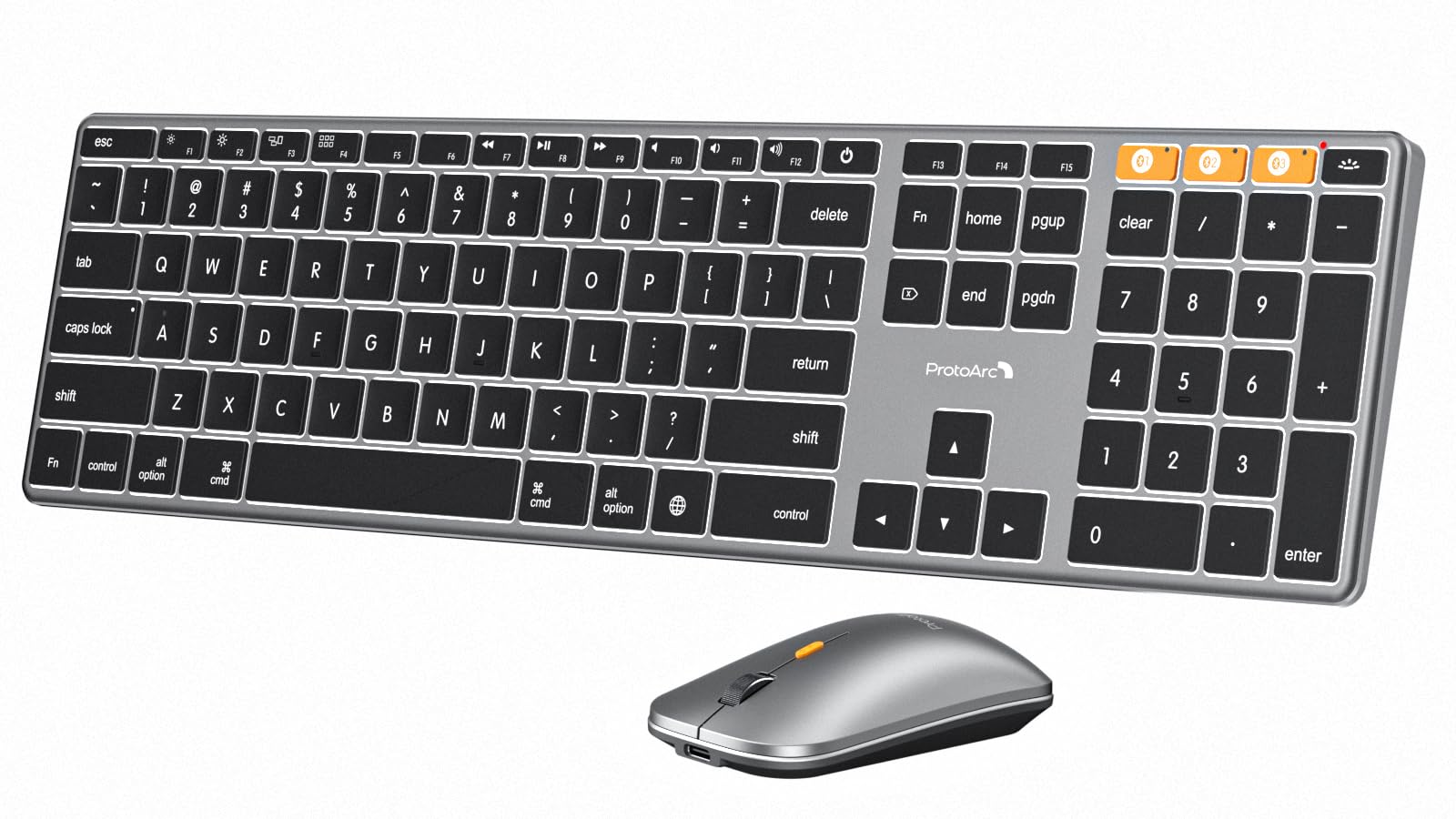
The ProtoArc KM110-A is a premium, Mac-only combo with a sleek aluminum body that visually matches the Magic Keyboard. It uses Bluetooth 5.1 to connect to up to three devices, letting you switch from a MacBook to an iPad to an iPhone with a single key press. The keyboard features three levels of adjustable white backlighting, which is gentle on the eyes in low light and creates a clean, professional look.
The low-profile scissor mechanism keys provide a smooth, laptop-like typing experience that Mac users will instantly appreciate. The mouse offers three DPI settings (1000/1600/2400) and works on multiple surface types. The keyboard houses an 1800mAh battery and the mouse a 500mAh battery, both recharged via USB-C. The devices automatically sleep after 60 minutes of inactivity and wake instantly when touched, though the backlighting must be manually turned back on after sleep.
Customer reviews highlight the perfect weight, excellent key feel, minimal click noise, and the included soft cover. The only significant downside is that it is incompatible with Windows, Linux, or Macs released before 2013, so it is a pure Mac ecosystem investment. A single negative review noted a startup delay where the first few keystrokes were missed after the computer booted, which was frustrating for that user.
Why it’s great
- Premium aluminum build matches Mac aesthetic perfectly
- Seamless 3-device Bluetooth switching
- Quiet, laptop-style scissor keys with 3-level white backlight
Good to know
- Compatible only with macOS, iOS, and iPadOS—no Windows support
- Some users experience missed initial keystrokes after computer startup
6. Logitech MK850 Performance Wireless Combo

Logitech’s MK850 is a workhorse combo built for multi-device professionals. The keyboard pairs with up to three devices via Bluetooth or the included 2.4GHz USB receiver and lets you switch between them with a single button press. The cushioned palm rest and carefully cupped keys support fast, accurate typing over long stretches. Note that this model does not include a backlight, which is a significant omission for night workers.
The contoured right-handed mouse features a hyper-fast scroll wheel that lets you fly through long documents and web pages with a single flick. It can also switch to a notched mode for line-by-line scrolling. The Logitech DuoLink and Logitech Options software enable custom functionality and cross-device navigation, though the firmware is only available for Windows and macOS.
Customer feedback is mixed. Many praise the comfort, the smooth device switching, and the excellent scroll wheel. However, a substantial number of users report serious performance issues after a few months—keys sticking, erratic scrolling, and unresponsive behavior that requires power-cycling the keyboard. One IT company advised replacement after six months, citing internal quality concerns.
Why it’s great
- Comfortable cupped keys and cushioned palm rest for all-day typing
- Hyper-fast scroll wheel is incredibly efficient for long documents
- Multi-device pairing with easy switching
Good to know
- No backlighting on the keyboard at all
- Multiple reports of erratic key and scroll performance after months of use
7. Logitech MK955 Signature Slim Wireless Combo

The MK955 Signature Slim is Logitech’s premium quiet combo, engineered for users with larger hands and a need for near-silent peripherals. The keyboard uses familiar laptop-style keys with quiet scissor switches, and the M750 L mouse features SilentTouch technology that reduces click noise by 90%. The SmartWheel on the mouse lets you switch between precise line-by-line scrolling and free-spinning through long pages with a single flick.
Multi-device support is excellent: the keyboard pairs with three devices via Bluetooth or the Logi Bolt USB receiver, and you can switch between them with a single tap. The Logi Options+ app unlocks customizable keys, shortcuts, and extended possibilities for Windows and macOS. The build uses 25-48% post-consumer recycled plastic, and the design is sleek and solid. The full-size layout is comfortable for larger hands without feeling bulky.
Users consistently praise the quiet, responsive keys, the smooth and accurate mouse tracking, and the seamless multi-device switching. The initial setup for additional computers can be slightly confusing if you do not follow the connection order carefully. One reviewer found the guide for connecting to a second computer poorly described. Overall, it is considered a premium, versatile combo that is worth the investment for a distraction-free workflow.
Why it’s great
- Whisper-quiet typing and clicking with SilentTouch technology
- SmartWheel scroll adapts from precise to fast scrolling
- Full-size layout and contoured mouse fit larger hands comfortably
Good to know
- Multi-device setup instructions could be clearer
- No backlighting on the keyboard—keys are not illuminated
FAQ
Can I use the backlight on a backlit wireless keyboard all the time?
Do all backlit wireless keyboard and mouse combos use a single USB receiver?
Final Thoughts: The Verdict
For most users, the backlit wireless keyboard and mouse combo winner is the EDJO MK228 Pro because it combines a massive 4000mAh battery, full RGB customization, and quiet ergonomics at a compelling value. If you need true gaming-grade performance with tri-mode connectivity, grab the Redragon S101M-KS. And for all-day ergonomic comfort with premium build materials, nothing beats the SABLUTE Ergonomic Combo.

Mo Maruf
I created WellFizz to bridge the gap between vague wellness advice and actionable solutions. My mission is simple: to decode the research and give you practical tools you can actually use.
Beyond the data, I am a passionate traveler. I believe that stepping away from the screen to explore new environments is essential for mental clarity and physical vitality.