Our readers keep the lights on and my smoothie glass nicely filled. As an Amazon Associate, I earn from qualifying purchases.
Buying a color printer on a tight budget is a trap. The hardware price looks tempting, but the real expense is the ink that follows — and most budget shoppers don’t see the ambush until their first cartridge runs dry.
I’m Mohammad Maruf — the founder and writer behind WellFizz. I’ve spent years analyzing hardware specs, ink yields, and long-term cost-per-page data to separate genuine values from bait-and-switch machines.
This guide breaks down seven of the most reliable best budget color printer options available, comparing print speeds, duplex features, connectivity, and the hidden subscription traps every shopper needs to navigate.
How To Choose The Best Budget Color Printer
Every budget color printer forces a trade-off. You can get low upfront cost, but you’ll pay for it in ink, speed, or features. This guide walks through the decision points that matter most for home and light office users.
Ink Yield & Cost Per Page
The real price of a budget printer isn’t on the box. Starter cartridges that ship with the machine often hold half the ink of standard cartridges — you’ll be shopping for replacements after just a few dozen pages. Look up the page yield of standard and XL cartridges before buying. A printer that uses separate color cartridges (cyan, magenta, yellow individually) lets you replace only the color that runs out, saving money over tri-color carts.
Print Speed & Duty Cycle
Color print speed for entry-level inkjets ranges from 5 to 10 pages per minute (ppm). If you mostly print documents, black speed matters more — look for 7.5 ppm or higher. Monthly duty cycle (usually listed up to 1,000 pages) tells you what the machine can handle over a year. Exceed it regularly and you’ll wear out the printhead faster.
Duplex & Document Feeder
Automatic duplex printing (printing on both sides) is a standard feature on most mid-range models now, but some entry-level units only offer manual duplex — you have to flip pages yourself. An automatic document feeder (ADF) matters if you frequently scan or copy multi-page stacks; it saves you from feeding each page individually.
Connectivity & Software
Dual-band Wi-Fi (supporting both 2.4 GHz and 5 GHz) is more reliable than single-band. Most sub- printers still use 2.4 GHz only, which can be congested in apartments. Mobile printing apps (Canon PRINT, HP Smart, Epson Smart Panel, Brother Mobile Connect) vary wildly in quality — the app experience often determines whether setup takes five minutes or two hours.
Quick Comparison
On smaller screens, swipe sideways to see the full table.
| Model | Category | Best For | Key Spec | Amazon |
|---|---|---|---|---|
| Brother MFC-J1360DW | All-in-One | Home office productivity | 16 ppm black / 9 ppm color | Amazon |
| Canon PIXMA TS7720 | Photo & Document | Quick mixed-use printing | 15 ppm black / 10 ppm color | Amazon |
| Epson WF-2930 | Home Office | Fax & multi-page scanning | 10 ppm black, 5 ppm color | Amazon |
| Canon PIXMA TS6520 | Compact All-in-One | Small desk spaces | 14 ppm black / 9 ppm color | Amazon |
| Epson XP-4200 | Home & Photo | Borderless photo printing | 10 ppm black, 5 ppm color | Amazon |
| HP Envy 6458e (Renewed) | Refurbished | Budget with ADF & auto-duplex | 10 ppm black / 7 ppm color | Amazon |
| HP DeskJet 2855e | Entry-Level | Low-volume home printing | 7.5 ppm black / 5.5 ppm color | Amazon |
In‑Depth Reviews
1. Brother MFC-J1360DW

The Brother MFC-J1360DW stands out in the budget color printer category for one reason: it doesn’t skimp on productivity features. With a 150-sheet paper tray, a 20-sheet automatic document feeder (ADF), and automatic duplex printing, it handles multi-page homework packets and office forms without manual page-flipping. Print speeds hit 16 ppm in black and 9 ppm in color — fast enough for a home with multiple users.
Setup is the main friction point. The printer only connects to 2.4 GHz networks, which forced some users to reconfigure their router settings. Once connected, the Brother Mobile Connect app provides solid control for scanning, copying, and monitoring ink levels using the Page Gauge tool. The 1.8-inch color display makes on-device navigation straightforward.
Ink economics are reasonable. LC501-series cartridges yield more pages than the starter cartridges, and Brother offers a Refresh subscription trial that can lower cost per page for high-volume users. The scanner produces crisp color copies, and the ADF reliably feeds mixed paper types. For home offices that need real workflow efficiency without paying premium prices, this is the most complete package.
Why it’s great
- Generous 150-sheet input tray and 20-sheet ADF
- Strong print speeds for the price tier
- Automatic duplex printing included
Good to know
- Setup requires a 2.4 GHz Wi-Fi network
- Paper tray can be tricky to open initially
- Starter ink cartridges have limited yield
2. Canon PIXMA TS7720

The Canon PIXMA TS7720 brings a large 2.7-inch LCD touchscreen and impressive print speeds — 15 ppm black, 10 ppm color — to the budget-friendly segment. The touch interface is responsive and makes ink level checking, Wi-Fi setup, and paper selection much easier than button-only models. It uses a two-cartridge system (PG-285 black, CL-286 color), which simplifies replacement but means you throw out all colors when one runs dry.
Wireless setup is generally smooth through the Canon PRINT app, but some users reported initial connection hurdles requiring manual intervention. The printer supports automatic duplex printing, so you save paper without flipping each page. It also handles borderless photo printing up to 8.5 x 11 inches, though color vibrancy is slightly less punchy than Canon’s five-ink photo-focused models.
The biggest drawback is the lack of an automatic document feeder — scanning or copying more than one page means feeding each sheet individually. The rear paper tray also auto-retracts when not in use, which can be annoying if you leave paper loaded. For mixed document and photo printing with a modern touch interface, the TS7720 is a strong contender for the mid-range tier.
Why it’s great
- Large, intuitive 2.7-inch touchscreen display
- Fast print speeds for both color and black
- Automatic duplex saves paper effortlessly
Good to know
- No automatic document feeder
- Tri-color cartridge wastes ink on single-color depletion
- Setup can require manual workarounds
3. Epson WorkForce WF-2930

The Epson WorkForce WF-2930 brings professional home office features — including a 35-page automatic document feeder, fax capability, and automatic duplex printing — to a price point that usually lacks these tools. The 1.4-inch color display is smaller than the Canon TS7720 but still functional for menu navigation. Print speeds are modest at 10 ppm black and 5 ppm color, but for document-heavy home offices, the ADF and fax make it a uniquely capable unit.
Epson’s heat-free Micro Piezo technology is a genuine advantage: the printhead is designed to last the life of the printer, and there’s no heat-up time before the first page. The Epson Smart Panel app supports voice printing through Alexa and Siri, which is a convenience bonus. Setup via the app is generally smooth, though some users reported needing to use Wi-Fi Direct as a workaround.
The ink situation requires caution. The WF-2930 uses individual T232 cartridges, which is good for replacing only the empty color. But starter cartridges come less than half full, so budget for replacements almost immediately. Epson’s warranty explicitly excludes damage from non-genuine ink, so third-party cartridges carry real risk. If you need fax and multi-page scanning without moving to a higher price tier, this is your best bet.
Why it’s great
- 35-sheet ADF for efficient multi-page scanning
- Built-in fax capability for home offices
- Heat-free technology with a durable printhead
Good to know
- Starter cartridges have very low ink volume
- Non-genuine ink voids the warranty
- Color print quality can appear dull
4. Canon PIXMA TS6520

The Canon PIXMA TS6520 earns its place in this list by pairing a compact footprint with a unique 1.42-inch monochrome OLED display — a rarity at this price tier. The OLED panel shows ink levels, printer status, and settings crisply without backlight bleed. Dual-band Wi-Fi (2.4 GHz and 5 GHz) makes wireless connections more stable than single-band rivals, especially in crowded apartments or smart homes with multiple devices.
Print speeds are competitive at 14 ppm black and 9 ppm color, and automatic duplex printing is fully supported. The two-cartridge system uses PG-295 (pigment black for sharp text) and CL-286 (dye-based color for photos). Canon’s PRINT app, Apple AirPrint, and Mopria Print Service are all supported, making mobile printing straightforward. Setup typically takes under 10 minutes, though a USB cable is not included in the box.
The paper tray capacity is modest — typical for a machine this size — and the printer is slightly taller than ultra-slim competitors. Ink costs are reasonable for standard cartridges, but the XL versions offer much better page yield per dollar. For users who prioritize wireless reliability and a clean visual interface in a small desk space, the TS6520 is a smart mid-range pick.
Why it’s great
- OLED display for clear status at a glance
- Dual-band Wi-Fi for stable wireless connections
- Strong print speeds for its size
Good to know
- Small paper tray limits high-volume jobs
- No USB cable included in the box
- Tri-color cartridge leads to waste
5. Epson Expression Home XP-4200
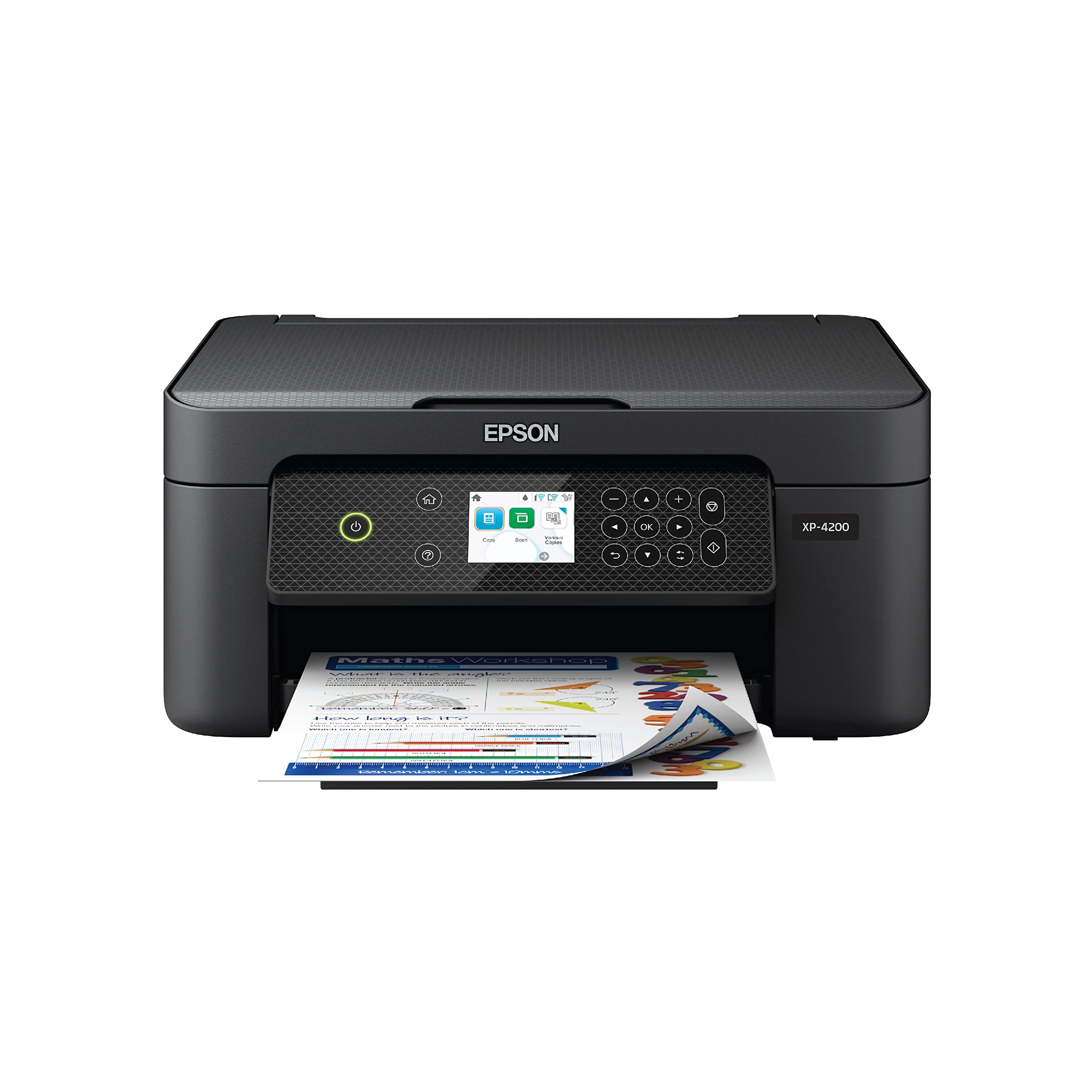
The Epson Expression Home XP-4200 is built for families who want vibrant borderless photo prints without spending on a dedicated photo printer. Its 2.4-inch color display makes menu navigation easy, and the Epson Smart Panel app handles mobile setup well. The four-cartridge system (individual cyan, magenta, yellow, and black — T232 series) is a strong advantage over tri-color cartridges, since you only replace the color that actually runs out.
Print speeds are modest at 10 ppm black and 5 ppm color, which is fine for home use but not for deadline-driven work. Automatic duplex printing is included, which helps with school handouts and double-sided document printing. Voice printing via Amazon Alexa and Google Assistant adds hands-free convenience. The scanner produces good results for documents and photos, supporting up to 48-bit color depth for detailed image capture.
The biggest point of contention is the firmware lock on genuine Epson ink. Several users reported that firmware updates disabled third-party ink cartridges, and non-genuine ink voids the printer’s warranty. Ink costs are higher than average, and the starter cartridges run out fast. For photo-focused home use where print volumes are low and ink budget is flexible, the XP-4200 delivers quality results.
Why it’s great
- Individual color cartridges reduce waste
- Large 2.4-inch color display for easy navigation
- Borderless photo printing capability
Good to know
- Firmware updates block third-party ink
- Starter cartridges deplete quickly
- Color print speeds are slow
6. HP Envy 6458e (Renewed)

The HP Envy 6458e (Renewed) delivers the features of a mid-range office printer at a price that sits close to entry-level machines. It includes a 35-page automatic document feeder, automatic duplex printing, and dual-band Wi-Fi — three features rarely found together in this tier. Print speeds reach 10 ppm black and 7 ppm color, and the print resolution of 4800 x 1200 dpi produces sharp color documents and acceptable photos.
The renewed unit comes with starter HP 67 cartridges, which offer limited page yield. Users report that setup via the HP Smart app works well for most, but the mandatory HP account and the default WSD port can cause connection frustrations. The printer supports mobile printing via Apple AirPrint, Chrome OS, and Mopria, plus fax via the HP Smart app. The self-healing Wi-Fi feature helps maintain connections after network interruptions.
The subscription angle is unavoidable. HP Instant Ink is promoted heavily during setup, and the printer encourages enrollment. Without it, standard ink costs are relatively high. The refurbished condition means cosmetic imperfections are possible, but multiple users reported receiving units that looked and functioned like new. For budget shoppers who need ADF and duplex without paying mid-range prices, this is a solid gamble.
Why it’s great
- 35-sheet ADF and auto duplex at a low price
- High 4800 x 1200 dpi print resolution
- Dual-band Wi-Fi for reliable connectivity
Good to know
- Refurbished condition means some cosmetic risk
- Starter cartridges have low ink volume
- HP Smart app and Instant Ink push can be annoying
7. HP DeskJet 2855e

The HP DeskJet 2855e is the simplest and cheapest entry into color printing in this lineup. It prints, copies, and scans, with speeds of 7.5 ppm black and 5.5 ppm color — adequate for to-do lists, school worksheets, and one-off document copies. The 60-sheet input tray is smaller than most competitors, but for low-volume households it won’t be a problem. The white compact design fits easily on a small desk or shelf.
Wireless setup is where the 2855e shows its budget roots. It only supports 2.4 GHz Wi-Fi, which can be problematic in homes with mesh networks or router settings that default to 5 GHz. The HP Smart app handles setup and basic functions, but the app-wide mandatory HP account and frequent pop-ups for Instant Ink enrollment frustrated many users. Some reported the WSD port causing the printer to go offline frequently.
Manual duplex printing is supported, meaning you flip the pages yourself for double-sided output. Print quality is decent for text-heavy documents — HP’s AI-powered page reformatting for web prints works well — but color graphics are not vibrant enough for photo printing. The printer ships with HP 67 setup cartridges that have very limited capacity. For occasional home printing where speed and color quality are secondary, the 2855e gets the job done at the lowest possible entry cost.
Why it’s great
- Lowest initial purchase cost of the group
- Compact, unobtrusive design
- HP AI improves web page print layouts
Good to know
- 2.4 GHz Wi-Fi only causes connection issues
- No automatic duplex
- Mandatory HP account and Instant Ink pop-ups
FAQ
How much does ink cost per page for a budget color printer?
Is a budget color printer worth it for photo printing?
Can I use third-party ink in a budget color printer?
What does the monthly duty cycle mean for a home printer?
Final Thoughts: The Verdict
For most users, the best budget color printer winner is the Brother MFC-J1360DW because it combines a large paper tray, automatic document feeder, fast print speeds, and the lowest long-term ink cost of any machine in this roundup. If you want a compact printer with a beautiful display and fast output, grab the Canon PIXMA TS7720. And for a home office that needs fax and a 35-sheet ADF on a tight budget, nothing beats the Epson WorkForce WF-2930.

Mo Maruf
I created WellFizz to bridge the gap between vague wellness advice and actionable solutions. My mission is simple: to decode the research and give you practical tools you can actually use.
Beyond the data, I am a passionate traveler. I believe that stepping away from the screen to explore new environments is essential for mental clarity and physical vitality.