Our readers keep the lights on and my smoothie glass nicely filled. As an Amazon Associate, I earn from qualifying purchases.
Stepping up from 1080p to a 1440p monitor is the single most noticeable visual upgrade a gamer or creative professional can make without jumping into the financial deep end of 4K. The sharpness jump doubles pixel density on a 27-inch panel, letting you see finer details in games and read text clearly on spreadsheets. The real challenge is finding a model that delivers a true 2560×1440 (or 3440×1440 ultrawide) resolution paired with a refresh rate above 144Hz — and actually holds that performance without ghosting or tearing.
I’m Mohammad Maruf — the founder and writer behind WellFizz. After analyzing hundreds of display panels across refresh rates, response times, and color gamut measurements, I’ve focused on the specific combination of specs that matter most when you are shopping for a cost-effective high-resolution monitor: pixel response consistency, adaptive sync implementation, and whether the stand and connectivity match your actual desk setup.
You will find models ranging from fast IPS panels built for competitive shooters to curved VA ultrawides that spread your desktop across 34 inches. This guide is built to help you identify the best 1440p budget monitor for your specific workflow and gaming style.
How To Choose The Best 1440P Budget Monitor
Choosing a monitor at this price point means you are trading off between raw speed, color fidelity, and ergonomic features. Knowing which pillar to prioritize depends entirely on your primary use case.
Panel Technology: IPS vs VA for 1440p
IPS panels offer superior color accuracy and wider viewing angles, making them the standard for creative work and vibrant game worlds. VA panels, especially curved ones, provide deeper blacks and higher contrast ratios (often 3000:1 vs 1000:1) which makes dark scenes in movies and games look richer. For a budget monitor, an IPS panel will typically give you more consistent motion handling, while a VA panel will give you better immersion in single-player titles.
Refresh Rate and Adaptive Sync
A 1440p monitor at 165Hz to 180Hz is the current sweet spot for value. Higher refresh rates like 240Hz or 300Hz are available in this budget range, but you must ensure your graphics card can push those frames at 1440p. Adaptive sync technology (FreeSync Premium or G-Sync Compatible) is essential to eliminate screen tearing during gameplay — always confirm the monitor is certified for your GPU brand.
Ergonomics and Connectivity
An adjustable height stand (tilt, swivel, pivot) is a premium feature in the budget category. Many monitors save costs by offering only tilt adjustment. Check the stand’s footprint: a wide base takes up desk space. For connectivity, a DisplayPort 1.4 cable is required to run 1440p at 180Hz or above; HDMI 2.0 often caps at 144Hz, and HDMI 2.1 provides higher bandwidth for future-proofing. Always inspect the included cables in the box.
Quick Comparison
On smaller screens, swipe sideways to see the full table.
| Model | Category | Best For | Key Spec | Amazon |
|---|---|---|---|---|
| ASUS TUF VG27AQM5A | Fast IPS | Competitive FPS Gaming | 300Hz / 0.3ms GtG | Amazon |
| Acer Nitro XV272U F3 | IPS 300Hz | High-Speed E-Sports | 300Hz / 0.5ms GtG | Amazon |
| Alienware AW2725DM | IPS QHD | All-Round Gaming | 180Hz / DCI-P3 95% | Amazon |
| Samsung Odyssey G5 G50F | Fast IPS | Immersive 32-inch Gaming | 32-inch / 180Hz | Amazon |
| ASUS TUF VG27AQ (Classic) | IPS 165Hz | Proven Workhorse | 165Hz / 1ms MPRT | Amazon |
| LG UltraGear 32GS60QC | VA Curved | Dark Scene Visibility | 32-inch VA / 3000:1 | Amazon |
| Pixio PX278 Wave | Fast IPS | Aesthetic Battlestations | 180Hz / 1ms GtG | Amazon |
| SANSUI 34-Inch Curved | VA Ultrawide | Productivity & Immersion | 34-inch VA / 200Hz | Amazon |
| Sceptre C345B-QUT168 | VA Ultrawide | Ultrawide Multitasking | 34-inch / 180Hz | Amazon |
In‑Depth Reviews
1. ASUS TUF Gaming 27” 1440P Monitor (VG27AQM5A)

The ASUS TUF VG27AQM5A is built for the player who prioritizes raw refresh rate without sacrificing the 1440p visual upgrade. Its Fast IPS panel pushes 300Hz with a 0.3ms gray-to-gray response time, making motion clarity exceptional in fast-twitch shooters like Valorant or Apex Legends. The Extreme Low Motion Blur Sync (ELMB Sync) technology allows variable refresh rate and backlight strobing to run simultaneously, which is rare at this tier — you get both tear-free motion and sharp image transitions.
The 95% DCI-P3 color gamut ensures vibrant color reproduction out of the box, though peak brightness is moderate for HDR content. The stand offers full height, tilt, swivel, and pivot adjustments, so you can dial in the perfect viewing angle without an aftermarket mount. Connectivity includes DisplayPort 1.4 and HDMI 2.0, plus a USB hub for peripheral management.
Built-in speakers exist for convenience but are thin and lack bass — you will want dedicated desktop speakers or a headset. The anti-glare matte coating works well in brightly lit rooms. For competitive gamers who play at high frame rates and want a monitor that scales with future GPU upgrades, this Asus TUF is the clear frontrunner.
Why it’s great
- 300Hz refresh rate with 0.3ms GtG response for elite motion clarity
- ELMB Sync works alongside VRR for tear-free ghosting reduction
- Full ergonomic stand with height, pivot, and swivel
- 95% DCI-P3 color gamut for vibrant visuals
Good to know
- Built-in speakers are weak and lack bass response
- HDR brightness is moderate; not true HDR performance
- Menu system requires some familiarization
2. Acer Nitro 27″ WQHD IPS Monitor (XV272U F3)

The Acer Nitro XV272U F3 is a focused weapon for competitive players who need high refresh rates at a restrained cost. It delivers a native 300Hz refresh rate with a 0.5ms GtG response time on a Fast IPS panel, providing the smooth motion and low input lag essential for ranked play. The DisplayHDR 400 certification gives it a slight edge in peak brightness over many budget competitors, making highlights pop a bit more in supported titles.
Color accuracy is strong for the tier, covering 99% of the sRGB gamut, which makes it suitable for light creative work alongside gaming. The ergonomic stand is a standout feature at this price — it offers height, pivot, swivel, and tilt adjustments, giving you flexibility that many rivals reserve for more expensive models. The ZeroFrame design maximizes the screen-to-body ratio, creating an immersive look in a multi-monitor setup.
Some units have reported backlight bleed along the bottom edge, and the built-in speakers are basic. To hit the full 300Hz refresh rate, you must use the included HDMI 2.1 cable; the DisplayPort 1.4 can be limited under certain color depth settings. Despite these minor quirks, the combination of refresh rate, response time, and ergonomic adjustability makes this Nitro a top value pick for serious gamers.
Why it’s great
- 300Hz refresh rate with 0.5ms GtG response for ultra-smooth competitive play
- Full ergonomic stand with height, pivot, and swivel adjustments
- DisplayHDR 400 certification for improved brightness in highlights
- 99% sRGB color gamut for accurate color reproduction
Good to know
- IPS backlight bleed can be noticeable on some units
- Built-in speakers are weak and tinny
- DisplayPort 1.4 may limit color depth at 300Hz
3. Alienware 27 Gaming Monitor (AW2725DM)

The Alienware AW2725DM strikes the most balanced deal between performance, build quality, and price in the 1440p budget segment. It uses a 27-inch IPS panel with a 180Hz refresh rate and 1ms GtG response time, which is the current sweet spot for both competitive shooters and story-driven games. The DCI-P3 95% color coverage with VESA DisplayHDR 400 certification means colors are vibrant and highlights have punch, making it a solid choice for media consumption too.
The build quality is noticeably above the category average. The stand is sturdy with a small footprint, includes height, tilt, swivel, and pivot adjustments, and uses a tool-less mounting mechanism. The hardware-based low blue light solution reduces eye strain without washing out colors, which is a real advantage for long sessions. NVIDIA G-Sync and AMD FreeSync compatibility ensure tear-free gameplay regardless of your GPU brand.
The on-screen display is controlled by a simple joystick, and the monitor includes both DisplayPort 1.4 and HDMI cables in the box. The only notable omission is a USB-C input, which limits single-cable laptop setups. For the vast majority of gamers and desktop users, this Alienware delivers a premium experience without the premium price tag.
Why it’s great
- Excellent color accuracy with 95% DCI-P3 coverage
- Solid ergonomic stand with height, swivel, pivot, and tilt
- VESA DisplayHDR 400 for enhanced brightness and contrast
- G-Sync and FreeSync compatible for tear-free gaming
Good to know
- No USB-C connectivity for single-cable laptops
- IPS glow is present, typical for the panel technology
- Only 180Hz; competitive players may prefer 240Hz+
4. Samsung 32” Odyssey G5 G50F

The Samsung Odyssey G5 G50F is the entry point for buyers who want a larger 32-inch screen without sacrificing refresh rate. It uses a Fast IPS panel at 2560×1440 with a 180Hz refresh rate and 1ms GtG response time, offering a generous viewing area that is excellent for immersion in open-world games and productivity workflows. The wide 178-degree viewing angles keep colors consistent even when you lean back or share the screen.
HDR10 support adds some depth to shadows and highlights, though the 300 cd/m² brightness means it won’t compete with dedicated HDR monitors. The Black Equalizer is a practical feature for competitive gaming, brightening dark areas without overexposing the rest of the image. The ergonomic stand includes height, tilt, swivel, and pivot adjustments, a welcome inclusion that is often missing on larger budget monitors.
The single HDMI 2.0 port and one DisplayPort 1.4 are adequate but limit you to one high-bandwidth input at a time. The menu joystick is located on the back bottom-left corner, which takes some getting used to. For those who value screen real estate and smooth 1440p performance, the Samsung G50F delivers a commanding presence without breaking the bank.
Why it’s great
- 32-inch IPS panel with 180Hz and 1ms response for immersive gaming
- Full ergonomic stand with height, swivel, and pivot adjustments
- Black Equalizer improves visibility in dark game scenes
- G-Sync compatible for smooth tear-free gameplay
Good to know
- Only one HDMI 2.0 and one DisplayPort input
- Menu joystick is awkwardly placed on the rear corner
- Peak brightness is moderate at 300 cd/m²
5. ASUS TUF Gaming 27″ 2K HDR Monitor (VG27AQ)

The ASUS TUF Gaming VG27AQ is a veteran in the 1440p space and remains one of the most reliable options for those who want a monitor that just works. It offers a 27-inch WQHD IPS panel overclockable to 165Hz with a 1ms MPRT response time. The Extreme Low Motion Blur Sync (ELMB) reduces ghosting effectively, though it cannot run simultaneously with G-Sync — you choose between motion blur reduction or variable refresh rate.
The build quality is robust, with a stand that provides height, tilt, swivel, and pivot adjustments, plus VESA mount compatibility. The 99% sRGB coverage gives accurate colors out of the box, and the Shadow Boost is genuinely useful for competitive shooters with dark corners. Connectivity includes DisplayPort 1.2 and HDMI 2.0, both with cables included, plus a 3.5mm audio jack for external speakers.
The external power brick is a minor annoyance for cable management, and the HDR10 mode is underwhelming on Windows due to the 350 cd/m² brightness ceiling. The on-screen display uses a joystick which is responsive and intuitive. For buyers who value proven track record and consistent performance over the latest headline specs, this TUF monitor remains a rock-solid choice.
Why it’s great
- Proven 165Hz IPS performance with G-Sync compatibility
- Full ergonomic stand with height, swivel, tilt, and pivot
- Reliable build quality with a 3-year warranty
- Shadow Boost enhances dark scene visibility effectively
Good to know
- ELMB cannot run simultaneously with G-Sync
- External power brick complicates cable management
- HDR10 performance is weak due to limited brightness
6. LG UltraGear 32GS60QC-B

The LG UltraGear 32GS60QC is the monitor to pick if deep blacks and high contrast matter more to you than the widest viewing angles. It uses a VA panel with a steep 1000R curvature that wraps around your peripheral vision, creating a genuinely immersive experience for single-player games and cinematic content. The 3000:1 static contrast ratio means black levels are significantly deeper than any IPS panel in this price range, making dark scenes look rich rather than washed out.
The 180Hz refresh rate and 1ms GtG response time keep motion smooth, though VA panels can exhibit some dark-level smearing at lower refresh rates. The 99% sRGB color gamut covers the standard range well, and HDR10 support adds some dynamic range. The tilt-adjustable stand lacks height adjustment, which is a notable omission for a 32-inch monitor — you may need a VESA mount to get the perfect eye level.
The Borderless Design looks sleek on a desk, with thin bezels on three sides. The Dynamic Action Sync reduces input lag, and the Black Stabilizer helps spot enemies in dark corners. Some users report that the auto-brightness feature cannot be fully disabled, which can be distracting during color-sensitive work. For gamers who prioritize contrast and immersion over color-critical accuracy, the LG UltraGear delivers where IPS monitors fall short.
Why it’s great
- 3000:1 contrast ratio for deep, true blacks
- 1000R curvature provides strong immersion for gaming
- 180Hz refresh rate with 1ms response for smooth motion
- 99% sRGB color gamut with HDR10 support
Good to know
- Stand lacks height adjustment; only tilt is available
- VA panel may show dark-level smearing at low refresh rates
- Auto-brightness feature cannot be entirely disabled
7. Pixio PX278 Wave Champagne Gold
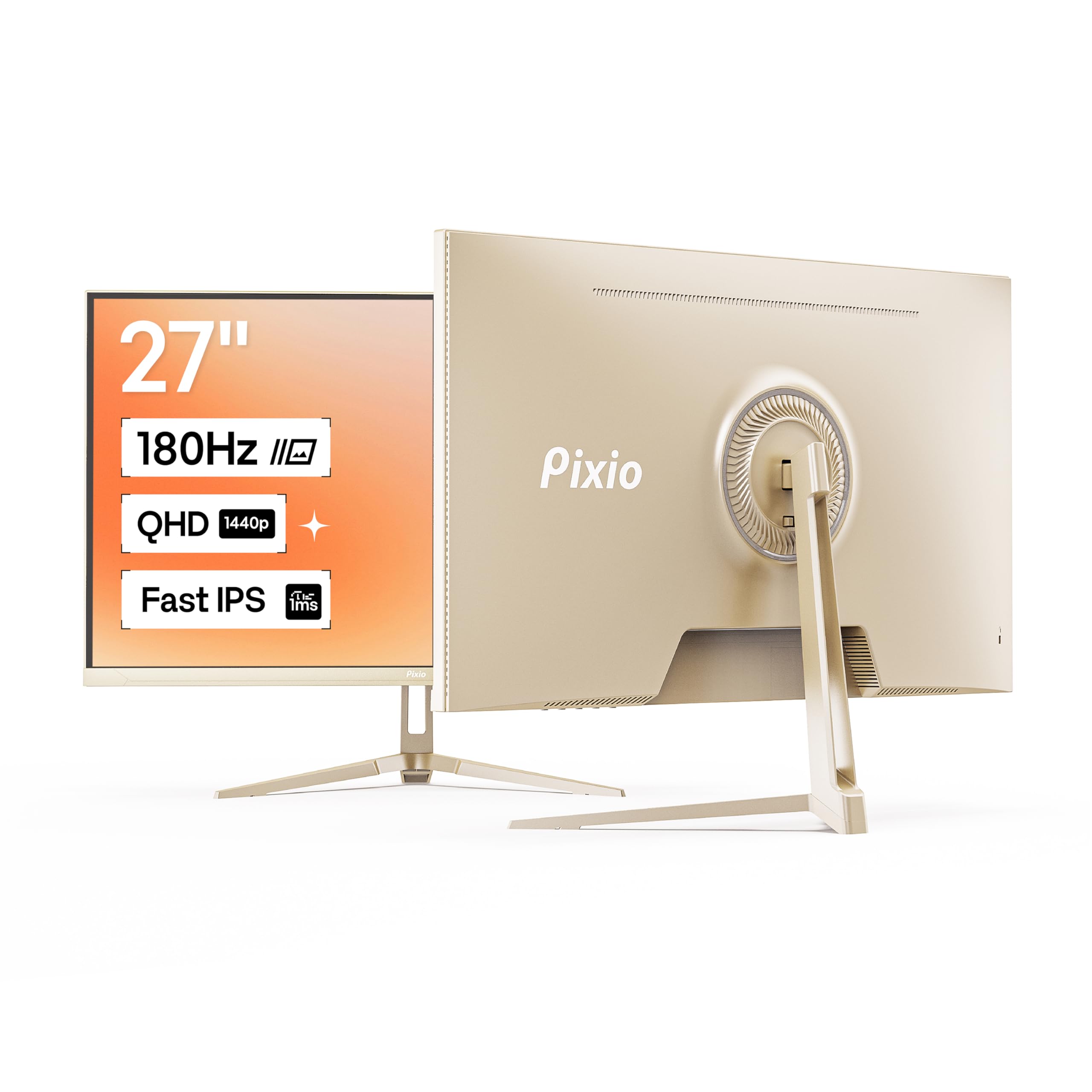
The Pixio PX278 Wave stands out in a market of black rectangles by offering a Champagne Gold finish that adds personality to your setup without sacrificing performance. Under the distinctive color, it is a solidly specced 27-inch Fast IPS monitor with 2560×1440 resolution, a 180Hz refresh rate, and 1ms GtG response time. The 350 cd/m² brightness is brighter than many rivals, giving images a punchy look in well-lit rooms.
The color accuracy is good for a budget IPS panel, with rich saturation that makes games and media look vibrant. The matte screen coating reduces reflections effectively, which is helpful if you have windows behind your desk. It includes two HDMI 2.0 ports and one DisplayPort 1.4, and the built-in speakers are functional for system sounds and casual use, though they lack depth for immersive audio.
The stand only offers tilt adjustment, so you will need a VESA mount if you want height or swivel control. The champagne gold color is a specific aesthetic choice that may not match all setups. For users who want a solid 1440p gaming experience and value personal expression in their hardware, the Pixio PX278 delivers both visual flair and capable performance.
Why it’s great
- Unique Champagne Gold color for aesthetic customization
- 350 cd/m² brightness for punchy visuals
- 180Hz Fast IPS with 1ms response for smooth gaming
- Matte screen coating minimizes reflections
Good to know
- Stand only offers tilt adjustment; no height or swivel
- Built-in speakers are acceptable but not immersive
- Champagne Gold color may not suit all desk setups
8. SANSUI 34-Inch Curved Gaming Monitor
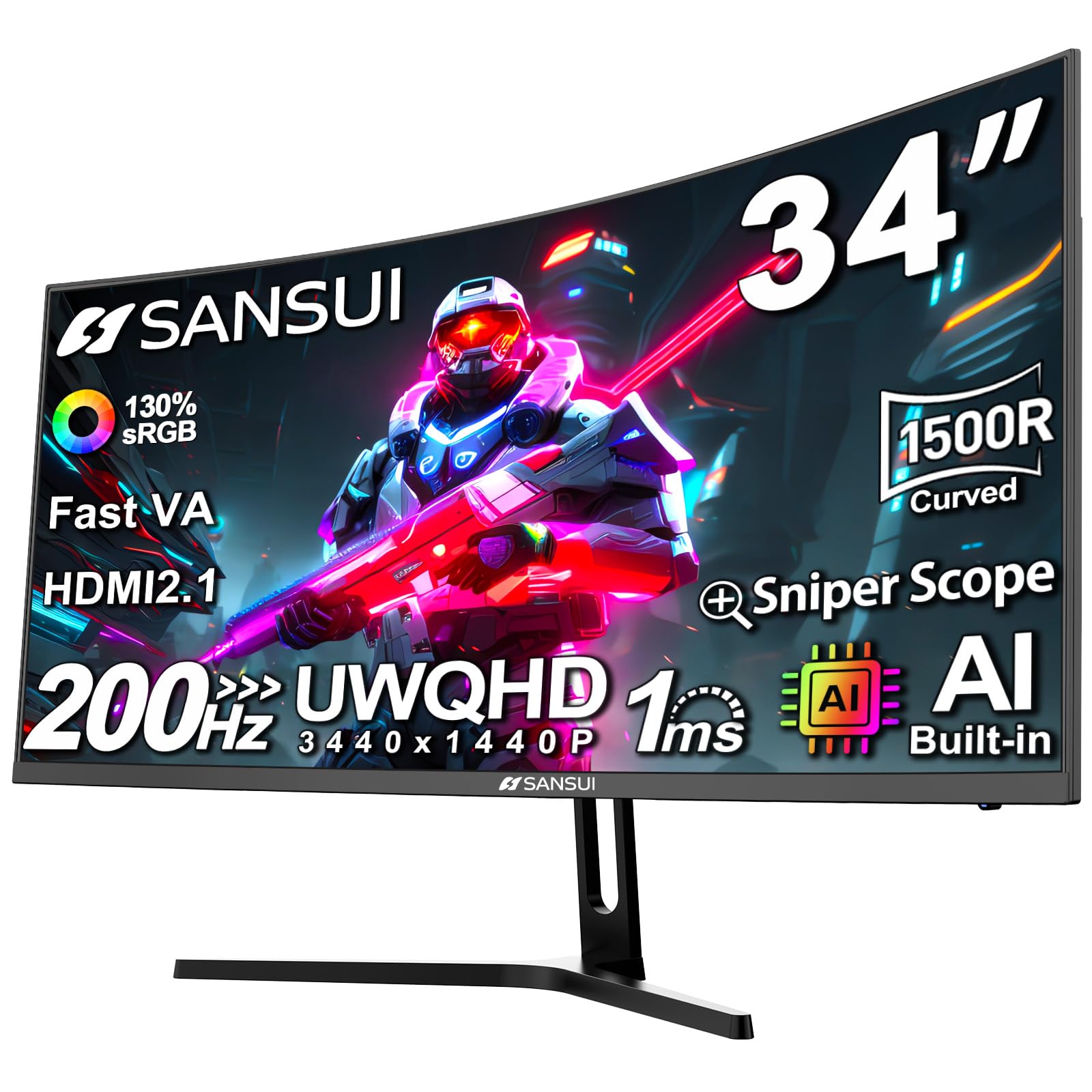
The SANSUI 34-inch Curved Monitor brings ultrawide resolution to the budget segment with a 3440×1440 VA panel that offers 30% more horizontal screen space than a standard 27-inch QHD monitor. The 1500R curvature is subtle enough for productivity use but provides enough wrap-around feel for immersive gaming. The maximum 200Hz refresh rate (advertised; some units report 180Hz) gives you fluid motion in supported titles.
The color gamut is impressive for the price, covering 130% sRGB and 97% DCI-P3, resulting in vivid, saturated colors that make games and movies look lively. The VA panel’s 3000:1 contrast ratio delivers deep blacks that enhance dark scenes significantly better than IPS. It includes two HDMI 2.1 ports and one DisplayPort 1.4, which is excellent connectivity for modern GPUs and consoles. The Picture-in-Picture and Picture-by-Picture modes are genuinely useful for multitasking between two input sources.
The stand offers only tilt adjustment, and the monitor runs noticeably warm during extended use. The AI features like AI Crosshair and AI Blue Light Reduction are more gimmick than essential. For users who want an immersive ultrawide experience without spending premium prices, the SANSUI delivers the widest view for the lowest cost.
Why it’s great
- 34-inch ultrawide 3440×1440 resolution for immersive screen space
- 130% sRGB and 97% DCI-P3 for vivid color reproduction
- Two HDMI 2.1 ports for modern graphics cards and consoles
- 3000:1 contrast ratio for deep, rich blacks
Good to know
- Stand only offers tilt adjustment; no height or swivel
- Monitor runs warm during extended gaming sessions
- Advertised 200Hz may be limited to 180Hz depending on unit
9. Sceptre 34-Inch Curved Ultrawide WQHD Monitor (C345B-QUT168)

The Sceptre C345B-QUT168 is the most affordable gateway to a true 34-inch ultrawide 3440×1440 experience. It uses a VA panel with a 1500R curvature and supports up to 180Hz refresh rate (165Hz via DisplayPort, 180Hz via HDMI 2.0). The 1ms MPRT response time keeps motion reasonably clear, though VA dark-level smearing is occasionally visible in high-contrast transitions. The 99% sRGB coverage provides solid color fidelity for a panel in this price tier.
The ultrawide aspect ratio is the star here — it effectively replaces a dual-monitor setup for productivity, giving you space for three documents side by side. The 1,000,000:1 dynamic contrast ratio (1000:1 static) delivers decent black levels. The monitor includes a single-button joystick for menu navigation, though it is placed awkwardly on the bottom center bezel and doubles as the power button, which can be confusing initially.
Build quality is adequate but not premium — the plastic housing feels light, and the stand offers only tilt adjustment. The included cables are limited to a DVI cable, which is outdated; you will likely need to purchase a DisplayPort or HDMI cable separately. Some users report backlight bleed or dead pixels after extended use. For the price, it delivers the ultrawide experience, but you are making clear compromises in ergonomics and long-term reliability.
Why it’s great
- 34-inch 3440×1440 ultrawide for enhanced productivity and immersion
- 180Hz refresh rate with 1ms MPRT for smooth motion
- 99% sRGB coverage for accurate color reproduction
- Luminous back cover lights add aesthetic flair
Good to know
- Stand offers tilt only; no height or swivel adjustment
- Included DVI cable is outdated; buy a DP or HDMI cable separately
- Quality control can vary; some units have backlight bleed or dead pixels
- Single button for power and menu is unintuitive
FAQ
Is a 27-inch or 32-inch screen better for 1440p resolution?
Can my graphics card run a 1440p monitor at 180Hz?
What cable do I need for 1440p at 180Hz?
Final Thoughts: The Verdict
For most users, the best 1440p budget monitor winner is the Alienware AW2725DM because it blends an excellent IPS panel with a robust ergonomic stand, accurate colors, and reliable adaptive sync at a price that undercuts most premium options while outperforming entry-level displays. If you want maximum refresh rate for competitive shooters, grab the ASUS TUF VG27AQM5A. And for an ultrawide experience on a budget, nothing beats the screen real estate of the SANSUI 34-inch Curved.

Mo Maruf
I created WellFizz to bridge the gap between vague wellness advice and actionable solutions. My mission is simple: to decode the research and give you practical tools you can actually use.
Beyond the data, I am a passionate traveler. I believe that stepping away from the screen to explore new environments is essential for mental clarity and physical vitality.