Our readers keep the lights on and my smoothie glass nicely filled. As an Amazon Associate, I earn from qualifying purchases.
A podcast camera that overheats after twenty minutes or hunts for focus during a guest’s answer kills the flow of a conversation. The wrong choice means patching together shaky footage and separate audio files when you could have a single, reliable 4K recording device that handles both. The market now offers everything from dedicated camcorders with XLR inputs to compact mirrorless bodies with face-tracking autofocus, and each option trades off zoom range, sensor size, and audio connectivity in ways that matter specifically to a two-person interview or a solo monologue.
I’m Mohammad Maruf — the founder and writer behind WellFizz. I’ve spent years analyzing production hardware for content creators, comparing sensor performance, recording limits, and audio preamp quality across dozens of models to separate genuinely useful equipment from overhyped feature lists.
This guide narrows the field to eleven cameras that serve different podcasting workflows, from a budget-friendly vlogging camera with built-in stabilization to a professional broadcast unit with 12G-SDI output. The best 4k camera for podcasting depends on whether you need a simple all-in-one solution for a two-person show or a cinema-grade rig that integrates into a multi-camera live production.
How To Choose The Best 4K Camera For Podcasting
Podcasting places unique demands on a camera that standard video work does not. Long recording sessions, fixed studio lighting, and the need for continuous autofocus on a talking subject mean you must look past general video specs and weigh factors like overheating behavior, recording duration limits, and audio input options that are often irrelevant for short clips or outdoor shooting. Understanding these nuances prevents a post-purchase surprise when your camera stops recording mid-interview.
Recording Duration Limits
Many mirrorless cameras impose a 29-minute 59-second recording limit per file due to European import tax regulations. For podcasting sessions that can run an hour or longer, this forces you to manually restart recording — or accept a gap in the footage. Some bodies, particularly recent Sony and Panasonic models, have removed this cap entirely. Camcorders and dedicated studio cameras rarely have this restriction, making them a safer choice for uninterrupted filming.
Autofocus Reliability
A podcast is almost always a static shot of one or two people talking. Continuous autofocus that drifts or hunts ruins the footage. Phase-detection systems with face and eye tracking, like Canon’s Dual Pixel CMOS AF or Sony’s Real-Time Eye AF, lock onto a subject and hold focus even when the subject leans forward or turns to the side. Contrast-detection systems are slower and more prone to searching, which is problematic for an interview where you cannot pause to refocus.
Audio Connectivity
The camera’s built-in microphone is never adequate for a podcast. Look for at least one 3.5mm external microphone input. Better options include dual XLR inputs with phantom power, which let you connect professional lavalier or boom microphones directly without an external audio recorder. The Zoom Q8n-4K and the Panasonic HC-X20 both offer XLR inputs, saving you the expense and cabling of a separate mixing board.
Sensor Size and Low Light
Studio lighting is often soft and diffused, which can push a camera to higher ISO values. A larger sensor — APS-C or Super 35 — collects more light and produces cleaner images at higher sensitivities compared to a 1/2.3-inch sensor common in consumer camcorders. Cameras like the Sony ZV-E10 (APS-C) and the Sony FX30 (Super 35) handle dimmer environments well. If you control your lighting tightly, a 1-inch sensor in a camcorder like the Panasonic HC-X20 still delivers excellent 4K quality with less noise than a smaller sensor.
Quick Comparison
On smaller screens, swipe sideways to see the full table.
| Model | Category | Best For | Key Spec | Amazon |
|---|---|---|---|---|
| Sony ZV-E10 Bundle | Mirrorless | No-cutoff podcasting with APS-C quality | 24.2MP APS-C, 4K30p, 425-point AF | Amazon |
| Panasonic HC-X20 | Camcorder | All-in-one pro news/interview recording | 1-inch sensor, 20x optical zoom, XLR | Amazon |
| Zoom Q8n-4K | All-in-One | Hands-free audio capture with 4-track recording | 4K30p, 2x XLR+phantom, 150° wide lens | Amazon |
| Sony FX30 | Cinema Line | Cinematic multi-camera podcast studio | 20.1MP Super 35, 4K120p, dual base ISO | Amazon |
| Blackmagic Micro Studio 4K G2 | Studio PTZ | Live switched production via 12G-SDI | 4K sensor, 13-stop dynamic range, MFT | Amazon |
| OBSBOT Tail Air | AI PTZ | Solo creator with AI tracking and NDI | 4K30, AI tracking, NDI/H.264, 2.5hr battery | Amazon |
| Canon VIXIA HF G70 | Camcorder | Point-and-shoot simplicity with time-stamp | 4K UHD, 20x optical zoom, UVC streaming | Amazon |
| Panasonic LUMIX G100 | Mirrorless | Compact travel-ready vlogging with tracking audio | Micro Four Thirds, 4K30, tracking mic | Amazon |
| Canon EOS R100 Kit | Mirrorless | Budget entry into interchangeable-lens podcasting | 24.1MP APS-C, 4K24p, Dual Pixel AF | Amazon |
| Xtra Muse | Pocket Gimbal | Ultra-portable solo vlog-style podcasting | 1-inch CMOS, 4K120, 3-axis gimbal | Amazon |
| Blackmagic Pocket 6K Pro | Cinema Camera | Highest dynamic range for graded podcast footage | Super 35, 6K/4K, 13-stop DR, internal ND | Amazon |
In‑Depth Reviews
1. Sony ZV-E10 Mirrorless Camera with 16-50mm Lens, 128GB Bundle

The Sony ZV-E10 eliminates the 30-minute recording limit that plagues many entry-level mirrorless cameras, making it one of the few sub-thousand-dollar interchangeable-lens bodies you can trust for a complete podcast episode. Its 24.2-megapixel APS-C sensor captures clean 4K at 30 frames per second, and the 425-point phase-detection autofocus with Real-Time Eye AF locks onto a speaker’s face and holds focus even when they gesture or lean. The side flip-out touchscreen lets you monitor the frame from the host’s position, and the built-in three-capsule directional microphone works as a scratch track while you record clean audio through the 3.5mm jack.
This specific bundle includes the 16-50mm retractable power zoom lens, a 64GB SD card, a tripod, and a spare battery — everything needed to start filming immediately. The lens’s optical SteadyShot stabilization keeps the frame steady on a basic tripod without gimbal work. Video reviewers consistently praise the ZV-E10 for its reliable face-tracking and natural skin tones out of the box, which reduces color grading time. The menu system is streamlined for video work, with a background-defocus button that instantly opens the aperture for a blurred backdrop.
The main trade-off is the 16-50mm kit lens’s variable f/3.5-5.6 aperture, which forces higher ISO in lower studio light; upgrading to a fast prime lens like the Sigma 16mm f/1.4 solves this. The camera lacks in-body image stabilization, but for a static tripod podcast setup that is irrelevant. Some users report the small grip is less comfortable for long handheld sessions, though that does not apply to a studio camera that stays on a mount. For a focused podcast recording rig that does not interrupt your session mid-take, the ZV-E10 package is the most balanced option available.
Why it’s great
- No 30-minute recording limit lets you film a full hour uninterrupted.
- 425-point phase-detect autofocus with eye-tracking stays locked on a speaking subject.
- Bundled accessories (spare battery, SD card, tripod) reduce initial setup cost.
Good to know
- Kit lens is slow (f/3.5-5.6); a faster prime lens is recommended for controlled studio lighting.
- No in-body stabilization, but irrelevant for tripod-based podcasting.
- Some bundle reports occasionally missing items; verify contents immediately upon delivery.
2. Zoom Q8n-4K Video Recorder for Music, Podcasts & Streaming

The Zoom Q8n-4K is not a camera that also records audio — it is an audio recorder that also shoots 4K video, and that distinction matters for podcasters who prioritize sound quality above all else. The dual XLR inputs with phantom power let you connect two professional microphones directly, while the internal stereo microphones can capture ambience or a third source. The 150-degree wide-angle lens with five field-of-view presets (including indoor and concert modes) ensures both hosts fit in the frame even in a tight space. The camera records four simultaneous audio tracks, allowing independent post-production level adjustment for each mic.
Live streamers benefit from the USB webcam mode, which outputs video directly to a computer without a capture card, and the flip-out screen makes framing easy from the front of the lens. The included remote control app lets you adjust settings and start/stop recording from a phone, which is useful when the camera is positioned across the room. The 150-degree wide lens at its widest setting produces the cleanest 4K image; cropping in noticeably softens the picture.
The video quality is the divisive element. In well-lit studio conditions the 4K output is adequate for YouTube or social media, but in low light the image becomes grainy — several customers noted the video looks worse than a modern smartphone. The camera lacks optical zoom, relying solely on digital cropping, and there is no image stabilization. If your primary goal is a simple rig with professional audio built in and video quality is secondary, the Q8n-4K is an efficient tool. If you need high-end cinematic footage, you will want a separate audio recorder paired with a better camera.
Why it’s great
- Two XLR inputs with phantom power eliminate the need for an external audio interface.
- Records four separate audio tracks for independent post-mixing.
- USB webcam mode streams directly to a computer without extra hardware.
Good to know
- 4K video quality degrades noticeably in low light; needs strong, even lighting.
- No optical zoom — only digital crop presets, which soften the image.
- Some units arrive with defects; test recording and charging immediately upon receipt.
3. Sony Cinema Line FX30 Super 35 Camera

The Sony FX30 is a proper cinema camera built around a Super 35 (APS-C) sensor that delivers 6K oversampled 4K footage with over 14 stops of dynamic range. For a podcast studio aiming for a cinematic look — think soft backgrounds, rich skin tones, and the ability to grade in post — this camera provides S-Cinetone color science that looks polished without any editing. The dual base ISO (800 and 2500 in S-Log3) keeps noise low even when you are lighting with softboxes rather than intense key lights. The 495-point phase-detection autofocus with Real-Time Eye Tracking is as reliable as any mirrorless system on the market, and the active cooling fan prevents overheating during multi-hour recording sessions.
Podcasters who run a multi-camera setup will appreciate the FX30’s flexible recording options. It records internally in 4K at up to 120 frames per second for slow-motion inserts, and the dual card slots allow relay recording so you never run out of space mid-episode. Users who have filmed over 45 podcast episodes on this body report that the autofocus and in-body image stabilization make setup trivial — you just set the frame and hit record. The camera has no 30-minute limit, so a two-hour interview is captured as a single take.
The battery life is the weak point: the NP-FZ100 lasts roughly one to two hours of continuous recording, meaning you will need an external USB power bank or a dummy battery for longer sessions. The FX30 is also a body-only purchase; you need to budget for an E-mount lens, preferably a wide-to-standard zoom like the Sigma 18-50mm f/2.8. For a premium podcast studio where image quality is the top priority and the budget allows for additional accessories, the FX30 outperforms every mirrorless alternative in its class.
Why it’s great
- 6K oversampled 4K with S-Cinetone delivers cinematic color straight out of camera.
- Active cooling prevents overheating; no recording time limit.
- Dual card slots for relay recording; 4K up to 120fps for creative shots.
Good to know
- Battery life is 1-2 hours; external power is necessary for long podcast sessions.
- Body only — you must purchase a separate E-mount lens.
- Higher price point reflects cinema-grade features; overkill if you only need basic 4K.
4. Blackmagic Design Micro Studio Camera 4K G2

The Blackmagic Micro Studio Camera 4K G2 is the smallest dedicated studio camera on this list, designed specifically to integrate with ATEM switchers for live multi-camera broadcasts. Its carbon composite body and MFT lens mount make it incredibly compact for placement in tight studio spaces, while the 12G-SDI output carries uncompressed 4K video and tally signals over a single cable. The dual native ISO of 400 and 3200, combined with 13 stops of dynamic range, delivers clean images in the even lighting of a podcast studio. Blackmagic RAW recording to USB disks preserves maximum flexibility for color grading in DaVinci Resolve.
The camera is made for a workflow that assumes you have external power and control. The included AC power supply with international adapters handles long sessions, and the SDI connection allows remote control of exposure, color correction, and zoom from an ATEM panel. For a podcast that streams live to YouTube or Twitch with multiple camera angles, this camera eliminates the need for separate capture cards and HDMI splitters. Reviewers who use it as a crash cam or a secondary angle praise its image quality and small footprint.
The major friction point is that the Micro Studio Camera is not a standalone device. It has no built-in display for framing — you must connect it to an external monitor or rely on the ATEM’s multiview. The built-in battery is intended only as backup; the LP-E6n lasts under 30 minutes, so the camera is tethered to AC power during normal use. The MFT lens mount means you need micro four-thirds lenses, and the menu navigation, which requires facing the front of the camera, is awkward. This is a specialist camera for a live switched production, not a general-purpose podcast rig.
Why it’s great
- 12G-SDI output integrates directly with professional live production switchers.
- 13-stop dynamic range and Blackmagic RAW recording for extensive post-production flexibility.
- Extremely compact body fits into tight studio spaces for multi-camera setups.
Good to know
- No built-in screen — requires an external monitor or ATEM multiview for framing.
- Battery life is under 30 minutes; must be plugged into AC or external power.
- Requires MFT lenses and a specific understanding of the Blackmagic ecosystem.
5. OBSBOT Tail Air NDI Streaming Camera 4K

The OBSBOT Tail Air is a PTZ (pan-tilt-zoom) camera that uses AI to track a subject automatically, making it a compelling choice for a solo podcaster who moves around or for an unmanned multi-camera shoot. The 1/1.8-inch CMOS sensor captures 4K at 30 frames per second, and the AI tracking can follow a human, an animal, or an object — you could have the camera follow you as you walk to a whiteboard or track a guest who turns their head. The camera supports NDI, USB-C, HDMI, and Ethernet connectivity, which means it slots into almost any streaming pipeline without a capture card. Gesture control lets you start and stop tracking or zoom with a hand signal.
The Tail Air’s built-in battery lasts about 2.5 hours, which covers most podcast recording sessions, and the companion app (Obsbot Start) gives you full control over ISO, shutter, white balance, and preset positions. Reviewers highlight the fast and accurate autofocus, the smooth pan and tilt mechanics, and the quiet operation that does not pick up on microphones. The camera body is smaller than a soda can, which is a major advantage for desk-mounted or shelf-mounted placements where a full mirrorless rig would look intrusive.
The deal-breaker for some is that the battery is not user-replaceable. Multiple reports describe the camera failing after about a year when the internal battery degrades and can no longer hold a charge, rendering the camera unusable even when plugged into power. If you plan to use this camera for daily podcast production, the risk of a non-repairable failure after 12-14 months is a serious consideration. For occasional use or as a secondary angle, the Tail Air’s tracking and connectivity are excellent. For a primary workhorse camera, the battery reliability issue may push you toward a traditional PTZ with a user-serviceable power source.
Why it’s great
- AI tracking follows a moving podcaster automatically; gesture control for hands-free operation.
- NDI, HDMI, USB-C, and Ethernet connectivity for flexible streaming setups.
- Compact body (smaller than a soda can) fits discreetly into any studio layout.
Good to know
- Battery is non-replaceable; multiple reports of camera failure after 12-14 months when battery degrades.
- NDI license key is sold separately, not included in the box.
- Limited to 4K at 30fps; no 60fps high-frame-rate option for smoother motion.
6. Canon VIXIA HF G70 Camcorder

The Canon VIXIA HF G70 is a traditional camcorder that prioritizes ease of use — you press record and it simply goes. The 1/2.3-inch 4K UHD CMOS sensor paired with the DIGIC DV 6 image processor produces sharp 4K images up to 30 frames per second, and the 20x optical zoom with advanced image stabilization allows you to punch in on a speaker from across the room without losing sharpness. The on-screen display time stamp feature embeds date and time directly into the file, which is useful for archival footage. The UVC livestreaming outputs HD video to a computer over USB without a separate capture device.
This camcorder earns its place in a podcast setup if you need a no-fuss camera that automatically adjusts exposure and focus. The Hybrid AF system with face detection locks onto a subject quickly and does not drift, though the contrast-detection system is less responsive than phase-detection in rapid changes. The dual SD card slots allow hot-swapping or relay recording, and the built-in ND filter handles bright studio lighting. The physical exposure compensation knob on the body is a small but appreciated touch for on-the-fly adjustments.
The low-light performance is the main liability. The small 1/2.3-inch sensor means gain at ISO levels above 400 produces noticeable noise, and the image becomes soft at higher gain settings. The HDMI output and USB webcam mode are limited to 1080p, not 4K, so if you need a full 4K feed to your live stream, the camcorder falls short. It also lacks XLR inputs; you must use the 3.5mm mic jack with an adapter for professional microphones. For a well-lit, stable podcast environment where simplicity matters more than sensor size, the HF G70 is a reliable workhorse.
Why it’s great
- 20x optical zoom with excellent image stabilization for dynamic framing.
- Dual SD card slots for relay recording; no 30-minute recording limit.
- UVC livestreaming outputs directly to a computer over USB.
Good to know
- Small sensor struggles in low light; image noise is noticeable in dim studios.
- HDMI and UVC outputs are limited to 1080p, not 4K.
- No XLR inputs — requires a 3.5mm adapter for pro microphones.
7. Panasonic Camcorder HC-X20

The Panasonic HC-X20 is a professional-grade camcorder that combines a 1-inch MOS sensor with a 20x optical zoom lens, delivering 4K 60p video in a form factor designed for news, interviews, and event coverage — all scenarios that mirror the typical podcast studio. The 1-inch sensor is significantly larger than the 1/2.3-inch chip found in consumer camcorders, giving it better low-light performance and more natural background separation. The 24.5mm wide-angle lens at the wide end fits two people comfortably at a desk, and the optical zoom reaches a full-frame equivalent of roughly 500mm for tight singles. The HEVC codec records 4:2:2 10-bit at 4K 60p, which provides ample color information for grading.
The audio connectivity is where this camcorder shines for podcasting. The built-in XLR inputs with phantom power handle two pro microphones directly, and the triple manual ring (focus, zoom, iris) gives you full tactile control without digging through menus. The 5-axis HYBRID O.I.S. stabilizes the frame even if the camera is on a less-than-rigid boom arm, and the face-detection autofocus works reliably in a controlled lighting environment. Built-in Wi-Fi and Ethernet (via a USB-LAN adapter) allow direct livestreaming to platforms like YouTube without a computer.
The main drawback is the price, which places the HC-X20 in a tier with entry-level cinema cameras. It is also a large camcorder body compared to a mirrorless setup; if you are working in a tight space or want a discreet camera on a desk, the size can be distracting. The autofocus, while good, is based on contrast detection and occasionally hunts in challenging light. For a podcast studio that already has a dedicated live-streaming pipeline and needs a reliable, feature-rich camera that records for hours without a single technical hiccup, the HC-X20 is a broadcast tool that will not let you down.
Why it’s great
- 1-inch sensor offers excellent low-light performance and depth of field control.
- Built-in XLR inputs with phantom power for professional microphones.
- Records 4:2:2 10-bit 4K 60p for high-quality post-production grading.
Good to know
- Premium price tag; comparable to an entry-level cinema camera body.
- Large camcorder form factor is not discreet; takes up desk or shelf space.
- Contrast-detect autofocus can hunt in challenging or low-contrast lighting.
8. Canon EOS R100 Mirrorless Camera with RF-S18-45mm Lens Kit

The Canon EOS R100 is the smallest and most affordable entry into the EOS R mirrorless system, and for a budding podcaster who wants interchangeable lenses and Canon’s Dual Pixel CMOS AF, it is a capable starting point. The 24.1-megapixel APS-C sensor captures 4K video at up to 24 frames per second, and the 143-zone autofocus covers a wide area with face and eye detection that keeps a single speaker sharp. The retractable 18-45mm kit lens covers wide-angle to standard perspective, which is appropriate for a compact desk setup where two hosts sit close together. The lightweight body makes it easy to mount on a basic tripod without needing a heavy-duty head.
The R100 speaks directly to beginners. The guided menu interface helps new users understand exposure, and the DIGIC 8 processor handles the 4K pipeline without overheating in normal studio sessions. The camera also functions as a webcam via Canon’s EOS Webcam Utility, making it a dual-purpose option for podcast recording and Zoom calls. Customers consistently note the impressive image quality for the price point and the intuitive controls that ease the learning curve.
The limits are real. 4K video is capped at 24 frames per second, which looks cinematic but is less fluid than 30fps for fast-moving conversation. The EOS R100 also has the 30-minute recording limit, which means you must manually restart it for a podcast lasting longer than half an hour. The LCD screen does not articulate fully — it tilts up and down but cannot flip forward for self-framing. The 18-45mm lens is slow at the telephoto end (f/6.3), which pushes ISO up in dim rooms. For a budget-focused podcaster who plans to upgrade lenses and is willing to work around the recording limit, the R100 delivers impressive APS-C quality at the lowest entry price in this category.
Why it’s great
- Canon Dual Pixel CMOS AF with face/eye tracking is reliable for a stationary subject.
- APS-C sensor provides better low-light performance than camcorders in this price range.
- Lightest and smallest body in the EOS R series; easy to integrate into a small studio.
Good to know
- 4K video limited to 24fps and has a 30-minute recording limit.
- LCD screen tilts only; cannot flip forward for self-monitoring.
- Kit lens is slow (f/6.3 at telephoto); requires good lighting or a faster prime.
9. Panasonic LUMIX G100 4K Mirrorless Camera

The Panasonic LUMIX G100 is built around a unique feature for a mirrorless camera: a 360-degree tracking microphone that adjusts its pickup pattern based on where the subject is in the frame. If you are recording a solo podcast and move around, the mic will shift its focus to follow you, which is a genuine timesaver if you do not want to wire a lavalier every session. The Micro Four Thirds sensor delivers 4K video at 30 frames per second with V-Log L gamma for color grading, and the 5-axis hybrid image stabilization keeps the frame steady when you are holding the camera in a vlog-style setup. The camera also functions as a UVC webcam, connecting directly to a computer for live streaming.
The G100 is exceptionally small and light, making it a good travel podcast camera for recording remote interviews on the road. The 12-32mm retractable kit lens is pancake-flat when closed, and the Micro Four Thirds system gives you access to a wide range of affordable lenses. The frame marker feature shows social-media aspect ratios (1:1, 4:5, 9:16) while recording in 16×9, helping you frame for TikTok or YouTube shorts simultaneously. Reviewers appreciate the high-quality footage and the user-friendly interface, and the included microphone is genuinely useful for ambient or scratch audio.
The G100 has a 20-minute recording limit before automatically stopping, which is shorter than the 30-minute limit on many competitors. The Micro Four Thirds sensor is smaller than APS-C, so background separation is less pronounced and noise is higher in low light. Several users also note that the kit lens is very dark (f/3.5-5.6) and recommend pairing the body with a fast prime like the 25mm f/1.7. The body feels plasticky and less durable than a metal-alloy mirrorless camera. For a second camera, a travel rig, or a creator who values the tracking-mic feature, the G100 is a unique option with clear trade-offs.
Why it’s great
- Integrated 360-degree tracking microphone automatically follows the subject in the frame.
- Extremely compact body with Micro Four Thirds lens system flexibility.
- UVC webcam mode and V-Log L support for easy streaming and grading.
Good to know
- 20-minute recording limit is shorter than most competitors; requires manual restart.
- Kit lens is slow; a faster prime is needed for better low-light performance.
- Plasticky build feels less durable than other mirrorless cameras in this price range.
10. Xtra Muse Vlogging Camera with 1” CMOS & 4K/120fps
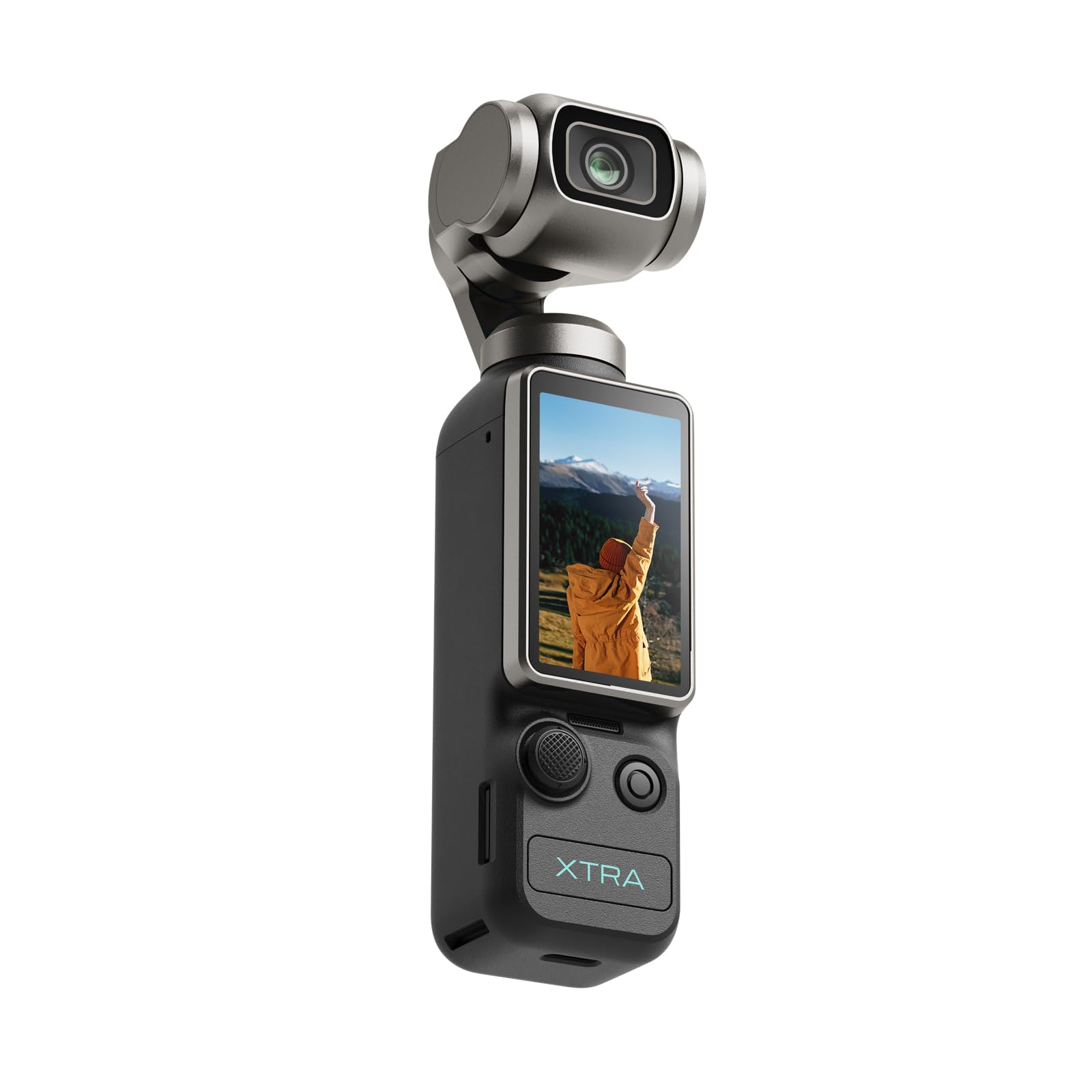
The Xtra Muse is a pocket-sized camera with a 1-inch CMOS sensor and a built-in 3-axis gimbal stabilizer, designed for smooth handheld 4K video at up to 120 frames per second. For a podcaster who films in a vlog style — setting the camera on a desk and moving around, or walking while talking — the gimbal eliminates the shaky footage that would normally require a separate gimbal rig. The 2-inch touchscreen switches between horizontal and vertical orientation for multi-platform content, and the Master Follow feature keeps the camera centered on you even when you move. The 10-bit X-Log color profile captures over one billion colors for flexible post-production grading.
The build is compact enough to fit in a jacket pocket, making it a viable option for mobile podcast recording or on-the-go content creation. The 1-inch sensor is larger than the sensors in typical action cameras and competes with the DJI Pocket 3 in terms of image quality. Users consistently rate the stabilization as excellent, and the face/object tracking is responsive. The camera charges via USB-C and the included carrying bag and wrist strap make it easy to pack as a secondary angle for a studio shoot. Battery life of roughly 161 minutes covers most podcast recording sessions.
The trade-off for such a compact physical footprint is the lack of interchangeable lenses — the fixed wide-angle lens provides roughly a 20mm equivalent field of view, which means you cannot zoom in optically for a tighter headshot. The image quality, while very good for its size, does not match the sharpness and dynamic range of an APS-C or full-frame camera in controlled lighting. The gimbal is also fragile; dropping the camera can damage the motor. As a primary camera for a professional studio where you need lens flexibility and maximum image quality, the Xtra Muse is a step down. As a portable, stabilization-equipped backup or mobile rig, it is hard to beat for the price.
Why it’s great
- Built-in 3-axis gimbal produces silky-smooth handheld footage without an external stabilizer.
- 1-inch CMOS sensor captures 4K up to 120fps with excellent detail for its size.
- Compact and pocketable; ideal for mobile or vlog-style podcast recording.
Good to know
- Fixed wide-angle lens lacks optical zoom; cannot tighten the frame without digital crop.
- Gimbal mechanism is delicate; not as durable as a traditional camera body.
- Image quality is impressive for a pocket camera but falls short of larger-sensor mirrors.
11. Blackmagic Design Pocket Cinema Camera 6K Pro

The Blackmagic Pocket Cinema Camera 6K Pro is the highest-performance camera on this list, featuring a Super 35 sensor with a native resolution of 6144 x 3456 and 13 stops of dynamic range. For a podcast that demands cinematic depth, with rich color that can be pushed and pulled in DaVinci Resolve without falling apart, this camera delivers the kind of raw-imaging power that no consumer mirrorless or camcorder can match. The built-in 2, 4, and 6-stop ND filters let you control exposure for a wide-open aperture in bright studio lighting. The 5-inch HDR tilting touchscreen is bright enough to use as a monitor reference without an external display.
The 6K Pro records 12-bit Blackmagic RAW internally to CFast 2.0 or SD UHS-II cards, and the USB-C port supports direct recording to an external SSD for unlimited runtime — ideal for film-length podcast sessions. The dual gain ISO up to 25,600 keeps noise minimal in dim conditions, and the Canon EF lens mount gives access to the most extensive selection of cinema and photo lenses available. Every review from working video professionals notes that the footage from the 6K Pro rivals cameras costing two to three times as much. The included DaVinci Resolve Studio activation key is a substantial bonus that eliminates the need for separate editing software.
The hurdles are practical. The auto exposure system controls only iris and shutter — there is no auto ISO, so the exposure jumps harshly when lighting changes mid-shot. This makes the 6K Pro unsuitable for an unattended, run-and-gun podcast where the talent adjusts lighting themselves. The camera records to expensive CFast cards or requires an SSD with a cage. The body is larger and heavier than a mirrorless body, and battery life with the included NP-F570 is limited to roughly 45 minutes, necessitating a power solution (AC adapter or larger V-mount battery) for a full session. The 6K Pro is the right choice only if your podcast has a dedicated camera operator and the budget to support a cinema-grade workflow.
Why it’s great
- 13 stops of dynamic range and 12-bit Blackmagic RAW recording for absolute grading flexibility.
- Built-in 2/4/6-stop ND filters allow wide-aperture shooting in bright studio light.
- Internal 5-inch HDR tilting screen; records to SSD via USB-C for unlimited runtime.
Good to know
- No auto ISO in video mode — exposure jumps must be managed manually or in post.
- Short battery life (~45 minutes); requires AC power or an external battery solution.
- Large form factor and CFast/SD card costs add to the overall budget significantly.
FAQ
Can I use a standard DSLR for podcasting or do I need a camcorder?
Why does my camera keep overheating during a one-hour podcast?
Do I need a camera with XLR inputs for a two-person podcast?
Is 4K necessary for a podcast that only goes to YouTube or audio platforms?
Final Thoughts: The Verdict
For most users, the best 4k camera for podcasting winner is the Sony ZV-E10 bundle because it combines a large APS-C sensor, reliable phase-detect autofocus, no 30-minute recording limit, and a kit that includes the lens, spare battery, and tripod — everything needed to start filming a high-quality interview today. If you want professional XLR audio integrated directly into the camera body without a separate recorder, grab the Zoom Q8n-4K. And for a cinematic multi-camera studio where image grading and dynamic range are the top priority, nothing beats the Sony FX30.

Mo Maruf
I created WellFizz to bridge the gap between vague wellness advice and actionable solutions. My mission is simple: to decode the research and give you practical tools you can actually use.
Beyond the data, I am a passionate traveler. I believe that stepping away from the screen to explore new environments is essential for mental clarity and physical vitality.