Our readers keep the lights on and my smoothie glass nicely filled. As an Amazon Associate, I earn from qualifying purchases.
A budget wireless keyboard shouldn’t feel like a compromise—yet most cheap plastic boards deliver mushy keypresses, phantom inputs, and a battery that dies mid-sentence. The difference between a frustrating typing session and a seamless one isn’t always about spending more; it’s about knowing which features actually matter under .
I’m Mohammad Maruf — the founder and writer behind WellFizz. I’ve spent the past eight years analyzing user reviews, manufacturer specs, and real-world failure rates across hundreds of entry-level peripherals to separate the boards built for daily abuse from the ones that collect dust after a week.
Whether you’re outfitting a home office on a tight budget or just want a reliable spare for late-night work, finding the right budget wireless keyboard comes down to connection stability, key feel, and battery efficiency—not just the sticker price.
How To Choose The Best Budget Wireless Keyboard
When you’re shopping in the value tier, a difference often marks the line between a keyboard that lasts two years and one that rattles after two months. Here are the three specs that define performance in this bracket.
Connection Protocol: 2.4 GHz vs. Bluetooth
At sub- prices, 2.4 GHz wireless dongles deliver lower latency and more stable signals than traditional Bluetooth, which can suffer interference from other household devices. Look for a board with a dedicated USB nano receiver; it eliminates pairing delays and guarantees sub-10 ms response times even in crowded apartments. Skip any budget board advertising only Bluetooth 3.0—the connection drops are not worth the cost savings.
Key Feel and Switch Durability
Most budget boards use rubber dome membrane switches, rated for roughly 5-10 million keystrokes. What separates a tolerable membrane from a terrible one is the actuation force (usually 55-65 g) and the snap-back spring tension. A keyboard that feels “mushy” uses low-grade rubber; one that feels crisp uses a double-layer membrane with better rebound. Scissor-switch boards exist in this price range and offer shorter travel (about 2.5 mm) with a more laptop-like feel—good for fast typists who hate bottoming out.
Battery Management and Sleep Logic
Many budget wireless keyboards lack an on/off switch, relying entirely on auto-sleep to preserve battery life. The best boards enter sleep after 15-30 minutes of inactivity and wake with a single press that doesn’t cut off the first character. Avoid units that require two or three presses to wake the receiver; that quirk will frustrate you over dozens of daily sessions. A keyboard that wakes correctly and uses a single AA/AAA battery for 12+ months is the gold standard in this tier.
Quick Comparison
On smaller screens, swipe sideways to see the full table.
| Model | Category | Best For | Key Spec | Amazon |
|---|---|---|---|---|
| SABLUTE MA41 | Wave Ergonomic Combo | Quiet office typing | 30 dB key noise | Amazon |
| EAYBLLY Wave Keyboard | Ergonomic Wave Board | Wrist-pain relief | Cushioned leather wrist rest | Amazon |
| Logitech MK270 | Combo Set | Office/school all-in-one | 36-mo keyboard battery | Amazon |
| Logitech K270 | Standalone Board | Reliable entry-level typing | 24-mo battery life | Amazon |
| QUASIO 2.4G KB | Full-Size Ergonomic | Budget value with wrist rest | 104 key layout | Amazon |
In‑Depth Reviews
1. SABLUTE MA41 Wireless Keyboard and Mouse Combo

The SABLUTE MA41 delivers the quietest typing experience in this price bracket, with a measured 30 dB noise floor that rivals boards costing twice as much. Its contoured wave key profile aligns with the natural resting curve of relaxed hands, and the cushioned leather palm rest eliminates the cold, hard plastic contact point found on most budget models. Users consistently report reduced finger fatigue during 8+ hour sessions, and the dual-system switch allows seamless toggling between Windows and macOS without driver hassle.
The included mouse adds real utility with 11 one-touch shortcuts and three DPI levels (800/1200/1600), though a few of the custom shortcuts are not fully mapped under macOS. The single USB-A/C receiver handles both devices over a 33 ft 2.4 GHz link, and the auto-sleep function preserves battery life without requiring an on/off switch. Reviewers note that the mouse can feel sensitive during gaming but performs reliably for productivity tasks.
Where the MA41 really shines is in shared workspaces or late-night sessions where clacking keys disturb others. The ultra-quiet membrane switches have a slightly softer bottom-out than scissor switches, which some typists find more forgiving. The ergonomic mouse’s raised-left design also supports natural hand posture better than standard symmetrical mice. Backed by a 1-year replacement policy, this combo sets a new standard for what an entry-level ergonomic kit should feel like.
Why it’s great
- True 30 dB quiet operation—no disruptive clacks
- Leather palm rest stays warm and comfortable over long typing sessions
- Dual-system switch for instant Windows/macOS compatibility
- Single unifying USB receiver eliminates port clutter
Good to know
- Some mouse one-touch shortcuts don’t work on Mac
- Wave key layout requires brief adjustment period if coming from flat boards
- Mouse sensor can feel twitchy during fast cursor movements
2. EAYBLLY Ergonomic Wireless Keyboard with Cushioned Wrist Rest
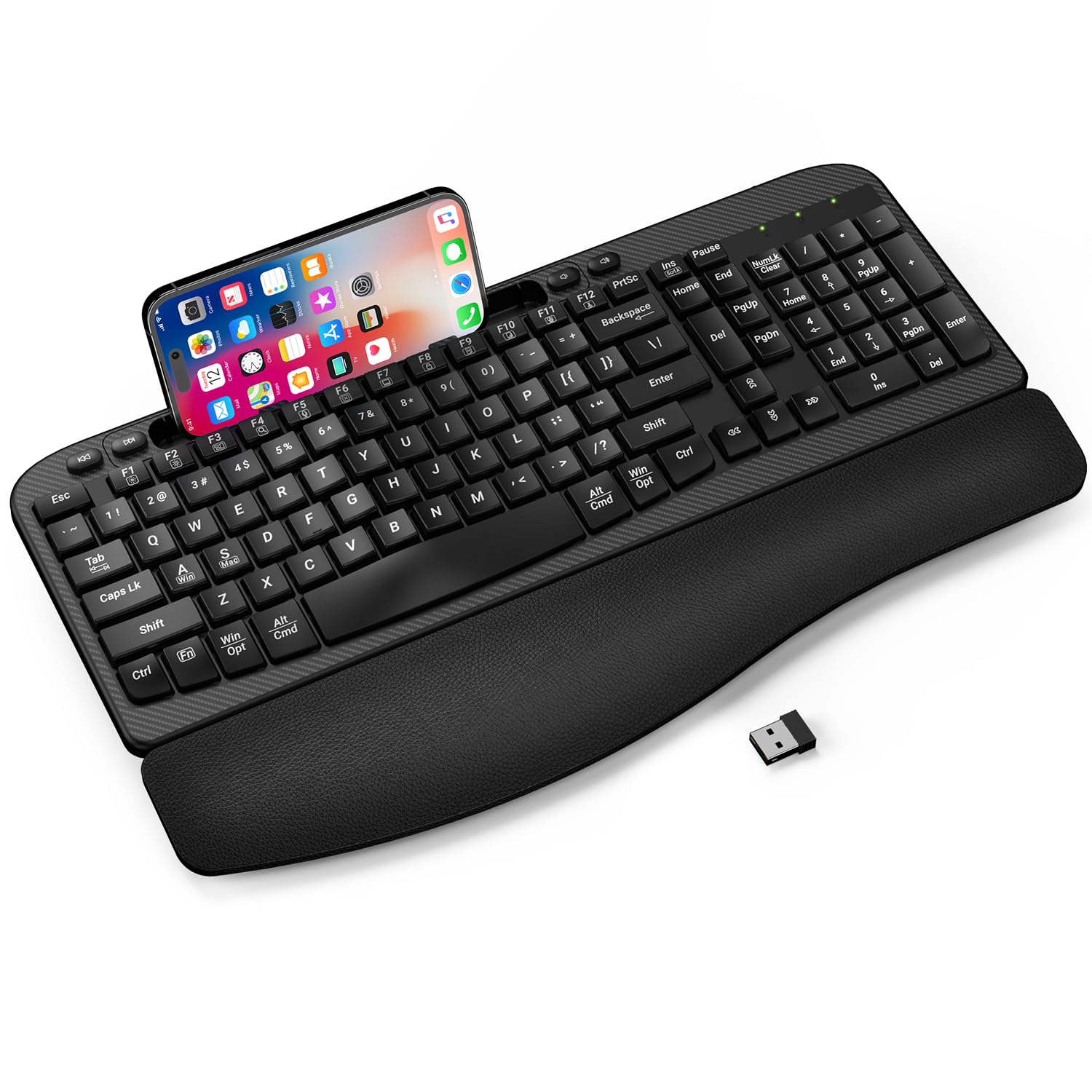
What sets the EAYBLLY board apart from most budget ergonomic options is its integrated cushioned wrist rest made of layered leather over high-density support foam, rather than a detachable plastic add-on. The wave-shaped key frame encourages a neutral hand posture without the steep learning curve of a split keyboard. Users with existing wrist or thumb pain reported significant relief within days of switching, and the board’s 16.57-inch width accommodates full-size hand placement without crowding.
A built-in 7.28-inch device slot along the top edge holds a smartphone or tablet for quick glances during multitasking, though owners of larger phones with bulky cases may find the fit snug. The 2.4 GHz connection is plug-and-play with no driver installation, and an additional USB-C adapter is included for modern laptops without full-size USB-A ports. A single AA battery runs the board; the auto-sleep function engages after 30 minutes of inactivity.
Review feedback highlights one recurring note: the wave-shaped keys can occasionally register double characters or missed keystrokes depending on typing angle and force. This appears to be a membrane alignment variance rather than a systemic failure, and most users report the issue surfaces only sporadically. For the price, the cushioned wrist rest and ergonomic contouring make this a compelling choice for anyone battling repetitive strain symptoms at a desk.
Why it’s great
- Premium cushioned leather wrist rest reduces wrist pressure measurably
- Wave key layout promotes natural hand angle immediately
- Built-in phone/tablet holder great for split-screen workflows
- Includes USB-C adapter for newer laptops
Good to know
- Occasional double-character keystrokes reported by some users
- Phone slot width too narrow for oversized case-protected devices
- No Mac-specific function row keys
3. Logitech MK270 Wireless Keyboard and Mouse Combo

The Logitech MK270 has been the best-selling entry-level keyboard combo for years, and that reputation is built on bulletproof 2.4 GHz connectivity and an absurdly long 36-month keyboard battery life. The full-size layout includes a number pad, arrow keys, and eight multimedia shortcut keys for instant volume, email, and playback control. The keycaps use durable printed characters and a spill-resistant design that handles minor coffee spills without shorting out—a genuine desk-use advantage.
The included compact mouse uses a symmetrical ambidextrous shell with smooth cursor tracking on most surfaces, though it lacks side buttons and adjustable DPI. Reviewers consistently praise the combo’s reliability over years of daily office or school use, and the 33 ft wireless range works solidly through walls. The keyboard’s low-profile quiet keys produce a moderate clatter—noticeably louder than the SABLUTE MA41 but still acceptable for shared rooms.
The main trade-off is the lack of ergonomic shaping. The MK270 uses a traditional flat frame with a subtle slope, no wrist rest, and standard rubber dome switches at 60 g actuation force. Users with existing wrist pain may find the flat profile less forgiving than the wave-shaped alternatives. For budget-minded buyers who want a proven, worry-free setup that just works for years without battery changes, the MK270 remains the pragmatic benchmark.
Why it’s great
- Industry-leading 36-month keyboard battery life eliminates battery anxiety
- Spill-resistant frame protects against accidental liquid damage
- Plug-and-play 2.4 GHz setup with zero software needed
- Eight dedicated multimedia hotkeys accessible without Fn layers
Good to know
- Non-ergonomic flat layout offers no wrist support
- M185 mouse lacks side buttons and DPI control
- Standard rubber dome keys feel noticeably louder than scissor-switch models
4. Logitech K270 Wireless Keyboard for Windows

The standalone Logitech K270 strips away the mouse and keeps everything that made the MK270 combo a classic: a full-size 104-key layout, eight dedicated multimedia keys, and Logitech’s 2.4 GHz Unifying receiver compatibility. The spill-proof membrane tray drains small liquid spills through internal channels without damaging the electronics, making it a safe choice for coffee-heavy desks. The 24-month battery life runs on two AA batteries, and the deep-profile keys deliver a familiar tactile bump that long-form writers appreciate.
Reviewers note that the K270’s keycaps feel slightly recessed compared to modern chiclet designs, giving it a “vintage” typing sensation that loyalists prefer. The Unifying receiver can pair with multiple compatible Logitech peripherals, reducing USB port consumption when combined with a mouse like the M510. Setup is truly plug-and-play: insert the receiver, install batteries, and type immediately with no pairing codes or driver downloads.
The downsides are minor but worth noting. The keyboard lacks an integrated wrist rest, and its flat profile offers no ergonomic contouring. The battery compartment stores the USB receiver snugly, but the board weighs only 1.1 pounds, which can feel light and slide slightly on polished desks without the included rubber feet. For a pure typing tool with proven Logitech longevity and zero frills, the K270 remains a reliable entry point.
Why it’s great
- Proven 2.4 GHz Unifying receiver works across multiple Logitech devices
- Spill-proof design protects against accidental coffee or water spills
- Deep-profile keycaps provide satisfying tactile feedback for touch typists
- Durable printed characters resist fading for years of use
Good to know
- No ergonomic wrist rest or palm support built in
- Flat profile lacks tilt adjustment beyond one angle
- Lightweight build can slide if rubber feet aren’t engaged
5. QUASIO Wireless Keyboard, Full-Sized Ergonomic

At the very bottom of the price scale, the QUASIO board packs surprising value with a full 104-key layout, an integrated detachable wrist rest, and a foldable phone holder that tilts the board into a comfortable typing angle. The 2.4 GHz receiver delivers a stable connection up to 33 feet, and reviewers consistently confirm quick, reliable pairing with Windows and macOS devices. The keys produce a modest click sound—quieter than a mechanical switch but not silent—and the anti-slide pads keep the board planted during fast typing.
Review feedback reveals two consistent quirks. First, the auto-sleep function engages after 30 minutes, but waking the board requires pressing the spacebar, which often cuts off the first character of the sentence that follows. Second, there is no physical on/off switch, so the keyboard continues to draw a small amount of standby power. A single AA battery is required (not included), and average battery life sits around 5-6 months with daily use—noticeably shorter than the Logitech options.
The wrist rest is a simple foam pad that clips onto the front edge, providing basic support without the premium feel of the EAYBLLY or SABLUTE leather rests. The QUASIO is best suited for occasional use, secondary workstations, or budget-conscious setups where every dollar counts. For the price, you get a functional, full-size wireless board that covers the basics without major reliability complaints from the majority of buyers.
Why it’s great
- Includes both a wrist rest and phone holder at a very low price point
- Full 104-key layout with number pad for spreadsheet work
- 2.4 GHz connection is plug-and-play with stable 33 ft range
- Anti-slide rubber feet keep the board stable on polished surfaces
Good to know
- Auto-sleep cuts off first typed character after waking from spacebar press
- No power switch forces reliance on sleep mode only
- Battery life around 5-6 months is shorter than Logitech competitors
FAQ
Can I use a budget wireless keyboard with a Mac or Chromebook?
Why does my budget wireless keyboard sometimes miss the first letter I type after waking from sleep?
Is a wave-shaped ergonomic keyboard always better than a flat one for wrist pain?
Final Thoughts: The Verdict
For most users, the budget wireless keyboard winner is the SABLUTE MA41 because it combines true 30 dB quiet operation, a genuine leather palm rest, and dual-system compatibility in a single package that costs less than a single dinner out. If your top priority is proven longevity and zero-hassle setup, grab the Logitech MK270 for its 36-month battery and spill-resistant construction. And for wrist-pain relief on a tight budget, nothing beats the EAYBLLY Wave Keyboard with its integrated cushioned rest and ergonomic contouring.

Mo Maruf
I created WellFizz to bridge the gap between vague wellness advice and actionable solutions. My mission is simple: to decode the research and give you practical tools you can actually use.
Beyond the data, I am a passionate traveler. I believe that stepping away from the screen to explore new environments is essential for mental clarity and physical vitality.