Our readers keep the lights on and my smoothie glass nicely filled. As an Amazon Associate, I earn from qualifying purchases.
When an elderly parent, patient, or loved one needs help, every second of delay matters. A dedicated alert button bypasses shouting and searching, sending an immediate audio or app-based signal directly to the caregiver in the house. These systems offer a critical layer of independence for seniors and peace of mind for families, all without a recurring subscription fee.
I’m Mohammad Maruf — the founder and writer behind WellFizz. I have spent years analyzing home safety technology, looking at the connectivity protocols, decibel ratings, battery life, and range figures that separate dependable wireless alerts from ones that fail when needed most.
After combing through real user reviews and technical specifications, I’ve isolated the most trustworthy models on the market. This guide is your data-driven path to finding the best alert buttons with instant emergency contact features for your specific home and care situation.
How To Choose The Best Alert Buttons With Instant Emergency Contact
Selecting the right home alert system requires matching the technology to the user’s mobility, the home’s layout, and the caregiver’s daily routine. The wrong choice can lead to false alarms, missed calls, or complicated setups that frustrate everyone involved. Focus on these three factors to narrow the field.
Range & Signal Type: RF vs. Wi-Fi
The first fork in the road is whether you need a simple local pager system or a smart solution with phone app alerts. Radio frequency (RF) systems — like the 433MHz models — offer a specific in-home range (typically 100–1000 feet open air) and are completely independent of your internet router. They are plug-and-play and will work during a power outage if battery-powered. Wi-Fi systems add remote monitoring, letting family members receive alerts even when away from home, but they require a stable 2.4GHz network and are more complex to set up.
Audio Output: Decibels, Tones, and Volume Levels
The primary job of an alert button is to be heard. Look for a minimum of 90 decibels, but 110dB is far better for multi-story homes or for caregivers who are hard of hearing. Many units offer selectable ringtones (Ding-Dong for mild reminders, a continuous alarm siren for emergencies) and 4–5 volume levels. A silent mode with only an LED flash is a life-saver for overnight care, allowing the patient to call without waking an entire household.
Button Design & Sensitivity
The physical button is the user interface. If the press requires too much force, an arthritic hand cannot trigger it. If it is too sensitive (a common complaint in some models), it will trigger false alarms when worn around the neck or tucked under a blanket. The form factor matters, too: wrist-worn buttons are best for active users who move around, while wall-mounted or lanyard pendants are better for bedridden patients. Water resistance (IP55 or splash-proof) is essential for a button that will live in the bathroom.
Quick Comparison
On smaller screens, swipe sideways to see the full table.
| Model | Category | Best For | Key Spec | Amazon |
|---|---|---|---|---|
| PILSAMAS Wi-Fi 3-Pack | Wi-Fi + Hub | Remote monitoring via app | 230ft range / 95dB | Amazon |
| PILSAMAS Wi-Fi 2+1 | Wi-Fi + Wristband | Wearable smart alert | 230ft range / 95dB | Amazon |
| Daytech Wrist Pager | RF Wrist + Receiver | Wrist-worn simplicity | 800ft range / 110dB | Amazon |
| SYNLETT 3+2 System | RF Portable Pager | Multiple receivers for large homes | 500ft range / 90dB | Amazon |
| FullHouse 1000ft | RF Long Range | Maximum range and volume | 1000ft range / 110dB | Amazon |
In‑Depth Reviews
1. PILSAMAS 3 Pack Wireless Caregiver Call Button

This is the only model in this guide that combines a local 433MHz RF hub with full Wi-Fi connectivity, giving you the best of both worlds. The hub uses a 230-foot range through walls and doors, so the local chime works even if the internet goes down. The critical differentiator is the free Tuya app, which pushes a notification directly to a smartphone anywhere in the world the instant a button is pressed—perfect for a family member who works away from home but still wants to monitor an elderly parent.
The kit includes three large pre-paired buttons, each of which can be named in the app (e.g., “Bathroom,” “Bedroom”). The hub supports 18 selectable ringtones and four volume levels, so you can assign a unique chime to each button. Setup is straightforward for a 2.4GHz Wi-Fi network, but note that SMS, phone calls, and email alerts require an additional subscription—the free app notification is the core feature. The buttons use included C batteries, though some users noted needing to change to a plastic case to prevent false triggers from accidental leaning.
Customer feedback consistently highlights the value proposition: a robust, multi-user system with global reach at a mid-range price point. The sensitivity of the button press is the primary trade-off—it activates easily, which is good for weak grips but bad for pendant wearers. For a dementia patient who needs to signal from bed or a chair, and where a caregiver might be in the yard or another floor, this is the most versatile pick in the lineup.
Why it’s great
- Global push notifications via free app
- 18 custom ringtones per button
- Works with 433MHz range and Wi-Fi
- No monthly fees for basic alerts
Good to know
- Button is very sensitive, prone to false alarms when worn around neck
- Supports 2.4GHz Wi-Fi only, not 5G
- SMS and email alerts require a subscription
2. PILSAMAS WiFi Caregiver Pager with Wristband
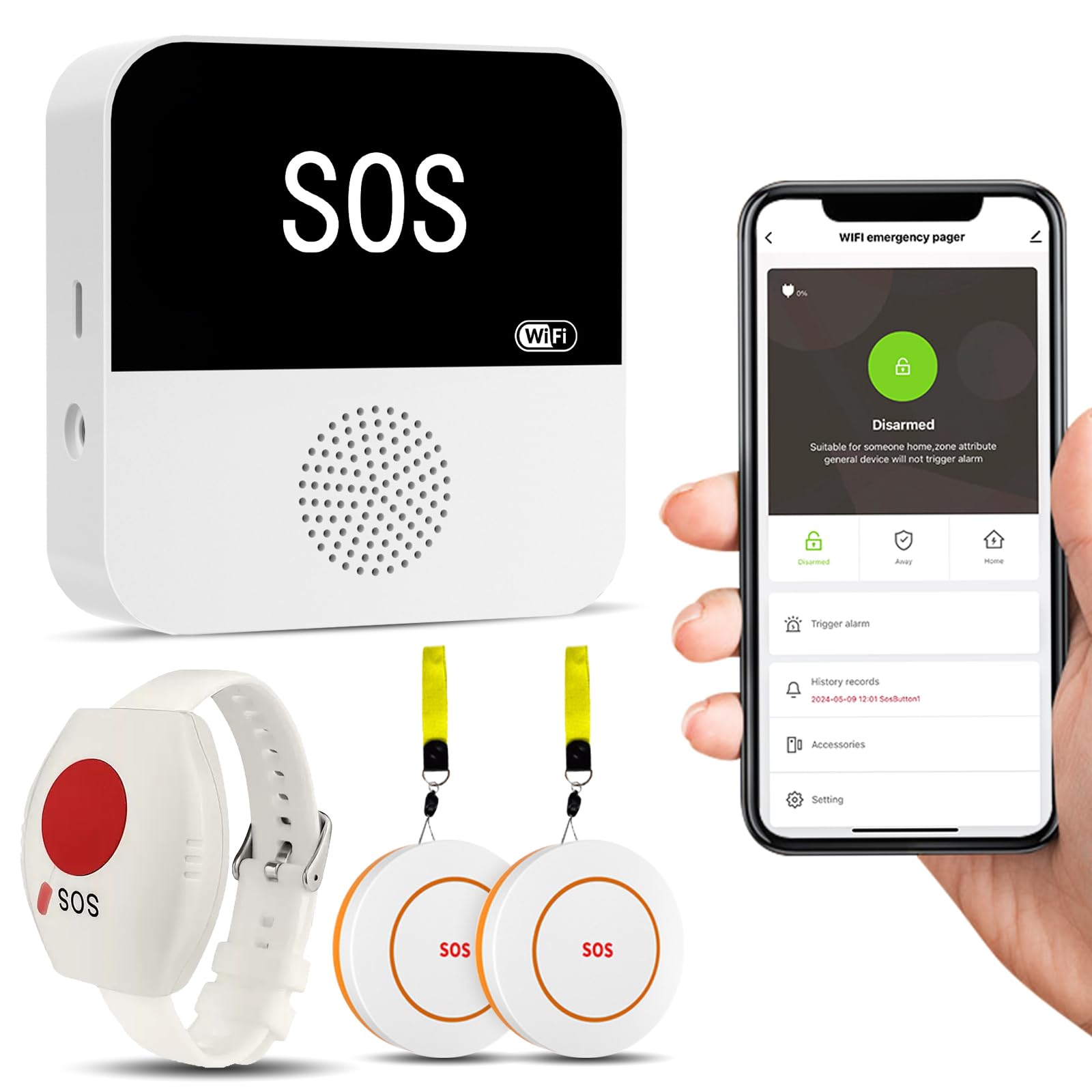
This kit reconfigures the same reliable hub from the 3-pack into a form factor that prioritizes mobility. It comes with one Wi-Fi hub, two standard call buttons, and one wrist-worn panic button with a hypoallergenic strap. The wristband is the hero here: it allows the user to keep the alert button on their person at all times, which is crucial for those who are mobile but at risk of a fall in the garden or garage—places where a bedside button is useless.
The same app architecture applies: 18 ringtones, four volume levels, and global push notifications. The wrist button is particularly well-suited for users with limited hand dexterity, as the press detection is broad and requires very little force. However, that same sensitivity means the wrist button can activate if the wearer leans on a table or gets tangled in a blanket, leading to false alerts. The hub’s loudspeaker is rated at 95dB—enough for a single-story home but quieter than some competitors in this guide.
Users praise the setup speed and the value of having a wearable option without paying a monthly medical alert service fee. The trade-off is that the wristband may be too large for very small wrists, and the continuous alarm sound on the iPhone app cannot be customized. For a mid-range budget where wearable mobility and app connectivity are the priority, this is the most targeted solution of the five.
Why it’s great
- Wrist-worn design for on-the-go protection
- Free app notifications to family members
- Hypoallergenic, adjustable wristband
- No monthly subscription for core features
Good to know
- Button sensitivity can cause false alarms when worn
- 95dB output is quieter than dedicated RF models
- Wristband may not fit very small wrists well
3. Daytech Wireless Wrist Pager with 2 Receivers

The Daytech system takes a purely local RF approach and focuses on sheer audibility and coverage. The wrist-worn call button has an open-air range of 800 feet (reduced to about 30 meters/100 feet through standard walls) and pairs with two plug-in receivers that can sit in different rooms. The receiver pumps out an impressive 110 decibels, which is loud enough to be heard over a running dishwasher, a television, or from deep inside a basement workshop.
This is a “no-app, no-Wi-Fi” system, which is actually a strength for households that want absolute simplicity. The button is splash-proof (IP53 rated) and can be worn in the shower, though it cannot be submerged. The receiver offers 20 ringtones and five volume levels, including a silent mode with just an LED flash—ideal for overnight monitoring without disturbing other family members. Pairing multiple buttons to multiple receivers is straightforward, and users report that the battery-powered life for the receivers is excellent.
The primary criticism is that the wrist strap is a single fixed size that can be too large for small wrists, and the band itself may wear out over months of daily use. Also, because it lacks Wi-Fi, a caregiver cannot receive alerts when away from home. For a family where the patient is bedridden or mostly on one floor, and the caregiver is always home, this is the loudest and most reliable direct-connection unit available in this price tier.
Why it’s great
- 110dB alarm is among the loudest in this guide
- 800-foot open-air range covers large homes
- Silent LED flash mode for overnight use
- Includes two separate plug-in receivers
Good to know
- No Wi-Fi or smartphone app alerts
- Wrist strap may be too large for small wrists
- Range drops significantly through thick walls
4. SYNLETT 3 Call Buttons + 2 Pagers

The SYNLETT system is designed around redundancy and coverage. It furnishes three large call buttons and two portable belt-clip pagers, meaning you can station one pager with each caregiver in different parts of the house. Each call button includes a wall-mountable bracket and a lanyard, giving you the flexibility to hang it on a bedside headboard, mount it in the bathroom, or have the user wear it as a pendant. This is the best entry-level configuration for a family with multiple caregivers sharing duties.
The 500-foot open-air range (specified as 150 meters) is more than adequate for most ranch-style homes and modest two-story houses. The audible output is a solid 90dB—not the loudest, but sufficient for a quiet home. The key feature is the two-tone system: you can select a “Ding-Dong” chime for non-urgent calls or switch to a continuous alarm siren for genuine emergencies. The receivers have an adjustable volume control on the side and a pause button to stop the alarm once acknowledged.
Real-world users report that this system works flawlessly in ramblers and multi-room homes, with the signal traveling through walls and even into backyards. The battery life on both the buttons and pagers is described as “ultra-long lasting,” and the manufacturer includes all four AA batteries needed to start. The only feature this lacks is app connectivity—this is a purely local system, so a caregiver who leaves the property cannot receive alerts. For a budget-friendly in-home setup with multiple alert zones, this is the most complete kit available.
Why it’s great
- Two belt-clip pagers for multiple caregivers
- Ding-Dong and continuous alarm siren modes
- Batteries included, ready out of box
- Wall-mount bracket and lanyard per button
Good to know
- 90dB output is quieter than competition
- No Wi-Fi or app-based remote alerts
- Range drops indoors; best suited for modest homes
5. FullHouse 2 Call Button + 3 Plug-In Receivers

The FullHouse system is built for the largest homes. It claims a maximum range of 1000 feet in open air (approximately 500 feet through walls), and it delivers on that promise with three separate plug-in receivers that can be distributed across multiple floors or wings of a house. The audible output is a category-leading 110 decibels, and with 52 different melodies to choose from, you can assign a distinct tune to each button so the caregiver knows instantly which room needs attention without looking at the receiver.
The call button is IP55 splash-proof, making it safe for a bathroom wall mount, and it can be worn as a lanyard pendant. The receivers offer five volume levels, including a silent mode that flashes the LED lights without any sound—a genuine lifesaver for overnight care where a patient may need help navigating to the bathroom without waking the whole household. Setup is as simple as plugging in the receivers; no Wi-Fi, no app, no password entry. This is the most “instant” system in the guide: press the button, the receiver screams.
Customer feedback indicates the system has been running flawlessly for over 12 months in some households, with strong signal integrity and zero pairing drift. The small number of critical reviews mention that the range, while excellent, may still not cover a very large multi-story home without strategically placing all three receivers. This unit also lacks any form of smartphone connectivity, so it will not notify you if you are at the store. For pure, hard-wired reliability and maximum decibel output at an entry-level price, the FullHouse is the closest thing to a professional nurse-call system you can buy off Amazon.
Why it’s great
- Highest range (1000ft) and volume (110dB)
- Three plug-in receivers for whole-home coverage
- 52 selectable melodies for room-specific ID
- IP55 splash-proof button for bathroom use
Good to know
- No Wi-Fi or app for remote monitoring
- Three receivers may be overkill for small apartments
- Range through walls drops to about 500 feet
FAQ
Do these alert buttons replace a medical alert system for 911 calls?
What happens if the Wi-Fi goes out on a smart alert system?
How do I prevent false alarms from an overly sensitive call button?
Final Thoughts: The Verdict
For most users, the alert buttons with instant emergency contact winner is the PILSAMAS 3-Pack because it uniquely bridges local RF reliability with free global app notifications, all without a monthly fee. If you need a wearable wrist alert with the same app connectivity, grab the PILSAMAS 2+1 Wristband kit. And for the most raw, loud, and simple system that covers a very large home at a budget-friendly price, nothing beats the FullHouse 2-Button system.

Mo Maruf
I created WellFizz to bridge the gap between vague wellness advice and actionable solutions. My mission is simple: to decode the research and give you practical tools you can actually use.
Beyond the data, I am a passionate traveler. I believe that stepping away from the screen to explore new environments is essential for mental clarity and physical vitality.