Our readers keep the lights on and my smoothie glass nicely filled. As an Amazon Associate, I earn from qualifying purchases.
Choosing a business card printer can feel overwhelming when every vendor promises “professional quality” and “easy setup,” yet real-world experiences vary wildly. I have spent weeks dissecting hundreds of verified customer reports, technical datasheets, and long-term reliability complaints to separate the true workhorses from the expensive paperweights.
I’m Mohammad Maruf — the founder and writer behind WellFizz. My research approach focuses on cross-referencing manufacturer claims with real user pain points, software compatibility issues, and hidden consumable costs that most buyers discover only after purchase.
After analyzing hundreds of real user reviews and technical specifications, this guide reveals the best business card printer for your specific needs.
How To Choose The Best Business Card Printer
Every business card printer on the market balances print quality, speed, software usability, and long-term consumable costs. Understanding these four pillars will help you pick a machine that fits your workflow without hidden surprises.
Print Technology: Dye Sublimation vs. Laser
Dye sublimation is the dominant technology for PVC card printers. It heats solid dye ribbons into a gas that bonds directly to the card surface, producing vibrant, durable images that resist scratching and fading. Laser printers, like the HP Color LaserJet Enterprise, use toner fused onto paper or card stock — great for paper business cards but not compatible with standard PVC ID cards.
Software and OS Compatibility
The design software bundled with a printer can make or break your experience. Some packages offer intuitive drag-and-drop templates, while others feel dated and restrictive. Mac and Linux users must pay extra attention: several popular card printers lack modern macOS drivers or require workarounds for ARM-based Macs. Windows users generally enjoy the widest compatibility.
Print Speed and Volume
Speed is measured in cards per hour (CPH) or seconds per card. Entry-level units typically print one full-color card in 30–45 seconds, which is adequate for a few dozen cards per week. If you need hundreds of cards daily, look for higher CPH ratings and printers with larger ribbon capacities to reduce changeover downtime.
Quick Comparison
On smaller screens, swipe sideways to see the full table.
| Model | Type | Best For | Key Feature | Amazon |
|---|---|---|---|---|
| Fargo DTC1250e | Dye Sublimation | Daily ID card production | AES-256 encryption & GreenCircle certified | Amazon |
| Bodno Magicard 400X | Direct To Card | High-volume dual-sided printing | 4-year warranty & lifetime support | Amazon |
| Bodno Seaory S26 | Direct To Card | Value with all-inclusive kit | 300-print ribbon & 2-year warranty | Amazon |
| Magicard Pronto100 | Dye Sublimation | First-time buyers and small teams | 3-year warranty & web camera included | Amazon |
| HP Color LaserJet M455dn | Laser | Paper card stock and office printing | Auto-duplex & HP Wolf security | Amazon |
| IDP SMART-21S | Dye Sublimation | Entry-level badge printing | Starter kit with 100 cards & ribbon | Amazon |
| Badgy100 | Dye Sublimation | Occasional badge printing on a budget | Near-edge printing & Mac/PC software | Amazon |
In-Depth Reviews
1. Fargo DTC1250e Single Sided Desktop Printer
AES‑256 EncryptionGreenCircle Certified

The Fargo DTC1250e is widely regarded as the benchmark for single-sided ID card printers. It prints at up to 225 cards per hour in color, using dye sublimation and thermal transfer for crisp, durable credentials. The plug‑and‑play USB setup and intuitive interface make it accessible for any team, while built‑in AES‑256 encryption and resin scramble data protection satisfy security‑conscious organizations. Its compact 13.7‑inch width fits easily on a desk.
User reviews consistently praise its reliability and print quality. Many customers report running thousands of cards without issues, and one reviewer noted it’s a “true workhorse.” The primary complaint is that Mac compatibility is lacking—drivers from 2015 may not work on recent Macs. The return process for defective units can be tedious, but the majority of units operate flawlessly for years.
For any small to medium business needing a dependable, high‑output ID card printer, the DTC1250e delivers the best balance of speed, security, and cost‑per‑card. It earns our top recommendation for general office use.
Why it’s great
- Fastest in its class at 225 cards/hour
- Excellent security features (AES‑256)
- Energy‑efficient GreenCircle certification
- Reliable workhorse with many long‑term users
Good to know
- Not compatible with modern Macs (no updated drivers)
- CD‑ROM installation may be outdated
- Return process can be slow if issues arise
2. Bodno Magicard 400X Dual Sided ID Card Printer
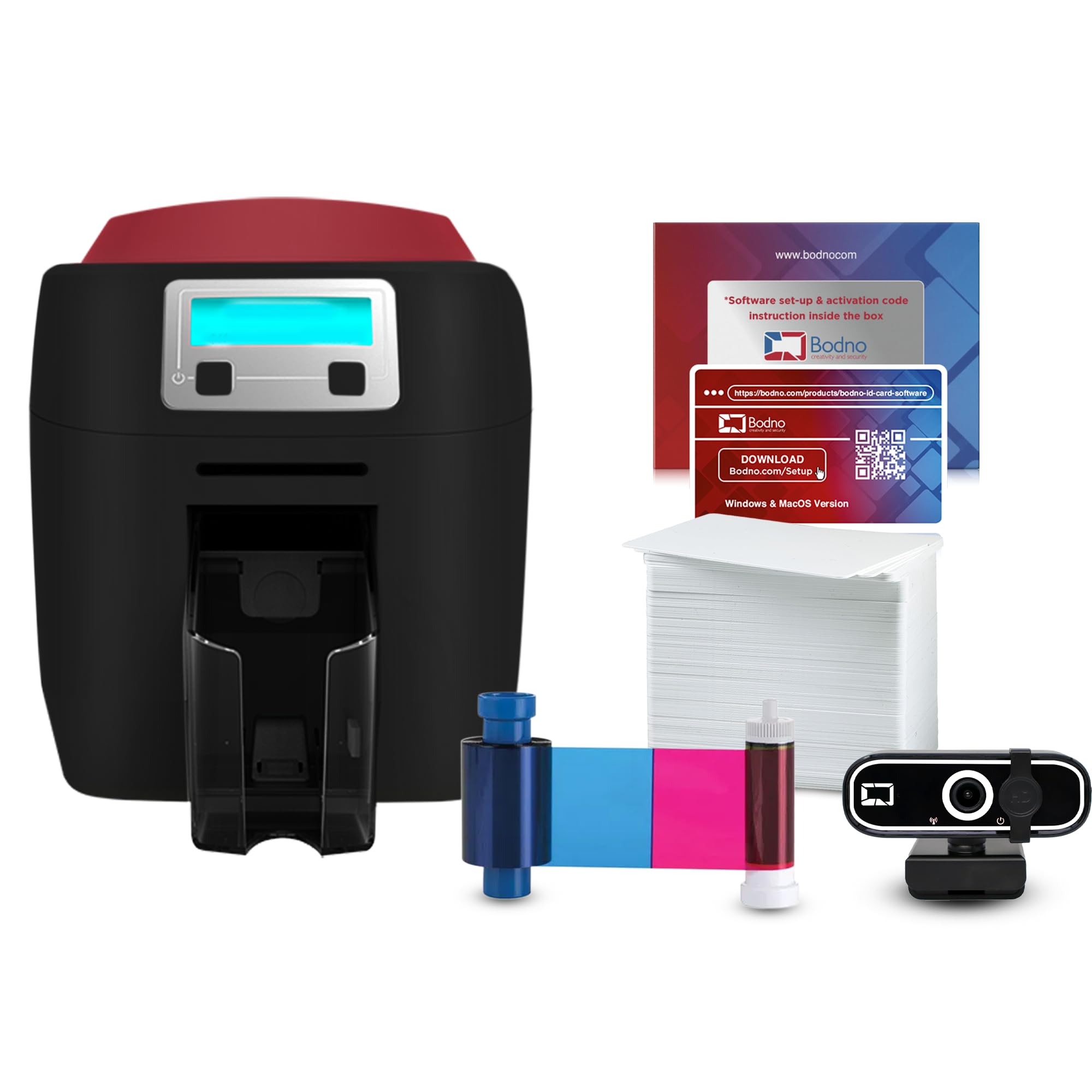
The Magicard 400X from Bodno is a dual‑sided direct‑to‑card printer designed for high‑volume professional environments. It includes a 300‑print YMCKO ribbon in the box, so you can start producing full‑color, double‑sided badges immediately. Print speed is approximately 3 color cards per minute, and it supports both Windows and Mac operating systems. The included Bronze Edition software offers pre‑made templates and drag‑and‑drop design.
Customer reviews are overwhelmingly positive, highlighting the exceptional print quality—sharp text and vivid colors with no fading. The standout feature is the support: multiple reviewers mention technicians like Jude and Byron who provided fast, patient, screen‑sharing assistance to get the printer running in minutes. The 4‑year warranty and lifetime software support provide peace of mind that few competitors match.
For organizations that need to print hundreds of dual‑sided ID cards each week—such as schools, hospitals, or corporate security teams—the Magicard 400X is the most reliable, well‑supported investment you can make.
Why it’s great
- Excellent dual‑sided printing quality
- 4‑year warranty – best in class
- Responsive, knowledgeable customer support
- Includes 300‑print ribbon and software
Good to know
- Premium price point – budget‑conscious buyers may look elsewhere
- Speed is adequate but not the fastest (3 ppm color)
3. Bodno Seaory S26 Single Sided ID Card Printer
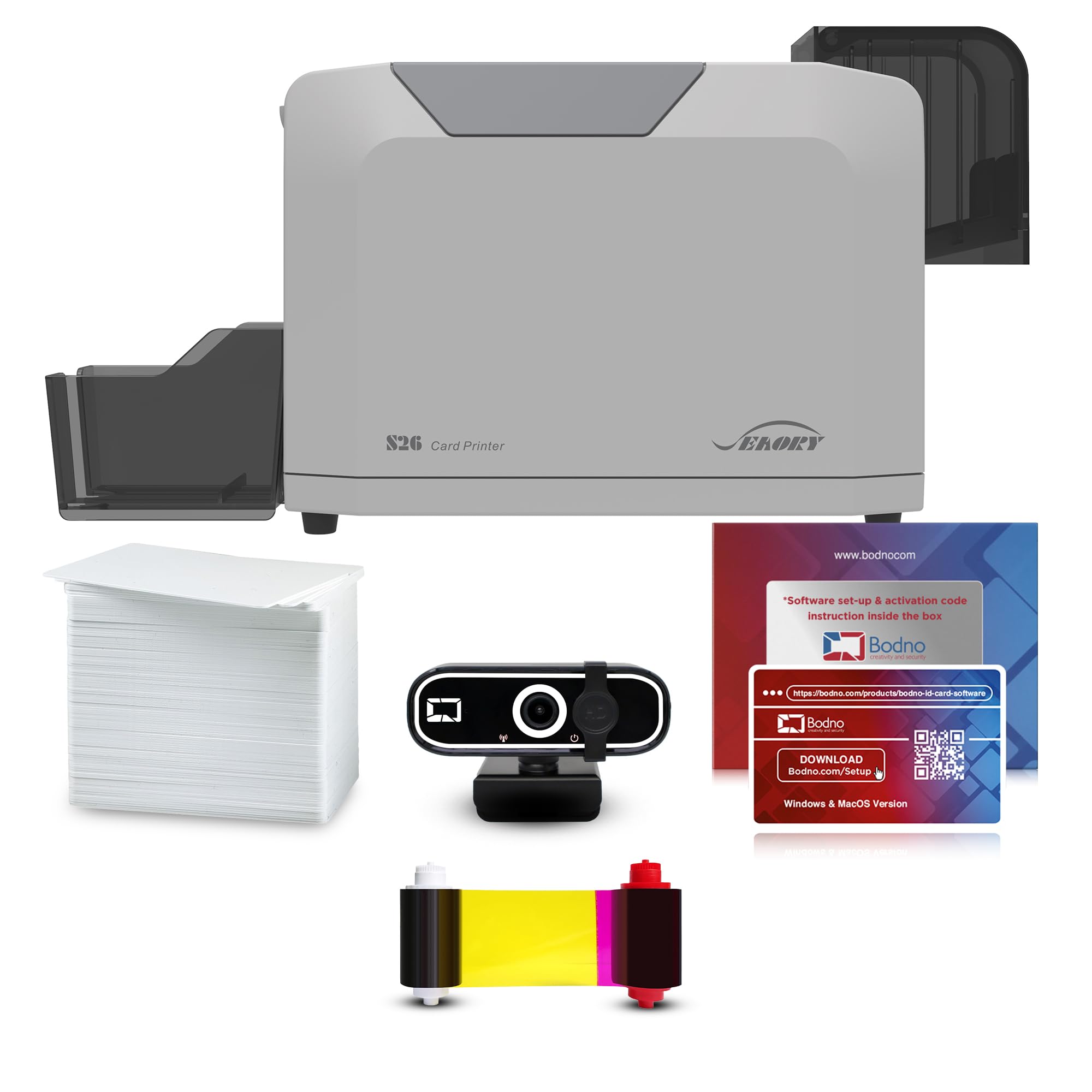
The Seaory S26, sold as part of Bodno’s Bronze Edition package, is a single‑sided ID card printer that offers remarkable value. It prints at up to 300 x 1200 dpi resolution and includes a 300‑print color ribbon, 100 PVC cards, a web camera, and lifetime Bodno software with a permanent activation code. Compatibility extends to Windows, Mac, and Linux—a rare flexibility in this market.
Real‑world reviews consistently give it five stars. Users praise the print quality as “100% very good,” and the setup process is straightforward with support from representatives like Angelo, Byron, and Leigh who are described as patient and detailed. The 2‑year hardware warranty adds confidence, and the all‑inclusive nature means no hidden costs for starting up.
If you run a small business, nonprofit, or school that needs professional ID cards without breaking the bank, the Seaory S26 delivers everything you need right out of the box—including a generous ribbon and excellent support.
Why it’s great
- Includes 300‑print ribbon and cards in the box
- Compatible with Windows, Mac, and Linux
- Lifetime software license with no subscriptions
- Outstanding customer support reviews
Good to know
- Single‑sided only (no dual‑side option)
- Software may require a call for initial activation
4. Magicard Pronto100 Single Side ID Card Printer

The Magicard Pronto100 is designed for first‑time ID card printer buyers. It prints single‑sided color badges using dye sublimation, and includes a ribbon, 100 PVC cards, and Card Imaging design software. A web camera is included in the package for capturing employee photos. The printer can also print on both sides manually by reinserting the card—a nice flexibility for occasional dual‑sided needs.
User feedback is mixed but generally positive once the initial setup is conquered. Many customers find the software easy to use and produce professional results quickly. However, some reviewers report a steep learning curve with the CardImaging software, especially the licensing requirement of keeping a flash drive inserted. A few experienced defective units on first delivery, but replacements worked perfectly. Support is email‑only and can be slow.
For small teams that want a low‑cost entry point with a solid warranty, the Pronto100 is a capable choice—just be prepared for a slightly more involved setup than advertised.
Why it’s great
- 3‑year warranty gives long‑term confidence
- Includes web camera and design software
- Manual dual‑sided printing capability
- Fast print speed reported by users
Good to know
- Software licensing requires flash drive to remain plugged in
- Email‑only support; no phone or live chat
- Some units arrive defective and need replacement
5. HP Color LaserJet Enterprise M455dn Duplex Printer

While not a PVC card printer, the HP Color LaserJet Enterprise M455dn excels at printing paper business cards and letterhead. It uses laser technology for crisp, fast output at up to 29 pages per minute in color, with automatic duplexing to save paper. The 2.7‑inch color display and HP Web JetAdmin make fleet management easy. HP Wolf Enterprise Security provides malware detection and self‑healing capabilities.
Customer reviews are mixed. Print quality and speed receive high marks, but many users report frustrations: slow boot‑up times, frequent error messages, and expensive toner. The Wi‑Fi module is an extra cost accessory that often fails. Mac users on M1 chips may encounter an encryption credentials issue requiring a workaround. Several buyers received refurbished units sold as new.
If your primary need is high‑volume paper business card printing with strong security, the M455dn is a capable machine—but be prepared for a potentially rocky out‑of‑box experience and ongoing toner costs.
Why it’s great
- Fast color printing at 29 ppm
- Auto‑duplex saves paper
- Enterprise‑grade security features
- Centralized management via Web JetAdmin
Good to know
- Slow boot‑up and frequent errors reported
- Wi‑Fi module sold separately and often unreliable
- Some units shipped as refurbished despite “new” listing
- Mac compatibility issues with encryption credentials
6. IDP SMART‑21S Simplex Printer Kit

The IDP SMART‑21S is an entry‑level dye sublimation printer that comes as a complete kit: printer, 100‑print YMCKO ribbon, 100 PVC cards, and PC‑only iDesigner software. It prints up to 150 color cards per hour, making it suitable for low‑volume badge creation. The compact footprint (6.6 x 10.2 x 7 inches) fits on any desktop, and the single LED button simplifies operation.
Reviews are polarized. About half the users love it—calling it “great” and “awesome” for small businesses and nonprofits. The other half strongly criticize the design software as “garbage” and “useless,” and report that customer service is unhelpful or unresponsive. Replacement ribbons are only available in 100‑card bundles, which can be confusing due to labeling across different models.
If you need a bare‑bones, budget‑friendly ID card printer for occasional use and are comfortable with basic software, the SMART‑21S can work—but be prepared for potential software headaches and limited support.
Why it’s great
- Complete starter kit with ribbon and cards
- Compact and desktop‑friendly design
- Easy single‑button operation
- Affordable entry point for basic ID printing
Good to know
- Software is widely criticized as unusable
- Customer support is reportedly poor
- Rib
7. Badgy100 Color Plastic Card Printer

The Badgy100 is a compact, single-sided dye sublimation printer designed for occasional badge and membership card printing. It prints a full-color badge in approximately 45 seconds with a near-edge print margin of just 1.35mm. The included design software works on both Windows and Mac, and setup is straightforward for beginners. The printer weighs only 3.74 pounds, making it highly portable.
Customer feedback is split. Many users praise the print quality as “great” and find it an affordable solution for small businesses needing a handful of badges per week. However, a significant number of reviewers report that the printer stops working after 20–30 prints with a “WaitingForPrintJob” error that is not fixable through troubleshooting. Customer service is described as unresponsive, and some units arrive defective.
The Badgy100 is best suited for very low-volume printing where budget is the top priority—but the risk of early failure and poor support makes it a gamble. If reliability matters, consider stepping up to a more robust model.
Why it’s great
- Affordable entry-level price point
- Near-edge printing for professional look
- Works on both Windows and Mac
- Compact and lightweight design
Good to know
- Many units fail after 20–30 prints
- Customer support is unresponsive
- Not suitable for high-volume use
- Cards may have small blemishes
Understanding the Specs
Dye Sublimation vs. Direct‑to‑Card
Dye sublimation heats solid dye ribbons into a gas that bonds with the PVC card surface, producing vibrant, scratch‑resistant images. Direct‑to‑card (DTC) printers, like the Seaory S26 and Magicard 400X, use thermal transfer to apply dye directly onto the card. Both methods deliver excellent durability, but DTC printers often have higher resolution (up to 300 x 1200 dpi) and more consistent color accuracy.
Print Speed and Ribbon Yield
Speed is measured in cards per hour (CPH) or seconds per card. Entry‑level printers typically manage 150–225 CPH in color. Ribbon yield determines how many cards you can print before replacing the consumable—common yields are 100, 150, or 300 prints per ribbon. Higher yield ribbons reduce per‑card cost and downtime, making them essential for medium to high volume environments.
FAQ
Can I print on both sides of a card with a single‑sided printer?
What software do I need to design ID cards?
Do these printers work with Mac or Linux computers?
Final Thoughts: The Verdict
For most people, the best business card printer winner is the Fargo DTC1250e because it delivers the fastest print speeds, robust security features, and proven long‑term reliability for daily ID card production. If you want dual‑sided printing and the strongest warranty, grab the Bodno Magicard 400X. And for the best value with an all‑inclusive kit and cross‑platform compatibility, nothing beats the Bodno Seaory S26.

Mo Maruf
I created WellFizz to bridge the gap between vague wellness advice and actionable solutions. My mission is simple: to decode the research and give you practical tools you can actually use.
Beyond the data, I am a passionate traveler. I believe that stepping away from the screen to explore new environments is essential for mental clarity and physical vitality.