Our readers keep the lights on and my smoothie glass nicely filled. As an Amazon Associate, I earn from qualifying purchases.
Finding a reliable mouse that won’t eat into your savings feels like a small victory — but the market is flooded with options that look good on paper and fail within months. I’ve spent weeks digging through specifications, reading hundreds of user experiences, and comparing build quality across every major budget brand so you don’t have to gamble your money on a dud.
I’m Mohammad Maruf — the founder and writer behind WellFizz. My approach to product research relies on cross-referencing technical specifications with long-term user feedback to separate genuinely well-engineered budget options from cheaply made alternatives that won’t hold up past the return window.
This guide covers wired, wireless, gaming, and ergonomic models under a sensible spending ceiling. After researching dozens of models across price brackets, I’ve narrowed the field to the best budget mouse options that deliver reliable everyday performance.
How To Choose The Best Budget Mouse
Not all affordable mice are created equal. A few dollars can mean the difference between a smooth, long-lasting peripheral and a frustrating experience that has you shopping again in three months. Here’s what to look for before you click “buy.”
Wired vs. Wireless: The Real Trade-Off
Wired mice give you zero latency, no battery anxiety, and a lower price tag for the same sensor quality. Wireless adds desk clutter freedom but introduces dongle dependency, battery replacement, or charging routines. On a tight budget, wired typically delivers better performance per dollar — but modern budget wireless options have closed the gap significantly for office and casual use.
DPI and Sensor Quality
DPI (dots per inch) determines how far your cursor moves per inch of physical movement. For office work and general browsing, 1000–2400 DPI is plenty. Gamers and high-resolution display users may want 4000 DPI or higher. More important than the maximum number is sensor quality — a well-tuned 2400 DPI optical sensor outperforms a jittery 7200 DPI sensor every time.
Ergonomics and Build Materials
A mouse that doesn’t fit your hand will cause fatigue regardless of its specs. Look for contoured shapes, textured grips, and a weight that feels balanced. Budget mice often use smooth plastic that can get slippery — rubberized side grips or matte coatings add comfort during extended sessions. Hand size matters: ambidextrous designs tend to suit small to medium hands best.
Button Quality and Longevity
The switches under each click determine how long your mouse lasts. Budget mice typically use generic mechanical switches rated for 3–5 million clicks, while premium budget options may use higher-rated switches. Silent-click models use dampened mechanisms that reduce noise but can feel mushier. Side buttons and a reliable scroll wheel add real productivity value if you use them regularly.
Quick Comparison
On smaller screens, swipe sideways to see the full table.
| Model | Type | Best For | Key Feature | Amazon |
|---|---|---|---|---|
| Redragon M612 Predator | Wired Gaming | Budget gamers who want premium features | 11 programmable buttons + 8000 DPI | Amazon |
| Logitech Signature Wired M520 L | Wired Office | Quiet, eco-friendly office work | USB-C + 90% noise reduction | Amazon |
| ProtoArc EM11 NL | Wireless Vertical | Ergonomic relief and wrist health | Vertical design + 3-device connectivity | Amazon |
| INPHIC PG1 | Wired Gaming | High-DPI competitive gaming | 12800 DPI + 1000Hz polling rate | Amazon |
| Macally Wired USB C Mouse | Wired USB-C | Mac and USB-C laptop users | Native USB-C + silent clicks | Amazon |
| MKETech Cool Viper | Wired Gaming | RGB style with solid performance | 7200 DPI + braided cable | Amazon |
| Logitech M185 Wireless | Wireless | Everyday portable wireless | 12-month battery + nano receiver | Amazon |
| Macally USB Wired Mouse | Wired | Simple, reliable Mac/PC use | 5-foot cord + ambidextrous shape | Amazon |
| Uineer Wired Mouse | Wired | Programmable budget productivity | 7200 DPI + 6 programmable buttons | Amazon |
| Censprin USB Computer Mouse | Wired | Ultra-simple quiet office work | Silent clicks + ergonomic shape | Amazon |
| Huifen USB C Gaming Mouse | Wired USB-C | Budget RGB gaming on USB-C devices | 7-color RGB + Type-C connection | Amazon |
In‑Depth Reviews
1. Redragon M612 Predator RGB Gaming Mouse

The Redragon M612 Predator punches so far above its price point that it feels like a pricing error. You get eleven programmable buttons, a dedicated rapid-fire key, and five adjustable DPI levels ranging from 500 to 8000 — specs that belong on mice costing three times as much. The frosted coating resists fingerprints, and the rubber-textured left side gives you a secure grip during intense gaming sessions without feeling cheap or sticky.
Tracking accuracy is where this mouse really shines. The optical sensor delivers smooth, jitter-free cursor movement across all DPI settings, and the 1000 Hz polling rate ensures your inputs register instantly. The RGB lighting offers five decent backlit modes that look clean and modern, though you can turn them off entirely if you prefer a more subdued setup. Users consistently report that the build quality feels solid and premium, with no creaking or flexing during use.
The only real trade-off is the slightly large form factor, which favors medium to large hands and claw-grip users. Left-handed users should also note the right-handed sculpted shape. But for anyone wanting genuine gaming-grade performance without the premium price tag, the M612 Predator is the most well-rounded budget mouse on the market right now.
Why it’s great
- Exceptional value with premium gaming features
- Highly accurate optical sensor with wide DPI range
- Solid build quality with comfortable textured grip
Good to know
- Right-handed design only, not for lefties
- Larger shape may not suit small hands
2. Logitech Signature Wired M520 L for Business
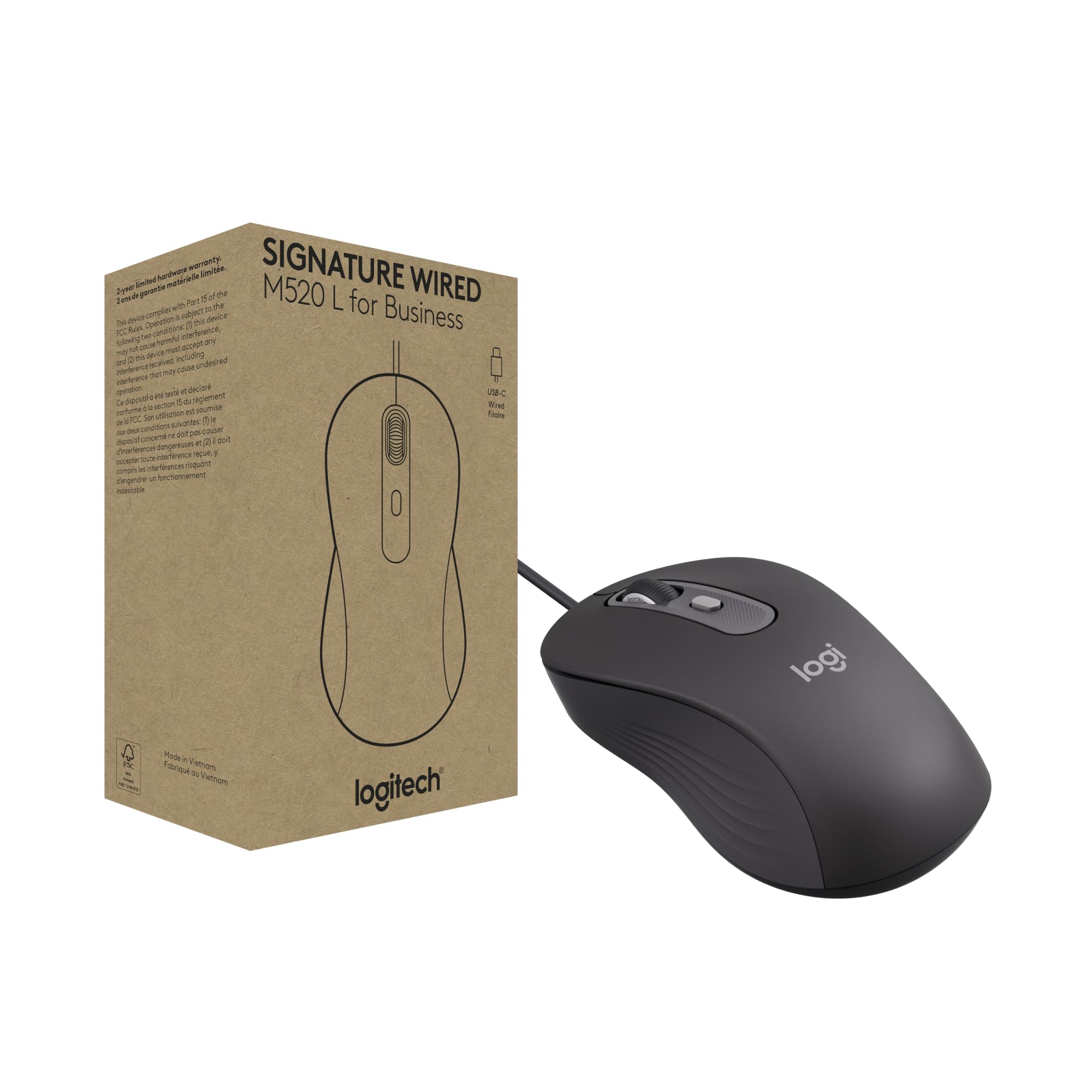
Logitech brings its enterprise-grade engineering to the budget space with the Signature Wired M520 L, a mouse designed for organizations that demand reliability without unnecessary complexity. The standout feature is the SmartWheel — a flick of the wheel switches between super-fast free-spin scrolling and precise line-by-line mode, making long documents and spreadsheets infinitely more pleasant to navigate. Silent Touch technology reduces clicking noise by 90 percent, which makes a real difference in shared workspaces or late-night sessions.
The USB-C connection is a forward-thinking choice that works seamlessly with modern laptops and eliminates the need for dongles or adapters. The ambidextrous contour fits both left and right hands comfortably, and the customizable DPI button lets you adjust cursor speed on the fly or remap it to another shortcut using Logi Tune or Logi Options+ software. Build quality is typical Logitech — solid, precise, and built to last through years of daily use.
One minor caveat is the lack of a USB-A adapter included in the box, which could be an issue if your primary machine only has older ports. The wired design also means you’re tethered, but for office productivity, the trade-off buys you zero latency and zero battery anxiety. For professionals who want a quiet, reliable, and eco-conscious wired mouse with a premium feel, the M520 L is a standout choice.
Why it’s great
- SmartWheel offers both fast and precise scrolling
- USB-C connection for modern laptops
- Extremely quiet clicks with solid tactile feedback
Good to know
- No USB-A adapter included
- Wired only, no wireless option
3. ProtoArc EM11 NL Bluetooth Vertical Mouse

The ProtoArc EM11 NL takes a fundamentally different approach to budget mouse design by prioritizing wrist health over flashy features. Its vertical orientation keeps your hand in a natural handshake position, which significantly reduces forearm strain and carpal tunnel risk compared to traditional flat mice. The rechargeable 500mAh battery lasts for weeks on a single charge, and the included USB-C charging cable means you can top it up without hunting for proprietary chargers.
Connectivity is impressively flexible for the price. You can pair the EM11 NL with up to three devices simultaneously using dual Bluetooth 5.0 channels or the included 2.4 GHz USB-A receiver, switching between them with a single button press. The optical sensor offers three DPI levels — 1000, 1600, and 2400 — which covers office work, web browsing, and basic creative tasks without any tracking issues. The silent left and right buttons are genuinely quiet, though the scroll wheel and side buttons produce a more audible click.
The vertical shape requires a short adjustment period — most users adapt within a week or two, and many report that wrist discomfort they didn’t even realize they had gradually faded. The EM11 NL is specifically designed for small to medium hands (under 7.5 inches), so those with larger hands may find it cramped. For anyone already experiencing wrist strain or wanting to prevent it, this is the most affordable ergonomic upgrade you can make.
Why it’s great
- Vertical design genuinely reduces wrist strain
- Rechargeable battery with long life between charges
- Seamless switching between three devices
Good to know
- Best suited for small to medium hands
- Requires 1–2 week adaptation period
4. INPHIC PG1 Wired Gaming Mouse

The INPHIC PG1 brings enthusiast-grade specifications to a price point that barely registers as a splurge. With a maximum DPI of 12800 spread across six adjustable levels and a 1000 Hz polling rate that samples your movements 1000 times per second, this mouse is built for competitive gaming where every millisecond counts. The A825 professional gaming chip processes inputs with minimal latency, and the adjustable report rates (125/250/500/1000 Hz) let you fine-tune performance for different game genres.
All six buttons are fully reassignable through the INPHIC driver software, allowing you to create macros and customize your workflow or combat rotations. The RGB backlighting offers 12 different lighting effects that can be customized via the driver or cycled through with a long press of the DPI button. The white-gray color scheme gives it a clean, modern aesthetic that stands out from the typical all-black gaming mouse crowd. Build quality feels solid, with a comfortable right-handed shape that suits medium to large hands.
A small number of users have reported sensor inconsistencies developing after several months of use, which is worth noting if you’re looking for a mouse that will last multiple years. The PG1 also lacks Bluetooth or wireless capability — it’s strictly wired via USB-A. But for the raw performance on offer at this price, the INPHIC PG1 delivers exceptional value for gamers who want high-DPI precision without the premium markup.
Why it’s great
- Extremely high DPI range for competitive gaming
- Fully customizable buttons and RGB lighting
- Adjustable polling rate for fine-tuned performance
Good to know
- Some users report sensor issues after 4–6 months
- Wired only, no wireless connectivity
5. Macally Wired USB C Mouse

Macally has carved out a reliable niche making no-nonsense peripherals for Apple users, and this wired USB-C mouse is a perfect example of their philosophy. It connects directly to any USB-C port — MacBook, iPad Pro, or modern PC — without requiring adapters or dongles. The three-button layout with a scroll wheel keeps things simple and focused, and the ambidextrous design works equally well for left and right-handed users. The 5-foot cord gives you plenty of reach without cluttering your desk.
The optical sensor offers four DPI settings (800/1200/1600/2400) that you can cycle through with a dedicated button, making it easy to switch between precision work and faster cursor movement. Silent click technology reduces button noise significantly, which is a blessing in quiet offices or late-night work sessions. Build quality is clean and minimalist — the white with silver trim design looks right at home next to Apple hardware, and the compact footprint travels well in a laptop bag.
Some users note that the cord can occasionally get in the way compared to a wireless mouse, and the simple three-button layout means no side buttons for forward/back navigation. But for those who value reliability, simplicity, and native USB-C compatibility above all else, the Macally wired mouse delivers a frustration-free experience that just works — no drivers, no pairing, no battery anxiety.
Why it’s great
- Native USB-C plug-and-play with no adapter needed
- Quiet clicks with adjustable DPI settings
- Clean design that complements Apple hardware
Good to know
- No side buttons for forward/back navigation
- Wired cord can feel restrictive to some users
6. MKETech Cool Viper Wired Gaming Mouse
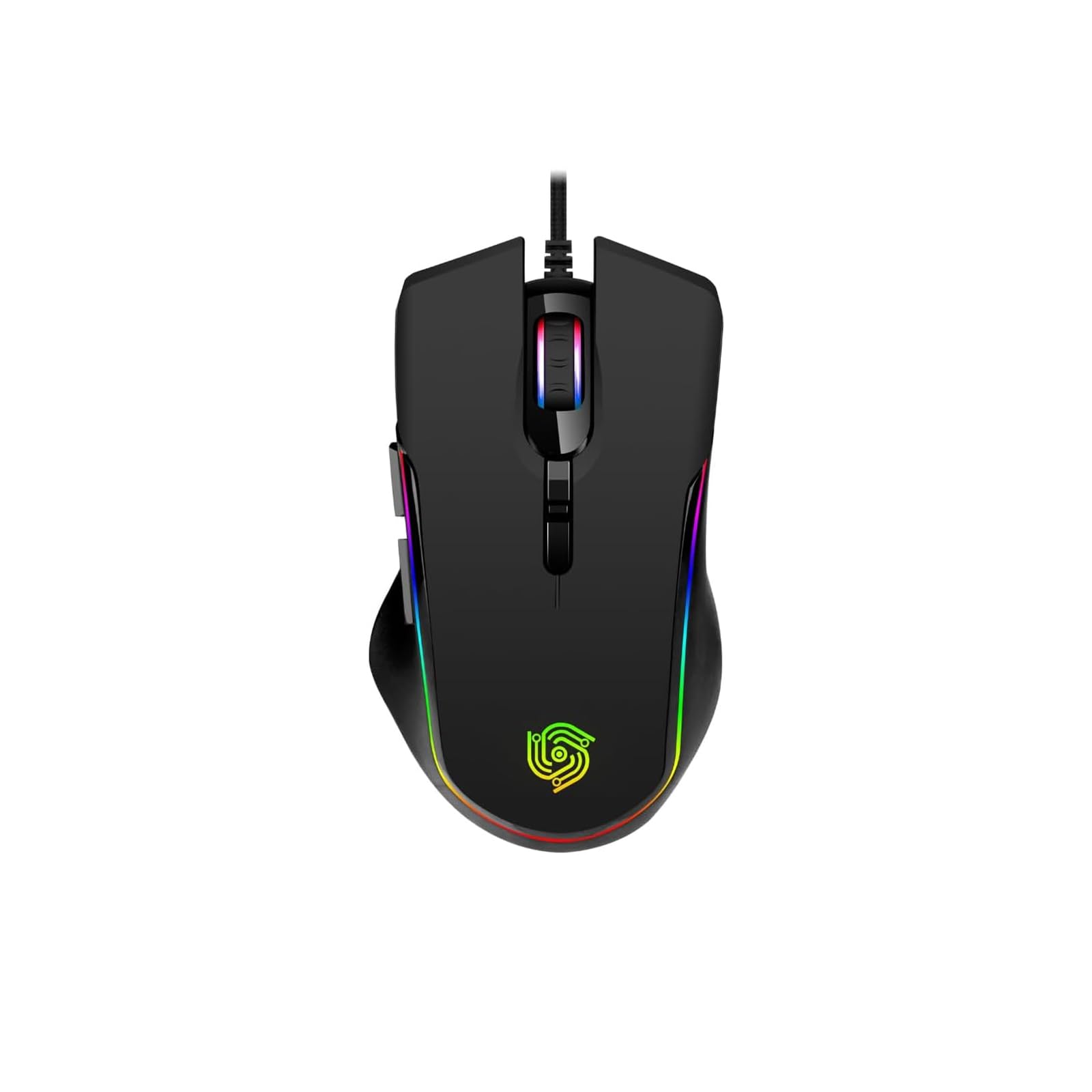
The Cool Viper from MKETech Electronics proves that you don’t need to spend much to get a stylish, responsive gaming mouse with serious RGB flair. The long RGB light bar runs smoothly through rainbow effects, and you can customize colors and lighting modes through the downloadable driver software. With four DPI settings ranging from 1200 to 7200, you get enough sensitivity range for everything from casual browsing to fast-paced shooters.
The six programmable buttons allow you to assign macros or commands using the MKE-TECH official driver, though the mouse works perfectly with default functions straight out of the box. The claw-grip design is specifically shaped for gamers who prefer a more aggressive hand position, and the 115-gram weight provides a balanced feel that helps with precise tracking. The braided USB cable is a nice touch at this price — it resists tangles and wear much better than standard rubber cables, and at 71 inches it gives you plenty of slack for desktop setups.
User feedback consistently highlights the comfortable shape for long sessions and the responsive, lag-free performance. The RGB lighting is bright and attractive without being gaudy. The main downside is that the driver software is necessary for full customization, and the right-handed design won’t suit lefties. For gamers who want a reliable, good-looking wired mouse with customizable lighting and buttons, the Cool Viper delivers exceptional bang for the buck.
Why it’s great
- Smooth RGB lighting with multiple customization options
- Durable braided cable resists tangling
- Comfortable claw-grip shape for extended use
Good to know
- Driver required for full button remapping
- Right-handed design only
7. Logitech M185 Wireless Mouse

Logitech’s M185 is a certified classic in the budget wireless space for good reason. Its compact, contoured shape fits comfortably in either hand, making it a fantastic travel companion or everyday mouse for small to medium hands. The 2.4 GHz wireless connection is rock-solid up to 33 feet, and the tiny nano receiver stays in your laptop’s USB port without protruding — so you can leave it plugged in permanently without worry.
Battery life is the headline feature here: a single AA battery lasts up to 12 months thanks to smart sleep mode that kicks in when you stop moving the mouse. That’s genuinely set-and-forget convenience. The 1000 DPI optical sensor provides smooth, accurate tracking on most surfaces, and the line-by-line scroll wheel gives you precise control over documents and web pages. Setup is truly plug-and-play — insert the receiver, and you’re working in seconds with no software to install.
Some users note that the M185 is on the smaller side, which may feel cramped if you have larger hands. The single-button design (left/right click plus scroll wheel) means no side buttons for forward/back navigation, which power users might miss. But for anyone who wants a reliable, portable wireless mouse that just works without fuss or battery anxiety, the M185 remains a benchmark that competitors still measure themselves against.
Why it’s great
- Exceptional 12-month battery life on one AA
- Compact, ambidextrous shape travels well
- Rock-solid wireless connection with nano receiver
Good to know
- Small size may not suit larger hands
- No side buttons for navigation
8. Macally USB Wired Mouse (TURBO)

Macally’s TURBO wired mouse is the definition of “just works.” With a straightforward three-button layout plus scroll wheel, 1000 DPI optical tracking, and a generous 5-foot USB cord, it covers all the basics without any unnecessary complexity. The ambidextrous shape conforms comfortably to either hand, and the compact footprint makes it easy to toss in a laptop bag for use on the go.
Compatibility is broad — it works with Mac, Windows, Chromebook, and Linux out of the box with no drivers or software required. Users consistently praise its reliability as a wired alternative to finicky Bluetooth mice, especially for those who’ve dealt with wireless interference or constant battery changes. The scroll wheel features a subtle red LED backlight that adds a touch of character without being distracting.
The build quality feels a bit light compared to more expensive mice, and some users note that it doesn’t have the solid heft of premium alternatives. The 1000 DPI sensor is adequate for office work and browsing but won’t satisfy gamers or high-resolution display users. But for the price, you get a dependable, no-nonsense wired mouse that handles daily tasks flawlessly — exactly what a budget mouse should do.
Why it’s great
- Broad OS compatibility with true plug-and-play
- Long 5-foot cord for flexible desk placement
- Ambidextrous design works for left and right hands
Good to know
- Feels lightweight and less premium in hand
- 1000 DPI sensor is basic, not for gaming
9. Uineer Wired Mouse

The Uineer wired mouse packs an impressive feature set into a very accessible price bracket. With four adjustable DPI levels reaching up to 7200, a comfortable ergonomic shape, and six programmable buttons including forward and back navigation, it’s well-suited for productivity-focused users who want to streamline their workflow. The macro definition software lets you assign commonly used functions to the extra buttons, potentially saving you significant time on repetitive tasks.
The ergonomic design features a natural curve that reduces finger pressure during extended use, and the matte black finish resists fingerprints and smudges. Setup is genuinely plug-and-play — just connect the USB cable and start working. The 1.5-meter cable provides adequate reach for most desktop setups, and the optical sensor tracks smoothly across various surfaces without skipping.
Some users have reported that the clicks become harder to trigger after several months of use, suggesting that the switch quality may not be built for the long haul. The smooth plastic surface can also feel a bit slippery during intense sessions. However, for the price, you get a feature-rich mouse that enhances productivity with programmable buttons and high DPI sensitivity. If you need those extra buttons and don’t mind potentially replacing it after a year, the Uineer is a solid value proposition.
Why it’s great
- High 7200 DPI for precise cursor control
- Programmable buttons boost workflow efficiency
- Comfortable ergonomic shape for long sessions
Good to know
- Click reliability may diminish after a few months
- Smooth plastic can feel slippery
10. Censprin USB Computer Mouse

The Censprin USB mouse focuses on two things and does them well: silence and comfort. The left and right buttons produce a noticeably quiet click that won’t disturb coworkers or family members during late-night work sessions. The ergonomic shape features a gentle curve that supports your palm and reduces fatigue during all-day use. For a basic office mouse, it hits all the right notes without any unnecessary frills.
The optical sensor provides smooth, responsive tracking on most surfaces, and the three-button layout with scroll wheel is refreshingly simple — no drivers, no software, just plug and play. Users consistently praise its lightweight design and comfortable fit, noting that it feels much more expensive than its price suggests. The scroll wheel features a subtle backlight that cycles through colors, adding a bit of visual flair without being distracting.
One notable quirk: the scroll wheel click is not silent, producing an audible click that some users find annoying in an otherwise quiet mouse. The mouse is also right-handed oriented, so lefties may find the shape less comfortable. But for anyone who needs an affordable, quiet, and comfortable wired mouse for office or home use, the Censprin delivers exactly what it promises without any fuss.
Why it’s great
- Genuinely quiet clicks for shared spaces
- Comfortable ergonomic shape for extended use
- Simple plug-and-play setup, no drivers needed
Good to know
- Scroll wheel click is not silent
- Right-handed design, less ideal for lefties
11. Huifen USB C Gaming Mouse

The Huifen USB C gaming mouse is an ultra-budget option that brings RGB lighting and Type-C connectivity to the entry-level market. With seven color backlighting modes and unique side flow lighting effects, it offers more visual customization than most mice in its price range. The 2400 DPI maximum sensitivity, while modest compared to gaming-focused alternatives, is perfectly adequate for everyday computing and casual gaming.
The silent click design is a pleasant surprise at this price point — left and right buttons operate quietly, making it suitable for library or office use despite its gaming aesthetic. The ergonomic shape with textured rubber side grips provides decent comfort for extended sessions, and the compact size makes it easy to carry between devices. As a Type-C mouse, it works seamlessly with modern laptops, tablets, and PCs that have USB-C ports, eliminating the need for adapters.
Some users have reported that the RGB lighting cycles continuously without the ability to set a solid color, and a few noted that very fast swiping can cause the sensor to lose tracking momentarily. The build quality is acceptable for the price but doesn’t feel particularly durable. Still, for the absolute lowest entry point into a USB-C mouse with RGB lighting and silent clicks, the Huifen offers surprising value — especially for kids or as a backup travel mouse.
Why it’s great
- USB-C native connection for modern devices
- RGB lighting with multiple color modes
- Silent clicks at a very low price point
Good to know
- RGB cannot be set to a single solid color
- Sensor may lose tracking during fast movements
Understanding the Specs
DPI (Dots Per Inch)
DPI measures how sensitive your mouse is to physical movement. A higher DPI means the cursor moves further with less hand movement. For general office work and web browsing, 1000–2400 DPI is sufficient. For gaming or high-resolution monitors, 4000–12800 DPI can be useful, but beyond 8000 DPI the gains are mostly marketing — few users actually need extreme sensitivity. What matters more is sensor quality: a smooth, consistent optical sensor at 2400 DPI will feel better than a jittery one at 7200 DPI.
Polling Rate
Measured in Hertz (Hz), polling rate determines how often your mouse reports its position to your computer. Standard office mice poll at 125 Hz (every 8 milliseconds), while gaming mice often offer 500 Hz (2ms) or 1000 Hz (1ms). Higher polling rates reduce input lag but consume more system resources. For competitive gaming, 1000 Hz is ideal. For everyday use, 125–500 Hz is perfectly fine and you won’t notice the difference.
Wired vs. Wireless
Wired mice offer zero latency, no battery concerns, and generally lower prices for equivalent sensor quality. Wireless mice provide desk freedom but introduce potential connectivity issues and battery management. On a budget, wired typically gives you better performance per dollar. However, modern 2.4 GHz wireless mice like the Logitech M185 have latency that’s imperceptible for office use, making them a viable choice if you value a clean desk setup.
Switch Quality and Longevity
The mechanical switches under each button determine how long your mouse will last. Budget mice typically use switches rated for 3–5 million clicks, while higher-end models may use 10–20 million click switches. Silent-click mice use dampened mechanisms that reduce noise but often have a mushier feel and may wear out faster. If longevity is your priority, look for mice with optical switches or well-reviewed mechanical ones — and consider that a slightly more expensive mouse with better switches may outlast two cheaper replacements.
FAQ
What DPI setting should I use for everyday work?
Is a wired or wireless budget mouse better for gaming?
How long should a budget mouse last?
Do I need a mouse with programmable buttons?
Final Thoughts: The Verdict
For most people, the best budget mouse winner is the Redragon M612 Predator because it delivers genuine gaming-grade features — 11 programmable buttons, 8000 DPI, and solid build quality — at a price that undercuts everything else with similar specs. If you want a quiet, professional wired mouse for the office, grab the Logitech Signature Wired M520 L. And for ergonomic relief and wrist health, nothing beats the ProtoArc EM11 NL. Whichever you choose, every mouse on this list proves that you don’t need to spend a fortune to get a reliable, comfortable daily driver.

Mo Maruf
I created WellFizz to bridge the gap between vague wellness advice and actionable solutions. My mission is simple: to decode the research and give you practical tools you can actually use.
Beyond the data, I am a passionate traveler. I believe that stepping away from the screen to explore new environments is essential for mental clarity and physical vitality.